
On this page
- Background
- Watch the hands-on user tutorial on YouTube
- Installing & Setting up
- Manual installation
- Installation via command line
- Configuration
- Permissions
- Configuration options
- Usage
- Restrict access to nodes
- Restrict access to taxonomy terms
- Drush commands
- How to protect inline files as well
- How can I export the permissions to another Drupal site?
- Testing
- Behat tests
- Kernel tests
- Unit tests
- Create lots of testing fixture nodes and terms with permissions via Drush
- Performance
- Node Access Records
- Warmed page cache
- An alternative to PbT: Taxonomy Access Control Lite
- Please Notice
- After an update, the following steps are suggested
- Examples
- Securing documents in your filesystem
- Integration with the XML Sitemap module
- Drupal 8 and 9 version available
- Known issues in the Drupal core
Permissions by Term
Please make sure you have read the "Please Notice" section at the end of this page.
Background
Per default Drupal allows you only to restrict access to Drupal nodes by coupling node content types to user roles and the creators of the content by their user account. The Permissions by Term module extends Drupal by functionality for restricting access to nodes by taxonomy terms in relation to users and their roles.
You are able to create content groups with Drupal's basic entities: nodes and taxonomy terms. No introduction of new entity types. This is a very lightweight and easy solution compared with other Drupal modules, which are creating their own subsystems and additional entity types like the Group or Organic groups module. There's not that much to learn. If you know how nodes and taxonomies are working, entities which are shipped by Drupal core, then you are already nearly familiar with the PbT module.
Watch the hands-on user tutorial on YouTube

Installing & Setting up
Manual installation
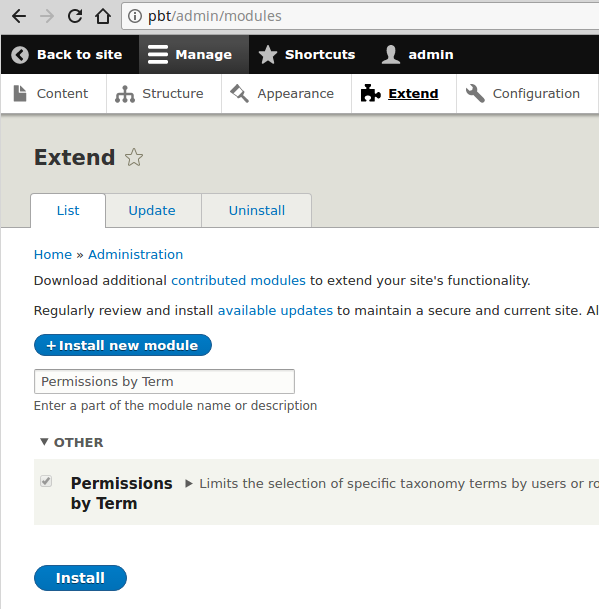
Just download the module from the project page, copy it into your Drupal 8 project's "modules" folder and enable it at the module management page (/admin/modules). Composer (PHP package manager) is not needed for installing the Permissions by Term module.
Installation via command line
The module can be installed via Drush or Drupal Console. E.g. with Drush:
drush en permissions_by_term -y
Configuration
Permissions
Except the permissions setup, there's nothing necessary to configure which allows the usage of this module. The module provides you the following permission:
-
Term permission form on node edit page
-
Shows up the taxonomy term related permissions information on the node edit page for the certain user roles.
-
-
Term permission form on term page
-
Shows up the taxonomy term related permissions form on the taxonomy term edit page for the certain user roles.
-

Configuration options
- By default users have granted access to an node, as long they have access to a single related taxonomy term. If the single term restriction configuration option is checked, they must have access to all related taxonomy terms to access an node. Because until the specific node is related to a "single" non-permitted taxonomy term, the access will be disallowed.


Usage
Restrict access to nodes
- Create or edit a taxonomy term in a dedicated taxonomy (do not use the standard "Tags" taxonomy or bad things may happen, see the related issue) and add permissions to it. You can edit permissions in the "Permissions" labeled form field set:

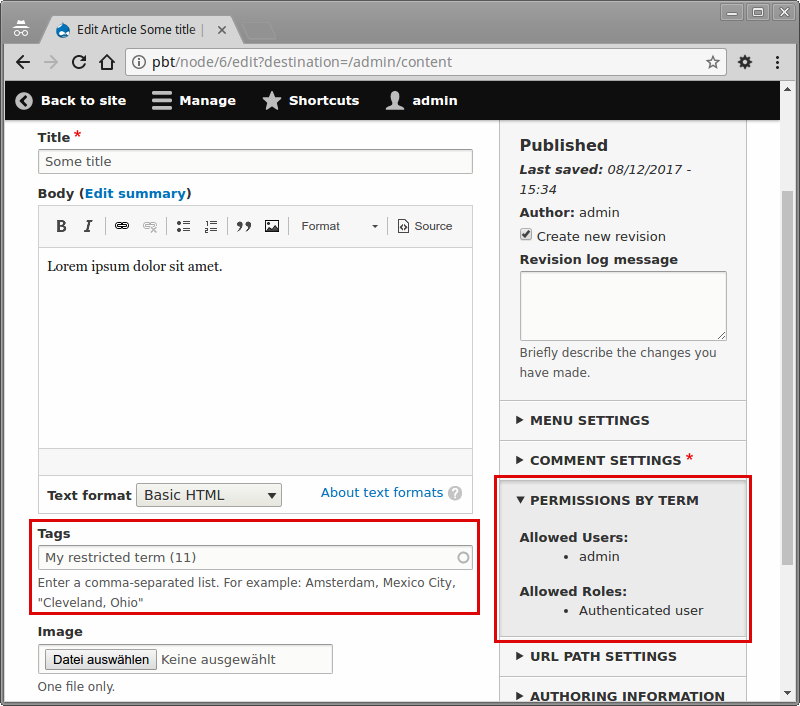
- Afterwards you are able to restrict the access to your node by setting up the taxonomy terms. On the node edit page, you can see the allowed users and allowed roles, after you have saved the related taxonomy terms:
- Then if an not allowed user wants to access your node, he will be send to a access denied page. This goes for the node view and node edit.
Restrict access to taxonomy terms
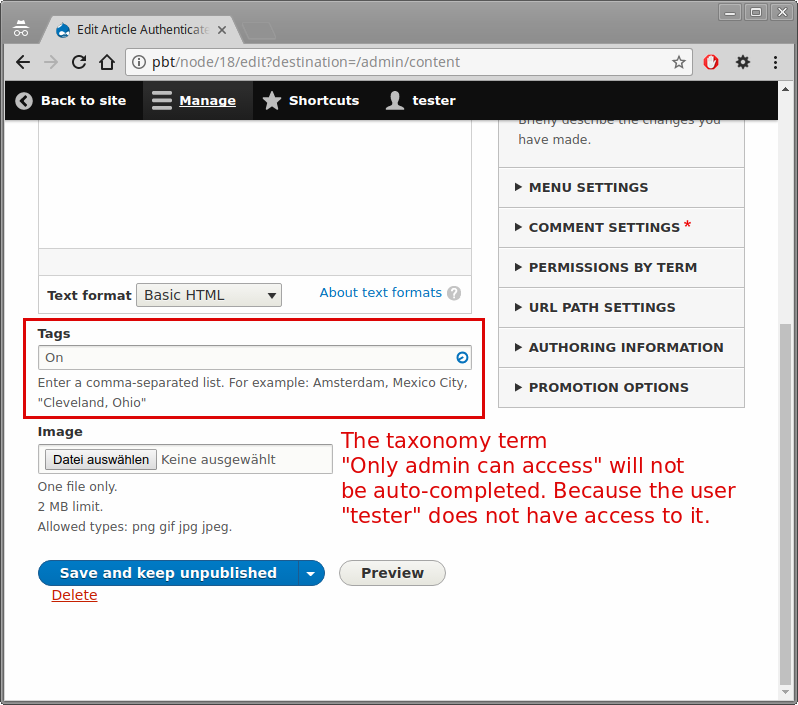
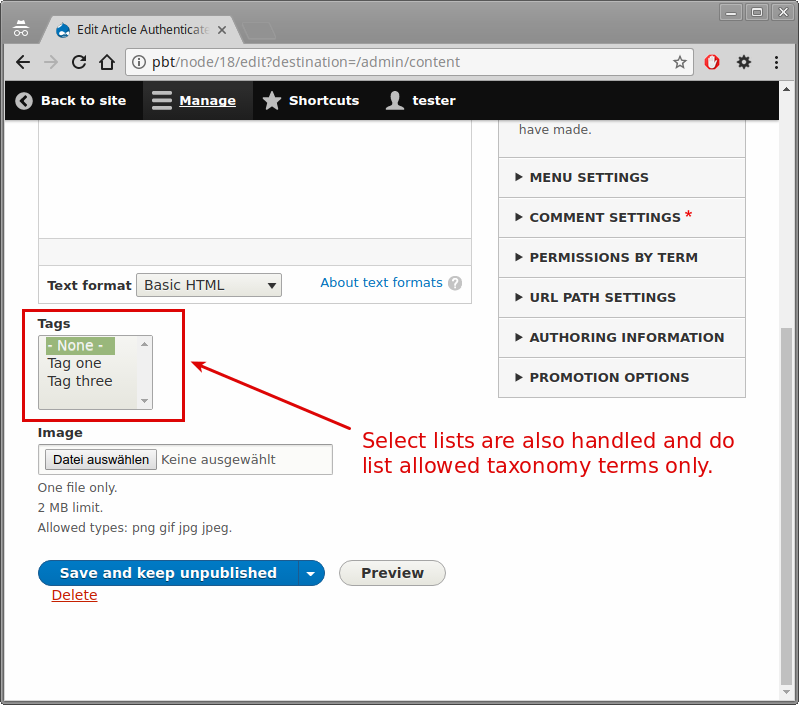
The taxonomy term restriction on node edit pages, restricts the access to taxonomy terms at node editing.

Drush commands
This feature was introduced in version 8.x-2.28 for Drupal 8 and 3.1.5 for Drupal 9.
Rebuild node access for terms related to permissions by term:
drush permissions-by-term:rebuildor via alias:
drush pbtrHow to protect inline files as well
- set private filesystem path in settings.php as a path below /files (though this seems to be discouraged in settings.php); e.g.
/var/www/drupal/web/sites/mysite/files/private-files - protect path from direct access in your web server config and test whether it actually prevents access
- set default download scheme to private files at
/admin/config/media/file-system
Cache needs to be rebuilt before this is available. - Now make CKEditor place its uploads in the private dir as well by navigating to
/admin/config/content/formats, clicking configure for the needed edit format and configuring the CKEditor file upload plugin to use Drupal's private file scheme. Leave the upload directory at its default,inline-files. This will be the directory below the private file directory. Repeat for all needed edit formats. - Tags can now be added to nodes to configure access using PbT. Files uploaded by CKEditor have the correct
/system/files/..path so permissions get checked by Drupal before delivering files. Direct access to this path without login does not succeed because of Drupal itself, access to the filesystem path does not succeed because of the webserver setting.
How can I export the permissions to another Drupal site?
You must create a SQL database dump of two tables. If you can select only specific database tables with the Backup and Migrate module, then it is also okay to use that module. Otherwise use the mysqldump terminal command:
mysqldump -u... -p... mydb permissions_by_term_role permissions_by_term_user > permissions_by_term_tables.sqlYou can easily dump these two database tables and import the dump to any other site. The SQL dump needs to contain only this two tables - not the entire database:
* permissions_by_term_role
* permissions_by_term_user
Please make sure that you have the same taxonomy terms on the other website, where you want to transfer the permissions to. Otherwise there won't be a relation between the taxonomy terms and your imported permissions. As a result you will have permissions in your database, which cannot be referenced (dead data).
Taxonomy terms are no config entities, they are content entities. So the database dump export and import way is the way to go.
Testing
Find the continuous integration pipelines at Bitbucket.
Behat tests
If you open the Permissions by Term project folder, you can find Behat tests under "tests/src/Behat". The Behat tests are extending from the Drupal Extension to Behat and Mink project. The Behat tests are developed with the Chromedriver to simulate user interaction in the Google Chrome webbrowser. To execute the Behat tests, you must install the PHP libraries via Composer. The packages are contained in the composer.json file. Check the README.md file in PbT's root directory to learn more about setting up the Behat tests.
Kernel tests
If you open the Permissions by Term project folder, you can find kernel tests under "tests/src/Kernel".
Unit tests
If you open the Permissions by Term project folder, you can find unit tests under "tests/src/Unit". The unit tests are using the PHPUnit version, which is shipped by Drupal core.
Create lots of testing fixture nodes and terms with permissions via Drush
This feature was introduced in version 8.x-2.28 for Drupal 8 and 3.1.5 for Drupal 9.
The following Drush command allows you to create as many nodes and terms with permissions you wish:
drush permissions-by-term:create-nodes-with-permissions ANY-NUMBERThe alias is:
drush pbtcnwp ANY-NUMBERPerformance
Node Access Records
As in most web-applications, you must take care of your database queries. The Permissions by Term module uses Drupal's "Node Access Records" to provide access restriction for nodes within the system. That way restricted nodes aren't listed in views, search results and menus, if an user does not have access. Access records are stored in the "node_access" table. Permissions by Term will create 1 access record per 1 node. When all node access records are rebuild, there will be created 1 dataset per node in the node_access database table. You can test this process, by executing it via /admin/reports/status/rebuild.

Usually this process is only impacting the user experience on your site, if users with the "Administer permissions" permission will update their profile. Mostly you do not want users to update their user role by their own, so this will not bother you.
You can update the node access records via cron. By this process you are reducing the chance, that the node_access records rebuild will have any impact regarding user experience. Note: if there's no access record for a certain node, because the access records rebuild process is ongoing, this node is not accessible. However, the chance that a user will access your node in a period which is smaller than 1 second, is very low. The node_access records are build in batch mode. The "max_execution_time" and "memory_limit" PHP config options are not notably important here. So even if you have a huge amount of Drupal nodes, the process will finish.
All access records are rebuild when:
- Drupal cron is being run
- User with "Administer permissions", which allows him to edit his roles, will update his user profile
- A new user account is created
- Permissions rebuild is executed via admin backend at /admin/reports/status/rebuild
Some access records are rebuild when:
- A taxonomy term is inserted or updated. Then only the related access records are being updated.
- A node is inserted or updated. Then only the related access records are being updated.
Warmed page cache
If you want to improve your performance, then the page cache and the dynamic page should be enabled in your Drupal site. Also you should warm the page cache, so you won't cause a page load without a page cache hit, on your very first page load after the cache rebuild. You might want to try the Warmer module.
An alternative to PbT: Taxonomy Access Control Lite
The Taxonomy Access Control Lite module project does quite the same things as PbT does. Additionally it restricts the edit/delete permissions on Drupal nodes. You might take a look on this module also for usage within your project.
Please notice, that this project was developed without any automated tests (be aware of regressions in your software) and the configuration user interface is more complicated. To configure this module you have several forms on different URLs. While PbT bundles the permission configuration on the taxonomy term edit page. Furthermore Taxonomy Access Control Lite works with "schemes" for each taxonomy vocabulary, what eventually makes the maintenance of your project more complicated, than you want it to be.
Please Notice
- Permissions by Term requires at least PHP version 7.1 since version 8.x-2.0. Make sure you are running at least PHP 7.1 on your webserver. PbT versions lower than version 8.x-2.0 are not supported anymore.
- Edit and create permissions for related nodes are currently not supported. See the related issue here.
- The admin user (user with id "1") will bypass all access checks.
- All nodes will be shown to users with the permission "bypass node access".
- If there's no access record for nodes, while the access records are being rebuild, the nodes can be listed in views, search results and menus! See "Node Access Records" paragraph.
- Note that the usernames autocomplete widget will only work for users with the 'access profiles' permission. Other users will have to specify the name manually.
- Exposed filters in views are not restricted. You might check this issue: #2991174 - Exposed filter in view not restricted
- As any other open-source project, PbT provides NO WARRANTY. Behind PbT stays no company, which would guarantee overall manual and automated testing of PbT before an new release to prove functionality for your business purpose. Releases are currently made by 1 volunteering person. Please stay responsible before any update of the PbT module: do not directly UPDATE to an new PbT version on your LIVE system!
After an update, the following steps are suggested
- Check the changes carefully on a "sandbox" Drupal instance which could might be your local development environment or a staging instance in the same infrastructure as your live system.
- Please report any issues in PbT's issue queue.
- Apply the live-update after your careful check, if you are sure, that nothing will break. Pbt's automated tests might help you.
Examples
Securing documents in your filesystem
You can enable the Permissions by Entity module, which is integrated as a sub-module in the Permissions by Term base module. Then access to all content entity types can be handled via taxonomy terms. Not only the node content entity type. A prominent content entity type could be a document bundle from the media type.
I will show you, how you can restrict the access to documents from your file system via a document media type bundle.
- Firstly enable drupals private file system
- Make sure your fields file is located in the private file system (field settings)
- install the Permissions by Entity module
- and implement hook_file_download() by adapting the following code into your custom modules *.module file:
/**
 * Implements hook_file_download().
 */
function fancy_module_media_document_file_download(string $uri) {
  $files = \Drupal::entityTypeManager()
    ->getStorage('file')
    ->loadByProperties(['uri' => $uri]);

  foreach ($files as $file) {
    $multipleMedia = \Drupal::entityTypeManager()
      ->getStorage('media')
      ->loadByProperties(['field_media_file.target_id' => $file->id()]);

    $oneMedia = reset($multipleMedia);

    if ($oneMedia instanceof \Drupal\media\MediaInterface) {
      /** @var \Drupal\permissions_by_entity\AccessChecker $accessChecker */
      $accessChecker = \Drupal::service('permissions_by_entity.access_checker');
      $isAllowed = $accessChecker->isAccessAllowed($oneMedia);

      if (!$isAllowed) {
        throw new \Symfony\Component\HttpKernel\Exception\AccessDeniedHttpException();
      }
    }
  }

}
Now requests to https.//my-website/private-file-folder/secure-document.pdf will be handled over your permissions. Users without permissions will be redirected to a "Access denied" page (HTTP status code 403)
Integration with the XML Sitemap module
If you are using the XML Sitemap Drupal module, then you can secure content from being exposed via the XML sitemap with hook_sitemap_link_alter(). Here is an example from a user issue:
function permissions_by_term_xmlsitemap_link_alter(array &$link, array $context) {
  if ($context['entity'] instanceof NodeInterface && $link['access']) {
    $access_check = \Drupal::service('permissions_by_term.access_check');
    if (!$access_check->canUserAccessByNode($context['entity'], 0)) {
      // Status is set to zero to exclude the item in the sitemap.
      $link['status'] = FALSE;
      // Set to zero to make the element non-accessible by the anonymous user.
      $link['access'] = FALSE;
    }
  }
}
Drupal 8 and 9 version available
Please notice that Permissions by Term 2.x is for Drupal 8. While the 3.x version is for Drupal 9.
Known issues in the Drupal core
- Be aware of the following Drupal core issue: #2971902 - Unpublished content is not visible in views to users with the 'view own unpublished content' permission when used in combination with node grants
Help improve this page
You can:
- Log in, click Edit, and edit this page
- Log in, click Discuss, update the Page status value, and suggest an improvement
- Log in and create a Documentation issue with your suggestion
