Configure the layout and format of content and data presented to site visitors.

Nices image display

Pantallazo_0.thumbnail.png

This module add a small jquery code that give a border around the images, and put the alt attribute information under the picture, I get the idea from wordpress.com and the Wikipedia.

Front Node

A small module which allows users to set node as a front page.

After installation of the module there is a new node-edit form option "Use node as front page". After the option will be checked , the node is displayed on the front page.

Interface

The interface module allows site administrators to modify the way entities look through a drag and drop interface. It uses plug-ins to present information in different styles, such as tabbed interfaces, complex page layouts, and the like.

The original D6 version of the module was concerned only with content entry forms. The D7 version is a complete rewrite and is concerned primarily with the presentation of entities, especially ones lacking a conventional layout in relation to typical content in a Drupal site. It will also support modifications to entry forms, just not yet.

Features include:

* Drag-and-Drop Authoring Tool

Form elements can be moved around on a page by simply clicking on them and dragging them where they belong.

* Plug Ins

Interface uses a number of plug ins to control the presentation of content. The D7 version ships with a tabbed interface plug-in for right now, with others coming soon.

* Multiple Interfaces per Content Type

Interface allows users to create different layouts for each display mode associated with a bundle.

* API

Interface provides ample hooks for templates and behaviors to perform actions without needing to modify the core interface module. Documentation for developers is provided within some of the behaviors included with this distribution.

Open Flash Chart 2 API

Open Flash Chart 2 API

********** ATTENTION: **********

This module is now merged with Open Flash Chart API according to the following discussions [1], [2]. The code has been migrated to Open Flash Chart API version 6.x-3.x so I recommend using that module instead of this one because no new features will be implemented here. I will also update the documentation page to reflect the Open Flash Chart API version 6.x-3.x soon.

*******************************

This module provides an API to generate Open Flash Chart 2 charts in Drupal.

Features

  • Option to use SWFObject to embed charts with dynamic publishing.
  • Option to automatically apply wmode:transparent to all charts. This helps fix the issue about Flash content always stays on top and ignores z-index of all other elements.
  • User can specify additional Flash parameters when rendering charts.
  • Uses standards compliance and cross-browser support XHTML code to embed charts using the "nested-objects" method. (more info)

Views Slideshow: ImageFlow

ImageFlow

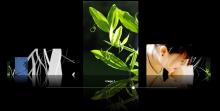
This module will display a view of images using the ImageFlow JavaScript plugin available from http://finnrudolph.de/ImageFlow.

ImageFlow is a picture gallery, which allows an intuitive image handling. The basic idea is to digitally animate the thumbing through a physical image stack. That intuitive handling is automatically caused by the metaphorical use of the well known process of thumbing through.

This solution is known as the Cover Flow technique, which has been developed by the artist Andrew Coulter Enright. Now - after it has been bought by Apple - it is used in iTunes and the file browser of Apples OSX.

Please see the important note when installing; it will break when you turn on CSS aggregation otherwise.

Pages

Subscribe with RSS Subscribe to RSS - Content display