

Closed (fixed)
Project:
Drupal core
Version:
10.1.x-dev
Component:
block_content.module
Priority:
Normal
Category:
Feature request
Assigned:
Unassigned
Reporter:
Created:
19 Apr 2013 at 18:24 UTC
Updated:
18 Oct 2023 at 00:37 UTC
Jump to comment: Most recent, Most recent file
 Show commands
 changes


Comments
Comment #0.0
traviscarden commentedUpdated issue summary.
Comment #1
rootworkI agree -- I'm surprised this hasn't been taken up by anyone else.
At the very least, it would be nice to separate out "edit blocks" from "administer blocks." There are lots of use cases where you want to give site editors the ability to edit blocks on the site, but not go to the block administration page and start moving around and deleting things.
Just as one use case: Contact forms often have text at the top of them, which in Drupal 8 is contained in a custom block. Right now if a site editor doesn't have administer blocks permission, the site editor effectively can't edit the contact page.
Comment #2
rootworkMarked #2282967: Blocks should provide more granular permissions as a duplicate.
Comment #3
rootworkComment #4
Anonymous (not verified) commentedcreate block type
edit block type
delete block type
create block instance
edit block instance
delete block instance
Since each theme has different regions we cannot add per-region permissions(although since themes can now provide many stuff maybe they can also provide permissions - worth investigating). So these are needed too:
change block instance order/weight(edit block instance permissiosn would be needed too)
change block instance region(edit block instance permissiosn would be needed too)
Comment #5
akalata commentedHere's a contrib module in the same space, currently D6 and D7: Block Access
Comment #6
tancSurprised theres not more people clamouring for this. Granular permissions for blocks would help to make blocks a first class citizen in the entity world.
Comment #7
anavarreComment #8
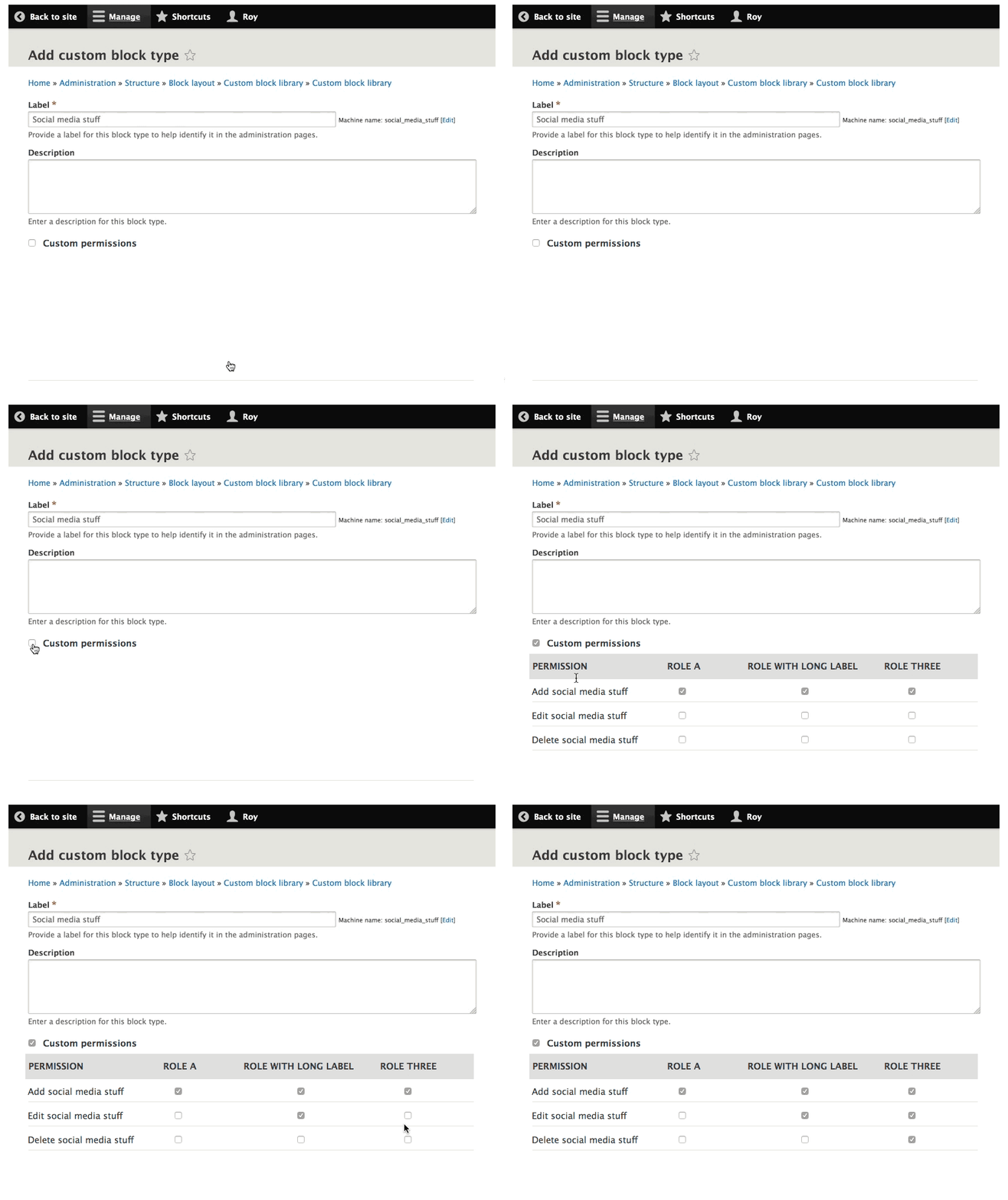
rootworkFor those who are wondering, development on a D8 port of Block Access, mentioned in #5, is explicitly blocked waiting for an outcome on this issue, as you can see here: #2644588: Drupal 8 port
It would be nice to know if there is at least support for making this happen in core. If for some reason there is not, or if folks want to see this solved in contrib first and then ported back to core, let's report that back to Block Access maintainers -- because otherwise both sides will be waiting on each other ;)
Comment #9
danepowell commentedI think there's a very strong argument for this being fixed in core. It's a silly and terrible user experience to treat blocks as content and then only provide a single administrative permission to manage them. It would be analogous to having an "administer content" permission for nodes and nothing else.
Comment #10
Anonymous (not verified) commentedYep, it's exactly like that.
Comment #11
traviscarden commentedI definitely agree. The amount of power now in the block system is far too much to grant to many administrative users, which means that they can't be allowed to use blocks at all. I personally hope that one day we will abolish the distinction between blocks and nodes altogether and just have content with page displays and block displays (#1164718-55: Improving the usability between "custom block" and "content"). But in the meantime, core unquestionably needs more permissions around custom blocks.
Comment #12
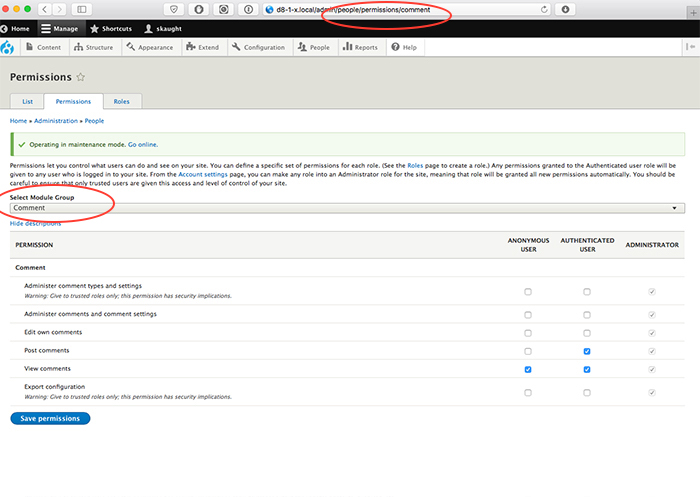
xjmI can see the case for this, but there is a cost associated with adding even more permissions to core. Access control is also complex to configure and often site-specific. Furthermore, adding additional permissions to core has a usability cost.
We have similar issues to add more granular permissions to other content systems (like taxonomy). As I've said on those issues, I think it would make sense to implement this as a contributed module first, if possible, for a short-term solution. That would help us evaluate whether it belongs in core.
A longer term solution would involve doing a usability overhaul for the permissions system. Better block placement permission and access control would also be a part of the layout initiative in an upcoming minor, I think.
Comment #13
rootworkI'm on the side of building this in core, specifically because of what I noted in #1:
It's very hard to hand a site to clients and tell them they can't edit "the text on that page" (as they interpret it) except from super-admin accounts. To me that seems like a bug -- not just a feature request that can be addressed with a contrib module.
Comment #14
xjm@rootwork, yeah, that's exactly why I see it as part of the overall problem of layout building -- the Drupalism of "content" versus "block" is a big part of the layout problem. The same problem also applies to other kinds of non-node content (not just blocks).
Comment #15
Anonymous (not verified) commentedFYI: in order for this to be fully covered Drupal would also need to implement plugin permissions into the plugin discovery mechanism so that, in this case, when the block module will request the block plugin definitions so it can list available block in the "attach block to region" listing it would not be able to "see" block plugins that should not be accessible(for example devel's "execute php code" block).
I do not think we should add another method to plugin manager for this(to be able to get ALL plugin definitions and ACCESSIBLE plugin definitions). I think the getDefinitions() should just get an argument for enable/disable filtering out the inaccessible plugins.
Comment #16
moshe weitzman commentedI think Drupal 8.x could add the notion of hidden permissions. These are perms which don't show up in core's perm UI. Perms which are hidden are expected to provide own UI for admins. Block module would offer such a UI. It could potentially reuse the same code and UX of the core perm UI.
As for which perms to offer, start with the exact set that Block Access offers?
Comment #17
benjy commentedNot sure if i'm misunderstanding something there but that sounds like a usability issue to me, we'd be making permissions less consistent and it's a bad example to set IMO for contrib.
In general though, i'm +1 for adding additional block permissions to core, much like how bean did in D7 contrib.
Comment #18
lambic commentedI'd love to see this functionality make it into core, it makes sense from an "everything is an entity" perspective as blocks are no longer the poor neglected cousins of nodes.
It's important to point out that the Block Access module has two levels of permissions:
* Permissions can be granted on individual blocks.
* Permissions can be granted at the module level so that all blocks generated by module X inherit the same permissions.
Other challenges:
* The Block Access UX is not pretty (what can I say, I'm a backend guy) and needs some design love.
* There is some region placement level permission stuff in the module that only partially works, that would either need to be fixed or ditched.
* There are hooks in the block system to add other config forms, so hooks would have to be provided to add perms on those custom forms.
Comment #19
rootworkTo me that's a good place to divide between core and contrib. The first is a core issue -- various core-generated blocks need to have permissions so that different roles can edit them without managing all blocks. The second is really about contrib -- enabling specific roles to have control over blocks related to particular modules. To be clear, the second piece is a really useful feature! But if we're narrowing the scope of what is necessary in core, it seems like the first piece fits that bill, while the second could continue to be addressed in contrib.
My two cents.
Comment #21
dr. gubó commentedAgreed this being very important with the new block system.
I think the permissions should be tied to the new custom block types. This would cover most use cases I can think of.
A very useful plus could be to have view permissions as well.
Comment #22
delmarr commentedFrom a UX perspective I could see having a tab on the 'Add custom block' page with additional local task menu item called 'Permissions' and then replicating the layout of the core permissions page (admin/people/permissions).
Maybe best handled in a separate module with it's own config page
Comment #23
afoster commentedI'm in agreement with dr. gubó -- Permissions by Custom Block Type would be best (perhaps as a short term solution)
We could use a simplified version the same permission patterns as the node permissions for custom block types and leave "Administer Blocks" to be the equivalent of "Administer content types"
EG if you create a custom block type called "Fancy Block"
The permissions would be:
Administer blocks
Fancy Block: Create blocks
Fancy Block: Delete blocks
Fancy Block: Revert revisions
Fancy Block: Delete revisions
Fancy Block: Edit blocks
Fancy Block: View revisions
(I'm assuming we can't do any of the "edit any" vs "edit own" content as I don't think blocks have authors)
Comment #24
finex commentedBeing "Bean" module be included in Drupal 8 core, this feature should be re-added: it is extremely useful. Dropping the functionality is a bad step from Drupal 7.
Comment #25
delmarr commentedDr. gubó, yes that would be a great first step.
Comment #26
rooby commentedKeeping as close as possible to nodes makes sense to me.
In addition to #23, there also needs to be a separation of 'Administer block types'.
Since blocks are more like content now it would make sense to store the author but that's a separate issue.
Comment #27
tancI'll be attending Drupal Dev Days 2016 and would love to work on this during the sprints. I'm not experienced with core development so I'd need a mentor. Is anyone watching this thread able to mentor me there?
Comment #28
mlncn commentedMaking an attempt at this.
I am focusing only on the content editor experience, here, so not taking on splitting up administer block types from administer blocks. The biggest win here is to get contextual edit links to work for people without administer blocks permission, but will certainly add an access permission for the custom block library page (in my opinion custom blocks should be another tab under Content with content, comments, and contact forms, but that's another issue-to-come, i hope).
I couldn't find any user interface for reverting or deleting block content revisions, so i won't be adding any of those permissions— that would just give people another place to check and recheck while going slowly insane wondering why they can create block revisions but not do anything with them. Other than that though doing exactly afoster proposed in #23.
Hi tanc! I started working on this already (wanted to see if i could do it before i claimed it, heh) but i am certain there will be cleanup or follow-up needed. Dev Days is the 21st through the 26th? I wish i were in Milan for that! I'll be in a good position to mentor (remotely) as far as familiarity with the code, at least.
Comment #29
tanchi @mlncn :-) I'm more than happy to be involved in any way I can. I've done bits of work on this, just to get to know APIs and to see whether it would be possible to provide block type permissions for content editors in a contrib module. The main issue I had was with contextual links, I just couldn't wrap my head around how they work.
Anyway, I'll make myself available to work on this at Drupal Dev Days, the main sprint days are the 21st and 22nd of June so if there is stuff lined up to look at then I can have a go. Happy to write tests, review code etc.
Comment #30
mlncn commentedOne part of this is complete: Editing individual blocks through contextual links. Needs review because i'd like the testbot's opinion, and everyone else's too. But the rest is really in needs work state.
It was fun until the part about spending several hours before figuring out that there is a View overriding the in-code listing of custom blocks, and it needed to get the new 'access custom block library' permission also. Now we can reach the page, but nothing in the view shows up. Haven't got a clue about that after a good bit of poking and haven't even looked at why /block/add gives access denied still, but i expect that one will be an easy fix.
Then there's a deeper problem of how do we update this view on existing sites. Does core have an approach for (unmodified) core-provided views like this?
tanc— there may be a good bit of work, and i might not be knowledgeable enough to help as much as i'd like! And yes, this will need tests!
Comment #32
mlncn commented... could someone help me interpret those test failures? Undefined offset in the block content listing view... test?
Comment #33
stella commentedI tried out this patch and while the extra permissions appeared in the list and I could assign it to my Editor role, the user still couldn't access admin/structure/block/block-content despite having the "Access the Custom block library page" permission. Nor could the user add blocks, but they could edit them...
Comment #34
stella commentedFigured out the problem with accessing the block content listing:
drush cim --source=core/modules/block_content/config/optional --partialSo maybe we need an update hook for this? Not sure what the recommended approach is here.On the last point, we need to select one permission and use that. I'm guessing the patch should use 'access custom block library' as the least far-reaching permission, but it will mean administrators who have just the 'administer blocks' permission wouldn't have enough access to access that page.
Add permissions are not working in two areas:
Edit and delete perms work fine, but I'd like to see some tests added.
There are also further changes required - for example, the help text in block_content.module needs to be updated in line with the new permissions.
In addition, some tests need to be updated to reflect the changes, and a whole bunch of new tests added.
Also on the custom block library page, the 'Block type' column appears empty when accessing the page as a user who has just the 'access custom block library' permission and not 'administer blocks' too.
Comment #35
tancJust getting familiar with the patch from #30. Here is a re-roll with some cleaned up comments.
Comment #36
kae76Patch #35 applied against 8.1.3 - no errors.
Steps to configure:
From: Administer Blocks
To: Access the Custom block library page
Steps to test as specified user:
(using this granular permission along side 'Editor' role & 'Manage Users' role)
I'm very happy this is working!
Comment #37
tancI spent a bit of time yesterday looking at some way to get the permissions combination (administer blocks+access custom block library) working but concluded the only way (that I could understand) of doing it would be to create a views access plugin but the down side to this is that the new plugin would be visible and available to all admins to choose from when assigning a permission handler to a view. So as Stella said I think its best to stick to using 'access custom block library' permission for the view, while the route can handle the 'or' combination.
Comment #38
tancI've done a bit more work on this, in particular:
This is just some late night work in progress but wanted to add the patch here in case I don't get to work on it for a few days and someone else wants to continue the work. In my basic testing the /block/add list should now only show those block types the user has create permission for. Likewise when a user tries to add a block for a specific type (e.g. /block/add/basic) they should be allowed or denied correctly.
I'll start writing some tests and modifying existing ones next.
Comment #39
tancThis patch includes two changes to the tests to allow them to pass with the new permissions. We still need to add specific tests for the individual add/edit/delete per block type permissions. And possibly fix more tests.
Comment #40
tancChanging to needs review to trigger testbot
Comment #41
tancTests are now passing but we need more tests for the new permissions. I also noticed a new module that has been added to the 8.2.x branch called block_place (#2724819: Create experimental module for place block on any page feature). We should ensure that these changes are compatible with that module.
Comment #42
tancLooking at block_place.module on line 55 there is an access check for the 'administer blocks' permission.
I've asked for a core dev to review this thread as I think its important that this gets approved for inclusion in 8.2.x and the appropriate permissions are known about when others are working on block related tasks. If anyone can get a core developer's attention on this I think now would be an appropriate time for a review.
Comment #43
larowlanFWIW by participating here, you're a core developer. There is no exclusive club of 'core developers', if you participate in the issue queue, you're a core developer.
I don't think we need to implement hook_ENTITY_TYPE_access here. We already have an entity access controller, lets move this code into it.
nit: Missing newline
There is no new checks here - we're still using 'administer blocks'
This permission is defined by node module, we can't rely on it being available. Is this a copy/paste error?
Doesn't seem to be used?
commented code
Where is this used? Never seen this before - there is no mention of it anywhere else I can see
I've pinged @yoroy from the UX team for a usability review.
He noted that it would be good to see the ability to set the permissions from the block-type edit form, like we do for text formats.
Comment #44
jibranComment #45
tancw00t!
I'm a newb for the core stuff so just finding my way and understanding who to talk to, what the protocols are etc. Feedback appreciated!
Comment #46
podarokdue to #43
Comment #47
yoroy commentedThe feature request makes sense. Discussed this a bit with @larowlan in IRC and we arrived at the idea of providing a way to override the global blocks permission. That way you don't have to set permissons for each new block type but you could if you wanted too. So what about something like this:
Considerations:
- The default permissions would be the starting point, so likely some boxes would already be checked
- I'm not happy yet that you have to check the box to be able to see what the default permissions are
- Gabor pointed out that my labels here don't reflect the ones in the patch "Social media stuff block: create new blocks" seems a bit too much for when you alrady are in the context of that block.
We're going to do something similar (bringing permissions in context of the thing itself) in #2757349: WI: Deal with scalability issues in the UI. Our prior art in core is Text formats: there you can confiugre which role can use which text format on the config screen of the text format (/admin/config/content/formats/manage/basic_html).
Comment #48
ipwa commented@yoroy that looks awesome
Comment #49
lambic commentedThat mockup looks really nice although it'll get unwieldy with lots of roles.
Also, there should be more perms than just add, edit, delete. For example:
* Enable social media stuff
* Disable social media stuff
* Move social media stuff
* Configure visibility settings for social media stuff
The block_access module has more, but those I think are the key ones.
Comment #50
acbramley commented@yoroy nice work, and agree with @lambic being able to customise the other types of actions you can do with blocks would be great.
Comment #51
traviscarden commentedThat does look great, @yoroy!
That's a good point. If there are a definite number of permissions (e.g., 3) and an indefinite number of roles, the table as depicted should probably be flipped on its axis (perms across the top and roles down the left) so it can expand with the variable length content without causing horizontal scrolling. My current project, as an example, has 33 roles--some with quite long names. That would be a doozy of a side scroll.
Comment #52
acbramley commented@TravisCarden good idea, but then it'd be a UX issue since the admin/people/permissions page does roles across the top, permissions listed down. Maybe another solution is required? How does the admin/people/permissions page handle your 33 roles?
Comment #53
stella commentedIt looks good, but I'd be concerned that now people need to configure permissions outside of the core permissions screen. It seems non-standard and could be confusing.
Comment #54
yoroy commentedThe default would be what you configure on the permissions page. What you could do here is override those defaults.
There is hardly a way to make this work with 10 permissions and 30 roles...
Comment #55
traviscarden commented@acbramley: admin/people/permissions can't even be loaded with 33 roles, actually. There are so many form elements it exhausted the PHP memory. I believe there's a core issue somewhere to deal with this, but I don't have it off hand. I suppose that grids like this are almost guaranteed to produce side scrolling. I'm not competent to propose a solution given that assumption.
Comment #56
skaught#54/#55
this permission page issue is certainly a long standing core issue once many modules introduce this sort of sub-permisisons, ie: sites with many node types and many roles -- which is common in a wide range of projects.
Moving each section of module permission to it's own route would be one solution.

leaves open the idea for a /all page (traditional) with an empty first load when you hit /admin/people/permission
Especially if block_content is going to add a new subset for each custom block.
Comment #57
skaughtlinking
Comment #58
skaughthave started related an issue/patch
Comment #59
thamasThere could be a pre select at the contextual override proposed in [#47] also to choose which roles you want to give permissions (default to all).
It would not resolve the too much role to display problem (especially not on narrow screens) but could simplify the editing of the role overrides.
Comment #60
geerlingguy commentedI'm not sure if this issue is the best place to bike shed on fixing the permissions UI... I'd feel more comfortable adding in the permissions on the existing page (with all other permissions and roles), and continuing work elsewhere on an overall permissions UI improvement. I'd hate having to go to multiple parts of the site to manage permissions, or have slightly different UIs for blocks vs. everything else.
Plus, as we've seen with the core permissions UI improvement, it could take years. Almost everyone would benefit right now from having at least a base set of new block permissions, regardless of the UI complexity.
Comment #61
tancI feel the same way. I'd rather get the basics down for a 8.2.0 release and have the UX discussions on permissions elsewhere.
I'm on holiday for another week but when I get back I'll start implementing the suggested code improvements and look at any other basic permissions.
Comment #62
skaught#60/61
Of course, changes to the overall permission page has nothing to do with this ticket in that respect. but if this ticket introduces such dynamic permissions per block instance.. then at least, the enhancement will be ready. [ie: chx: [site] had 5500 checkboxes on this page, we actually had a printout on the walls, it was so funny. It was less funny, of course, that your browser crashed most of the time when trying to load the page. ] Say, once a site with 20+roles has an addition 60checkboxes for each block... WSOD for everyone. then #2763719 would get pushed through quick.
#geerlingguy
you're almost saying that blocks should have a completely independent permission system. maybe that is an answer in terms of this ticket. ..for blocks and layouts in general
Comment #63
stefan.r commentedIf we can't get the UI right prior to 8.2.0, perhaps we can make this feature opt-in instead (at least for now), and just implement these permissions as regular permissions on the permissions form, as suggested in #60 and #61?
The main issue seems to be that this might break the permissions form (through max_input_vars/scrolling/browser/PHP memory issues), but the feature is opt-in, at least people deliberately choose to do so.
Comment #64
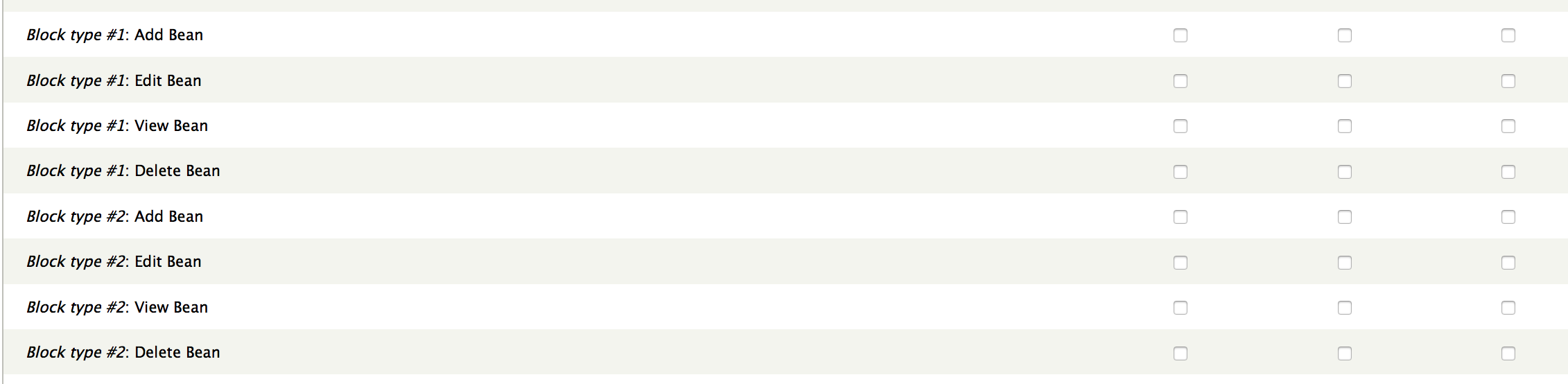
stefan.r commentedFor what it's worth, Bean (D7) just puts permissions on the permissions form as well:
Comment #65
nicholas.alipaz commentedI agree with the opt-in reasoning. If some one has to opt-in they could always manage the permissions with drush if the form won't load or even fix by adjusting the needed settings. Any adequate warning should be all that is required until the much larger issue is tackled.
Comment #67
ifrikMeanwhile... would it be possible to just add one separate permission to allow users to edit the content of these custom blocks without doing anything else?
Because for now we still need to give any content editor that once in a while needs to edit a bit of text in a custom block, all the rights to mess up all other blocks and the whole site - which is a security problem.
Comment #68
stefan.r commented@ifrik so no add/delete, just edit? That does seem to be the 95% use case, so it could be good to have a minimal patch that implements that, as a first step.
Comment #69
ifrikYes, editing would cover that.
My current use cases all involve blocks that are placed as part of the site building, but content administrators of the site at a later stage might need to change the content of an existing block.
In terms of content vs. configuration, that only impacts on the "content" part of a custom block, which is not part of the configuration management either.
Any user who needs to add or remove a block obviously thereby changes the placement of blocks, which would be a more structural task, that also changes the configuration yml files.
Comment #70
acbramley commented+1 for at least 1 extra permission for editing content in blocks and nothing more.
Comment #71
laravz commentedIf nothing else, the 1 permission for editing custom blocks would be highly useful in my case as well.
Comment #72
zerdiox commentedI'll support the idea for #67, just a edit permission will be more then enough to start with and cover most of the bases. 99% of the sites we develop have a need for editing and that's it. Most other issue's can be solved with extra fields on a node or different views.
Comment #73
larowlanI've written a D8 module that adds permissions for editing block content - e.g 'edit own|any {type} block content' and 'delete own|any {type} block content' and 'create {type} block content'.
You can find it here http://github.com/larowlan/block_access
Feedback welcome.
Comment #74
jibranThanks @larowlan the code and tests looks great. Let's move this into core now.
Comment #75
yoroy commentedI agree that adding only edit permissons to exising blocks would already be a big win. It often is not useful to use a view or reference to existing content to highlight something. In those cases, blocks are often used as simple containers to manually put in a link, image, bit of text to a promoted item, important message, campaign… Allowing people access to edit only specific types of block would enable this in a very straight forward way.
Comment #76
ifrikI would already be happy if a user who needs to edit the content of an existing block cannot mess around with the Block layout page.
If setting edit permissions per custom block type is as complex to set up as edit permissions for blocks in general, then of course that's fine as well, and it would follow the expected behaviour that permissions are set on that level for other entities as well.
Comment #77
jeff.a commentedI support #67. Sounds like a great short term solution that'll work for most site builders. I was also having issue with this when handing a site off to a client. Thankfully contextual links have some nice css classes (at least with bootstrap, can't speak for other themes and if there's any difference), so here's a quick work around to hide the block config link with css if it hasn't already been mentioned. This is adequate for this client at least, don't think they'll ever find the config screens. If they do they'll be too scared to change anything.
Add user roles to the body class in .theme file:
Add css:
body.role-CLIENT_ROLE ul.contextual-links li.block-configure{display: none;}Comment #78
yoroy commentedShall we create a separate issue for just the "Edit block" permission? It really seems like a no-brainer quick big win.
Comment #79
skaught#2763719: Add provider selection to Permission page. does provide a path for each module provider
Comment #80
ifrikGood point yoroy.
I've created #2809291: Add "edit block $type" permissions as a separate issue.
Comment #81
stefan.r commented@yoroy: #2809293: Add edit block block permissions
Comment #82
joshua.roberson commentedI can see a big need for region and block level permissions. We have an editor role and it would be nice if I could restrict their ability to add blocks to certain regions and edit certain blocks (block type?). Also, editors shouldn't be able to see the regions and blocks they don't have permissions for. Since editors can place a block into a region when adding a block, denied regions should be hidden there too.
For example, if you have three regions: header, content, and footer. I want to deny editors the ability to place blocks in the header and footer regions. I also want to deny editors the ability to edit any blocks in the header region and some blocks in the footer region.
Comment #83
dddbbb commented+1 for the ideas in #82, this was always something that I really appreciated in Panels in D7. For now I' be happy with just enhanced block permissions though - that would be a solid step in the right direction.
Comment #84
joshua.roberson commentedI created a new D8 module that adds permissions for administering blocks during block layout. If anyone wants to take a look, I would appreciate the feedback.
Project: Block Region Permissions
Comment #85
skaught#84
very interesting! i can't review in this moment..but will as i can.
have you tested with outside_in enabled?
Comment #86
flocondetoile#84. Seems very useful. I will look it soon.
Comment #87
joshua.roberson commented#85
I just tested it with outside-in and the "Configure block" option does go away for regions the user doesn't have permissions to administer.
Comment #88
hoporr commentedIn the meantime #73 works pretty good.
Either we encourage the dev to move forward with this, or use this as a base here.
Comment #89
hoporr commentedComment #91
joshua.roberson commentedI created a new D8 module that adds permissions for managing block content and block content types. There are only a few small things left that I am working on, but for the most part it works. If anyone wants to take a look, I would appreciate the feedback.
Project: Block Content Permissions
Comment #92
sassafrass commentedHi Joshua... I tried to clone your repository but it failed. I'd like to contribute if I can...
git clone git://git.drupal.org/sandbox/joshua.roberson/2849003.git
Cloning into '2849003'...
fatal: unable to connect to git.drupal.org:
git.drupal.org[0: 140.211.10.43]: errno=Operation timed out
Comment #93
joshua.roberson commentedHi sassafrass, apparently I needed to set a default repository for this project. It should work now. I don't mind other contributors helping out.
Comment #94
sassafrass commentedHave installed code from #73 and it is working for me. Thank-you, larowlan!
Comment #95
tancJust started to look at this again and re-roll the patch for current HEAD. It has occurred to me that a blocking issue is around the permissions for viewing the 'Custom block library' page. While we can (and have in the patch) provided a new permission that allows users to view the custom block library page, they can't navigate to it without the administer blocks permission. This is due to the custom block library page being a tab on the block layout page and the block layout page requires administer blocks permission.
@ifrik can you link to the issue you mentioned about refactoring the content section?
Comment #96
ifrikThanks tanc,
there are two issues that are relevant for this: there is a general issue about re-organizing the admin menu #2755613: Restructure the admin interface Information Architecture and one where we are collection experiences to show that the current structure causes problems #2863335: Examples of adding/moving admin menu items - contrib examples.
I briefly mention this issue there so we can keep track of it.
Comment #97
seanpclark commented@tanc sorry if I'm replicating work in-progress, I had started working on it before seeing your most recent comment.
Updates include:
To do / working on:
Comment #98
seanpclark commentedUpdated issue summary with block permissions. I'll follow up with a revised patch.
Comment #99
seanpclark commentedStill needs tests, but updated the following per revised issue summary:
Comment #100
shaunmilo commentedIt seems that with #73, you still have to grant the 'Administer blocks' permission, which gives the user access to manage all blocks & regions. Otherwise I kept getting access denied, even after granting Block Access permissions
Comment #102
amateescu commentedComment #103
fagoI had some troubles applying the patch to 8.3.7 so here is a re-rolled patch for 8.3.x. btw, patch works as it should for us and is useful!
Comment #104
ludo.rJust tested patch #103.
Permissions are created but:
Comment #105
tancCorrect, currently the major blocker to this is the UI and permissions issue around navigating to the custom block library page. As custom block library page is a tab on the block layout page and the block layout page requires administer blocks permission it isn't navigable to without allowing permissions to the blocks admin page. I'm not sure how to progress this issue until that can be resolved.
Also see #95 and #96 for context.
Currently (with current patch) you should be able to view the custom block library page directly (enter the url in location bar) with the 'Access the Custom block library page' permission. But navigating to it isn't possible without administer blocks permission.
Does anyone have any insights or suggestions?
Comment #106
ifrikWe could move the "Custom block library" out of the structure path so that it's not a tab on block layout.
That would require this issue to be fixed: #2862859: Create a top level, extendable, "Content" admin menu route that behaves like "Structure"
Comment #107
tancGreat! Good proposal which would definitely solve this issue. Will try and carve out some time to contribute.
Comment #108
aimevpI think the Bean module for Drupal 7 is again a great example of how this should work. The Bean module added a menu "Block types" under "Structure" and a "Blocks" page/tab under "Content" which holds the block library. The placement of the "block types" page is imho fine where it is now under "Structure > Blocks".
Comment #109
rjg commentedUpdated #103 for 8.4x
Comment #110
skaughtComment #114
rjg commentedRegenerated patch, updated from #109
Comment #115
manuel garcia commentedComment #117
skaught@rjg:
switching issue status to 'needs review' when you attach a new patch get DrupalCI to run tests. also, you should attach an interdif with patch! (:
Comment #118
fagoThe patch in #114 misses the BlockContentAddAccessCheck class, so #109 seems to be the better re-roll. An interdiff would have been nice, yeah. :/
Comment #119
MaskOta commentedRe-roll of the patch in #109. I had trouble to apply that patch so i don't know what the interdiff should look like...
Let's get this ship moving again.
Comment #120
MaskOta commentedComment #122
dsnopekHere's a reroll of #109 for 8.4.x (for those who want to patch 8.4.x) but done with Git so it'll apply with
patch -p1which is needed by most automated build processes. I'm going to mark this one as hidden and not to test -- development should continue on the patch from #119Comment #123
dsnopekHm, so, testing this out I noticed the problem noted by several other commenters (ex. #100) that you need to grant "administer blocks" to access the UI for the content blocks, and by granting that, you also are giving all permission to do anything with content blocks.
However, beyond that, this issue doesn't address more granular permissions for block placement, which would also be necessary to really use this in practice. Let's say users can get to the content block UI without granting "administer blocks" (like if it was moved out under "Structure" or some new place for that), what's the use of being able to create a content block if you can't place it? And right now the only way to allow placing blocks is to allow everything.
To be useful, we'll also need permissions for placing blocks without granting "administer blocks"!
I'd propose something like:
Maybe this should be a separate issue (I couldn't find an existing one)?
Comment #124
skaughtrun test
Comment #126
xjm#2934995: Add a "Manage permissions" tab for each bundle that has associated permissions is the issue we filed to abstract per-bundle permission functionality (including reasonable UIs for it) in the entity system.
Comment #128
aaronmchaleReplacing static links to issues linked in the summary with actual references to them, also subscribing
Comment #129
pixlkat commentedI started with the patch in #119 and applied it to 8.6.x. Hopefully tests are passing now; I had to update the permissions in tests to reflect the changes to the permissions for the content block lists, and I added some checks for users without 'administer blocks' permission.
I've made a first attempt at updating the block placement UI to allow users without 'administer blocks' permissions to actually work with blocks.
I added the following permissions and updating access handling to reflect these. I combined the permission for enabling/disabling blocks into a single permission -- it doesn't make a lot of sense to me to allow a user to do one without the other. I tried to make the permission labels correspond to the operation labels on the admin UI.
Comment #131
pixlkat commentedFixed the test failures and code sniffer suggestions from #129 and re-rolled the patch.
Comment #132
yobottehg commentedreroll for 8.5.2
Comment #133
eelkeblokGreat work so far. Two small nitpicks I happened to bump into:
Comment #134
psf_ commented#132 work for me, but I don't know if test are ok.
Comment #135
wengerkJust re-rolled for 8.6.x && 8.5.x.
8.6.x
I had to make some changes to class of tests which are now deprecated:
Drupal\Tests\rest\Functional\EntityResource\BlockContent\BlockContentResourceTestBaseThis class is now deprecated & changes has been moved to
.
Drupal\Tests\rest\Functional\EntityResource\BlockContentType\BlockContentTypeResourceTestBaseThis class is now deprecated & changes has been moved to
Drupal\Tests\block_content\Functional\Rest\BlockContentTypeResourceTestBase.Also, It was impossible to generate a correct interdiff with
interdiff 1975064-block-permissions-131.patch 1975064-135.patch > interdiff-1975064-131-135.txtIf some may help me to generate a proper interdiff. I got the following errors:8.5.x
I had to make some changes to class of tests which are now deprecated:
Drupal\Tests\rest\Functional\EntityResource\BlockContent\BlockContentResourceTestBaseThis class is now deprecated & changes has been moved to
.
Drupal\Tests\rest\Functional\EntityResource\BlockContentType\BlockContentTypeResourceTestBaseThis class is now deprecated & changes has been moved to
Drupal\Tests\block_content\Functional\Rest\BlockContentTypeResourceTestBase.Comment #136
psf_ commentedHi wengerk,
You could use the git method to generate the interdiff: Creating an interdiff. I think maybe be more simple.
Comment #137
wengerkThanks for suggestion psf_ but already try whiteout success. As I had to apply the patch on a old commit (
ba1e5705db) of 8.6.x to apply it "clean" & then re-roll it on the latest commit of 8.6.x the generated interdiff between those two branches is huge & not usable.Comment #139
grimreaperHello,
Rebasing patch from comment 135 on Drupal 8.6 because it can't be applied on Drupal 8.6.1.
Comment #142
josephdpurcell commentedThank you @Grimreaper!!
I can confirm that the patch from #139 applies to 8.6.10 core, and that I see these permissions under a "Block" section on the permissions page:
Comparing this work to the description, there's still some permissions missing such as per-type permissions. Perhaps this patch along with functionality from block_content_permissions module could be combined (since the module has per-type perms)?
Comment #143
opi#139 patch does not apply on Drupal 8.7.0
Comment #144
geek-merlinComment #145
vacho commentedPatch rerolled.
Comment #146
opiWorks fine on Drupal 8.7.1, thanks
Comment #147
alonaoneill commentedWorks fine on Drupal on 8.8 as well.
Thanks
Comment #148
claudiu.cristeaWe need more granular, per-type, permissions. Also we have to account the fact that we have revisions for blocks.
Comment #149
berdirNo, blocks don't have types nor revisions, this is about the block module and block config entities. What you mean is permissions for block_content, which has a separate issue somewhere.
Comment #150
claudiu.cristea@Berdir, you're correct. I landed here from
block_content_permissionsmodule.Comment #151
larowlan#2809291: Add "edit block $type" permissions
Comment #153
davidferlay commentedHi all,
New permissions added are great but don't cover one use case I have in mind :
This kind of permission would be quite useful to allow client webmaster to manage content blocks, without risk to change any configuration
I was only able to do it using Block Content Permissions contrib module + one of their patch but I believe it makes sense to include such a permission in core
What do you think ?
Comment #154
aaronmchale#153 sounds like a valid use-case which I imagine could be quite common.
Edit: the IS has “Access the Custom block library page” which sounds like it would cover the suggestion in #153.
Comment #155
MaskOta commented@#153 & @#154 isn't that what the issue linked in #151 is trying to solve? Otherwise +1 for adding those permissions
Comment #156
aaronmchaleLooks like #2809291: Add "edit block $type" permissions is only dealing with the edit and create permissions, not the permission to access the custom block library.
Comment #158
b-prod commentedReroll of #145 for current 8.9.x
Comment #159
mayurjadhav commentedComment #160
mayurjadhav commentedComment #161
smustgrave commentedAnyone have D9 patch for this issue by chance?
Comment #162
ravi.shankar commentedHere I have added reroll of patch #158.
Comment #163
ravi.shankar commentedTried to fix failed test of patch #162.
Comment #164
ravi.shankar commentedMy bad, mistakenly made wrong changes in patch #163
Here added a new patch, which removed those mistakes and that might fix failed test.
Comment #165
meena.bisht commentedComment #166
meena.bisht commentedRerolling the patch #158.
Comment #167
meena.bisht commentedComment #168
meena.bisht commentedReroll patch#165.
Comment #169
meena.bisht commentedComment #170
meena.bisht commentedSorry, reroll patch #158
Comment #171
smustgrave commentedFrom the testing I've done the user still needs the Administer Blocks permission which seems to override all the new additional permissions
Comment #173
cboyden commentedThe most recent rerolls of patch 158 didn't include the added files - here's a new patch to test.
Comment #175
cboyden commentedThis patch should fix all of the code deprecation failures, but there are still failures in the JSON API and Views tests that need to be investigated.
Comment #176
nikitagupta commentedfixed the test case.
Comment #178
cboyden commentedLooking back at the history of this issue, the last time a patch passed all the automated tests was for Drupal core 8.6.x. Since then, the tests have failed due to some access control problem. Even when the test user has "administer blocks," they're getting a 403 / Access Denied on the block overview and on some JSON tests. These problems are not occurring in the UI, just in the automated tests. There may have been a change between core 8.6 and 8.7 that is messing up the access control that's added in this patch.
Comment #179
bkosborneRE #149 from Berdir
I skimmed all the comments and didn't see this distinction made. The latest patch appears to cover block content.
Comment #180
bkosborneI spent hours today trying to figure out why hook_ENTITY_TYPE_create_access is not called for custom blocks at all. It doesn't get invoked when determining access to the add block form in the block_content module, or in layout builder when adding an "inline" block. Since this hook is part of entity API I'm a bit surprised to find that it's not even invoked by the entity save process. But I guess I just misunderstood.
Anyway, Looks like this patch doesn't address that as it doesn't add distinct 'create' permissions, but it's an improvement.
Comment #181
aaronmchaleRe #180:
I can only assume it's because for the
block_content.add_pageandblock_content.add_formroutes, there is only a simple permission check taking place:Whereas other routes, for example the
edit_formroute uses proper entity access checking:As much as
hook_ENTITY_TYPE_create_accessis part of the Entity API, if the actual route itself isn't using the Entity API's Access Checker, then the hook will never be called for that route.It definitely makes sense to fix that, but the fact that the create routes aren't using the access checker should probably be addressed as a bug in a separate issue.Edit: looking at the most recent patch, it might address that problem as a side effect.Comment #183
klaasvw commentedFor anyone who needs it, here's a reroll of #176 against 9.1.x.
Comment #184
klaasvw commentedCorrect patch attached for reroll against 9.1.x, previous one had a couple of files missing.
Comment #185
xjmComment #186
utcwebdev commented#183 (#184 attached file) does not work for my project. After patching Drupal 9.1.x, install, cache rebuild, I get:
Note: this is run on a project with a full content database from the production site that seems to operate as normal for Layout Builder actions such as adding and moving blocks to nodes, etc.
If I clear caches individually via the GUI vs. Drush, they all flush without complaint. When "Flush all caches" or `drush cr` is run, the fatal error occurs.
We use Layout Builder for all content types in this project, and assign our Section Editor role to be able to place Custom Blocks such as text blocks, image blocks, button blocks, card blocks, etc. in layouts on nodes within their Workbench Access permissions.
On a fresh install, built from configuration, drupal installation cannot complete, and the BlockAdminAccessCheck error is visible in the install.php web page.
Comment #187
benjifisherIn Comment #185, this issue was made a child of #2934995: Add a "Manage permissions" tab for each bundle that has associated permissions. I fear I may have confused things by re-scoping and re-titling that issue. The old title was
#2934995 is certainly related to this issue:
Comment #189
andypostshould be post update hook
Comment #192
smustgrave commentedWith #3318110: [meta] Reorganize Block items in the administration menu being actively worked on for D10.1 this is going to become important so lets breathe new life into it!
Also #1984588: Add Block Content revision UI is very close to landing
I think for this issue we should stick with the existing permissions.
Administer block types
Access the Custom block library page
Per type: Create new blocks
Per type: Edit any blocks
Per type: Delete any blocks
Then create followups for the revision permissions,
#2834546: UI for publishing/unpublishing block_content blocks isn't as close so "view unpublished blocks" can be covered there or as a child of that issue.
Attempted to reroll for 10.1.x
Did address #189 but will need test coverage. So will leave the tag for that. But do we need any other additional tests?
Thoughts?
Comment #193
smustgrave commentedComment #194
larowlanThat plan seems reasonable, but now that #1984588: Add Block Content revision UI is in - we might need to adjust for revision UI.
Comment #195
larowlanFor #194 see see
\Drupal\block_content\BlockContentPermissions::buildPermissionsIt added:
So we have those already.
Comment #197
smustgrave commentedThink this is ready for review now!
Comment #198
rkollertwo things i've noticed, one observation and one question.
1) if a role has the permission to
access the custom block library pageplus theadminister block typesbut NOTadminister block libraryand NO permission is granted tocreate a new blockthe user with that role is still able to see theadd custom blockbutton. if the button is clicked i get the following help text which also seems about the wrong context:You have not created any block types yet. Go to the block type creation page to add a new block type.( i actually see one custom block i've created with the block type basic block in the custom block library. In contrast if i add the same permissions for nodes theadd contentbutton is hidden.2) i wonder about another detail. there is the permission
Access block placement overview page. that permission works well with the first approach @larowlan created a POC for https://www.drupal.org/project/drupal/issues/3318112#comment-14941932 where things are managed per task. in contrast in the second POC https://www.drupal.org/project/drupal/issues/3318112#comment-14941942 things are managed by theme now. in the first approach there is a single overview page but with the second approach you basically have the same number of block placement overview pages as installed themes. would it make sense to be granular and add a permission for every installed theme? or is a single generalized permission enough?i'll set the issue to needs work based on the first point.
Comment #199
smustgrave commented@rkoller pushed a fix for #1
Comment #200
rkollerthanks @smustgrave i can confirm that your latest changes fixed #198.1. When i access
/admin/content/block-contenttheadd custom blockbutton is gone now as the user i had seen the button with before.will test a few more permission combinations tomorrow but now it's sleep time for me.
Comment #201
rkolleri shouldn't try "just" one more thing when i wanted to go to bed. :( but had to test one more detail (which might go into node permissions as well). all permission changes made to the default content editor role.
for custom blocks
basic block: create new block content- checkedaccess the custom block library page- checkedadminister block types-checkedthe rest of the permissions in the custom block group is unchecked.
i am able to access the
custom block library. i am able to add a custom block. on thecustom block libraryno operations are available. and theblock typecolumn displays theblock typeof the availablecustom blocksin the list. in theblock descriptioncolumn are just links. that might be my only nitpick. if clicked i get anaccess denied. that is completely correct behavior since the role doesnt haveadminister block libraryand aview custom blocksimilar toview published contentdoesnt exist. but i wonder would it make sense in the described scenario not display links for the description pointing into anaccess deniedpage but instead just use plain text for the descriptions?and out of the scope of this issue but for consistency reasons i've tried the same now for nodes (until now i did everything the other way around and checked if the behavior for custom blocks is consistent with nodes)
for node:
article: create new content- checkedbasic page: create new content- checkedaccess the content overview page- checkedadminister content types- checkedthe rest of the node group permissions are unchecked. i have two nodes in
/admin/content. there arent any operations shown like forcustom blocks, thats the expected correct behavior.but then a few potential problems. the
content typecolumn is empty, and the entries in the title column have the same problem likecustom blocks, the title is shown as a link and when clicked i get an access denied. and if i click theadd contentbutton, even though thecreate new contentpermission is checked i get aYou have not created any content types yet. Go to the content type creation page to add a new content type..Comment #202
smustgrave commented@rkoller
For the link to content feature. Sounds like this is covered by #3028906: Add access check when using "Output this field as a link"
Maybe we open a ticket for when operations are empty to display something? Not sure if that happens in the view or listbuilder. But probably should be global fix.
Comment #203
rkoller@smustgrave i am not sure if i understand the linked issue correctly but if the effect would be, in case the user doesn't have the permission to view/edit content that the person gets an output like in the mockup, then it would be perfect imho.
i think access denied pages for options that are available to the user should tried to be avoided if possible.
but i wonder just one detail. wouldn't it be useful that there is a permission to allow viewing a block to users but not editing it? meaning a small group of people is responsible for the editorial part but then are those placing content and without the right to view/preview it might be potentially challenging to make a selection just based on a block description? ( i haven't read through the whole issue, perhaps that detail was already discussed before. )
and good idea about opening an issue for the empty operations column. but also that the content type column is empty seems odd, in particular since there are content types available for the nodes displayed. and as point, probably related with the empty content type, the you have not created any content types yet message when clicking add node might also need a ticket if there isnt any yet. but out of the scope for this issue definitely. just stumbled across them while comparing permissions for nodes and custom blocks.
Comment #204
smustgrave commentedThink the ability to view is it's own separate ticket also as we currently don't have that ability to view a block on it's own. Opened #3342998: Add view tab + standard template for block content a few weeks ago that may address that.
Comment #205
rkollerah excellent! i thought viewing a block was already discussed and decided against it. but if there is already a ticket for perfect!
Comment #206
smustgrave commentedI think it should get added as editors may want to preview the block without having to place on a page first. That ticket is about folding in a simple custom module. After the reorganization was going to add to my list.
Comment #207
larowlanFunctionally I think this is ready, but we need a UX review.
Updated the issue summary to indicate the remaining tasks and the final state of the patch
Comment #208
smustgrave commentedComment #209
larowlanComment #210
larowlanComment #211
smustgrave commentedFound 2 issues
1. When you have "access block library" and "Administer block type" permissions. On the block library the "Add custom block" button appears. It should not.
2. If you don't have "administer block type" permission then in the block library the type column is empty.
Comment #212
smustgrave commentedPushed up a change for #211.2 still need to figure out .1
Comment #213
smustgrave commentedMaybe that makes sense? Because the link will take you to a page with a link to create block types. So you can create them just can't use them.
Comment #214
rkolleranother scenario i've noticed: in the block section on the permissions page i have only
Access block placement overview pagechecked the rest of the block section is unchecked for the role i test with.place blockbuttons are visible.add custom blockbecause theCreate new blockcontent permissions for the available block types are checked on the permissions page and i get to thenew block contentform.place blockbutton in the modals operations column. that click has no effect at all. i can click indefinitely.=> in that case i wonder if it would make sense to hide the place block buttons on the block layout page in the first place?
and another detail on the block layouts page in the region column eventhough
Configure existing block placementsis unchecked on the permissions page i am able to alter the region via the select lists and move a block to a different region plus am able to save that change. without the permission also unexpected being able to alter the placement of an already added block.Comment #215
rkollerUsability review
We've discussed this issue at #3345799: Drupal Usability Meeting 2023-03-10. The direct link to the recording of the meeting is https://youtu.be/af9KLbbo7MY
For the record, the attendees at today's usability meeting were @aaronmchale, @antoniya, @benjifisher, @rkoller, @shaal, and @simohell.
At first the group has taken a look at the patch from a functional perspective. We've visited the examples I’ve outlined in comment #1975064-198: Add more granular block content permissions (point 1) and #1975064-214: Add more granular block content permissions. I wanted to get some feedback wether the suggested changes find a broader agreement within the group.
There was a clear consensus that bugs in scope of blocks should be fixed within the issue while bugs that don’t apply to blocks only but to modules like media or nodes as well should best be solved for Core in general in a follow-up issue so this issue wouldn't be blocked. And there was the consensus and agreement if a permission is not granted for an interface component then that component shouldn't be shown to the user. that way no false expectations are created on the users end.
points only applying to blocks:
create new block contentpermission is granted don’t show theadd custom blockbutton.block placementpermission is granted don’t show theblock placementbuttons on the block layout page (even in case that the user has the permission to create custom blocks - having the modal just for the sake of theadd custom blockbutton and a list of custom blocks with dysfunctionalplace blockbuttons isn’t the best choice)point applying to more modules in Core (at least for nodes):
Then it was noted that the issue is currently filed under the
block_content.modulecomponent but the patch is applying changes to the block module as well. Therefore the group recommends splitting up the patch - one for the changes to the block content module and one for the changes to the block module since each module also has different sub-system maintainers.For the rest of the meeting the focus was on the micro copy for the permissions. After some discussion the group agreed that all recommendations that will be made will use the terminology in line with the current state and naming scheme in drupal instead of already using new terminology for this patch. Otherwise the patchwork of differently named thing would grow further and would make making everything consistent more troublesome in the end. It is the more sensible step to make all the necessary adjustments on the micro copy in #3318549: Rename Custom Block terminology in the admin UI. Discussions can and should already happen in the linked issue but it makes sense to wait with the final renaming until everything is finally in place (the block permissions and the block layout in appearance).
The reason that lead to the aforementioned sticking to the currently used terminology for now, if you take a look at the section label
custom blockand compare it with the micro copy of the contained permissions, the termcustom blockcould only be found in one out of nine permissions within the termcustom block library.Then there was the consensus to strike the word
anysince it is only used for the users own permissions (which are not available for custom blocks if you compare it for example with nodes). ThenView any block content history pageswas considered odd and confusing. Does that permission refers to the history module (probably not) so it is out of step with the rest of therevisionrelated custom block permissions. Plus if you search for the stringhistory pageson the permissions page it is the sole occurrence.And in general we tried to be consistent and in line with the node permissions naming scheme. The suggested changes for the permission labels and two of it's descriptions in the custom block section are as follows:
We haven't had enough time to also finish the necessary discussion on the naming of the permissions in the block section. That requires some more discussion. We will revisit the issue finishing the review. Therefore i'll leave the Needs usability review on the issue.
Comment #216
smustgrave commentedNeed to read a few more times but only concern with the label suggestions is we are trying to move away from "custom blocks"
Comment #218
smustgrave commented@VladimirAus what changes did you make in the MR?
Comment #219
smustgrave commentedRemoved the block specific changes to #3347517: More granular permissions for block module
Comment #220
smustgrave commentedComment #221
smustgrave commentedComment #222
aaronmchaleWhen testing the latest changes in the MR, I notice the permission labels still have the word "any" in them, which during the usability review we noted doesn't make sense unless there are corresponding "own" permissions.
Comment #223
smustgrave commentedI don't think "own" is going to work as the blocks don't have an author field so the blocks belong to everyone not the creator.
Comment #224
aaronmchaleYep, that's what I'm saying :)
Just drop the word "any" from the permission labels in the UI, so
%type_name: Edit any block contentbecomes%type_name: Edit block content. I would still leave any in the permission IDs/machine names, because that then doesn't hinder core or contribs ability to introduce "own" permissions in the future, if that's ever desirable.We also recommended sticking with "custom block" in the permission labels just now, to be consistent with everywhere else in the UI, and then adjust the labels in #3318549: Rename Custom Block terminology in the admin UI so that we're changing everything at once.
Comment #225
smustgrave commentedDropped "any"
But not sure I'm for adding "custom block" knowing it's not correct and that we want to fix.
Comment #226
joshua.roberson commentedMaybe they should be called "block content" and "block content types" based on the core module's name? There are also views blocks and probably other types through contrib modules. If I recall correctly, there is a "block" and "block content" core module. Placing a "block content" or other types of blocks in a page's region is technically called a "block". It's probably not specific enough to just say "custom block" or "block", and might cause some confusion.
Comment #227
larowlanLet's use custom block in the user facing string, but block content in any machine names
Changing user facing string can be done in one go in the other issue
Comment #228
aaronmchaleYeah so the reason I'm suggesting doing the permission user-facing label changes from "custom block" to "block content"/"content block" in #3318549: Rename Custom Block terminology in the admin UI is on the off chance that issue doesn't get done before 10.1, at least in 10.1 we have consistency throughout the UI.
Comment #229
smustgrave commentedUpdated label.
Comment #230
aaronmchaleAdded comment to MR.
Comment #232
smustgrave commentedComment #234
fenstratThis is ready to go, fantastic work everyone.
I reviewed this from the perspective of a site that's making use of https://www.drupal.org/project/block_content_permissions - good news is that that module should be obsolete now once this issue gets in.
The one permission block_content_permissions defines I wasn't sure on is
view restricted block content"View full list on the Block Content overview page ignoring the create/update/delete filter.". However the newaccess block libraryintroduced here and assigned to the block_content view covers that nicely.I also think that using the user facing "custom block" doesn't feel right, however agreed that it is a good compromise. And it'll be fixed in the follow up #3318549: Rename Custom Block terminology in the admin UI.
Also, fixed a minor CS issue with the
@todocomment format.Comment #235
joshua.roberson commentedIn response to #234. I'm the project maintainer for the Block Content Permissions module. Good to hear this is almost done. My module is temporary until this works.
Regarding the "View restricted block content" permission. It relates to an extra feature I added for practical reasons outside the scope of this project. Drupal's default behavior is to show all or nothing. I felt seeing all block content in the library list regardless of type specific permissions could be overwhelming, so by default I restrict the list to types the user can create, edit, or delete. Enabling that permission turns off that restriction so you see the full list, which is the default Drupal behavior.
Comment #236
larowlanSaving issue credits
Comment #238
larowlanUn-postponed #3351423: Make use of new block content permissions in Umami profile
Published change notice
Added to release notes
Committed and pushed to 10.1.x 🎉
Huge effort everyone. 10.1.x is shaping up to be the block content release 🥳
Comment #239
larowlanComment #240
ifrikThank you to all of those who made this happen!
Comment #241
joshua.roberson commentedI also tested it and it works great. Thanks everyone! I've added info to the Block Content Permissions module's project page for migrating to the new permissions.
Comment #242
larowlanAdded follow up for some help text we missed here #3352550: Hook help for block content module is out of date after new permissions
Comment #243
effulgentsia commentedTagging for release notes and release highlights. Great work here!
Comment #244
aaronmchaleGreat to see this land, thanks everyone!
See you all in the other issues on #3318110: [meta] Reorganize Block items in the administration menu.
Comment #245
quietone commentedThis issue is tagged for, 'Needs usability review', but I see that happened in #47 and #215 but the tag was deliberately not removed in #215. Now that this is fixed, is it still needed?
I asked that in #ux and @AaronMcHale confirmed that the tag can be removed.
Comment #246
aaronmchaleYep! Can confirm that the usability group was very much involved in this issue and the tag not being removed was simply an oversight.
Comment #248
jenlamptonBlock permissions that were working in D9 don't seem to be working anymore in D10.
In drupal 9 our editors had the following content block permissions:
Type 1: Edit content block
Type 2: Edit content block
Type 3: Edit content block
With these permissions we were able to build an admin listing of content blocks (using views) that contained the "Bulk operations" field. Editors could use the edit link here to edit these Blocks. Important note: This view's "Access" is set to Permission: Type 1: Edit content block
After upgrading to Drupal 10, editors can still access this view (so the permission works in general), but all the edit links are missing from the "Bulk operations" column (so the permissions do not work for editing blocks anymore)
For developers (admin role) both edit and delete links are present under "Operations".
What I tried:
* Does not work: Adding the views field for "Link to edit Content block" -- this link appears for developers (admin role) but not for editors.
* Does not work: Adding the views field for "Block content ID" and rewriting this field as a link
/admin/content/block/{{ id }}-- this link appears for editors, but when attempting to edit the block they still get "Access denied"* Does work (with consequences): Granting editors the
Administer block contentpermission -- this restores the edit links for editors, but it also adds a delete link, and grants them edit/delete access to additional block types that they should not be able to access.edit: I've created a new issue where we can address this problem