

 Come together with the global Drupal community in Rotterdam, 28 Sept – 1 Oct 2026. Sessions, contribution, connection, and Early Bird savings until 8 June.
Problem/Motivation
Now we have Drupal 8 and positively encourage developers to create multiple types of content entity, we need to stop assuming that all content is made from nodes. Even in core drupal, we have node content, comments, files, custom blocks, taxonomy terms and more. As of 8.4 we also have Media.
Proposed resolution
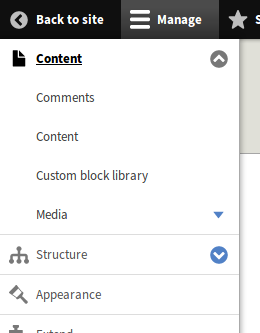
Change the menu admin/content to use the same page layout as admin/structure and then have the current node content view a sub page of that, the comments views another sub page, etc etc.
Remaining tasks
- We need to determine whether to go with the path as defined in #2862859-31: Create a top level, extendable, "Content" admin menu route that behaves like "Structure". Can someone review this?
If the above patch doesn't meet consensus for direction, I have a high-level next steps as:
- Create a basic page listing for Content that mirrors Structure, per #2862859-18: Create a top level, extendable, "Content" admin menu route that behaves like "Structure".
- Implement the design logic per #2862859-25: Create a top level, extendable, "Content" admin menu route that behaves like "Structure" (or an alternative of #2862859-30: Create a top level, extendable, "Content" admin menu route that behaves like "Structure".
- Create, test, and confirm the update hook process/cases defined in #2862859-26: Create a top level, extendable, "Content" admin menu route that behaves like "Structure".
User interface changes
The admin/content routes (and below) will change to more reflect that in admin/structure
API changes
none I am aware of yet!
Data model changes
none
| Comment | File | Size | Author |
|---|---|---|---|
| #47 | admin > content with node uninstalled.png | 41.32 KB | benjifisher |
| #47 | screenshot of empty admin > content.png | 64.18 KB | benjifisher |
| #31 | 2862859-31.patch | 3.97 KB | manuel.adan |
| #20 | content-page-minimal.png | 31.69 KB | ifrik |
| #15 | content-menu-item.png | 42.77 KB | ifrik |



Comments
Comment #2
rachel_norfolkAdding a patch so far.
I have a need to somehow remove the basic content admin (/admin/content/node) menu item when the fancy views version is enabled. Willing to hear suggestions how.
Comment #3
rachel_norfolkBut the basic idea is taking shape...
Comment #4
ifrikI'm not sure about the plans for the Media module, but the current contrib module already adds a sub-menu item under content, so by doing this, we are also creating a place for contrib modules to place their content.

Comment #5
rachel_norfolkadding some "Needs" tags for the upgrade path. We are changing a couple of views so will be needed.
Comment #6
ifrikThe following is a summary of our findings, talking to site builders and other users, taking the new core Media module into account.
Why do we have the current Content page?
The "Content" menu item in the Admin menu and consequently in the toolbar is a legacy from Drupal 7 and it creates UX problems in Drupal 8.
In Drupal 6, we had a Content menu items that contained links to user generated content, content types and the admin pages of some other menus, as well as a link to create content.
During the D7 development, it was decided that "Content" in the Admin menu would only be used for node content.
In Drupal 8 this decission was not revisited. Therefore we "Content" is not a landing page (AdminMenuBlockPage) like "Structure" or "Configuration" but "admin/content" displays a list of all content item created via the Node module. Additional tabs (actions) give access to Comments and Files, even though these are not nodes. In addition, there is also a submenu item linking to the Comments page.
In earlier Drupal versions, all content were nodes, so using that term for this entity is a legacy we will have to live with, even though by now there are more types of content.
Which problems does that cause in a default core website?
The admin menu can be displayed in the toolbar either horizontally or vertically. For "Structure" and "Configuration", it does not make a difference whether a user chooses to display the menu horizontally or vertically. For "Content" however it does make a difference, because submenu items placed under "Content" are not visible to users, if the navigation is used horizontally. Any pages added in the admin structure here, are therefore not accessible to users.
The contrib Media module for example had added a submenu item under content to access the user generated media content items, but Media in core resorted to adding a Tab on the Content page.
Users can uninstall the Node module (for example if they decide only to use media entities instead) in this case they see a Content page with the Text "You do not have any administrative items." and then a Media tab on it.
(A seperate issue here would be to assess when or for what we use pages (menu), tabs on pages (actions) or secondary tabs (tasks) for/on admin pages.)
Content page when Media module is enabled and Node is uninstalled.
What problems does it cause for contrib and for building websites?
Any other modules that create content entities can only place their admin pages as tabs on the existing content page, because otherwise users using the toolbar horizontally have no way of accessing them.
We had that problem with Media as a contrib module, and the same problem occurs for any custom entity that is created. Consolse currently solves this by placing two links under structure: one for the custom entity types and one to list the custom entity content. This in turn means that users need permissions to access the Structure and Config pages in general in order to get to the custom entity content, causing security problems.
The only option to properly place additional content pages are as additional tabs on the Content page. (Examples for site builders are for example additional pages that only list one content or media type, to show different columns in the table per type.) This leads to an unyielding number of tabs that are all one page load away from the menu.
Similar issues would arise if we want to to discuss to move for example the Custom Block library or lists of taxonomy terms out of Structure because they contain user generated content, to be accessed by users on a production website who should not be able to also have far reaching permissions for structural tasks.
What would be the minimal viable change?
We should create a Content landing page that (in the same way as a structure) simply lists any submenu items.
The current Content page which lists all nodes could still be called Content. This would result in a Content page in the Content section of the admin menu.
Media, but also Comments and Files, should be turned from tabs into submenu items.
At this point the Content landing page would be a simple listing just as Structure. Any changes to give these pages a different format could be done accross the board at any later stage.
What disruption does this cause?
Such a change would indeed change existing printed documentation or training videos, but users who look for the Content page would still find it at that place and under that name, but with an additional click.
At the same the time Media, would be accessible and discoverable at the same level as Content and not one step removed.
There would be no extra page load to first load the Content list, and there wouldn't be any problems if the Node module is uninstalled.
Using "Content" twice would not be perfect, but the technically correct "Nodes" would be a really big and confusing disruption. "Content items" could be an option, if we really want to avoid to duplicate "Content" but doesn't really add that much.
Changing this now - while Media is still an experimental module - would also be less disruptive because we could place Media into the menu now, instead of moving it later.
Changing this as a first patch for 8.5 - as briefly discussed at DevDays Seville - would also mean that other users and contributors have a long time to get used to this.
Additional benefits
Many site builders to whom we talked said that they created new menus for the future users of the site - for various reasons, but also because tweaking the existing admin menu/toolbar implementation is more work then it's worth. Reasons were the inability to place items under Content, problems with fine-tuning permissions to admin pages, and Config submenu items that only state "You have no administrative items here". (See #2863335: Examples of adding/moving admin menu items - contrib examples)
This means that the well-thought out functionality of the horizontal/vertical menu bar is not used on many sites. Changing the Content menu item would be one step in making the toolbar more useful for end users.
Comment #7
ifrikComment #8
rachel_norfolkOh this is a fab, detailed and convincing analysis, Ifrik - thanks!
We need to think about how to involve contrib module developers as they will need to slightly change from adding a tab on the Current Content node view to adding a full menu item.
Comment #9
ifrikComment #10
yoroy commentedComment #11
webchickThis was talked about on today's UX meeting. Overall impressions of the approach in #6 were positive, though there are some things to figure out (Content > Content, migration path from older sites). Next step is for product managers to leave more in-depth feedback and remove the "Needs product management review" tag.
Comment #13
yoroy commentedThe general idea is sound and worth doing. Though putting the main list of content one level deeper is risky (that was the D6 problem we solved in D7)
1. Is it a technical limitation that the current implementation of tabs results in non-linkable pages? Is that fixable? Because this proposed solution does feel like a workaround for exactly this problem, correct?
2. Default shortcuts could have the link to the second level Content > Content page
3. Could the Content>Content page still have tabs for Comments, Files, etc.? Ideally we provide ways to go those listings that do not rely on toolbar navigation. Maybe not tabs but other ways to link to those other listings.
We should try to design it such that people don't have to pogo-stick up and down the navigation. I think we need to have a plan for that in order to proceed with this initial step because the pogo-stick problem is real and we should not introduce more of it. Ideas, sketches for how we could do this horizontal navigation between the multiple content listings are welcome! Tabs is the current but incomplete answer to this. What else could we do?
Comment #14
joachim commented> We should try to design it such that people don't have to pogo-stick up and down the navigation.
I feel that that's trying to solve a wider problem that affects all of the admin menu. Dealing with it here is going to slow down this fix, which is important now that core (and contrib) have more content entity types.
> Because this proposed solution does feel like a workaround for exactly this problem, correct?
I wouldn't say so. The content menu doesn't have the same structure as the other admin menus, but we're now adding to it as if it did. This issue is about fixing that. The use of tabs is also not scalable, as it's fairly easy to have too many content entity types to show cleanly as tabs.
Comment #15
ifrikWhen the issue got solved between D6 and D7, we only had one type of content entity, and the solution to only have the list of node content under Content solved the problem, that a number of configuration pages (such as content types) where also listed there.
In Drupal 8, we already got two different content entities (node and media) in Core. The site breaks if Media module is enabled, but Node is disabled because Media relies on the Node module creating that page to put a tab on.
It is a quite normal step to add additional views to only show one content type or one media type with different fields in the table, depending on the users' requirements. So we are not talking about just one tab per module. Even on a simple site, I easily end up with 10 tabs there. This simply does not scale. It also locks the sitebuilder into a hierarchy whereby Node content is the most important content.
We also loose the functionality of the toolbar. Especially when the menu is displayed vertically, users could go directly to the specific pages in the content section without having to first loading a page that is of no use to them.
Some screenshots from a current project;
The default content tab, custom pages per content type, default files tab, media tab and custom media pages
Tabs when the toolbar is used
Tabs are collapsed when the screen size is too small (less than 1000px in this case).
Customisation: Content and media pages are directly accessible. The sitebuilder could also add links to two specific vocabularies that users needed to access here. The content menu item got lost here because they are hard-coded in the theme.
Comment #16
ifrikThere is also a permissions issue with tabs:
In order to access the pages that are in tabs, users need to have access to the first page. So any user who needs to access the Media page, also needs access to the Content overview page - no matter whether they should have access to nodes or not.
Comment #17
ifrikTalked with yoroy at DrupalCon sprint:
"Pogo-stick" would be a navigation whereby users first have to go a level to deep before then moving back up in the navigational hierarchy.
This is what we currently have when users first need to load the Content (node) page, before they can proceed to the Media page.
Applying the same hierarchy as on Structure would solve this as it puts node content and media on the same hierarchical level.
To access the Content page (with the node content): there would be an overview page in between. This would add another click here, but for users who use the toolbar vertically, there would be no additional page loads. Also in all cases, the navigation would drill down from general to more specific.
The design would be for now just like the Structure page - without developing anything new here.
All top-level pages could then re-designed together. (Then we could even fix this 9 year-old problem with the Configuration page #296693: Restrict access to empty top level administration pages
Can we have a go at this during the DrupalCon?
Comment #18
ifrikJust talked to Roy: We can go with the default design (as used by the structure page for example) for now.
Comment #20
ifrikIn a minimal Drupal install with Media module enable, media items are not accessible through the admin menu at all - it can only be accessed if you know that the path is admin/content/media or by installing Views.
So this issue should be considered a bug now.
/admin/content in the minimal install profile.Comment #21
rachel_norfolkIs it awful that I’m now thinking “Yay - it’s a bug!!”??
Comment #22
rachel_norfolkIssue type updated
Comment #23
eelkeblokIs it clear what happens to menu items that get defined as local tasks (i.e. tabs) below admin/content? Does it "just work" (at the very least, create an entry in the new overview page), or would changes be required? (As silly as it may sound, that could be the difference between this being a BC change or not).
Comment #25
ifrikThe tabs should be individual pages in their own right with a menu link. The problem with the Media tab now is that if the Node module is not installed, then it's still a tab on a page with no content.
This requires changing the Content view (as provided for the default installation) because that's set up as a parent menu item. In an existing Drupal site this is part of the configuration, and can have been changed further, so we have to make sure that those configuration changes are not overwritten.
Site builders can also have added other tabs in this view (for example to only list one content type).
I've talked to Joachim and #2976861: add an entity Links handler, to provide menu links/tasks/actions for entity types might help solve this.
Comment #26
joachim commentedAn update hook will need to:
- load all views which provide a path under admin/content
- interate over each display which provides a path
- handle the admin node view main display specially, as detailed in #25
- any other view display:
- if it's a node view, assume it should remain a tab alongside admin/content/content
- if it's something else, assume it should be changed to be its own menu item at admin/PATH
Comment #28
rachel_norfolkNot sure where we got with the whole concept of this. Is it being considered elsewhere and needs linking as a duplicate or is this still a "thing"?
Comment #29
ifrikI think this is still a thing, especially with the media library, which is currently hidden away on a tab behind the list of nodes.
Comment #30
ifrikJust discussed with xjm: another, less disruptive change within Drupal 8 could be to create an additional top level menu item for something like "All content" in addition to the current "(Node) content", under which Comments, Media library, and other content such as Custom Block library could live.
Comment #31
manuel.adanThis is another approach to be considered:
I think it is not disruptive, it has a relatively easy implementation, fixes the main usability concerns and looks pretty natural for the user.
The patch provides an initial implementation. It still needs work. The default content tab remains visible if the only local tasks present are provided by views. This is because of the hook_local_tasks_alter() calling order, the views implementation is called after the system one, so at the time the system module looks for additional local tasks, it doesn't found anyone, so it preserves the default one.
It also needs tests, cache review and of course feedback!
Comment #37
larowlanComment #38
joachim commentedIt's a bug because:
- the current design doesn't scale with additional entity types
- it breaks when node module is not enabled
Comment #39
larowlanAdding a new title that clarifies why this is a bug, as the previous title had feature/task vibes
Comment #40
joachim commented> Media listing not linked from anywhere when node module is uninstalled
That's only *one* of several UI bugs which this redesign solves. Changing the title to that makes it unclear what the work here is.
Comment #43
Webbeh(updated Remaining Tasks in IS with this list, please adjust as you see fit if it does not match current status)
As best as I can see from the issue comments, I have the remaining tasks as following:
If the above patch doesn't meet consensus for direction, I have a high-level next steps as:
Comment #44
rachel_norfolkMay have been an accidental removal of the tab. Re-adding as this issue was worked on in Seville.
Comment #45
aaronmchaleRemoving trailing whitespace from issue title.
Comment #46
ckrinaAdding #3203618: New “content creation” menu proposal as related efforts.
Comment #47
benjifisherUsability review
We discussed this issue at #3331562: Drupal Usability Meeting 2023-01-13. That issue will have a link to a recording of the meeting.
For the record, the attendees at today's usability meeting were @benjifisher, @AaronMcHale, @rkoller, and @simohell.
Option 1: postpone
One option is to put off working on this issue. Besides the core issues #3203618: New “content creation” menu proposal, #3325034: Providing additional methods of navigating the admin interface, and related, there is a lot of activity in contrib: we are thinking of the Gin Admin Theme and the Gin Toolbar module. Perhaps progress there will suggest new options here that can get some consensus, or it could mitigate the "additional click" objection raised in #6, #17.
Option 2: no changes when Node module is installed
If anyone wants to work on this issue sooner, not later, then the usability team supports the idea in #31 of making changes when the Node module is not installed. For reference, here are screenshots of Drupal 10.1.x (no patch applied).
Standard installation profile, no nodes:
After uninstalling the Node module:
Using a redirect, as in #31, is not ideal. We would rather see something like the original proposal (but only when the Node module is uninstalled). The question then is what to do about the local tasks (i.e., the Comments and Files tabs in these screenshots).
For implementation (no usability) it is probably better to implement the default behavior in the System module, then override it in the Node module. The patch in #31 has the System module check whether the Node module is installed (more or less).
Option 3: work in contrib
Another option if someone wants to move this issue forward is to change the page at
/admin/contentin a contrib module. It should be possible to override routes and local tasks. This option gives a developer maximum freedom, and it could serve as a proof if concept. If the module gains any traction, then we can bring the changes into Drupal core.