Configure the layout and format of content and data presented to site visitors.

Area

Area

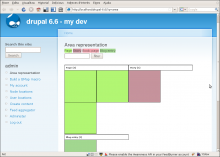
AREA is a visualization tool that allows friendly-graphical browsing of your nodes and creation of intuitive representations.

Image cycle

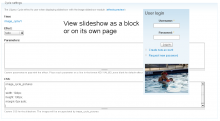
Image cycle settings page and an example slideshow displayed as a block in the left sidebar.

Integrates with Image module to allow image galleries to be displayed as sideshows using the

jTemplate

jTemplate is a front-end JavaScript based template engine.

Allows creating complex themes that are rendered completely on the user's end. Fetching raw data via Ajax and rendering it becomes a trivial task.

jTemplate API and examples: http://jtemplates.tpython.com/

How does it work with drupal?

Bypass Forced Preview

Drupal core has the option to force users to use the preview button, before being able to submit content. This option is pretty effective to prevent certain bots from spamming your site.

Barcode

Barcode - QR Code - Drupal Module

The Barcode module provides a text field to generate barcode images.

Dependencies

  • FreeType Support and GB Support enabled for PHP
  • Barcode for D6 requires content.module to be installed.

Installation

  1. Place the entire barcode directory into the directory in which you've chosen to place contrib modules (usually sites/all/modules).
  2. Enable the barcode module by navigating to: administer > modules
  3. Copy your font to the barcode/ folder (D6)
  4. Finish the configuration at admin/content/barcode (admin/settings/barcode in D6 v2 and admin/config/media/barcode in D7 v2) specifying the location of your font file and the desired encoding.
  5. Add barcode fields to your content types as desired.

Features:

  • Generate a barcode image on the fly. It supports QR Code, EAN-13, EAN-8, UPC-A, UPC-E, ISBN, 2 of 5 Symbologies (Strandard, Industrial, Interleaved), Postnet, Codabar, Code128, Code39 and Code93 symbologies.
  • You can also display the barcode as simple text, or an image.
  • You can provide your own font file at fonts directory

Upgrade from 1.0 to 2.0

Administration theme

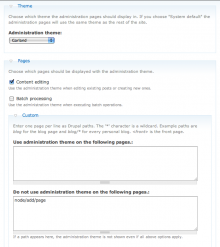
Administration theme settings page

Drupal allows you to define a different theme for administration pages (Administer -> Site configuration -> Administration theme). By default this only applies to pages with a path starting with 'admin' and content editing pages.

The Administration theme module allows you to use this theme on more pages like :
- batch processing pages
- devel node load and render pages
- coder code review pages
- pages you define yourself in the provided textarea

Some of these options will only be available to you if they apply to your installation, i.e. you have the module installed which generates these pages.

Use default theme (not administration theme) for anonymous users on admin/*

This is possible using this module. See issue http://drupal.org/node/372156 for more details.

Module maintainers

You can add extra pages by implementing hook_admin_theme_options in a module.
For Drupal 7 the hooks are hook_admin_theme_info and hook_admin_theme_check

How can you get involved?

Pages

Subscribe with RSS Subscribe to RSS - Content display