

Closed (fixed)
Project:
Drupal.org security advisory coverage applications
Component:
module
Priority:
Major
Category:
Task
Assigned:
Issue tags:
Reporter:
Created:
4 Aug 2015 at 09:03 UTC
Updated:
14 Oct 2015 at 06:54 UTC
Jump to comment: Most recent, Most recent file


Comments
Comment #1
PA robot commentedThere are some errors reported by automated review tools, did you already check them? See http://pareview.sh/pareview/httpgitdrupalorgsandboxVijayaSankarN2544636git
We are currently quite busy with all the project applications and we prefer projects with a review bonus. Please help reviewing and put yourself on the high priority list, then we will take a look at your project right away :-)
Also, you should get your friends, colleagues or other community members involved to review this application. Let them go through the review checklist and post a comment that sets this issue to "needs work" (they found some problems with the project) or "reviewed & tested by the community" (they found no major flaws).
I'm a robot and this is an automated message from Project Applications Scraper.
Comment #2
Vijaya Sankar N commentedCorrected all indent errors.
Comment #3
Vijaya Sankar N commentedComment #4
Vijaya Sankar N commentedComment #5
Vijaya Sankar N commentedComment #6
arun ak commentedHi Vijaya Sankar,
I tried Weather Check module. Please see my observations below:
1) Add javascript in module files instead of adding in template file. I saw this in weather-status.tpl.php
<script type="text/javascript" src="http://maps.google.com/maps/api/js?sensor=false"></script>2) Move css to the css file instead of adding as inline. weather-status.tpl.php Line no 2
3)Try to use of hooks to add module related js files. In weathercheck.module file line no 9-19 can move in to a hook and then it is more flexible to add condition like in which page need to add this js files. You can use hook_page_alter() hook to add these js.
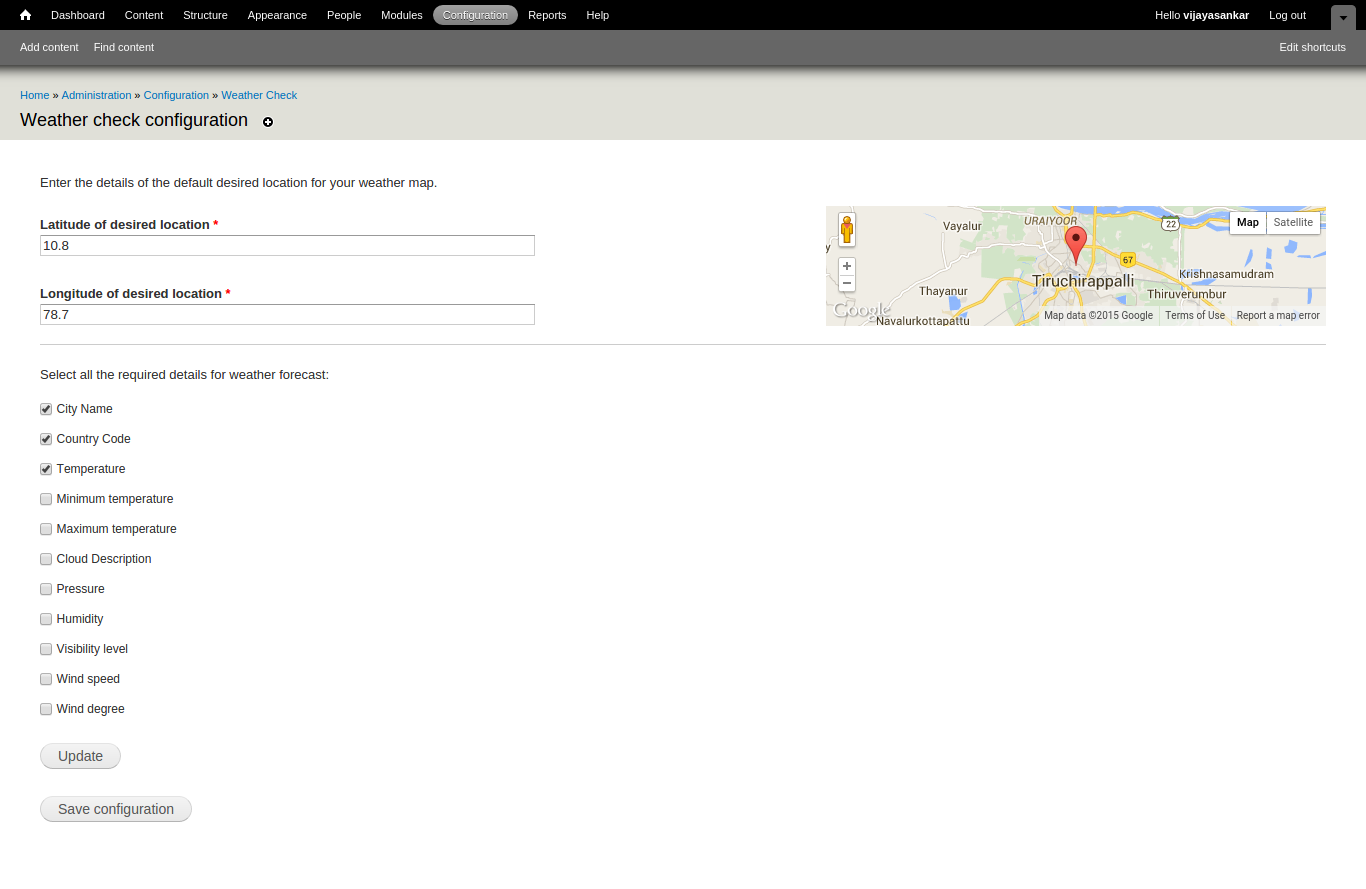
4) What is the use of 'Update' button in configuration page? By default drupal system settings form is coming with 'Save Configuration' button. Update button is not working as expected. You can show a preview in right side when click on 'Update' button.
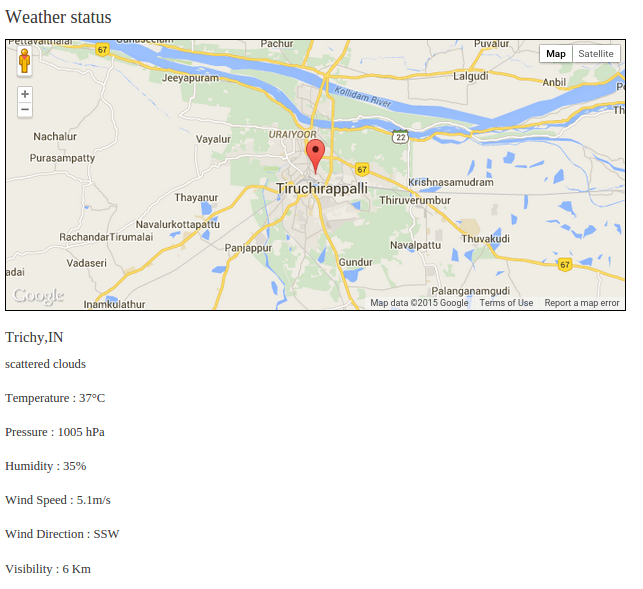
5) Once I save the configuration page, then Weather Check block only displaying the MAP not displaying any weather information.
6) Use Google Maps module to include map js. Getting error in console : https://www.drupal.org/files/issues/map_js_error_1.png
7) Use Drupal Behavior in your javascript code. Check weathercheck.js and AdminMap.js.
Refer:
Thanks,
ARUN AK
Comment #7
Vijaya Sankar N commentedComment #8
Vijaya Sankar N commentedHi Arun,
Thanks for the review. I have fixed some of your requests you have pointed out. Now, issues are fixed and the module work as expected. Yet am working on hook_page_alter() to follow Drupal Standards.
Comment #9
Vijaya Sankar N commentedComment #10
Vijaya Sankar N commentedComment #11
ivanzhu commentedHi Vijaya Sankar N,
Automated Review
There are still some problems on pareview.
Manual Review
This review uses the Project Application Review Template.
That's all, Thanks.
Comment #12
Vijaya Sankar N commentedhook_help has been added and hook_page_alter has been implemented.
Comment #13
Vijaya Sankar N commentedComment #14
bisw commentedHi Vijaya,
Errors in Automated Review:
js/AdminMap.js: line 13, col 24, Error - "google" is not defined. (no-undef)
js/AdminMap.js: line 14, col 21, Error - "google" is not defined. (no-undef)
js/AdminMap.js: line 17, col 20, Error - "google" is not defined. (no-undef)
js/AdminMap.js: line 19, col 24, Error - "google" is not defined. (no-undef)
js/AdminMap.js: line 24, col 7, Error - "google" is not defined. (no-undef)
js/AdminMap.js: line 31, col 3, Error - "google" is not defined. (no-undef)
js/weathercheck.js: line 10, col 3, Error - "angular" is not defined. (no-undef)
js/weathercheck.js: line 25, col 27, Error - Do not nest ternary expressions (no-nested-ternary)
js/weathercheck.js: line 52, col 24, Error - "google" is not defined. (no-undef)
js/weathercheck.js: line 53, col 21, Error - "google" is not defined. (no-undef)
js/weathercheck.js: line 56, col 20, Error - "google" is not defined. (no-undef)
js/weathercheck.js: line 58, col 24, Error - "google" is not defined. (no-undef)
js/weathercheck.js: line 63, col 7, Error - "google" is not defined. (no-undef)
js/weathercheck.js: line 64, col 9, Error - "angular" is not defined. (no-undef)
js/weathercheck.js: line 69, col 3, Error - "google" is not defined. (no-undef)
Comment #15
rabbitlair commentedPlease, change the git clone command, replacing weather_check to weathercheck.
Automated Review
Some errors found: http://pareview.sh/pareview/httpgitdrupalorgsandboxvijayasankarn2544636git
Manual Review
Comment #16
Vijaya Sankar N commentedHi Zequi Vazquez,
Thanks for the review. I have fixed 1, 2, 3 and 5. Regarding 4th point of your suggestion, I wanted to append 0 or 1 depending on the checkbox being selected. So I have used ternary expression to append them to the value attribute.
Regarding Pareview, I have imported those js files inside the web page. I have used those scripts to be imported there. Since google and angular is not defined in js files, it raises the warning. But in real time there will be no warning reported.
Regarding
I wanted to know steps to perform this.
Thanks.
Comment #17
Vijaya Sankar N commentedComment #18
prashant.cHi Vijaya,
Avoid using remote files :
drupal_add_js('https://ajax.googleapis.com/ajax/libs/angularjs/1.0.7/angular.min.js', 'external');
drupal_add_js('http://maps.google.com/maps/api/js?sensor=false', 'external');
I also found some errors for some lat and long, block displays "undefined" and NaN.
you need to fix these things.
Comment #19
prashant.cChanging status as errors need to be fixed for NaN and Undefined.
Comment #20
Vijaya Sankar N commentedHi Prashant.c,
Thanks for the review. But to be sure, those values are returned by the Weather API, which means values are not updated for you city.
And without using remote files, can you please suggest the best way to include those files.
Comment #21
prashant.c@Vijaya
I think instead of displaying NAN or defined in case of values not available you can simply hide those parameters or you can display some message "Data not available" or something like that.
Comment #22
Vijaya Sankar N commented@Prashant
The issue has been fixed. Thanks.
Comment #23
Vijaya Sankar N commentedComment #24
Vijaya Sankar N commentedComment #25
naveenvalechaReview of the 7.x-1.x branch (commit 80beb72):
This automated report was generated with PAReview.sh, your friendly project application review script. You can also use the online version to check your project. You have to get a review bonus to get a review from me.
Manual Review
The starred items (*) are fairly big issues and warrant going back to Needs Work. Items marked with a plus sign (+) are important and should be addressed before a stable project release. The rest of the comments in the code walkthrough are recommendations.
If added, please don't remove the security tag, we keep that for statistics and to show examples of security problems.
This review uses the Project Application Review Template.
Comment #26
naveenvalechaRTBC it because not found any blocker so far
please do adress rest issues in #25 and add comments on #25.5
Assigning to heddn for final review,.
Comment #27
Vijaya Sankar N commentedComment #28
Vijaya Sankar N commentedComment #29
Vijaya Sankar N commentedHi @naveenvalecha,
1. I have replaced hook_page_alter with hook_page_build.
2. README.txt now follows README Template.
3. Updated the summary with the dependencies needed.
Thanks for the review!
Comment #30
Vijaya Sankar N commentedComment #31
heddnweather-status.tpl.php, weathercheck.install, etc.:
Vijaya Sankar N <https://www.drupal.org/user/3238637>Comment #32
heddnThere's also a hard-coded '$scope.city = 'Trichy';' This shouldn't be.
Un-assigning for now. None of these things are individually blockers, but there's a lot of stuff that could be improved on this module before it could be used in a live site.
Comment #33
Vijaya Sankar N commented@Heddin
All the reported issues are fixed now. Thanks for the review!
Comment #34
heddnI still noticed a non-module namespaced html id of 'YourElementId', but this is much cleaner now and is definitely not a blocker, although it should probably be fixed.
Thanks for your contribution, Vijaya!
I updated your account so you can promote this to a full project and also create new projects as either a sandbox or a "full" project.
Here are some recommended readings to help with excellent maintainership:
You can find lots more contributors chatting on IRC in #drupal-contribute. So, come hang out and stay involved!
Thanks, also, for your patience with the review process. Anyone is welcome to participate in the review process. Please consider reviewing other projects that are pending review. I encourage you to learn more about that process and join the group of reviewers.
Thanks to the dedicated reviewer(s) as well.
Comment #35
heddnComment #36
Vijaya Sankar N commentedThanks heddin!
I promoted the project from sandbox account to https://www.drupal.org/project/weathercheck. But the git clone remains same:
git clone --branch 7.x-1.x VijayaSankarN@git.drupal.org:project/2544636.git
instead of
git clone --branch 7.x-1.x VijayaSankarN@git.drupal.org:project/weathercheck.git
And I can't clone with the VijayaSankarN@git.drupal.org:project/2544636.git. It says