Maintainers strive to actively monitor issues and respond in a timely manner.

Google Form

Google Form integration for Drupal 6 (will work on D7 port)

Main Features of Module:

Forms (FSE)

Forms based on entities.

Status

The first Beta is released. We like to rethink the permissions before releasing stable. We also need to test more with features and ctools exports. Furthermore it is bug fixing! Fill that issue queue!

Description

Ever needed Webforms with complete Views integration?
Since Forms is build on the fieldable Entity layer, you get full support for Rules and Views out of the box.

When you are building long forms or expect a lot of submissions, the Webform module is probably a better choice. This Forms module is compared with Webform heavy, but more flexible.

The Forms module now comes with:

  • Views support
  • Rules support
  • Features support
  • Fields support
  • A Field to attach a Form to another Entity (e.g. Nodes)

All Fields you use in nodes can be used in Forms as field, including images, files and dates.

Multi page Forms is supported with Field group or with skilip's sandbox project Page break field.

Use Forms with other Entities

Entity Relationships

Allows you do define rich relationships between Drupal entities while storing relationship data independently of either entity.

Bitcoin Address

The Bitcoin Address module provides a CCK Field type for holding Bitcoin Addresses.

Slickgrid

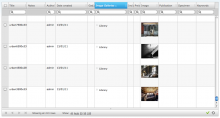
slickgrid-screenshot.png

The Slickgrid module is an implementation of Michael Leibman's jquery slickgrid plugin, a lightening fast JavaScript grid/spreadsheet.

It defines a slickgrid view style, so all data can be output as an editable grid.

Features of the grid:

  • Grouping field - group fields with a common value together
  • Collapsible taxonomy fields (tree structures)
  • Tabs - organise columns into tabs
  • Resize, reorder & hide columns
  • Delete entities via the grid
  • Force fit columns (to fill the available column space)
  • Undo (undo previous changes - uses node revisions)
  • Set viewport height
  • Set row height
  • Add entities via the grid*
  • Clone entities*
  • Export data (via the views data export module)*
  • Multi edit/delete/clone/export (checkboxes will be displayed in the rows - select as many rows as you want to perform action against)*

* Drupal 7 version only.

At the front end, users can show/hide, resize, reorder columns & resize the height of the grid. These settings will be stored per user and used next time the grid is shown. Saving the view (via the usual views UI) will reset these settings.

Pages

Subscribe with RSS Subscribe to RSS - Actively maintained