Problem/Motivation
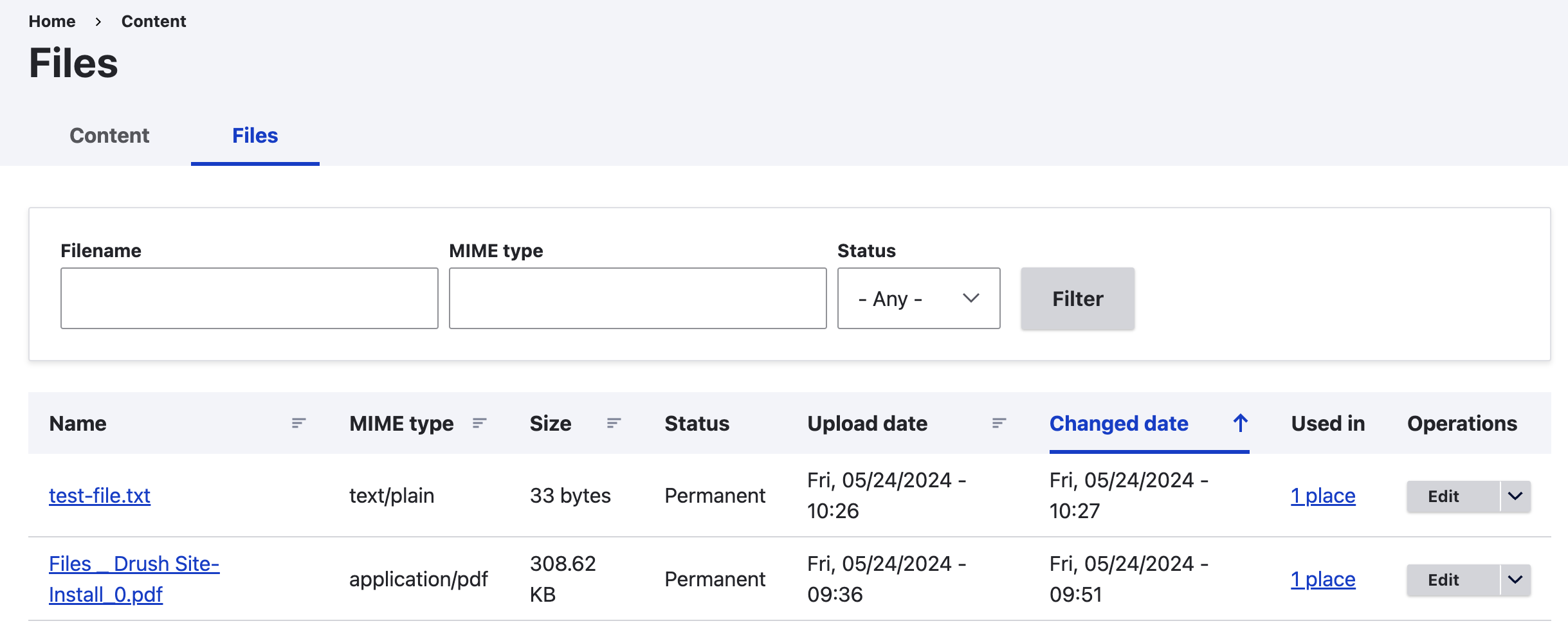
/admin/content/files route allows only to browse and delete files.
There is no way in Drupal to overwrite a file, and keeping the same filename.
Deleting the file and replacing it with a new version while retaining the same filename does not work, as the new version would automatically get a suffix ("_0") attached to it each time a new version is uploaded (for example: "filename_0.pdf"; "filename_1.pdf", etc.).
Proposed resolution
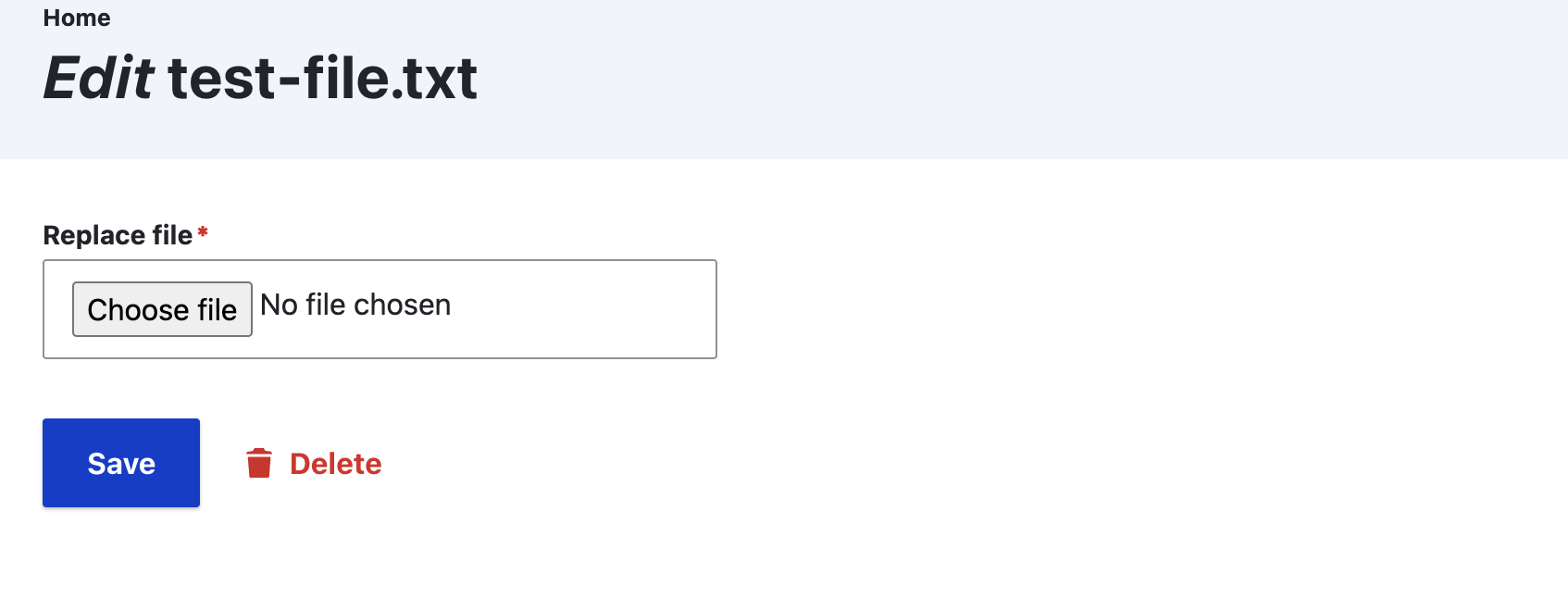
It should be possible to overwrite a file and keeping the same filename.
Introduce Edit option in /admin/content/files that will allow replacing the file
Original report by [dupal.user]
(There seems to be no way in Drupal 8 to to manually delete a file, other than waiting for some automatic cleanup of orphaned files.
Primitive solution: /admin/content/files may allow deleting files just as /admin/content allows deleting content.
Better solution: It should be possible to choose between deleting or unlinking previously uploaded file field attachments when editing a node.
Deleting is required in order to replace a file with a new version.)


 Show commands
 changes





Comments
Comment #2
dupal.user commentedComment #3
swentel commentedThat's where file entity comes in place - https://www.drupal.org/project/file_entity
Could be done for 8.1.x maybe - or in a later minor release.
Comment #6
azinck commentedThis is a pretty huge annoyance if you're using revisions. With revisions it's going to be virtually impossible to release all usages of one of these outdated files. That means there's no way via the UI for people to remove outdated files from their site. Given the likelihood of deep-linking (both from external sites as well as internal pages) to PDFs and other files, it means that outdated info will live on forever and it will be very hard to disseminate new, accurate files.
Comment #7
dawehnerI think this belongs more into the file system component.
Comment #8
azinck commentedComment #9
saurabh.tripathi.cs commented@swentel,
Can you please specify how file entity can be used for this feature.
Feature: Replace files on upload instead of appending _0 to it.
Thanks
Comment #10
azinck commented@saurabh.tripathi.cs I don't believe File Entity by itself provides a widget that will "solve" this for file fields. I suspect you may be able to use something like https://www.drupal.org/project/file_browser to achieve this in a field context, but I'm not sure and haven't tested it.
File Entity does, however, allow you to edit file entities directly (most typically from admin/content/files) and edit any fields on the file entity, including replacing the associated file. But it doesn't give a way, at least to my knowledge, of changing the behavior of the core file field widget to replace files rather than creating new ones. It's a stopgap measure.
Comment #11
saurabh.tripathi.cs commentedThanks @azinck ,
I will evaluate this module. However i see lot of users expecting this functionality.
I gave this a try using hook_pre_save. Hope this feature gets released soon.
Comment #12
teemerson commentedFeature: Replace files on upload instead of appending _0 to it.
In work flows we are looking at, this would solve a problem.
Providing a switch to enable/disable the feature would be useful to tailor the solution as needed.
Comment #13
CabKab commentedThis hook works to force files to overwrite using the filename as uploaded:
The downside is that it doesn't check to see if the entity you are acting from is the entity referencing the file. Users could inadvertently overwrite another file on the disk for that entity type if the file has the same name as another entity's file.
Comment #14
james.bcn commentedAlthough the above code from CabKab works, in that the uploaded file has the same name as previously, unfortunately there are now two records for the file, one of status Permanent and one of status Temporary. This means that the Temporary version is being deleted by a cron job, and since it is the same file as the Permanent one the file is deleted, so this solution doesn't work.
I have worked-around this problem by giving users access to the imce plugin in CKeditor.
Comment #15
CabKab commentedHere is where I ended up with my D8 module code. This is the first bit of custom code I've written for Drupal so I'm figuring it out as I go...
It stashes the entity info from hook_file_presave for later use, then picks it up during hook_entity_update and does some collision checks before overwriting the file and cleaning up the temporary files for the filename being used so that cron doesn't find a mess and remove the good files. It seems to work. Is there a more elegant way to do this? I couldn't figure out how to get the content item being edited from the file entity upload. Stashing the entities and picking them up later was the only way I could get it to work. I only have the functionality that does the overwriting firing for the 'documents' content type. You could expand this to other content types.
Comment #17
kevinquillen commentedThis issue is really multifaceted and doesn't exactly end at "deleting a file". I arrived here after asking on Drupal Answers.
I myself wanted to find a way to do this, and now understand why there is a movement urging to just use Media instead.
I also tried the code above, and tried to add my own reasoning in, but a few things continued to happen:
I assume this is why CabKab then sought to stash the entity in a session and convey the intent during presave and update. Knowing that, I wasn't comfortable going that route.
Here are the downsides to deleting a file or renaming it to an existing file, no matter the intent:
After coming to that realization I effectively stopped trying to make the system do what doesn't seem practical.
Essentially, you would want all of the following in my opinion:
This is the part that would seem to make it better, easier or at least more helpful for non technical users who don't get why files are replaced with foo_0, foo_1 if they upload the file again and again. They don't expect the dedupe. The larger issue is, if they entered WYSIWYG link content or other means that linked to physical files, there is no decent way to know where all of those are and be able to edit them quickly. Depending on the size of your site and the amount of content, this can be a dreadful, difficult task.
The stopgap I came up with for now (for my case) was adding another content search tab hooked to Solr index to allow for a keyword search against the full rendered content. This is due to me using Paragraphs as a majority of the building blocks for content (using a Node based View was just too much - too many filters, too many relationships, too confusing for the end user). This allows editors to type in 'foo.pdf' and find any match where it was used, and then, edit the node and make the update. Better than nothing. Only downside is waiting for Solr to commit the update and refresh, so that the next search doesn't return an invalid record...
Comment #18
kevinquillen commentedSo it looks like I will have to implement this. I cannot find any good way to do this. This is the best I have come up with so far, incorporating CabKab's initial post:
Basically, the presave results in the file being overwritten and saved to the database. The main issue is now there are two records in the database pointing at the same file, although one is temporary.
For this to even be feasible, you have to disable Drupals automatic cleanup of orphaned files - otherwise it will delete valid files on disk due to the duplicated records.
The cron job above goes through and finds (in my case, ONLY documents) that are temporary, and deletes any duplicate records it finds based on file name. This still doesn't seem right to me, because files may have the same filename, but different URIs (indicating they were uploaded on another field or with a different token pattern for the filename - the default seems to be date month and year uploaded).
I cannot see any other way to do this. As stated before, the issue lies in the fact that if someone links to files from a WYSIWYG, the links wind up breaking over time as files get replaced. Since WYSIWYG content is plain text, the link is never updated. Same applies to a menu link that points directly at a file.
Has anyone found a better way to manage this?
Comment #19
kevinquillen commentedSo I considered a case where cron could be running while a user is uploading a file, and tried to use hook_file_update instead.
Whenever the node is saved, if the file was changed, hook_file_update will fire twice. It's confusing because I am querying for the file by file id, which you think is the one that was just uploaded, but the status flag is there to catch the one we replaced. The file that was uploaded over it is already set to permanent status before this is fired. You can test this by using a .txt file, adding some content, uploading, then changing the content and reuploading it. Also, since this only operates on files updating, there is a chance you may have old records in the database that don't get cleaned up, which is why I went the cron route first.
The second part of this is not only can the filename not change, but you don't want the URL to change either. So now you are limited to non-token based file paths. The risk here is you can wind up uploading a file in a new node of the same type, upload the file, except the check fails and now you have two files in the database with the same name and same uri set as permanent. There is no way to inject a token for the path like node id to make it unique, and the only thing you could use perhaps is the current timestamp. But that isn't very user friendly. It really does seem nearly impossible to overwrite a file in place, but ensure it is unique at the same time.
I am struggling to find a balance here between uploaded files, users linking to them in WYSIWYG or link fields (directly to the file) and not having those links go stale over time. Surely there must be some way to handle this?
Comment #20
kevinquillen commentedSigh. Nevermind. Both ways opened too many holes.
I wound up using CabKabs extended code and cleaned it up in a few areas and improved some of the messages that get printed.
I tested this a few ways and it does appear to work, in so far as replacing a file in line and also preventing an overwrite from another part of the system where context matters (ex. 1 persons foo.pdf is different from someone elses foo.pdf).
Comment #21
kaizerking commentedit seems this issues still not solved
I am facing the same problem
is there a solution?
Comment #22
idebr commentedThe D7 version of file_entity fixed this issue by allowing a file to be replaced by files of the same file extention, see #2271229: Allow file replacement extensions for the same file type
Comment #23
kevinquillen commentedDoes the Drupal 8 version address that?
Comment #24
azinck commentedYou can use File Entity to replace specific files on the file system, but it's not a very intuitive process.
Comment #25
imclean commentedIt shouldn't be too hard to do in a contrib module but it could be tricky to support every other handling file module. Dropzonejs implements its own file upload method separate to core's file field, for example.
Comment #27
kevinquillen commentedComment #28
joelpittethttps://www.drupal.org/contributor-tasks/write-issue-summary
Comment #29
baben commentedI am about to update the issue summary at DrupalCor Vienna
Comment #30
baben commentedI have updated the issue summary to format it within the template. Please let me know if this represents the issue correctly.
Comment #31
baben commentedComment #32
kevinquillen commentedFor now, I solved this issue in contrib (when using Media as a container): https://www.drupal.org/project/media_entity_download
Trying to juggle the event and session through form handlers above works in some cases, but also triggers in other cases where it shouldn't (I am using Paragraphs).
Now I just have them link to the download url, so it doesn't matter as much if the filename changes. YMMV on what you want to achieve.
Comment #33
skaughtlinking.
Another relevant issue involving "file take-down notices" is in my mind, but i can't just find at this time.
Comment #34
ivan berezhnov commentedComment #36
enriquez1983 commentedMy solution, for now, is simply moving or renaming the file after the form submission, using the managed_file type policy, so for instance:
Comment #38
anybodyThank you very much for this interesting issue. There once was a Drupal 6 / 7 module fixing the same problem: https://www.drupal.org/project/upload_replace (that never worked cleanly ;))
We could take over maintainership for a Drupal 8 branch and create proof of concept code there based on #20, but we should not delete files if we use revisioning for them. Instead we should keep the modules concept and rename older revisions _1 _2, ... but keep the original file name.
The problem that two different files with the same name exist in the file system could only be fixed by using media and adding the media ID as unique indicator to the file name or path. That would ensure the files to be the SAME file by definition.
Another idea would be to keep the drupal file naming system without changes and instead use pointers / redirects instead of direct file URLs access. A replacement would then simply change the pointer to file X keeping the URL the same. The bad thing about it is that each file request would have to be handled by PHP which will lead to performance implications. This is what https://www.drupal.org/project/media_entity_download does, I think. That might be a proper workaround with performance implications.
Comment #39
rjg commented@Anybody agreed there should at the least be the option to choose to not delete files, especially if revisioning is on.
One thing to keep in mind that I think would impact any solution (replace, rename so current version gets the primary file name and older files get
_#, etc.) is that when dealing with an image file: if the file URI stays the same then image styles/image_style(s) for the image uri will need to be flushedComment #40
zarpele commentedMy best solution was:
These methods setFilename() and setFileUri() only change the values in the database, the system keep creating file_[NUMBER].csv files.
I think the rename function must be added into the core to allow keep the same file for any submit action. If you are setting the filename using these last functions its obvious you are trying to modify the database and the file system.
Comment #41
acontia commentedSame problem here.
A client has sent a newsletter with a deep link to a pdf file, and now he needs to upload a new version of that pdf keeping the same URL so the people that have received the newsletter can access the updated file.
To avoid this in the future I'm thinking using something like this https://www.drupal.org/project/path_file, so instead of sharing the direct path to the file we would share an alias to the file (which can be updated to reference to a new file).
To fix this specific one-off case now, I can think of:
* Replacing the file directly via FTP.
* Redirect at server level with htaccess (seems an overkill to me).
Any better alternative that you can think of?
Comment #42
VishalKumarSahu commentedBeing newbie in drupal and spending my three hours to alter the form from function MY_MODULE_form_user_form_alter(&$form, &$form_state, $form_id), I was able to achieve what I wanted. I found setFileUri and file_move helpful altogether. I am just curious about if there is any loophole if I just use this much code. Do I need to do anything else apart form this? My client site is to be up soon.
Comment #44
solanas commented+1 for comment 38 . I think that the upload_replace module is well oriented.
Editors should not be able to delete a file while the file is used in previous node revisions. Renaming the old files uploaded with the same name and their references in the history revisions in order to preserve the original file name I think is the best solution.
Comment #45
drclaw commentedFor anyone still looking for replace functionality for file fields, I made a little module that will let you select the method of file handling on the file field settings page https://www.drupal.org/project/file_field_replace
After creating the module, the more I think about it, the more @kevinquillen's comments about the downsides of replacing files seem quite real. Especially the mention of potential data loss with multiple editors. Be sure to read the caveats on the project page, and use at your own risk!
Comment #46
chris burge commentedI started writing a module to allow file upload replacement and ended up shelving it. The idea was that if you remove a file and then upload a replacement with the same name that it should be replaced. You don't want to overwrite an unrelated file that happens to have the same path/name. You also don't want to delete the file if the user doesn't submit the form after removing the file.
One of the big issues I ran into was knowing when to replace a file and when to not. For example, you have Media enabled with a File bundle. On media/1 you have syllabus2019.pdf attached as a file. If you want to upload an updated version, then, yes, overwrite it. But what if another user is uploading a different file with the same name to media/2? The file has to know know about its parent entity when it's being uploaded to make that call. (The issue is further complicated by the fact that you can upload multiple files to the same field.) Also, replacing a file (at least in the UI) is a multiple-step process, which means subsequent server calls. You have to store information in cache for retrieval on subsequent calls. I spent a few days in this rabbit hole before abandoning the work.
This issue really requires a core solution to be fixed right. I don't think it can be reasonably solved in contrib.
Comment #47
drclaw commentedHa yeah I've been at least part way down that rabbit hole too. That's a great summary of the issues you've written, though.
I'm working on a "safe" mode of file replacement right now for file_field_replace where we'll only replace files that have been removed by the user in the field they're currently uploading to. I figure we can get around using the cache by checking the entity field from the entity object that's stored in the form state and comparing against the fids in the current request input. On paper it seems like it'll work but I won't know until I dig in ¯\_(ツ)_/¯
Comment #48
serverjohn commentedI am looking for a solution for this as well. We are migrating from a D7 site using upload_replace. It has worked pretty good for us but there is not a D8 version. It is looking like Media Entity Download is the best option out there but even that has small amounts of activity and is still in beta.
We have files that are updated regularly and it would work great if others didn't directly link to our documents but they do. So then we have old documents being served that are out of date.
Comment #49
csunway commentedNeeded the feature too to replace a file without renaming it after uploaded. Was using file field since D7. In D7, uploaded a file to private path, we are able remove it (it does removed the physical file) and re-upload a file with the same name and thus it doesn't break the link.
However in D8, the previously uploaded file did not get remove physically when we tend to replace it with a new one, resulting in the new file name get appended with "_0.xxx", and old files getting builds up in the folder.
Any solution to this please?
Comment #50
bkosborneThis contrib module for D8 called File Replace seems to solve the problem pretty well. It works by creating a separate form for replacing an existing file. It first stores the replacement file as a temporary file, then performs an unmanaged copy of that file to the original file, and then deletes the temporary file.
Comment #52
bsfajardo commented@drclaw, thanks for your module as mentioned in #45. It worked like a charm for me.
In my case, I was looking at a solution that would replace an existing file and make it consistent across all entities referencing that file. So your module was the perfect fit.
Thanks!
Comment #53
mradcliffeUntagging.
I removed the novice tag because I did not find any other actionable task.
Comment #54
csunway commentedInstalled File Replace 8.x-1.1 to use with Drupal Core 8.7.9. However i do not see the replace page, and couldn't see how it could work to replace a file that I have uploaded.
Please help.
Comment #55
dlufkinYou can access the edit screen for replacing the image by going to /admin/content/files/replace/xxx, where xxx is the File ID for the image to be replaced.
You can either go directly to that screen if you know the File ID, or you can add a new column to the main File Listing view (/admin/content/files) that takes you to that page.
You can edit the main File Listing view at /admin/structure/views/view/files and do the following:
Here's the custom text to add:
<a href="/admin/content/files/replace/{{ fid }}">Replace File</a>You'll need to assign the appropriate permissions to replace the file if you are not an administrator.
Comment #56
csunway commentedI get it now. Thank you so much dlufkin! =)
Comment #57
bkosborneFor anyone using core media module to manage documents, I just contributed a new module that resolves the file replacement problem: Media Entity File Replace.
It works just like the file replacement functionality worked in the File Entity module in D7.
The module detail page provides usage instructions, how it works, and how it's different from other modules that have been discussed here.
Comment #58
chris matthews commentedBrilliant, the Media Entity File Replace module works great, and does function very familiar to D7 File Entity. Hopefully this can get in to 8.9.x or 9.0.x core as it seems essential for any cms to provide a user friendly file replacement feature.
Comment #59
pandaski commented@bkosborne
We will test this module in GovCMS8 distribution, thanks
Comment #60
imclean commentedI've created yet another file upload replace module, for those who like testing such things. It isn't nearly as polished as the others yet, but takes a different approach.
File Upload Options let's you set the replace behaviour per field in a central location. This can take it out of the control of content editors if you wish, so only site admins can change it.
The field settings also apply when uploading via core's REST (but not JSONAPI at this stage).
Comment #61
chris matthews commentedAt this point in the drupal core development cycle, I believe the version for this issue should now be 9.1.x-dev, correct?
Comment #62
imclean commentedPart of the problem is there is no unified API for managed file uploads at this time. Multiple form widgets, REST, JSONAPI and lower level file operations all need to be taken into account separately.
This related issue looks like where it might be starting to happen.
Comment #63
imclean commentedComment #64
pandaski commented@bkosborne
We've added this module to our GovCMS8 distribution. Appreciated for your great work in this module.
https://www.drupal.org/project/govcms8/releases/8.x-1.1
Comment #65
chris matthews commentedChanging version metadata to 9.1.x-dev
Comment #68
d8v15 commentedUsers don't necessarily want to go to the media screen in order to update a file (file-1) that they inserted at the node level. Many don't realize it exists or even care to understand the difference between a file vs media vs node. At this point I'm thinking it makes more sense to create a custom node edit form. Store the possible updated file (file-2) and media (media-2) in a temporary location.
On submit => move the file-temp to overwrite the existing file-1 AND update all nodes and media that pointed to file-1 to point to new file-2
OR
simply use the non database updating file move function, though I guess you would have to manually update the file size, name, time etc.
Horrid this issue still exists
Comment #72
smulvih2#40 worked for me, best solution I've found so far.
Comment #73
maskedjellybeanHas anyone attempted to solve this problem by automatically creating a redirect from the old file URL to the new file URL when Media is edited and a new file is uploaded? Are there any obvious reasons it couldn't work?
I've seen some modules that create a redirect from a constant URL to the actual file URL, but these all rely on content editors understanding that they should never link directly to the file URL. I don't think content editors should have to remember this and I don't trust that they will.
Comment #74
bkosborneThe old file URL will still exist on the filesystem in some cases, in which case a Drupal-created redirect will not work. Your web server won't even involve Drupal when someone requests a file that exists in the filesystem.
Comment #75
kevinquillen commented#73 I still think, performance tradeoff aside, permanent URI a la node/123 is preferable over raw file URLs. They will always work until that media item is deleted. Whatever file it holds, its name or path is irrelevant and can be changed or replaced as many times as you want without the drawbacks. Over the years, support has been built in to popular linking add on modules like LinkIt.
As bkosborne points out in #74, the application won't have a chance to respond when a file like that is otherwise requested.
Comment #76
maskedjellybeanAh, I hadn't thought of that. Dang.
I can see how a permanent URI would be the ideal solution for a site without many editors and where everyone adheres to the rules. It won't work for my situation unfortunately. I am testing your media_entity_file_replace module bkosborne, and it seems to be working great so far. Hopefully I can convince the team that being able to replace files and maintain the URL is more important than revisions on media. Seems like a fair trade based on how frustrated editors are with the current file replace situation. Thanks for your work!
Comment #77
chrisckI've been able to replace and rename files in Drupal 9 without any custom code by using the File (Field) Paths module. Following this awesome blog post, Better File Management for Drupal 8 and Drupal 9 – Part 1 I was able to give content editors the power to rename media files with normal sentence case and spacing, but have ideally managed filenames renamed by File Field Paths:
Media name:
Product Handbook 2023
Filename:
product-handbook-2023.pdf
In addition, if this were a media entity type Document and had a taxonomy term attached to this e.g. onboarding, I was able to get FFP to automatically place these in a structured location for easy file management:
/sites/default/files/document/onboarding/product-handbook-2023.pdf
The only difference between what I did and what you'll find in the blog post is I have unchecked "Create Redirect" and "Retroactive update" and only have checked "Active updating" under the FFP settings in the file field settings. Retroactive update is useful if you have existing files that you want to update, and you'll only have to check this box once, and after it runs it unchecks itself. I've also used this to change file systems from private > public or public > private and update the file paths for my media files.
I am also using the Media file delete module so that users are managing media entities rather than Files themselves. If the media entity is deleted, so is the file. I set the default value to be checked:
Since I'm making users manage media entities and not files, media names dictate the filenames, so what happens when two media entities are named the same? I'm using Unique Field Ajax module to prevent that from happening so every media name is unique. Patch here extends support for media name: https://www.drupal.org/project/unique_field_ajax/issues/3250271
Finally, I have the following in my settings.php file, so that if I want to make sure orphaned files are removed, I can either wait for the next cron run or trigger a manual cron job.
This method also works for media entities with more than one file e.g. Gallery. Uploading a set of images results in:
/sites/default/files/gallery/gallery-image.jpg
/sites/default/files/gallery/gallery-image_0.jpg
/sites/default/files/gallery/gallery-image_1.jpg
/sites/default/files/gallery/gallery-image_2.jpg
At a glance, you know these images belong to one media entity because they share the same name. Renaming the media entity will rename all of these files. Deleting the media entity will delete all of these files on the next cron job.
Comment #78
berdirOut of scope, but:
> $config['system.file']['temporary_maximum_age'] = 1;
This is wrong and will delete files that users are in process of creating if cron runs between uploading a file and saving the entity. Introducing this setting at all was a mistake, this should always be set to the same as the form cache max age (6h by default), that's the reason temporary files aren't immediately deleted. And we should also reintroduce the logic that immediately deletes files as the change from permanent to temporary/lose all usages.
Comment #80
ninobrownh20 commentedHas anyone come up with a way to make the file replacements when uploading media in bulk? I'm surprised that has not been brought up.
Comment #83
sukr_s commentedCreated a related ticket for better authorisation #3450005: File entity update is allowed only for user who has uploaded the file
Comment #84
smustgrave commentedComment #85
smustgrave commentedBeen 2 months with no word so upping to framework manager
I did try testing the feature but when I go to replace the file I get a fatal error
Error: Call to a member function getFileName() on false in Drupal\file\FileForm->validateForm() (line 108 of core/modules/file/src/FileForm.php).
Comment #87
solideogloria commentedComment #88
smustgrave commentedNot getting a fatal error.
but tagging for usability review now as it's not clear how it's suppose to function
Assumed I could replace the file with whatever but that doesn't work, has to be the same name apparently but had to read several threads to figure that out.
Also on an Umami install the edit link doesn't appear for any of the image/jpeg files created. Not sure why
Comment #89
sukr_s commented@smusgtrave: the Problem / motivation states
Comment #90
sukr_s commentedComment #91
smustgrave commentedBut how is anyone suppose to know that without reading this entire ticket?
Anyway 100% needs usability review before going any further
Comment #92
smustgrave commentedAm moving to NW as not all files are getting the edit button.
Comment #93
rkollerOne detail i've noticed while initially testing the MR is that after you have replaced an image for the first time, the image "sticks" to that image from this point on. Meaning i've tried to replace the image two more times, so i had replace 1, replace 2, and replace 3. when you click on the name on
admin/content/filesafter the third replace you see the image of the first replace while the thumbnail onadmin/content/mediashows the image of the third replace. Is that a caching issue?Comment #94
sukr_s commented@smustgrave
1. umami issue: For the files created by the install, the UID column in file_managed is null. That coupled with issue #3450005: File entity update is allowed only for user who has uploaded the file results in Edit button not shown in umami profile
2. All files are not getting edit button: This is due to the current permission implementation. Check #3450005: File entity update is allowed only for user who has uploaded the file
3. w.r.t. needing the same file name: It's a bit of a learning curve. So let's await for usability review.
@rkoller
yes it's a caching issue. That's fixed too. If you pull the latest code, kindly clear cache before testing.
Comment #95
rkollerthanks for the quick fix @sukr_s, i can confirm that the caching issue is being fixed by your changes. tested replacing an image three times in a row, each time the new replacement got shown correctly now.
Comment #96
rkollerUsability review
We discussed this issue at #3467007: Drupal Usability Meeting 2024-08-16. That issue will have a link to a recording of the meeting. For the record, the attendees at today's usability meeting were @benjifisher, @rkoller, and @simohell.
In general we've had a clear consensus that the issue is solving a longstanding problem and the general direction looks good. During our testing and the subsequent discussion, the following points emerged:
Editon a drop button onadmin/content/filesthe person gets to a page withEdit [file name] | [Site name]in the page title andEdit [file name]in theh1, but the page itself only contains theReplace filecomponent. The default option for a drop button onadmin/content/mediais alsoEditwithEdit image [file name]in the h1 andEdit image [file name] | [Site name]in the page title. The page itself mirrors the drop button options as local tasks (edit, delete, revision, translate), and contains an image field set, plus vertical tabs for "Revision information", "URL alias", and "Authoring information", as well as a checkbox for the publish state. So strictly speaking the user is provided with two completely different sets of actions/functionality clicking a button labeledEdit. In the context ofFiles,Editis sort of a mislabel.In the following a list of recommendation we've agreed on:
admin/content/fileschange the button label fromEdittoReplaceand change the page title fromEdit [file name] | [Site name]toReplace [file name] | [Site name]and the h1 fromEdit [file name]toReplace [file name].ReplaceandDeleteanalogous to media items since Revisions and Translate are not available for Files.I'll remove the "Needs usability review" tag and set the issue back to "Needs work".
Comment #97
rkollerand the MR also needs a rebase due to the following commit https://git.drupalcode.org/project/drupal/-/commit/8b368d712d83900765744... which introduced a fix for an issue with a naming case which lead to the following error when i try to checkout the feature branch
a big big big thanks to @rfay who helped to figure out the root cause of this error on checkout. i was unable to figure it out myself i 've only had a hunch a rebase "might" solve due to the time since the last commit and that there "might" be something introduced since then. but randy figured out the what part. thanks again.
Comment #99
sokru commentedI cleaned up the code a bit and used same terminology as media_entity_file_replace module is using.
Addresses the usability review recommendation #96.3 by not requiring the user to use same file name as the existing file. However requires the mime type to be same as existing file.
#96.1 and #96.2 might not be feasible since EntityBase does not offer "replace" function.
#96.4: That would require reliable entity-usage system, so I'd suggest creating a separate issue for it and postponing it by one of the entity usage issues.
Comment #100
sokru commentedComment #101
acbramley commentedGenerally in support of the feature but I think a bit more thought needs to be put into the access side.
The route requires edit access to the file, which is only allowed (with core) by the owner of the file. I also don't see much test coverage around access either?
Do we want to focus efforts on #3450005: File entity update is allowed only for user who has uploaded the file first?
Comment #102
sukr_s commentedComment #103
acbramley commentedStill needs more access based testing.
Comment #104
sukr_s commentedremoved invalidated test case and added new test case to cover different mime type upload.
Comment #105
needs-review-queue-bot commentedThe Needs Review Queue Bot tested this issue. It fails the Drupal core commit checks. Therefore, this issue status is now "Needs work".
This does not mean that the patch necessarily needs to be re-rolled or the MR rebased. Read the Issue Summary, the issue tags and the latest discussion here to determine what needs to be done.
Consult the Drupal Contributor Guide to find step-by-step guides for working with issues.
Comment #106
sokru commentedRebased.
Comment #107
needs-review-queue-bot commentedThe Needs Review Queue Bot tested this issue. It fails the Drupal core commit checks. Therefore, this issue status is now "Needs work".
This does not mean that the patch necessarily needs to be re-rolled or the MR rebased. Read the Issue Summary, the issue tags and the latest discussion here to determine what needs to be done.
Consult the Drupal Contributor Guide to find step-by-step guides for working with issues.
Comment #108
berdirNote: The query string that's added is an interesting approach, but fundamentally not a solution. I mentioned before that it's similar to what crop module does, but that's not entirely true. It still results in a different URL, that difference just happens to be in the query string and not the filename. The result is the same. Depending on your caching situation/infrastructure, original links are _not_ guaranteed to fetch the most recent version of a file.
Those limitations might be OK as a contrib module, where you can document that and users will be aware of that. It's however IMHO challenging to add this as a default feature to core, knowing that it will not work reliably in all cases.
If that's your requirement, then I recommend, as mentioned by #32 and #38, to try https://www.drupal.org/project/media_entity_download, which I maintain. It doesn't expose your file names and is instead only tied to the media entity, resulting in non-cacheable or only short-term caches responses. There are downsides like the mentioned performance issues and you will need to integrate using those links into your processes (there are formatters as well as a linkit integration) and instruct your editors to use it.
As a starting point, I'd suggest updating the issue summary to explain what workarounds are being implemented here, limitations of that and links to alternatives like media_entity_download.
Comment #109
mxr576Tried the latest patch from this module, still applies on Drupal core 10.4.x. I did that after I also checked https://www.drupal.org/project/file_replace - for my use case, both of them have the same limitation which may worth considering in the scope of the final solution: How to access to the replaced file content in
hook_entity_update()? Because currently it is not possible,$file->originalis pointing to the same file entity whenhook_entity_update()is called and the content of the file is already replaced when that hook is called - so if you would like to run some business logic based on file content changes, you cannot.