

 Come together with the global Drupal community in Rotterdam, 28 Sept – 1 Oct 2026. Sessions, contribution, connection, and Early Bird savings until 8 June.
Problem/Motivation
This issue is the first step in wider move #3318110: [meta] Reorganize Block items in the administration menu, which was discussed and agreed as part of #3316853: Drupal Usability Meeting 2022-10-28.
When the comment, node and media modules are enabled, the following admin links are easily accessible at /admin/structure:
- Comment types (/admin/structure/comment)
- Content types (/admin/structure/types)
- Media types (/admin/structure/media)
However, for the new user, it is not immediately obvious that in order to add/edit a Block type you have to:
- Click on Block layout (/admin/structure/block)
- Click the Custom block library tab (/admin/structure/block/block-content)
- Click the Block types link (/admin/structure/block/block-content/types)
Proposed resolution
Move the "Block types" page from /admin/structure/block/block-content/types to /admin/structure/block-content. Update the child pages (add, edit, delete, etc.) to match.
That page used to be a second-level tab on /admin/structure/block/block-content, and used the same page title, "Custom block library". Make it is a separate page, and change the title to "Custom block types".
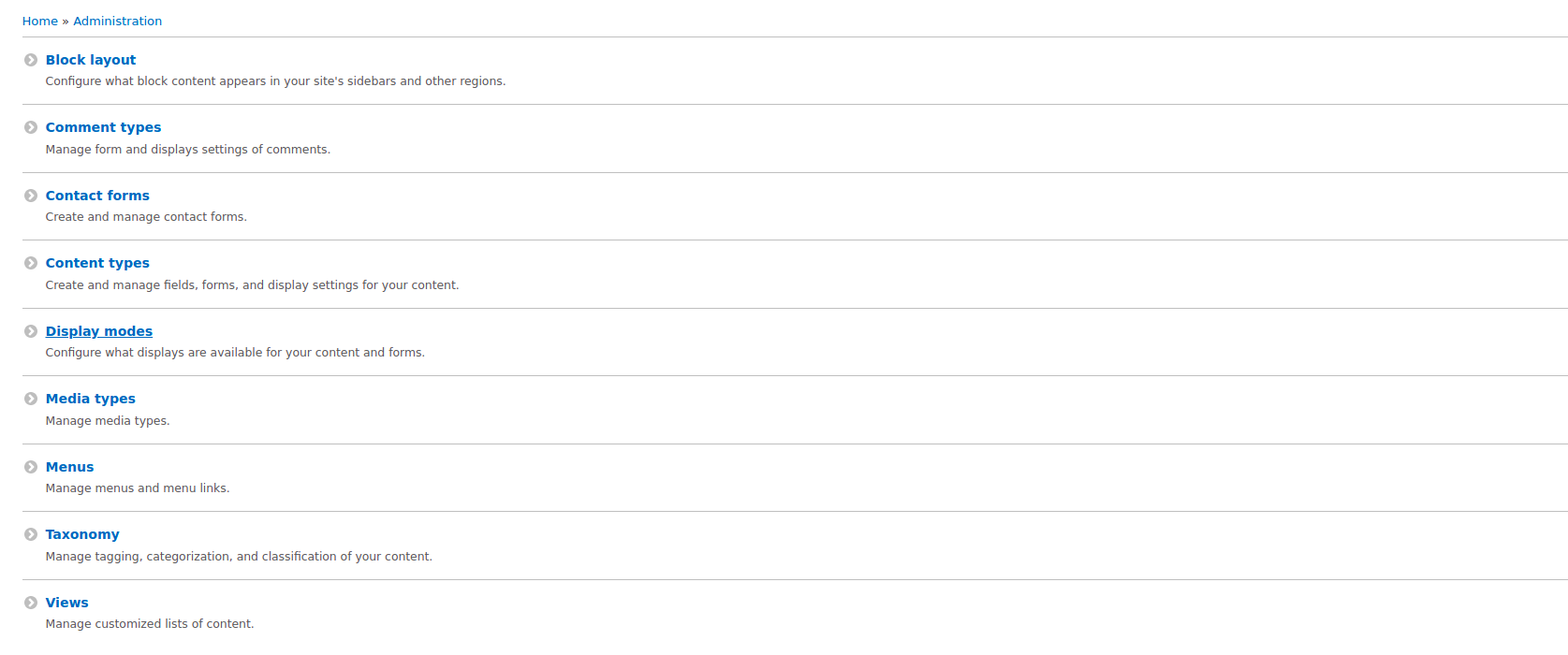
Add a "Block types" link to the top level of the Structure menu to align it with other core modules that provide bundles.
Update implementations of hook_help() and Help Topics to reflect these changes. Remove the help text from /admin/structure/block-content for consistency with other entity types. (See Comments #89, #90, and #96.)
Update automated tests.
Remaining tasks
User interface changes
Before patch:

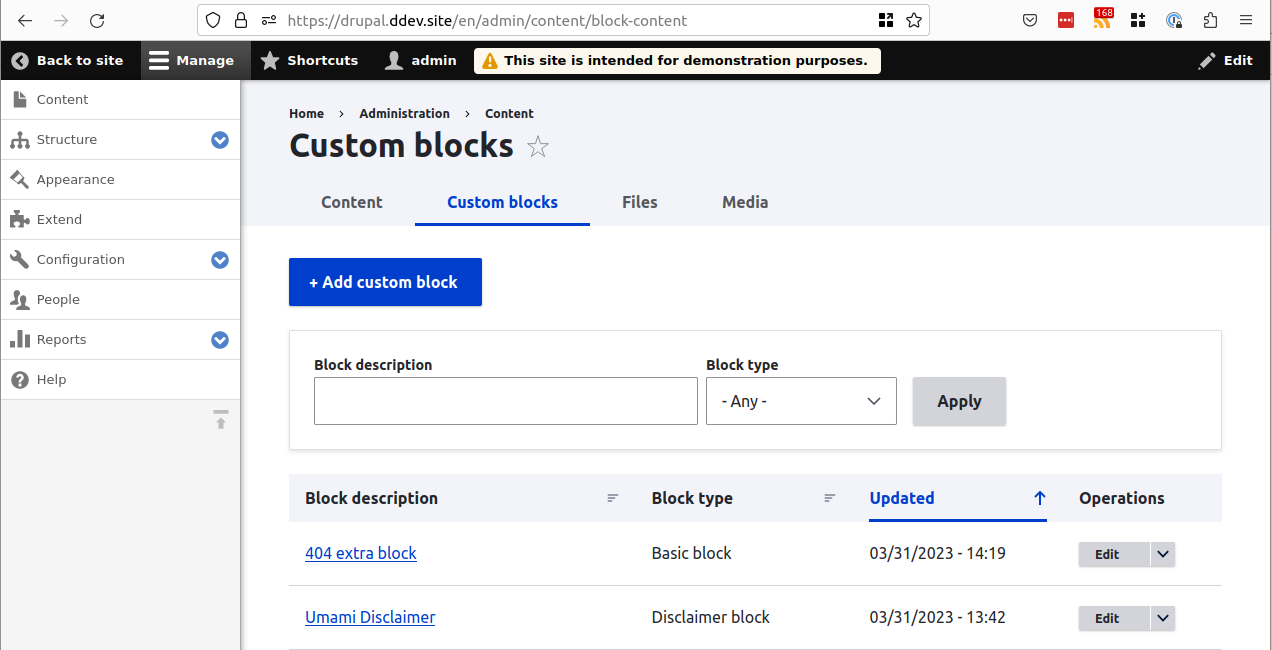
After patch:

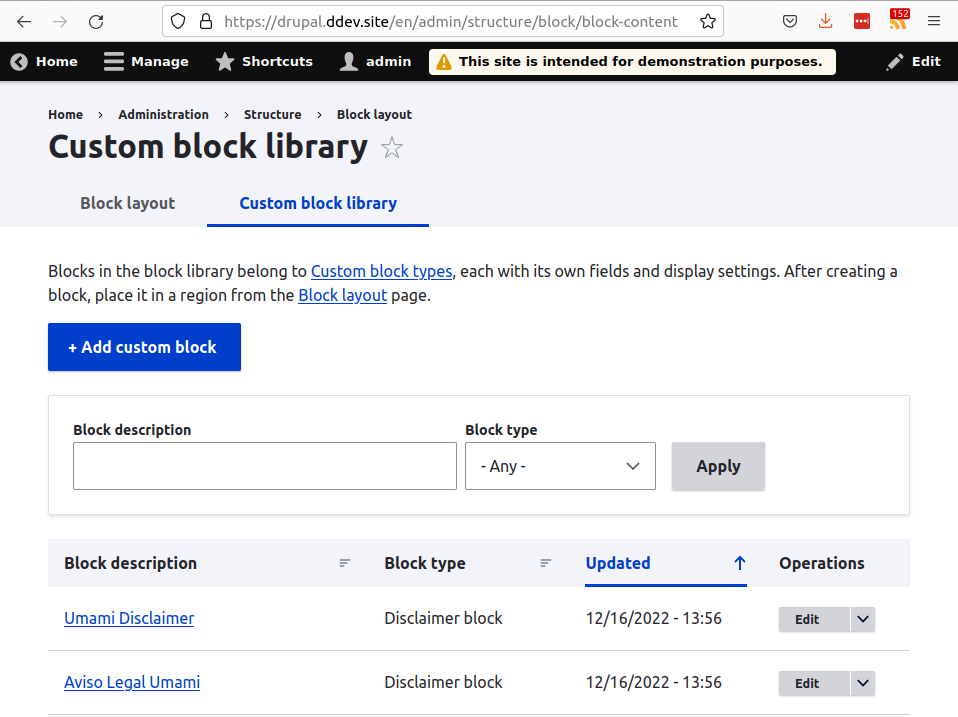
Before the patch, there are two second-level tabs on the Custom block library:

After the patch, both second-level tabs are gone:
API changes
None
Data model changes
None
| Comment | File | Size | Author |
|---|---|---|---|
| #124 | custom-block-types-after.png | 128.37 KB | benjifisher |
| #123 | custom-block-list-after.png | 93.04 KB | benjifisher |
| #116 | 2987964-116.patch | 18.04 KB | smustgrave |
| #116 | interdiff-109-116.txt | 4.13 KB | smustgrave |
| #104 | custom-block-library-after.png | 98.98 KB | benjifisher |
Issue fork drupal-2987964
 Show commands
Start within a Git clone of the project using the version control instructions.
Or, if you do not have SSH keys set up on git.drupalcode.org:
 compare







Comments
Comment #2
maboresev commentedI'm working on it. I think it's a good idea for novice users of Drupal.
Comment #3
maboresev commentedMade and reviewed.
I wish it's what you wanted, @Chris2
Comment #5
chris matthews commented@maboresev - I'm a novice developer so I can't speak with any authority at the code level, but from a UX perspective your patch does implement my proposed resolution. If you're willing, I'll leave the status at Needs work so you can address the test failing. I would only add the following:
Comment #6
tedbowThe block_content module also different custom block types. So the menu item should be moved there.
I am glad found this issue!!
In #2957425: Allow the inline creation of non-reusable Custom Blocks in the layout builder we will be using custom blocks directly in the layout builder. They will not be part of the "library" in a sense that you won't
It we don't need a new route but just can point menu item to the existing route...
Hmm that route is create dynamically because \Drupal\block_content\Entity\BlockContentType in it's annotation sets the path for
collectionfor links.But I think can still point to that route once we figure out what it is.
Comment #7
tim.plunkettSee also #2862564: Move Custom block library to Content
Comment #8
pminfI will be working on this.
Comment #9
pminfI've addressed #2 and #6 by fixing typo, moving the new link to block content module and using the existing route. There is no interdiff because it differs to much from the first patch.
Comment #10
pminfComment #11
pminfThe menu item name from my last patch was not suitable so I've changed it.
Comment #12
sutharsan commentedReviewing the issue for DrupalEurope
Comment #13
holist commentedDid a manual test, looks exactly as in the proposed resolution.
Comment #14
sutharsan commentedPatch looks good. Link tekst and description are according to issue summary and consistent with content type link.
Adding screenshot of the new link.

Comment #15
tim.plunkettThis means that there are two ways to get to the same place within the same hierarchy.
And it's a different place than proposed in #2862564: Move Custom block library to Content.
Perhaps that part needs more discussion?
Comment #16
alexpott#15 makes me think we need more review before committing.
Comment #17
pminfCustom blocks are "now" content entities with types similar to node types. As a newbie I would expect menu links for creation of custom block types next to node, comment and media types.
The current link as a tab under block layout is quiet hard to find and also suggests, that custom blocks are only usable for block layout. But this is not true. E.g. the new layout builder also allows you to use custom blocks based on those types. For me this wasn't obvious although layout builder also uses the term "block".
I agree, that there should be only one way to get to the same place within the same hierarchy. This way should be the short and content type consistent one via "Structure" > "Block types". The problem is, that users are used to the current circuitous way. If we remove that one, users might think that custom block types are gone or at least will be surprised by this UI change. That's why I vote for two ways to get to custom block types (kind of backward compatibility) till #2862564: Move Custom block library to Content is resolved.
Comment #19
manuel.adanComment #20
manuel.adanWrong path prefix on previous patch.
Comment #21
pminf@manuel.adan Could you please provide an interdiff to the last patch (#11)? I don't understand why there are so many changes. On which comment/issue is your patch based on? #15 and #16 suggested some discussion about a possible solution of this ticket. Unfortunately this didn't happened yet (besides my 2cents in #17).
Comment #22
manuel.adanThe 5 lines patch from #11 just adds a link to the structure menu, so I thought that an interdiff was not necessary in this case. I briefly explain the purposed changes at #19, but I go in more detail.
In addition to the new link, I propose two additional changes in attention to the following background:
From #15:
From #17:
So I removed it from its current location (Block layout -> Custom block library -> Block types) in favor of the new link at Structure -> Custom block types.
If the Block content types admin page will be now at Admin -> Structure, its URL should follow the same schema as the other similar items, so I changed it from /admin/structure/block/block-content/types to /admin/structure/block-content
Only one thing remains:
Totally agree. At the Block layout (/admin/structure/block) we can add some additional help text with an indication about the current location of the custom block library, that would be useful for new as well as existing Drupal users.
Finally, about #2862564: Move Custom block library to Content, it is tight connected to this, actually I was working on it as well. None of both block the other, but I thing both issues should go within the same Change Record.
Comment #27
maskedjellybeanThe patch in #20 no longer applies cleanly to 8.9.13.
I think this is something that really should be done. With Layout Builder in core, I bet for most new sites, the primary use of Block Types has nothing at all to do with anything else you can access in the Block Layout menu. Hiding Block Types like this discourages new developers from using them and probably leads to inefficient architectural decisions. This is a real shame because they are so powerful when used in conjunction with Layout Builder.
Comment #28
gauravvvv commentedThe patch in #20 doesn't apply cleanly to 9.2.
Needs reroll.
Comment #29
kishor_kolekar commentedRe-roll patch #20
please review.
Comment #31
gauravvvv commentedPatch #29, added a Custom block type menu in the structure.
Adding screenshot for reference.
Comment #32
gauravvvv commented2987964-29.patch has been queued for custom testing.
Comment #33
vikashsoni commentedApplied #29 patch working fine now we able to see custom block type in admin/structure sharing screenshot ....
Comment #35
chetanbharambe commentedVerified and tested patch #29.
The patch is not applied successfully and not working as expected.
Needs to be Re-roll.
Testing Steps:
# Goto: Appearance -> Apply Seven theme
# Goto: /admin/structure
Expected Results:
# User should see the default "Custom Block types" link.
Actual Results:
# Currently, the User is not able to see the default "Custom Block types" link.
Please refer attached screenshots for the same
Not working as expected.
Can be a move to Needs Work.
Comment #39
smustgrave commentedRerolled 29
Fixed some broken test cases also.
Comment #41
smustgrave commentedSmall tweak.
Comment #43
smustgrave commentedComment #44
rkollerI've successfully applied the patch in #43 to a Drupal 10.1.0-dev install. Everything looks and works fine.
The only potential problem I see is the proximity of
Block layoutandCustom block types. I like the fact thatCustom block typesgot moved to the same menu level likeContent types,Comment types, andMedia types. But due to the prepended wordcustomand the alphabetical sorting you haveBlock layouton top of the list then four other menu items and thenCustom block types.I wonder if it would make sense to rename it to just
Block types? Cuz without the patch applied on/admin/structure/block/block-content/typesthe page title isCustom block librarybut the title of the tab is onlyBlock types. That title admin_toolbar is using as well.Block typeswould have a better readability. If a person is scanning forblockthe word custom has to be processed while with justBlock typesit would be easier to comprehend. I am not that long into Drupal so I am in lack of the evolution and historic background of the feature but are there also "regular" block types if there are custom block types?And like #2862564: Move Custom block library to Content this issue might also need a follow up for admin_toolbar.
Comment #45
smustgrave commentedFully agree with that. We don't call "Media bundles" "Custom Media Bundles"
Uploaded a new patch with those changes.
Comment #47
smustgrave commentedTest fix.
Comment #48
benjifisherI am making this issue a child of #3318110: [meta] Reorganize Block items in the administration menu so that it will be grouped with #2862564: Move Custom block library to Content.
Comment #49
rkollerI've applied the patch in #47. In regards of the name change to
Block typesI've found a few moreCustom block typeoccasions in the block type interface:+ Add custom block typeat/admin/structure/block-content.custom block typeappended.translate custom block type.I've also searched for
custom block typein vscode and that had a few more additional results. but sure if all of those would have to be adjusted as well :/Comment #50
smustgrave commentedReplaced all Custom block type references with block type
Comment #51
rkollerCool! thank you for the updated patch in #50. I can confirm that the three points I've listed in #49 got updated and fixed and the number of search results searching for
Custom block typein VSCode got reduced dramatically as well.The only two places I am still able to find the old string, are the
project_data.jsonfor project browser, which is currently in contrib, and thedrupal-10.x.de.pofile which is the translations file for the german localization, that got downloaded when the second language got added (before the patch got applied). So all occasions ofCustom block typegot catched now. looks good to me. i'll leave the status atneeds reviewso others could do a code review.Comment #52
rkollerWhen
Body layoutgets moved out ofStructurein #3318112: [PP1] Move "Block layout" from Structure to Appearance, it might be worth to consider to change the route to theBlock typepage fromhttps://drupal101.ddev.site/admin/structure/block-contenttohttps://drupal101.ddev.site/admin/structure/block. That way it would be consistent with pages like content type or media type.Comment #53
smustgrave commentedpatch #43 is probably the one we want now as it doesn't rename.
Comment #54
smustgrave commented@rkrolller can you confirm #43 is what we want now. It doesn't do any renaming.
Comment #55
smustgrave commentedComment #56
rkollersorry for the delayed reply. quickly applied #43 and can confirm that in there none of the renaming took place yet. so i agree that this should be the desired one.
Comment #57
prasanth_kp commented#43 patch applied and working fine for me. Thanks for the patch @smustgrave
Comment #58
aaronmchaleReviewing patch in #43.
The link name should be
entity.block_content_type.collectionto match the route name.Users with the <em>Administer blocks</em> permission can create and edit custom block types with fields and display settings, from the <a href=":types">Block types</a> page in the site Structure.I would change that last part to simply say
under Structureorunder the Structure menu, something about "in the Site structure" doesn't quite sound right.Users with the <em>Administer blocks</em> permission can create, edit, and delete custom blocks of each defined custom block type, from the <a href=":block-library">Blocks</a> page in the Custom block libraryThe end of this sentence can now be shortened as there is only one tab for the custom block library, something like
from the <a href=":block-library">Custom block library</a>.Each block type has its own fields and display settings. Create blocks of each type on the Blocks page in the custom block library.None of the other collection pages under structure have any text at the top, so in the interest of consistency, neither should this collection.
Comment #59
aaronmchaleAlso filed this issue about the
addroute #3319145: [PP-1] Provide a "add" link template for the block_content_type entity typeComment #60
smustgrave commentedComment #61
smustgrave commentedFixed colon issue.
Comment #62
aaronmchaleLooks good, also updated the issue summary.
Comment #63
aaronmchaleComment #64
acbramley commentedHaven't reviewed the patch but a big +1 to this. Also happy we're dropping the word "custom".
I'm wondering if we should update the issue title and/or summary with that detail? Also should we consider a change record?
Comment #65
benjifisherYes, this issue needs a change record (CR). I just added a stub CR, and I would like to use it for this issue and its siblings (the children of #3318110: [meta] Reorganize Block items in the administration menu). I am also adding the tag for updating the CR.
Comment #66
benjifisherI notice that the patch in #61 updates the text in
block_content_help(), but I do not see any updates in thehelp_topicsmodule. Maybe onlyblock_content.type.html.twigneeds to be updated. It should be pretty easy to enablehelp_topicsand review all the topics related to blocks. It would be helpful to add notes to the sibling issues at the same time.I would also like to see the required changes to help text summarized in the "Proposed resolution" section of the issue summary. I am adding the tag for a summary update.
Comment #67
benjifisherI am adding tags for the required approvals.
Comment #68
smustgrave commentedThink this will be a great feature that will make blocks more usable for the user. So stamp of approval
Comment #69
amber himes matzPlease take a look at the following Help Topics which I think will need to be updated with this change:
1. Defining a custom block type (the breadcrumbs) - core/modules/help_topics/help_topics/block_content.type.html.twig
2. Creating a custom block (step 1) - core/modules/help_topics/help_topics/block_content.add.html.twig
Thanks!
Comment #70
smustgrave commentedUpdated based on #69
Updated CR but think it was agreed upon that all the issue in the meta will be included in that CR. So added a small note based on just this ticket
Comment #71
amber himes matzI took a look at the interdiff in #70 and I can see I was unclear in my comment.
What I meant is that:
1. In the Help Topic, "Defining a custom block type" (core/modules/help_topics/help_topics/block_content.type.html.twig), the breadcrumbs need to be updated to reflect the new location of the custom block types page.
2. In the Help Topic, "Creating a custom block" (core/modules/help_topics/help_topics/block_content.add.html.twig), step 1 needs to be updated to reflect the new location of the custom block types page.
Comment #72
smustgrave commentedUpdated. Sorry case of the Mondays
Comment #73
amber himes matzI reviewed the patch in #72 as follows:
2 changes needed on core/modules/help_topics/help_topics/block_content.type.html.twig:
1. Line 12 of core/modules/help_topics/help_topics/block_content.type.html.twig:
Change to:
2. Line 18 of core/modules/help_topics/help_topics/block_content.type.html.twig:
Change to:
Note:: To see this change, you will need to clear/rebuild caches.
Comment #74
smustgrave commentedAddressed issues in #73
Comment #75
amber himes matzUpdate to my review in #73, line 9 in core/modules/help_topics/help_topics/block_content.add.html.twig needs to be changed so that the link title matches what is on Structure (admin/structure) with the patch applied.
Change to:
{% set library_link_text %}{% trans %}Custom block types{% endtrans %}{% endset %}I'm sorry I missed this in my previous review.
Comment #76
smustgrave commentedAddressed #75
Comment #77
amber himes matzThanks @smustgrave for the new patches and working with me here!
I've reviewed the patch in #76 as follows:
There are no custom blocks available.Add a custom block.So there is 1 thing that needs work still:
[NEEDS WORK] On the Custom block library page (admin/structure/block/block-content), In the list of custom blocks, the no results text needs to be updated so that there is a grammatical space between the 2 sentences. Right now it displays
There are no custom blocks available.Add a custom block..Comment #78
smustgrave commentedSo just tested and I'm not seeing that?
Comment #79
amber himes matzLooking at this again, I think that nitpick of mine (in #77) is out of scope for this issue. It doesn't look like any of the code in the patch affects that view of custom blocks, just the routing of that page and the ripple effects of changing its location in various places. (So, I won't upload a screenshot for that reason.)
I think this is ready for a product manager to take a look.
Comment #80
amber himes matzFor the reasons stated in #77 and #79, I think this is RTBC.
Comment #81
aaronmchaleRe #77 and #79, those updates might be in scope for #2862564: Move Custom block library to Content.
Comment #82
benjifisherFor #77.20, I already opened #2965817: Missing space between sentences on the Custom Block page, which was closed as a duplicate of #3095893: Remove duplicate "add block" link from block content type view's "Results not found" message.
Either way, I agree that it is out of scope for this issue.
Comment #83
amber himes matz@AaronMcHale - Thank you for clarifying!
If I'm understanding correctly, this issue's changes affect just 1 help topic, "Defining a custom block type" (core/modules/help_topics/help_topics/block_content.type.html.twig).
Changes to core/modules/help_topics/help_topics/block_content.add.html.twig should not included in a patch for this issue.
But should be included in #2862564: Move Custom block library to Content.
Edit: If the location of the Custom block library page changes in #2862564: Move Custom block library to Content, then this help topic's navigation instructions would need to be updated as well.I've updated the issue summary.
Comment #84
smustgrave commentedRemoved the change to block_content.add.html.twig
Comment #85
nivethasubramaniyan commentedApplied the patch #84 and it is working fine.
Comment #86
aaronmchaleLooks like the patch in #84 is the same as the RTBC patch in #61, with the only difference being the minor change to help topics to point to the new location for the Block Type Collection.
Given that, setting back to RTBC.
Comment #87
aaronmchaleHiding unnecessary screenshots.
Comment #88
larowlanUpdating issue credits, removed @trackleft2 as their branch was empty
Added credits for reviews that changed the patch and those on the UX team who've played a big role behind the scenes here
Comment #89
larowlanI can't see anything above explaining why this was removed - was it intentional?
I know we didn't introduce this here, but I think this effectively making two requests to the same url?
One with ::clickLink and another with ::drupalGet - I think we can remove the ::clickLink one?
Setting to NR for the first item.
I've pinged product managers in slack to hopefully get their approval so we can remove that tag.
Thanks for all the work here everyone, excited this is close.
Do we have an existing issue for making the 'redirect to place block form when block content is added' optional - as that's another odd UX issue with block content
Comment #90
smustgrave commentedAddressed #89.2
For #89.1 please the reason it was removed was for consistency. The media types and content types pages don't have a description.
Comment #91
smustgrave commentedsmall tweak to the test. Saw it was 2 drupalGet() back to back.
Comment #93
smustgrave commentedSeems random unrelated failure
Comment #94
gaurav-mathur commentedApplied patch #43 and working fine.
Comment #95
larowlanI think this is ready
I've pinged product managers but haven't had a response.
There's buy in here from the UX team.
Comment #96
aaronmchaleRegarding the removal of the help text, I have filed #3325034: Providing additional methods of navigating the admin interface based on discussion at #3323771: Drupal Usability Meeting 2022-12-02, as it's clear we need a more holistic pattern for deep-linking between related parts of the admin UI.
Comment #98
smustgrave commentedrandom ckeditor failure.
Comment #99
catchDiscussed this with @xjm in slack.
This already has UX team sign-off, the conditions for needing product manager sign-off are:
(from https://www.drupal.org/contribute/core/maintainers)
Since the change is just bringing the menu item in line with patterns for other entity types, I don't think that's signfiicant enough to require product manager sign-off, so I am going to go ahead and untag this.
I haven't yet reviewed the issue to be able to commit it myself though so leaving RTBC.
Comment #100
benjifisherI am updating the Proposed resolution in the issue description to be a little more complete: we are changing the path as well as the menu links. I am also being a little more generic, removing the specific Help Topics file that gets updated.
I have a couple of questions about the changes to
BlockContentType.php:What page does that affect?
I think it is a good idea to update page titles as part of this issue and its siblings, unless we already decided to do that in separate issues. I do not have time to figure it out myself, but I think that the Block Types page is currently a tab on the Custom Block Library, so it has the same title, and this change fixes that. If that is correct, then let's add that to the issue summary.
That looks like an indentation error on the last line, so back to NW. I am adding the Novice tag for this change. Please remove the tag when you post an updated patch.
Comment #101
quietone commentedSetting back to NW per the previous comment.
Comment #102
smustgrave commentedIt was agreed upon to address the renaming in separate tickets. https://www.drupal.org/project/drupal/issues/3318549 or https://www.drupal.org/project/drupal/issues/3318558
If that is what you are referring to?
Comment #103
smustgrave commentedFixed indentation
Comment #104
benjifisher@quietone, thanks for updating the issue status when I forgot to.
@smustgrave:
As we discussed on Slack, I was asking about the change I quoted in #100. I now have more time, and I have confirmed that it affects the page title (the title rendered as an H1 element) of the page now at
/admin/structure/block-content. The sibling issue #3318549: Rename Custom Block terminology in the admin UI deals with the custom block library, not with this page.I am updating the issue summary to mention the page title.
I am adding screenshots of the Custom block library before and after the patch, to show that the second-level tabs are removed.
I had a closer look at the patch, and it needs more work.
1.
There are two links in that line, and the wrong one is updated. We want to change from "... the Blocks page in the Custom block library" to "... the Custom block library", since there is no longer a second-level tab labeled "Blocks". We do not want to change the link to the Block layout page. I do not think we want to remove the link to the Block module help.
This is hard because
hook_help()requires us to paste together strings. That is one of the reasons we are switching to the Help Topics module.2.
Why are we removing this help text? Again, I think we should replace "Blocks page in the custom block library" with "Custom block library" since there is no longer a second-level tab labeled "Blocks".
3.
The first paragraph ("About") on
/admin/help/block_contentis unchanged:It used to be that both block types and "custom" blocks were managed by Custom block library and its descendant pages. Since that is no longer true, we should change the first sentence to something like this:
Comment #105
smustgrave commentedAddress points 1 and 3 from #104
2 please see comments #89, #90, and #96.
Comment #106
benjifisher@smustgrave:
Thanks for the references to previous comments. I may not have been clear about the changes to the help text.
Keeping the numbering from #104,
/admin/help/block_content, the line under "Creating custom blocks" now reads,The first "Custom block library" should be a link, and the second should be "Block layout page", linking to
/admin/structure/block./admin/help/block_content, the first link to "Block types" is broken.Back to NW.
Comment #107
smustgrave commentedComment #108
benjifisher@smustgrave:
Thanks for fixing those.
I am sorry I did not notice this before, but I would like one more change. On the help page, under "Creating custom blocks", the current patch removes the phrase, "see the Block module help for more information about placing blocks." That is a good change, since it already says that under "About". But if we are removing that link, then we should also remove
':block_help'from the$argumentsparameter to thet()function.If you want, make a similar change to the "About" line: remove the unused
':block-content'parameter. It was already there and unused before this issue, so it is not really in scope, but as long as we are editing that line we might want to clean it up.Comment #109
smustgrave commentedComment #110
benjifisher@smustgrave:
Thanks for fixing those last two points.
I reviewed the code changes, and I updated the issue summary to make sure that the proposed resolution matches what the patch does. There are a few changes that are not strictly in scope, but I think they are all good and have been discussed in the comments.
I tested manually, checking
hook_help()and Help Topics)It all looks good to me, so back to RTBC.
Comment #111
Gunjan Rao Naik commentedAdded patch against #109 in 10.1.x version
Comment #112
WebbehI've hidden the patch in #111, as I believe #109 is already queued against 10.1.x, unless there's something I missed where we needed an additional re-roll.
Comment #113
smustgrave commentedNope you are correct 109 already applied for 10.1
Thank you for the interest gunjan-rao-naik but you can check if the previous patch already applies by clicking the test/retest button. Removing credit as it’s a duplicate patch.
Comment #114
benjifisher@gunjan-rao-naik:
If you would like some guidance on how you can help with this issue (and the related ones) then you can join us in the #block-content channel in Drupal Slack.
Comment #115
xjmThis is a great change! I recently rebuilt my blog on D10, and noticed how awkward the navigation for custom blocks is. Also, the voice of webchick in my head is telling me that people who aren't already Drupal-indoctrinated just think of blocks as content, so this issue plus #2862564: Move Custom block library to Content will make Drupal easier to understand.
I did wonder why we were keeping the word "Custom" despite the sensible reasons in #44 and #45 to drop the word. @smustgrave pointed out that that will be changed in #3318549: Rename Custom Block terminology in the admin UI, which is good scope management. That way, the terminology for "Custom block library", "Custom block types", etc. won't get out of sync until we are ready to change it all together.
I applied the patch, clicked around in the user interface, and made sure all the changed elements made sense. I did find one place (well two places on the same page) that we missed reverting "Block types" back to "Custom block types", on the Help page:

We will change them eventually in #3318549: Rename Custom Block terminology in the admin UI, but just in case all three issues aren't done before 10.1.0-alpha1, we should make sure the link text is "Custom block types" for now, since that matches the menu link text.
I did check Help Topics to be sure, and the text does seem to be "Custom block types" everywhere there.
Comment #116
smustgrave commentedFixed the 2 instances of Block types to Custom block types. Since it's such a small change I feel comfortable moving back to RTBC.
Comment #117
larowlan+1for the RTBC
Comment #119
xjmI reviewed the patch with
git diff --color-wordsto carefully review the changes to the help strings and paths.I checked to ensure there were no references to the old path or route with:
Finally, I carefully read over all the results for "Custom block library" to confirm that they were referring to the list of content, and not the block types"
[ayrton:maintainer | Fri 13:49:31] $ grep -r 'Custom block library' *Really glad to have this change in -- onto the next issue in the meta! Committed to 10.1.x as a minor-only user interface improvement, and published the change record.
Comment #120
xjmLet's consider this improvement to the information architecture (along with its sibling issues) as something we can highlight about 10.1.
Comment #121
aaronmchaleAwesome to see this get committed, thanks @xjm for going through it in such fine detail.
As a reminder, the next issue to work on in this series is #2862564: Move Custom block library to Content, which is now unblocked.
Comment #123
benjifisherI am adding an updated screenshot. I notice that the one on the issue summary shows "Custom block library" instead of "Custom blocks". I am also adding it to the change record.
Comment #124
benjifisherAnd here is a screenshot showing the Custom block types page: