

To improve Drupal’s information architecture and make it easier to manage block types (formerly custom block types) and content blocks (formerly custom blocks), several administration pages have changed. The changes include paths, navigation in the Administration menu, and some titles, as described in the tables below. Changes in paths affect breadcrumbs.
If you visit one of the old paths, you will be redirected to the new one with a warning message. The redirect will be removed in Drupal 11.
Changes to paths, titles, and navigation
The tables below show the main paths that have changed. Child paths, such as the "Manage fields" page for block types, are also updated. Visiting one of the old child paths will redirect to the new one.
Before Drupal 10.1.0
| Page or tab title | Path | Administration menu (tab > sub-tab) |
|---|---|---|
| Block types | /admin/structure/block/block-content/types |
Structure > Block layout (Custom block library > Block types) |
| Custom block library | admin/structure/block/block-content |
Structure > Block layout (Custom block library) |
| Edit custom block … | /block/{block_content} |
N/A |
Starting with Drupal 10.1.0
| Page or tab title | Path | Administration menu (tab > sub-tab) |
|---|---|---|
| Block types | /admin/structure/block |
Structure > Block types |
| Content blocks | admin/content/block |
Content > (Blocks) |
| Edit content block … | /admin/content/block/{block_content} |
N/A |
Screenshots
See the individual issues for "before" screenshots. The images here show how the pages look in Drupal 10.1.0.
Block types
This screenshot shows the path, breadcrumb, admin menu, and tab structure in Drupal 10.1.0:
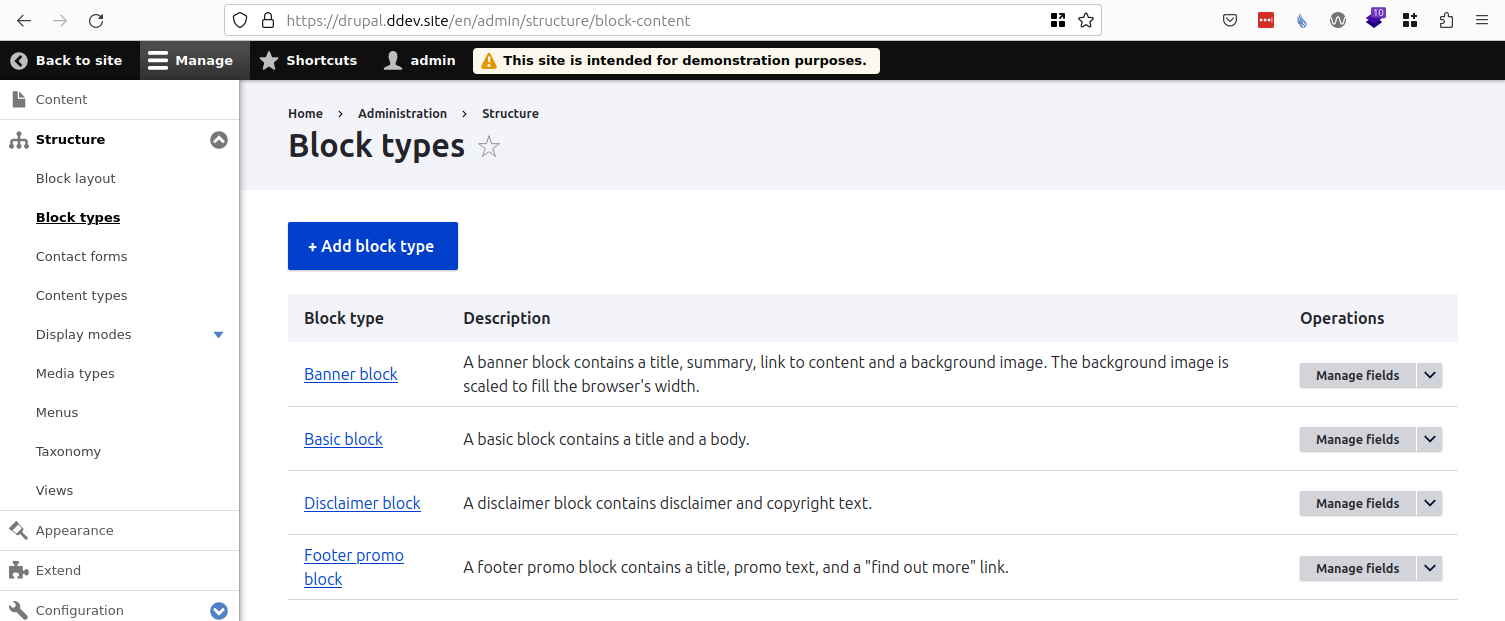
Content blocks
This screenshot shows the path, breadcrumb, admin menu, and tab structure in Drupal 10.1.0:

Edit content block …
This screenshot for the block-edit form in the Umami demo profile shows the path /en/admin/content/block/5 and the breadcrumbs "Home > Administration > Content > Blocks":

Other changes
Module name changed from "Custom block" to "Block Content"
Terminology now used is as follows:
- Block content - to refer to the pieces of content
- Block types - to refer to the bundles for the content entities
For module developers
If a contrib module adds a child path to one of the changed paths, then it should also provide a redirect from the old child path. The same thing is true if a module updates the path of one of its own routes.
The module should create a "backwards compatible redirect" route using the old path and adding ".bc" to the name of the route. For example, if the route mymodule.settings has changed from old/path/mymodule-settings to new/path/mymodule-settings, then add the route mymodule.settings.bc for the path old/path/mymodule-settings.
The controller for the "backwards compatible redirect" route can use the new Drupal\Core\Routing\PathChangedHelper class:
use Drupal\Core\Routing\PathChangedHelper;
use Drupal\Core\Routing\RouteMatchInterface;
use Symfony\Component\HttpFoundation\Request;
use Symfony\Component\HttpFoundation\RedirectResponse;

  public function pathChangedRedirect(RouteMatchInterface $route_match, Request $request): RedirectResponse {
    @trigger_error('The path old/path/mymodule-settings is deprecated in mymodule:1.1.0 and is removed from mymodule:2.0.0. Use new/path/mymodule-settings. See https://www.drupal.org/node/3320855.', E_USER_DEPRECATED);
    $helper = new PathChangedHelper($route_match, $request);
    $params = [
      '%old_path' => $helper->oldPath(),
      '%new_path' => $helper->newPath(),
      '%change_record' => 'https://www.drupal.org/node/3320855',
    ];
    $warning_message = $this->t('You have been redirected from %old_path. Update links, shortcuts, and bookmarks to use %new_path.', $params);
    $this->messenger()->addWarning($warning_message);
    $this->getLogger('mymodule')->warning('A user was redirected from %old_path to %new_path. This redirect will be removed in a future version of MyModule. Update links, shortcuts, and bookmarks to use %new_path. See %change_record for more information.', $params);

    return $helper->redirect();
  }
Followup to change terminology
| Attachment | Size |
|---|---|
| Block types | 119.2 KB |
| Content blocks | 86.2 KB |
| Content block edit form | 99.92 KB |




Comments
Blocks with Layout Builder Enabled No Longer Use Front End Theme
When editing a block's layout you no longer edit in the front end theme. You now use the admin theme.
Ex. /admin/content/block/1/layout - now uses admin theme whereas in the past it was frontend theme.
on the contrary, managing the layout display for all blocks of a type: /admin/structure/block-content/manage/{block_name}/display/full/layout still uses the frontend theme.
I think the preferred method is to always use the frontend theme, unless you are using a module like: https://www.drupal.org/project/layout_builder_admin_theme
is this an issue anywhere? i can't find it. thanks!
No link from content/block to structure/block page
I was teaching an intro to Drupal class this week and noticed there is no link from content/block to structure/block pages. This seems like an oversight.
Ryan Price
DrupalEasy Podcast