

Closed (fixed)
Project:
ShareThis
Version:
7.x-2.x-dev
Component:
Code
Priority:
Major
Category:
Bug report
Assigned:
Unassigned
Reporter:
Created:
1 Jul 2016 at 12:33 UTC
Updated:
22 Aug 2019 at 14:16 UTC
Jump to comment: Most recent, Most recent file




Comments
Comment #2
ramdas gaikar commentedHello,
Please check if you have any Javascript errors on Browser Console, as I can see this Configuration form uses below Java scripts in which one is external and other are local:
Comment #3
mp commentedhi. yes got one ...
ReferenceError: _all_services is not defined
jQuery.each(_all_services, function(key, value) {
Comment #4
ramdas gaikar commentedHi,
Make sure you are able to access the below javascript file in your browser.
https://ws.sharethis.com/share5x/js/stcommon.js.
The _all_services Object/Variable is defined in this javascript. So by anymeans like firewall or security, If you are not able to access the above js file, then you will not be able to use sharethis.
Thanks.
Comment #5
mp commentedhi
i can access it from my computer, but can i put this adress somewhere in the script so that i can test it from my webspace?
Comment #6
ADrupalUser commentedI just started having this same issue as soon as I upgraded to 7.213. I'm getting the following javascript error:
ReferenceError: stlib_picker is not defined sharethis:303:1
Comment #7
naveenvalechaMoving back to 7.x-2.x-dev branch
Comment #8
Rob_Feature commentedI'm also getting:
sharethis:line 130 Uncaught ReferenceError: stlib_picker is not definedMarking major since this would prevent proper setup of the module (it seems to retain any previous settings if you're upgrading instead of installing from scratch)
Comment #9
Rob_Feature commentedCleaning up issue title.
Comment #10
ADrupalUser commentedJust adding more information. Since this issue occurred with the upgrade to 7.213, I already had my desired services selected. After the upgrade, the services also stopped appearing on my node pages.
I've since regained functionality by downgrading to the previous version.
Comment #11
naveenvalechahHere's the start but its not the whole fix.
Comment #12
naveenvalechaComment #13
naveenvalechaWith some more changes and progressive patch but the issue still exist. The images are not loading. Anyone wants to pick this up feel free to jump into it.
Comment #14
navneet0693 commentedPatch is independent of the above patches. Please review :)
Comment #15
naveenvalechacan you also merge #13 +#14 patch
Comment #16
navneet0693 commentedSure :)
Comment #17
navneet0693 commentedComment #18
naveenvalechaThanks! Looks good.
Comment #20
naveenvalechaCommitted and pushed to 7.x-2.x
Will be out in next release.
@gr4phic3r,
Please use the latest release and let us know if this resolved for you.
Comment #21
Seraphemme commentedI just tried the latest dev version. Still can't select options. The select boxes are reversed -- the possible social media options are on the right, choices selected on the left. You can highlight an option, but it won't transfer to the services selected.
Comment #22
navneet0693 commented@Seraphemme
Please try clearing cache or enabling disabling module. Also, do check for reports in dblog. I am not facing any such issue on my local. Please refer to screenshot.
Comment #23
Seraphemme commented@navneet0693 Just tried disabling, then enabling and clearing cache. No change. This time I noticed that it's actually not possible to select an option. (During my previous attempt, overzealous clicking made the option appear to be selected.) Hovering highlights options, but clicking doesn't select them. I tried this in Chrome and Firefox. Tried various options. Nothing worked.
Comment #24
navneet0693 commented@Seraphemme Quick one, try uninstalling, clearing cache and installing again.
Comment #25
naveenvalecha@Seraphemme,
Can you share your settings/steps to reproduce it.
Here are the steps that I quickly followed to test it :
Launched two versions of sharethis on simlytest.me
https://simplytest.me/project/sharethis/7.x-2.12
https://simplytest.me/project/sharethis/7.x-2.x
Go to admin/config/services/sharethis
The services section is working fine on both.
Comment #26
Seraphemme commented@navneet0693 Uninstalling, clearing cache and installing made a difference. There was a default selection of social media buttons set up in the "Selected Options" area, and they were initially satisfactory, so I saved and proceeded to a page. I use Panels and my ShareThis widget area was blank. The title showed, but not the Sharethis buttons. I fiddled around and discovered that if I added ShareThis as a node on my panel, both the node and the widget buttons appeared, disabling the node buttons made the widget disappear again. So, reenabled the node buttons.
I then found that I did not like the Google plus 1 and Facebook Like options or the "show Sharethis on hover" under Advanced options. I unchecked those, returned to my sample page and the buttons had disappeared again. I returned to configure Sharethis and checked all the options I had deselected. I was able to get Facebook Like and Google plus 1 buttons to appear, but all the others were missing. I checked back in with the configuration page, and sure enough, the other social media button options in the selected options list were no gone, and once again, I cannot select the options to add them back to that list.
I'll probably have to uninstall again and reenable again. Also, I'm going to have to replace all of my Sharethis widgets with Sharethis node content in each of my panels. I'd rather not have Facebook Like, Google Plus 1 and Sharethis hover options enabled, but possibly leaving the defaults alone is the only way that the module will function? (Oh, also, I didn't test to see that I could actually use the buttons.)
Comment #27
Rob_Feature commentedI'm seeing this same behavior and I've upgraded (not installed from scratch). Unless I'm not understanding correctly, this is still broken unless you uninstall/reinstall. That's not really an acceptable solution for an upgrade path from previous versions of the module, so I'm reopening this as 'needs work'.
Comment #29
naveenvalechaI have reverted the patch for now. Leaving it open to fix it in the proper way.
Comment #30
navneet0693 commentedReverting commit of Issue-#2687179.
Comment #31
navneet0693 commented@Seraphemme,
Thanks for explaining about the issue. I believe the issue is due to the #2687179: Markup overrides for st spans feature that got committed before 7.x-2.13. I am working to resolve the issues.
Comment #32
navneet0693 commentedAdding code to resolve js issues. Please take this patch for testing.
Comment #33
navneet0693 commented@Seraphemme,
Could you use the patch in #32 and test it. Please, let us know if the issue is resolve or not.
Comment #34
graber commentedNot working for me..
Comment #35
navneet0693 commented@Graber Did you tried patch in #32 ?
Comment #36
graber commented@navneet0693 Yes, it didn't work for me. I just gave up and included sharethis code on relevant node pages in a custom module using hook_node_view. There was no time unfortunately.
Comment #37
anas_maw commentedPatch 32 not working for me
Comment #38
nathanlawsn commentedI'm also unable to select services on a fresh install of 7.x-2.13.
I'm receiving the following error in the console.
sharethis:145 Uncaught ReferenceError: stlib_picker is not definedComment #39
navneet0693 commentedHi Folks,
I am sorry for making it difficult for you all and getting this resolved late. Please apply the patch on latest version of module.
Steps to solve:
1. Apply the patch
2. Run command on terminal in docroot directory :
drush pm-disable sharethis -y; drush pmu sharethis -y; drush cc all; drush en sharethis -y; drush cc all;Note: Only execute the above code after applying the patch. Do not test directly on productions.
Comment #40
fantonPatch #39 not working for me
Comment #41
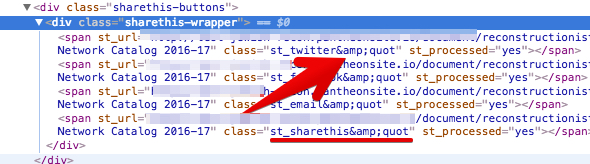
bdevore commentedPatch #39 brings back the service providers selection, but the images for the UI are broken, and custom icon options are gone. It looked like a misplaced quote before I patched, as the custom markup form had a double quotation mark before the label name of the service. So "Twitter "Facebook, etc, and when I tried to save the output was sanitizing, so on save it would switch to
"e;Twitter, saving again would do this again, and you would get&quote;TwitterComment #42
navneet0693 commented@fanton Did you tried uninstalling and installing again ? Please apply this patch on latest version of module.
@bdevore Did it finally worked ? Please follow the steps the i have mentioned. This seems to be working perfectly at my at end.
Even after applying the patch, if you don't uninstall the module and install it again, variables are stored in variable table with previous values, so it might affect.
Comment #43
dpovshed commentedMy 2 cents are directly not related to the root of the problem, but might be an acceptable workaround for sitebuilders in despair.
I downgraded to 7.x-2.12 and everything works.
Comment #44
Helice commentedPatch #39 fixed it! However I added "Whatsapp" service but it isn't displaying.
Comment #45
Rob_Feature commentedI just want to chime in as someone using this on a live site: The suggestion keeps being made to "uninstall and reinstall". That's really not ever an acceptable solution if a module is already active on a production site. Whats the reason for the uninstall? It seems like something should be done so an uninstall/reinstall isn't necessary.
Comment #46
laborouge commentedSubscribe.
Comment #47
hockey2112 commentedWill the fix be committed to the official release soon? Using 7.x-2.13
Comment #48
navneet0693 commented@Rob_Feature Uninstall and re-install required to reset the values of variables of sharethis being stored, however carefully removing and adding the value of sharethis_service_option will not require re-installing.
Comment #49
Rob_Feature commented@navneet0693 can't these variables be reset/updated/removed (etc) with an update hook that is run during module update? That seems like the proper way to handle that type of change for existing users.
Comment #50
svenryen commentedI had this issue, tried both 7.x-2.13 and 7.x-2.x-dev. Both failed at providing the admin UI. I also tried disabling advagg and tried with different jquery_update settings. The module didn't work. Downgrading to 7.x-2.12 fixed everything.
Comment #51
hayk hayrapetyan commentedI had same issue. Downgrading to 7.x-2.12!
Comment #52
voughndutch commenteddowngraded but page still throwing errors
Comment #53
phpforfree commenteddowngraded to 7.x-2.11 and everything seems to be working again. The arrows in the admin UI were missing when I downgraded to 7.x-2.12
Comment #54
c.hugot commentedI have the same issue.
Drupal 7.50
The only way, I found to resolve the problem is the downgrading of shareThis modules to 7.x-2.12
Comment #55
ergow commentedI have the same problem with version 7.x-2.13. I attach screen capture.
Thanks
Comment #56
Rob_Feature commentedmarking as needs work since it doesn't seem to be solved for most people.
Comment #57
gnurob commentedFor what it's worth, after disable, uninstall, delete from sites/all/sharethis, and re-installation of 7.x-2.13 on Drupal 7.51, using Firefox on Mac, the problem persists, however there are some interesting observations and there's a way to make it work, if you're desperate.
So, as a temporary fix, you can remove Sharethis completely, and not make any changes, and the icons will reappear. Unfortunately I need Node placement. If anyone has a tip on where to change this (there's no ShareThis table), I'd really appreciate the tip.
Comment #58
yogeshchaugule8 commentedThe issue is caused because of major revamp of code of "stlib_picker.js" and "ShareThisForm.js" JS files and other module code. As per new code structure, we've to use
windowbefore defining and using variable, check example here. Attached patch has all these required changes.Comment #59
nandt commentedtried patch #58 the same situation exists.
i can;t select available servives from the right hand when you click the service nothing happens.
my console throught the following error.
stlib_picker.js?ofylnp:80 Uncaught TypeError: Cannot read property 'title' of undefined
at Object.stlib_picker.setupPicker
Comment #60
flux423I also tested patch #58 and are experiencing a similar response as @nandt. I can now see the services but can not push them from "Possible Services" to "Selected Services".
Comment #61
nandt commentedi am tired with this module. sorted out..easy
with adding sdk on html.tlp file
and with social_buttons plug in.
on 29th of octomber they had left their certificate expired and all sorted links were broken.. ->https://www.drupal.org/node/2823654
Comment #62
yogeshchaugule8 commentedHi @nandt, @flux423,
I've also received the same error while working on patch and got it working after following steps. Please try below steps, and see if this works for you as well:
This is because when configurations are saved earlier, the settings are not properly saved into database, which causes this error. So we first need to clear all saved configurations for ShareThis module. Which can be easily done by uninstalling and installing module.
Comment #63
nandt commentedi have done this several times..
by unistalling you mean delete the module ..
as i can;t find anywhere the table on database.
if you know the table please let us know.
thanks
Comment #64
yogeshchaugule8 commentedNo I don't mean completely removing module. I simply mean as disabling module, un-installing module and then installing module again.
Please see the steps below:
The reason we need to un-install the module and install again is, if we've saved module configuration when using 7.x-2.13 version of module the configuration are not saved properly in variable table, which throws above error in JavaScript.
Comment #65
Rob_Feature commentedAgain...all the above about uninstalling-reinstalling may work and may be true...but it's not the correct way to solve this. There should be an update hook that simply removes the old data and rewrites the new data in the new format (preserving any settings). It's never really OK to tell users to uninstall/reinstall your module (losing all their production settings in the process)
Comment #66
Infinitee commentedThis has been a pain for months now. After poking round and replacing all https with http in the modules css and js files I was able to get the GUI back up but, it still does not function correctly. It definitely has to do with the fact that the AddThis website is no longer serving files via SSL and https. I contacted them about this and will have to wait and see what they say. This is what I sent them...
Drupal ShareThis module not working due to the sharethis site not delivering content via https and SSL.
Error flags:
Mixed Content: The page at 'https://www.infinitee-designs.com/artwork/princess-nattai#overlay=admin/...' was loaded over HTTPS, but requested an insecure script 'http://ws.sharethis.com/share5x/js/stcommon.js'. This request has been blocked; the content must be served over HTTPS.
Mixed Content: The page at 'https://www.infinitee-designs.com/artwork/princess-nattai#overlay=admin/...' was loaded over HTTPS, but requested an insecure image 'http://www.sharethis.com/images/Direction_Icons_Sprite.png'. This content should also be served over HTTPS.
I can now confirm that the patch in #58 does work following these steps:
1. Disabled, the sharethis module
2. Uninstalled the sharethis module
3. Cleared Cache
4. Implemented the patch in #58
5. Enabled the module again
On my production site, the arrows are not displaying but, they still work for adding services and adjusting the positioning.
R:)
Comment #67
EducoWebDesign commentedHi folks, I just wanted to add (and please forgive me if I missed this somewhere in the previous comments) that I was having the exact same problem described and shown in the original screenshot and I went through the whole patch, uninstall, reinstall process and still wasn't getting the ShareThis configuration or block to work...
...then I realized that I was accidentally editing the site in a private window *_*!! I switched to a new window and it immediately worked *facepalm* so I figured I'd put this out there – if nothing else works, make sure that you're not in a private/incognito window or in a browser with an ad blocker enabled.
Good luck!
Chris
Comment #68
commonColby commentedUsing version 7.2.13
When I visit admin/config/services/sharethis I am also unable to select any services. I am also seeing the following error:
stlib_picker is not defined
I did the following:
1. Disabled, the sharethis module
2. Uninstalled the sharethis module
3. Cleared Cache
4. Implemented the patch in #58
5. Enabled the module again
However I still have a similar issue. I am getting the following error:
Uncaught TypeError: window.stlib_picker.setupPicker is not a function
I am not using Ad Blocker, and the window is not private/incognito. However I am on a development server on a VPN.
This issue is rendering this module unusable. I will look to another module like Service Links, or AddThis for a working solution.
Comment #69
yogeshchaugule8 commentedI've just tried applying a patch in #58 in ShareThis (7.x-2.13) module in fresh Drupal (7.52) install and it is working. Please check screenshot.
@EducoWebDesign: Thanks, but it has nothing to do with Normal Window and Incognito, it should work every where.
Comment #70
EducoWebDesign commented@yogeshchaugule8 I wasn't saying the patch didn't work. I was saying that I applied the patch in #58 and couldn't tell that it worked because I was in an incognito window in Firefox. In my particular case, I wasted extra time that could have been saved if I realized that the patch was fixing the issue but my browser was hiding the fix. As you can see from my attached screenshot, when I open admin/config/services/sharethis in an incognito window in Firefox (tested in Chrome incognito and it works fine) the services disappear.
@commonColby are you running AdvAgg and have you updated to the latest version as per this issue? https://www.drupal.org/node/2274477
Comment #71
ezoulou commentedI confirm this worked for me :
1. Disabled, the sharethis module
2. Uninstalled the sharethis module
3. Cleared Cache
4. Implemented the patch in #58
5. Enabled the module again
share this : 7.x-2.13
drupal : 7.53
Comment #72
alphex commentedHaving problems with this.
I've...
Disabled the module.
Uninstalled module.
Run the patch on #58
Reenabled module.
And still this...

Comment #73
Infinitee commentedalphex...
Did you flush all caches?
Comment #74
jenlamptonI'm having the same problem with the patch as reported in #72, and yes, all caches have been flushed. The attached patch brings back the picker, but I'm unable to select anything (and the default options are also gone). The error I see in the console is
TypeError: _all_services[pickerDefaults[i]] is undefinedI have tried downgrading to 7.x-2.12, but even after downgrading I'm unable to get the module working. I tried to uninstall and reinstall, but the project is also missing a uninstall hook.
Comment #75
navneet0693 commented@Rob_Feature your suggestion is right. I am picking up this issue again.
Comment #76
navneet0693 commentedPlease test this patch. Steps are:
1. Apply the patch
2. Run the command:
drush updbNote: drush updb will remove your old service configurations, so you might to choose them again.
Comment #77
piyuesh23 commented@Navneet,
The patch works as intended. The only thing is as an end-user i would not like my configurations to get wiped off with an updated version of the module. We should try preserving the configuration in the current DB & probably replace the " tags.
Comment #78
gg24 commentedThis patch works for me as intended.
Comment #79
navneet0693 commented@alphex @jenlampton Can you check with the patch above ?
Comment #80
manav commentedComment #81
manav commentedHi @Navneet,
#76 patch is working fine for me but agreed with #77. we have to find a solution to preserve the configuration in the current DB.
Drupal: 7.x
PHP: 5.6.10
Mysql: 5.5.42
Attaching screen-shot for the same.
Comment #82
navneet0693 commented@piyuesh23 Implemented suggest in #77.
Steps to do :
1. Apply the patch
2. Run the following command:
drush updbComment #83
gg24 commentedPatch brings back the services and we are able to select the services. Please do remember to run "drush updb". That will save your previous configuration. This patch works as intended.
Comment #86
purushotam.rai commentedThanks for your efforts, I have pushed the code to 7.x-2.x.
Comment #88
madelyncruz commentedPatch #87 is not working with Sharethis 7.x-2.x-dev. I'm using jQuery 1.10
Comment #89
christian deloach commentedmadelyncruz,
Do you see any JavaScript errors reported in the error console?
Comment #90
berliner commentedRe-rolled against 2.13 if anyone needs it.
Comment #91
digitalfrontiersmediaAfter either downloading the latest dev OR applying the latest patch #90 and running drush updb && drush cc all, I now get the following error in the console:
_all_services is not defined
No services appear. Nothing can be selected.
Comment #92
wheelercreek commentedI'm running into the same issue after updating the module. I see the services selection panes, but can't select anything. Unable to click on a service on the right side. Console error: Cannot read property 'title' of undefined at Object.stlib_picker.setupPicker() at sharethis line 104.
I'm using jQuery drupal default version in the Seven theme.
Comment #93
mp commentedi switched to AddToAny https://www.drupal.org/project/addtoany
Comment #94
wheelercreek commentedI finally did a complete uninstall & re-install of the latest (dev) version. That fixed it. Just putting in the patch & clearing caches wasn't enough on mine.
Comment #95
digitalfrontiersmediaContrary to my comment #91 9 days ago, I just happened to look today and it was working. The only thing that changed which might have effected it was that I turned off HTTP Basic Authentication to the environment. Maybe it's possible it was blocking some sort of ajax response or something?
Comment #96
lancewig commentedThe patch is now in the dev download
1. Disabled, the sharethis module
2. Uninstalled the sharethis module
3. If you have the normal version, delete it from the module directory and copy in the dev version
3. Cleare Cache
4. Enabled the module again
Comment #97
localnetwork commentedThis version solves my problem: https://www.drupal.org/project/sharethis/releases/7.x-2.12
Comment #98
madelyncruz commentedIt's working with jQuery version 1.8 using the 7.x-2.13+14-dev version, but should be applied to admin pages only.
Comment #99
sceefo commented#90 patch was not working for me and I found out that the selector crashes because bebo is no longer present in _all_services but it is set in stlib_picker.defaultServices therefore the initial load of the picker fails cause trying to find bebo in _all_services. This should be the problem on dev branch as well. I made patch to dev version but it should work on 2.13 as well.