This Background Video module allows to play video in the background of the page. To play video background in the background what you have to do is just specify
the name of the class to which you want to add the background video. There are some other specification like Loop the video, where to place the controls
like play/pause and mute/unmute, Autoplay video when the page loads etc.
This module requires Libraries API along with JQUERY Video Background. Download and place the library in /sites/all/libraries directory.
Here is the link of the project: https://www.drupal.org/sandbox/pankajsachdeva/2714369
Git clone command : git clone --branch 7.x-1.x https://git.drupal.org/sandbox/pankajsachdeva/2714369.git background_video
Similar Modules
Video Background
Difference between modules :
1. Video Background module the similar functionality and it uses the HTML 5 tag to append video. But Background Video module uses the Jquery Library to integrate video.
2. Video Background module just add the video to the whole background of the page. But Background Video module provides the ability to add video to any specific id/class on the page. Its configurable. Note: But there would be some theming efforts required in case of overflow of video.
3. Video Background module doesn't provide the controls like Play/Pause and Mute/Unmute. But Background Video module provides the Controls and also you can control the visibility of controls to a specific id/class. Its configurable.
4. You can also play video in LOOP. Its configurable.
You can check my manual reviews: https://groups.drupal.org/node/509361


Comments
Comment #2
pankajsachdeva commentedComment #3
pankajsachdeva commentedComment #4
pankajsachdeva commentedComment #5
pankajsachdeva commentedComment #6
PA robot commentedThere are some errors reported by automated review tools, did you already check them? See http://pareview.sh/pareview/httpsgitdrupalorgsandboxpankajsachdeva271436...
I'm a robot and this is an automated message from Project Applications Scraper.
Comment #7
pankajsachdeva commentedpareview.sh errors fixed.
Comment #8
pankajsachdeva commentedComment #9
pankajsachdeva commentedComment #10
pankajsachdeva commentedComment #11
sumitmadan commentedHi Pankaj,
Its really nice module. Some points I have to mention :
(attach: function (context, settings)).background_video_preprocess_pagefunction.hook_libraryin your .module file. It should be used instead of adding drupal_add_js in yourhook_preprocess_page. Please use 'background_video' instead of 'background_video_js' and add css file as well.variable_getyou use otherwise it will throw an error till the variable is not set.Comment #12
pankajsachdeva commentedHi sumitmadan,
Thanks for a nice review and provides me some good suggestions.
I fixed all of the issues as you mentioned above.
Comment #13
feyp commentedAutomated Review
The pareview.sh report for the project looks good. No automated test cases were found, but that is no requirement.
Manual Review
https://www.drupal.org/project/background_video, nothttps://www.drupal.org/backgroundas mentioned in the REAMDE file.<IMG SRC=/ onerror="alert(String.fromCharCode(88,83,83))"></img>.XSS.background_video_menu(): Why are you usingadminister userspermission for the settings page? Please implement hook_permission() to provide your own permission and check for that inhook_menu().background_video_uninstall(): Please use variable_del() to delete your variables.background_video_form(): This is not an implementation ofhook_form(), but a form builder function for your module settings form. Please read the documentation on hook_form() for information on whathook_form()does. Consider renaming the function to a different name to avoid confusion (e.g.background_video_admin_form). At least, please update your DocBlock.background_video_form()at line 21: Please use a token for the expected library path so that the string doesn't need to be retranslated, if the path ever changes.background_video_form(): Your files are saved tofile_managedtable as temporary files. Since no module claims usage, the files will be deleted bysystem_cron()once they are older thanDRUPAL_MAXIMUM_TEMP_FILE_AGE(see file unmanaged save upload and How is the file data in the database table file_usage created and managed?).background_video_preprocess_page(): The DocBlock should readImplements hook_preprocess_HOOK() for page.tpl.php..background_video_form(): Why do you check, if the functionlibraries_detectexists? Since you added the libaries module as a dependency, the function should always be available.background_video_form(): Consider to use the configured default scheme for the upload location of your video files ($scheme = variable_get('file_default_scheme', 'public') . '://';should get you going).background_video_form(): Note, that form elements of typecheckboxdo not use the#optionsproperty (see Form API reference).background_video_preprocess_page(): You're using different default values for your variables here than inbackground_video_form(). As a best practice, use the same default values throughout the module for clarity.background_video_preprocess_page(). Or check, if path_is_admin() returnsFALSE.pngas an extension for poster images, if the library you use allows for it.The starred items (*) are fairly big issues and warrant going back to Needs Work. Items marked with a plus sign (+) are important and should be addressed before a stable project release. The rest of the comments in the code walkthrough are recommendations.
Revision reviewed: 634a597
If added, please don't remove the security tag, we keep that for statistics and to show examples of security problems.
This review uses the Project Application Review Template.
Comment #14
feyp commentedComment #15
rajab natshahHi Pankaj,
Nice module.
Manual Review:
1. It is important to have a custom permission. And not use the
'access arguments' => array('administer users'),If we gave a user role "User Manager" which are able to manage users only. The config will show up for the user managers too.
2. You do have a very restrictive validation for videos ( Why it is a must to have [ .mp4, .webm, .ogv ] at the same time?
We could have the validation to have one of them.
3. Uninstall actions Delete variables when. I think using variable_del will do better if the list of variables are less than 10.
Rewarded Module you have ;)
Comment #16
pankajsachdeva commentedHi @FeyP and @RajabNatshah,
Thanks for the review and give me some helpful suggestion.
I fixed the issues as mentioned by both of you.
Comment #17
EversonDaSilva commentedGreat module, if I only had seen it before!
manual review:
1. In the function background_video_menu, make sure to use the t() function for the title and description attributes.
2. I saw that @sumitmadan told you to add a default value, but the default value for variable_get is already NULL, so you don't need variable_get('whatever', NULL). But you have to check if the value is null before you do something with it. For the boolean values (loop and autoplay), I would add a FALSE or a TRUE value in background_video_preprocess_page as you do in the form.
3. wrap css with the class of the module to avoid conflict with classes already present in the theme
4. As @RajabNatshah said, you shouldn't need to upload the three videos in order to work, can you instead put only one field that accepts three types of file?
Your code is well written and I was able to find only minor issues, but I would strongly recommend you to implement item 4.
Thanks for your module.
Comment #18
feyp commentedPlease don't run title or description in hook_menu() through t(). See Strings at well-known places: built-in menus, permissions, log messages and .info files for more information.
Comment #19
pankajsachdeva commentedHi @FeyP
I think there is no need to add t() function in hook_menu() as described in the link you suggested above.
Comment #20
asiby commentedI am puzzled. Maybe I am misunderstanding something in the way Drupal handles variables.
In your code, there is not a single variable_set() call. Yet, you have several variable_get() calls to retrieve module specific variables using the name pattern background_video_*.
So basically, all these calls are always going to simply return the default value. It seems to me that some refactoring is needed there.
Finally, in hook_uninstall, you are calling variable_del() to delete several variables that are never set. More refactoring is needed here also.
The source code of variable_get is shown below. As you can see, it never sets anything either.
Comment #21
sandipauti commentedHey pankajsachdeva,
Here is some errors, please look into it, nice module by the way.
http://pareview.sh/pareview/httpsgitdrupalorgsandboxpankajsachdeva271436...
Thanks,
Comment #22
sandipauti commentedComment #23
ajitsCoding standards issues are not application blocker. Is there something else that is blocking the review or marking this a RTBC?
Comment #24
ashwinshHello pankajsachdeva.
My findings for your module as follows:
File: background_video\background_video.admin.inc
Line 93 : Missing function doc comment
File: background_video\README.txt
Line 25 :Line exceeds 80 characters; contains 115 characters
Thank you,
Comment #25
yogeshmpawarHi pankajsachdeva,
Your module is looks nice, got below warning while uploading the videos in background video configuration page.
Warning : array_flip(): Can only flip STRING and INTEGER values! in DrupalDefaultEntityController->load()
you should look into the issue.
Comment #26
yogeshmpawarComment #27
ajitsHi @Yogesh Pawar!
Thank you for your reviews! Please make sure to change the status of the project after the review if applicable.
If the issue you found is a application blocker (I think it is), please change the status to "Needs work". If you think there is no blocker, then changing the status to "Reviewed and tested by community" will help application go ahead.
Comment #28
sudishth commentedAutomated Review
Here some error please fixed it
http://pareview.sh/pareview/httpsgitdrupalorgsandboxpankajsachdeva271436...
Comment #29
gaydamaka commentedHi,
$ogv_uriunnecessary variable.Use
$url_ogv = file_create_url($ogv_file->uri);Comment #30
goodboy commentedCoding style & Drupal API usage
1. The function background_video_preprocess_page() contains three similar blocks for retrieve url for ogv, mp4, webm.
You can create a helper function.
And then use this function in background_video_preprocess_page() :
Comment #31
arun ak commentedHi pankajsachdeva,
I did a manual review. See my comments below:
Otherwise module working fine and looks good to me. Please fix above issues.
Thanks,
ARUN AK
Comment #32
pankajsachdeva commentedHi Arun,
Thanks for the review and giving some nice suggestions.
1. I added path_is_admin() function to check the Admin path.
2. As far as concerned for hook_requirements, I already added the condition on the configuration for itself which tests that the jquery library is installed or not.
Comment #33
pankajsachdeva commentedComment #34
arun ak commentedPlease fix this issue.
Thanks,
ARUN AK
Comment #35
pankajsachdeva commentedHello Arun AK,
Thanks for review and giving me some nice suggestions.
I have added all the suggestions as you suggested in the above comment.
Comment #36
pankajsachdeva commentedComment #37
arun ak commentedHi pankajsachdeva,
It seems like have fixed the issues mentioned in my previous comment. I have done one more round of review and see my comments below:
As you are not processing any theme variables, use hook_page_build() instead of background_video_preprocess_page(&$variables) to add elements in to the pages.
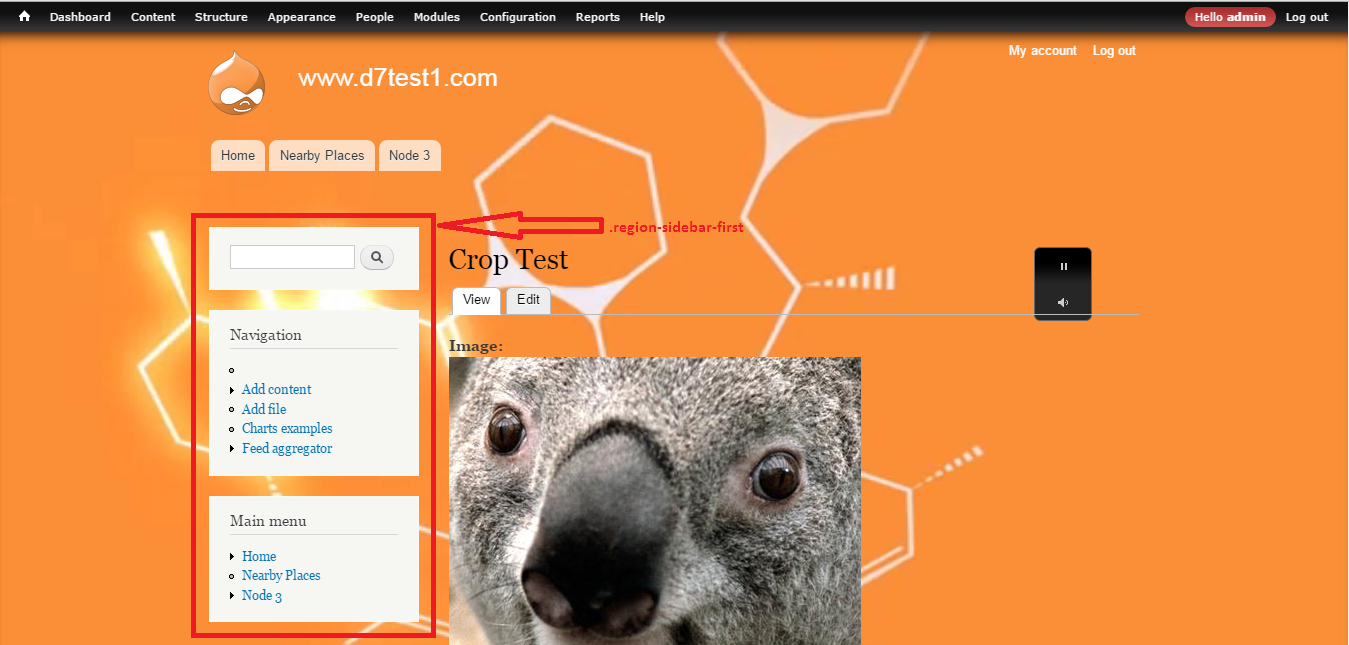
Also noticed some alignment and z-index issues on video controls. In configuration I setup .region-sidebar-first as Control Position. But it is not displaying properly in that region. Please see attached screenshot.
It would be better to have Enable/Disable checkbox in configuration page to disable video temporarily. Currently either need to disable the module or need to remove videos from settings to disable background video.
Otherwise looks good to me. Moving to RTBC.
Thanks,
ARUN AK
Comment #38
pankajsachdeva commentedHello Arun AK,
Thanks for update the status of project to RTBC.
Yeah I will definitely add the suggestions as you mentioned in the latest comment.
Once again thanks.
Comment #39
dman commentedSome fantastic reviews here! Especially from FeyP.
It sure looks like we should push this forwards.
Giving it a run locally, and seeing if it works OK...
* Enabled the module
* It required jquery_update (fair enough) - but it would have made sense to have listed that on the project page somewhere.
* code review on background_video.install:background_video_requirements() shows some major whitespace indent problems. I'm not gonna block on that (Everything else is well clean). But it could be fixed.
* The Status report shows the hook_requirements well, so that is well in line with Drupal expectations.
* Suggestions: a drush *.make file that can pull in the named 3rd-party library makes this module possible to automate tests for (simplytest.me and things)
I am freaked that the library we need to pull in is what? 16 M big !?
That's bigger than many full sites. How is that even possible?
* The manual install instructions were fine, and installing the lib went as expected.
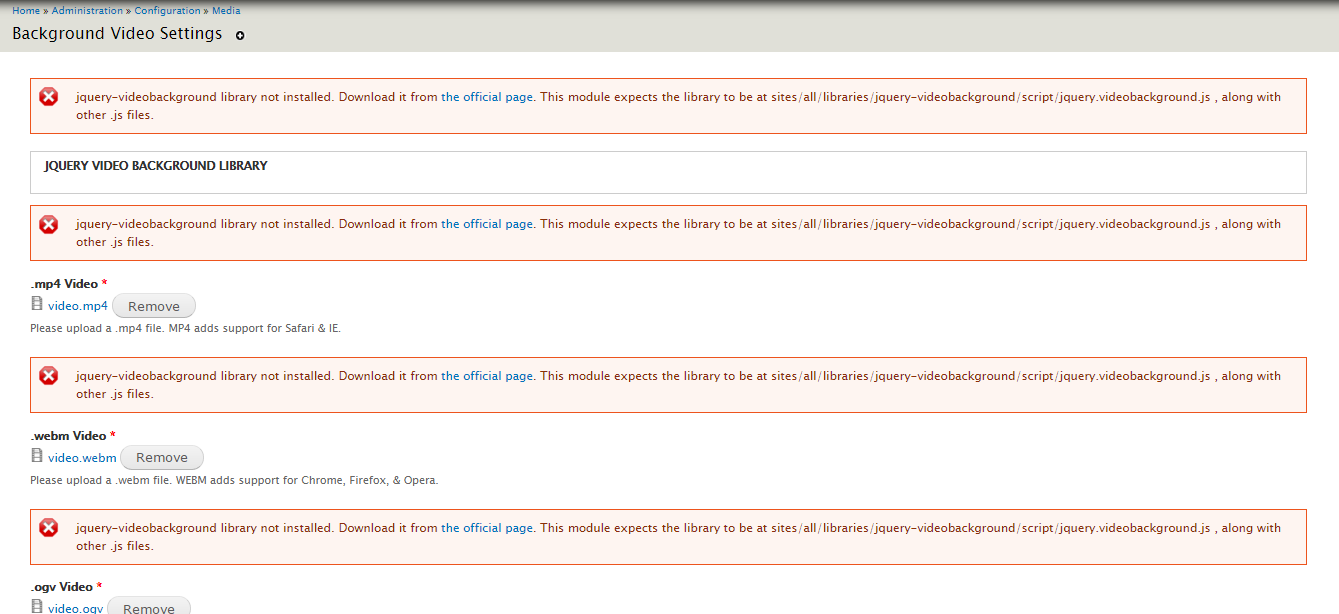
* I was puzzled about the gap between installing the module and actually finding the setting or instructions for it. The project page, and the README, provided installation instructions but no actual usage instructions at all. This lack of user support makes it difficult to evaluate or test.
...
..
I seriously have no idea where to look next after installing this module. How do we make it work? But it seems that the previous reviewers were able to guess..
From the module page, I see a good link to /admin/config/media/background-video-settings ... That could be repeated on the usage instructions on the project page or README I think..
..
Looking at the config form. (Would be GREAT if your project page had a snapshot of the config form, that helps us evaluate what sort of control the module provides)
Sooooooooo?
This module sets only one video for your whole site ever?
No context, no tag-or-content control?
And, uh, I must supply 3 formats of the same video file before anything can be tested!? That's a true pain.
It actually took me many many minutes to find even a default sample ogv video of anything to use as a placeholder so that I could even submit the form successfully. This is a bit weird, given the solid "media" management support that has been made available to Drupal in the recent years.
It did actually place a video on my page when I got through that though. So it does at least work, when the UI problems have been fought.
* The background video does not "fill the page" as we expect from this sort of effect. it was scaling itself down to fit the space when the window is resized, instead of cropping and expanding. The config settings did not provide a clue as to how we could adjust that behaviour.
* Although the UI promised to provide video controls in the 'footer' of the page, these were not available.
* Without any control over which paths or pages the video was shown on, or the ability to have different videos in different contexts, this module seems *very* limited in utility, and not suitable for a CMS at all. It's really just a short step up from an HTML template.
In Drupal, we would expect some way to manage this display that was in some way related to the content being shown. Modules such as
- https://www.drupal.org/project/bg_image
- https://www.drupal.org/project/bg_image_formatter
- https://www.drupal.org/project/background_image_formatter
- https://www.drupal.org/project/dynamic_background
- And I am sure many more
... each provide a good amount of control over what is set as a background, and when. That would be the Drupally approach.
Comment #40
dman commentedLooking at the code:
It's much too light on real comments or documentation.
does not in itself provide any information about what you are doing, or, more importantly why.
Although the code is well-structured, it's still not what anyone could call self-explanatory enough to think you can leave it entirely undocumented.
Your comment:
Is quite simply, bullshit.
-----
It's quite weird that you found it necessary to filter for xss on a filename here
but not in the next stanza here
Can you explain why you found that mp4 filenames are more dangerous than webm filenames?
-----
The way that you have fixed on the 4 'formats' and treat them (and only themr) as all required, all the time is reflected in the code - via copy & paste repetition in the way these fields are handled.
This architecture will not scale, and is a bit short-sighted.
Suggestion: You could have a list of acceptable video formats (a pluggable definition list that contains their respective descriptions, capabilities, suffix etc), and put loops around your form UI to reduce the copy & paste code bloat.
----
Javascript and CSS is well done and very clean. Still somewhat lacking in maintainable documentation though.
----
Thanks to the reviewers above, the uninstall hooks are done well. Good job there!
(Whitespace errors (TABS!!?!) there are annoying, but are trivial to fix)
----
Suggestion:
(For next time, not worth a rewrite)
You can namespace your variables much quicker, and build a settings_form much quicker, if you use FAPI to set your form values to an array with '#tree'=TRUE, like
Because that means that :
* retrieving your 'background_video' settings when you need them each time every page is just one DB lookup instead of 10
* cleanup later is much easier than the hard-to-maintain-manually:
----
DESPITE all these grumbles, The use of the Drupal API is correct throughout, the module works correctly (within its limitations), it's as secure as can be expected, and provides a utility I've not seen elsewhere in the Drupal module list. If this effect is what you want, this code is a good enough way to get it.
There are a number of things that could be done better in order to become more useful - but if your site needs the one video coming up all the time behind every page... this module does that for you.
I endorse the RTBC, and think we can promote the account based on this code.
Comment #41
pankajsachdeva commentedHi @dman,
Thanks for a nice review.
I have made some changes as you suggest in above comments.
When I will free, then I will try to add all the suggestion.
Thanks once again.
Comment #42
dman commentedYeah, this has been RTBC with no problems for too long. Definitely can be promoted.
Thanks for your contribution, pankajsachdeva!
I updated your account so you can promote this to a full project and also create new projects as either a sandbox or a "full" project.
Here are some recommended readings to help with excellent maintainership:
You can find lots more contributors chatting on IRC in #drupal-contribute. So, come hang out and stay involved!
Thanks, also, for your patience with the review process. Anyone is welcome to participate in the review process. Please consider reviewing other projects that are pending review. I encourage you to learn more about that process and join the group of reviewers.
Thanks to the dedicated reviewer(s) as well.
Comment #43
pankajsachdeva commentedYeah!!!!
Got GIT Vetted Access for my contrib module Background Video (https://www.drupal.org/project/background_video)
Thanks to all the Reviewers and specially @Dman (https://www.drupal.org/u/dman) for giving me the GIT Access.