Problem/Motivation
Admin Toolbar provides the same type of dropdown and flyout functionality that Admin Menu provided in Drupal 7.
It was always the intention of the Spark team to provide dropdown functionality when the bar is in horizontal mode, but this was never implemented since the the user is able to access the subtree through the vertical menu.
Adoption of Admin Menu shows that users like the immediacy of dropdowns and since they don't conflict with the vertical orientation there's really no reason not to include them.
Admin Menu module does have a Drupal 8 branch but that branch does not (AFAICT) extend the existing core toolbar. Admin Toolbar module does extend the core toolbar and therefore seems to be a good candidate for inclusion in Drupal 8.1. Admin Toolbar appears to have a stable Drupal 8 release (I have it running on several sites and have encountered no bugs yet). I have not tested it for a11y or i18n but I don't *think* a11y is a problem since the entire subtree is already exposed to screen readers via Drupal Announce. Someone should test it with an RTL language.
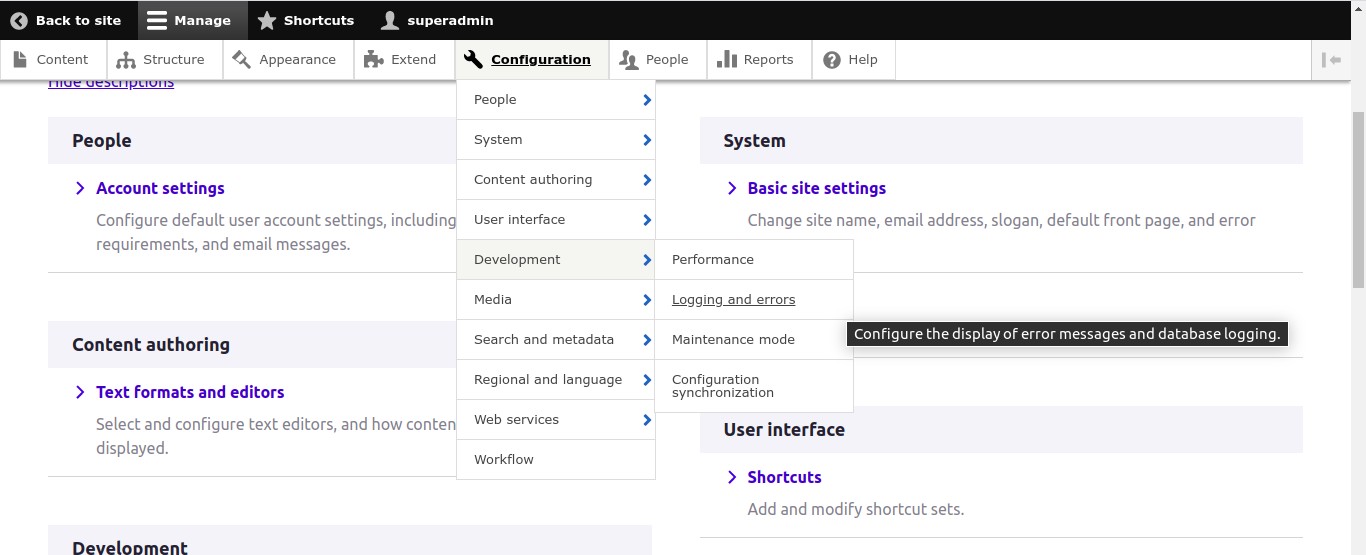
In addition to improving general usability, dropdown menus (regardless of which module implements them) will also help the problems of navigation and discoverability seen in UMN testing:
"This is a jambled-up hardware store with no wayfinding. I have to go through every aisle looking for electrical outlets."
Proposed resolution
Add the drop-down menu functionality of Admin Toolbar to the core Toolbar. So existing admin menu items at various depth levels can be accessed directly through the toolbar
This issue should not add additional menu items that don't exist . For example, items like Content > Add Content > etc. and Content > Add Content > etc, or cache rebuild links that are added admin_toolbar_tools submodule of Admin Toolbar are helpful, but if they don't exist on your site, this issue should not aim to create them. There are benefits to having such links but it does not have to be in the scope of this issue.
Remaining tasks
Make it work with administration themes (works now)
- Fix existing tests:
Drupal\Tests\shortcut\Functional\ShortcutLinksTest::testShortcutQuickLinkDrupal\KernelTests\Core\Theme\Stable9LibraryOverrideTest::testStable9LibraryOverrides - Shouldn't touch Stable9 at all for this.Drupal\KernelTests\Core\Theme\StableLibraryOverrideTest::testStableLibraryOverrides- Shouldn't touch Stable at all for this.
- Add new JS tests:
- Pointer hover
- Keyboard tabbing
- Reviews / improvements
- Accessibility review
- UX review
- Frontend framework manager review
- RTBC
- Commit
User interface changes
TBD.
API changes
None.
Data model changes
None.
Release notes snippet
TBD.


 Show commands
 changes


Comments
Comment #2
tkoleary commentedComment #3
wim leersComment #4
swentel commentedOh yes please, a million plus for this one.
The module also contains a submodule for admin tasks (like flush caches etc), should we help out the maintainer and move those to devel then for instance ?
Comment #5
swentel commentedThis could potentially help out #1852346: [discussion, no patch] Toolbar UI regression: shortcuts and menu not visible at same time if we add dropdowns to the shortcuts too maybe ?
Comment #6
andrewmacpherson commentedThe issue summary mentions a11y but only goes as far as mentioning the screen reader experience.
We should also pay attention to the keyboard-only experience. The top-level tray links (content, structure, etc.) should remain easy to reach, i.e. without having to tab through all of the sub-menu items.
Comment #7
jacineThis would be a nice addition to core.
Comment #8
wim leersWould we still want to do this if we'd already do #1781422: Add search/jump/command functionality to toolbar? @jacine, what do you think?
Comment #9
jacinePersonally, I think #1781422: Add search/jump/command functionality to toolbar belongs in contrib.
I've not actually used it yet (this is the first I've heard about it), but I watched the screencast, and my impression of it is that it's cool, but to get the most use out of it, you have to have some sort of orientation with Drupal, to know what you're looking for. It's a power user tool all the way; therefore, not something needed in core itself IMO.
What I like about admin_toolbar is the ability to add/customize the menu items, and the fact that it actually makes Toolbar useful by reducing clicks to perform tasks and helps to give an idea of where everything is.
Comment #10
wim leersIf you use the toolbar menu try vertically, you'd also get that sense of where everything is.
So, for that aspect, always showing the toolbar's menu vertically, and never the extremely limited horizontal one. Then it's the same on narrow screens and wide screens.
(Just to be clear, I'm just playing devil's advocate, I like
admin_toolbarpersonally.)Comment #11
jacineI hear you, but I'd still prefer admin_toolbar personally. Using the vertical menu is something I will not do, unless mobile, which is almost never. You've got to click to expand the items, which is annoying. And Coffee doesn't solve the issue of adding/customizing items, which is the main draw of this issue for me.
Also, I consider these 2 issues unrelated. I get how some people might find the Coffee functionality useful, but at the same time, I wonder how/why it's even being considered for core inclusion. I think back to D7 days, when the top level menu items (structure, appearance, etc) were undergoing a re-org, and one of the UX problems that kept being brought up is how bad our terminology is, how hard it is for users to find stuff, and that WE as Drupal developers, basically use the browser address bar like a command line to get around those issues, etc. Coffee module just seems to mask those issues and encourage that command-line style navigation approach as a solution, which I find odd.
Comment #12
wim leersGreat feedback :) It's good to have that spelled out explicitly.
Because it allows power users to navigate even more quickly. And we can add aliases, to allow people to use slightly different terminology and still get useful suggestions.
Your other criticism of course still stands.
So, given all that, I'd say… let's get a core patch going? It should be mostly copy/pasting from the D8 contrib module? I sent a tweet to the module maintainers, only one of them is on Twitter: https://twitter.com/wimleers/status/700413389764476931.
Comment #13
gábor hojtsy@Jacine: I think the fate of the toolbar search feature would be great discussed in #1781422: Add search/jump/command functionality to toolbar so people find the feedback there :) Thanks a lot!
Comment #14
eme commentedHello,
I'm the co-maintainer of Admin Toolbar. To answer to Wim Leers, a patch shouldn't be too complicated indeed but it won't be a copy paste as we had to overcome the limitation of the core toolbar module that do not load the sub-element in horizontal state. Thus it should be a little patch against toolbarVisualView.js and a bunch of CSS (on that part, we should fix before #2635832: Fix all RTL issues).
I'm talking about including the admin_toolbar and not its sub-module as it seems to me that indeed having too many links at the very beginning could be confusing an not easily accessible and could stay a contrib module.
I'll go in holiday next week but will take some time to make a first patch to demonstrate after.
Comment #15
wim leers@eme Awesome, thank you!
Comment #17
ressaI second all what @Jacine said - I think Coffee is more oriented towards power users, who know what to search for. Also, Admin Toolbar serves as an educational tool for new users, in that it allows them to explore Drupal, without having to click and wait, and click and wait.
Comment #18
wim leersI think everybody is +1. We just need somebody to start pushing this forward :)
Comment #19
ressaGreat, I just thought I'd share my 2 cents, to keep the ball rolling on getting Admin Toolbar into core :-)
Comment #20
tkoleary commentedI know you are all champing at the bit to work in backbone but don't everyone jump at once. :)
Comment #21
mrf commentedHere is a rough working patch that illustrates what admin toolbar is actually doing, almost all CSS.
There is definitely a need for some refactoring, and some additional work and testing to make sure we have accessible keyboard navigation, but I wanted to make sure we weren't scaring anyone off with unhelpful comments about backbone.
Comment #22
andrewmacpherson commentedTagging so I can find this again.
To clarify, are we talking about having dropdown-menus and keeping the expandable-deep levels inside the vertical tray orientation?
Comment #23
skaught#21 is a great start. it does bring up to the forth menu level for hoving. I just noticed the todo about making a config.
generally:
Otherwise missing core module.manu.yml links that Admin toolbar adds in need to be completed for some things
I'ld say that as far as Admin Toolbar goes unless anyone wants to include functionality for dev's like 'clear cache' links and the like.
Certainly any #a11y concerns need a clearer review and help
--
switching status to run tests.
Comment #25
Benia commentedI think it should be in core.
Comment #28
pfrenssenI just tried it and the dropdowns are not keyboard accessible. What's good though is that it at least doesn't break the current functionality, the menu is still visible and accessible in the standard way.
I think this is probably a good thing. There is no loss of functionality for keyboard only users, and there is added functionality for mouse users. I've never come across a dropdown menu implementation that worked 100% flawless for keyboard users.
Note that if it is not keyboard accessible this also means it is not accessible for touch users. It only works with pointing devices that support hover states.
Comment #30
ressaI just tried the patch from #21 against Drupal 8.2.8-dev and it's a big step in the right direction. It would be great to offer the 'Flush all caches', 'Run cron', and 'Run updates' links, if possible?
Comment #31
wim leers#30: you don't need anymore in D8, or you should need it very rarely.
Anyway, overall +1 for this. I already said that more than a year ago, in #18.
Comment #34
ressaThank you for creating the patch in #21 @mrf, here is a re-roll for 8.6.x.
Like @mrf notes, there is need of refactoring, for example the chevron-right.svg (the little blue arrow) is not showing in some situations, and also the sub-items have a little overlap.
Try the patch with the new single command to install Drupal:
curl -sS https://ftp.drupal.org/files/projects/drupal-8.6.x-dev.zip --output drupal-8.6.x-dev.zipunzip drupal-8.6.x-dev.zip && rm drupal-8.6.x-dev.zipcd drupal-8.6.x-devwget -q -O - https://www.drupal.org/files/issues/2018-05-09/toolbar-dropdown-support-2634854-34-8.6.x.patch | git apply -php core/scripts/drupal quick-start demo_umami#2911319: Provide a single command to install & run Drupal
Comment #35
ressaComment #37
oriol_e9gRolled a new patch.
Comment #39
ressaThe previous patch didn't seem to apply cleanly, and was also missing toolbar.libraries.yml file, so rolled a new patch.
Comment #41
oriol_e9g@ressa the patch rolled in #37 applies cleanly and I have not missing any change (see testbot), maybe you're patching an old drupal version.
Comment #42
ressaSorry @oriol_e9g, you're right. I just tried again, and your patch in#37 applies just fine. But it does not contain the toolbar.libraries.yml file, so the dropdown isn't activated.
On another note, I wonder why the testbot fails both our patches, even thought they both seem to apply fine ... The original patch in #21 passes with flying colours.
Comment #43
visabhishek commentedJust Rerolled the Patch #41, Because it's showing "Patch Failed to apply".
Comment #46
oriol_e9g@visabhishek now we need to finish the work and update the tests.
Comment #47
ressaThanks for rerolling the patches @visabhishek, they seem to pass now. The only difference I see is this, which might be the cause?
Your patch:
My patch
EDIT: @oriol_e9g was right, I was using at the wrong version. The version of Drupal core at https://ftp.drupal.org/files/projects/drupal-8.7.x-dev.zip is not identical to the git-version, which is why the toolbar.libraries.yml files were different. Downloading core with git in stead like this seems to give me the correct version for Drupal core development:
Sorry for all the noise in this issue.
Comment #48
nancydruI applied this to 8.6.2 and it is a vast improvement but it is still not as good as Admin Menu in 7.x. For example, I cannot go directly to a content type in the drop down.
Comment #50
ivnish+1. Core toolbar is inconvenient
Comment #51
volegerJust reroll
Comment #52
dwwI don't understand why we're changing this description. Toolbar module is still providing a toolbar, not just a menu. ;) Please revert this from the next patch.
p.s. I'm on a mission to make toolbar *not* admin-specific. Regular users can make nice use of toolbar to get access to the user tray and shortcuts (once you patch a few core issues). So, I'd definitely like to *not* further enshrine "admin" anywhere in this module.
Comment #55
nod_Latest patch duplicate the links in the menu and hover doesn't seem to work for me?
Comment #56
vsujeetkumar commentedComment #57
ressaI just applied the patch on Drupal 9 released today, which went fine, except for the
toolbar.info.ymlbit. Like @NancyDru commented, certain second level items, like content types and Content > Add Article are missing from the drop down. I don't see any duplicate links though, and hover also seems to work ...Comment #58
vsujeetkumar commentedComment #59
vsujeetkumar commentedRe-roll patch created for 9.1.x.
Comment #60
sivaji_ganesh_jojodae commentedPer #52 this still needs work. Info file description need not be changed. Provide interdiff to see what has been changed since previous patch.
Comment #61
dwwAlso still definitely needs FunctionalJavascript test coverage before this should be in "Needs review". That's what the "Needs tests" tag is about.
Thanks,
-Derek
Comment #62
codersukanta commentedSuccessfully applied the patch #59. Did manual testing and its working fine.
And reverted the description changes in
as recommended by #52.
Screenshot with patch:

Comment #63
codersukanta commentedI am really sorry @vsujeetkumar, I did not notice that the issue is still assigned to you.
Comment #64
dwwThat's okay, there's no need for this to be assigned. Anyone is welcome to work on a JS test, which is what most needs to happen next.
Thanks,
-Derek
Comment #65
dwwGiving the summary a proper template, and accurate remaining tasks list.
Anyone's welcome to fix the current test failures. Please only upload a new patch if you've run these tests locally and confirmed they pass:
Noting that the JS tests should include both:
Thanks!
-Derek
Comment #66
vsujeetkumar commented@dww In this patch I have fixed fail tests, now only JS tests pending, Please review.
Comment #67
dwwThanks, @vsujeetkumar!
Not understanding why assertNoLink() isn't working for this assertion. The alternative seems more complex and brittle. Maybe add a code comment why assertNoLink() isn't enough?
A) This should be assertEmpty().
B) We should move the custom 'Shortcut link removed from page' message to an inline comment, not an assertion message:
// Ensure the shortcut link is removed from the current page.Same here for all of the above.
I don't understand why we setRoot() and excludeRoot() here. What's wrong with the existing setMinDepth(2)?
This change could definitely use some comments.
Not clear why this change is happening in this patch. Seems out of scope, but I probably misunderstand.
We shouldn't be changing stable nor stable9 for this issue.
We need to change the default toolbar module CSS file (which we already do) and then check all the core themes. Any core theme that's overriding this file needs the new styles added to their override. Core themes that don't touch it should be inheriting directly from the module CSS now, not stable or classy.
Sorry I didn't spell this out in #65. The reason those testStableLibraryOverrides tests were failing was because we were changing libraries we shouldn't. The solution isn't to change from a 'state' to a 'component'. It's to not touch stable or stable9 at all.
A) This needs to use a relative URL or it'll break on sites installed in a subdirectory.
B) There's probably other stuff in the CSS that could be improved, so tagging for frontend framework manager review.
Comment #68
vsujeetkumar commentedComment #69
vsujeetkumar commented@dww I have fixed the changes mentioned in #67, Please review
#1,#2 & #3:
Because of permission not able to see 'Cron' shortcuts link with the "assertNotLink", So I have added permission now we can use "assertNotLink".
+
+ $this->drupalLogin($this->drupalCreateUser([
+ 'access toolbar', 'access shortcuts', 'administer site configuration',
+ ]));
#4: For display the child menu I have just incrase setMaxDepth(2) to setMaxDepth(4).
- $parameters->setMinDepth(2)->setMaxDepth(2)->onlyEnabledLinks();
+ $parameters->setMinDepth(2)->setMaxDepth(4)->onlyEnabledLinks();
#5: I have revert back to 'state' in toolbar.libraries.yml.
#6: Revert back all the changes in stable and stable9.
Comment #70
hardik_patel_12 commentedPatch is failed to apply on 9.1.x , re-rolling the patch.
Comment #71
lauriiiWould be great if we could get a sign-off on this feature from product managers before we start going deeper into the implementation.
Comment #74
vikashsoni commentedPatch is failed to apply on 9.3.x-dev , needs to re roll patch
Comment #75
colanUpdated status based on previous comment.
Comment #76
matroskeenI think this issue can be a good candidate to be moving forward with "Easy out of the box" initiative. I think it's not only can be added to Drupal core but also enabled by default for Umami and Standard installation profiles.
Will try to reach out to the initiative leads and see if they're interested 👌
Comment #77
avpadernoComment #78
yogeshmpawarWorking on re-roll.
Comment #79
yogeshmpawarStraight re-roll against 9.3.x branch.
Comment #80
avpadernoComment #81
yogeshmpawarWorking on custom command failures.
Comment #82
yogeshmpawarResolved custom commands failures & added an updated patch with an interdiff.
Comment #83
ressaThanks for fixing that @yogeshmpawar.
I noticed that the border of the original first level menu items seemed bigger, so here's a patch which only adds border to sub-menu items.
Main menu borders too wide

Normal borders

Tip: Use Drupal Quick Start Command for easy patch testing:
Comment #85
rkollerI wanted to test the latest patch in #83. The patch is labeled for 9.3.x but I've tried with the current Drupal 9.4.x-dev. Even though the patch still applied successfully there was no submenu showing like in #62. So basically no admin_toolbar functionality available. And there were also no errors in the devtools shown, when i've checked. I'll set the issue to needs work again. probably needs at least a reroll against 9.4.x.
Comment #87
ressaThanks for the feedback @rkoller, I have re-rolled the patch for 9.4. Tugboat fails (see #3275720: Tugboat fails, dead link) but when it works again, we should be able to preview it there.
Some second level items, like content types and Content > Add Article are still missing from the drop down.
Comment #90
rkollerthanks for the reroll @ressa ! i've applied and tested the merge request diff on a
9.4.xinstall on DDEV. the patch applied properly. the changes in/core/modules/toolbar/css/toolbar.menu.cssand/core/modules/toolbar/src/Controller/ToolbarController.phpare there. i've also cleared caches with drush several times and ensured that theadmin_toolmodule, i usually use per default on test installs, is disabled and uninstalled.already wanted to write that i am still unable to see any effect of the patch but then i've remembered and tried something. per default i always use Claro as admin theme when i test. There i am unable to see any of the
admin_toolbarfunctionality this patch introduces on a code level. BUT when i switch to Seven it works!The


configurationmenu item looks correctwhile for the
structuremenu item only the sub menu items fordisplay modesare shown, for every other item they are missing.not sure if that is the intended result compared to the menu structure
admin_menuprovides.Edit: Forgot to mention tested on MacOS 10.13.6 with Safari 13.1.2 as well as the latest version of Firefox
Comment #91
catchRetitling to make it a bit clearer what's being proposed. This could use the screenshots embedding in the issue summary for easier review.
Comment #94
ressaThanks for checking the patch @rkoller. You're right that the patch doesn't work at all for Claro, which I also just discovered via the fixed Tugboat live preview, since #3277057: Make Claro the default admin theme in Standard profile landed and made Claro the default admin theme.
I have added a new "Make it work with administration themes" item in the "Remaining tasks" list with Claro, Seven, and Olivero which is also included under "Administration theme". Interestingly, the patch works for Olivero.
Also, like you observed and @NancyDru as early as November 2018 (#48) most of the deeper links are missing, such as display modes, but also Content Types > Article (missing) > Manage fields (missing) and Content > Add Content (missing) > Article (missing).
In my mind, the goal should be to give the same user experience as Admin Toolbar, giving immediate access to all links at the deepest levels.
Comment #97
mgiffordReferencing WCAG 2.1.1 SC.
Comment #98
gábor hojtsy@bnjmnm pinged me for product management feedback. Given that https://www.drupal.org/project/admin_toolbar is the 4th most installed module, I think it would make sense to add it to core. Its a universal improvement. There was lots of resistence to add it to Drupal 7 when the current toolbar was added I think because the popup menus would have caused confusing with the overlay also popping up. With the overlay gone, I don't think that argument stands anymore.
That said, it would be great to somehow figure out which parts of the contrib module are 80%, as in including them in core would essentially serve as a replacement and remove the use case to install the separate contrib module for most sites. That would be a genuine improvement. If we are only adding part of the module but most sites would still install the contrib module then IMHO we would not move the needle too much.
Finally there are some high profile contrib projects that would be good to coordinate with, such as Gin Toolbar, so that they are not caught by surprise and/or improvements they need may be taken into account as well.
Comment #101
bnjmnmAdded the admin_toolcore branch that works with admin themes, and makes the menu depths configurable.
These links don't exist in the Adminstration Menu by default, thus they are not available in the updated toolbar here. There is a submodule of Admin Toolbar
admin_toolbar_toolsthat generate these links, but I don't think replicating that should be in this issue's scope. This issue is introducing many beneficial UI changes already. Attempting to create NEW menu items within this issue's scope introduces it's own complexity and concerns . Those additional links can be added in a followup.Still needs test coverage as mentioned in #65. It may be possible to port some of the tests from Admin Toolbar.
Comment #102
bnjmnmComment #103
bnjmnmComment #104
lauriiiTested this manually. I think we need to make some minor design improvements to how we indicate links with subitems, as well as focus styles. On top of that, we probably should try to address #6 because right now navigating the toolbar using keyboard is certainly more tedious than it used to be.
Comment #105
bnjmnmThe most recent push makes the submenu item navigable via arrow keys instead of tabs, so it's not necessary tab through every darn item on a journey. The test for keyboard nav was removed and this is now better to test manually.
Claro focus styles also added.
Comment #106
lauriiiMade some minor changes to the styles in collaboration with @ckrina.
Comment #107
lauriiiI don’t this we need to provide an option in core to limit the menu depths. This could be part of the contrib module functionality. There are benefits to keeping the experience consistent across sites by limiting the configuration options people have on things that are not critical.
The main reason I’m thinking we should remove it is that there are efforts to redesign the toolbar and I don’t know if this feature will make sense anymore after that. From that perspective, adding it will add more complexity.
Also, this doesn’t change the configuration for the vertical toolbar, and it's not something we have provided as a configuration there. In future if this is deemed as something we need, we could add it separately as its own feature.
Comment #109
bnjmnmI agree with #107 - it was my personal preference anyway but I was trying to go with an approach that is more likely to land. Since a PM is making the suggestion I think this seems like a choice that won't obstruct things 🙂. The menu depth stuff has been removed from the MR
Comment #110
smustgrave commentedSeems there are some issues in the MR possibly from a rebase?
Maybe we could get a 11.x branch also?
Comment #111
camilledavis commentedI made an MR to add keyboard navigation to the admin_toolbar here: https://www.drupal.org/project/admin_toolbar/issues/3286466
Comment #112
camilledavis commentedI'm testing 3821 (in Firefox) and had a few issues:
1. If I set the menu to vertical orientation, then back to horizontal, the arrow icons disappear and there is no more focus state
2. Using my assistive software (Vimium) I'm unable to navigate the toolbar because the chevrons in the horizontal mode are not a separate element that open/closes the menus (the way they are in vertical mode).
The functionality I'm relying on assigns a key sequence to all visible UI elements so it can be clicked/toggled directly using the keyboard, and is a common feature in assistive software (for example Voice Control, ShortCat and VimMotion provide this functionality for macOs). So having the collapse/expand button be its own element would make it easier in general for assistive software to interact with. This could be implemented in addition to the "arrow keys" functionality (and in general I think it's a good accessibility principle to provide multiple ways to do the same thing)
Comment #114
quietone commentedThe Toolbar Module was approved for removal in #3476882: [Policy] Move Toolbar module to contrib.
This is Postponed. The status is set according to two policies. The Remove a core extension and move it to a contributed project and the Extensions approved for removal policies.
The deprecation work is in #3484850: [meta] Tasks to deprecate Toolbar module and the removal work in #3488828: [meta] Tasks to remove Toolbar module.
Toolbar will be moved to a contributed project before Drupal 12.0.0 is released.
Comment #115
quietone commentedToolbar has moved to contrib