

 Come together with the global Drupal community in Rotterdam, 28 Sept – 1 Oct 2026. Sessions, contribution, connection, and Early Bird savings until 8 June.
Problem/Motivation
When useres register for an account and follow their one-time login link, or requests a one-time-link because they forgot their password, the resulting user/edit form does not require them to choose a new password. If by chance they miss that part of the form (which happens quite often as it's not highlighted), they're left with the inital random password.
To make matters worse, when they return to the user account page to change their password later on, they are prompted to enter their OLD password - the one they have forgotten. This creates a terrible user experience for users, and a headache for site admins.
Contrib workaround:
Until this is fixed https://www.drupal.org/project/prlp provides a workaround for this, but IMHO the core workflow needs to be fixed, so this module can be deprecated.
Proposed resolution
It would make for a better user-experience all around if the prompt to reset your password were on the one-time login page.
Remaining tasks
- Update issue summary with screenshots.
- Add simpletests.
User interface changes
None.
API changes
user_pass_reset():
- moved the second phase (the form response) to user_pass_reset_submit().
- Clarified the status message for already used links. Expired links are caught by the first if, so let's be specific here: In the end, a user needs to know if there are signs that a 3rd person could have used the link and taken over the user's account.
- The status message for logged-in users: "You have already used this one-time login link. It is not necessary to use this link to login anymore. You are already logged in." is misleading. While it is true that it is not necessary to use this link, first of all it is also true that it is not possible anymore. Changed this to "You have already used this one-time login link, therefore you need to login with your password. In this case this is not necessary because you are already logged in."
user_pass_reset_submit():
- To save the new password I'm straightly using user_save() unlike in patch #4 where a custom query was used. True, that user_save is a bit behemoth. But we need to do all checks, call all hooks, allow for alternate password hashing schemes etc. Certainly we don't want to reimplement or copy/paste that code. In the end using user_save is no problem because resetting the password is no performance-critical task.
user_pass():
The button title "E-mail new password" has been incorrect for quite a while. We're not sending passwords, but one-time login links. I changed the button title to "Request password reset" which is generic enough not to be incorrect, yet easy to understand.
Also, a description was added to the textfield.
user_pass_submit():
- The message "Further instructions have been sent to your e-mail address." misses out the one-time login link and therefore leaves the user unclear about whether this means his action was successful or not. Changed to: "A one-time login link and further instructions have been sent to your e-mail address."
- The redirect to the login page is confusing because logging in is exactly what the user can't do at the moment. Rather we should leave the user where s/he is. S/he anyway needs to check mail, first.
_user_mail_text():
- Changed the e-mail text so it reflects our changes.
- Maybe we can improve on some of the messages.
Also I wasn't sure if hook_user_login (invoked by user_authenticate_finalize) should be provided both password and username, so modules hooking in there can make use of the information (at that point there is not enough documentation about the hooks available). As hook_user_login currently doesn't get any useful information, going with what we have should be okay. If someone knows more about this aspect, I'd appreciate some info though.
Original report by joshk
When users register for an account and follow their one-time login link, or requests a one-time-link because they forgot their password, the resulting user/edit form does not require them to choose a new password. If by chance they miss that part of the form (which happens quite often as it's not highlighted), they're left with the inital random password.
It would make for a better user-experience all around if it were required that newly registered users were required to choose a password which they can remember. This would mean:
1) Making the password fields required for the one-time-login form
2) Give the password section of the form a very light weight to put it at the top
I'll create a patch for this unless there's a compelling reason not to.


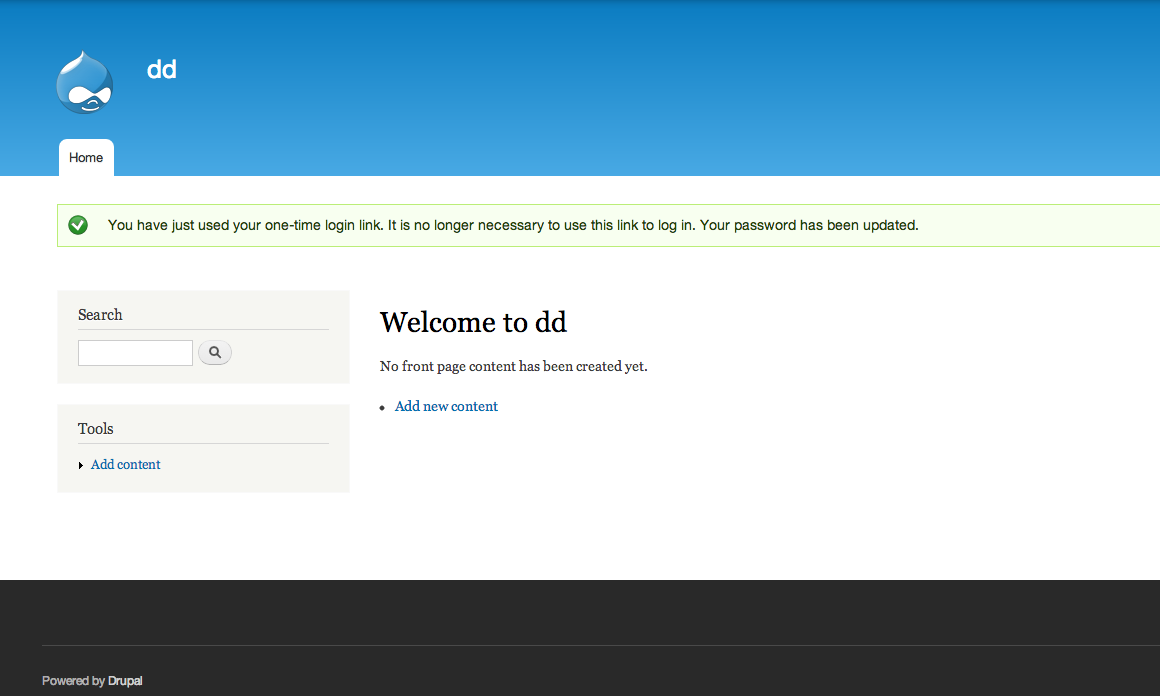

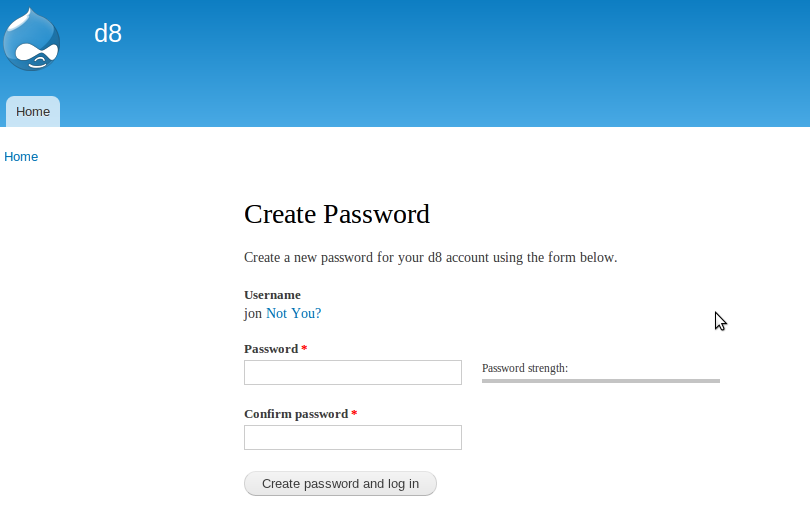
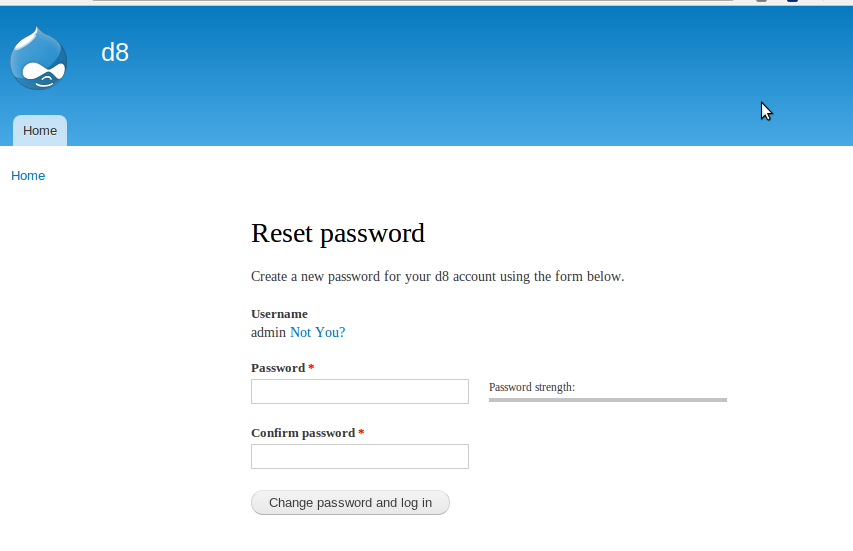
Comments
Comment #1
joshk commentedSimple patch to implement this functionality. I add 'passreset' as a query in the drupal_goto() that fires after the one-time "Log In" button is pressed, which adds the #required attribute on the user//edit form.
I think this is a good user-experience improvement, as some users will otherwise use one-time login links, login, and then fail to set their password to something they can (hopefully) remember.
Comment #2
drummIt would be nice if the password field were actually on the password reset page.
Comment #3
joshk commentedPatch attached does that. It adds password fields to the one-time-login form (formerly just a login button). If they match, the password is stored. If not, the same form refreshes with form_set_error. Also made some changes to the message on the successful login screen to reflect that the user already changed his/her password, and to remind him/her to make a note of the new pass.
Comment #4
joshk commentedThis version creates a user_pass_reset_submit() function to handle successful submissions. Note, may be duplicate functionality of a patch from Moshe.
Comment #5
killes@www.drop.org commentedFeatures go into cvs.
Comment #6
dmitrig01 commentedlove the idea, but it's do for a re-roll
Comment #7
panchoGood idea. Moving to D7 queue, though.
Comment #8
cburschkaYou may have meant to, but you didn't actually do so. So here.
Comment #9
panchoRight :) Thanks...
Comment #10
earthangelconsulting commentedok, i'm confused. is there a corresponding version 6.x patch to accomplish this? if so, where?
thanks!
Fish
Comment #11
stevenpatzNo. Things are fixed in the 7.x branch first and then (possibly) backported.
Comment #12
panchoI'm working on a fix against HEAD. Close to done.
Actually this is a usability bug.
Comment #13
panchoHere's the patch against HEAD.
The central change: the user is now required to set a new password right after using the one-time login link. This effectively prevents hopping away from the user/edit page without actually changing the password. Also, the one-time login link is only invalidated after the new password has been set (except it expires).
Rather minor changes:
Maybe we can improve on some of the messages.
Also I wasn't sure if hook_user_login (invoked by user_authenticate_finalize) should be provided both password and username, so modules hooking in there can make use of the information (at that point there is not enough documentation about the hooks available). As hook_user_login currently doesn't get any useful information, going with what we have should be okay. If someone knows more about this aspect, I'd appreciate some info though.
Otherwise, all that is left to be done, is taking care of the simpletests. I'll do so asap.
Comment #14
pancho@goatvirus:
Here is also an untested D6 version of the patch. Please test, and give me some feedback. Possibly we can get the backport committed to D6.
Comment #15
panchoSome codestyle.
Comment #16
earthangelconsulting commentedPancho - I have tested the patch in #14, against Drupal 6.5... I haven't had time to verify every little text change, but the basic functionality (ie: making sure that the user MUST change the password, when using a one-time only login link) seems fine. Nice work!
cheers
Fish
http://goatvirus.com/resume
Comment #18
Bodo Maass commentedIsn't it better to pass form values as 'value' instead of 'hidden' ?
In the patch from #15, the uid is passed as
$form['uid'] = array('#type' => 'hidden', '#value' => $account->uid);According to the Forms API docs, this would better be the following, because then the uid would not be sent to the browser:
$form['uid'] = array('#type' => 'value', '#value' => $account->uid);Comment #19
mr.baileysRelated issue: #138805: Security/usabillity: require password change after one-time login
Comment #20
Alan.Guggenheim commentedThanks for all the contributions.
I am migrating a 5000+ users site from WordPress to Drupal and CiviCRM, and the login/password issues have been a real BIG problem. Most people get their one time login, maybe even type anew password in the fields, but, because the form is so long, they do not go to the bottom, and do not save the new password. They are logged-in, so they can post and do whatever they need, then next time when they try to login it does not work!
I applied the user_passs_reset_force_0 patch and tried the password_reset_patch545230_06, but that does not address all the issues.
So I used #14 as a base and patched my files. here is the diff for you guys to check and try to get a real patch out for 6.15.
At least my site is working now.
Thanks
Alan
Comment #21
Alan.Guggenheim commentedUsability issues:
I really think that some of the wording of messages (dispalyed on the screen) should be easily changeable by the admin (parameters, not hard coded).
For some sites, User login, password reset,... is so critical, that it needs to be fine tuned to the audience...
One thing I would like to change is the message on the screen people get when they click on the one time link. I am currently using Logintobogan, so it says:
"You have successfully validated your e-mail address"
and the below Reset password with two fields and the help: Please enter the new password in both fields.
Apparently for my users, this is not clear enough. They get confused and think they are back to the same screen requesting a new password!
Anyway, can we change it to something like:
"You have successfully validated your e-mail address. Please now enter your new password (twice) in the fields below and then click on the Log In button"
or something like that?
Thanks
Comment #22
Alan.Guggenheim commentedI upgraded to 6.16 and the issue is still there. It seems incredible that after several years, the new user registration/login and password reset features are still so arcane and too hard to use for 90% of the people!
On 6.16, when a new user registers, he gets an email that says:
Thank you for registering at . You may now log in by clicking on this link or copying and pasting it in your browser:
http:///user/validate/5873/1268094884/99a2e7...
This is a one-time login, so it can be used only once. After logging in, you will be redirected to http:///user/5873/edit so you can change your password.
This is actually wrong, as he does not get re-directed.
He gets a message saying:
•Login successful.
•You have just used your one-time login link. It is no longer possible to use this link to login. Please change your password.
And there is no indication on how to change the password!!!
Comment #23
stevenpatzMost likely too late for the 6.x series. And 7.x is about to be released, so moving to 8.x development branch,
Comment #24
Alan.Guggenheim commentedWow! for an issue that is impacting a lot of people, and has been active for 4 years, having to wait an other 2 years?
Comment #25
stevenpatzI feel your pain. I'm still waiting for issues in the 4.6 series to be fixed.
Comment #26
earthangelconsulting commentedre: #17... Any details on why that patch (in #15) failed, or what has been done since? Maybe my testing wasn't as rigorous as yours, but I found that the patch worked and helped A LOT with readability/usability of the Password Reset feature.
If any of you are really needing a fix for this NOW, and not willing to wait for Drupal 8, I would suggest trying to implement that patch. Though you may have to do it manually if you are on any version higher than Drupal 6.5...
cheers
Fish
http://earthangelconsulting.com
Comment #27
tmetzger commentedHere's one for d16.
Comment #28
damien tournoud commentedI don't see anything that cannot be implemented as a contrib module here.
http://drupal.org/project/password_policy seems to implement a big part of it.
Comment #29
catchComment #30
panchoDamien: That might be true, however bugs are nothing we leave to be fixed by contrib.
Preparing an updated patch against HEAD.
Comment #31
quicksketchThis is a great usability improvement and I'd love to see it implemented. However it's not actually a bug as core had never intended to work this way. If the discussion in #1050616: Figure out backport workflow from Drupal 8 to Drupal 7 is implemented (and it looks like it will), major and critical bugs will actually prevent any new development of Drupal core, so I'm re-categorizing issues to their proper levels/categories. See http://drupal.org/node/45111 for an extensive description of priorities.
Comment #32
jenlamptonThis is a re-work of a patch from #138805: Security/usabillity: require password change after one-time login
I'm going to need some help with the tests. Chx had some good ones at http://drupal.org/node/138805#comment-1903692
Comment #33
dwwbjaspan, myself and chx spent a bunch of effort on something like this over at #138805: Security/usabillity: require password change after one-time login which was then casually postponed and eventually forgotten. That issue was recently marked duplicate with this. Just letting folks know there's some good discussion and patches over there if anyone's interested...
Cheers,
-Derek
Comment #34
dwwargh, sorry...
Comment #36
jon pughI've been dying to take a stab at cleaning up these pages. So here's another patch that addresses a couple of things:
Attached are the patch, and screenshots for any people interested in quickly reviewing the usability of this.
Thoughts?
Comment #37
jon pughNeeds review
Comment #39
timhilliard commentedWhile I agree that this would be awesome change to make, I think that any change we do make needs to be compatible with drush uli or at least provide an alternative method for drush uli to work. As a system administrator it is sometimes important to be able to log in as other users but I don't want to have to know the other users password or change it. I also use this method more often than not to log in as user 1 rather than using a username and password.
Comment #40
steven jones commentedSeems that the patch in #36 is actually a patch on top of the patch in #32 so here's a re-roll of 36, that applies directly to 8.x.
Given the UI changes alone, I'm not sure this change could even be considered for backport to D7, let alone D6?
Comment #42
David_Rothstein commentedIs the title of this issue correct? It sounds like it's more about making fields that are already there required (and/or moving them to a new form), rather than adding new fields...
Also, like @timhilliard said, there are use cases for one-time logins where the user does not want to actually change their password: drush uli, as he mentioned, and another would be where you (or perhaps your five-year-old sitting at the keyboard) mistypes your password a bunch of times and triggers the flood control; at that point, you can still use the one-time login link to log in without waiting for the flood control time limit to expire, but that doesn't mean you actually want to set a new password on your account. So whatever we do here should probably find a way to preserve those use cases. (Maybe "request new password" and "request a one-time login link" should actually be two separate actions?)
And yeah, like Steven Jones said, I don't see how a feature like this could ever be backported :) Removing those tags...
Comment #43
hefox commentedOn a d6 install how I have it working is that the password fields show on on password reset form, but they are not required, so user may set their password there if desired.
Comment #44
hefox commentedHere's a middle ground patch, that allows the one time login link to work exactly as it worked before but with password field to set if desired.
Removed user_password_reset being a form callback and put the form logic in a simple form callback and that user_password_reset calls.
Comment #45
hefox commentedComment #46
hefox commentedAdding some tests.
User password reset tests don't actually test logging in currently, so added that + change password.
I tried reusing the same user via $account = user_load($account->uid) but even with TRUE, to reset, the url generated was invalid (due to outdated $account->login likely), so not sure what was up with that and didn't feel like digging into it, so changed it to create a new user each test :-/
Comment #47
rob c commentedInteresting idea. I've tested #46 and it seems to work. (also together with #115801 and that works just fine)
I'm working on #115801: Allow password on registration without disabling e-mail verification that's very much related to these developments. It offers a checkbox on the 'admin/config/people/accounts' page to enable / disable the functionality provided by the patch i'm working on. Seems the feature in this issue does not offer a config option? (yet?)
And will setting a password on the reset form be required later on? That would really finish it for the scenario where i want to use this. (i can now just click on login and i'm in, like it normally does.)
Comment #48
yesct commentedupdating issue summary.
@hefox and @Rob C, please double check the remaining tasks.
some tests were added. are more needed?
screenshots and steps to manually test might help answer #47 about if there is a config option.
needs an interdiff and also a test only patch.
Comment #49
hefox commentedPatch currently doesn't have a config option -- I'm not of the opinion that core needs to provide a config option for this.
As far as tests go, not sure -- I believe I found the the current password reset tests are a bit lacking as they don't test using the password reset page (which the patch adds, both variants).
I am confused about having a failing test -- this is a feature request, not a bug, so the purpose of a patch only is to show the feature doesn't exist?
Screenshots attached of the areas the current patch visually changes (and one it doesn't).
To test #47
1) Create an account
2) log out
3) request password email
4) visit page
Pass: password reset fields appear, text makes sense
5) Change password to two different passwords
Pass: validation error
6) Change password to two same passwords and login in
Pass: Logged in
7) Logout, login with new password
Pass: logged in
8) Logout and request new password again
9) login w/o changing password
Pass: logged in
10) logout and use exiting password to login
Pass: logged in
Comment #50
rob c commented@hefox
And what if we want to have #115801: Allow password on registration without disabling e-mail verification and the current feature request in core? (this issue)
Then you are able to set a password Before and During registration/reset. (set with 1 or 2 config options)
(the idea is that #115801 wouldn't work if we apply #75924 without an option, because then people need to set a password twice (if both patches are applied).)
(willing to work on providing a proposal-patch to create the options.)
Comment #51
hefox commentedMy patch (47) doesn't require setting password reset -- if password fields are left blank, it retains the current functionality of logging in the user and not changing their password.
Comment #52
rob c commentedOk, got it, thanks for the quick feedback.
But you will still see them and no way to customize anything, not a huge deal, but something to remember.
(just scouting the issue queue a bit, looking into what's possible / what's not.)
Comment #53
Nephele commentedFYI, there is a separate issue, #1628120: New user, with email validation, can finish registration with no password, that is being used for developing a minimal fix for d7/d8 in response to the original bug, as opposed to refactoring the whole password-reset system.
Comment #54
Nephele commentedWhile I'm at it, here are some other issues I've found that I'm crosslinking because they overlap significantly:
Then I added yet another related bug: #1914628: New user one-time-login link incorrectly states that email link will expire. Patch #46 moves the incorrect text to user_pass_reset_form(), but does not fix the error.
Comment #55
Shai commentedAdding to Nephele's list, please note the Password Reset Landing Page project created by Jitesh Doshi
It's new and needs more work, but it creates a password reset only form which people get to when they click the one-time log-in link in their emails. It's for Drupal 7 and it works right now.
Shai Gluskin
Comment #56
yesct commented@hefox Ah yes, if this is adding new functionality, then dont need to show failing tests, as you say, failing tests would only show the feature did not already exist.
I missed that screenshots were added in #49. Personally, I'm a fan of embeded screenshots (dreditor is helpful to do that) as it makes it easier to scan an issue and get quick reviews.
Steps to test added in #49 are very helpful. Those could be added to the issue summary.
the issue summary likely needs updating to make reviews easier to get. The screenshots of before and after could be added there too.
I'll resend the latest patch to the testbot, and review it.
Comment #57
yesct commented#46: drupal_password_reset-75924-46.patch queued for re-testing.
Comment #59
yesct commentedthis section could use a comment to show how it's different from the test right before it.
I think the doc block for this might need to be updated to agree with the standards in http://drupal.org/node/1354#functions
specifically:
And I think @params
see the section on Form-generating functions
in http://drupal.org/node/1354#functions
Specifically, use the sentence structure that begins like: Form constructor for the user login form.
@params
@ingroup
And the "notes" to:
I dont know if html like the paragraph tags should be in the t() or not, but these two lines take opposite approaches.
The api on t() does not say anything about markup. http://api.drupal.org/api/drupal/core%21includes%21bootstrap.inc/functio... I looked at a few examples, linked from the api and didn't see anything instructive.
similar to the form function above, the sumbit handler should be like:
finalize is being repurposed here? to invalidate, but also does other stuff? Sounds ok...
these comment lines could be wrapped to 80 chars (not critical)
drupal_goto was used in the code that this is replacing so seems reasonable.
Other coding standards look pretty good.
@params are a core gate,
http://drupal.org/core-gates#documentation
so needs work for those.
tests were added, removing needs tests tag
Comment #60
yannickooTagging
Comment #60.0
yannickooUpdated issue summary with remaining tasks to make it easier for new people
Comment #61
PavanL commentedComment #62
jenlamptonComment #63
jenlamptonComment #64
jenlamptonPatch from #40 is still a huge improvement for D7 sites.
@timhilliard I don't think we should leave the UX broken because we have existing CLI tools that depend on it being that way. It should be the other way around... first we fix the UX. Then we build CLI tools that let us do the things we need.
Comment #65
les limRelated issue/patch converting the user_pass_reset() procedural logic into a Controller and Form object: #1998198: Convert user_pass_reset to a new-style Form object
Comment #66
jenlamptonHere's a re-roll of the approach in #40 against 7.26
Comment #67
jenlamptonmost recent patch still applies cleanly to 7.32
Comment #68
jhedstromFeature request => 8.1.x.
Comment #69
jenlamptonPatch rerolled for 7.39
Comment #72
jenlamptonPatch rerolled for 7.50
Comment #73
manjit.singhComment #76
jenlamptonPatch applies to 7.52
Comment #78
jenlamptonPatch still applies cleanly to Drupal 7.56.
Comment #79
cilefen commentedCool - let's get a Drupal 8 patch done. I don't see that this has had a usability review.
Comment #81
gábor hojtsyLooking at this issue on the Drupal Usability meeting today. This was at the top of the Needs Usability Review queue (oldest highest priority issue :) We remembered we looked at this issue about #1259892: Users could not find the Change password fields recently as well, which would improve the underlying user form but not enough to solve this problem obviously. We also looked at how others do password reset, including Facebook, Twitter, Google, Apple.
I believe our official policy still is to add new features to Drupal 8 first, but we wanted to look at the usability aspect first, since the tag was added to avoid coding if the usability team finds it problematic anyway.
1. We found it problematic to change the behavior of password reset. At least we know experts use the feature to not need to remember passwords, so they don't know their old password but not interested in changing it either. There is no harm done to present this password change form for a user already logged in, that is how Drupal already works.
2. The dedicated password reset form looks like a definite improvement for this process, we would cut down considerably on the words on the form and mark the fields required. The button would be "Save password" or something along those lines since you would already be logged in. We would either provide a way to cancel out this action with a "Cancel" link along the submit button or some other way.
Comment #82
benjifisherI see a lot of screenshots attached to this issue, but none of them are shown in the issue summary. I was about to add the "Needs issue summary update" tag, but I see it is already there. It would help reviewers a lot to show the current and proposed screens, in D7 and D8.
Another way to phrase (1) from Comment 81: -1 for requiring the user to set a new password after using the one-time link.
I say +1 for skipping the current page where all you can do is click the login button. The login link provided by drush already skips that page.
After using the one-time link, I want to be logged in to the site. Please do not take away my admin menu! If I can navigate normally, then I do not need a dedicated Cancel button. I think these requests are consistent with having a simplified form to set a new password.
If I remember correctly, the way it currently works is that the one-time link contains a token. When I click the Login button, a new token is generated for use on the user-edit form. It seems simpler to skip that login page and just use one token. Am I missing anything? That is, is there some extra security in having two different tokens? If so, then we should still use two tokens even if we skip the login page.
I wonder if this issue is easier to implement in Drupal 8 than Drupal 7. Can a big part of the work be done by adding an additional form mode for user entities?
Comment #83
gábor hojtsy@benjifisher:
Let's keep in mind that one time login link are not for admins only :) While you know you can navigate away from the form, someone who is less tech savvy would not know if that is going to break something *unless* there is an explicit action on the form to cancel it, in which case they would have an indication that it is safe to not change the password.
Comment #85
jenlamptonPatch still applies cleanly to Drupal 7.57.
Comment #86
jenlamptonPatch in #69 still applies cleanly to Drupal 7.58.
Comment #87
benjifisherComment #88
benjifisherComment #89
jenlamptonPatch in #72 still applies cleanly to Drupal 7.59.
Comment #91
gnugetPatch in #72 still applies cleanly to Drupal 7.61.
Comment #95
deepak goyal commentedComment #96
deepak goyal commentedComment #97
mradcliffeI removed the Novice issue tag because I don't think it is clear what the next step would be for a patch. The patches and testing are for Drupal 7 but the Version incremented from 8 to 9.1.x. I'm resetting the Status to Active because of the Version differences.
I think this will need the Needs product manager review tag, but I don't think there is anything for a product manager to review at the moment.
If someone does want to update the issue summary, then I think the next steps are to document the changes necessary for Drupal 9.
Comment #105
quietone commentedI closed #1628120: New user, with email validation, can finish registration with no password as a duplicate and am moving credit.
Comment #106
quietone commentedAdd tag
Comment #108
solideogloria commentedI think it would be good to separate the idea of a one-time login link from the idea of a password-reset link.
I use the one-time login links generated by
drush user:loginfor development/admin purposes. I also sometimes generate them for users who are unable to log in temporarily or because of a bug.Another reason is that some sites have external authentication providers, such as OpenID Login. In that case, the link will still bypass authentication, but the message shown to the user is wrong, as the password cannot actually be changed on the user edit page.
While some messages can be configured at /admin/config/people/accounts, this particular message isn't currently configurable.
Comment #109
sukr_s commentedIn 10.2.5 the Account Edit provides a link to Reset password if the user has forgotten their current password. Therefore changes to the one time login link may not be really needed especially considering #108
Perhaps the issue can be closed.
Comment #110
anybodyVERY HUGE +1000 on this! Just went through the workflow on a Social Drupal project and was shocked, how horrible this registration and password reset workflow is!
No idea why this didn't come up earlier with high priority, but I think this is a UX and conversion killer for user-registration, because people are confused and frustrated and forget setting their updated password again and again.
I also agree that the password reset intermediate confirmation page is the PERFECT place to enter the new password including confirmation, because at that point users are focues on the password reset and can not proceed without entering their new password!
We should really try to get this fixed together asap! Oh man... UX people must be crying =D
Until this is fixed https://www.drupal.org/project/prlp provides a workaround for this, but IMHO the core workflow needs to be fixed, so this module can be deprecated. I added the module to the issue summary as workaround.