Problem/Motivation
A number of users have become confused around the datetime element's format attributes #date_date_format and #date_time_format.
If you use the HTML5 form elements (which are only supported in some browsers, others make them behave like text fields), then the date/time formats *have* to be the HTML5 flavors ('Y-m-d' and 'H:i:s'). And per Datetime::getInfo(), they default to the HTML5 inputs when not specified.
Part of the problem comes from the docs being in a weird place for this form element.
Proposed resolution
Possible solutions include:
- Improve the docblocks and/or move some of the information around, perhaps much on Datetime::processDatetime() should be moved to the top level comment on the class (and some of that may not be accurate in Drupal 8 anymore).
- Trigger a notice when custom formats are specified with the HTML5 elements.
- If a custom format is specified, then force the element to 'text' (maintainer is not keen on this, and it has probably has BC consequences).
Remaining tasks
Discuss, agree, code.
User interface changes
None
API changes
TBD
Data model changes
None.
Original Summary
We are getting error - Error : "The date is invalid. Please enter a date in the format 2017-05-03 12:57:23". even if we provided expected format in '#date_date_format' & '#date_time_format' in our custom form field - datetime as below code.
$form['datetime'] = [
  '#type' => 'datetime',
  '#size' => 20,
  '#date_date_format' => 'd/m/Y',
  '#date_time_format' => 'H:m',
];
Value Provided on Form Submission : "03/05/2017 12:57:23"
Expected format : "d/m/Y" but Drupal 8 - DateTime supports only "Y-m-d".
I guess, Drupal 8 follow the HTML5 () default date format. Please skip this validation if user provided their own date formats. Please help us to resolve this.
--
Thanks
Vignesh.R


Comments
Comment #2
vickey commentedComment #3
jonathanshawThe docs say:
You should be able to work round this without too much difficulty in a custom widget extending one of the core widgets.
Comment #4
jonathanshawComment #5
saru1683 commentedI had same issue, here is the link which one useful to change the date format Datetime widgets
Comment #6
mpdonadioExpanding on #3, this is really a problem of the docs being in a weird place for this form element. Per
https://api.drupal.org/api/drupal/core%21lib%21Drupal%21Core%21Datetime%...
if you use the HTML5 form elements (which are only supported in some browsers, others make them behave like text fields), then the date/time formats *have* to be the HTML5 flavors ('Y-m-d' and 'H:i:s'). And per Datetime::getInfo(), they default to the HTML5 inputs when not specified.
If you want to use your own formats, you have to explicitly make the form elements 'text'. The following should work:
This topic has come up enough times that I think we need a better solution here. I think there are a few (potentially not mutually exclusive) options here:
- Improve the docblocks and/or move some of the information around, perhaps much on Datetime::processDatetime() should be moved to the top level comment on the class (and some of that may not be accurate in Drupal 8 anymore).
- Trigger a notice when custom formats are specified with the HTML5 elements.
- If a custom format is specified, then force the element to 'text' (not keen on this, and it has probably has BC consequences).
Open to other suggestions. I like the first two.
Comment #7
mpdonadioComment #8
vickey commentedHi Folks,
Thanks for taking care of my issue.
Comment #3 - Thanks for your response. It did some work around below.
Comment #5 - The reference link is useful but we don't want to introduce more complexity to fix this.
Comment #6 - Thank you for the fix but if we applied '#date_time_element => 'text' attribute, date_popup is not displayed but we need to date_popup feature also.
I did work around in our custom module that, we have excluded the date default validation(HTML5) by using '#element_validate' => array() attribute like below, now default HTML5 validation error(actual) not displayed and i have written our own validation in validateForm().
Is this standard work around for this issue? Please let me know your thoughts on this.
Comment #9
jonathanshawI don't really understand what you need here. If you're using a popup, why care about format?
Anyway, the issue queues for Drupal core aren't typically the best place for support questions around the details of your specific workaround. To get more support, I suggest you post a detailed question on Drupal answers.
#6 is a good direction for this issue, I'll update the IS to fit that.
Comment #10
jonathanshawComment #11
vickey commentedHi jonathanshaw,
Screenshot here
Drupal 8 force use HTML5 format('Y-m-d') even if we choose our custom format(d/m/Y) using date popup and submitting the form, Drupal 8 - it throws error that, "invalid date". we need both date popup and custom format(d/m/Y). If we use "date_time_element" => "text", date popup will be removed as per your suggestion, we need to implement the date popup using own custom js code. We don't want to introduce more complexity on this because Drupal 8 core has that feature.
Hope, this will help to understand our current situation.
--
Thanks
Vignesh.R
Comment #12
mpdonadio#11, can you explain a little more why you need the popups and your own custom format? The custom format is used to parse the input, but if it is coming from the popup, it isn't needed. If you need the date in another format in code, you can just convert it in your submit handler.
Comment #13
vickey commentedDate popup is make life easy to end user who don't have knowledge about date format and they will use this option to select the prefered date, custom format is essential(preference) as they are using in their circumstance after they selected date from the popup. As per your last comments, we could convert it in submit handler but we are not able go there due to default Date validation("Invalid date") from core. reference screenshot here - #11.
Expectation :
We can use custom format along with date_popup, it is accepting now except that "Invalid date" error provided by Core - datetime module. We expects, if developer provides custom format, core should validate the given custom format, not to force HTML5 date format, it will be irrelevant.
It is good to participate people to this discussion. thanks for your response - mpdonadio.
Comment #14
mpdonadio#13, in your submit handler `$form_state->getValue('datetime') will be a DrupalDateTime object built from the date/time in your form. You can use that directly, or if you need the 'd/m/Y', you can just `$form_state->getValue('datetime')->format('d/m/Y')`
Comment #15
vickey commented#14, yes we could. I am forcing custom format('#date_date_format' => 'd/m/Y') for end user while choosing the date popup - this execution doesn't go to submit handler because it is already stopped in validation itself due to below error. it is not allow to submit the form with the custom format.
Error Message : The date is invalid. Please enter a date in the format 2017-05-03 12:57:23
We are looping continuously without understanding actual issue place. Let me put it this way, If we get the answer for the below questions, we will have to expected solution in hand.
Questions are,
1. Why Drupal 8 force - HTML5 date format(Y-m-d) even we used custom format('#date_date_format' => 'd/m/Y')? this is not scenario in Drupal 7.
2. How to resolve above error without using "#date_date_element" => 'text' as we need to popup feature also.
3. How to code date & time popup field in Drupal 8 using custom format('#date_date_format' => 'd/m/Y')? Please provide your patch code before make sure above error will not occur.
Comment #16
mpdonadio#15, per https://developer.mozilla.org/en-US/docs/Web/HTML/Element/input/date
.
Drupal 8 uses HTML5 input elements, so the date popup is either from the browser itself with those that support it (eg, Chrome, iOS) or the polyfill from those that don't (eg, Firefox but not 100% sure if that is still the case). Drupal 7 uses text inputs w/ the jQuery UI library for the popup.
If you want the popup, you aren't going to be able to use `'#date_date_format' => 'd/m/Y'`. You will need to retain the 'Y-m-d' format in the $form element, and then convert the value to 'd/m/Y' in the submit handler. My working code for this is on my other machine I; I will post a sample later.
Comment #17
vickey commentedHi All,
HTML DATE FORMAT & POPUP VIEW is differ based on browser which we are using to viewing the form page.
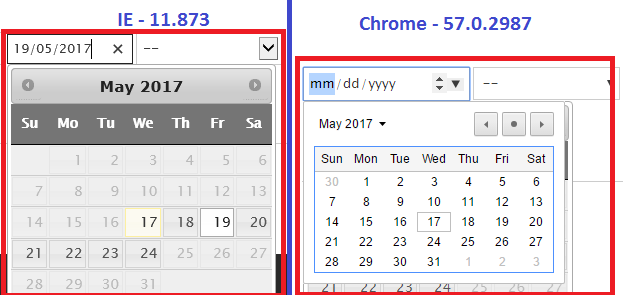
I have tested it both in IE-11 & Chrome 57. Please find the attached screenshot here.
IE 11 - Supports Default HTML Date format - YYYY-MM-DD
Chrome 57 - Supports Different Date format - MM-DD-YYYY
Even if we are not using the custom format ('#date_date_format' => 'd/m/Y'), date field is taking different format and different view of date popup based on browser which we are using to viewing.
In Drupal 8, We want to display the date field with uniform format and date popup for all the browsers. Please share your thoughts on this and guide us.
Comment #18
jonathanshawI suspect these are display formats that will depend on the browser's locale. This fiddle might help you explore this behavior: http://jsfiddle.net/to311fj5/
You may be able to avoid this if you don't use the core datetime (HTML5) element but instead a jquery datepicker. But please discuss that on Drupal Answers, not here in the Core issue queues.
Comment #19
vickey commentedThanks for your response. Let me try to use jquery datepicker, will share patch-code once its works fine. If any issues, i will post it on Drupal Answers.
Comment #20
skaughtComment #22
eojthebraveI'm trying to get this working, so that I can then update the documentation. Here's what I'm encountering thus far.
Trying an element like the following, which uses a custom date, and time, format, doesn't work.
When the form is submitted, during validation,
\Drupal\Core\Datetime\Element\Datetime::valueCallbackis called to get the value of the field, which in turn uses\Drupal\Component\Datetime\DateTimePlus::createFromFormat. createFromFormat in this case throws an exception here:This is because $test_time, and $time are not equal.
When you enter the value 4/3/1982 10:10 into the input field, it creates a valid DateTime object. Then, later in the method it runs this
$test_time = $date->format($format);to get the test time.$format = 'm/d/Y H:i'from the element above. And you end up with$time = '4/3/1982 10:10'and$test_time = '04/03/1982 10:10'because m, and d, and H, and i all allow for optional leading zeros. So, the check fails, and expection is thrown, and the element doesn't validate. But ... it really should.I think in addition to updating the documentation this problem should probably also be fixed.
Comment #24
liquidcms commentedIs any of this covered by documentation? Specifically, I had been trying to use a "date" form element (rather than "datetime" element) but seeing now that "date" element does not work correctly: #2944552: Documentation for #default_value in Date form element is incorrect.
Switching my element to "datetime" does work correctly, but, it displays time, which i do not want. Dying to know where documentation is so that I can disable time portion of field.
Comment #25
mpdonadio#24, oddly it's all on Datetime::processDatetime. See my comment on #6 about potentially moving this to a better place.
Comment #26
brianwagner commentedHiding the 'time' element is possible.
I struggled with this like liquidcms in #24, as I was using the 'date' form element.
Docs here show you need to:
- use the 'datetime' field
- specify '#date_date_element' as 'date'
- specify '#date_time_element' as 'none'
Also, this allows you to set default value, which requires a DrupalDateTime object. The 'date' field will not accept a default value.
Comment #28
tostinni commentedThank you @brianwagner for your comment it is very handy :-)
Comment #32
avpadernoComment #35
jaime@gingerrobot.com commentedComment #37
mstrelan commentedIs this still relevant now that #2791693: Remove sample date from date field error message and title attribute is in?
Comment #38
johnvYes, this still is a DX problem.
In the contrib field Office Hours, maintainer each time struggles with this, whenever there is an issue with the HTML5 setting. For a 'modern' UX element, persons expect the 'ampm' time format to be supported. If this si not the case, this must be perfectly clear. Also, as stated above, the developers machine may not support all OS-version in the field.
Comment #39
johnvTo add a note: especially ampm vs. 24-hours notation and with: #2811507: Date hour format is hard coded and can't be override
Comment #40
skaught#37
yes, this wider issue is still relevant. Core's date wow's are 'as tough to deal with as ever'
1 .as a dev working on client project. core date field/widgets lack in many many ways!!!!
2. as a user filling out date forms in drupal sites.. simple test 'all the date widgets' drupal provides, not just daterange (:
Comment #41
solideogloria commentedI agree that the datetime UI element needs work and that the am/pm format should be supported by default.
Comment #43
quietone commentedUpdating tags per Issue tags field and Issue tags -- special tags and for issue #3565085: Drupal core issue tag cleanup.