

Active
Project:
Paragraphs
Version:
8.x-1.x-dev
Component:
User interface
Priority:
Major
Category:
Feature request
Assigned:
Unassigned
Reporter:
Created:
22 Mar 2016 at 10:00 UTC
Updated:
27 Apr 2019 at 08:19 UTC
Jump to comment: Most recent, Most recent file


Comments
Comment #2
miro_dietikerAdding some related stuff.
Comment #3
miro_dietikerAnd more... ;-)
We might move the divi builder specific aspects into a sub issue and promote this to an overall meta.
Comment #4
miro_dietikerAnd adding some discussion reference when approaches about layout was discussed.
#2449347: Can we use layout_plugin module to provide different templates for paragraphs
Comment #5
jonathanshawThe situations when you want a rich visual UI are probably also situations where you want to be able to move forward things around a lot.
Comment #6
jonathanshawI've been wondering about this for a while. One example UI I have considered is Squarespace.
I see Squarespace as an example of a preview based builder, in that everything happens in a fairly faithful preview of the real page.
Divi builder on the other hand looks like an abstract builder, in that building happens on a kind of abstract Lego page.
Preview builders are great for editing, but they have a lot of trouble with complex structures. Nesting, and moving, both get awkward fast. Squarespace only manages to make a preview builder work by forcing structures to be simple.
Therefore paragraphs would need an abstract builder, and so divi builder is a great choice of example.
A big question is how to get some of the benefits of a preview builder as well.
Might it be possible to have 2 tabs in a widget: build and preview. Build would be the abstract builder, preview would be a full preview of the paragraphs field that used ipe to allow tweaking of placed paragraphs. Advantage of tabs would be so that we could toggle modes quickly. ??
Comment #7
yobottehg commentedI discussed this a bit with Miro yesterday at Drupal Meetup Basel.
The idea is really good. We could use layout_plugin for backend / frontend layout.
Here are some more scources for inspiration:
WP page builder
visual composer
themify
About the different paragraphs all these module ship with, we already started something like this:
wondrous paragraphs
Comment #8
jeroen.b commentedOr the Mailchimp builder.
I also discussed this with my boss. It would be best to split this in 2 parts:
Frontend editing: powered by Quickedit, as minimalistic as possible (something like Sir Trevor or something like Dries's recent blog.)
Backend editing: complex interface, something more like the Divi Builder
Comment #9
jonathanshawA lot of the complex stuff in creating a backend interface is managing the hierarchy, the moving, nesting, expanding, collapsing. I wonder if it would be worth using a toolset like jstree where the problems of managing hierachy have been solved for us.
I'm not saying that the UI should look like a tree, but rather that whatever the UI looks like, it has to solve tree-like hierarchy-interface problems so maybe there are other tools out there for this kind of hierarchy-interface problem that we can build on.
Comment #10
yobottehg commentedI did some more research and found 1 more very interesting approach which uses only FE editing ( you should try the demo )
beaver builder
About managing hierarchy... i looked into some free / open source layout builder for Wordpress and my eyes are literally bleeding right now. There's nothing we should inherit.
Comment #11
jonathanshawWow, that Beaver builder demo is amazing. It's surely very close to what we're dreaming of. Interestingly it's preview-based but does a fine job of handling complex hierarchy, so I was wrong about that.
Here are some key aspects from a Paragraphs perspective:
1) The standard interface is a preview, enhanced by contextual action buttons as you hover, with generous margins around paragraphs to keep things separated.
2) Editing a paragraph happens in a popover. This could be quick edit based, if quick edit can work on a node edit page?
3) Adding new paragraphs happens by selecting the paragraph you want and dragging it to its desired location. I'd suggest this should be reversed though, in the way that Squarespace and Dries's recent blog have it: hover in the desired location to bring up an add button, click the add button to pick your paragraph type.
4) There's a rich library of ready-defined paragraph types, including ones that use layout_plugin to create multi-column rows. These ready-defined paragraph types don't need custom code, we can go an enormously long way with Drupal fields, layout_plugin to create multi-column rows, and a module like field_group to create Paragraphs with lots of settings.
Comment #12
berdir@dawehner also suggested something similar to Medium, which is very minimalistic.
Comment #13
dawehnerFor a limited amount of usecases something like https://imgur.com/GytKlmV is quite a nice UI. The basic idea is that by default we have text paragraphs and no layout support. When hitting the + though, the user can select the paragraph type, like image / video etc.
Of course this would not solve the problem of having layouts, but at least for now, and for many usecases this could be totally enough.
Comment #14
miro_dietikerYeah that looks nice.
IMHO an "Add / +" button would be valuable in quickedit for all multi value fields.
Additionally, i also see this work when we add a layout aware paragraph. After nesting you will see a "+" for each field.
I think i would display the "+" more below the current item?
Comment #15
jonathanshawIn comments on Dries' "How to make Drupal Outside in" Kevin OLeary said:
Sounds like something that could be helpful here in one way or another.
Comment #16
miro_dietikerI have seen the invision UI of its dashboard today. It looks like something similar: sections with title and inside a few draggable paragraph types representing the elements / resource types it supports. The cool thing is the fast, dynamic, minimalistic UI for it.
Comment #17
miro_dietikerSee my blog post about the alternative UI topic:
http://www.md-systems.ch/en/blog/2016-05/the-future-of-paragraphs
For now, we have not enough resources to jump into this topic.
Lowering the priority to indicate that we want to first focus on:
Comment #18
zmove commentedHello,
I share the main idea to transform paragraphs into a powerfull page builder system, I even worked on my own implementation of it (can see a video here)
My module is very simple. It does the following things :
I will have 4 "Builder paragraphs type" : Section, Container, Row, Column (It's based on Bootstrap) and I plan to create the following "Content paragraphs type" : Image, Textarea, Icon, Form, Nodes, Views, Block, etc... the idea is to be able to render every Drupal entity + some basic things like image or textarea.
The main strength of that concept is that it would be very easy for drupal users to add their own "content paragraphs type" to extend the system, without the need of coding
The problem I have actually is that I'm learning Drupal 8 (it's hard) and even if I have something working actually, all things was created with the UI (paragraphs, fields, etc....). It will be difficult to me to programatically create all that things to just install the module and enjoy, but I would be happy to share the concept with a drupal 8 developper that would make it live in a module. Don't hesitate to contact me.
Alex
Comment #19
miro_dietiker@zmove thx for sharing the idea.
What is the definition of a "Section" and you also mention Container (not existing in video).
Why do you need these two levels of definition that allow/require to add more nesting?
Instead you could also only add just rows on top level.
If you say it's just about grouping attributes, i'm not sure a user understands the terminology.
I'm asking this because just now, finding proper names and definitions for the containers / sections wrapper levels is important.
Comment #20
ciss commentedRegarding sections: In our paragraphs bases layout builders we use sections to group rows together, e.g. to apply a common background or background image to them. (We also add section title fields to direct our editors toward a certain page content structure). An alternative to using sections would be dividers that are inserted between rows to create a new group (we did a similar thing for panels).
If nesting should be kept as low as possible then each field item must be able to store metadata. Scald does this for its atom reference field, which allowed us to implement gridlist.js and store size and position for each reference item.
Comment #21
miro_dietikerHow do you store that metadata thingy you present in the right column? All those all grouped fields?!
Comment #22
zmove commented@miro_dietiker
The section is the top level paragraphs that contain all the things. It's a full width element wrapped in a section tag (even if it's configurable). It will have some specific options like backgrounds images or videos. I took this idea from webflow (which I really like) that make you create section first before putting container, columns etc..., it's always a good idea to have a full width element that contain your rows and columns, that is the purpose of a section.
The container (which is not in the video you right but I already have them in my Drupal 7 test version of the concept) is basically a bootstrap container. It have the specific option to have class "container" or "container-fluid" based on the bootstrap requirement. It probably could be merged with rows to remove 1 level of nesting. Good point.
I didn't created row on top level because sometimes (to not say often), you need to have several rows in a more general wrapper, that's why I prefer to create a section first.
For the option panel you see at the end of the video, I created a doublefield (textarea) for each "paragraphs", the first field take a json to provide the options (in json editor format) and the second field take the result when you click on save button. So it's very easy to define your own set of options, just provide your own JSON as default value of the first textarea, no coding required.
I will continue to work on it and try to provide a demo to let you try the concept, but I think I'm really close to something very good. I don't believe in modules that create some default paragraphs (text, text + image, text + video etc....) cause the possibilities are endless and I prefer to work on a builder that can cover all the cases with default / generic paragraphs, even if it require some nesting.
Comment #23
jonathanshawI've noticed the same thing as @ciss when planning a page of paragraphs, and looking at typical modern landing page design patterns:
it's natural to want to have a top-level of containers that divide the page in rows, often with a different background color or image, and sometimes with a title.
I think "section" is a very natural term for this; it is a term that is naturally used for content, and typically these top-level containers have a meaning at the content level, they're not only technical layout structures.
Comment #24
ciss commented@miero_dietiker Presentational data would be stored serialized in a separate field column. Scald uses an "options" column for this purpose.
Although I like the idea of using JSON instead.
Comment #25
zmove commentedHi,
You can try the demo of my concept here. (login : demo / password : demo)
Once logged, you can return to the homepage, edit it, and play with the builder.
It's a very first snapshot. I will create a sandbox project if you think it can have a future.
Here is the different elements :
Builder element
Content element
Very basic at the moment, I just added Image and Textarea elements, but many others are planned, for example :
Options
Actually, most options are common to all elements (wrapper, id, classes, animations) but it's defined as a Json in a textarea attached to all paragraphs type so each different paragraphs can have it's own set of options.
Possible improvements
Actually, it works in edit mode only for all paragraphs cause the paragraphs module itself only show buttons for the first nesting level when you use the preview mode. See my issue that did not encounter some success... maybe you will understand the problem better after that demo, don't know if the paragraphs module needs to be patched or if I can do something in my module to allow that.
Another possible improvements would be to remove bootstrap dependance and make the concept compatible with others grid solutions like Foundation, but it's not in my roadmap actually.
I'm also looking for a way to group things. To be able to dissociate builder paragraphs from content paragraphs. Probably by adding a field in the paragraphs form where you can choose a category.
Alex
Comment #26
jonathanshaw#2753941: [Experimental] Create Outside In module MVP to provide block configuration in Off-Canvas tray and expand site edit mode is developing an off-canvas tray to allow configuring items while still previewing them. No code yet, but the "outside in" people seems to be sprinting with this.
Comment #27
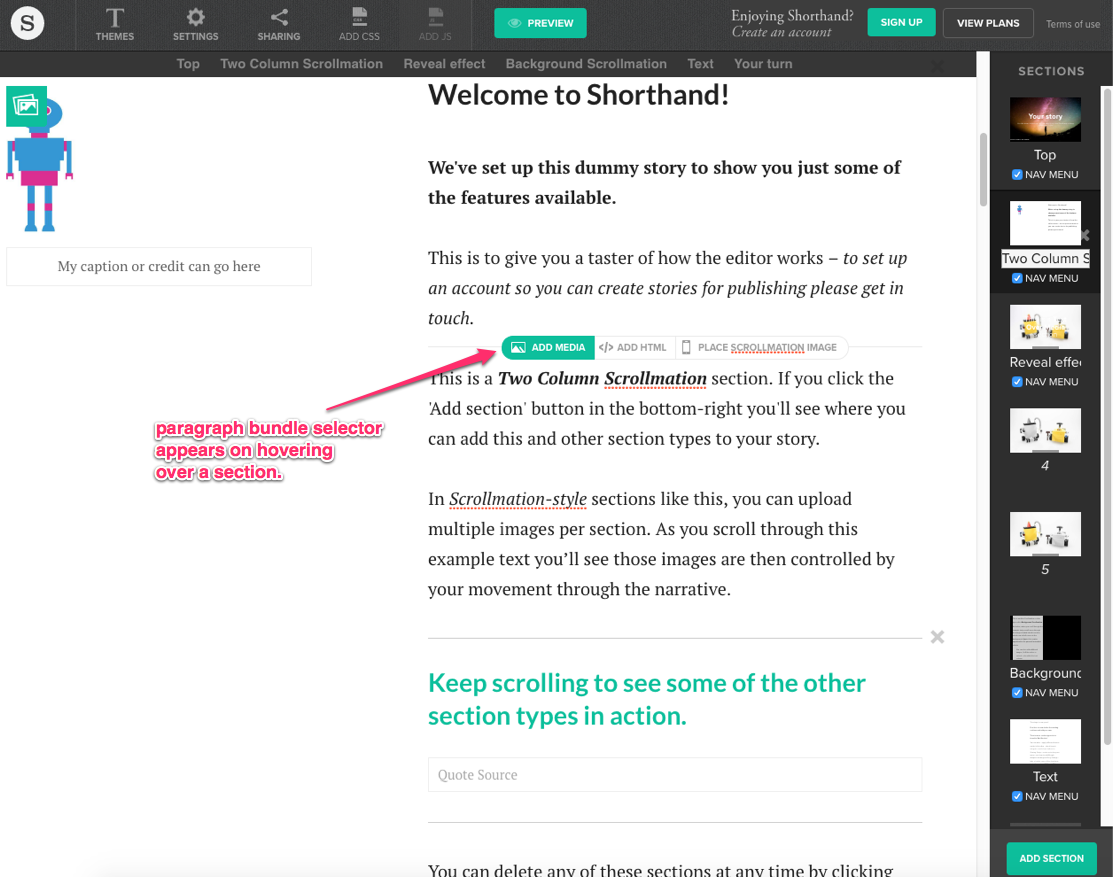
james.williamsI just bumped into another source for inspiration: Shorthand.
Here's a demo: https://app-demo.shorthand.com/ -- notice there's links to add types of content (probably correlating with paragraph bundles) when you hover over content within sections. (See annotated screenshot, but do go see the demo and play with it to really get a feel for the UI)
Comment #28
mdroste commentedMay be http://mobirise.com is another source for inspiration. It's a standalone desktop application based on content blocks with a 1:1 preview. Real Wysiwyg.
I'm in no relation to the developer of mobirise.
Comment #29
vollepeer commentedWe've been working on Geysir which introduces an "outside-in" approach for Paragraphs. It aims to optimise the Drupal user experience for non-technical users (authors) in general. https://www.drupal.org/project/geysir
Comment #30
simon georges commentedI was coming to this thread to mention http://innovastudio.com/content-builder.aspx, but it's already done...
I'm thinking this could be a great addition now that Outside-In is a thing ;-)
Comment #31
miro_dietiker@Simon great to have another collection of content "blocks". We are currently creating an overview of what we want to achieve.
@vollepeer It's great to see people build own solutions based on Paragraphs.
What i don't understand is, we are working on Paragraphs since almost 9 months now for full time. We have initiated workshops, invited community, developed a common sense strategy, called for sprinting collaboration, joined camps, .... We have discussed priorities and defined a strategy for Paragraphs and are actively working on that.
Recently instead, it seems people prefer to build own solutions instead of collaborating on Paragraphs itself. IMHO this is a waste of resources.
Just now we took a rest before pushing Paragraphs forward with the next huge leap. Because we felt revision management is as important as the creation experience itself. Thus, we are working on a stable release for Diff.
https://www.drupal.org/project/diff/releases/8.x-1.0-alpha5
Right after, we will work on Paragraphs itself and first focus on backend editing experience, possibly contextual editing, and then building the central repository of paragraphs types, to then define how the official advanced Paragraphs UI will look like. Again backend editing first, then contextual, possibly quickedit, and / or alternative UI / advanced frontend editing last.
But i'm pretty sure there will be incompatibilities with solutions like Geysir at some point.
Comment #32
kevinquillen commented@zmove, that is a fascinating demo. This is sort of the concept I saw in my head - although agnostic enough to support any grid system. Perhaps a configuration screen that lets you define row, column, section, and grid class names, so that when you use them they get injected as classes to the template renderings.
How much lift would it be to make that edit mode exist on the front end, so you might be able to see what you're making as you are configuring it? Just a thought.
Comment #33
kevinquillen commentedCraftCMS also has something similar with its Matrix feature: https://craftcms.com/features/matrix
Comment #34
kevinquillen commentedIf this isn't a paragraph, what is it exactly?
Comment #35
miro_dietiker@kevinquillen We will need to define how much we work with nesting of containers and how much power we put into complex fields.
For instance, here are two possibilities for a slideshow with 50% width (2 pages with an image each) on the left with some text on the right 50%
A full normalised 5 level setup:
- A container introducing a grid system, with 12 columns
-- A container (grid column) with a width of 6 column
--- A container defining a slideshow
---- A container defining a slide 1
----- A slide image 1
---- A container defining a slide 2
----- A slide image 2
-- A container (grid column) with a width of 6 column
--- A text element
In this setup, each container has one purpose. It either introduces a grid system, or a grid column, or a slideshow, or a slide.
It is though the way of maximum modularity. And implementation is easy.
To improve UX, we need special patterns and optimisations that allow simple creation of those containers and possibly hide some levels of nesting when editing content.
Alternatively, we can try putting more power into fields and implicitly deal with a grid.
Say there is a global 12col grid in place:
-A container defining a slideshow
->with a layout grid field defining width=6col=50%
--An image
-->Implicitly becoming a slide because it is direct child
--An image
- A text paragraph
-> with a layout grid field defining width=6col=50%
OK, we still need another level to establish rows or cover more complex slides, but we just dropped most levels.
This however is a challenging situation since layout grid fields need to be present on virtually any paragraph type.
Comment #36
miro_dietikerComment #37
kevinquillen commentedWell I am more thinking that the container defines only it's grid setting. I don't think you would need containers per slideshow, that would just be left to the markup of the slideshow paragraph by the developer.
Ideally, you would be adding a row, and optionally column. In each column lives a paragraph component. I think that demo video above is pretty close to what you'd want.
Comment #38
zmove commentedI see that this issue have some interesting new updated.
You probably noticed that my demo is no longer available, I made some big changes and it still need some work before being available again.
In fact, when I created the demo, I had only one big module that handle all my paragraphs types (row, columns, image, textarea...everything). I'm splitting this into several submodules. It will be organized like that :
- Paragraphs Builder > the main module to build grid style landing page, it contains section, row and columns paragraphs
- Paragraphs Builder Group > add another paragraph type named "group" that allow to group several paragraphs into one
- Paragraphs Builder Textarea > Add a textarea
- Paragraphs Builder Image > Add an image
- Paragraphs Builder Slider > Add a slider
- etc.... you could have one submodule for each different kind of content you want to provide (video, form, view, block etc....) all things that field API can provide !
@kevinquillen : It would be totally possible to have a paragraphs builder bootstrap submodule, paragraps builder foundation module etc... to support any grid system.
All that paragraphs have 2 fields, 1 for the content (textarea, image, or nested paragraphs), and 1 for the configuration (in a textarea doublefield, the first field contain the json configuration object, the second contains the result, I use json editor plugin to convert my json object to a configuration form on the right panel, as you can see on the video)
If the core paragraphs team is interested to get my code to see how it works concretely, I would be happy to share it, just PM me.
Actually there are 3 missing things that seems critical to me :
- A way to save and reuse previously made paragraphs, maybe there are some possibilities with replicate module, but I didn't investigate into it
- A way to edit / delete single paragraphs item, there is the geysir module possibility but I would prever to use something provided by core (contextual links or quick edit or both)
- A way to move a paragraphs in another paragraphs, actually you can just reorder sibilling paragraphs, but not change the hierarchy with drag & drop
Alex
Comment #39
kevinquillen commentedHere is another video... even though this is Drupal 7, how is it being done here?
http://preview.codecanyon.net/item/drupal-drag-drop-builder/full_screen_...
Comment #40
kevinquillen commentedHere is another with the gutter tray, where all potential components are listed:
http://innovastudio.com/builderdemo/example1.html
Comment #41
johnchquewow last example looks nice, we could even use the idea to place all the components in the outside in tray.
Comment #42
kevinquillen commentedI agree, the tray could simply list all paragraphs, represented by an image.
Although, this eliminates the "paragraphs as row/columns" approach, but you are then not confined with a paragraph in a paragraph, unable to 'move' it to another paragraph or outside of a paragraph entirely.
But yeah, implementing a 'complete' solution like that is where I would want to be. Paragraph fields would have default values, dragging from the tray to the column would perform "add new paragraph" function like a normal node form.
Comment #43
miro_dietikerYeah i also like the visual selection it offers for the paragraphs to add.
@Simon also already pointed at this solution in #30.
This kind of "add" functionality could be combined with slightly improved quick edit.
People who are interested in joining a sprint (or two..) around advanced paragraphs based content creation experience, plz connect. I'm starting to work on the details of our masterplan. :-)
Comment #44
kevinquillen commentedSomeone posted a new Paragraphs module: https://www.drupal.org/project/paragraphs_browser
Comment #45
zmove commented@kevinquillen : Nice find, I wanted to do something like that in my builder module to group paragraphs by type. I think I will add a dependency on that module ^^
Comment #46
kevinquillen commentedYet another example... ignore the fact that it is built into CKEditor. Click on the purple B.
http://js.plus/products/bootstrap-editor/demo/ckeditor
Comment #47
miro_dietiker@kevinquillen This is a very interesting example as we have CKEditor in Core and we need to decide at least how to integrate with it.
Our frontend like editing could be heavily based on CKEditor if it is offering a satisfying experience.
Comment #48
drobnjak commentedHere are the issues that are contributing UX improvements we are currently working on and examples from them that need to be added to this discussion.
by @gmclelland
Concepts similar to the current idea of the issue, improved Add paragraph button and opening overlay to add new element/item. https://www.modmore.com/contentblocks/ and there is a demo at http://demo.modmore.com/manager/?a=resource/update&id=1
by @zerolab
Wagtail (a Django-based CMS) has a similar concept to Paragraphs (called StreamField). https://www.youtube.com/watch?v=oUJNweMWwVQ video explains it and has some of the UI interactions, most importantly the inline add button which appears when going between fields. It also has icons that developers can set in code and they appear when the list of choices is shown.
Comment #49
patrickroma commented@zmove,
Is your Builder Module available for testing purpose somewhere?
Comment #50
sgurlt commentedWe are using Paragraph container a lot to build grid systems or for example slide shows of what ever.
For our customers it is always complex to understand the wrapping of containers when we have more then two layers.
For example:
- Grid 50/50 - 1
-- Multi Slider Container 1
--- Video Slide Element
--- Image Slide Element
--- Teaser of some content
- Grid 50/50 - 2
-- Multi Slider Container 2
--- ...
We very often get the question then, why it is not possible to drag&drop content from Multi Slider Container 1 to Multi Slider Container 2.
Is there anything out there to handle this more nicely? :)
Comment #51
primsi commented@sgurlt Contribution in form of testing/reviewing/providing feedback is wellcome #2825575: Introduce a Drag & Drop Mode :)
Comment #52
sgurlt commented@Primsi, ah that is awesome, very nice ! :)
Will do my best to support you with it.
Comment #53
miro_dietikerI just stumbled upon the Medium module that provides a medium like UI. Possibly worth looking at how it's built.
https://www.drupal.org/project/medium
Comment #54
kevinquillen commentedFound another decent example, check the demos on ApostropheCMS: http://apostrophecms.org/
Comment #55
jepster_How about a decision for frontend improvement and concrete concept inside an issue for implementation? Seems like we are in an endless discussion here and a minimum improvement like "adding paragraphs between existing paragraphs on first level" is not implemented yet.
Comment #56
lyalyuk commentedHere is very similar module https://www.drupal.org/project/widget_engine
Comment #57
jepster_Well, but it does not provide the feature, which is mentioned in this issue.
Comment #58
miro_dietiker@Peter we are improving Paragraphs editing currently and cleaning the backend experience. 80% of our UI proposals from about 1 year ago have been implemented and we need another iteration of specification to define next steps.
The job of this issue is exactly to collect what is coming up. The two topics (polishing backend UX VS frontend editing) can stay completely separate discussions.
Someone started frontend editing prototype recently... need to find the sandbox again...
IMHO the key question to answer is here what is a healthy balance between
* Using core patterns such as Quickedit, limitations
* Using outside-in / settings tray as a frontend edit pattern
* Consider complete edit decoupling
* Consider available resources skills
* Consider amount of money / resources available
IMHO it's about finding a sweet spot in the the balance is more important than a standalone proposal that looks nice and seems to be the perfect thing...
I'll investigate these topics in the coming weeks.
Comment #59
miro_dietikerCreated an issue to investigate how we use the settings tray:
#2942364: [META] Investigate adoption of outside-in settings tray
Comment #60
strykaizerThe sandbox @miro_dietiker is talking about in #58 is probably #2913857: Managing paragraphs in the frontend, available on github.
Comment #61
vollepeer commentedWe have gained some experience in this regard when working on Geysir (https://www.drupal.org/project/geysir/). Maybe we can exchange knowledge and discuss scope etc?
Comment #62
shaisamuel commentedI found glazed-builder, which looks like DIVI for Drupal. Didn't yet try it...
Comment #63
shaisamuel commentedI found glazed-builder, which looks like DIVI for Drupal. Didn't yet try it...
Comment #64
jurriaanroelofs commentedHello, this is Jurriaan from SooperThemes.com. Glazed Builder is indeed the Drupal equivalent of Divi builder, Visual Composer, Elementor, Beaver Builder, etc.
I'm releasing the 8.x-1.0 version Tuesday and I hope the product can be as valuable to the Drupal community as the WP builders are to WP users.
Currently the module is only available for paid subscribers and this is needed because I work on this full time (more like double full time) and rely solely on sooperthemes for income. By now the WordPress market has evolved to the point that Elementor has been able to attract enough capital to first develop their product and then offer it for free, with a paid "pro" option. I hope I can do the same with Sooperthemes when the market circumstances permit this.
Currently the Drupal market for my product is very small, I think because people are unaware a page builder exists for Drupal and is actually more powerful (views integration, Drupal blocks etc.) in some ways than other page builders.
Let me know if you have any questions about Glazed Builder, I just found this issue in my referrals and wanted to check in. You can reach me via the d.o. contact form or here: https://www.sooperthemes.com/contact
oh and you can try an admin demo for free, I won't post the link here because that feels kind of inappropriate in this issue queue but you can find the link on the product page that the user above me posted.
Comment #65
ckngHave tried the Glazed Builder demo some time ago. IMO the Glazed Builder is non-structured and having all the markup is a no-go for paragraphs. The first thing when using Paragraphs is to utilize its building blocks to have structure data. Glazed Builder would be more suitable for traditional single body field where you don't care about the data structure and/or markup in the content. So Glazed Builder and Paragrpahs are heading two totally different directions.
An ideal builder for paragraphs would be a structured layout builder, along the line of what Bricks is doing OR an advanced version of it. However, could not get it to work, so far.
Comment #66
ckngSomething along this?
https://events.drupal.org/nashville2018/sessions/build-banging-sites-bpm...
Comment #67
miro_dietikerI created a BoF about "A next generation UI for Paragraphs" at Drupal Europe.
https://www.drupaleurope.org/bof/next-generation-ui-paragraphs
See you on thursday 11:30-12:15!
Also promoting to major due to the recent development.
There are multiple alternative solutions and core evolved.
It's time to figure out how Paragraphs support frontend editing with Paragraphs.
Comment #68
RAFA3L commentedHello, I have had working on this for a long time and this is what I achieved for now in D7.
This is the basic structure
paragraph->box(paragraph)->content (image,text,video,forms,widgets)
Each paragraph and box can be edited in a float window, and the changes are visible in realtime before save.
These are the options:
Background color and image
Background Fx (fixed, parallax, pattern)
Background overlay (darken, lighten)
Margins and paddings
Border radius
Box shadow
Number of colums
Layout (boxed, wide)
Text align
Dividers
Custom CSS field
Custom classes
All is responsive by default but i'm working to make the options work per media queries.
@miro_dietiker the event will by streamed?
Comment #69
miro_dietikerThere are so many different approaches existing already.
This session provided some nice overview about existing solutions / prototypes in Drupal that provide a more "enterprise level editorial experience":
https://www.drupaleurope.org/session/creating-enterprise-level-editorial...
Dries stated in the Driesnote that the Drupal Core MVP for a React based solution that replaces the Drupal backend - and showed a video of it as well.
So it seems this will not bring us into the domain of Frontend editing any soon.
https://www.drupaleurope.org/session/driesnote
Comment #70
miro_dietikerPulling in from #3039121: paragraph front end UI edit capabilities much needed
@laurencefass As a minimum for more complex sites paragraph would benefit from a context sensitive edit button top right hand corner similar to blocks, views and entities... Even better would be integration with settings_tray for a simplified interface available as slide-in menu with link to full page reload to edit page.
In fact that's about what we discussed recently as a potential next mielstone. We will need to update the summary and create specific tasks. I plan to setup a larger initiative and maybe dedicated Sprints for this over the year. Contact me if you are interested in contribution through participation or funding.
Comment #71
batkorHi guys!
I ran into a new native js editor.
This github
https://github.com/codex-team/editor.js
This CodePen example:
https://codepen.io/batkor/pen/dLaeqx?editors=1011
Documentation:
https://editorjs.io/getting-started
Screenshot
What do you think?