

Closed (fixed)
Project:
Administration menu
Version:
7.x-3.x-dev
Component:
CSS / Browser Support
Priority:
Major
Category:
Bug report
Assigned:
Unassigned
Reporter:
Created:
20 Oct 2014 at 19:16 UTC
Updated:
1 Aug 2018 at 18:09 UTC
Jump to comment: Most recent, Most recent file


Comments
Comment #1
sunfire-design commentedHi,
i have the same issue in FF34.
I think the problem, isn't the z-index.
It's the opacity value in #admin-menu .dropdown li li.
After disabling, the menu the subsubmenus are visible.
Comment #2
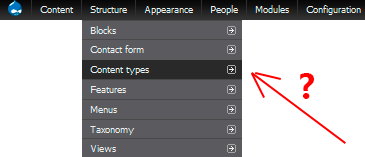
jonnyhocks commentedExperiencing this on Firefox Developer Edition on Windows. Same as the screenshot provided in OP
Comment #3
eiriksmsame here. I am no css guru, but would be glad to provide a patch if anyone has found the fix for this.
Comment #4
eyal shalevThere are two possibilities to solve this problem:
1. Change the "#admin-menu .dropdown li li" rule to be more specific
2. Remove the opacity property completely (I can't see the purpose of it anyway)
Comment #5
eyal shalevSuggested patch for the first option.
Note this patch is from version 7.x-3.0-rc4
Comment #6
eyal shalevComment #7
gngn commentedI'm experiencing amost the same with FF 34.0 on Windoze.
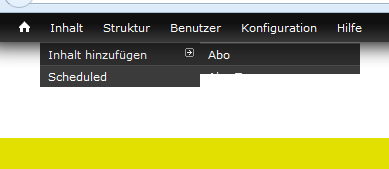
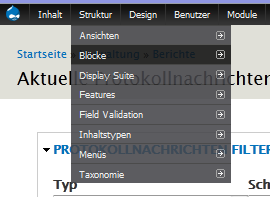
It does not look exactly like the provided screenshot - in my case the tertiary menu does not show at all.
In my screenshot I tried to open the tertiary menu for blocks (german "Blöcke").
The patch provided in #5 worked for me.
I do not care, that it's loosing the menu's transparency, but some people might?
My css knowledge stops at filter and opacity, so I just fuddled around a bit.
Found setting the opacity to 1 in "#admin-menu .dropdown li li" (and changing nothing else) solved the problem for me.
First setting "background" is the fallback for the following "background-color" via rgba, isn't it?
And "filter" is IE8 thing to set opacity?
And is there some css style guide to put "background" and "background-color" in one line?
I think it looks ugly that way ;)
Comment #8
eyal shalev@gngn,
The admin menu is only shown in the back end (Usually only to developers). You can either remove the opacity / filter settings completely or you can change the background to rgba. The only browser not supporting rgba is IE8 and I'm guessing you aren't using it.
If you want to learn more about css I'm suggesting W3Schools
Comment #9
mobil_maniak commentedYes, its about opacity tag. Thx
Resolved for: Firefox 34+ , Firefox Developer edition 34+ (currently 35.02a)
Add css to your theme / system theme:
Comment #10
ofry commentedCosmetic reroll of patch #5 (added one line break)
Comment #11
ofry commentedComment #12
roball commentedA better workaround is to add the following custom CSS to your theme:
This does not remove the transparency.
Comment #13
roball commentedAnd the corresponding code for the "Administration menu" module 6.x-1.8 is:
Comment #14
eyal shalev@roball,
There is no need to declare opacity: 1 if there was no opacity: 0.88 to override.
If you don't set a fallback a developer using IE8 (As if) will see no background on the menu items.
Comment #15
roball commentedYes, if there was no
opacity: 0.88from the module's CSS to override, then you don't needopacity: 1; in your own CSS. The workaround was intended without changing module code (thus it's just a workaround).And, a developer won't use IE8 ;-)
Comment #16
roball commentedComment #17
arx-e commentedI have observed the same issue in Firefox 34. and applying the changes proposed in the patch in #10 solved them for me.
It seems like a Firefox bug with list elements and opacity: whenever a li has opacity less than 1, its children are not displayed whatever their opacity is.
Comment #18
roball commentedThis also seems like a bug of FF34 to me. Thus changing this issue's Category and Title.
Comment #19
marcmueller commentedRight now, I'm trying to track down a problem that occurs for the editor of one of my pages, please see the screenshot (admin-menu-cutoff.png (35.05 KB)) attached. Is this the same problem as described in #1?
Comment #20
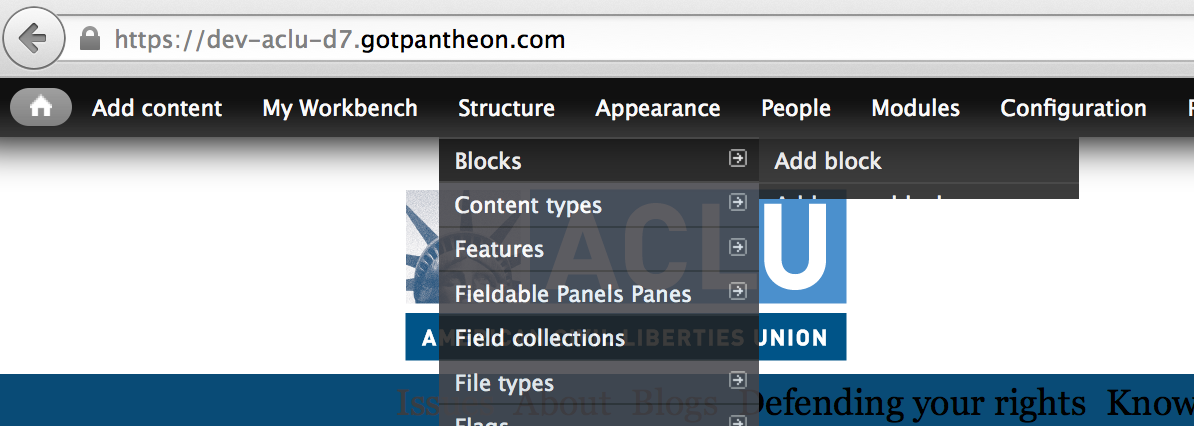
dalin@marcmueller Yes your screenshot is what this ticket is about.
I confirm that the patch in #10 works. This is RTBC.
Comment #21
gngn commentedPatch in #10 worked for me too.
Comment #22
bohemier commentedPatch #10 worked for me. Thanks for solving this mystery :) Hoping to see it merged
Comment #23
dd 85 commentedHelped me ideally patch of page https://www.drupal.org/node/2387761#comment-9408075
The patch is successfully operating at the same time there is much less change.
Comment #24
nicorac commentedI'm still at FF 33.1 because I don't want to patch all of my sites CSS.
#10 works for me too, please include it in dev.
Comment #25
gagarine commentedPatch #10 fixes the issue but really I think we should move away of "transparency effect".
Comment #26
nicorac commentedI agree, admins could safely skip "bells and whistles" ;)
I also think priority should be raised because on latest FF the module is pretty unusable (especially for new users ignoring 2nd level menu existence).
Comment #27
bohemier commentedI also agree. This module is more about efficiency than eye candy and with the release of FF 34 it has become broken for FF users...
Comment #28
aprioul commentedYou can just write this to fix
Comment #29
joshuautley commented#10 worked for me. I had tried #28 but it failed after a minute.
Comment #30
dd 85 commentedWORKS GREAT!
Comment #31
joshuautley commentedNote when viewing admin theme with Overlay the admin menu works fine with no patch or css override. Not sure if this will help in determining the best Patch to resolve the issue but I thought I'd point it out.
Comment #32
kingfisher64 commented#10 worked so nice to see those options again. Was driving me nuts!
Comment #33
manmohandream commented#10 work for me too. Thanks ofry.....
Comment #34
KerMaAnne commented#10 worked fine for me. Thanks
Comment #35
cabplan commentedSo #30 worked but only on my homepage for the admin toolbar, when I go to any admin page, like Content, all the menus have that same issue. I cleared my admin toolbar cache and the theme cache, actually all cache, still have this issue on admin pages specifically, does anyone know a fix for this?
Comment #36
bohemier commentedDid you apply the fix in your theme or in admin menu? With Overlay disabled, applying it in your theme will not fix the admin theme unless you fix both the front and the admin theme. That's why it's better to patch the module...
Comment #37
plazik commented#28 works for me. Thanks!
Comment #38
ayalon commentedPlease merge #10 and push an new dev version. Thanks!
Comment #39
jeffschuler#10 is working for me on FF 34 for Mac.
#30 did not work for me. Couldn't see third-level items at all.
Comment #40
dd 85 commentedjeffschuler Specify which file did change.
Comment #41
kappaluppa commentedIf you can't get to the patch right away, I found the problem when away when I unchecked "Keep menu at top of page"
Comment #42
selwynpolit commentedNice call kappaluppa. That works for me.
For those who need more detail, navigate to admin/config/administration/admin_menu and uncheck "Keep menu at top of page"
Comment #43
tommyk commentedFor D7 sites I fixed the problem by unchecking "Use hardware acceleration when available" in Firefox settings: Advanced > General.
No luck with that on D6.
Comment #44
BlaF commentedThx TommyK, #43 works fine for me (FF34.0.5, OSX, D7 website.) Maybe a problem to report to Mozilla?
Comment #45
tritof commentedThanks TommyK. #43 worked for me. Config : W8/FF34/D7.
Comment #46
slippast commentedI used #25 to fix this issue.
I happen to agree that the transparency adds nothing to the functionality. From a usability standpoint the menus are easier to read with that turned off.
Thanks everyone.
Comment #47
mvonfrie commentedPatch in #10 worked for me too.
Comment #48
kipbuis commentedHi would firefox 34 be updating their software (are they even aware of this bug?) or would I have to patch my drupal to fix this? Thanks.
Comment #49
criznach commented#10 works for me. RTBC IMO. Thanks.
Comment #50
Sundevyl commentedI, too, was having difficulty with the tertiary menu items displaying properly when using 7.x-3.0-rc4. I just installed and tested 7.x-3.x-dev in Firefox 34 on my Windows 7 machine. And we may still have a problem.
I find that the problem is fixed as long as the option "Keep menu at top of page" is not checked. When this option is checked, however, the tertiary menu items do not display properly.
Additionally, I find that the tertiary menus for only the first three "secondary" menu items display properly when "top of page" option is checked and the "shortcut" plugin option is also checked. When the "shortcut" plugin option is NOT checked (and the "top of page" option is still checked), the only portion of the tertiary menu items that display is that which would have been over the "shortcuts" bar (about the first 1.5 menu items of the tertiary menu). This last appears visually the same as the screenshot from dalin which he posted when first reported the problem in October and that of marcmueller which he posted 11 days ago.
I'm a site builder, not a programmer/developer. But hopefully this will point you "fixers" in the right direction. :)
Comment #51
langweer commentedHad the same issue. The patch from #10 works fine for me. Thanks!
Comment #52
johaziel#10 works for me too.
Thanks !
Comment #53
klonosBoth removing opacity (solutions from Comment #10 and #2387761: Level three menu items not autoexpanding with Firefox 34) as well as the simple
float: none;from Comment #28 fixed this for me (I do not use overlay and could not care any less for the transparency effect).Please commit any of these and be done with it.
Comment #54
pasqualleComment #55
aleksandar.boros.gyevi commentedHi I'm administrator of many drupal site and it will be a big job to apply patch on every site.
I install https://addons.mozilla.org/en-US/firefox/addon/stylish/ add-on and add
and it works for all of the sites.
Comment #56
Sundevyl commentedMy apologies to all. I am new to dealing with Drupal issues, and had assumed this had been committed to the latest Dev version, which had an update of today. I have read through the documentation I could find about dealing with issue queues, but am still having trouble determining when a fix to a problem has been committed. If anyone could direct me to the correct documentation on the subject, I would appreciate it.
Comment #57
ofry commentedHuh. First way - via git log. Because log messages usually contain issue number in queue.
Next. You can see which issue was recently set to "Fixed", etc...
Comment #58
joachim commented@Sundevyl: see the handbook page on issue status: https://www.drupal.org/node/156119
Comment #59
Konstantin Komelin commentedThis is one of the hottest issues I've ever seen and I vote to raise this issue priority.
I wonder what if Mozilla changes FF behavior again? Maybe it's a bug on their side?
Anyway, I tend to agree with those who think that opacity is redundant.
Thanks,
Konstantin
Comment #60
Sundevyl commented@joachim: thanks for the heads up. Helped a lot.
Comment #61
Konstantin Komelin commentedComment #62
cptX commentedCode for Drupal 6:
Replace line:
#admin-menu li li { width: 160px; background: #202020; filter:Alpha(opacity=88); opacity: 0.88; }With line:
#admin-menu li li { width: 160px; background: #202020; background-color: rgba(69,69,74, 0.88); }Comment #63
kipbuis commentedHi any hope this will be fixed in a future Firefox release? Anyone wanna assist? Thanks!
Comment #64
joachim commentedThere's a lot of crosstalk on this thread, but patch #10 works for me, and AFAICT that's the one that's RTBC.
Could people posting suggested fixes please post proper patches rather than line-by-line descriptions of changes?
Comment #65
muranod commentedI'll have to try the patch. Unchecking "keep menu on top" works for Firefox, but Chrome then shows it at the bottom of the page and many of the items are cut off.
Comment #66
Konstantin Komelin commentedTested #10 on the latest FF, Chrome, Opera and IE, moreover, on IE 8 compatibility mode. It works like a charm without noticeable changes in appearance. So I confirm RTBC.
Comment #67
nicorac commented#10 is already a patch, RTBC.
I asked Dave to take a look here and include that patch ASAP but still no answer.
Comment #68
pvasili commentedСorrect solution
Comment #71
pvasili commentedComment #73
nicorac commented@pvasili: your patch seems too invasive to me.
Rendeing issue is related to transparency, so removing it also brings better-reading menu items (a thing I already need on some of my themes).
Also, why did you change issue priority?
For FF users this is a show-stopper that makes the module pretty unusable (and make it seem a poor-quality one to newcomers).
Comment #74
plazik commentedPatch from #28. It's simply than others patches.
Patch from #10 is using
rgbacolor which doesn't work in IE8 http://caniuse.com/#search=rgba.See also Drupal Browser requirements https://www.drupal.org/node/61509.
Comment #75
Konstantin Komelin commentedGuys, are you kidding? Why don't you like #10? At least one reason?
Comment #76
joachim commented> Could people posting suggested fixes please post proper patches rather than line-by-line descriptions of changes?
I should have also said: please explain why your patch is a better solution than previous ones.
This is not going to get fixed any time soon at this rate. Project maintainers need a clear consensus on which patch is the right fix.
Comment #77
TuMMa commentedI'm using Firefox 34.0.5 and #10 solution works perfectly for me, thx!
Comment #78
plazik commentedPatch from #10 is using
rgbacolor which doesn't work in IE8 http://caniuse.com/#search=rgba.See also Browser requirements https://www.drupal.org/node/61509.
Comment #79
xaffimarc commentedThis can be fixed quickly in the CMS by turning off " Keep menu at top of page" in : "/admin/config/administration/admin_menu"
There is a minor loss of functionality (the menu does not scroll with you anymore) but it doesn't really effect me, and fixes the issue without code. Try it as a short term fix until they new version is released.
xaffimarc
Comment #80
markusa commented#10 works great for me. I'm managing over 20 sites, with this solution working for every one!
Comment #81
Konstantin Komelin commented@Plazik, you're right, rgba is CSS3 feature which is not supported by IE8. We should support this legacy browser for D7 if the documentation says that or change requirements (It's almost impossible). So let's consider your solution as a potential candidate.
@xaffimarc, make sure you read comments above. Your solution was suggested at least two times. And it causes loss of functionality. We're choosing between correct solutions here.
Comment #82
xaffimarc commented@konstantin.komelin Comments appreciated
Comment #83
joachim commentedPatch #74 works for me too.
@Plazik: could you maybe edit the comment that patch is attached with your reasons given further down, so it's clearer?
> We should support this legacy browser for D7 if the documentation says that
It could be argued that since admin_menu is intended for developers, we're outside of the standard D7 browser support. And that no sane developer is using IE8 (or IE at all!).
But given that #74 works and is claimed to be compatible with IE8, it seems that it doesn't hurt to pick the fix that supports it.
Comment #84
Konstantin Komelin commentedJust tested #74 on FF, Chrome, Opera, IE11, IE8 compatibility mode. It works fine.
Comment #85
plazik commented@joachim, I've edited my comment.
Many users use this module as a alternative for Toolbar module and not for developing.
Comment #86
roball commentedSo let's agree that patch from #74 is the recommended fix. It does not make sense to re-post other workarounds here, since we have a suggested fix.
Comment #87
BigMike commentedNumber 9 fixed it for me. Thank you so much for everyone's help!
For my D6.34 and Admin Menu 6.x-1.8, it was line 27 of /admin_menu/admin_menu.css.
Regards,
BigMike
Edit: Sorry I had no clue how many replies there were, just found the first suggestion that worked and moved on.
Comment #88
ladybug_3777 commentedI can confirm that patch #74 worked for me
Confirmed to fix FF34 and FF35(beta). It also did NOT create any issues for me in IE10 or Google Chrome 38.
Comment #89
dave reidI've tested this in Firefox 34 and cannot reproduce this error. I know that several people have RTBC'd this but I'm hesitant to commit with it appearing to be not an issue with the current 7.x-3.x-dev code.
Comment #90
dave reidIf this is no longer related to Firefox 34, or only happens under certain conditions, then we need the issue summary updated urgently.
Comment #91
joachim commentedI am still getting this problem on Firefox 34 on OS X 10.6, on all of my Drupal sites, both live and dev environments.
Comment #92
dave reidComment #93
markusa commentedI sure hope this fix gets into a release, because without a patch, admin_menu is basically broken for firefox users
Comment #94
dave reidOk, so this is reproduce-able for Firefox 34 on Mac, not Linux. An issue summary specifying browser version and operating system would have been significantly more helpful for maintainers.
Comment #95
dave reidComment #96
roball commentedChanging the title to reflect the problem has been reported to occur on Windows and OS X operating systems. Linux has been reported to be *not* affected.
Comment #97
biarr commentedPatch #74 works fine for me in FF34.0.5
Comment #98
nicorac commented1-line patch #74 works for me too, FF34.0.5 on Win7-x64.
Comment #99
eelkeblokMay I be so bold as to set this to RTBC? I am using #10 in production, but several people now have reported #74 to work correctly. The confusion reported by Dave Reid in #89 has been cleared up to.
Comment #100
ayalon commentedFucking Firefox... I told every customer to user Firefox. Now I had to patch a zillion drupal sites... :-/
Reviewed +1 #74. I prefer #74 over #10
Comment #101
ladybug_3777 commentedI can also confirm that my issue was related to the Windows OS and FF 34. It is also an issue on Windows with FF 35 (beta channel). #74 fixed both for me.
Comment #102
Perseids commented#10 works fine. Nightmare lost all morning trying to figure out this after FF update..
Comment #103
Konstantin Komelin commentedUpdated issue summary so that it reflects initial problem and our progress.
Comment #104
altrugon commentedIt seems that nobody has noticed it but this is also a bug on Firefox Developer Edition. And yes, #10 fix it on FFDeEd too.
Comment #105
Konstantin Komelin commentedComment #106
Konstantin Komelin commented@altrugon It just means that you didn't read comments above, i.e. #2 and #86. But thanks, I added FF DevEd to the issue summary.
Comment #107
langweer commentedDoes it need another confirmation? #74 solves it for FF 34.0.5 on MAC OS.
Thanks to all taking care here!
Comment #108
ofry commentedOK. Patch #74 solves my problem too :) Windows 8.1, Firefox 34.0.5
Comment #109
nicorac commented#74 is RTBC for me.
Meanwhile I added Stylish plugin to my FF (see #55) to fix all of my sites.
Comment #110
dd 85 commentedVote for Patch # 74 written based on # 28 and # 30.
Patch # 74 works fine in Firefox 34.0, Chrome 39.0, IE 8.0-11.0, Opera 26.0
Comment #113
dave reidOk committed #74 to 8.x-3.x and 7.x-3.x. According to #2389227: Correctly display tertiary menu list items in Firefox 34+ Drupal 6 this would also need fixing for Drupal 6. Let's find the appropriate backport patch here.
Comment #114
roball commentedThank you for committing the fix to 7.x-3.x and releasing 7.x-3.0-rc5. Working perfectly.
Comment #115
roball commentedAttached is the backported patch against the 6.x-1.x branch.
Comment #116
blacklabel_tom commentedComment #117
blacklabel_tom commentedHi,
The patch #115 in works perfectly for me on FF 34.0
Cheers
Tom
Comment #118
yan commented#115 solved the problem for me in Drupal 6, too.
Comment #119
reg commentedComment #120
dave reidThis was not reproducible on Linux with Firefox 34. Unless you're confirming that it was?
Comment #121
reg commentedIt was an issue on my linux box.
Comment #122
jakew commentedDrupal 6 - Firefox 34 - Linux - happens.
Comment #123
dave reidCommitted #115 to 6.x-1.x, but we still need a patch for 6.x-3.x.
Comment #125
roball commentedThanks for committing to 6.x-1.x. I know there are only 2 commits since 6.x-1.8, but do you consider releasing 6.x-1.9 anyway? The last commit is quite important, and 6.x-1.8 has already been released back in 2011, so I think it should be no problem to roll out another release soon.
Comment #126
blacklabel_tom commentedBump, it would be good to get a new release with this fix in as it's a biggie.
Comment #127
kevster commentedI can confirm that its still an issue in the new FF 35.0.1 - thx for the patch
Comment #128
izmeez commentedThanks, the commits on 7.x-3.x and 6.x-1.x solve the issue for Firefox v.35.x also.
Comment #129
dunx commentedCan confirm #115 fixes the issue on D6 and FF35.
Comment #130
roball commented@129: This patch has already been committed, so there is no more need for confirmations.
Comment #131
nicorac commented...maybe we need to change status to Fixed.
Comment #132
megachrizNo, because (see #123):
Comment #133
dunx commented@130: It's not fixed on the current recommended version for D6.
Comment #134
izmeez commentedIt is fixed in the admin_menu-6.x-1.x-dev release from Jan 24, 2015 https://www.drupal.org/node/251566
But, the dev release is not shown on the project page. Either showing the dev release on the project page or having a new 6.x-1.x tagged release would help.
Comment #135
dave reidNew 6.x-1.9 release is out.
Comment #136
roball commentedThank you Dave, that will help a lot of people. Just updated to 6.x-1.9 and can confirm it's working fine.
Comment #137
mshepherd commentedJust a note to say that this bug, which was also apparent in the 7.x-3.x branch on Firefox 35 (but maybe previous versions also) has been fixed in 7.x-3.x-dev by 2015-Feb-21.
Comment #138
roball commented@mshepherd: This bug has already been fixed with the releases of 7.x-3.0-rc5 and 6.x-1.9. It just needs to be fixed also in 6.x-3.x-dev, thus this issue's status is still at "Patch (to be ported)".
Comment #139
mshepherd commented@roball Yep, I said it was fixed :-)
Thanks.
Comment #140
truls1502Since the issue is already solved, so I am going to mark the issue as fixed.
However, if anyone is still facing the issue, please to re-open the issue.
I have also changed it to D7 because D6 is EOL (End-of-life).