The transition between the collapsed and open state of details is very sudden. From a visual perspective, this makes the interface feel very blunt rather than smooth.
I suggest that we add a very small transition between open and closed state, having it collapse. This should be doable with CSS only, and we have to make sure that we do this collapse within the "noticeable" but not causing it to feel slow. This should be easily do-able, and now that we don't need JS for this anymore - it seems like a feasible objective.
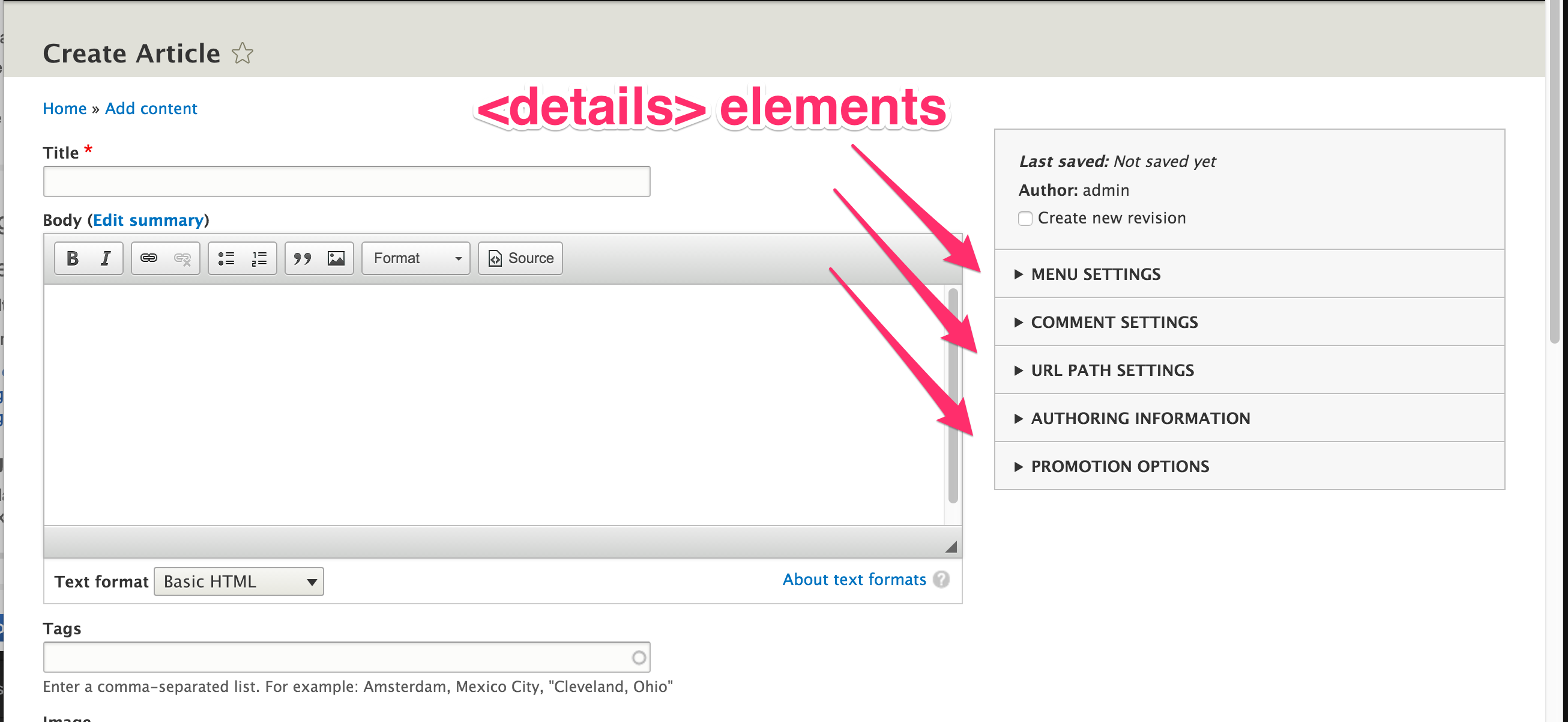
Screenshot of where to find a <details> element.


 Show commands
 compare





Comments
Comment #1
cmanalansan commentedAccording to this:
http://stackoverflow.com/a/19341648
CSS3 transitions needs to have a specific height.
This patch uses the 'max-height' workaround.
Comment #2
Bojhan commented@cmanalansan Thanks a whole lot! I cant seem to detect any change, all details seem to open right away? Do you notice change?
Comment #3
cmanalansan commented@Bojhan 2 potential causes for not noticing the change:
Let me know if neither case applies.
Comment #4
Bojhan commentedI have tried it in various browsers, but it seems to not work at all (Chrome 35.0.1916.114) or rather janky (Firefox 29.0.1). I made a small screenshare http://screencast.com/t/BLB5w1Dhob .
I wonder if this is simply part of trying it with CSS3, but perhaps its just an optimization somewhere.
Comment #5
cmanalansan commentedAccording to this:
http://stackoverflow.com/questions/17301282/transitioning-between-open-c...
You are running into the problem because of limitations to CSS3.
Let me know if you want me to try this transition via jQuery.
Comment #6
lewisnymanComment #7
nod_Wth, my post just got eaten.
Short version: I'm against a JS solution. Had to take the animation out because of modal autoresize. The JS interface for CSS3 animation is a mess and no amount of jQuery will help if we want to do that properly (read: without hacks we'll regret for years to come).
At this point: drop animated details or drop modals autoresize.
Comment #8
nod_Comment #9
Bojhan commentedLooks like this is a lot harder, and we don't have to do this before release. So moving to 8.1
Comment #10
lewisnymanComment #12
emma.mariaComment #13
mgiffordGlad this issue is active again.
It may not cause an issue with visually induced motion sickness, but something to be aware of for animations.
Comment #14
emma.mariaComment #15
emma.mariaThis is a nice standalone Novice task of adding a CSS3 animation to a component in Seven.
Comment #16
nod_If a novice picks this up, there might be dragons lurking, don't hesitate to ping me if things don't work as expected.
Comment #17
syamnath commentedHi I have created a patch. Needs review
Thanks in advance
Comment #18
nod_Tempted to put it at need work already but let's see how it goes. What happens when the content inside details is taller than 500px?
Comment #19
syamnath commentedThanks for notifying about the overflow.
I have modified the patch with increasing the max-height: 3000px;/*Maximum possible height */ for comfortable view and added overflow- x to auto to scroll in case of overflow.
Thanks
Comment #20
mgiffordI took a look and can't see that causing a problem with VIMS as it is now. The animation pretty minor. Think it adds a nice touch.
That said, I'm not sure how to test for motion sickness type problems.
Comment #21
andrewmacpherson commentedI tried the patch from #19:
admin/reports/dblog).overflow-y, if it's about height change?.entity-meta details[open]) but that didn't work, because the[open]attribute takes effect from the start of the transition.Comment #22
yoroy commentedTried the patch and while nice, I mostly notice the scrollbar that shows during the animation. It takes away much of the elegance this wants to add.
Comment #23
tstoecklerTesting this on my desktop (Ubuntu 16.04/Firefox 46) it otherwise looks nice, but I noticed the animation only happens on the first time I open a details element. Subsequently closing and opening it again there is no animation.Edit: Tested this again and in fact I do get the animation unless I close and open the details very quickly. So almost certainly a browser issue, I guess.Comment #24
cmanalansan commentedI get to work on this again, hooray! DrupalCon Extended Sprints.
Comment #25
cmanalansan commentedI removed the scrollbar, as well as changed the easing to apply to both "in and out" instead of just "in"
Comment #26
lauriiiThanks for your work on the issue!
I don't think these docs align with the CSS documentation standards that can be found here: https://www.drupal.org/node/1887862
White space before 60px
This could definitely use better explanation on why this is needed
Comment #27
cmanalansan commentedThanks @lauriii, I updated the documentation.
Comment #28
cmanalansan commentedComment #29
joginderpcReviewed and tested working fine without any issue purely css used.
Comment #30
wim leersIn latest Chrome and Firefox, this only works the first time you expand. Subsequent times, it opens without the animation.
Also, the different is barely noticeable.
I don't think this is ready.
Comment #31
andrewmacpherson commentedThe patch only adds animation to the <details> elements on the node edit form, but doesn't animate <details> elements found on other admin pages. For consistency should we not animate them all, by changing
core/modules/system/css/components/details.module.css?@Bojhan - can you confirm whether this was intended for details elements everywhere, when you created the issue? I think adding the screenshot of where to find some details elements made it seem like it was just about the node form.
Comment #32
emma.mariaComment #33
Bojhan commentedThis was intended for elements everywhere.
@Wim Good design is hardly noticeable :) So I am not sure if that is a good or bad quality.
Comment #34
yoroy commentedTo me it looks like the animation is only applied on expanding a details element and not on collapsing it.
Testing in Firefox I didn't notice a change of pacing when I change the duration value. Also: if you add a delay, you'll see that that expansion does start immediately, then halts for the given delay, than completes after the delay. Firefox specific maybe?
Comment #35
yoroy commentedHere's 3 minutes/35MB video of me trying out different timings: https://drive.google.com/open?id=0Bz3wdj7xhdmUZENadXVlWDdubUU
Comment #36
kostyashupenkoSorry @joginderpc, but you don't want to update assigned status as i see :)
@yoroy i will try to check this issue
Comment #37
yoroy commentedThank you @kostyashupenko
Comment #38
kostyashupenkoWell, from what i've seen: actually yep, we have only 1 way to manage of height using css only - is to use "max-height" property. And it should works good when we are trying to expand or to collapse any , but currently we dont have any animation when we are collapse in all browsers. It is related to JS.
From patch #27 we can't see any animation as well because of max-height: 1000000....0000.... px. I've reduced it on 1000px (but i think it's too much, better to reduce it more). And on the pages where we may have expanded menu more than height: 1000px - then better to manage it manually directly with this menu. So ~1000px with expanded menu would be enough anyway i think
@yoroy, your bug was because we had max-height: 60px as a default. Not sure why we had 60px if your menu has 40px. So i've reduced it too from 60px -> 40px. Now expanding animation is ok
So, let's to resume all what i've said:
1. We can't make collapsing animation, because need to look on JS where we have logic of expanding/collapsing
2. For now max-height of expanded menu is 1000px instead of 1000000px and we can see expanding animation
Comment #39
kostyashupenkoComment #40
yoroy commentedThis is much better!
Now that it works as intended I think it's clear that a full second for the duration is too long. From my own experimenting I came out at ±300ms. Then I found https://www.google.com/design/spec/motion/duration-easing.html#duration-... which suggests that 225ms would be a good average (different values are suggested for smaller or larger screens there).
With 225ms it's still clearly animated and also fast enough to not let people wait before they can do something.
So those 1000px would have to be the max-height for the contents of a single details element?
I suspect we might not be able to limit it that much, contrib modules might add quite a lot of settings in a details element (maybe Metatag for example?). I understand that the higher this number the less animation we'll see so we need to find a good enough number here. With 2000px and 225ms the animation is still noticable and snappy.
Comment #41
swarad07Comment #42
swarad07Changed the animation time to 0.225s as suggested by yoroy.
Comment #43
nod_Need to test views ui dialogs with this and make sure the dialogs' heights and position are still working as expected.
Comment #44
Anonymous (not verified) commentedSpelling correction in title: changed "exanding" to "expanding"
Comment #45
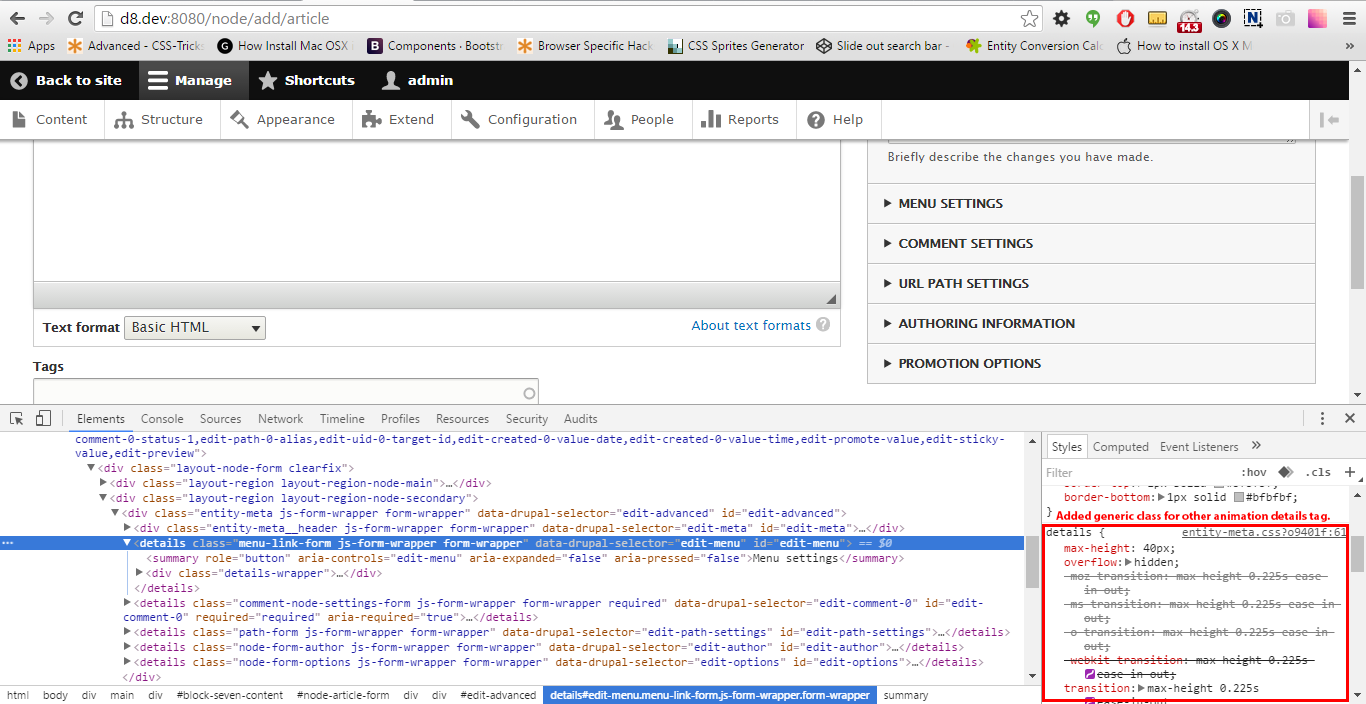
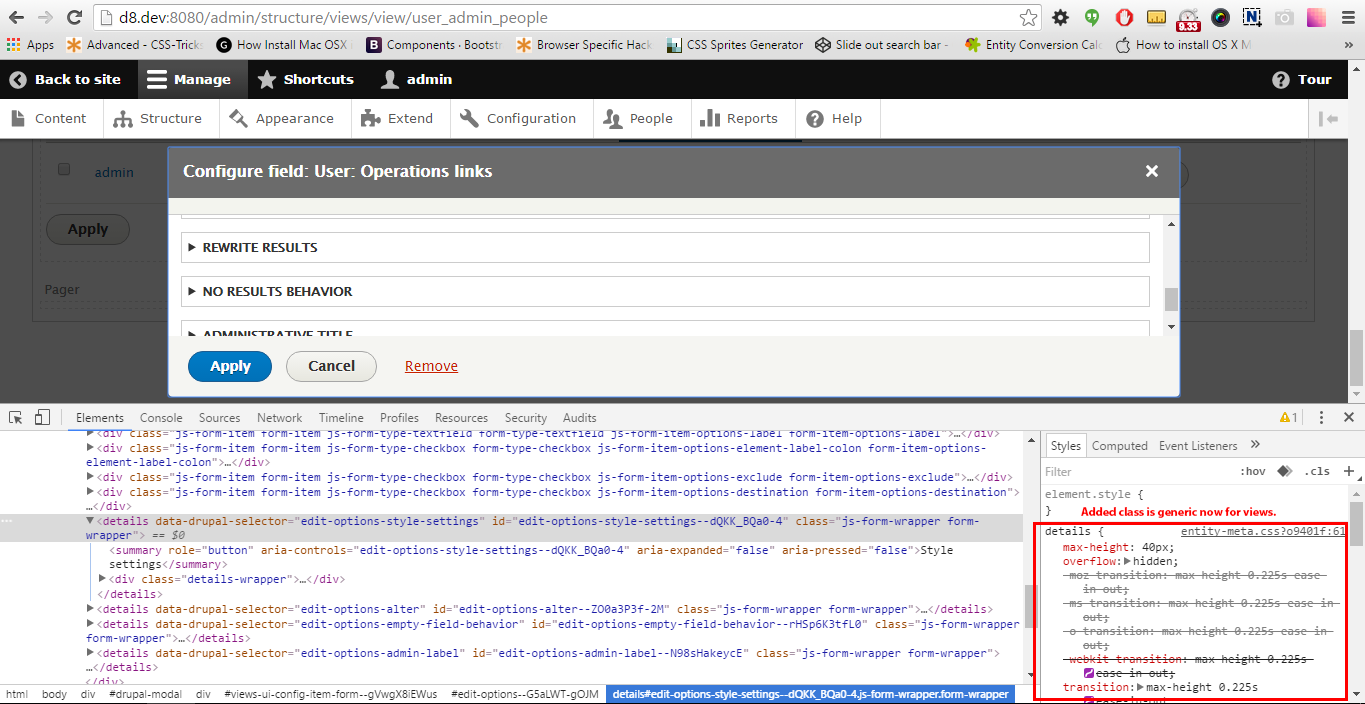
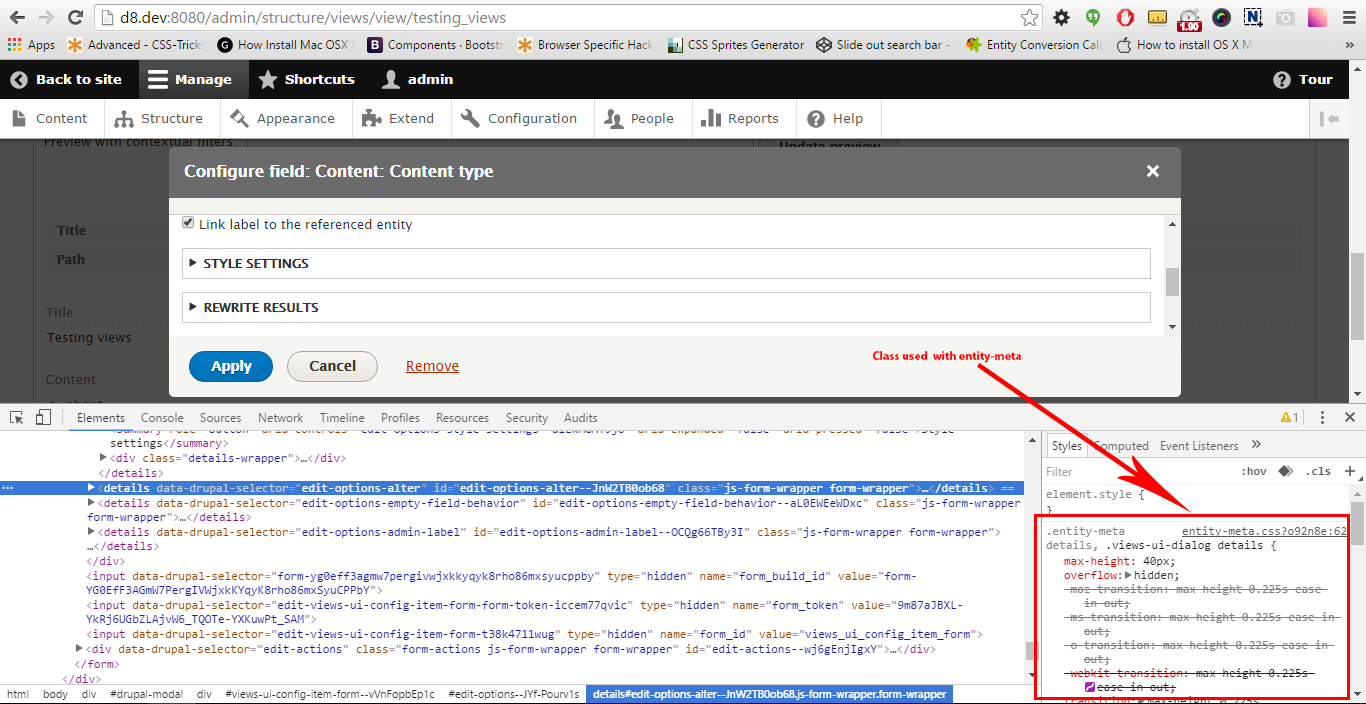
swarad07Hey node_, attaching a screenshot just to make sure we both are talking about the same views-ui dialog.
The HTML there does not match the CSS in the #42 patch, there is a details tag but no parent .entity-meta. So the transition won't be applicable on the views-ui dialog page.
Providing another patch which applies the same CSS on views-ui dailog details.
Comment #46
joginderpcYes @swarad07 you are right there is no '.entity-meta' class so you had added '.views-ui-dialog' so that it would work as others. Screen shot attached.
Comment #47
tstoecklerThe way I see it and as confirmed above, the CSS should apply to all details elements not just these two specific places. So we should make the CSS a bit more generic.
Comment #48
Jeff Burnz commentedTechnically this comment is incorrect, not all transitions require a specific height, only height and max-height (afaicr).
Grammar also, "transitions needs" not good, should be something like
CSS3 max-height transitions need a specific height.Comment #49
maninders commentedAs per the comment #47, CSS should apply to all details elements not just these two specific places, i just put a css on generic class.
And as per the comment #48, just changed the comment as suggested by the @Jeff Burnz.
Comment #50
maninders commentedTested the patch but it's not working so removed extra whitespace from css file. which is given error on applying patch. Please check this patch #50.
Comment #51
joginderpcTested manually on my system working fine as the animation and it is generic now for all details tag. Attached screen shot.
For views ui

Generic for all details tag

Comment #52
Jeff Burnz commentedSetting back, yoroys concerns in #40 have not been discussed or addressed, agree that 1000px seems insufficient for contrib. Increasing to 2000px should still be a good animation effect, but more will require an adjustment to the speed.
I'd think more like 3000px, and perhaps with an overflow scroll somewhere in there to make it really robust. E.g. right now I have a vertical tab in one theme that can be more than 5000px high (if all nested details are open). Remember, vertical tabs are details and they can hold a lot of stuff.
Put it this way, I would not RTBC this without robustness to support any amount of content, otherwise we are breaking BC and that's not allowed afaict.
Comment #53
swarad07It would be pretty hard to justify a height that would satisfy all use cases. We can make a calculated guess at best, 3000px might be reasonable but, like you said what happens when a vertical tab is 5000px?
The point is, as stated in #1, CSS3 transitions will need a height. We should also finalize if we want a scroll? one of the earlier patched had it, but we later removed it. Should we go back to that patch and start from there?
It seems, there is a disagreement over what this patch should do.
Feel free to add to the list or correct,
Comment #54
Jeff Burnz commentedCurrently Seven does satisfy all use cases (as our core admin theme should) and the current patch/proposal makes some forms in my project unusable. That is a BC break (and a bug). According to the current docs (https://www.drupal.org/core/d8-bc-policy) Seven may change, but it's pretty clear that should be to fix a "serious bug", however a CSS transition is really a feature, and we shouldn't be introducing bugs.
Does it need to be hard coded? I wonder if we can make this work with a few lines of JS providing the max-height, however that may be problem since we can't know the max-height until the detail is open. I'd like to experiment a bit before we think about a scroll (which is kind of ugly and probably the least favourable option, agreed).
No, not really, I think we all agree a transition/animation is nice to have and looks great, improves the feel of the details etc. The problem is the current patch breaks BC and introduces a bug - we just need to find a better way of doing this.
Comment #55
Jeff Burnz commentedAnother option might be to set a ridiculous max-height and use cubic-bezier() to perfect the easing:
While it's clear 1000px is not nearly enough, I doubt many go 10000px which is pretty mad.
Still be worth fiddling in JS, I'll have a crack at it.
Comment #57
charles belov@mgifford #13: Thank you for flagging this.
I watched the video posted by @yoroy #35. I'm feeling some aftereffects which are milder then the aftereffects I get from full-screen animations, but several minutes after viewing the video they are persisting.
There are a few complications that prevent me from saying whether the video is relevant.
1) I'm watching someone else's screen actions, so the action is unexpected.
2) This would not be a full-screen animation on a desktop but would be on a mobile device.
3) The inspector content is also jumping or changing rapidly.
That said, if/when #2316205: Provide a way to disable animations for a11y is implemented, it would be better to apply it to all animations rather than try to decide for someone else whether a particular animation is relevant.
Comment #58
mgiffordHaving a centralized way to control it is really important. Particularly for all the contributed modules/themes that are going to want to add their animations.
Comment #60
slayerjain commentedshouldn't we postpone the issue till #2316205: Provide a way to disable animations for a11y is merged?
Comment #61
Jeff Burnz commented#60 I don't think so, it's not dependant on that issue.
Comment #62
mgifford@Jeff Burnz how would we disable the affect for those this affects without #2316205: Provide a way to disable animations for a11y or should we just try to reduce the animation so that it affects people less?
Comment #63
charles belov@Jeff Burnz: How is this issue not dependent on #2316205: Provide a way to disable animations for a11y? If committing #2279049: Add a CSS animation to expanding of details elements is going to make me feel queasy every time I try to use the UI, it would seem to be dependent.
Full disclosure: Our site is still on D7 and is expected to be for at least the next two years. But #2279049 would be an additional block to moving to D8 until #2316205 is implemented. Obviously, #2316205 is not for me personally, but animation without a way to disable it would shut out a whole class of people as D8 users.
Comment #64
Jeff Burnz commentedIt's not dependant because all we are doing is smoothing the open/close of the details. They still open and close, and thus are still moving + reflowing themselves and everything below them. It's that movement that causes the issue - at least that is how I am reading the research papers (some on virtual reality etc, where there has been much research into this). E.g. parallax - there are no transitions etc, it's just about movement and perspective etc.
Disabling animations is not about removing a smoothing stylistic transition, but about details being OPEN by default all the time.
Comment #65
charles belovI just tried it in simplytest.me. It doesn't appear to be bothering me, likely because the animation is so fast, less than 1/4 of a second. I can't speak for anyone else.
Comment #66
Jeff Burnz commented@Charles Belov I suspected that might be a factor, if you're testing at 255ms it's fast, I tend to go a tad slower on my stuff, so it's noticeable "tada look at me I'm animating", however this is for marketing really (sigh...).
Comment #67
mgiffordI don't know of any way to test for VIMS. Not sure if there are industry standards yet. At the moment the best we have is, "Does it make Charles Belov feel queasy".
Can we agree that anything less than 1/4 of a second is probably fast enough that it won't impact most users? Charles, do you have any documentation?
I'm not really sure what easy way there would be to disable the CSS animations if a user couldn't handle that.
Comment #68
charles belovAlas, "Does it make me feel queasy?" is all I have to go on.
Teamwork, a collaboration site, is testing a beta that does a whole-page scroll-to-top which takes about a second for the page I just tested, about 3 full-screen scrolls, and it does make me feel queasy. It's using LazyLibs JavaScript and appears to be using the default scroll animation speed: scrollSpeed:300, easingType:"linear". Presumably the scroll speed is constant and lasts longer for a taller page.
Comment #69
Jeff Burnz commentedFYI the YAML Forms Examples module has several details elements that are more than 2000px long. https://www.drupal.org/project/yamlform
Comment #70
tkoleary commentedThis is not going to work with a max height. It needs an actual specified height but in order to do that yo will need to set the summary element text to whitespace: nowrap and text-overflow: elipsis so the line doesn't break at the edge of the box and look awkward.
IMO 1000px is not 'impossibly large'
Comment #71
mgiffordComment #72
tim.clifford commentedMax-height works well and is needed for the animation. I have applied a patch with a max-height of 10000px, kept the transition speeds the same as above and added in a scrollbar fix.
Comment #73
tkoleary commented@tim.clifford
Nice work. I had tried this before and couldn't get it to work with max-height.
Comment #74
Jeff Burnz commentedThis seems like a pretty fundamental change?
Comment #75
rajender rajan commentedApplied patch and its working fine !
Comment #76
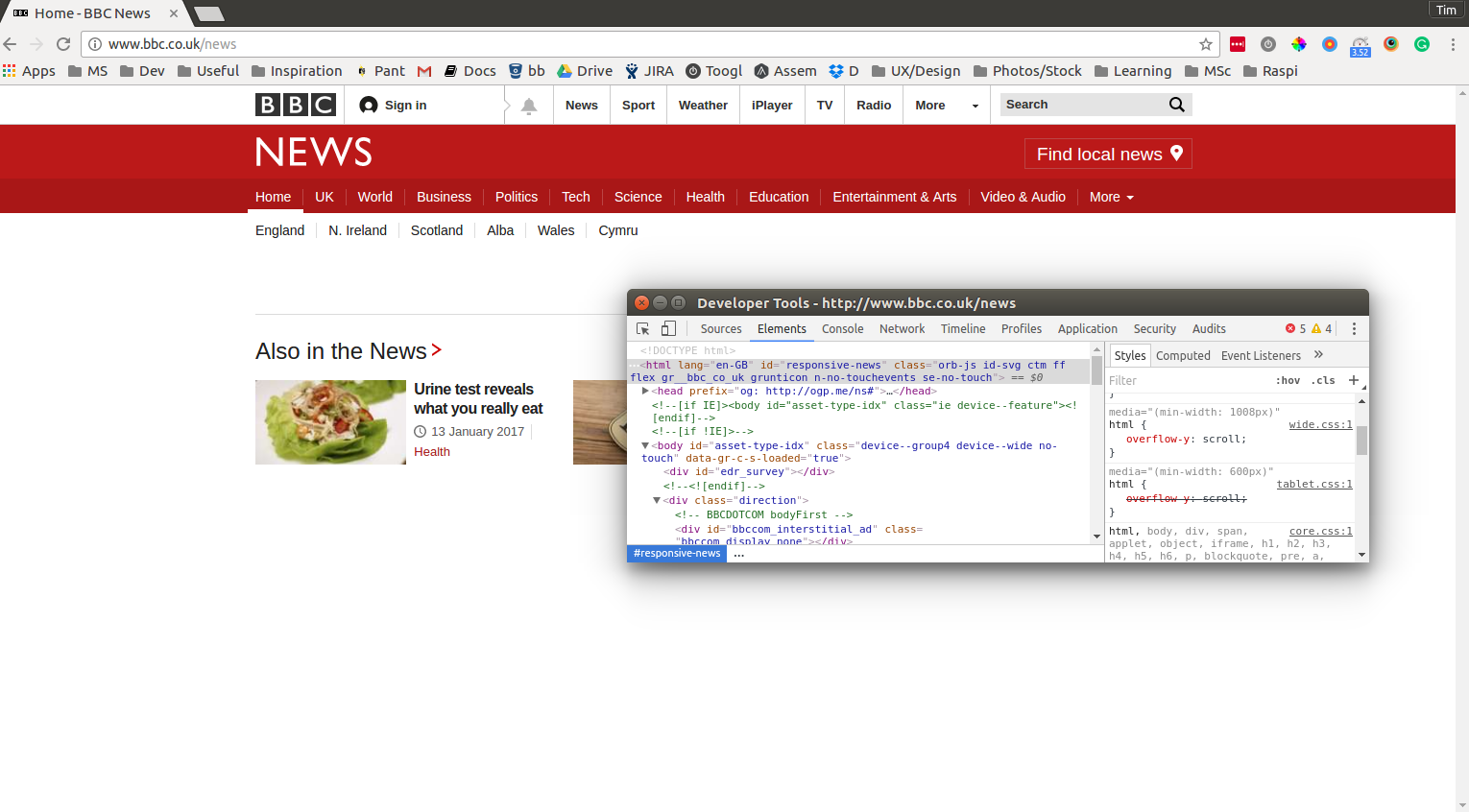
tim.clifford commented@jeff-burnz I guess it is a big change to force vertical scroll on all pages (even if there is not enough content to need a scroll). But then again, I don't think it is that odd that there is one by default either. Could even argue that users actually expect to see a scrollbar. Check the BBC website for example:
Comment #77
tstoecklerComment #78
Jeff Burnz commented@tim.clifford sorry but I can't agree with this major change in approach to scrolling pages in our core admin theme, not for what is effectively a feature. I'm not the Seven maintainer but personally I would veto this change - the reason being is that we're not using browser controls for something very fundamental, and I see no reason to disable browser features for the sake of an animation effect on detail elements :/
Comment #80
mgiffordWe should bring this back to Needs Work then based on @Jeff Burnz's concerns.
Can we get a video of whatever the final result is? That's going to be pretty useful to help visualize this change.
@Jeff Burnz do you have any suggestions on a better way to approach this?
Comment #81
tameeshb commentedAttached video after applying patch to d8.3 , clearing browser and drupal caches.
Comment #82
kostyashupenko@tameeshb, actually on your video there is some transition. But it looks pretty bad, coz max-height for opened detail is 10000px. Maybe it can be reduced? No other way to manage transition for it. Need opinion of some guys, who knows the ~~~ max-height for opened detail in this case. I'm sure that the value should be within 1000px
Comment #83
Jeff Burnz commentedI think choose a reasonable arbitrary max height and be dammed. Personally I use about 2500px, however on a current site I needed to adjust this up a bit, as will always be the case with almost any CSS we try to make global in Drupal core. Overflow scroll can look really shite on MSEdge, so lets avoid that like the plague (on details).
So the patch in #50 with #40 adjustments is about right, maybe 2500 because of the known yamlform module details are freaking huge (but incredibly useful for theming form elements etc, so expect this module to be used a lot by themers). Consensus?
Comment #84
tkoleary commented@Jeff Burnz
I'm ok with 2500
Comment #85
swarad07+1 for 2500
Comment #86
Karmen commentedAttach a patch with 2500px
Comment #87
joe_carvajalThe patch applies the comments #83, #84 and #85.
Looks good for me. +1 to RTBC.
Comment #88
lauriiiThere's another issue regarding details elements (#2854624: Details and accordion update based on Seven Style Guide) which is very close to getting committed. Maybe we should get that finished first, and then apply these style for the newly created details component.
Comment #89
lauriiiComment #90
lauriiiComment #92
andrewmacpherson commentedre: #67
An article on the WebKit blog this summer, Responsive Design for Motion, breaks down different kinds of animation trigger for VIMS with video demonstrations of each one.
WCAG 2.1 introduces Success Criterion 2.2.9 Animation from Interactions at level AAA.
Comment #103
markconroy commentedLet's move this to the theme system queue if we still think it's worth pursuing. And remove some of the redundant issue tags.
Comment #104
nod_per #88
Comment #105
lauriiiThis would have to be done in Claro. Would be great to hear from the Claro designers what are their thoughts about this.
Comment #106
gauravvvv commentedAs the detail accordion icon have a transition, and the detail doesn't have. It's not smooth experience. Detail opens up without and transition and the icon take some time (transition) to rotate.
I have added a patch with same transition timings as per icon. please review
Comment #107
nilesh.k commentedReviewing this ticket.
Comment #108
nilesh.k commentedComment #109
mgiffordAdding SC 2.2.9
Comment #110
shashwat-tiwari commentedI have reviewed #106 but I don't see any transition happening while expanding of details element.
Comment #111
shashwat-tiwari commentedAdding the patch with the suggestions included at #55, #83, #84 and #85.
Comment #112
shashwat-tiwari commentedComment #113
shashwat-tiwari commentedRecreated the patch after fixing the error in test `order/properties-order`.
Comment #114
amietpatial commented#111 applied cleanly and changes look good.
Comment #115
shaalI think using the CSS trick described here
https://www.youtube.com/watch?v=B_n4YONte5A
would achieve a smooth transition for any height (since the browser handles it).
For accessibility, the patch should include support for reduced-motion
Comment #116
shashwat-tiwari commentedThe above suggested trick is not working with the current structure. To incorporate the change, we have to use generic accordion structure instead of since it has its own mechanism to show and hide the elements.
Comment #118
Ratan Priya commentedRe-rolled patch #113 for 11.x-dev
Comment #119
smustgrave commented#113 has a trailing space issue but still applies to 11.x
Comment #120
ckrinaI'd love to see animation here:) But I'm a bit concerned with the max-height approach: have this been tried with longer content that exceeds these max-height defined? Like with the Metatags modules, where you can have really long forms inside the item. Or even custom items on the sidebar that jump into 3 lines (and take more than 90px)?
Comment #121
smustgrave commentedJust tested with metatags and it does cut off. So agree with @ckrina setting max-height doesn't seem the correct approach.
Comment #123
charles belovThe patch in #113 doesn't seem to respect #2928103: [policy, no patch] Use "prefers-reduced-motion" media query to disable animations. Is that now handled automatically by core, or is a change needed to the patch to agree with policy?
Comment #125
quietone commentedThe Claro theme was approved for removal in #3576460: [policy, no patch] Deprecate and remove Claro.
This is Postponed. The status is set according to two policies. The Remove a core extension and move it to a contributed project and the Extensions approved for removal policies.
The deprecation work is in #3576668: [meta] Tasks to deprecate Claro and the removal work in #3584638: [meta] Tasks to remove the Claro theme.
Comment #126
smustgrave commentedClaro has moved to contrib