Problem/Motivation
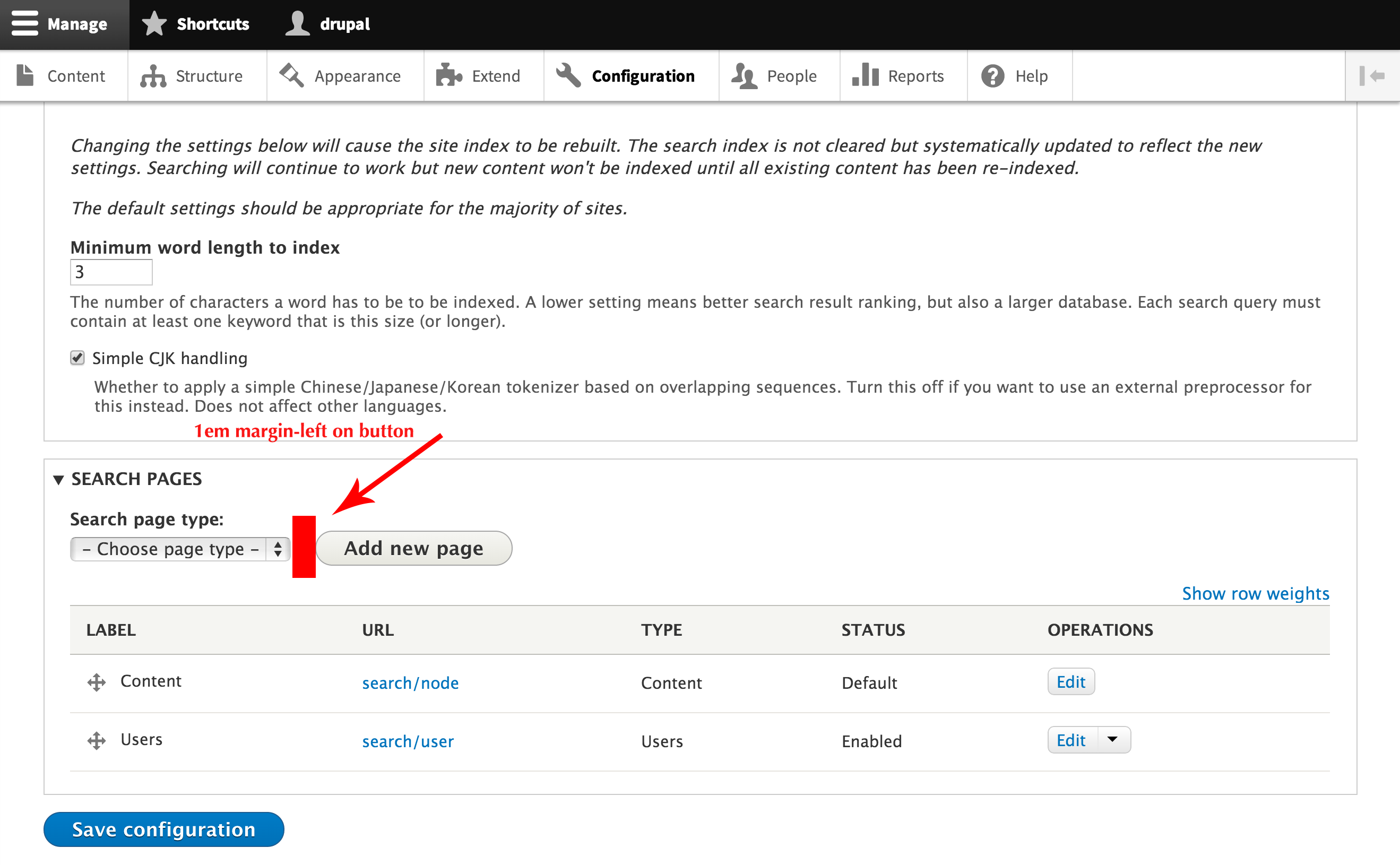
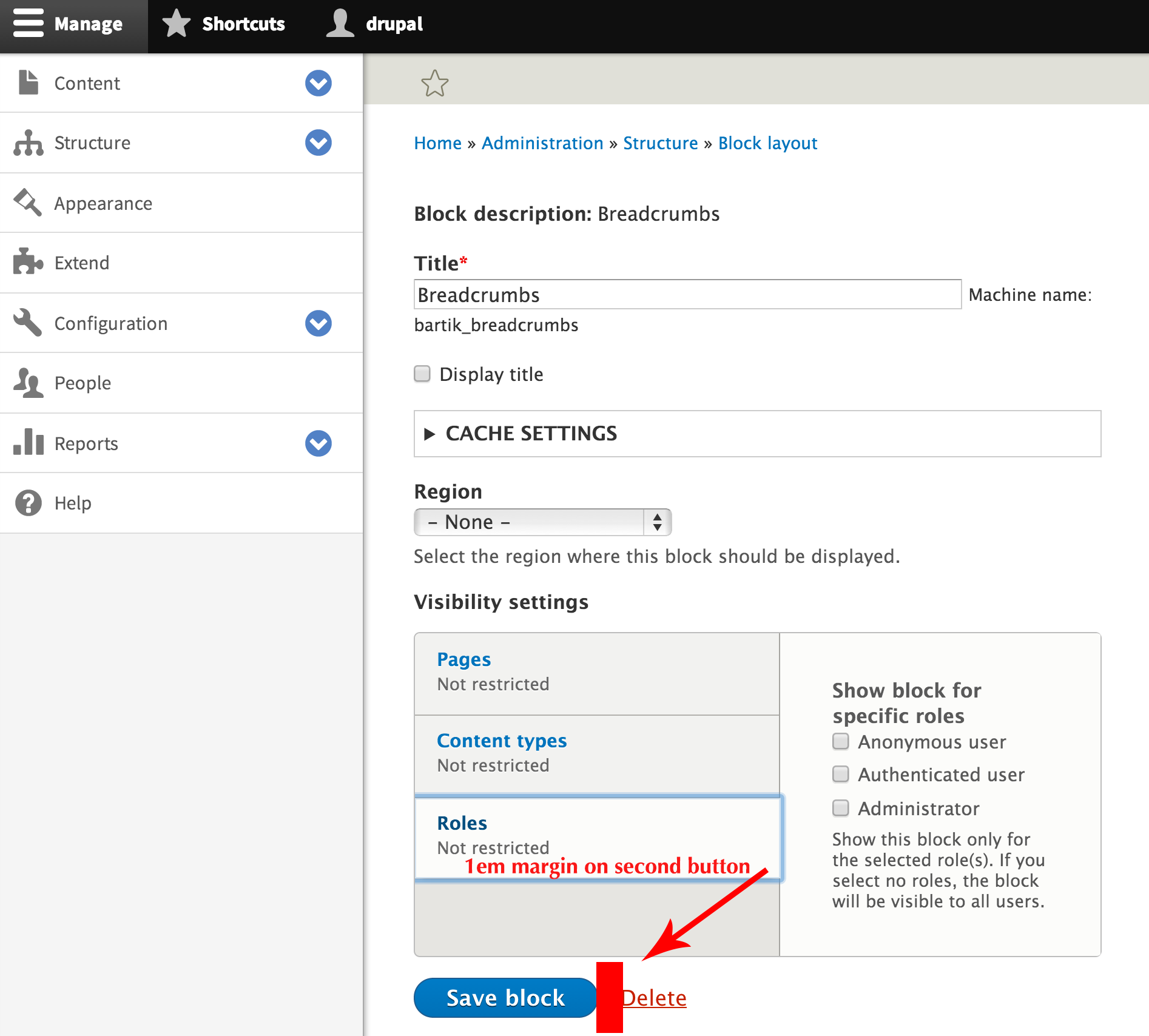
Buttons need to have some spacing between them. The current CSS for this looks like:
.button,
.image-button {
  margin-left: 1em;
  margin-right: 1em;
}
.button:first-child,
.image-button:first-child {
  margin-left: 0;
  margin-right: 0;
}
This can be fragile and can incorrectly add spacing in some situations:


The proposal to fix this issue is:
.dropbutton-wrapper,
.button {
  margin-right: 1em;/* LTR */
}
This introduces a problem in inline forms, because they were relying on the margin-left spacing for the button to provide the right amount of spacing between the form items and the button:
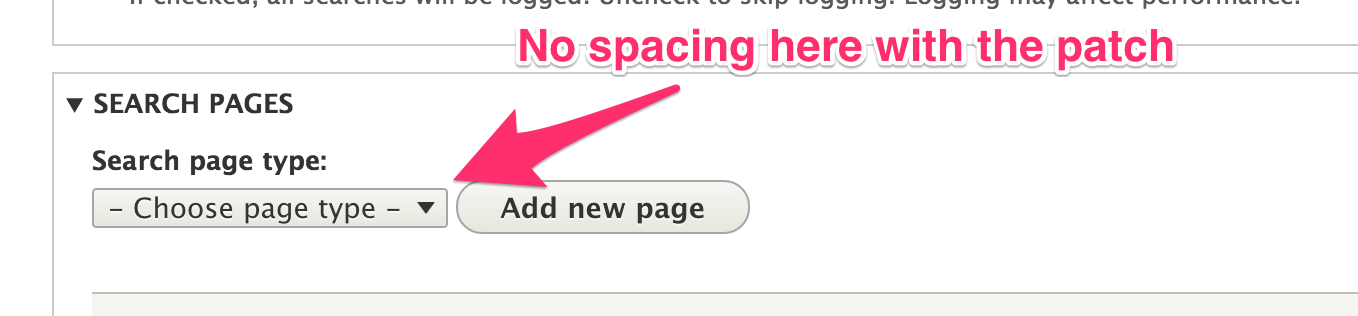
The implementation of #2417111: Replace container-inline with form--inline to display forms horizontally. removed this reliance by add margin-right spacing to all form items in .form--inline
Steps to reproduce
Proposed resolution
.dropbutton-wrapper,
.button {
  margin-right: 1em;/* LTR */
}
API changes
Global CSS change
Test pages
- admin/config/regional/translate
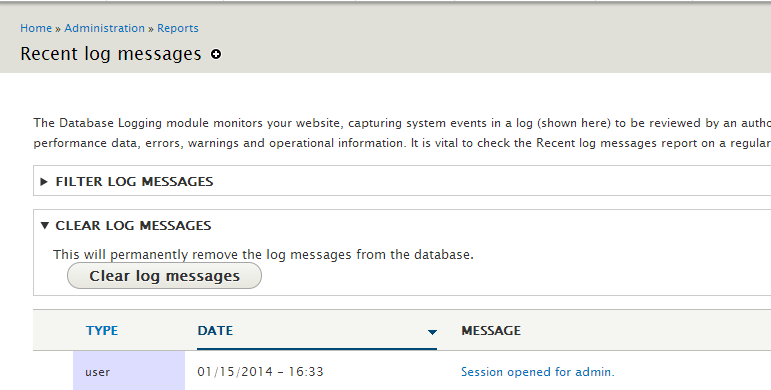
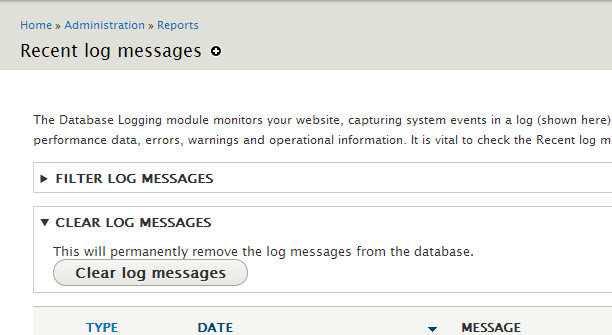
- admin/reports/dblog (under clear log messages)
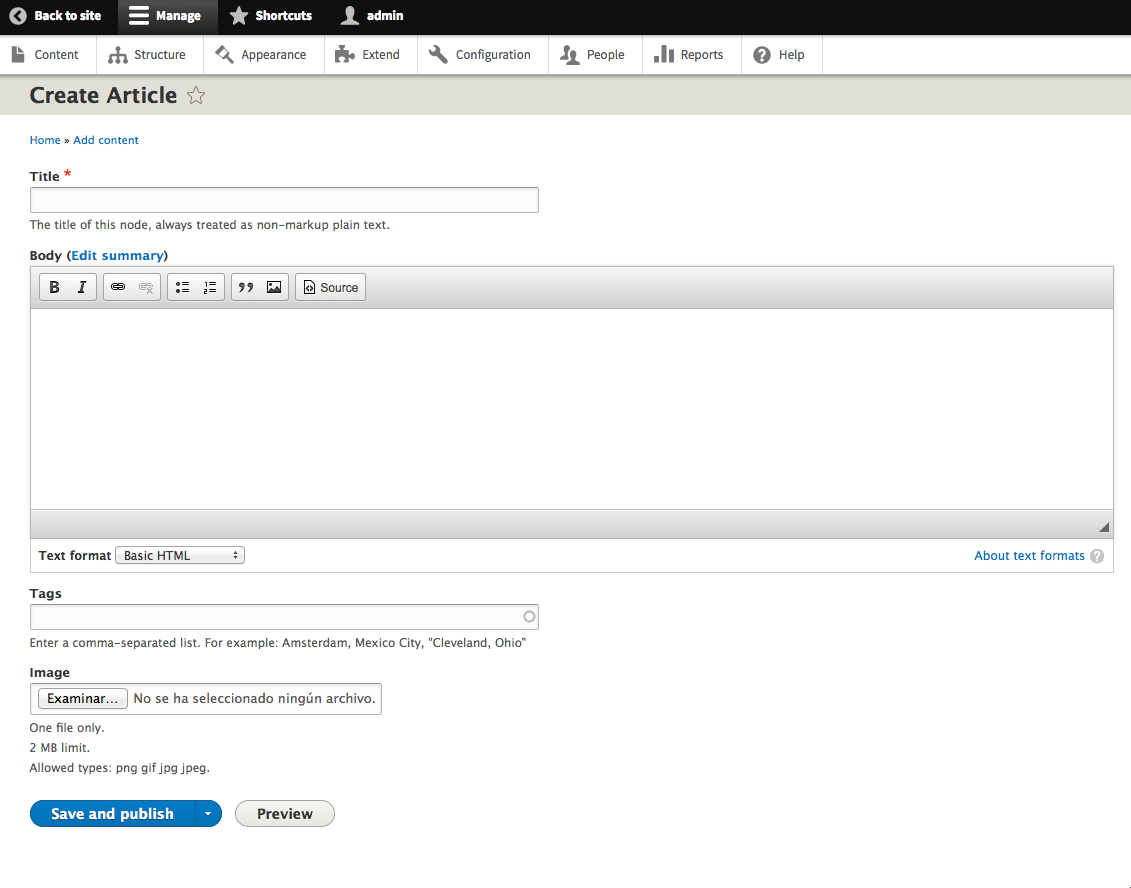
- node/add/article (check for regressions)
Remaining tasks
Postponed on #2417111: Replace container-inline with form--inline to display forms horizontally.
User interface changes
API changes
Data model changes
Release notes snippet



















Comments
Comment #1
lewisnymanComment #2
lewisnymanNo points for spotting the obvious type in the first patch.
Comment #3
oriol_e9gsimple improvement
Comment #4
webchickCould we maybe get some updated screenshots to show the "after"? I tested this locally but couldn't really tell a difference. (Not sure if it's caching related or what.)
Comment #5
manjit.singhI have tested patch locally and attach screenshots before and after applying patch.
Its look like button is overlap with text. Can we make them separate so that it looks attractive ?
Comment #6
manjit.singhPlease review patch, Adding margin top and bottom on button.
Comment #7
Bojhan commentedLets not just randomly add margin top and margin bottom. These button classes are used all over the place. Often with different margins on top depending on what is around the element.
Comment #8
lewisnymanActually Majit's CSS only applies to buttons when they appear after a details description. Maybe we could just fix this at the source and add a bottom margin on the deails description? Looking around the rest of core it's actually reallly way to use the details description property and instead add a form child. Maybe Majit's fix is enough to cover this rare use case. I would not place the selector together with the tabs though.
Comment #9
sahayarex commentedrefer my patch in comment 10
Comment #10
sahayarex commentedDrupal has already written css commonly for all buttons. Its not good idea to alter them which might cause other buttons. The problem is only when it comes inside details-wrapper. So i have added extra css for details-wrapper buttons.
Comment #11
Master_Hipsto commentedComment #12
Master_Hipsto commentedI can confirm that last patch (#10) is best solution. It was tested and is working as intended. Using this class does not appear to produce any bugs.
Comment #13
Master_Hipsto commentedComment #14
catchThis looks like it needs more review to me, there's a few different options available.
Comment #15
manjit.singh10: button-spacing-css-is-too-fragile-2160621-10.patch queued for re-testing.
Comment #16
lewisnymanI'd rather fix the underlying problem here than keep having to override the CSS when it's broken.
Comment #17
mathieuspil commentedOk the patch in #10 removes horizontal spacing from buttons in details-wrapper.
This is ok but then the buttons inside a details-wrapper and inside an inline-container also have no more spacing when floating against an inline element. ( very dirty to fix )
So instead of removing margin like in #10, I would suggest to add margin to every button inside a container where its elements are inline (container-inline & form-actions) and when any kind of element comes before the button. ( similar fix as in #2 )
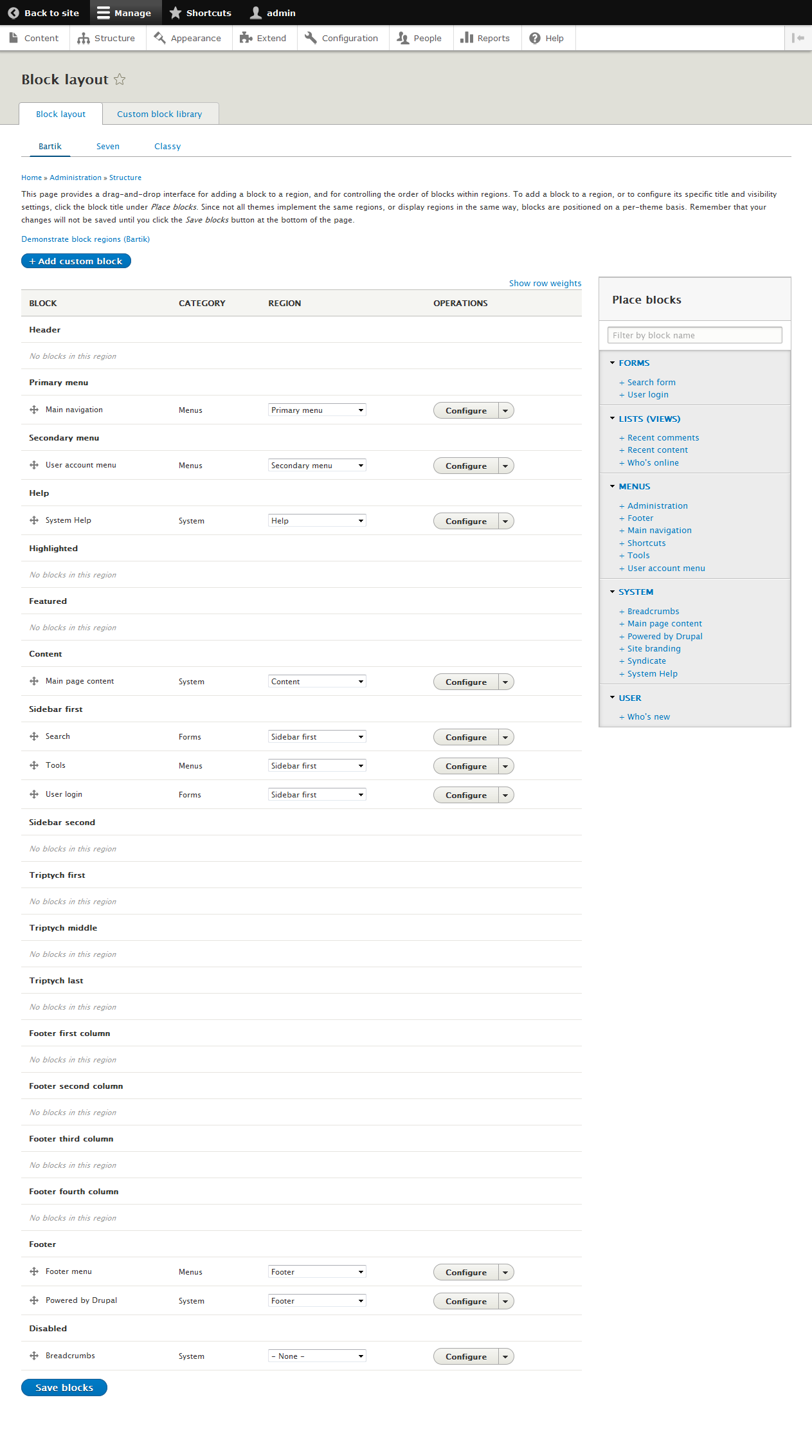
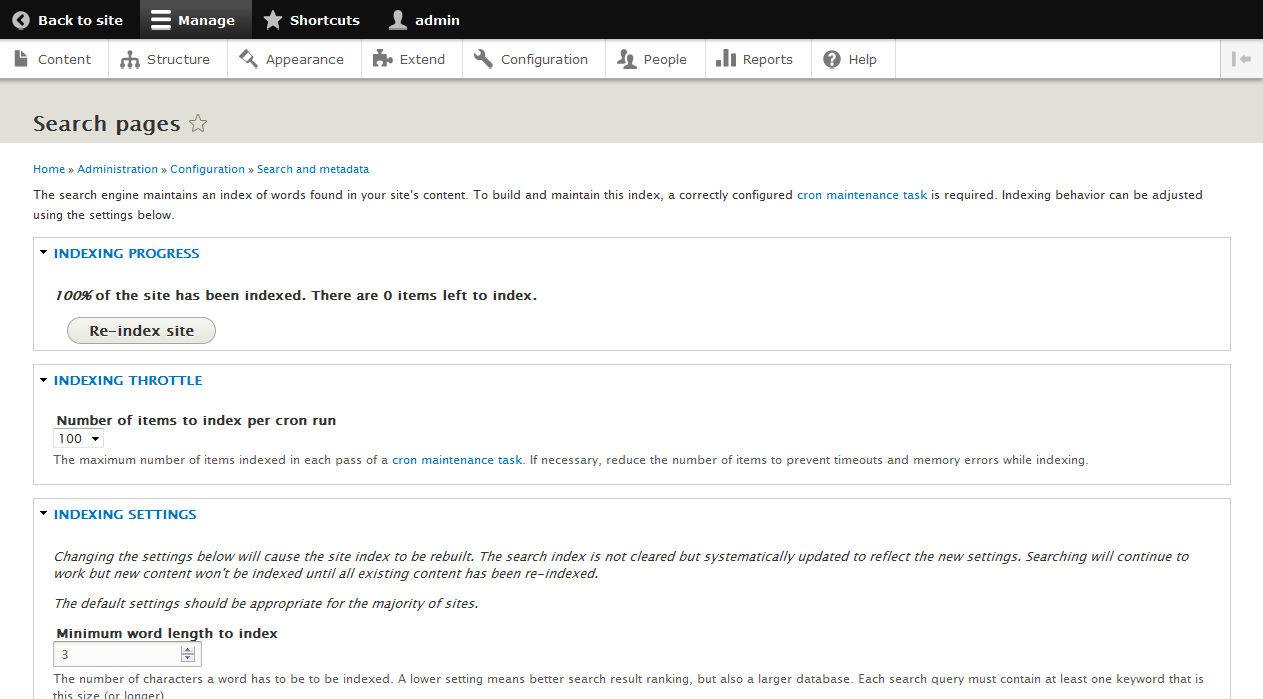
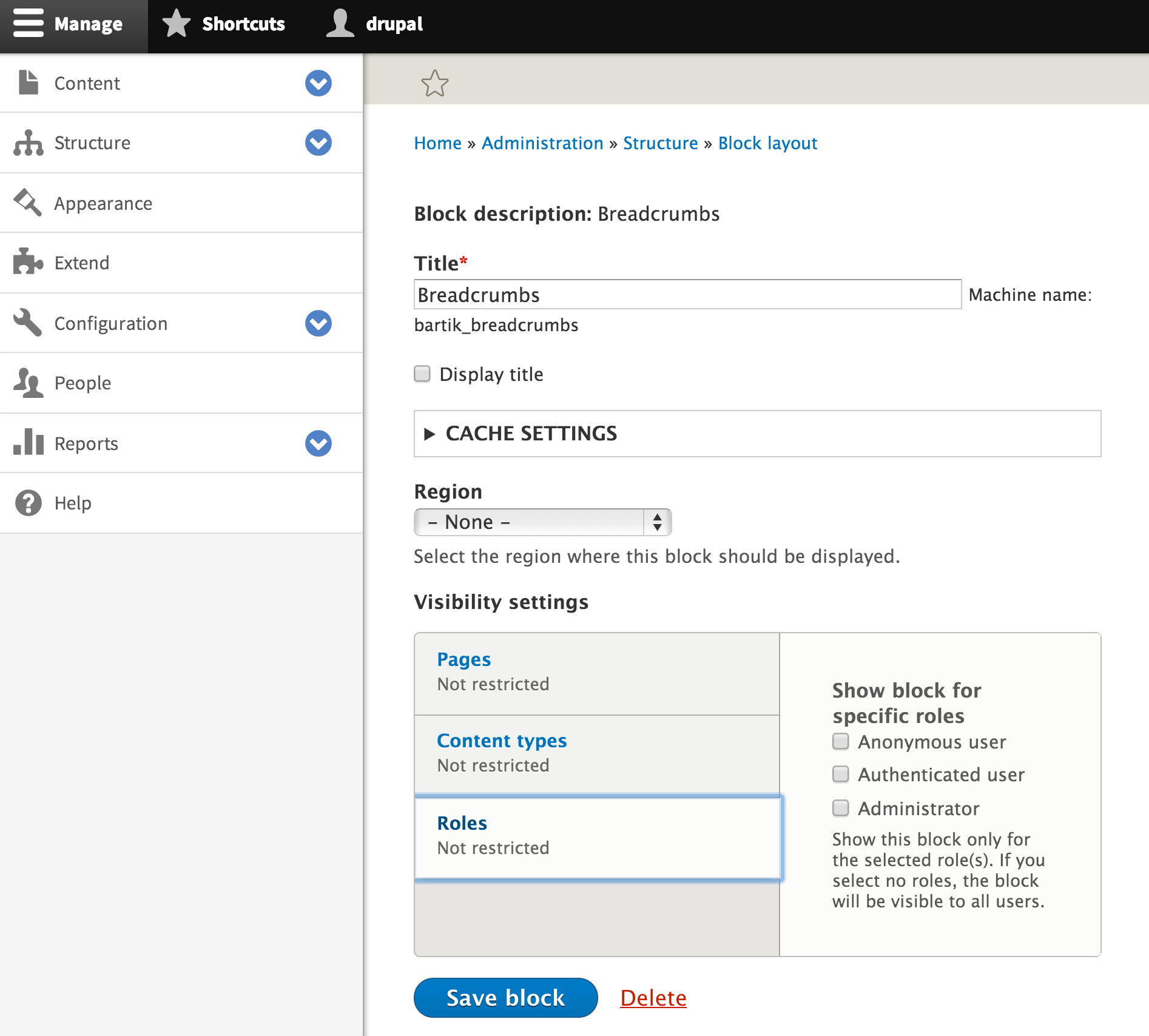
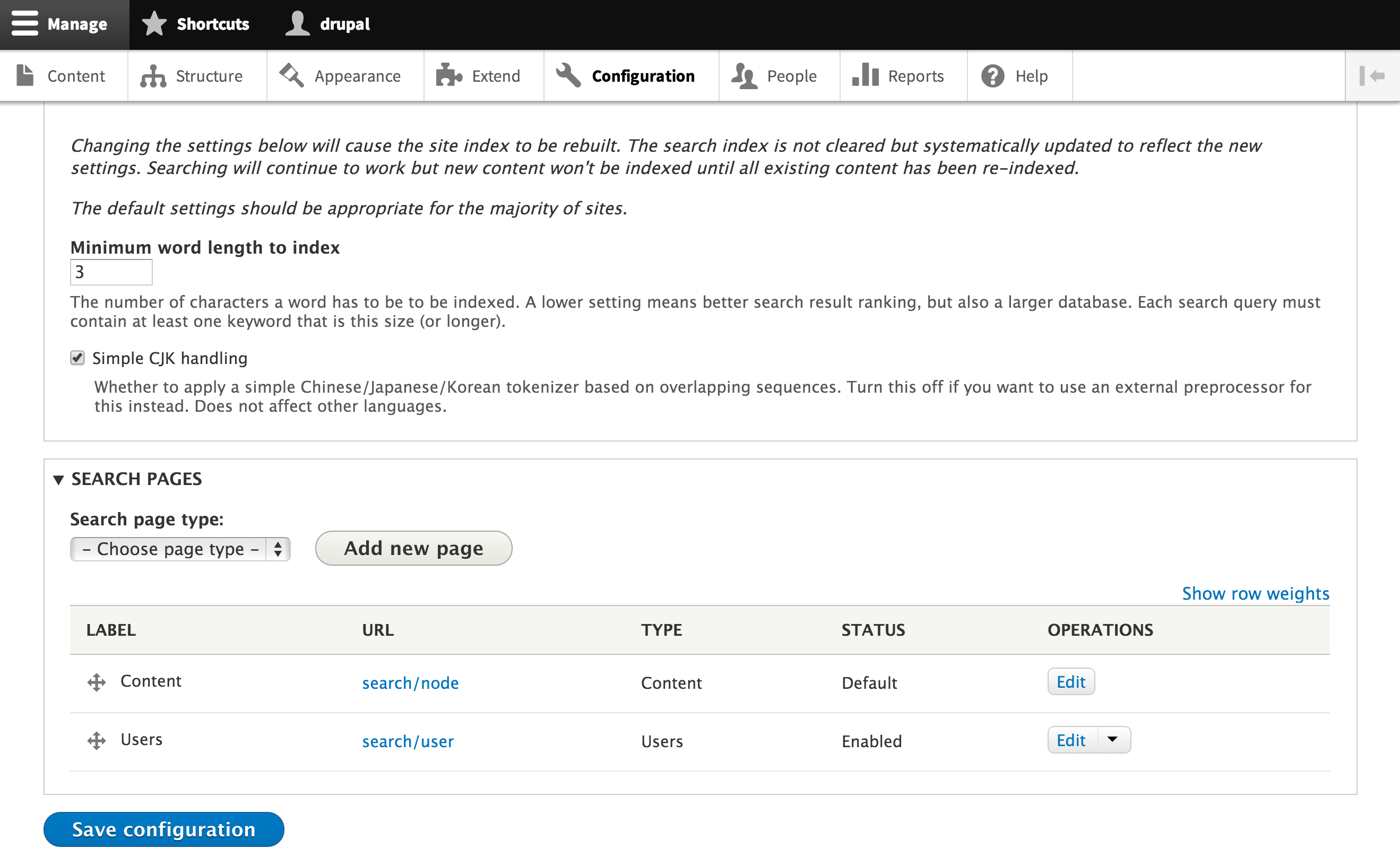
As far as I could see, these are the pages where this issue is most relevant:
/admin/config/search/settings
/admin/structure/block/manage/bartik_content
So in my patch i only give horizontal padding to buttons inside "container-inline" and "form-actions", everywhere else buttons don't need extra horizontal margin.
This is also tested on mobile.
See screenshots for fixed area's
Comment #18
mathieuspil commentedComment #19
mathieuspil commentedComment #20
mathieuspil commentedComment #21
mathieuspil commentedComment #22
yesct commented@MathieuSpil Thanks, those annotations on the screenshots are really helpful.
Please do something similar to the ones in the issue summary so we can see what the problem was.
(So we can compare before-the-patch and after-the-patch issue screenshots.)
Comment #23
mathieuspil commentedComment #24
mathieuspil commentedComment #25
Sumit kumar commented17: css-button-spacing-2160621-17.patch queued for re-testing.
Comment #27
mathieuspil commentedRecreated the patch + updated summary.
Make one more small modification (buttons no longer have margin to the right)
Comment #28
mathieuspil commentedComment #29
lewisnymanI wonder if this selector makes sense. Aren't all buttons always inline? Container inline does not affect buttons.
Comment #30
mathieuspil commentedIt does get affected, because on some admin pages (see below) other elements besides buttons will receive the floating property, what will result in the button floating against the other element (mostly a dropdown as far as I can see)
- admin/content/comment
- admin/config/search/pages
But I am starting to doubt is
.image-button. Because I am not sure where this is beïng used, Overall this seems me the most robust solution because of low css specificity.Comment #31
mathieuspil commentedFollow-up on last comment:
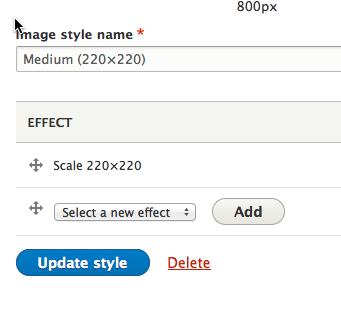
- admin/config/regional/translate is a edge case where it should keep on working.
Recreated the patch and replaced:
with:
Because the margin-left should only apply when the button is floating, and for this may be the use case inside
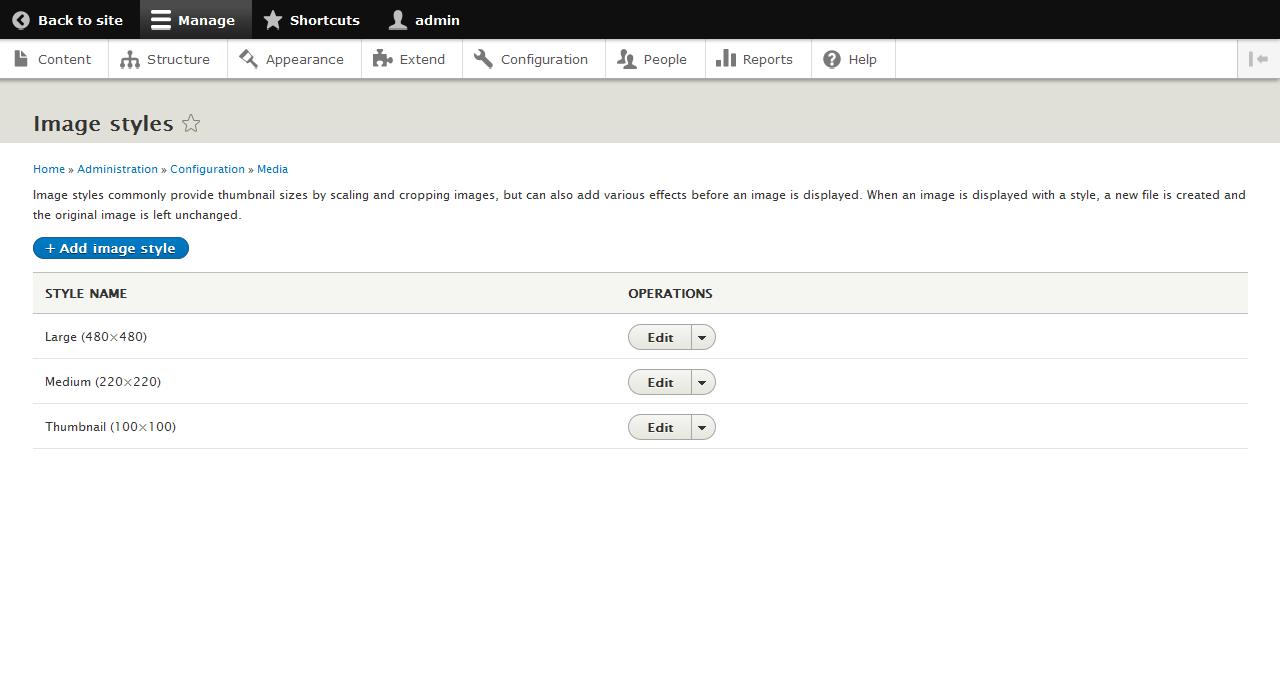
.container-inline, but it is sometimes also the use case inside a table (admin/config/media/image-styles/manage/large)So in conclusion: the button is always floated next to a form-item, (like on image-style edit page) OR floated next to another element inside a form-actions container.
Only problem I see here is that the specificity of the margin-left of buttons inside
.form-actionsis slightly higher than the margin-left of the buttons that are just normally next to.form-itemComment #32
Vidushi Mehta commentedThanks @MaieuSpil for contribution.
I have tested the latest patch
css-button-spacing-2160621-31.patch. I have checked buttons on other pages also like blocks, content, modules. It is working fine for me. Attaching screenshots before and after applying the patch.Comment #33
lewisnymanCan we get a few screenshots of other pages to make sure we aren't introducing any regressions?
Comment #34
Vidushi Mehta commentedHi LewisNyman, Please find the attached screenshots for other pages.
Comment #35
manjit.singhTested latest patch, working fine for me.
Comment #36
herom commentedNow that we only have a margin-left, this needs RTL styling too.
Comment #37
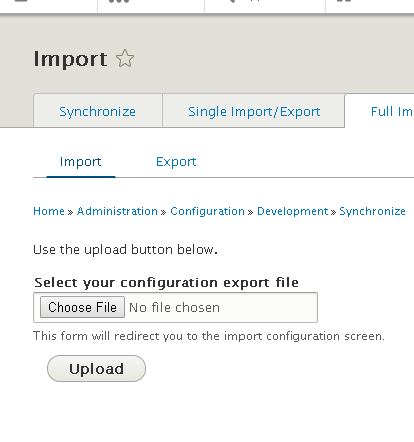
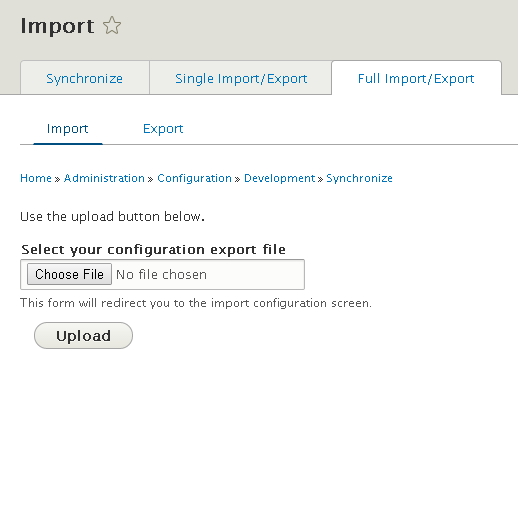
manjit.singh@LewisNyman @vidushi Find one issue on import file page
admin/config/development/configuration/full/import, Upload button hasmargin-left: 1em;. Please find attached screenshot. Adding patch for the same. Hope it will work.Thanks @herom for updating, Adding style for RTL also. Please review it.
Comment #38
lewisnymanThis is what I really want to avoid, complex logic to cover up problems that don't make any sense. This is a sign that the the original rule is not correct, because there are tons of situations where a button is going to follow an form item in contrib, and we can't create all the exceptions here.
Comment #39
Vally79 commentedTried the last patch, but it didn't work on Chromium 39.0.2171.65 .

Comment #40
Sumit kumar commentedi had tested this patch on my local machine
Comment #41
manjit.singh@LewisNyman Could you please suggest any other method to solve this problem ?
@Vally79 @Sumit kumar Can you guys clear cache and retest it.
Comment #42
lewisnymanI still don't understand what was wrong with the first patch in #2
Comment #43
manjit.singh@lewisNyman Actually i was testing with #27 and #31.
Looks like your patch #2 is resolving the problem. I have just checked your patch, Working fine from myside.
Others Please review #2 patch, and Give you inputs.
Comment #44
Vidushi Mehta commented@LewisNyman i have tested your patch #2 on my local. I have checked all the links in the site where buttons are placed. I haven't found any button related issue.
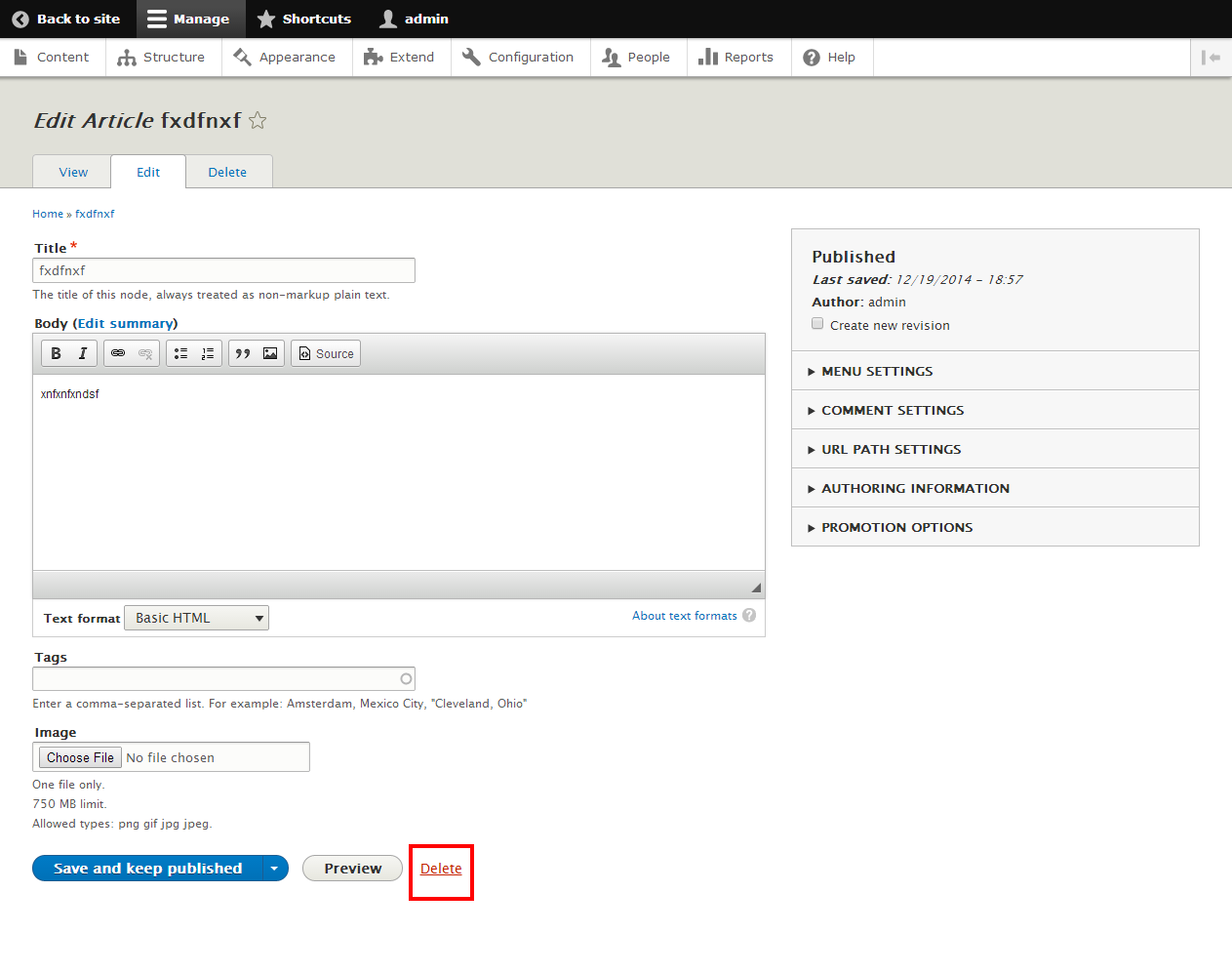
But i have some query related to delete button. Delete button should look like a button but its looking like a link. I am adding a screenshot of that.
Comment #45
Bojhan commentedIt should look like a link?
Comment #46
prashant.c#37 is resolving the button spacing issue.
Comment #47
manjit.singh@Vidushi Please check this Link for D8 UI reference.
Comment #48
Vidushi Mehta commentedHas somebody reviewed the #2 patch. Guys do review this patch and give your feedback.
Comment #49
deepakkumar14 commentedI have also tested the patch #2 on my local machine and i have checked all the buttons in the site and its also working fine for me.
Comment #50
lauriiiI tested patch from #2 and #31. Here's what I found out:
Before:

#2 & #31 after:

So both of them fixes the issue described on the issue summary. How ever patch #2 causes some extra issues on floating buttons.
Before:

After #2:

After #31:

I didn't find any other problems on #31 so I think it should be instead.
Comment #51
manjit.singhComment #52
herom commentedAdding the RTL bit to #31.
Comment #54
lewisnyman#31 also has problems that were reported in #37
Comment #55
lewisnymanI would really like to keep the logic in this CSS selector simple. Let me try and break down the overall problem:
I think we can fix the third problem quite easily, because we know that forms are displayed horizontally when they are wrapped in the
.container-inlineclass. This is soon to be replaced by.form--inlinein #2333719: Abstract Views Exposed Form styling out into a reusable class. If we add the logic there, restricts the scope of the CSS, so there is less chance of it affecting areas unintentionally.Here is the idea in patch form. Ideally every button would use the
buttonclass so we don't have to have so many classes but we haven't made progress in that area. See: #2278473: Simplify Dropbutton markup in line with our CSS standards.Comment #56
mathieuspil commentedThe reason why I was adding a new patch was because of the following:
If we add margin to the left on inline-buttons, one way or the other it will break.
Lets imagine 10 inline-buttons where the last 9 have margin-left. Sooner or later those buttons will have to be shown on multiple lines, and so the second line will start with margin-left. You can also translate this to: if the first element inside a inline-container is very wide, there is a big chance the following element won't need margin-left.
I think that the logic should go as follows: every button inside an inline-container, or even more general, every element directly under an inline container, should have margin-right.
Comment #57
lewisnyman@MathieuSpil That sounds like a nice approach, how would we handle the rule where we want to add spacing between button that aren't in container-inline?
Maybe we roughly have this:
I'm trying to think of a situation where you wouldn't want a button to have spacing after it...
Comment #58
mathieuspil commentedHmmm, maybe when only your last element jumps to the second line? (and without the margin-right it would be on the same line)
So maybe, we should make an exception for all last elements of such a containers
This way, when the first element is the last element, there is still no added margin?
Comment #59
lewisnymanSo something like:
Let's try and a patch and see if anything else comes up
Comment #60
mathieuspil commentedYea, will patch this evening (with RTL-support( so we can give this another round of testing.
Comment #61
mathieuspil commentedCore module Views has rather strange CSS applied to it, so it doesn't really breaks, it just doesn't make it better either.
Also when editing an image style, the wrapper around the select causes troubles.
Also /admin/config/regional/translate implements it's own logic.
Basically, my code doesn't break the custom code, it only allows them to refactor it's own CSS (but I think that this is out of scope for this or not?)
So:
Now I suggest that we keep this as core code(I know it isn't pretty), so we can steadily refactor the rest of the code to follow this principle? There is already a lot of CSS written in exactly this way So if we give this as a default, hopefully every module can cheat of one of 3 ways to apply the margins.
Also some silly stand-alone code can now be deleted:
After this we will be able to refactor a lot of code I think. We should also keep in mind to change .container-inline class with .form--inline later on (#55).
Comment #62
pakmanlhComment #63
pakmanlhI reviewed the patch and works ok, I attached some screenshots.
RTL Page:

Node add page:

Regional translate page:

Recent log messages:

Also I made a minor update solving "trailing whitespace" issue and adding a selector for the image styles issue, I don't know if that is a right solution.
Comment #66
yesct commented#2229187: SiteEffect: Automated frontend regression testing might be useful here. But I dont know if it can do a rtl install...
Comment #67
mathieuspil commentedPatch passed.
Comment #68
lewisnymanI went through a lot of the pages and couldn't find any problems, while it fixed all the old ones. I've attached the backstopJS report, but it is massive.
Here is a screenshot of the image style page on RTL to show it works as it does on LTR
My only question is:
This is annoying that we have to add this specific override. Can we maybe replace the
image-style-newclass with.container-inlineor save that for a follow up?Comment #69
lewisnymanComment #70
mathieuspil commented@LewisNyman
Hmmm, I think it might not belong in this patch indeed, maybe leave this out of the patch, and create a follow up on module-level?
Comment #71
ti2m commentedI ran a couple of tests on the patch with SiteEffect. Lot of changes are of course detected, I have to go through the whole issue here to get an idea of which button spacings are actually supposed to change. One that doesn't look like it should change is the input field for the height on image resolution form inputs, e.g. on /admin/config/people/accounts/fields/user.user.user_picture
The gif here is probably easier to get https://www.dropbox.com/sh/mvwdhrbyxahj6dj/AABDjQrNiVwScQXMEdZCLFGfa?dl=0
I'll take a closer look at the test results later on.
Comment #72
mathieuspil commentedThanks for the feedback @ti2m:
It seems to me that they are using a field-suffix to insert a seperator 'x'.
In the logic that field-suffix, should belong more to the previous field, instead of the field after it.
So following that logic, the patch is doing its job?
So I suppose that we should modify the css of this specific module
Comment #73
ti2m commentedI uploaded more gifs, not all, but one of each "type of change" that I found. Most look like intended changes, there is on more issue with an input filed, the search button in the search block and I'm not sure about the one with "Apply / Cancel / Remove". Am running tests on RTL right now, will let you know about the results.
Comment #74
lewisnymanIMO, this patch does fix the bug in the issue summary, there's a clearly a lot of inconsistency with implementation of container-inline, and now that we have #2333719: Abstract Views Exposed Form styling out into a reusable class. We can slowly reduce the reliance on container-inline over time.
I've created a follow up issue #2417111: Replace container-inline with form--inline to display forms horizontally.
Comment #75
ti2m commentedRTL seems to introduce the same changes that LTR brings. Here the 'x' separator is at the left of both, the width and height input form. So there is a problem with the separator in general. The RTL run failed to create some gifs so I have to rerun it, but in general it doesn't look like anything gets screwed up.
Comment #76
lewisnyman@ti2m Is it possible to label the screenshots before/after? Once the gif starts looping it's hard to tell which it is
Comment #77
alexpottAccording to #71 we've introduced a visual regression so putting back to needs work.
Comment #78
lewisnymanOk, so I discussed this at length with @MathieuSpil at Drupaldevdays. We went over the history of the issue to understand how to fix the original problem and how to fix the problems that this patch introduces. I've updated this issue summary
We should remove the .image-style-new and .container-inline selectors in this issue and only focus on the changes to button components.
We are postponed on #2417111: Replace container-inline with form--inline to display forms horizontally. which will remove the reliance on container-inline and removes the regression in this issue.
Comment #90
quietone commentedThis issue was discussed at a Bug Smash Initiative group triage meeting. mstrelan said that this issue is possibly still relevant and it may effect #3198236: "Add another" buttons could use vertical margin.
Adding related items, adding template to the Issue Summary and updating tags.
Comment #92
quietone commentedAdding credit for the triage.