

Closed (won't fix)
Project:
Commerce Discount
Version:
7.x-1.x-dev
Component:
Code
Priority:
Normal
Category:
Bug report
Assigned:
Unassigned
Issue tags:
Reporter:
Created:
5 Apr 2013 at 14:58 UTC
Updated:
30 Jun 2016 at 16:15 UTC
Jump to comment: Most recent, Most recent file













Comments
Comment #1
Horroshow commentedTo be clear: I'm using a fixed amount and choose the order discount option.
Comment #2
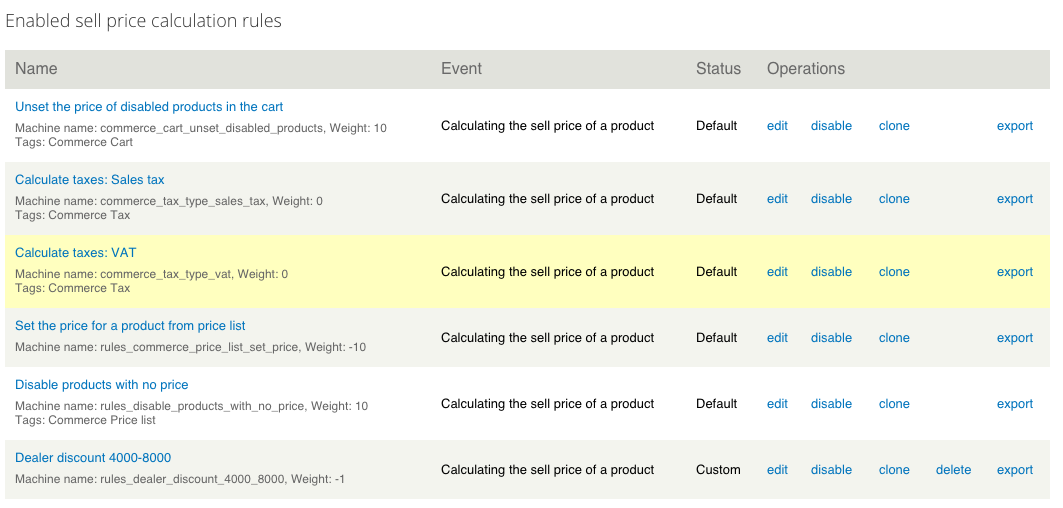
jwjoshuawalker commentedMake sure that all the tax rules have higher weight # than the discount rules.
It is a better/safer idea to increase the weight of tax rules, than decrease discounts since newly created discounts will always have a weight of '0'.
I experienced this same issue until maxing the weight on my tax rules.
Also, don't forget to clear caches after changing your rule settings! Just to be sure.
Please change status back if this doesn't help.
Comment #3
Horroshow commentedI will try it as soon as I have time to test it thoroughly. Thanks!
Comment #4
jwjoshuawalker commentedJust to be clear on increase/decrease with respect to weight.
What I meant is something like this:
my_discount_rule | weight = 0
my_tax_rule | weight = 10
Comment #5
Horroshow commentedYou mean I should change the weight programmatically with a module or change it with the UI?
Comment #6
jwjoshuawalker commented@Horroshow
Change the TAX rules' weights in the UI. Leave discounts at 0 (because new discount rules will always come through as 0).
Comment #7
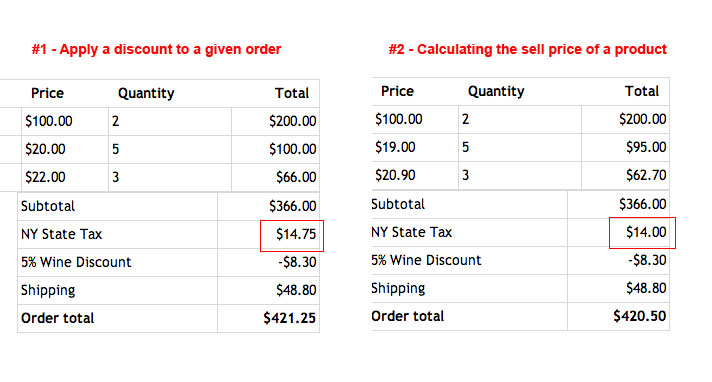
waltercat commentedThe weight only works when the discount reacts off an event "Calculating the Sell Price of a Product." The math works out, but the calculation display is very confusing (see #2). If it worked with the event "Apply discount to a given order" it would be much clearer but the tax is applied to the subtotal before the discount is applied (see #1).
I attached an image showing the difference between the two. Please note in this example that tax does not apply to the $200 line item. The correct tax for the order is $14 and that is based off the post discount subtotal. The incorrect tax is $14.75 as that is the tax of the pre discount subtotal.
For both rules #1 and #2, the discount has a weight of 0 and the tax has a weight of 10. For #1 if I change the weight of the tax to -1 to -10, nothing happens. For #2 if I change the weight of the tax to -1 to -10 the tax changes to the incorrect amount of $14.75 (the pre discount tax).
For now I am keeping my checkout at #2 because that is the correct calculation, but the calculation display is very confusing. The line items are discounted and the subtotal is actually the pre-discount total. Then the discount is shown again and it looks like the discount is applied twice.
The clearest display would be #1 in my attachment with the only thing changing the discount line calculating off of the post discount subtotal.
Comment #8
dpjef commentedSame issue : discounts are calculated on VAT included amounts.
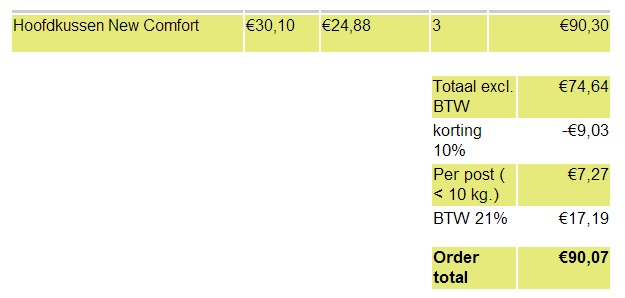
VAT is calculated on price excluding tax + shipping (74,64 + ,7,27 ) * 21 % =17,19, but the discount has no effect on the price excluding tax, only on the final price.
My tax rules weight are 10. But the discount rules are called during event "Apply a discount to a given order" AFTER "calculating the sell price of a product".
Is there any way to define that the discount % must be calculated on order total base price ? Or is there anything else that I could have mis-configured ?
Comment #9
Horroshow commentedIs there any progress for this issue?
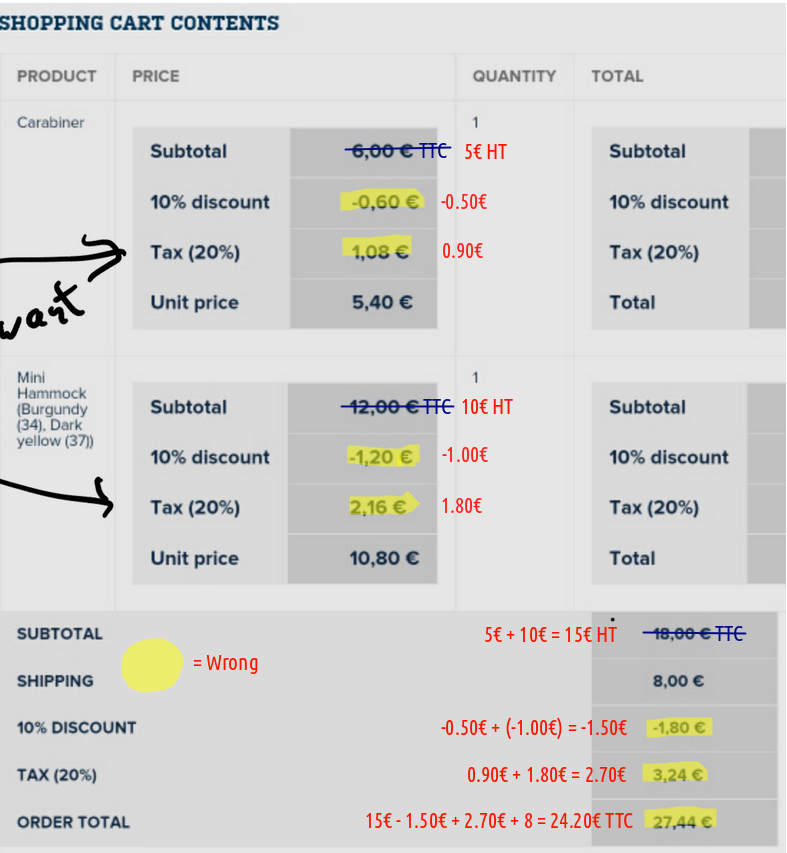
Comment #10
jkuma commentedSorry guys,
I know it's a long time issue we got with commerce_discount, but not only on our side, it's more a problem on Drupal commerce level. I need more inputs from Ryan about that. It should be solved but I didn't have the time to check if it was. I'll try to keep you posted guys as soon as possible.
Comment #11
jkuma commentedI've talked with rszrama and we could use this patch #1240216: Allow display inclusive taxes to be removed via Rules as a workaround for this issue.
Comment #12
jkuma commentedI'm working on that for both order and product discount.
Comment #13
jkuma commentedComment #14
liupascal commentedI'm currently working on a B2B ecommerce, where all the prices are displayed without taxes. The tax only get involved at the checkout process, so i'm completely fine with the discount being calculated on the total without vat
However, in a B2C website, when you say "10% OFF your first order" users usually assume it'll be 10% OFF the total, tax included.
How about having the options to select the price components that should be taken into account to calculate the total for discount ? I think it'd make the function more flexible
Comment #15
jkuma commentedHello guys,
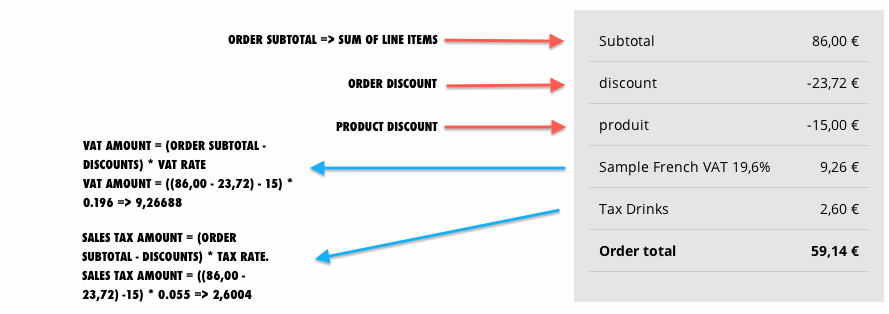
I've finally found a way to solve this issue. On order level, we are now calculating the VAT amounts based on SUBTOTAL - DISCOUNTS. Please, feel free to forward me any inputs and recommendation on this patch.
In order to use this patch, you need to clear your caches.
Comment #16
jkuma commentedComment #17
lluisandreu commentedThanks for the patch, but it doesn't work for me. I cleared caches, check rule weights (vat is 10 and discount -20), but the vat is still based on the line items total. Maybe I'm doing something wrong? See screenshot attached.
Comment #18
jkuma commentedMhh bizarre, can you forward the version of commerce currently installed on your website? Also, when you have applied the patch, did you create a new order or did you try to test the patch on a already created order?
Thanks for the reply !
Comment #19
jkuma commentedComment #20
lluisandreu commentedI'm using the last version (commerce 1.9) and (coupon dev version). I removed all orders and re-tested, but still doesn't work.
Thanks!
Comment #21
jkuma commentedHello lluisandreu,
I fixed a wrong PHP condition in the last patch. Please find an another attempt to solve this long time bug.
Comment #22
lluisandreu commentedThanks goldorak, the patch works very well :-)! I've been struggling with this issue for a month! Is there any plan to commit it to the module?
## Just a tiny problem: In order to get the right total amount I need to either checkout or update the cart. Do you think we can get the correct total at first?
Comment #23
jkuma commentedWe are also looking forward to push this commit as soon as possible but if you don't mind, I would prefer to loop over it as many time as it will be necessary.
Do you mean when the customer reaches the shopping cart page. Sounds like a bug for me, let me look at this issue.
Thanks again to help me in the debugging of this crucial issue.
Comment #24
adamgerthel commentedI can't get the patch from #21 to apply on either alpha 3 or latest dev (2014-Mar-19).
Update: I managed to apply the patch after cloning the repo. However, it doesn't seem to be working. The tax is still calculated based on the original price, not the discounted price. I've tested both with order discount and product discount. Same results.
See screenshot at: https://dl.dropboxusercontent.com/u/1996795/vat_problem.png
I'm using Commerce 7.x-1.5. The tax rule has a lower weight than the discount rule, as suggested in #1403498: Commerce Checkout - Wrong Subtotal - Ignores Discount (if that helps).
Comment #25
adamgerthel commentedWait, this is strange. I tried going to the checkout review page (last screenshot was from checkout), and the values changed.
See screenshot: https://dl.dropboxusercontent.com/u/1996795/vat_problem_2.png
In the above screenshot, the 25% VAT seems to have been applied to the discount of 100kr. This shouldn't be happening because the discount is supposed to be including VAT when entered.
Comment #26
lluisandreu commented@AdamGerthel see #22 and #23
The patch doesn't work yet, or only works when you update the cart/checkout (that's why your values changed). But if you go to admin/commerce/order you'll see that the discount hasn't been applied correctly.
@goldorak is dealing with the issue, patience!
Comment #27
adamgerthel commented@lluisandreu I thought you said in #22 that it was working, except that it didn't apply until you went to the checkout. Neither of those applied in my case (unless I misinterpreted your comments). I also reported an issue with VAT being applied to the discount itself, which I haven't seen anyone else here mention.
I'm sure @goldorak would like as much testing and information from testers as possible, which is why I posted my findings.
Comment #28
lluisandreu commentedHi guys,
While we wait for this patch (thanks goldorak) I came up with some sort of solution to apply a discount pretax using rules. Please have a look here:
http://www.drupalcommerce.org/discussions/13468/how-apply-fixed-discount...
Comment #29
izarco commented@goldorak, Any advance in the issue?
This is critical for me. How can i help?
Comment #30
izarco commentedAny information?
Comment #31
jkuma commentedSorry guys for the lack of updates, I tried so hard to make this patch working but I think I took the wrong direction. I'm currently making another patch based on a rule with a heavy weight (such as +50) that aims to fix the component prices (and especially the VAT ones) from the commerce_order_total field. I keep you posted, but please be patient, I'm doing this on my free time.
Comment #32
adamgerthel commentedUpped priority to critical since it causes receipts etc. to have incorrect information which might actually be illegal in some countries.
Comment #33
jkuma commentedHey guys,
I've finally found a way to solve this starting from the cart until the end of the checkout process. I've also tried to update the order and it seams to work like a charm.
Please, after applying the patch on the dev branch, make sure you have cleared your caches.
Any feedbacks are much appreciated!
Comment #34
jkuma commentedSmall update fixing a weird case when the order total amount equals zero.
Comment #35
discipolo commentedthis patch does not apply to the newest dev version, due to the most recent commit http://drupalcode.org/project/commerce_discount.git/commit/8dbc2e7 and needs a reroll
Comment #36
discipolo commentedi gave rerolling a shot.
Comment #37
discipolo commentedI tested the patch in #34 with the previous commit where it still applies but in initial testing discounts were not applied. I will try again to make sure it wasn't a mistake on my end.
Comment #38
discipolo commentedOrder discounts aren't being applied at all it seems. But product discounts are applied but still displayed above tax.
Will now see if it works with my reroll too
Comment #39
jkuma commentedHello guys,
I've retested the patch over the last dev version of commerce_discount and it still working like a charm. I've attached some screen shots with details about the calculation process. Please forward me as much information as possible in order to help me in chasing bugs :)
Comment #40
bojanz commentedAwesome. Here's a small formatting review:
I find multiline IFs like this really unreadable. It probably makes more sense to evaluate the conditions separately:
Unintentional? The space between & and drupal_static is not supposed to be there.
Comment #41
steveoriolCan we have a patch for the "7.x-1.0-alpha3" version ? or we have use "7.x-1.x-dev" anyway...
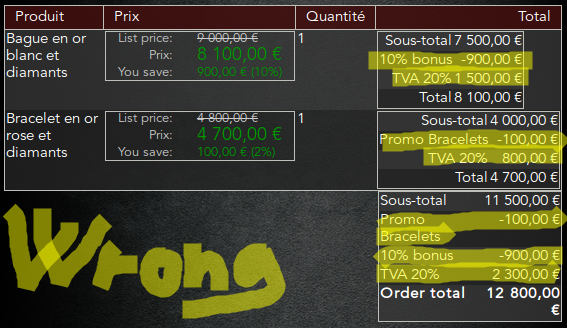

The patch do not work for me. I have missed something, but what ?
The first shot (Sélection_035.png) is without the patch:
And (Sélection_037.png) is with the patch :
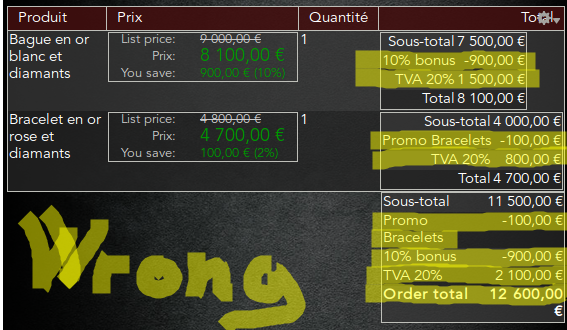
This is worse, because the total order is no longer good
Comment #42
bojanz commented@steveoriol
Alpha3 is seriously broken, you don't want to be caught dead using it.
Comment #43
jkuma commentedHello guys,
@steveoriol: Thank you so much for your feedback, Indeed the VAT amouts on line item level are wrong and miscalculated, But it seams the order total amount is correct (11500 - 100 - 900 => 10500 * 0.2 => 2100). Anyway, I've updated my patch accordingly to your inputs and I think we are starting to see the light at the end of the tunnel. The patch attached is aiming to fix up the following items:
Comment #44
steveoriolHello, (Merci goldorak and bojanz)
So I went back the following modules [commerce_discount (7.x-1.0-alpha3+31-dev) & inline_conditions (7.x-1.0-alpha3+10-dev)]


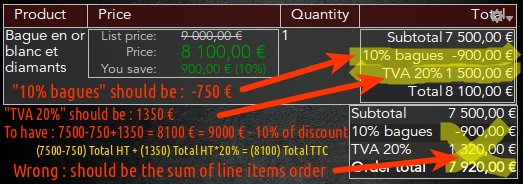
I applied the patch #43 without any problems.
I created a discount of 10 percent for a typical article (rings)
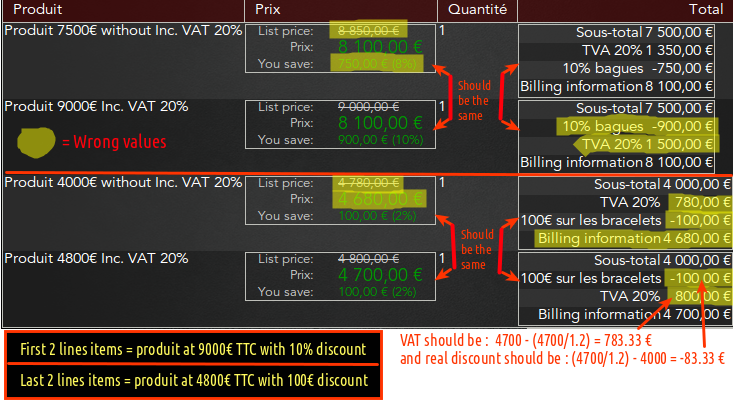
And I always miscalculations watch screenshot below :
Help me please...
Comment #45
discipolo commented@steveoriol: its strange that your discount rule seems to be set to 0.10 instead of 10.0
@goldorak: with your patch i used commerce_extra_price_formatters to show line item total and prices as rrp (like @steveoriol did for prices) because the lineitem based discount calculation was still wrong when showing components (again as seen in the last screenshot from @steveoriol above)
the calculation of the order total, discounts and taxes seems correct for me now though, although i still needed to make sure the tax was displayed after discounts, above total (i did that via https://drupal.org/node/1853988) unlike in the screenshots above where the order is correct but the calculation is wrong.
Comment #46
jkuma commentedHello guys,
I've got a question about the miscalculation of the line items: what version of commerce are you using so far? Does the VAT is included into the product price? Maybe this last one is the source of the problem, I need to check it out. Thanks for your feedbacks guys!
Comment #47
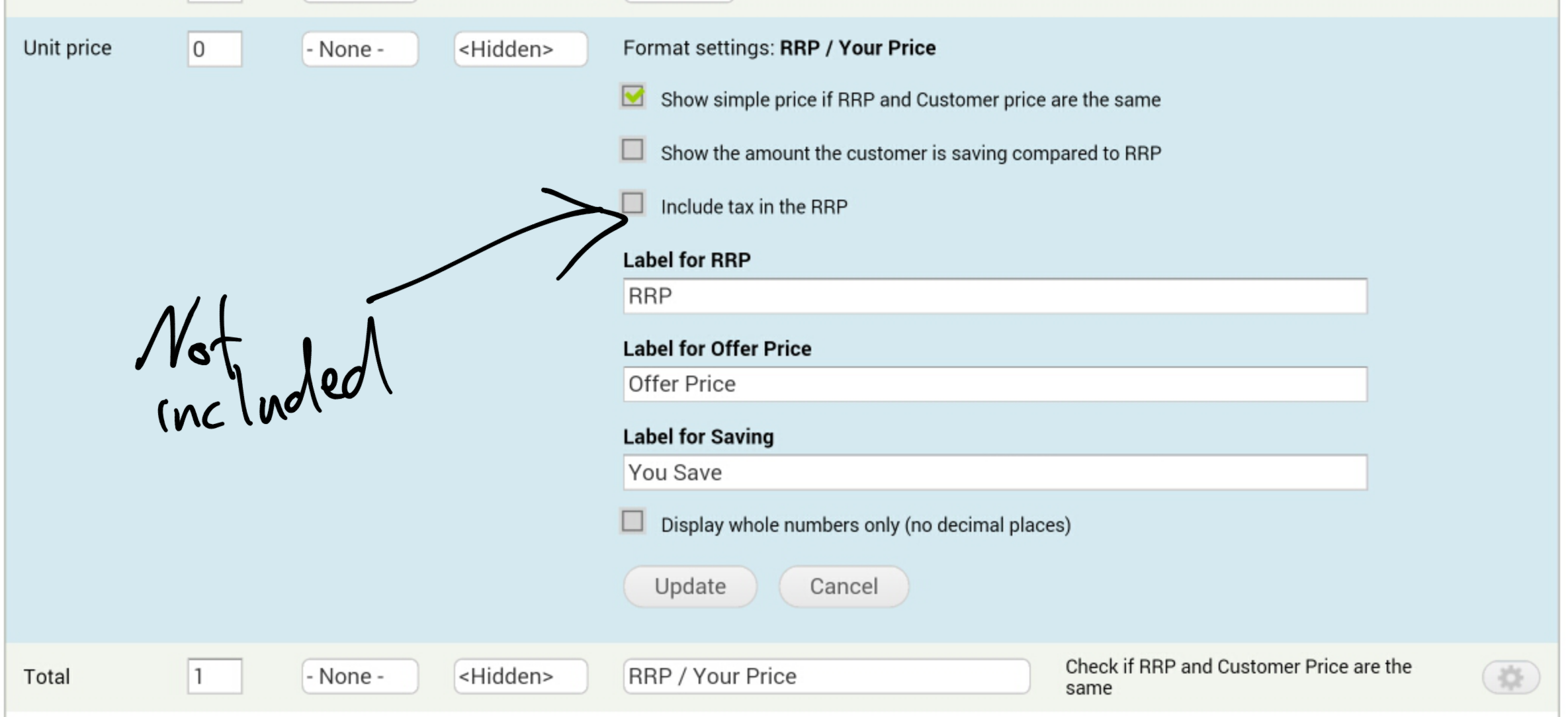
discipolo commentedchanging the formatter setting of commerce extra prices`rrp mode to include tax or not doesnt change anything... does that help?
Comment #48
steveoriol@goldorak,

my commerce version is "7.x-1.9" and I included VAT in product prices :
I tried to change that and the result is some better for just for "% discount", It is the column of prices that become wrong...

Look at the screenshot below, I grouped all possible cases:
They are both a reduction of 10 percent.
Comment #49
steveoriolIt's me again, sorry ;-)
I tried to repeat the test by changing the actions of two rules generated by "commerce_discount" by replacing actions what I find a few days ago, they are easy to install using the patch on #11 of issue 1825886 (commerce) .
I think it is worth looking in more detail the rules because they work well if VAT is included in the price of products.
There may be a way to build on its rules (actions) to correct "commerce_discount".
Test results for the percentage discount:
Replacing it


by,
Test results for an amount discount:
Results for a discount on the amount (without "Apply the discount including taxes" option )
This case is use for BtoB commerce


Replacing it
by,
in this case, the discount is applied on the HT price (price without VAT) for the product (case that may use for a client that not pay the TVA => BtoB)
Results for a discount on the amount (with "Apply the discount including taxes" option )
Replacing it


by,
...I'm getting a headache.
Comment #50
steveoriolHello,
I have just edit my previous post because the calculations are not wrong in case of a amount discount to when it is performed on the price excluding tax.
But rather rare situation from my point of view...
Note : For percentage discount, the result is the same if the reduction is applied before or after VAT.
Comment #51
discipolo commented10 percent works 4 me
edit\ wrong pic
Comment #52
discipolo commentedComment #53
discipolo commentedi needed to enhance the tax rule weights anyway though only to get taxes to display after discounts (calculation was correct)
Comment #54
steveoriolHello discipolo,
If your shop is for BtoC you should have, for a 10% discount over the order you give has example (18,00€ TTC) :
18.00 - 10% = 16.20€ TTC as "Order Tolal" and not 19.44
So the VAT should be : 16.20 - (16.20/1.20) = 2.7€
and the real amount of discount should be : (16.20/1.20) - (18/1.20) = -1.5€
So : 15 + (-1.5) + 2.7 = 16.20€ TTC
with :
15 = order subtotal (HT) => 15x1.2 = 18€ (TTC)
-1.5 = real amount of discount of the order
2.7 = amount of VAT of the order
Comment #55
discipolo commentedthese are product discounts, not order discounts so they should be applied before taxes (order total = subtotal - discount + VAT)
not sure if i understand what you are saying, maybe the numbers are confusing me.
it looks correct to me since 18 - 1.80 = 16.20 and 20%of that is 3.24 which added to 16.20 gives me the total of 19.44 (the lineitem unit prices are confusing since they include discount, but i cannot expand them to show components because the tax there is calculated incorrectly - i will upload a screen for that)
Comment #56
steveoriolOK, discipolo,
I see why, you do not understand. The 20% should not apply to 16.20 because VAT is already in it...
The 20% of VAT should apply to the prices (without VAT) = (HT)
So,
for no discount, this will be :
18€ TTC give (18/1.20) = 15€ HT and so, 15€ + 20%(15*20/100=3) = 15€ + 3€ = 18€ TTC (OK)
and with the discount :
15€ HT - 1.50 = 13.50€ HT + 20%(13.50*20/100=2.70) = 13.50€ + 2.70€ = 16.20€ TTC
You can not have 19.44€, this will be more expensive that the normal prise of 18.00€... ;-)
Comment #57
discipolo commentedI see what you mean.
I wanted to use extra price formatters rrp price to show line item unit prices and totals without tax by editing the cart view. See image above.
Below is what it looks like with components, I didn't really want taxes there
On a side note my discount rules keep dissapearing...
Comment #58
steveoriolIt should be like this...

For your "price" column, you can may be use this modules :
https://drupal.org/project/commerce_price_savings_formatter
Comment #59
discipolo commentedit appears this patch voids any shipping taxes i have set on flatrates.
Comment #60
discipolo commented@steveoriol i think i understand: you are referring to VAT taxes that should be included instead of sales tax maybe?
anyway my taxadvisor assured in our case the calculation we currently have is fine for b2c and b2b. the issue was originally that the discount was applied after tax, that is addressed by this patch correctly it seems, although I still have
1. randomly dissapearing discount rules (might be feature related)
2. shipping taxes that normally work dont work when discounts are applied, seemingly only with this patch but i will triple check that
3. the display order is still wrong, although that might be a small fix (since https://drupal.org/node/1853988 doesnt work as expected)
Comment #61
discipolo commentedi just rechecked and can verify that this patch still needs work because it breaks shipping taxes (the rule is executed but applied_tax isnt used/recalculated.)
Comment #62
discipolo commentedwhen recalculating taxes in the patch from subtotal shipping tax is missing because shipping isnt part of the subtotal.
i am probably completly off base but why not use the tax amount that is set if it is set instead of recalculating? what would break?
initial tests suggest this still uses the correct tax including shipping taxes
Comment #63
discipolo commentedComment #64
geek-merlinThis might be on the wrong track. See #2276227: [META] Use order discount with VAT for a potential fix.
Comment #65
discipolo commentedEven for sales tax? The last patch works for sales tax. Doesn't it work for vat? Why the other approach?
Comment #66
geek-merlinhi discipolo,
to be honest, i didn't grok this whole issue thread due to time limitations...
i do think the other approach is the most natural one:
* every line item can carry taxes
* discount line items get a new postprocess hook, then we can apply taxes (and do other things!)
* so the right sums come automagically and subtotals and totals are correct without additional effort
some notes though:
* did only do it for VAT module, but should be easy for TAX module
* also implemented "proportional taxing" which can be important for countries with VAT
Comment #67
discipolo commentedinteresting. i am currently using the patch from #63 successfully with sales tax & shipping tax without any manual changes.
Is VAT and TAX different modules (i thought sales and vat are just part of the taxes module)? if there is a different approach for sales tax i will test it, but are you saying the patch from #63 doesnt work for vat? or can you spot anything actually wrong with its implementation - why do you think it might be the wrong track?
have you tried if your approach works with shipping taxes?
Comment #68
geek-merlinsorry, just a short note today:
"Taxes should applied to SUBTOTAL minus DISCOUNT" is plain wrong: this will violate tax sum invariance and be legally wrong.
imagene we format the cart as a table:
this violates a law principle (in germany called "verprobung") which requires the vat mus sum up. (it doesn't: 20+0 != 10)
(other modules might also rely on that so we will need workarounds for them too...)
the other patch yields the correct result
the discount patch i provided adds a rules hook firing after discount. a prebuilt rule that fires discount vat calculation with vat module is available, you can as well fire tax calculation with tax module.
yes, vat is a different module specialized on eu vat
Comment #69
discipolo commentedalright. i will have to put that question to some tax professional.

i am currently using sales tax and not vat for my stores. was told that works for b2c and b2b. see attached cart table
Comment #70
discipolo commentedit looks like by setting the discount rule weights to -10 by default it is impossible now to do anything before that with rules when price is being calculated.
Comment #71
Anonymous (not verified) commentedI'm struggling to get this to work as we need it to work in the Netherlands for B2C shops.
For this to work my preferred method would be to specify whether the discount is to be calculated from the price including product taxes or excl product taxes.
Please bare with me as I try to illustrate the way I see it.
EG:
=====================================
Product price entered incl. taxes, Discount entered incl. product tax
=====================================
Product price Eur. 100.00 incl. 21% VAT
Discount rule: Eur. 50.00 incl. product tax
Result when showing calculated price for current user (product page etc.):
Product price Eur. 100.00
Discount Eur. 50.00
Your price Eur. 50.00
In the checkout you would get the following line-items:
Product price Eur. 100.00
Discount Eur. 50.00
Subtotal Eur. 50.00
Order sub total excl. tax Eur. 41.32
Tax (21%) Eur. 8.68
Total Eur. 50.00
=====================================
Product price entered excl. taxes, Discount entered excl. product tax
=====================================
Product price Eur. 100.00 excl. 21% VAT
Discount rule: Eur. 50.00 excl. product tax
Result when showing calculated price for current user (product page etc.):
Product price Eur. 100.00
Discount Eur. 50.00
Your price Eur. 50.00
In the checkout you would get the following line-items:
Product price Eur. 100.00
Discount Eur. 50.00
Subtotal Eur. 50.00
Order sub total excl. tax Eur. 50.00
Tax (21%) Eur. 10.50
Total Eur. 60.50
=====================================
Product price entered excl. taxes, Discount entered incl. product tax
=====================================
Product price Eur. 100,00 excl. 21% VAT
Discount rule: Eur. 50,00 incl. product tax
Result when showing calculated price for current user (product page etc.):
Product price Eur. 100.00 (Excl. tax)
Discount Eur. 41.32 (Excl. tax) (calculate the discount excl. tax rate product 50 / 1.21 = 41.32)
Your price Eur. 58.68 (Excl. tax)
In the checkout you would get the following line-items:
Product price Eur. 100.00
Discount Eur. 41.32
Subtotal Eur. 58.68
Order sub total excl. tax Eur. 58.68
Tax (21%) Eur. 12.32
Total Eur. 71,00
=====================================
Product price entered incl. taxes, Discount entered excl. product tax
=====================================
Product price Eur. 100,00 incl. 21% VAT
Discount rule: Eur. 50,00 excl. product tax
Result when showing calculated price for current user (product page etc.):
Product price Eur. 100.00 (Incl. tax)
Discount Eur. 60.50 (Incl. tax as you display the product price incl. tax, calculate the discount incl. tax rate product 50 * 1.21 = 60.50)
Your price Eur. 39.50 (Incl. tax)
In the checkout you would get the following line-items:
Product price Eur. 82.64
Discount Eur. 50.00
Subtotal Eur. 32.64
Order sub total excl. tax Eur. 32.64
Tax (21%) Eur. 6.86
Total Eur. 39.50
======================================================
If my assumptions are correct this would mean we would need to add the option on which of the prices the discount is calculated, either incl. tax or excl. tax.
The calculations would need to be changed to check if the product price is incl. or excl. taxes and whether to do extra calculations on the discount based on the products tax rate.
Comment #72
maxplus commentedHi,
there are a lot of posts about this issue:
- this post (https://www.drupal.org/node/1962484)
- https://www.drupal.org/node/2276227
- https://www.drupal.org/node/1825886
- https://www.drupal.org/node/1087410
- https://www.drupal.org/sandbox/iMiksu/1871090
- http://drupal.stackexchange.com/questions/49720/drupal-commerce-how-to-p...
I have tested different approaches explained in different posts, but I cannot seem to manage it so far.
1. My prices are displayed in the frontend without taxes
2. I use VAT (not sales tax)
=> I also want to achieve a order subtotal without tax, then discounts applied and then tax applied to the "subtotal - discount" amount
Im going to read the above posts again and try some suggestions again, hoping to find a decent working solution that I maybe overlooked right now
=> I keep you posted...
Comment #73
geek-merlinI can assist you with the (imho) thorough way outlined in #2276227: [META] Use order discount with VAT if you get stuck.
By thorough i mean: To use VAT and discount we can
* either do sole price display workarounds (that always rely on assumptions that may or may not hold i a particular use case)
* or make VAT and discount calculation play well together so that prices are stored right
i did the latter.
;-)
Comment #74
maxplus commentedHi Axel,
I don't really understand what you are saying.
I'm I correct when I say that all problems are solved after applying these patches?
* #2276233: Reverse calculation messes up price components on discount
* #2276335: Add discount postprocess hook
* #2276331: Allow proportional vat calculation
Thanks for the support!
Comment #75
skyredwangThe current status says "needs review", and it's probably for https://www.drupal.org/node/1962484#comment-8721771
Comment #76
geek-merlin@maxplus: yes i run those changes on 2 production sites and they do their job well even for discount and shiping calculation.
Comment #77
sansui commentedI'm not sure if my issue is the same here, but I am using the discount module to apply a flat amount off a set of products, but my state sales tax rule is applying to the pre-discount price of the product, even though the rule (which references the discount), says its event is based on calculating the sell price of a product. Changing the rule weights did nothing, and I have verified that other modifications to the sell price work just fine with sales tax calculation - only selecting a discount for the action causes this problem.
Comment #78
ralt commentedThe summary of this issue needs to be updated. As it currently stands, it's pretty much incomprehensible.
What's the current status of understanding? Is the original summary still correct? According to #68, it's plain wrong w.r.t. Germany's law. Should the choice be given?
What *exactly* is the issue?
Is it:
- The issue **only** happens for order discounts?
- The discount should be applied **BEFORE** taxes?
- The discount should be applied **AFTER** taxes?
- The discount should be applied according to the VAT rule and the discount rule **weights**?
Coming to the issue today, I have to say I'm lost. This issue seems to be a big one, yet it's quite unclear what should be done. Clearing up this misunderstanding for everyone seems to be the first step to resolution.
Comment #79
liupascal commentedCould this issue be resolved with this commit : http://cgit.drupalcode.org/commerce_discount/commit/?id=aa4f423
Anyone (with code) would be able to define what price component should be taken into account for the discount ?
Comment #80
sansui commentedI'm with Ralt here. Proper calculation of taxes on discounted price is pretty critical, and it's clear to see there are different needs between VAT, US Sales tax and other implementations.
I think the discount module should work to respect the weight of rules, so that the rules based administration will allow prices to be calculated properly for different needs.
Comment #81
robit8deb commentedAgree im lost as well. I know as far as the US goes - the tax is applying to the subtotal minus the discount which is incorrect. It should be applying to the updated price with discount applied. I tried the patch in the link and it made no difference. This is a pretty big hole in the checkout process since we are ripping off customers who apply a discount. They shouldnt be paying that much tax on the purchase.
Comment #82
shaneonabike commentedI tested the patch on #63 and can confirm that it works with Commerce Taxes and Commerce Canadian Taxes now calcultating things properly. The only feedback that I might suggest (usability wise) is that the weight of the discount is at the bottom of the list. So it is misleading in causing people to think that it is applied after everything.
Comment #83
geek-merlinI can't see how this can solve the problems raised in #64, #66, #68 and #2276227: [META] Use order discount with VAT. If you tested this please document.
Comment #84
chefnelone commentedI applied the last patch to 7.x-1.0-alpha4+4-dev and it is working fine.
-Using Sales Taxes.
-Discount applied to Order.
Comment #85
sansui commentedHave tested the patch in #63 and it has no affect on us sales tax calculation. At checkout the sales tax continues to calculate from the pre-discount subtotal.
Comment #86
mrpeanut commentedI successfully applied the patch from #63. However, at checkout, the sales tax is calculated from the pre-discounted subtotal (as Sansui said).
My subtotal is $60 minus a $30 discount and the sales tax is calculated off the $60. I am using Commerce 7.x-1.10 and Commerce Discount 7.x-1.0-alpha4+4-dev. I have cleared my cache and deleted the entire order (and started with a new order).
Comment #87
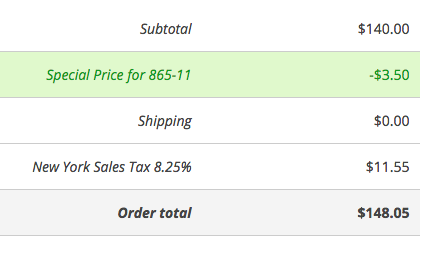
deardagny commentedI'm in the same boat as robit8Deb, Sansui, and Mr. Peanut. Patch in #63 applied fine but don't see any difference in behavior. ShaneOnABike or chefnelone — any chance you could post a screenshot of your line items with the correct calculations? Are you using Product discounts or Order discounts? Maybe we're just missing something inherently different in our setups.
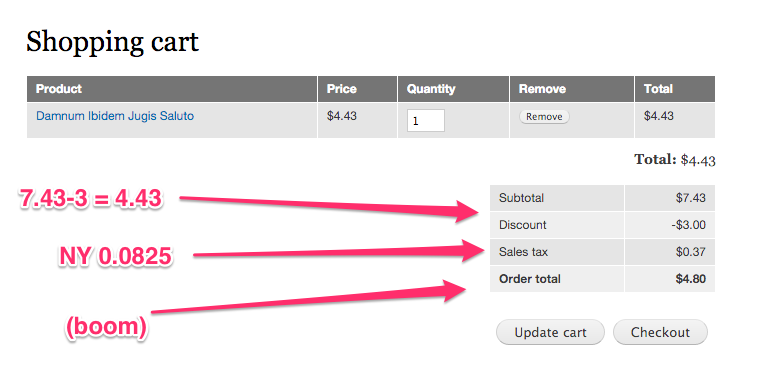
For reference, this is the incorrect behavior I'm still seeing with New York State tax. The amount of $11.55 is calculated from $140.00, when it should actually be $11.26 after the $3.50 discount (136.50*.0825).
EDIT: Since applying the patch in #63 on a fresh install of Commerce Kickstart, Product Discounts seem to work correctly. However, Order Discounts still have the problem shown below.
Comment #88
deardagny commentedI tested on a fresh install of Commerce Kickstart and still no luck. I posted my steps at https://www.drupal.org/node/2262865 to try and keep the discussion going. Christmas is coming up, and as far as I can tell this makes Order Discounts a non-option where taxes must be charged.
Comment #89
sansui commentedThis issue has certainly languished.
There is a patch here - https://www.drupal.org/node/2276335 - that I have tried in conjunction with these other changes with no effect.
To me the most frustrating part is I don't understand where the logic failure occurs in determining the line item prices vs line item tax calculation. Every few days I keep going back to the code and poking through.
Particularly in commerce_discount.rules.inc, I would think there would be something to update the line item price the way it provides an update to the order total. But I don't know... its very hard for me to follow this module.
Comment #90
deardagny commentedOne more note: It looks like a viable workaround would be to use a Product Discount with no conditions — which mimics an Order Discount by applying the % off to every order item individually. This seems to work in testing so far using Sales Tax. I'm not sure how this would apply to VAT.
Comment #91
mrpeanut commented@deardagny — Good find. However, this may work for percentages off, but not for dollar amounts off. For example, if I have a $10 off coupon, a product discount will apply the $10 off to each item.
Comment #92
deardagny commentedAhh good point. I've only been working with percentages so dollar amounts hadn't crossed my mind. Not being a real coder, guess I'm just happy I made any progress at all.
Comment #93
sansui commentedDo we need to try and come up with funds to get some outside help on fixing this issue or is it just time to abandon the discount module.
Comment #94
discipolo commentedi am currently using the patch from 63 for product percentage discounts with commerce_tax.
i am also testing the alternative commerce_vat approach from https://www.drupal.org/node/1962484#comment-8826541 and will report results there.
Comment #95
lpc commented#78
I think solution is not to use commerce_tax module and create a rule to calculate taxes. My basket with fixed and percentage discounts applied :
Comment #96
hosais commentedIs possible somebody explain a little what is the logic of the discount module and lets try to rewrite or create another discount-for-VAT module?
I use commerce_tax. I tried to use commerce_vat but it even has problem to install. So decide to use commerce_tax module. Furthermore, I suppose this is not difficult for Spain area. Currently, I just make discount (manually change the original price) and add discount explanations in the body. Everything is correct. Am I wrong?
Comment #97
adamgerthel commentedI think - and correct me if I'm wrong - that the issue is that the discount is applied like this:
Example:
Product price is 1000 incl. 25% VAT
Product discount is set to 10%
This is how the line item price component array will be laid out when the above item is added to the cart:
Base price: 800
VAT: 200
Discount: -100
The price will thus be 900 (correct). However, the tax amount will be 200, which is incorrect.
Perhaps the proper way would be to separately include tax for the discount in it's own component:
Base price: 800
VAT: 200
Discount: -80
Discount VAT: -20
In the above price component scenario the final result would be that the cost is 900 (correct) and the tax would be 180 (correct).
Comment #98
geek-merlin#97: yep, i agree.
like stated in #64-#68
Comment #99
maxplus commentedHi,
This is my situation:
1. My sales are located in Belgium, so I need VAT and not Sales Tax.
2. I enter my product prices excluding VAT
3. I create discounts excluding VAT
=> at the shopping cart form or order review, I just want all discounts to be calculated and AFTER that, VAT should be calculated on the subtotal.
The problem that I can not solve, is when creating discounts at Order level.
=> Product based discounts seem to work just fine, even without patching the Discount module.
Today, I tested the possible solution from [META] Use order discount with VAT again but with no success...sorry axel, I cannot make it work.
So I went back to the default commerce tax module and gave patch #63 another try, also with no success.
@axel.rutz: do you have a working site online with product and/or order discounts where I can see and test it?
I would be very happy to see a production site with this problem solved, that would be a new motivation in my search for "what I'm I doing wrong?"
Comment #100
geek-merlin@maxplus: please check the improved #2276227: [META] Use order discount with VAT and see it live on www.wein-mattheis.de (buy wine and mustard to see mixed vat).
Comment #101
maxplus commented@axel.rutz: thanks for showing a working example. I can indeed see the different VAT rates for mustard and wine during checkout.
=> I have set up a brand new commerce installation to test the current "[META] Use order discount with VAT" and it works. The only setting I need to change is that I want to also show taxes in my cart view and not only when entering checkout.
For now I don't really need the different VAT rates for different product categories, so I would like to keep using the Commerce Core TAX module to keep things simple.
I just don't understand why the tax part is not included in the Order Discount (fixed amount discount line item). Maybe because this is a Line item that is not referenced to a product and does not have a clue about what VAT rate to use...
Comment #102
geek-merlinSo please help by making the other patches (#2276227: [META] Use order discount with VAT and its 4 children) RTBC.
Comment #103
hosais commentedHello Axel,
In your setup, is it a must to use VAT module? I cannot setup VAT (Spain) module successfully. Do you have solution for Commerce Tax module (with VAT setting)?
Comment #104
geek-merlinYou can of course do the same for tax, but i've done the work for VAT.
Comment #105
hosais commentedThank you axel for your comments. From my observation, your solution is a temporal solution, am I right?
On the other hand, it is better to separate the discount and tax? To me how much the client pay, how much is the tax. It should be simple as that. Discount is a marketing thing, the difference in different places/countries is only how to explain to the client. Why we cannot put that part into the formatter such as "you saved $xxx, ...." in the formatter module?
Should we have a path to improve this "complicate" module, after all this issue is critical and should be solved.
Comment #106
geek-merlinImho tha patches and the module are designed to stay.
Comment #107
mrpeanut commented@luk82 — Would you mind sharing your Rule to calculate taxes? I can't quite figure out what actions need to be added to calculate and add a sales tax.
Comment #108
joelpittet@goldorak #43 looks really promising for commerce tax thank you!
Here's a review to maybe help a few things along:
This change is just patch noise in a complicated issue.
Shouldn't this be earlier? Maybe inside hook_commerce_cart_order_refresh?
This works for the out of the box tax type, but not for custom types(my case I have b2b_tax, though I guess I could rename it...). Maybe a check on whether it's "display_inclusive" would be more generic approach or not? Or simply strpos() !== FALSE would do?
Maybe use 'discount|' instead as that seems to be the check most other things in do in this module for consistency. Nice helper though.
Should this come from the tax type's round_mode or is this always the case?
This looks a bit scope creepy, Maybe push that to another issue?
Comment #109
joelpittetThis is my trickery to get this kinda working with minimum of code:
Comment #110
dubcanada commentedI can't seem to get any of these working, has anyone had any luck with them?
Comment #111
Anonymous (not verified) commentedSales tax is being applied to full price and not discounted price.
Comment #112
japerrySo related to this issue, the discounts are occurring after taxes in the display, even though the calcuations are correct.
This patch adds a weight right under the subtotal and before taxes are applied.
Comment #113
joelpittetIs there need to increment the weight? With many discounts this could end up near the taxes?
Can't remember what weight taxes are.
Comment #122
caw67 commentedsame thing here. i use 7.1.0 alpha 5 and applied the patch, but doesnt work!
dsicount is calculated correct, but tax is calculated from original price without the discount
Comment #123
agileadamjoelpittet,
I think you're onto something. Thank you!
In my abbreviated testing it's working perfectly (I just have US taxes for one state)
joelpittet's solution doesn't require any additional patching or code changes, so I encourage others to try this. YMMV.
Comment #124
stephenevans commentedI tried #66-#68 here: https://www.drupal.org/node/1612662#comment-10154372
Worked very well! (USA tax rules)
Comment #125
agileadamAt first glance the solution in #109 worked great. I'm not sure if I've changed something, but now my numbers are slightly off.
Here's what's happening:
I expect to see an actual tax amount of $0.836 (rounded up to $0.84 I'd assume?)
I can see that the tax component of the discount line item is calculated to -0.242 (-24.2 in minor units).
This should be 3.8*0.055 = 0.209 (20.9 in minor units). It's 3.3 minor units off. Weird.
Any idea why that simple calculation is off? I'll start looking up from commerce_tax_calculate_by_type() to see if I can pinpoint it.
Comment #126
joelpittet@agileadam it doesn't calculate taxes based on the order subtotal, it does it for each line item then adds them up.
Which can produce some rounding errors (which may be more accurate depending on your accountant...) which we are working on putting in tests in another issue. #2468943: Ensure proper rounding of price amounts and components when components are added via discounts
Comment #127
agileadam@joelpittet,
I should've specified, the subtotal in my example is a single $19.00 product. It's calculating the tax amount for that product line item correctly.
Here's a screenshot of what the components look like for each of the two line items. You can see it's calculating the wrong tax amount on the discount line item.
Thanks for the quick reply, btw.
Comment #128
joelpittet@agileadam it looks like the taxes are being applied before the discount (just eyeballing the component indexes)
I bet you (fake tax money) if your custom module is weighted below commerce_discount it will start calculating correctly... just a guess.
And yeah you should be getting $0.84 tax not $0.80
Comment #129
joelpittettestbot is being nice, retest
Comment #130
caw67 commenteddoesnt work. have module added and patch #113
Comment #132
caw67 commentedthe rule here works for coupons: https://www.drupal.org/node/1612662#comment-9516259
i think we can rewrite it for discounts.
Comment #133
capmex commentedI recently worked on this issue for a US site (Sales tax) and was unable to use a rule for this because when removing products with a discount the calculated negative values remained affecting the calculations, a customer would be able to add and remove products to artificially reduce the order total. Also if the discount no longer apply the calculated negative tax remains.
So I used the code on #109 as a starting point, basically I needed a way to remove any existing tax negative values previously calculated on discount line items and recalculate them if the conditions apply.
Here's the code with comments, this is specific to the site:
It works for coupons too. Sometimes there is a 3-4 cents difference on the tax that I think is from the rounding of the calculated negative amounts.
Comment #134
leendertdb commentedHi @capmex, #133 works really well for us! Many thanks for sharing that snippet.
I changed it up a small bit because we have multiple tax rates for different states, so I use "commerce_tax_rate_load()" to see if a tax rate exists for the billing address state, and if it does then apply it (so instead of hardcoding it).
So if anyone else has issues with this regarding US state tax calculations, try to use #133 and if necessary a few small alterations will go a long way.
Thanks again!
Comment #135
mglamanComment #136
mglamanPutting at needs work, given discussion. #112 has a solution to price component weight. However, IMO, taxes should just be given heavier weight than trying to adjust discount. Rolling a patch quick. However we should get a test in, too.
Comment #137
mglamanHere's an approach taken from #1612662: Calculate fixed amount before tax calculation that calculates taxes on a discount on presave to get a negative tax value. Putting to review, but we should get tests for this.
Comment #138
joelpittetThat could possibly work:) Let's get an automated test on that.
Comment #139
mglamanForgot to unassign. I might try to take a stab at the tests today.
Comment #140
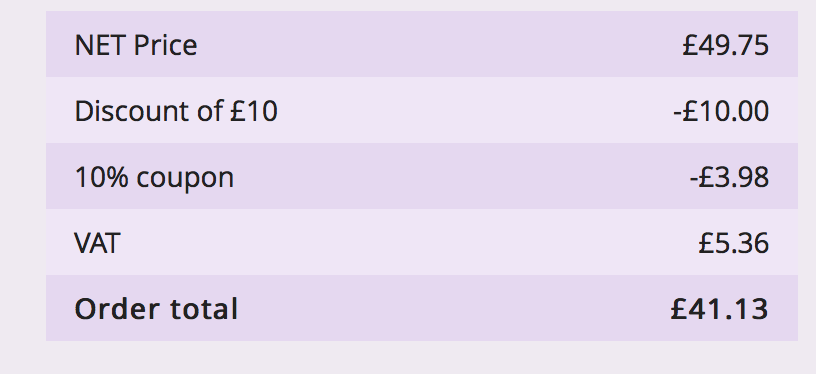
ollie222 commentedI believe I'm coming up against this problem myself, on the basket and check out it shows.
Order subtotal = £100
10% Discount = £12
UK VAT = £20
Order total = £108
The VAT shown is the tax before the discount is applied and the discounted amount is the amount of the total with tax included.
In my case I'd like to show the discount without tax and the tax on the discounted subtotal.
Am I correct in thinking this is the problem we're trying to address?
If it helps patch #137 applies cleanly but doesn't change anything, is it supposed to?
I'd be happy to test any future patches for this issue if it helps.
Comment #141
mglaman#140 Ollie222, did you clear caches? It adds a new hook it needs to be registered.
Comment #142
ollie222 commented#141 Thanks for coming back to me quickly.
Yes I did clear the caches and the hook is being executed right into the for loop when the rule is invoked for each tax type.
I printed the output of $line_item using devel but can't see any changes, should the change appear under the pricing?
Does that patch just need to be applied against the latest dev version or do I need to apply anything else?
Do discounts need to be configured to have a tax on them?
In case it makes any difference I have the discount configured as an order discount with a percentage discount and it is activated with a coupon using commerce_coupon 7.x-2.
Comment #143
mglamanYou know what, I wonder if we need to configure line items to accept tax. That's a good question. That's also why we need to get tests written. Can't gurantee the patch until we get a test case written
Comment #144
ollie222 commentedI don't understand fully how the tax and discounts are applied, although I'm willing to learn, however from what I can see a normal product $line_item->commerce_total['und'][0]['data']['components'] has two elements, a base price and a tax component.
If I understand correctly when an order discount is applied it creates an extra line item to store the discount and $line_item->commerce_total['und'][0]['data']['components'] has two elements, a base price and a discount rate. Should this line item also have a tax component?
If there is only one extra line item then taxes could only be applied if the all line items had the same tax code.
If different product lines had different tax rates (possible with EU VAT) then you'd need a discount line item for each product.
Comment #145
IckZ commentedsubscribe
Comment #146
calbasiHi,
I have the same issue than Ollie222 at #140
I guess taxes are applying to products, and product calculation price happens before order price modification.
I suppose Order Discount should work as a product discount, but applying all products at cart... I wonder if I can work around using a "negative tax"...
Comment #147
Scott Robertson commentedHaven't had a chance to roll a patch for this, but I was able to resolve this with a modified version of the presave hook from #137. Calculating the taxes alone wasn't enough, I had to remove the existing taxes first each time and then recalculate.
Comment #148
mglamanThis takes notes from #147. Kept it the usage of rules_invoke_event for commerce_tax_calculate_by_type instead of directly calling function, just in case. We do the same for discount components to prevent duplicates, so we should for taxes, too, on the discount line item.
Comment #149
ollie222 commentedApplying the patch in #148 seems to make no difference to my calculations at checkout. When a coupon is applied the VAT is still calculated on the non discounted price.
In my test case I get
SUBTOTAL £100.00
10% DISCOUNT -£12.00
UK VAT £20.00
ORDER TOTAL £108.00
Is there anything else I need to do other than just apply the patch in #148 to the latest dev version of commerce_discount?
Comment #150
jncrucesI solved it calculating the discount directly to product.
My discount previously was 10% to order if it have a special shipping method. I changed the discount to apply always over the product, not over the order. Now i have my discount added and the tax is calculated over the baseprice-discount.
Comment #151
tadesign commentedHi,
I've got the latest dev version of Commerce Discount, with the patch from #148 applied and I get the following with the discount set to Order Discount:
Subtotal £167.50 (exc VAT)
15% Discount -£30.15
UK VAT @ 20% £33.50
Order Total £170.85
The result should be
SUBTOTAL £167.50
- 15% Discount -£25.12
+ 20% VAT £28.48
TOTAL = £170.86
The Subtotal is correct but the discount is still applied after VAT has been applied. As can be seen above the total has a slight issue in that the Order total should actually be £170.86 rounded up. This rounding error becomes more problematic the bigger the order but is likely a separate issue to the discount problem.
I really need this to work for the Order rather than Product discount as I have products setup with "Commerce pricing attributes". If the discount is set to product the additional options don't get discounted and they get added to the line item after the line item has had discount and VAT applied. With the discount set to Order Discount the options do get discounted just in the wrong discount after VAT order as discussed. With discounts set to product rather than order and adding products to the cart with no additional options the Subtotal, discount, VAT and Total calculations are calculated correctly.
I'm really struggling with this issue and have an unhappy client as they have a site with discount that doesn't work as it should but I don't have enough knowledge to fix this issue and don't have the time to dedicate solely to this issue due to other website build commitments. I really appreciate all the effort made by everyone so far. The site is pretty big with multiple options available for clothes but if the Commerce pricing attributes is affecting the discount and VAT should I just bite the bullet and attempt to rebuild the site with Commerce custom line items?
Help!
Thanks
Richard
Comment #152
mglamantadesign, the biggest issue we face is calculating when the order discount runs.
On order refresh the
commerce_discount_commerce_cart_order_refreshhook is called. That in turn invokesrules_invoke_event('commerce_discount_order', $wrapper);The problem is that tax is at a line item level. We have order discounts. They do not technically work together. So some kind of hijack has to happen. Either after the rules event invoke, or somehow making all order discounts aware of tax.
Comment #153
tadesign commentedHi Mglaman,
Thanks for replying, I think I understand. It looks like I'll have to look into an alternative way of adding additional product options to work with the discount.
Thanks
Comment #154
IckZ commentedtadesign: Did you look into this issue? https://www.drupal.org/node/2429595
Comment #155
mdupree commentedI was able to get correct tax rate for (base price - discount) by setting the discount to the product, and setting the rule weight for calculating the discount rule higher then the tax rate rule.
In the Pricing rules under my discount rule ( Line item contains a specific: weight 1; )
under my tax rule ( Calculate taxes for a line item: weight 0; )
This seems odd, as under the checkout it displays the price table as:
Subtotal 22.00 CAD
pst (14%) 2.38 CAD
discount -5.00 CAD
Total 19.38 CAD
But the tax is correct.
Further investigating..
Comment #156
mglamanIckZ thanks for linking that! I didn't even notice that. Should we commit this patch to support tax + product discount and focus on #2429595: Order discounts are not taken into account during tax calculation for order support?
Comment #157
mglamanmdupree, if that worked want to try this patch? It alters the event to re-sort the calculation rules. It just ensures rax rules run early by a factor of 20.
Comment #158
joelpittet@mglaman that is a great patch, though I think it's kinda backwards for applying taxes.
Taxes should be applied with the discount included right?
@mdupree the patch won't fix the component order, just the values. That was messing with me when playing with it.
Correct taxes (please correct me if I'm wrong here)
And NOT
Comment #159
mdupree commentedI was able to fix the display by adding the following to commerce_discount_commerce_price_formatted_components_alter()
Getting an output of :
base price 16.00
discount -5.00 CAD
tax (14%) 1.54 CAD
total 12.54 CAD
Comment #160
mglamanDo we need to combine the last two patches, then? Or last patch seems like it own ticket.l, evenn.
Comment #161
tadesign commentedThanks for the link IckZ, I will take a look at that as the site currently has a lot of products imported and I don't really want to have to rebuild it.
I have got a bare bones version of the site with the discount working correctly with VAT applied after without using 'Commerce pricing attributes' and instead using a Pizza toppings example that uses taxonomy and pricing rules for the options it's just a lot of work to implement this at this stage.
Thanks again and I'll let you know how the solution you linked to works out.
Comment #162
puudutus commentedJust wondering if anyone was able to come up with a fix for this issue?
Comment #163
mdupree commented@puudutus Applying patch 157 & 159 does the trick, the only issue I have noticed is the base price in the view actually changes to be minus the discount.
Comment #164
mglamanThe subtotal? Or the unit price? Can you provide a screenshot? I'll also role #157 and #159 into a single patch.
I also updated title and summary to point that these patches only work with product based discounts.
Comment #165
mdupree commented@mglaman Here is a screenshot as to what I mean when I say the base price in the view.
Comment #166
ollie222 commentedJust to check if I'm doing this right, if I take a fresh copy of the latest dev version of commerce discount and apply the patches in #157 and #159 then it looks to make no difference to the calculations.
I have the shop setup with a sales tax of 20% (even though it's actually VAT we deal mostly business to business so show exclusive prices until checkout) and I've added the discount as a percentage product discount with a coupon.
In my case at checkout I get the values
Subtotal £100.00
20% Discount -£24.00
UK VAT £20.00
Order total £96.00
So subtotal and total are correct but the discount and VAT are not.
Am I doing something wrong?
With the patch in #157 I can see that it is changing the weight of the tax rules to a lower number than the discount.
Comment #167
mdupree commented@Ollie222 Are you using a kickstart build or a preconfigured shop of your own? I'm going to try and replicate and see if we can solve this issue your having.
Comment #168
joelpittetI think to actually fix this issue we need to write test cases. From what I was told VAT
(subtotal * tax) - discountcalculates these different from Sales Tax(subtotal - discount) * tax. Bojanz has confirmed this a few weeks ago on IRC but can anybody else here?So we should have two sets of test classes. One to prove we are getting the Inclusive and Exclusive taxes correctly.
Comment #169
ollie222 commented@mdupree
It's a kickstart store that we started developing a long time ago but it's launch has been put off for one reason or another.
Now we're trying to get it finally finished and live so it's been brought up to date and is now using kickstart 7.x-2.30 and with the discount module updated to the latest dev one and the patches in #157 and #159 applied.
It does have a number of customisations but none that I can think should be affecting the tax at checkout.
As mentioned while it's a UK store with VAT it's set up as a sales tax and prices are added exclusive of VAT as it will sell mostly business to business.
I suppose I should really try setting up a fresh test store and testing the patched discount module in case other things are affecting it.
Any help would be gratefully received as coupons are one of the final stumbling blocks.
Comment #170
mglamanOkay, here is a patch with #157 and #159 combined. The next step is to write tests for ourselves.
Comment #171
mglamanJust realized base_price_weight may not be defined right away. Technically the base price is always first component, but we should have $base_price_weight = 0; before the foreach.
Comment #172
ollie222 commentedJust a quick update with my issue on this.
I've just created a stock commerce kickstart install, changed the supplied commerce discount module to the latest dev version and added the patches in #157, #159 and #171, added the commerce coupon module and setup a 20% sales tax.
With that setup and a product based discount of 10% applied via a coupon in the checkout I now see the line item prices discounted by 10% and the totals work as expected although personally if the discount amount shown is before tax then I'd expect to see it listed above the tax in the subtotal box but this can be easily altered with weights and a hook.
So I must have an issue somewhere with my install that I need to try and track down. I'll report back when I find it.
Comment #173
ollie222 commentedI've just updated my site from 7.x-2.30 to the latest commerce kickstart 7.x-2.32 and with the discount module patch #157 and #159 a product discount now shows the correct amount of tax so the patch gets a thumbs up from me.
One thing of note I had some weirdness going on after adding a coupon with every refresh of the checkout alternating between showing the discount and not showing the discount.
I couldn't work out the actual cause but uninstalling and reinstalling the coupon module and deleting and recreating the discounts and coupons looks to have fixed the problem.
Thank you for the patches and the time people are giving to fix this issue, it's appreciated.
Comment #174
maxplus commentedHi,
I'm following this is issue for a long time, because Discounts are a very important feature in Commerce.
Today after testing the patches from #157, #159 and #171, I did another simple test that was a little surprising.
=> I did not know that when NOT using the Commerce Discount module, everything is working correct!
What I did:
What is the end result:
See attached files
Comment #175
mglamanOk! Here we go, I think this does it.
Math adds up. Display looks good. Hopefully this will resolve Product Discounts + VAT/Taxes so we can work on orders.
Comment #176
mglamanHere is a test to validate the logic.
Comment #177
joelpittetNice @mglaman! love to see tests:)
This assumes the base_price is before the other components, which we can't guarentee, no?
We are checking strpos($component['name'], 'discount|'), probably should keep this the same unless there is a reason not to?
This alter probably shouldn't happen for VAT, I could be wrong here but this looks good for Sales Tax (VAT is always different it seems:P)
Nice to have a test! I'm actually considering it may be nicer to move this to a new Test class and do the module enable in setup, then also do Sales Tax so we don't introduce a regression accidentally with this fix.
Maybe next patch, throw a test-only patch to watch it fail in all it's glory!
Comment #178
smccabe commented@mglaman sorry to throw shade on you but as far as I can tell all this patch is doing is force adjusting the weights. Taxes should already default to weight=0 and discount will default to weight=-1 as per the code below.
We're just removing some customization ability to fix misconfigured rules people already have?
I believe your new test passes with or without your changes, uploading test only version to confirm.
**As a note, I hate that sort_order code as well, it just takes a 0 to 20 sort order of discounts and turns it into a -10 to 10 weighting, which might land all over the place within your existing weighted rules
Comment #179
smccabe commentedHey, can anyone on this thread confirm where they are still getting bugs? I tested with a clean install and I get the below with a Flat Rate discount.
US/Cdn Sales Tax -> Works
Exclusive VAT -> Works
Inclusive VAT -> Doesn't work, and as per bojanz commerce doesn't really have the ability to handle this currently
*Edit - Inclusive VAT show the expected overall price, but it is calculating the tax based on the full value still
Comment #180
mdupree commentedOn fresh install,
with order discount:
Subtotal 16.00
discount -5.00
VAT 20% 3.20
CDN Tax 7% 1.12
Order Total 15.32
with product discount:
Subtotal 16.00
discount -5.00
VAT 20% 2.20
CDN Tax 7% 0.77
Order Total 13.97
Comment #181
maxplus commentedHi,
after testing patch from #176, I can confirm #179:
BE VAT -> Works
Exclusive VAT -> Works
Inclusive VAT -> show the expected overall price, but it is calculating the tax AND the calculated discount amount based on the full value still
Thanks for all the effort until now
Comment #182
Scott Robertson commentedIs there anything to actually be done here for Commerce Discount? There's already another issue open specifically for taxes on order discounts. From what I've read here, there's no actual problem with PRODUCT discounts and taxes, at least none that can be solved by Commerce Discount? The VAT display issue sounds like something that would have to be addressed at a core level.
Comment #183
smccabe commentedYah, talked with bojan and specifically inclusive vat with flat rates has no support and the whole system doesn't really support it. I think this big issue can now be closed as won't fix? All other tax applications with product discounts seem to work.
If someone wants to open a feature request for the VAT change than feel free.
Comment #184
adamgerthel commentedFrom @smccabe
This part is the real issue here. This makes all receipts invalid - and maybe even illegal in a lot of countries.
Comment #186
tewdin commentedNot problem if you don't use VAT and Commerce Sale Price, but if you do, Drupal Commerce is not able to calculate the taxes correctly. We tried to find a fix for this, but nothing worked perfectly so we used Commerce Cart Summary View's footer section to output all the necessary information.
Drupal Commerce should count taxes correctly without special modifications. Many web shops uses discounts and taxes are very important to count right.
You can read more here.
Comment #187
hypertext200The only possible solution available for this to use with order discounts is that implement a custom tax calculation function. You can do that by implementing
hook_commerce_tax_rate_info_alterand having your owncalculation_callback.Product discounts are working fine without this patch too.
Comment #188
Pierre.G commented@heshanlk
Do you have some lead for what a better function than
commerce_tax_rate_calculatewould be forcalculation_callback?Thanks!
Comment #189
hypertext200This is still not working with the Ajax request, the Ajax request doesn't have the data we need to process the tax calculation.