Problem/Motivation
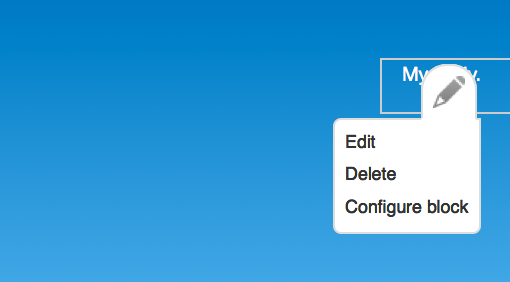
There are the things in the Add blocks page (Block library listing) which are block plugins. Those hold the description and the body. (for custom block, basic block type). Then there are other things on the Blocks admin listing. Those are block instances of those block plugins. The dropdown buttons on the blocks in the UI on the site, in place in the regions, have items in the dropbutton list (there are also items in the dropbutton list on the block admin list). Some of those items deal with the block plugin: edit, delete. Some deal with the block (block instance): configure. This is confusing.
Proposed resolution
Use words to distinguish between the two.
a)
Change 'Edit' to 'Edit plugin'
Change 'Delete' to 'Delete plugin'
Keep 'Configure block'
or
b)
Change 'Edit' to 'Edit block'
Change 'Delete' to 'Delete block'
Keep 'Configure block instance'
or
c) ...
Ideally the name of the thing block/block instance would match something on the page or the title of the page of the block admin list admin/structure/block
and the thing that the other stuff is called: block plugin/block library item would match some words on the page or the title of the page there admin/structure/block/list/block_plugin_ui%253Abartik/add
Remaining tasks
- Discuss. What are the things on the library listing called? Plugins? Block plugins? What can we call them in the UI? Block library items?
- Create initial patch to change the dropbutton items.
- more tasks to come later...
User interface changes
Yes. dropbutton action labels.
Before screenshot
API changes
No API changes.
Related Issues



Comments
Comment #0.0
yesct commentedlinked related issue to add a delete instance link
Comment #1
xjmDefinitely not the word "plugin". Both "plugin" and "block instance" are developer terminology that should not be exposed to the end user.
I mentioned this on #1956644: Add "edit" to dropbuttons on the block admin page, but for custom blocks I think that it should be "Edit block content," and maybe no delete op (as you suggest in another issue) because of the potential confusion. Another possibility would be to change "Delete block" (for the instance) to "Remove block".
Related: #1839516: Introduce entity operation providers
Comment #2
benjy commentedI agree with xjm here, if there is a consensus I can start on a patch.
Summary
Comment #3
klonosSometimes and for some languages the difference between "delete" and "remove" is very subtle a can often cause confusion. Do you think "Disable block" instead might be better?
Comment #4
benjy commentedIf it's subtle in that language I guess that would be addressed in the translation? I don't mind either way, I quite like "Disable block" and "Remove block", they both work for me.
Comment #5
xjmSee also #1879370: Add test coverage for the "disabled" block status.. If the consensus is to keep the disabled block status, let's change the operation to "Disable block" and do as @benjy suggests and simply set its region to "None."
Comment #6
Bojhan commentedI thought we removed the concept of "disabling". Frankly this concept should be moved. Like clicking "Delete" could trigger a modal asking if they want to delete the block or just the instance?
Comment #6.0
Bojhan commentedremoved unrelated issue about using block instance title on block listing. that issue had change to drop button split off to a yet unmade issue.
Comment #7
tutumlum commentedThere is no edit link for custom blocks. After you add a new custom block, you cannot do further changes on block content...
Comment #8
yoroy commentedIn the mean time, I do see 'edit' in the contextual links for custom blocks.
It is correct that things are confusing here, and in a major way, so leaving that priority there.
- Quick edit on body fields that belong to the parent (plugin) makes no sense, it breaks the "in place" model. We should probably simply not provide quick edit on parent fields from contextual links
- Same for the delete link. Current implementation truly deletes the parent block. Again, probably best to not provide direct acces to such a destructive action from the contextual links.
Comment #22
smustgrave commentedThank you for creating this issue to improve Drupal.
We are working to decide if this task is still relevant to a currently supported version of Drupal. There hasn't been any discussion here for over 8 years which suggests that this has either been implemented or is no longer relevant. Your thoughts on this will allow a decision to be made.
Since we need more information to move forward with this issue, the status is now Postponed (maintainer needs more info). If we don't receive additional information to help with the issue, it may be closed after three months.
Thanks!
Comment #23
smustgrave commentedActually believe this is already done, I just checked D11.x and the contextual links are
"Configure block", "Remove block"