Problem/Motivation
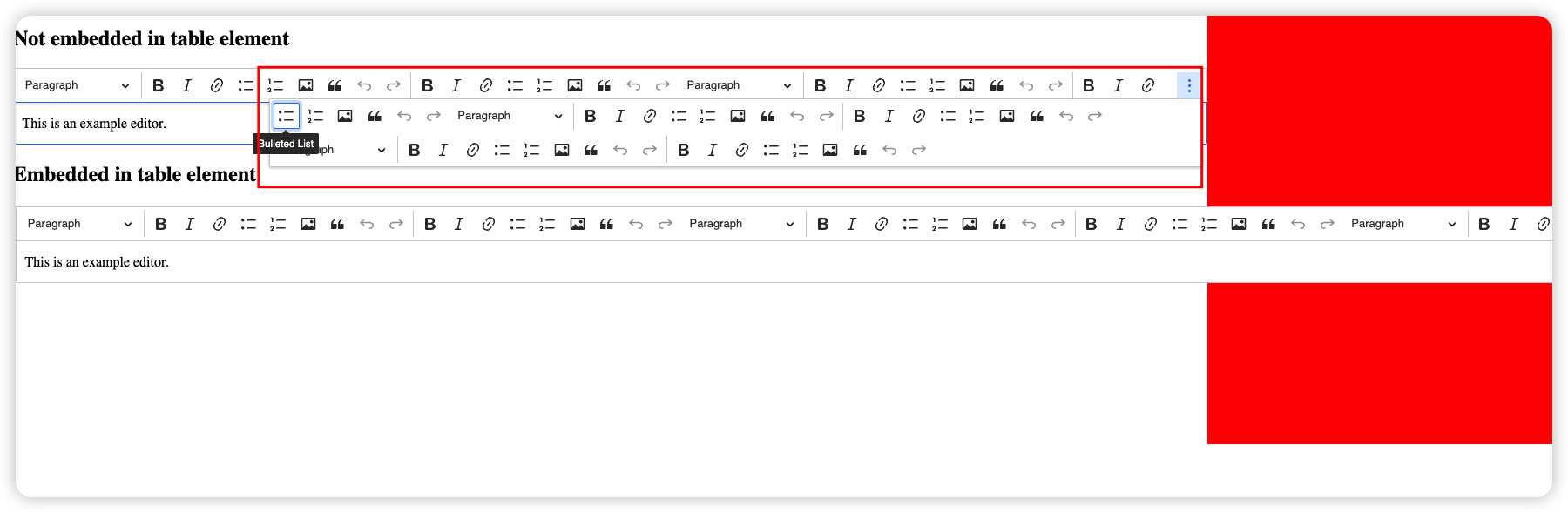
the toolbar items of ckeditor 5 is overlapping with the sidebar on the node form when it's being used in a multi-value field (or whenever the editor is being embedded in a table element?) and there are many toolbar items.

Steps to reproduce
1. Do a Drupal clean install. (I use https://simplytest.me/)
2. Navigate to a content type and create a field using ckeditor 5 and allow unlimited value.
3. Move the field to the top on the form display of the content type.
4. Add more items to the ckeditor.
5. Go to the create page of the content type and resize the browser down to around 1000px (depends on the number of the toolbar items)
6. See the overlapping issue.
Proposed resolution
https://github.com/ckeditor/ckeditor5/issues/11334 → points out this is because when CK5 is inside an element that can dynamically change width to accommodate the contents, then the editor is unable to determine if there are excess toolbar elements that need to be collapsed. To work around this for the most-common tabledrag scenario, we use JS to calculate the available width for CKEditor 5 then set a max width on the table cell, which results in a fixed width that CKEditor 5 can use to determine if the collapse ... is needed. This custom logic would retrigger any time the viewport resizes.


 Show commands
 changes




Comments
Comment #2
wim leersExcellent find + bug report!
Could you please reduce this to the most minimal circumstances possible? This is AFAICT an upstream bug, and hence we'll need to provide clear steps to reproduce.
(Asking them to install Drupal and configure it in a specific way is too difficult a way to reproduce.)
Comment #3
sker101 commented@Wim Leers
This looks indeed an upstream issue, I created a demo here on Codepen and I think it's clear enough to see where the issue is.
The solution of removing "nowrap" doesn't look like a good approach to fix the issue as it's breaking the default behavior of the editor which wraps all the items into a popup when there are too many items.
I guess it's up to the devs of ckeditor to decide what's the best solution here.
Comment #4
sker101 commentedLooks like this is also an issue when the editor is wrapped inside a fieldset element and someone opened an issue on the repo of ckeditor 5.
See Issue
Comment #5
sker101 commentedAfter looking into the code of ckeditor, I don't think it could be easily fixed from upstream as they might need to change the way of how to calculate if the toolbar items are overflowing or not.
Currently, Ckeditor 5 relies on the `resize` event to determine if the toolbar items should be wrapped inside a popup. However, the event doesn't seem to be triggered for the toolbar element when it's embedded in a table or fieldset as the flex styling isn't being resized correctly when a flex element is wrapped inside in the two said elements above and this seems to be the default behavior of current browsers (tested on Chrome/Safari).
See this codepen link for example.
I tried to see if we could replace the table used in the multivalue field to use div instead but looks like Drupal core is using tabledrag to handle the ordering and I assume we don't (can't) switch it to use div?
Comment #6
wim leersExcellent research, @sker101!
Could you please report this at https://github.com/ckeditor/ckeditor5? 🙏 😊
Comment #7
wim leersTangentially related, but different: #3328095: CKEditor 5 toolbar overflow can become unusable in Off canvas.
Comment #8
sker101 commented@Wim Leers
There is a similar issue on ckeditor5's repo but haven't been responded by anyone for about a year.
Comment #9
wim leersPerfect! I missed that! 😅 Relayed your suggestion there: https://github.com/ckeditor/ckeditor5/issues/11334#issuecomment-1405201841 — and pinged the CKEditor 5 project lead that issue 👍
Comment #11
wim leersI just realized that this bug had been previously reported at #3326431: Toolbar is not responsive. There I wrote:
and @DieterHolvoet responded:
It looks like this may be a problem specific to Paragraphs' CSS … because both the bug reported here and there is only occurring in the context of Paragraphs.
Can you please investigate if you can reproduce this without Paragraphs? 🙏
Comment #12
wim leersComment #13
sker101 commentedHi, @Wim Leers
I believe that this issue could happen whenever the ckeditor is embedded inside a table element, for example, a text field that supports multiple values.
See the reproducible steps that I have on the main post.
1. Do a Drupal clean install. (I use https://simplytest.me/)
2. Navigate to a content type and create a text field that uses ckeditor 5 and allow unlimited value.
3. Move the field to the top on the form display of the content type.
4. Add more items to the ckeditor.
5. Go to the create page of the content type and resize the browser down to around 1000px (depends on the number of the toolbar items)
6. See the overlapping issue.
Comment #16
wim leers@sker101 Thank you!
Also discussed this with @Reinmar from CKEditor 5, as well as @lauriii!
This bug has not been reported by other CKEditor 5 users; it looks like it's specific to a very particular container markup+CSS situation. @lauriii, @Reinmar and I agreed that it'd be best to solve this problem on the Drupal side, not upstream.
Comment #17
Les_Paul commentedGot the same issue. Claro admin theme + Paragraphs.
Comment #18
adstokoe commentedNot a long term fix but the below css change fixes the issue in Gin:
Comment #19
rgpublicI fixed this by adding this to the admin stylesheet:
Perhaps this is useful for anyone.
Comment #21
patrick.thurmond@gmail.comThe approach in #19 works for me. Except I added the css to a custom module I was already using as a new library. Then used MYMODULE_preprocess_page to attach the CSS.
That said, this overrides the hiding of the controls behind the triple-dot menu, which I think is cleaner. Its got to be JS that is doing that hiding because if I disable my new css in the browser in places it worked fine already it looks broken now. Let me think on this issue.
Comment #22
bob.hinrichs commentedJust chiming in, that we observed this issue in a form that is using the ever-popular inline_entity_form module to manage related entities to a node. One can see that inline_entity_form uses tables. In light of others working on this issue with CKE5, we worked around the issue by editing the toolbar in the text filter configuration to add line breaks into the toolbar. This eliminates the nice vertical-dots-see-more feature of the cke5 toolbar and does not look as nice, but it stops the toolbar from pushing out the editor's width.
Comment #23
sonvir249 commentedThe approach in #19 worked for me.
Comment #24
bvoynickComment #25
andikanio commentedHere is the #19 approach via claro in case someone else need it,
I'm not sure where to put it, so I just pick one of the css and apply patch on it.
Comment #26
bvoynickComment #27
gauravvvv commentedPatch #25, made directly changes to css file also using ! important; I have made changes into pcss fle and updated the patch and attached the interdiff
Comment #28
smustgrave commentedPatch didn't seem to solve the issue. Think we need to figure out how to trigger
edit
@Wim Leers is it an upstream issue where it doesn't pick up the width correctly?
Comment #29
willempje2 commentedPatch #25 works for me.
Unfortunately patch #27 does not, only works with the "!important" added to the style.
Comment #30
yfma commentedPatch #25 is working for us on core 10.1.4
Comment #31
gauravvvv commentedAdded !important to flex wrap. attached interdiff for same.
Comment #32
gauravvvv commentedComment #33
smustgrave commentedThink my comment in #28 could still be relevant.
Wondering if an upstream issue where the three dots aren’t appearing.
Comment #34
sker101 commented@smustgrave
It's because the resize event not being triggered correctly, I had an explanation and example in comment #5
Comment #35
smustgrave commentedThanks @sker101 for pointing out!
Think this needs to be fixed upstreamed still. So I'm repostponing this per #9
#31 makes it wrap like it did in ckeditor4.
So based on the IS screenshots we would have one text field behaving correctly and others behaving differently which I don't think is desired.
Hopefully upstream fix will address #3328095: CKEditor 5 toolbar overflow can become unusable in Off canvas as well.
Comment #36
wim leersPer #16, we should fix this on our end. Unless we've found a upstream blocker that makes it impossible to fix on our end? 🤔
Comment #37
obiwankenobi commentedThe sticky toolbar seems to fix the editor size issue when scrolling, and it happens in a fresh install (without paragraphs).
1. Launch a site (simplytest.me)
2. In the Basic HTML config page, add many items to the editor's toolbar (multivalued or not)
3. Save it
4. Create a new Article
5. The body field will cause the right sidebar to extend beyond the viewport.
6. Focus the editor, and scroll
7. The editor will change its size.
I'm attaching a video.
As a workaround, you could add the wrapping button to the CKEditor toolbar at the end of the line. This would show the toolbar in two lines if necessary, and would not overlap the right sidebar.
Comment #38
kleve commentedPatch from #31 works when aggregation of css is disabled on the performance settings page. But not when enabled.
Solution for me was to add it to a custom module until bug is fixed.
MODULENAME.libraries.yml
admin-theme-fixes.css
MODULENAME.module
Comment #40
wim leersClosed #3395224: Auto-expand CKEditor 5 expands horizontally as well causing issues in the admin UI as a duplicate. Crediting @scott_euser.
Comment #41
wim leersComment #42
meryem dibeHello,
Any updates on the issue with the three dots not showing when there are too many items in the embedded editor within a paragraph?
Patch #31 resolves the overlap with the sidebar—thanks @Gauravvvv.
However, I still face the issue of items going to the next line even with 'shouldNotGroupWhenFull' set to False. I've found comments on a potential solution on the upstream side: https://github.com/ckeditor/ckeditor5/issues/11334, but it seems to be ongoing.
Also, there are mentions of addressing the problem on the paragraph side, but I couldn't locate a specific link to the issue.
Any updates would be appreciated.
@sker101, @Wim Leers
Thanks.
Comment #43
davedg629 commentedI'm having the same issue as @Kleve in #38 with the patch only working when CSS Aggregation is disabled.
Instead of adding a custom module, I added the CSS to a ckeditor5.css file in my theme and included that css file by editing THEME.info.yml like this:
Comment #46
bnjmnmThe CKEditor 5 upstream issue looks tricky and I'm unsure how long it might take to get a fix there.
However, this is something that can be addressed on Drupal's end for at least one very common use case: when used inside tabledrag. We know enough about the structure it will be in that we can use some custom JS to set the CKEditor-containing table cell to a max-width, which will result in the editor properly implementing any needed ... and keeping the editor width within the table it belongs to.
I added a solution to the MR. It would benefit from tests, but it also seems difficult to test but maybe there's something elegant I'm overlooking.
Comment #47
smustgrave commentedHiding patches for clarity
Show the fix is working but seems that a different solution was proposed could that be added to the issue summary.
As far as a test case maybe could test that at browser size 1000 the ckeditor box = xyz ? Could that cause randoms to appear though?
Comment #48
bnjmnmComment #49
joevagyok commentedUploading patch version of the 5728 merge request for composer patching for the meantime. As it works fine for us.
Comment #50
joevagyok commentedAdding the same patch, only changing the
isInsideTabledragselector to make it work with Seven administration theme.Comment #51
penyaskitoWe detected this issue with our project automated tests (Playwright, sadly won't help here) as soon as we updated to ckeditor5 when running for mobile devices (we use Claro).
With the patch at #49 _some_ of our tests are back to green. I still need to figure out what's the case where this is still happening.
I'm surprised that per #50, Seven uses different classes for the draggable tables. Assuming Seven is still supported, what could be a desirable solution here? Is there any other selector we can use that could work for both while this is fixed upstream?
Comment #52
antoniya commented#49 & #50 both introduce a typo in:
Note the 'a' missing in 'addEventListener' method.
Comment #53
joevagyok commentedThank you for noticing, I fixed the typo in the MR and re-upload the two patches for composer patching.
Comment #54
yogen.prasad commentedAfter applying the patch the Safari browser and CKeditor5 :
Fields are getting compressed.
Comment #55
joevagyok commentedDouble check if you are using the correct patch for your theme! As I see you have seven, so use the patch made for seven theme!
Comment #56
vasantha deepika commentedHi,
It is happening when we are placing the filed inside the field group with Accordion, tab and detailed configuration. Working on this issue. Due to hide and show the width it not calculating from the parent.
Thanks!
Comment #57
vasantha deepika commentedComment #58
vasantha deepika commentedI fixed the issue mention in comment #54 and re-upload the Patches.
Comment #59
joevagyok commentedThanks, but the work is ongoing in the merge request and not with patch files! I clearly stated that the patches in #53 are meant to be used for composer patching. Also, changes missing from your patch which are present in the merge request. Please, make sure you work on the latest code and add your changes are in the merge request so we can review your commit. Nevertheless, #47 was not addressed yet.
Removing patches for clarity.
Comment #60
dianacastillo commentedfixed as in #22 by editing the toolbar in the text filter configuration to add line breaks into the toolbar.
Comment #61
vasantha deepika commentedHi,
Based on the comment #59 I've created a commit for the changes.
Kindly review and let me knows if anything need to be done further.
Thanks!
Comment #62
smustgrave commentedMR appears to have failures.
Comment #64
kolesnikoff commentedMerging the branch with the upstream fixed MR failures.
Please review and test.
Comment #65
smustgrave commentedRe-verified this bug following the steps mentioned. Actually was even able to trigger it when switching text formatters between basic and full.
Applying the MR did resolve the problem.
Know it wasn't in scope but also tested #3328095: CKEditor 5 toolbar overflow can become unusable in Off canvas while I was at it and unfortunately that issue still remains.
Comment #66
nod_some more things to fix
Comment #67
pminfHere is a patch for the latest changes and an additional one with changes from #53 to support seven theme. Not sure if this theme should be supported and therefore to be addressed in the MR.
Comment #68
dbuzinov commentedI am currently working on resolving the issues and suggestions that have been pointed out after review.
Comment #69
dbuzinov commentedPlease review and test.
Comment #70
smustgrave commentedAppears feedback from @nod_ has been addressed
Comment #71
nod_couple more comments
Comment #72
nod_I think we'll need to improve the performance here. What happens when there are 20 editors in the same tabledrag? we'll compute the width 20 times on resize instead of once for all the editors. Need to try with 20 ish editors in a single tabledrag and see what perf is like.
Comment #73
dbuzinov commentedMR was updated. Also, I did some optimization: the calculation of max-width now will be executed only once for the table. Please test and review.
Comment #74
smustgrave commentedNice update!
Still working for me.
Comment #75
matthieuscarset commentedMarking as NW because the issue still exist even with patches applied on Drupal 10 (tested with
10.2.2with a CKE5 text editor in a paragraph field + the Gin theme). Not sure if we want to backport the fixes to D10 though 🤷Feel free to disregard if we only want to fix this on D11.
Comment #76
joevagyok commented@matthieuscarset we are using the solution in a paragraph field with Seven theme and Claro over D10. I think the problem will be theme related, so the selector in the JS might not apply for Gin theme.
Comment #77
dbuzinov commented@matthieuscarset I believe the problem is theme-related. I investigated the issue with the Gin theme, so the issue is in empty TD that has 100% width in CSS rules that came in the end with negative max-width (see img - I have applied the proposed CSS, for testing and it works). As for me, the easiest solution will be just to add/update or alter the theme CSS to something like:
Note: also figured out the issue with the incorrect position of the drag-cell icon and here is the CSS fix:
But I think it is not related to this issue and is related to the theme CSS. Any thoughts on this?
Comment #78
dbuzinov commentedComment #79
lobodakyrylo commentedAfter 10.2.5 the patch stoped working. I quickly fixed it.
Comment #80
eduardo morales albertiAfter applying the last patch #79 the CKEditor appearance is not right.
Comment #81
davedg629 commentedI upgraded to Drupal 10.2.5 and I'm not seeing any issues. I'm not using any patches though. I added the CSS from #38 to my theme using the method described in #43.
Comment #82
tirupati_singh commentedComment #83
tirupati_singh commentedHi, made some changes for the CKEditor toolbar overflow issue. Please review the changes made. Attaching before and after changes screenshots for reference.
Comment #84
needs-review-queue-bot commentedThe Needs Review Queue Bot tested this issue. It fails the Drupal core commit checks. Therefore, this issue status is now "Needs work".
This does not mean that the patch necessarily needs to be re-rolled or the MR rebased. Read the Issue Summary, the issue tags and the latest discussion here to determine what needs to be done.
Consult the Drupal Contributor Guide to find step-by-step guides for working with issues.
Comment #85
underscore_boy commentedHello, a ";" is missing. line 38 to pass prettier.
Comment #86
tirupati_singh commented@underscore_boy, I've fixed the css syntax error. Thanks for figuring out.
Comment #88
mithun sResolved the merge conflicts and added a rebase for the MR. Please review.
Comment #89
smustgrave commented@matthieuscarset are you still seeing the issue you mentioned?
Comment #90
smustgrave commentedLeft a comment on an open thread
Comment #91
davedg629 commentedI'm on Drupal 10.3.2 and the CSS code from #38 no longer works. I applied the patch (Merge request !5728), but that didn't do anything (although I see the changes from the patch were made to the core files).
Is there a fix for Drupal 10.3?
Comment #92
amitrawat056 commented.ck.ck-toolbar.ck-toolbar_grouping > .ck-toolbar__items {
flex-wrap: wrap !important;
}
This CSS code still work for me, i m on Drupal 10.3.3
Comment #93
davedg629 commentedThanks for checking this. The CSS is indeed still working, I just discovered a related bug.
There is an issue where if you have a large inline image in one of the nested text editors, it causes overlap issues with the sidebar. To fix, I added this CSS which limits the width of the inline images to 800px wide.
Comment #94
sriharsha.uppuluri commentedAfter adding the wrapper icon in Editor settings as attached the editor is behaving responsive.
Responsive Laptop Screen
Responsive Monitor Screen
Comment #95
dioni commentedThanks @sriharsha.uppuluri, that is the only way I could make it responsive
Comment #96
nayana_mvr commentedThis issue is related to CkEditor field with unlimited values right? But after applying the changes of MR! 5728, it is affecting the CkEditor field with limited values also as mentioned in #3
Before:
After:
With 100% resolution

With 90% resolution

I think the following code is causing this:-
Is it a new change that is expected where the toolbar dropdown option will be visible only for screen width above 1440px?
Comment #97
natefollmer commentedThis issue just popped up after I updated a site to 10.4.4. It's reproducible by putting the ckeditor inside any container that doesn't have a fixed wdith. I was able to fix the issue by using the wrapper icon, but cannot get the editor to stay within it's parent element otherwise. These are single value long text fields.
Comment #100
gun2dru commentedComment #101
logeshvaran commentedI have set up a fresh Drupal 10.5.3 installation locally and added content using unlimited Paragraph components. However, the text containers are overlapping with the fields on the right side. Please refer to the attached screenshot
Comment #105
dabbor commentedI'm attaching a patch from: https://git.drupalcode.org/project/drupal/-/merge_requests/5728.patch to have a static version of the patch that is safe to reference from composer.
Comment #106
r.e.younan commentedWe reproduced the same behavior on Drupal 11 with Claro and Paragraphs (unlimited values / nested table markup).
Symptoms
- On node (entity) edit, a CKEditor 5 field inside Paragraphs shows the full toolbar row (e.g. .ck-toolbar__items) at an unrealistically large width (we saw negative left offsets and ~1000px+ widths in devtools).
- The same text format in the node “Description” (body) field correctly collapses extra controls into the overflow (“…” / “Show more items”) control.
What we think is going wrong
- ClassicEditor.create() registers instances in Drupal.CKEditor5Instances only after the promise resolves (async).
- In table / multi-value widget markup, the .ck-editor box can effectively grow with the toolbar, so measuring only the editor chrome does not give CKEditor a smaller “available width” than the intrinsic toolbar width — grouping never triggers.
- After Paragraphs AJAX and toggles, width needs to be recomputed again.
Interim workaround (JS, theme-agnostic enough for Claro entity forms)
- After editors exist, walk Drupal.CKEditor5Instances and set toolbar.maxWidth to a conservative pixel value derived from:
- Claro main column: .layout-form .layout-region--main .layout-region__content (with a couple of fallbacks),
- the field’s .form-textarea-wrapper,
- and the nearest table td when present,
- taking min(...) minus a small gutter, floored with a minimum (we used 280px).
- Apply both the observable (toolbar.maxWidth) and an inline max-width on the toolbar element so grouping recalculates.
- Re-run on: delayed timers (0/250/750/2000ms to catch async create), window load, window resize (debounced), jQuery ajaxComplete, toggle, and a debounced MutationObserver on document.body.
We packaged this as a small standalone module (no Paragraphs dependency) so sites can opt in without patching core:
https://github.com/osark/ckeditor5_toolbar_reflow.git
Release / tag: 1.0.0
Caveats
- Other admin themes (Gin, etc.) may need extra selectors in getMainColumnElement().
- Heavy MutationObserver is a tradeoff; a core fix might hook editor attach lifecycle instead.
If useful, we can help turn this into a proper MR against drupal/core (ckeditor5) or iterate as a contrib project — feedback welcome.