

 Come together with the global Drupal community in Rotterdam, 28 Sept – 1 Oct 2026. Sessions, contribution, connection, and Early Bird savings until 8 June.
Problem/Motivation
Currently it is a cognitive challenge bridging the gap between the Manage form display settings form and the effects those settings have in particular on a node add or node edit form. The pattern applies more or less to all entity types but for content types the problem is the most significant. Aside that the account entity has additional unique characteristics (the user name and password field widget and the language settings field set behavior) on top that are out of the scope of this issue.
- There is a disconnect between the order of fields on the
Manage form displaypage compared to the field widgets on the node add or node edit page. The order is mixed up in particular for theBasic pagecontent type. You have no indication which fields are the actual form elements and which are the meta data form fields in the side bar. - The
Provide a menu linkcheckbox is the only form element in the sidebar that could not be disabled and hidden - it is missing a field widget on theManage form displaypage. - You have the option to change the order on the
Manage form displaypage indicated through the drag icon or the weights option. For fields likePromoted to front pageit is possible that you are able to change the order within it'sdetails<code> element <code>Promotion optionsif you drag it underneathSticky at top of listsfield widget. But the position ofdetailselements never changes. If you for example change the position of theURL aliasfield widget, except moving it into thedisabledsection, there is no effect at all moving it up and down the list. In general the re-order pattern in combination of being able to drag field widgets to the disabled section is sort of problematic and creates potential false assumptions on the users end.
The following four examples illustrate the aforementioned general summary:
Article Content Type
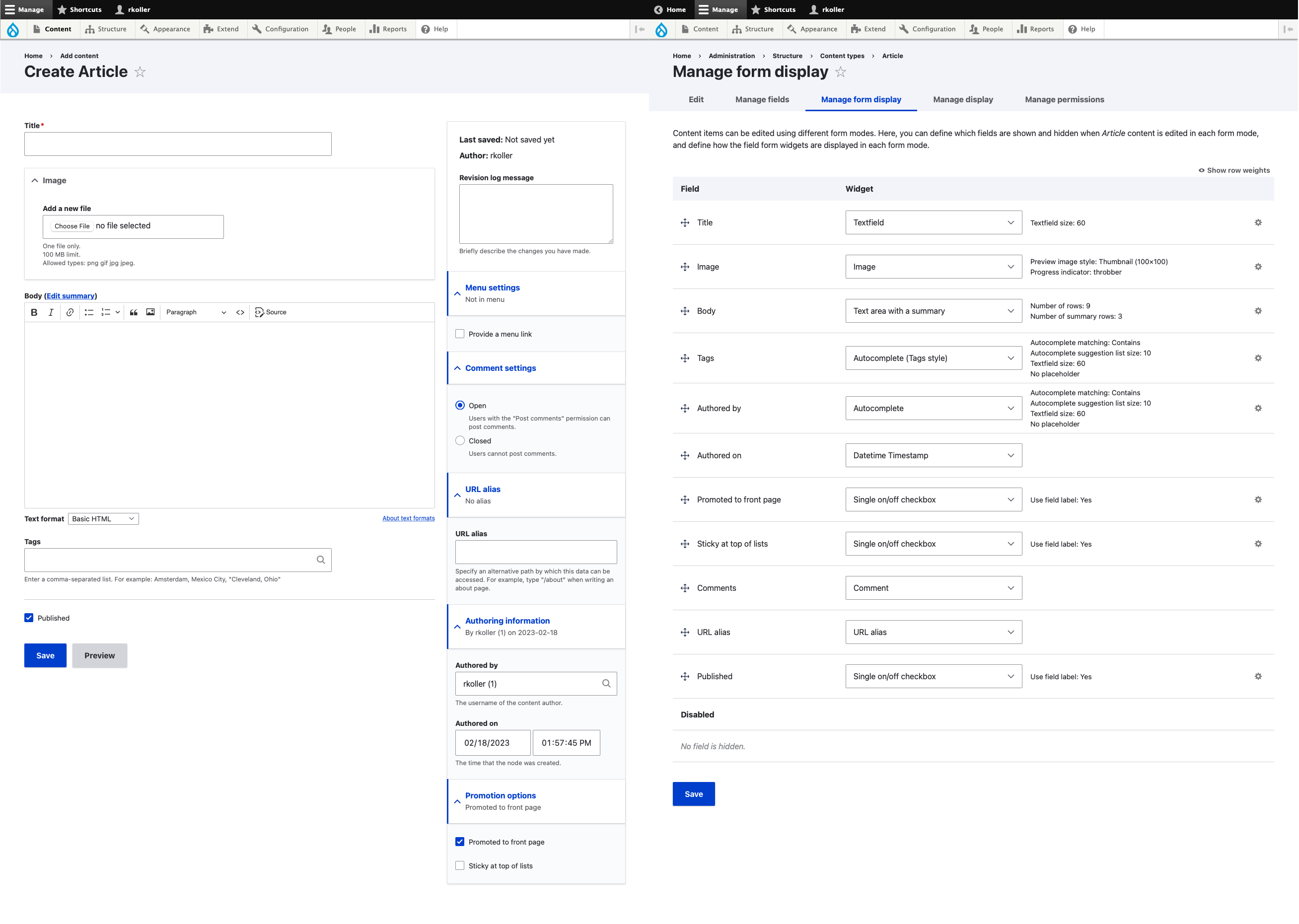
| Node edit page | Manage form display page |
|---|---|
| Title | Title |
| Image | Image |
| Body | Body |
| Tags | Tags |
| Published | Authored by |
| Provide a menu link | Authored on |
| Comment settings | Promoted to front page |
| URL alias | Sticky at the top of lists |
| Authored by | Comments |
| Authored on | URL alias |
| Promoted to front page | Published |
| Sticky at top of lists |
The expected field widgets order on the article manage form display page:
title, image, body, tags, published (then the main form section would be done and the sidebar would start), (provide a menu link - which is missing), comments, url alias, authored by, authored on, promoted to front page, sticky at top of lists.
Article Content Type with two fields added (E-Mail & Link)

| Node edit page | Manage form display page |
|---|---|
| Title | Title |
| Image | Image |
| Body | Body |
| Tags | Tags |
| Authored by | |
| Link | Authored on |
| Published | Promoted to front page |
| Provide a menu link | Sticky at the top of lists |
| Comment settings | Comments |
| URL alias | URL alias |
| Authored by | Published |
| Authored on | |
| Promoted to front page | Link |
| Sticky at top of lists |
The expected field widgets order on the article manage form display page with 2 fields added:
title, image, body, tags, e-mail, link, published (then the main form section would be done and the sidebar would start), (provide a menu link - which is missing), comments, url alias, authored by, authored on, promoted to front page, sticky at top of lists.
Basic Page Content Type

| Node edit page | Manage form display page |
|---|---|
| Title | Title |
| Body | Authored by |
| Published | Authored on |
| Provide a menu link | Promoted to front page |
| URL alias | Sticky at the top of lists |
| Authored by | URL alias |
| Authored on | Body |
| Promoted to front page | Published |
| Sticky at top of lists |
The expected field widgets order on the basic page manage form display page:
title, body, published (then the main form section would be done and the sidebar would start), (provide a menu link - which is missing), url alias, authored by, authored on, promoted to front page, sticky at top of lists.
Basic Page Content Type with two fields added (E-Mail & Link)<

| Node edit page | Manage form display page |
|---|---|
| Title | Title |
| Body | Authored by |
| Authored on | |
| Link | Promoted to front page |
| Published | Stick at top of lists |
| Provide a menu link | URL Alias |
| URL alias | Body |
| Authored by | Published |
| Authored on | |
| Promoted to front page | Link |
| Sticky at top of lists |
The expected field widgets order on the basic page manage form display page with 2 fields added:
title, body, e-mail, link, published (then the main form section would be done and the sidebar would start), (provide a menu link - which is missing), url alias, authored by, authored on, promoted to front page, sticky at top of lists.
Steps to reproduce
- Install Drupal 10.1.x with the standard profile.
- Add one or two new fields to the
ArticleandBasic pagecontent type - Create a node for the
Articlecontent type and one for theBasic pagecontent type - Compare
/admin/structure/types/manage/article/form-displaywith the node edit form of theArticlenode - Compare
/admin/structure/types/manage/page/form-displaywith the node edit form of theBasic pagenode
Proposed resolution
- I would suggest to add two secondary navigational tabs called something like
MainorContentandSidebarto theManage form display pageof content types - The
Maintab should have anEnabledandDisabledsection so you are still able to enable and disable field widgets for the main form and the order is directly reflected on the node edit form. - The sidebar tab is a bit more tricky. Intuitively it isn't clear that you are currently unable to alter the position of the details elements the field widgets are contained in. I haven't come to a conclusion what might work. Either keep a sort of fixed order and only allow disabling field widgets or the other way around find a way to also let the site builders adjust the order in the sidebar? At this point i am still not sure about the best solution.
- Add a field widget for the
Provide a menu linkcheckbox so it would be possible to disable it and consistent with the rest of the sidebar elements.
Remaining tasks
User interface changes
API changes
Data model changes
Release notes snippet
| Comment | File | Size | Author |
|---|---|---|---|
| basic page 2 fields extra.jpg | 658.59 KB | rkoller | |
| article 2 extra fields.jpg | 790.96 KB | rkoller | |
| basic page.jpg | 568.46 KB | rkoller | |
| article.jpg | 706.73 KB | rkoller |



Comments
Comment #2
rkollerComment #3
rkollerComment #4
rkollerComment #5
rkollerComment #6
rkollerComment #8
rkollerWe have discussed the issue at #3379289: Drupal Usability Meeting 2023-08-11. The issue will have a link to a recording of the meeting. For the record, the attendees of the meeting were @aaronmchale, @emma-horrell, @rkoller, and @worldlinemine.
The initial presentation of the issue took most of the remaining time of the meeting so that there wasn't much time left for an indepth discussion and to come up with any recommendations. There was a clear consensus that it is a valid issue. But there was doubt that the proposed resolution by adding a secondary tabbed tab would be the right choice here. The agreement was to continue the discussion about this issue in the #ux channel in the Drupal Slack for now.
Comment #9
kmaniAny update on this issue? we also facing same issue.e
Comment #10
rkoller@kmani not yet. but i have put the issue on the shortlist for one of the next ux meetings after I've stumbled across Field Layout and both plans for one to deprecate it from Core as well as moving parts of Field Layout into Core (meta: #3007167: [policy] Deprecate field_layout module and move it to contrib and corresponding child issues #2844302: Move Field Layout data model and API directly into \Drupal\Core\Entity\EntityDisplayBase and #2880746: [PP-1] Move Field Layout UI directly into Field UI). I haven't taken a look into Field Layout in quite a while but it turns out the capabilities it provides on
Manage form displaypages are directly related with the changes proposed for this issue - it suffers from the same problem being able as a user to distinguish and actually relocate any fields in the sidebar. based on the number of columns field layout is adding sections are added to the list of fields on theManage form displaypage. I think the solution for the aforementioned meta issue and this issue should be coordinated and discussed since they are related. That is the reason why i've put it back onto the ux meeting shortlist.Comment #11
rkollerWe discussed this issue at #3418992: Drupal Usability Meeting 2024-02-09. That issue will have a link to a recording of the meeting.
For the record, the attendees at the usability meeting were @AaronMcHale, @benjifisher, @duncancm, @rkoller, @shaal, @simohell, and @worldlinemine.
If you want more feedback from the usability team, a good way to reach out is in the #ux channel in Slack.
The main underlaying problem is that the theme has the final say how the fields available are used no matter if it is in Claro or Olivero (substitutional for any admin and frontend themes).
In the case of an admin theme that fact is way more problematic as illustrated in the issue summary. The consensus in the group was that it would be desirable that the experience is more clear and that administrators and site builders are more in control how forms that were set up are actually rendered.
But there was a clear consensus, with #3007167: [policy] Deprecate field_layout module and move it to contrib in place, it doesn't make any sense to ideate on any potential implementation details for this issue at this point. It was only noted having a layout set on a
Manage form displaypage and having more sections than enable/disabled (by installing the field layout module) makes the problems outlined in the issue summary even worse. The agreement was to postpone this issue on the aforementioned meta issue.And it was noted when this issue gets active again that it should be checked which theme is actually used by the user, some users are able to use the admin theme, others are only able to use the default theme. In this context the group also agreed on suggesting deprecating the
View administration themepermission in #3420470: Deprecate and move to contrib the "View the administration theme" permission.Comment #12
martijn de witThe field group module is already offering such "feature". More kind of a work around because things are not wel managed in core.
The issue ticket where that was developed: #2652642: Allow to position the group in the advanced (sidebar) column
Hope this ads some extra info / context.
Great to see some fresh conversations are there.
Comment #13
rkollerInteresting! thanks a lot for bringing that fixed issue and the Field Group module in general into the discussion. I have to admit I haven't had the Field group module on my radar. I've quickly tested the Details sidebar functionality. And i agree it is sort of a workaround since it is only providing a clear context for fields dragged into that Details sidebar group, for the rest the underlaying problem still persists. On a side note it seems there is no real way to alter the relative position to the other detail elements in the advanced column. One interesting detail i've discovered within the comments, I've added #2845425: Replace hook_form_node_form_alter() implementations with configured field layouts as an related issue since it might be relevant covering one potential implementation aspect for this issue.
Comment #14
rkollerComment #15
philsward commentedIt's really stupid, that core fields are mixed in with custom fields, with zero separation between the two and no way to inject custom fields into the core field area. Horrible UI. 25 years and some things never change.
Comment #16
rkollerI just noticed that the policy issue this issue is postponed on got fixed so i set this one active again.