

 Come together with the global Drupal community in Rotterdam, 28 Sept – 1 Oct 2026. Sessions, contribution, connection, and Early Bird savings until 8 June.
Problem/Motivation
The admin toolbar applies a padding to the top of the body element that should be equal to its height.
However, with the following scenarios, the height calculation is incorrect.
- Settings Tray is enabled and is accessible by the user, the page does not contain any contextual links (?) and the front-end (?) theme uses Bootstrap CSS
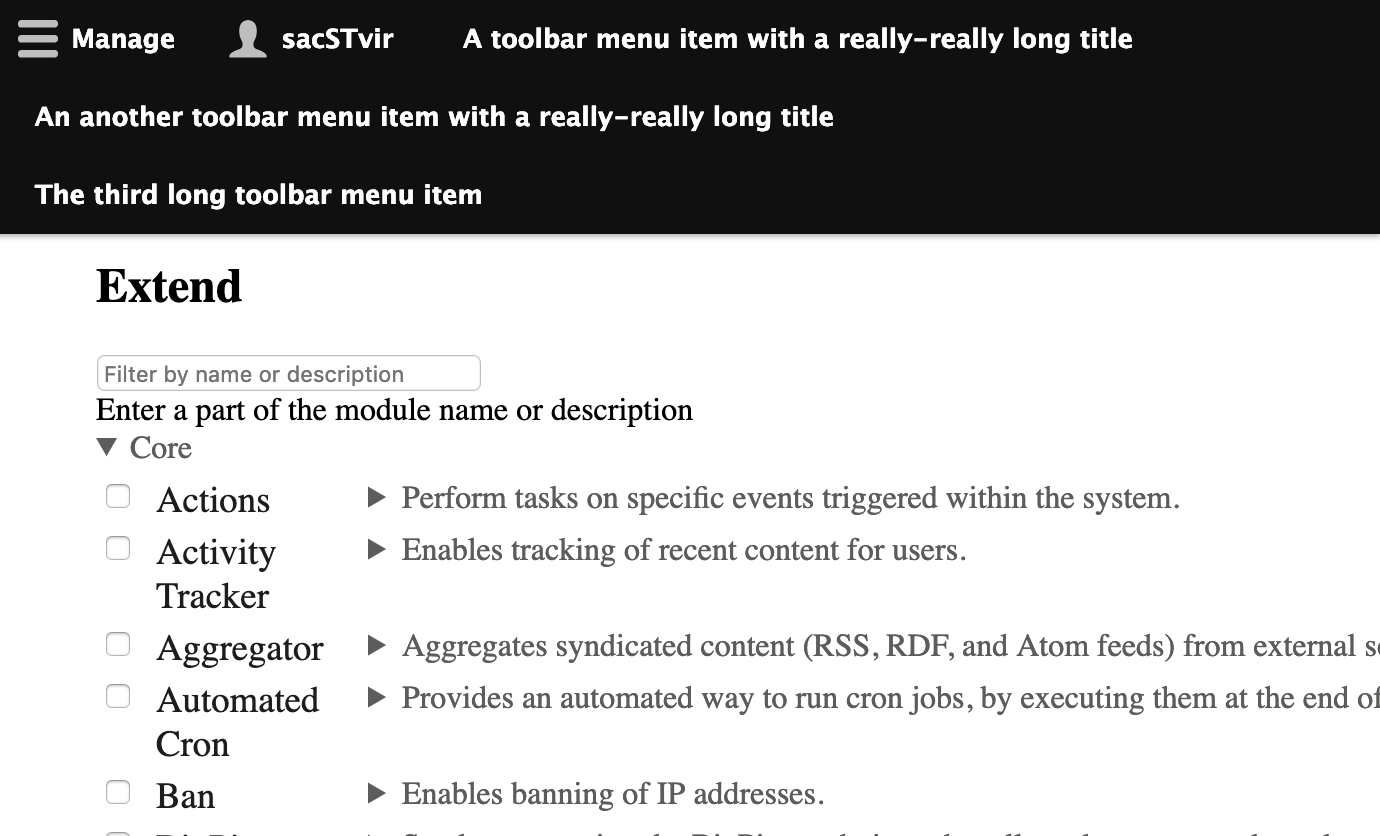
- The displayed toolbar tabs break into multiple lines.
Proposed resolution
Refactor Drupal.toolbar.ToolbarVisualView.updateToolbarHeight() to fix the height calculation issues.
Remaining tasks
* Test
* Patch
* Get a review
User interface changes
Toolbar does not overlap page content anymore.
API changes
Nothing.
Data model changes
Nothing.
Original report
The admin toolbar applies a padding to the top of the body element that should be equal to its height.
However in the following scenario the height calculation is incorrect.
Settings Tray module adds a tab to the toolbar with a class of hidden. It's the first element inside #toolbar-bar.
Bootstrap css defines hidden as display: none !important;
In ToolbarVisualView.js the updateToolbarHeight method sets toolbarTabOuterHeight by getting the outerHeight of the first .toolbar-tab
Because the first tab is hidden (and crucially, because of bootstrap it has !important), the outerHeight is 0px and thus the body receives a top padding of 0px.
I think the height calculation needs to do something like check the height of tallest tab, not just first one. Or perhaps just ensure the tab it selects to get the height isn't hidden/
Here is an example of calculating the height on an element that is display: none!important.
https://jsfiddle.net/marmite/d9oma2e3/7/
The jQuery documentation for outerHeight says:
The value reported by .outerHeight() is not guaranteed to be accurate when the element or its parent is hidden. To get an accurate value, ensure the element is visible before using .outerHeight(). jQuery will attempt to temporarily show and then re-hide an element in order to measure its dimensions, but this is unreliable and (even when accurate) can significantly impact page performance. This show-and-rehide measurement feature may be removed in a future version of jQuery.
| Comment | File | Size | Author |
|---|---|---|---|
| #56 | 2958478-56.patch | 15.31 KB | gauravvvv |
| #55 | after.png | 21.29 KB | andrerb |
| #55 | before.png | 17.23 KB | andrerb |
| #55 | toolbar-fix_height_calculation-295847-55--complete.patch | 15.16 KB | andrerb |
| #29 | toolbar_test.zip | 1 KB | ajits |
Issue fork drupal-2958478
 Show commands
Start within a Git clone of the project using the version control instructions.
Or, if you do not have SSH keys set up on git.drupalcode.org:
 changes




Comments
Comment #2
adriancidHi @jessebaker thanks for reporting, would be great if the next time you use the Issue Summary Template to report an issue.
Do you have some strange behavior with the module? Can you show some screens?
Comment #3
jessebaker commentedMy apologies, I'd not seen the template and will use it next time.
Attached is a screenshot of the issue caused by the incorrect height calculation. Note the page title is under the admin toolbar.
Comment #4
adriancidI see, can you help us providing a patch for this?
Comment #5
jessebaker commentedOh! I have just looked into this more closely and I'm afraid I made a mistake. My report is correct but It looks like the code which is causing the issue is in a file in the Drupal Core Toolbar module, not Admin Toolbar. I'm sorry!
Comment #6
adriancid@jessebaker no problem, this is normal, ;-) you can move this issue to the Drupal core issue queue and select the correct component.
Comment #7
adriancidComment #8
chanderbhushan commentedHi,
https://www.drupal.org/project/drupal/issues/2959062 same issue in drupal 8.4.x-dev. I have applied patch. thanks.
Comment #9
borisson_Is this a duplicate of #2951268: Improve rendering account link in the toolbar?
Comment #10
wrd commentedThis patch solves the issue Core Settings tray hides navbar in normal mode.
Comment #11
Christopher Riley commentedYes it does thank you so much for this patch.
Comment #13
dsrikanth commentedConfirming this patch works.
Comment #14
lauriiiTagging for subsystem maintainer review.
The latest patch also changes the compiled JavaScript file directly. Please update the patch to change the ES6 file and then compile it to take effect. More info: https://www.drupal.org/node/2815083.
Comment #15
huzookaWhat if we just use the
toolbar-bar's height if it contains at least one visible item (instead of the first visible item's height)?Comment #17
rj commentedThe attached patch changes both the compiled JS file directly and the ES6 file.
Comment #18
shubham.prakash commentedComment #19
afeijoConfirming this patch works.
Comment #21
huzookaAdded a test-only patch and a test+fix patch with an improved toolbar height calculation.
Comment #22
huzookaComment #23
huzookaComment #25
huzookaSummary about the test extensions:
Toolbar height test theme (
toolbar_test_themeTest):stark.system/baselibrary'shidden.module.cssthat hides.hiddenelements withdisplay: none !important;. This mimics the attribute of Bootstrap that is crucial in the reported issue.Toolbar items for toolbar testing module (
toolbar_test_toolbar_items):hook_page_top().The test tries to click on this element. Without the proper fix, this is impossible, because the toolbar overlaps this link.
.hiddenCSS class and-1000weight. This mimics the Edit toolbar item (provided by thecontextualmodule and altered bysettings_tray) thats get hidden if no contextual links are present on the current page.Drupal State API. These items are used to make the toolbar bar occupy more lines (and make it much taller than expected). This is needed for underlining why #17 is not the best solution.The test (contains four test cases):
.hiddenelements are removed withdisplay: none !important;, current user has permission to access contextual links, but these are removed from the page).Comment #26
huzookaComment #28
huzookaComment #29
ajitsI am currently working on a project which encountered a similar height issue of the toolbar causing the toolbar items overlapping the tray items. The cause was too many toolbar items (we use the contenta cms installation profile). To reproduce on vanilla Drupal, I have created a
toolbar_testmodule which I am am attaching to this issue.To reproduce:
modules/directory/admin/modulesAdding a screenshot below (after clicking the manage item):
Comment #30
huzookaRe #29, @AjitS:
I'd fix the bug you described in a separate issue. This is about the toolbar height calculation.
Back to NR.
Comment #31
martijn.cuppens commentedIt is possible to switch to
position: stickyinstead ofposition: fixed. This way, we can completely ditch the ugly padding hacks we have use now. The effect will be the same, onlystickydoesn't work in IE (see https://caniuse.com/#feat=css-sticky). The toolbar will still functionally work in IE though.I just tested the concept and succeeded to get rid of the padding hacks. There's some rewriting to be done for it (the navbar will need to use flexbox instead of floats and I'll need to finetune everything for mobile.
Let me know if I should continue on this. As well template, CSS and JS changes will be needed, it's gonna be quite a large patch.
Comment #32
denisev commentedWas there an issue made for #29 @huzooka? We have the same problem on a project and I am searching for a solution.
Comment #34
porchlight commentedI'm still running into an issue where the height is being calculated after orientation change. If I have 1 extra menu tab, the menu drops to 2 lines, and then if I stretch the screen a little wider the extra menu tab goes up onto the 1st line, but the toolbar height does not get calculated again so I end up with too much padding and a gap of space. Anyway we can calculate as the viewport width changes?
Comment #35
nod_To be honest at this point i would try to use position:fixed and let IE have a non-sticky toolbar, I was never comfortable doing this kind of page offsets. There were a few attempts a few years ago but support was too low. Need signoff from Usability folks though.
I can see we're not updating the
drupal-offset-topattribute, any idea when se stopped using that?Comment #36
nod_Related check out @droplet module: https://www.drupal.org/project/toolbar_anti_flicker
Comment #37
huzooka@nod_, @porchlight you only have to apply https://www.drupal.org/project/drupal/issues/3035577 (listed as a related issue)
Comment #38
porchlight commented@huzooka I tried the patch in that issue as well but still no luck. I'm not sure where to put my feedback at this point. I still think this needs work, but I'll just follow whichever one has more action.
Comment #39
martijn.cuppens commented@nod_,
position: fixedworks in IE,position: stickydoesn'tFWIW, the CSS only solution would look something like this: https://codepen.io/MartijnCuppens/pen/eYpabGZ
In IE, the toolbar just isn't sticky.
Comment #40
nod_Right I meant sticky! Sorry
Comment #41
huzooka@porchlight, I thought you have to apply both patches at once.
The if I stretch the screen a little wider case is fixed by #3035577: Re-calculate toolbar's height every time when the viewport changes.
Comment #42
porchlight commented@huzooka - I tried applying both this patch and the patch from #3035577 but they won't apply at the same time. Tried ordering this patch first then that one, didn't apply. Tried applying that patch then this one, didn't apply... Maybe they can be combined?
Comment #43
nod_Can we make a meta out of this issue please? too many different patches for slightly different issues. It's very hard to follow and review I could use some help aggregating everything. Thanks :)
Comment #44
huzooka@nod_, If you think that a meta would be useful, please create a new meta issue instead of changing this to a meta.
Maybe you missed, but I we have a patch here that also provides test coverage. Meta issues shouldn't have patches.
Comment #45
nod_Seems like there is an issue with offcanvas. Using the module that adds a link and a menu item, on the offcanvas test page, the link is hidden:
/off-canvas-test-linksand when opening/closing a tray, the margin is a bit too extreme probably not entirely toolbar fault but still a regression.The code is very similar to Drupal.displace, in fact doing
has the same effect as the code in the patch and is broken in the same way with off-canvas.
Comment #47
nod_Seems like the issue was caught before we changed the code to remove the flicker.
Comment #48
droplet commentedMULTIPLE LINES is illegal usage IMO. To me, I'd say many items also illegal usage! (If you do, MAX of 7 I think, which can fit into a small 375px screen)
If the CORE accepts multiple lines:
- It should be scrollable or extra dropdown (also Bad UX)
- You should consider what happens when the items covered half or 90% of the screens, or even 100% :s
In another word, if you used a lot of items and can't fit into a single line, make it responsive (to icons, even on a wider screen)
Comment #55
andrerb commentedStill a problem with Drupal 10.1.2 and Seven 1.0.0 (contrib)
Before:

After:

re-rolled patch
Comment #56
gauravvvv commentedTried fixing CCF in #55, 55 not applied on D11, so not attaching the interdiff.
Comment #57
gauravvvv commentedFixed CCF failure
Comment #58
needs-review-queue-bot commentedThe Needs Review Queue Bot tested this issue. It fails the Drupal core commit checks. Therefore, this issue status is now "Needs work".
This does not mean that the patch needs to be re-rolled or the MR rebased. Read the Issue Summary, the issue tags and the latest discussion here to determine what needs to be done.
Consult the Drupal Contributor Guide to find step-by-step guides for working with issues.
Comment #59
kostyashupenkoTrying to fix errors reported by bot.
Comment #60
smustgrave commentedSeems to have caused nightwatch failures.
Comment #64
mstrelan commentedConverted 59 to an MR, hiding patches.
Comment #65
mstrelan commentedNot just nightwatch that's failing now:
Functional JavaScript:
Nightwatch:
Comment #66
rohit sankhlaI was able to fix this issue by adding one line of css.
Comment #69
twodSummary of my changes:
pxunits to the body paddings, it would not work correctly without it.topstyle to the vertical toolbar tray so it follows--drupal-displace-offset-topwhen displacement is recalculated.toolbarApiTest.js- Not sure why the size increased to 80px, maybe rounding error?AssetAggregationAcrossPagesTest.php- Looks like the changed scripts were part of the asset aggregation size test and the change was large enough to fail it.Some test runs also failed
CKEditor5MarkupTest.php, but that test seems really unreliable evenmainand it looks like a race condition. Running it multiple times locally makes different parts of it fail. If I insert asleep(1)on line 346 before it checks if the response contains the expected scripts it will always pass. I did not include that change here though as it seemed too unrelated.The last run failed
testEditorFileReferenceIntegration::testEditorFileReferenceIntegration(), again it is also failing randomly for me onmain.Comment #70
needs-review-queue-bot commentedThe Needs Review Queue Bot tested this issue. It fails the Drupal core commit checks. Therefore, this issue status is now "Needs work".
This does not mean that the patch necessarily needs to be re-rolled or the MR rebased. Read the Issue Summary, the issue tags and the latest discussion here to determine what needs to be done.
Consult the Drupal Contributor Guide to find step-by-step guides for working with issues.