Problem/Motivation
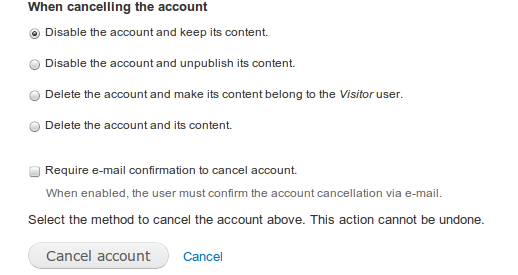
The two choices at the bottom of the confirmation screen when canceling a user account are a button with the text "Cancel account" and a link with the text "Cancel." While the intention may be obvious to many people, it is also likely confusing to many. “Cancel” is used as both an affirmative and a dissenting option.
This is true for both, cancelling a user account or mass cancelling several accounts.

Proposed resolution
Replace the "Cancel account" label button with "Apply changes".

Remaining tasks
None.
User interface changes
On user cancel account confirmation form, the label "Cancal account" of the operation button is replaced with "Apply changes".
API changes
None.
Data model changes
None.
Before Applying Patch # 48
https://www.drupal.org/files/issues
After Applying Patch #48


Comments
Comment #1
sreynen commentedThe word "cancel" is used throughout Drupal to stop an action before it's complete. As that's not what's happening with "cancel account," I think the word cancel should be replaced there with something more descriptive, maybe "delete."
Comment #2
vegantriathleteI understand that the account isn't necessarily going to be deleted; it may just be blocked, i.e., disabled.
But, the point is well-made about the notion of canceling. Maybe instead of "Cancel account" we could "Deactivate account." Or is "deactivate" too technical a term?
Other suggestions?
Comment #3
vegantriathleteCorrection: I have looked into user.pages.inc and right on line: 417, columns: 8 & 29 I see that the text is passed for the button and the link. So, it is NOT hard-coded behavior that the "Cancel" link has the text of "Cancel." It is possible to pass whatever is desired for the button and the link. The default behavior is that there is a button and a link (and if no text is passed for the button and/or the link there are defaults of Confirm and Cancel).
I would think that we should be reluctant to change the text of the "Cancel" link though, on account of the fact that it (probably) is standard across confirmation pages. Or is there a "standard" since it is obvious that the functionality exists to set it to whatever one wants.
In any case, it would probably be good to change the text on the button itself, which would also mean that it would need to be changed on line: 276, column: 22 as well.
Maybe the button would read "Deactivate account" and the link would read "Cancel account deactivation" (or "Abort account deactivation").
Comment #6
dpiSuggestions:
Change text for "Cancel account" button to: "Confirm account cancellation", or
Change text for "Cancel" button to: "Abort"
Its too late to not use the "cancel" terminology.
Comment #10
claudiu.cristeaI confirm this is a problem that can generate confusion, we've received such a complaint from a product owner.
I think the "Abort" replacement makes totally sense but let's see what the Usability Team has to say.
Here's a patch and I tidied-up the IS.
Comment #11
claudiu.cristeaComment #12
borisson_I agree, this makes a lot of sense.
Comment #13
claudiu.cristea@borisson_, thank you! Then let's RTBC :)
Comment #14
borisson_I'm not sure if needs a review from a usability expert, but if it doesn't - I've set this to RTBC.
Comment #15
jhodgdonI agree with #1.
Everywhere else in Drupal, we "Delete" things: nodes, views, date formats, etc. etc. etc. We don't "cancel" them. Or we disable them, which you can do with Views, for example.
Everywhere else in Drupal, we use the word Cancel to mean "Abort this action".
Nowhere else in Drupal do we have a combined "Cancel" action that would either delete or disable the thing. Cancel never made sense to me in the first place. Until I looked at the PNG of the confirmation screen, I didn't even really know that it meant "either delete or disable".
So why do we use the terminology of "Cancel" for user accounts in the first place? That is the source of this confusion, and changing the button wording to be more wordy doesn't make sense to me. Let's just call it delete when we are deleting user accounts, and disable when we're disabling them, and make it two separate actions.
Comment #16
pieterdcThanks for that input, @jhodgdon.
Comment #17
ifrikAgreeing with the above: At other places we only use "Cancel" to abort an action, and as far as I know "Cancel" is never displayed as a primary button. So having Cancel as a primary button to actually do an action is confusing.
As visible in the screenshot, there are different actions that can be done to the user account: either disabling them (they stay in the database, but are not active) or deleting them (removing them from the database). Depending on how the site is configured the user might not see all four of these options.
If the primary button where labeled "Delete" that would also be confusing if a user has just ticked on of the options to "Disable account.." because they don't want to delete the account.
We use "Disable" for views - but that would also be confusing, if the user really wants to delete an account.
I can see two patterns that we could use:
Comment #18
jhodgdonI think the Block Layout page is another good example to look at. There are two possible things you can do to cause a block in the layout not to be shown:
- Remove -- that will delete the block's layout config -- calling it delete would be confusing though, because the block itself still exists (whether it's a content block or a built-in block or from a view or whatever)
- Disable -- that will put the block's layout config into the Disabled section at the bottom, so it could be re-enabled later.
These are two separate actions in the Actions drop-down for each block layout item. Not combined into "Cancel".
Then Views, again you have "Delete" and "Disable" as two separate actions in the drop-down.
Then Menus, you have a checkbox for "Enable" (which you can uncheck to disable a menu item), vs. if you are editing a menu item, you can delete it.
So Users are the odd one out. In the Bulk Operations list, there are:
- Block the selected users
- Cancel the selected user accounts
Confusingly, if I choose the Cancel option, and then on the confirm screen I say I actually want to Disable the account, the action is, as far as I can tell, the same as Block -- the user account shows up as Blocked after I chose Disable. ???!???
I'm going to go ahead and say this is bad UI. It is inconsistent with itself as well as with other places in Drupal that allow you to disable things.
Comment #19
ifrikTo make matters more complicated: "Cancel" is already introduced on the user account page itself, where for most other entities it says "Delete".

Comment #20
wturrell commentedI agree about the terminology, although I'm going to speculate there's been at least one lengthly discussion elsewhere in an effort to pick an all-encompassing term for everything from deleting accounts and content, to moving the content elsewhere, or not really deleting anything but just deactivating the account for a bit - in its favour, 'cancel' is at least simple and short.
EDIT: Here we are - #8: Let users cancel their accounts (eight) - it seems to have at least partly evolved from the user's perspective.
"Cancel" (for accounts) is also used in other places of course, e.g.
I think "Cancel / Abort" on the confirmation screen is better than "Cancel / Cancel", but also nobody has yet floated the idea of just quietly dropping the second button entirely?
As an aside, I find it a bit annoying the way that if you start on /admin/people, '?destination=/admin/people' gets appended to the address, so that if you then Edit a user and click Cancel account, and then click 'Cancel' (as in abort), you're sent back to /admin/people rather than the user page you were previously viewing.
Comment #21
rachel_norfolk“Abort” can have a similar meaning to “Cancel” in the UK. People may click “Abort” to try and abort the action.
I propose just using “Apply changes” and “Cancel”
Comment #22
rachel_norfolkI’ve updated the patch accordingly.
“Apply changes” definitely feels more like an affirmative action than “Cancel account(s)” which means “abort” no longer required.
Comment #23
rachel_norfolkOh - and really should go against 8.6.x
Comment #24
steven jones commented@rachel_norfolk thanks very much for the suggestion and the patch, any chance you could update the issue description with your proposal and maybe a screenshot?
From looking at the patch, we'll have a form that references 'When cancelling these accounts' and has buttons for 'Apply changes' and 'Cancel', correct?
Comment #25
rachel_norfolkGood point Steven - done.
Comment #27
rachel_norfolkAnd that’s what happens when you assume your changes are so simple you don’t need to test locally. Oops. Sorting...
Comment #28
borisson_The title of that page also has a mismatch with the text now. The title is "Are you sure you want to cancel these accounts?", I think that should also be disable now.
Comment #29
rachel_norfolkNot sure we can change the text to Disable At the moment - sometimes, it’s to disable an account, sometimes cancel, sometimes delete.
If I understand the test failures properly, I needed to change a few test builds. New patch uploaded. Sorry, run-tests.sh not working on my setup right now.
Comment #31
idebr commentedComment #32
pfrenssenThis looks good to me. I have one remark but it is totally fine like it is, and it is not necessary to change the patch.
It is not necessary to assert that the "Apply changed" button exists since in the next step the button will be pressed to submit the form anyway.
I'm unclear on the status of this ticket right now. I would set it to RTBC but it still needs approval from the UX team. I'll leave it in "Needs review" for now.
Comment #33
ifrikDiscussed at UX meeting on 5 June.
The scope of this issue is to rename the buttons to avoid the duplication of "Cancel". Changing the page title to avoid any confusion between the "Cancel" in the title and on the button, has in turn knock-on effect on other pages where we refer to "Canceling an account". Adding this to this issue will extend its scope, so therefore there is a separate issue to deal with that #2977573: Reword "Cancelling" of user accounts.
Looking at this issue, I also noticed that a user canceling their own account don't have an idea whether their data is really deleted. So we need to look into that in another issue #2978063: Give information to user whether account is disabled or deleted when cancelled
So I would say this issue is RTBC, but deployment might need to wait for the broader rewording issue.
Comment #37
idebr commentedClosed #3075488: Change button text to "Don't Cancel Account" from "Cancel" as a duplicate issue.
Comment #38
idebr commentedReroll of #31
Comment #40
idebr commentedFixed \Drupal\Tests\user\Functional\UserSubAdminTest test assertion.
Comment #43
tanubansal commentedTested via patch #31 and its working fine on drupal 9.1 as well
'Cancel account' text is now 'Apply changes'
Comment #44
rachel_norfolkHi @tanubansal - can you test with the latest patch #40?
Comment #45
tanubansal commentedHi @rachel_norfolk - tested via latest patch #40. Its showing 'Apply changes' button text
This can be moved to RTBC
Thanks
Comment #46
borisson_Actually changing status based on #45
Comment #47
quietone commentedI tried to apply the patch to 9.1.x and it no longer applies.
@tanubansal, thanks for making the screenshots. It is also a good idea to update the issue summary with the latest screenshots so that there is a before screenshot and after screenshot. Cheers.
Comment #48
ravi.shankar commentedHere I have added reroll of patch #40 on Drupal 9.1.x.
Comment #49
quietone commented@ravi.shankar, please add an interdiff or a diff if that fails.
Comment #50
samiullah commentedissue has been fixed.
Interdiff needs to be added
After proper code review this can be moved to RTBC
Comment #51
snehalgaikwad commentedTested patch on local, working as expected. Cancel accounts is now replaced with Apply changes. Attaching screenshots and interdiff for #40 and #48 as well.
Comment #52
jhodgdonUm... Sorry to break in at this point, but the word "cancel" still appears twice on this page with two different meanings.
At the top of the page, it says "Are you sure you want to cancel the account"
At the bottom of the page is a "Cancel" button, which has the meaning of "don't cancel the user account".
To me, this is still very confusing.
Comment #53
jhodgdonMy suggestion would be to choose a different word other than "cancel" for the action of deleting/disabling a user account. Cancel doesn't even make sense to me at all, actually... We use "cancel" all over the UI for "close this form and don't do anything". Using it to mean "either deleting or disabling/blocking a user account" doesn't really make sense to me.
Comment #55
ifrikSo we are looking for a word that would cover both types of action: the deleting and the disabling of an account - and we should come up with that wording before we make a patch with it.
This wording then needs to be used at the about 6 places where it says "cancel" with the exception of the actual "Cancel" button:
One option would be to use "delete/disable" where it says "cancel" - but that's very cumbersome because it's used so often.
Another option would be to use "remove". Removing an account could mean deleting the account but it could also mean disabling: removing it from view of others.
We also use "remove" on the block layout page to describes the action of deleting the instance of that block from that layout without actually deleting the block. So we already have an example of using "Remove" where delete isn't quite appropriate.
Comment #56
nishat ahmad commentedTested patch on local and it's working fine. Cancel accounts is now replaced with Apply changes. Attaching screenshots and interdiff for #40 and #48 as well.
Comment #57
vikashsoni commentedAfter Applying Patch #48 successfully reword the cancel button to Apply changes sharing screenshot
Comment #58
aaronmchaleThank you for all of the input on this issue.
The problems identified in this issue are currently being looked at during Drupal Usability Meetings, we have been iterating on #3199972: Improve user interface text on the account cancellation screen which will address these problems (among others).
The discussion as to what to renamed the "Cancel account" button to was discussed at #3200771: Drupal Usability Meeting 2021-03-05 (see [#3199972-11 for the details) and as a group we unanimously opted for changing the button label to "Confirm". The option of "Apply changes" was not mentioned, however personally I feel "Confirm" is a better choice of words because: the options are not simply applying recoverable changes, generally the user is taking an unrecoverable action and this screen is simply to ask them what choice the action and them to confirm that they would like to proceed.
Additionally, during the meeting, an idea was raised to have the label of the primary action button change dynamically depending on which of the four options was chosen. The idea being that if either the first or second option was chosen the label could read "Disable", whereas if either the third or fourth option was chosen the label could read "Delete". It was agreed that this should be explored in a follow-up issue.
With that all in mind, given that #3199972: Improve user interface text on the account cancellation screen is addressing these issues and is also being actively iterated on at Drupal Usability Meetings, I'm going to mark this issue as a duplicate of that issue.