Pre-requisite-
1. Go to browser setting:
chrome://settings/content/javascript?search=content
2. Disable the javascript.
Steps to Replicate -
1. Go to the admin site.
2. Go to /admin/structure/views/view/content/edit (or any page with a vertical scroll)
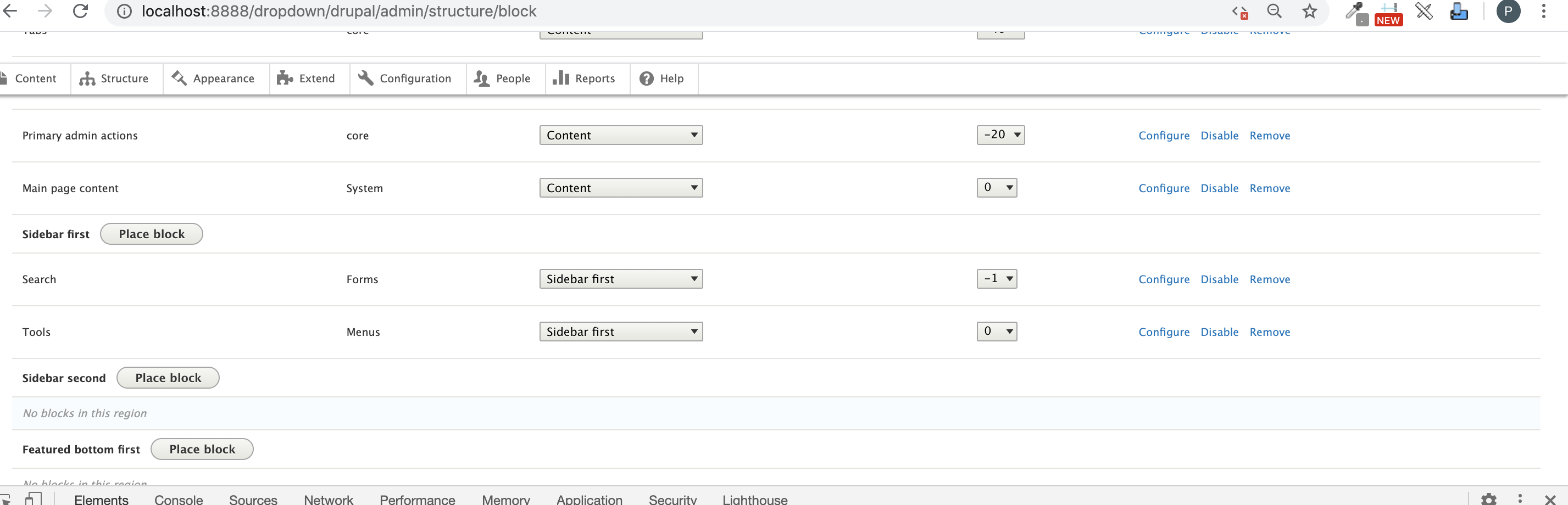
3. Scroll the page , the toolbar menu gets moved downwards.
4. Go to /admin/structure/views
5. Scroll the page , the toolbar menu gets moved downwards.
Current Result -
If you disable javascript and visit the views ui and views page than on scrolling the page , the toolbar menu gets scrolled down , moved on scrolling.
Expected Result-
It should be static.


Refer to the attached video for more clearance.





Comments
Comment #2
priyanka.sahni commentedComment #3
nod_Looks like a toolbar issue, it happens everywhere when the page has a scroll. Happens on /admin/structure/menu/manage/admin too.
Also make sure to test on the latest dev version of Drupal, at the moment bugs should be added against the 9.1.x version :)
Comment #4
nod_Comment #5
poojakural commentedComment #6
poojakural commentedToolbar scrollbar issue has been fixed. Tested on Seven, Bartik, Claro, Classy, Stable.
Step to Test:
1. Go to browser setting:
chrome://settings/content/javascript?search=content
2. Disable the javascript.
3. Go to admin site.
4. Open any admin page. [/admin/structure/views/view/content/edit ]
5 Scroll the page , the toolbar menu stick at top
please refer the SS and patch
Comment #7
poojakural commentedComment #8
poojakural commentedPlease refer the attached SS and patch
Comment #9
nod_Thanks will have a look. It's tricky because the changes looks scary but don't appear to break anything. need to figure this out a little.
Comment #10
nod_ok yep, does break something. On desktop version the tray is opened by default. Before the patch page title was shown, after the patch the toolbar tray is hidding the page title.
Comment #11
nod_Comment #12
nod_Comment #13
poojakural commentedComment #14
poojakural commentedverified and checked the above issue. [On desktop version the tray is opened by default. Before the patch page title was shown, after the patch the toolbar tray is hidding the page title]
Yes toolbar tray was hiding after the patch.
Fixed this issue
Step to Test:
1. Go to browser setting:
chrome://settings/content/javascript?search=content
2. Disable the javascript.
3. Go to admin site.
4. Open any admin page. [/admin/structure/views/view/content/edit ]
5 Scroll the page , the toolbar menu stick at top
Tested on Bartik, Classy, Claro, Stark, Seven themes
Comment #15
poojakural commentedComment #16
poojakural commentedAttached SS
Comment #17
Rkumar commented@poojakural Need to reverify the patch wrt to all themes. Will be helpful if you can attach similar proof as #8 with this updated patch.
Comment #18
poojakural commentedComment #19
poojakural commented@rumak - Tested 3143749-14.patch on Drupal 9.1.x-dev and 8.9.x themes. Tested themes Bartik, Seven, Start, Claro, Classy
Toolbar is working please check the SS
Comment #20
Rkumar commentedThanks for the attached screenshot. Let's just have thorough testing wrt all screen sizes.
Comment #21
pankaj.singh commentedTested the patch given in #14on different devices.
The issue is reproducible on Bartik and Stark theme except for the iPad device. SS attached for ref.
Comment #22
pankaj.singh commentedComment #23
pankaj.singh commentedI Just figured out, on devices the toolbar menu is not static as expected/normal behavior. That means when the JS enabled the toolbar menu also scrolled up with the page scroll. So, on devices, it can't be static.
Whereas on Desktop, the patch given on #14 already fixed the issue as the SS attached on #19. RTBC+1
Comment #24
tanubansal commentedBelow mentioned steps are tested after adding the patch #14
Pre-requisite-
1. Go to browser setting:
chrome://settings/content/javascript?search=content
2. Disable the javascript.
Steps to Replicate -
1. Go to the admin site.
2. Go to /admin/structure/views/view/content/edit (or any page with a vertical scroll)
3. Scroll the page , the toolbar menu gets moved downwards.
4. Go to /admin/structure/views
5. Scroll the page , the toolbar menu gets moved downwards.
Its working fine.
Screenshots are attached
This can be moved to RTBC
Comment #27
vikashsoni commentedApplied patch 3143749-14 working fine for reference sharing screenshot ....
Comment #30
Shubham Sharma 77 commentedApplied patch #14 applied successfully in drupal-9.5.x-dev. Working fine good for RTBC.
Thanks for the patch
For ref sharing screenshots...
Comment #31
omkar-pd commentedPatch #14 solves the issue. Moving this to RTBC.
Comment #32
quietone commentedThe latest patch is in #14. Screenshots for that patch were added in #16 and #19 for all themes, then in #21 for difference screen sizes. The screenshot submitted after that in #24, #27, #30 and #31 do not appear to me to be adding any new information. Therefore removing credit for those comments.
The patch still applied to 9.5.x, and there are no tests to run, so I am leaving this at RTBC.
Comment #33
alexpottThe fix looks sensible but I think the stable fix should match the toolbar.module.css fix... ie. right:0 should be top:0
Also we need patches for D10.x and D9.5 (no stable on D10). Also in the intervening years CSS standards have changed so this patch fails linting - if you do
yarn run lint:css --fixfrom the core directory it will fix things for you.Comment #34
nitin shrivastava commentedI am working on it.
Comment #35
nitin shrivastava commented@alexpott,
Made changes as per commet #33.
Needs review.
Comment #36
pooja saraah commentedFixed failed commands on #35
Attached patch against Drupal 9.5.x
Comment #37
prasanth_kp commentedtried #36 patch in d9.5.x-dev, failed to fix issue
Comment #39
gaurav-mathur commentedComment #40
gaurav-mathur commentedAfter disable the js from browser setting & appliing Patch #36 on Drupal 10.1.x-dev
The patch not work for me..
Refer to screenshots.
Comment #41
needs-review-queue-bot commentedThe Needs Review Queue Bot tested this issue. It either no longer applies to Drupal core, or fails the Drupal core commit checks. Therefore, this issue status is now "Needs work".
Apart from a re-roll or rebase, this issue may need more work to address feedback in the issue or MR comments. To progress an issue, incorporate this feedback as part of the process of updating the issue. This helps other contributors to know what is outstanding.
Consult the Drupal Contributor Guide to find step-by-step guides for working with issues.
Comment #42
ranjith_kumar_k_u commentedComment #43
ranjith_kumar_k_u commentedComment #44
smustgrave commentedConfirmed the issue in the issue summary and the patch #42 resolved it. Attaching screenshots.
Just FYI to help get the message out there.
Starting March 2023, simple rerolls, rebases, or merges will no longer receive issue credit. Only rerolls that address a merge conflict will be credited, and the merge conflict that was resolved must be documented in the text of an issue comment.
To receive credit for contributing to this issue, assist with other outstanding tasks or unaddressed feedback.
See the issue credit guidelines for more information.
Comment #45
larowlanI think we need separate patches for D9 and 10 here per #33
Comment #46
ranjith_kumar_k_u commentedCreated a patch for D9 (from #42) and I can confirm that the patch is working fine on the 9.5 dev version
Comment #47
ranjith_kumar_k_u commentedComment #48
smustgrave commentedJust noticed in #42 this was added to claro also. Was it confirmed to be an issue there?
Comment #51
quietone commentedThe Toolbar Module was approved for removal in #3476882: [Policy] Move Toolbar module to contrib.
This is Postponed. The status is set according to two policies. The Remove a core extension and move it to a contributed project and the Extensions approved for removal policies.
The deprecation work is in #3484850: [meta] Tasks to deprecate Toolbar module and the removal work in #3488828: [meta] Tasks to remove Toolbar module.
Toolbar will be moved to a contributed project before Drupal 12.0.0 is released.
Comment #52
quietone commentedToolbar has moved to contrib