Problem/Motivation
The toolbar experiences several kinds of visual flickering when initialized.
This issue is specific to the flickering that results from top or side padding being added shortly after the page is rendered, in order to make space for open trays (top padding added for horizontal trays, side padding added for vertical)
This happens on every page-load, both in vertical and horizontal orientation.
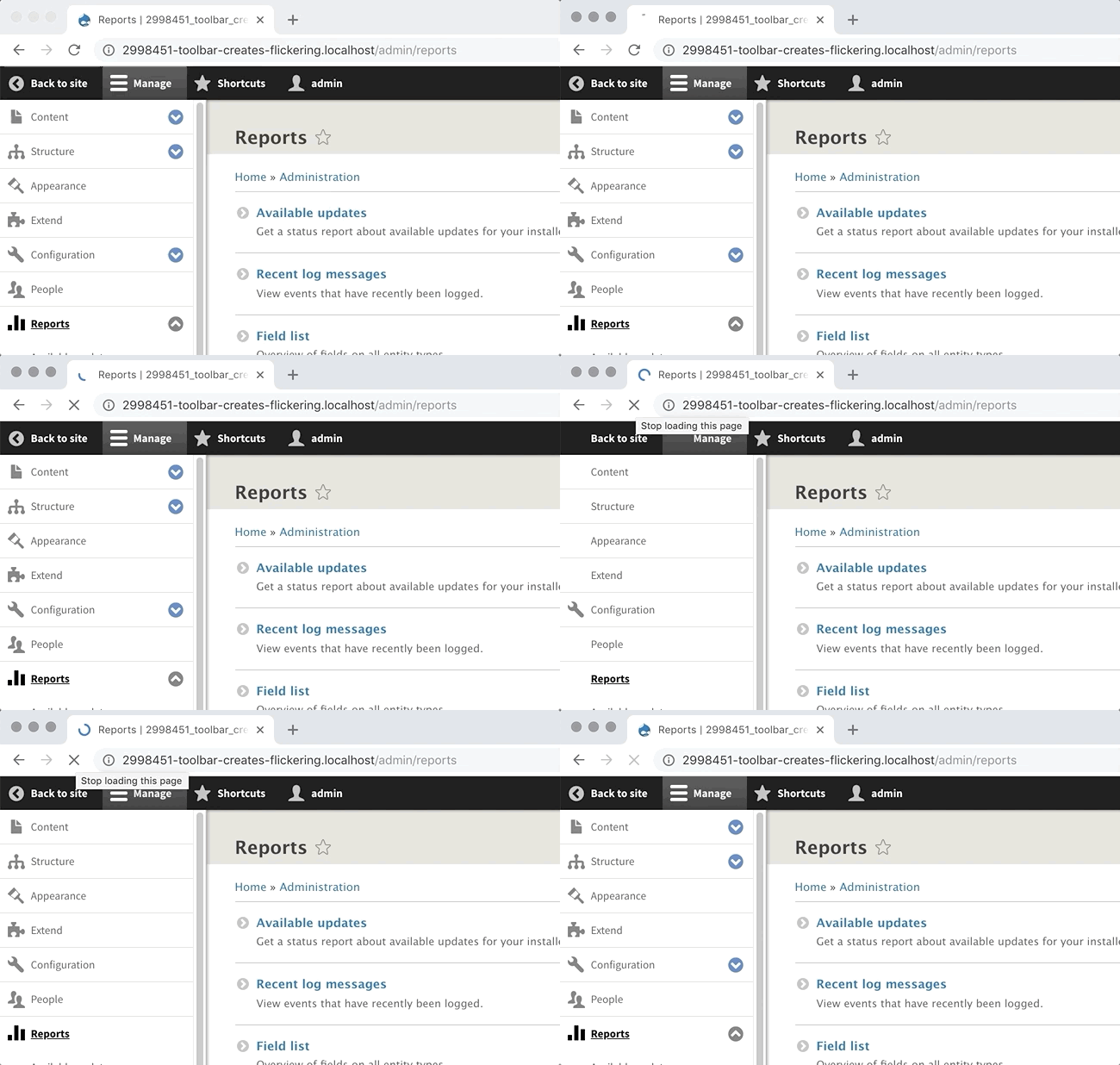
There are 4 possible states:
|
Horizontal |
Vertical |
| Shortcut-bar visible |
|
|
| Shortcut-bar invisible |
|
|
In the gif attachments you can clearly see this.
These gifs are recorded with Standard profile and Drupal 8.7.x.
Note that the flicker of the 'admin' button in the black top-menubar is not part of this issue, see #2951268: Improve rendering account link in the toolbar
The toolbar in general has it's share of flickery things that can't all be addressed within this issue, but see gifs below for the specific problem being targeted and see this video of the proposed fix in action as of April 4 2023.
Visual effect
Horizontal toolbar orientation
Main-content area jumps 1 row lower (exactly the toolbar height) on page-load.
Main-content starts with Drupal-icon + "toolbar_rendering_...".

Vertical toolbar orientation
Main-content area goes from 100% width to 80% width (exactly 100% minus toolbar width).
You see the main content moves from left to right on page-load.

Proposed resolution
The reason is that javascript is used to add/change some css-classes to the page that are used by the toolbar.
And this javascript is executed after the initial page drawing.
Therefor the browser paints the toolbar twice when loading the page.
The css-classes needed for painting the toolbar must be there on initial page-load. So that the first html delivered to the browser contains the toolbar state. Pseudo-code <div class="toolbar toolbar-orientation-vertical toolbar-shortcuts-open"></div>. This can be added by inlining JS that loads before the page is painted, and adding the necessary classes to the <html> tag - the only tag available that early in the rendering process.
Remaining tasks
User interface changes
API changes
Data model changes


 Show commands
 changes




Comments
Comment #2
sam152 commentedComment #3
ndf commentedThanks Sam152, I just commented in #2542050: Toolbar implementation creates super annoying re-rendering. that this issue is the follow-up.
Comment #4
chi commentedComment #5
ndf commentedComment #6
fabioneves commentedHas someone made more discovery on this?
Like trying to load the page with the class already there? We probably won't have the flickering but there'll be a blank block before the toolbar loads there, it'll always load after initial page load, right?
Comment #7
drintios commentedComment #8
drintios commentedComment #9
ndf commentedImproved the issue-summary
Comment #10
chi commented@ndf, does the toolbar work fine for you without Big Pipe?
Comment #11
ndf commented#10
Without Big Pipe (uninstalled the module) won't go away.
Horizontal toolbar orientation without Big Pipe
This looks a lot better then with Big Pipe installed, but there is still a redraw.
Vertical toolbar orientation without Big Pipe
Without Big Pipe you clearly see that the vertical view renders in 2 steps.
Comment #12
ndf commented#6 I cannot find the exact file now, but yes it is possible to change the default to vertical or horizontal. Currently the default is 'hidden'.
I tested this by settings a breakpoint in the javascript file (probably
core/modules/toolbar/js/toolbar.menu.es6.js).Then a placeholder is rendered first (an empty toolbar-div).
After that the toolbar-javascript decides if the toolbar must be rendered vertically or horizontally or not at all (hidden).
If the actual render is the same as the placeholder, you won't see a redraw.
If the actual render has a different orientation or hidden, you will see a redraw.
Comment #13
chi commented@ndf, In my experience, without Big pipe the main area does not jump at all in horizontal orientation.
However in vertical orientation the flickering remains the same as on your screenshot.
Comment #14
ndf commented@Chi Maybe that horizontal screenshot is triggered because I scrolled down a bit first. If I don't do that it looks good horizontally (without big pipe)
On Chrome I notice that the vertical scrollbar is not present initially, but is present after the toolbar is rendered. That might be related.
Comment #15
hog commentedI see this issue: on reload page menu is jumping to the top.
Comment #16
hog commentedComment #17
hog commentedComment #18
hog commentedComment #19
rcodinaPatch on #18 doesn't work for me. On Google Chrome the problem happens on almost every page reload, on FF only on some reloads.
Comment #20
rcodinaComment #21
ndf commented#18 thanks for your patch HOG.
There are 4 possible states:
Looking at your css-solution it seems it targets the horizontal orientation only.
What we need is that that both the toolbar orientation and the if the shortcut-bar is visible are set in the initial page-render.
Comment #22
hog commentedComment #23
hog commented@ndf what issue with Shortcut-bar do you see? Wrapper fixed by default, other display works with JS. I think we can test with this task together: https://www.drupal.org/project/drupal/issues/2951268
Comment #24
hog commentedI added body default padding as well.
Comment #25
hog commentedComment #26
hog commentedFixed mobile display.
Comment #27
ndf commentedRegarding #23 and #21.
It seems like a variant with a horizontal toolbar with a hidden shortcut bar is gone. When I hide the shortcut bar now (in horizontal mode) it will re-appear on page-load. This is in 8.7.x now, nothing to do with your patches.
Hi HOG just checked #26
Mobile looks good to me.
On desktop with a vertical menu the jump is still there.
See this example with patch #26

@HOG do you see an approach that could work for all orientations?
Comment #28
ndf commentedNo this example :) (vertical menu and patch #26)
Comment #29
hog commented@ndf, I see what do you mean. But I think wouldn't be able to fix vertical menu 'jump' because:
1. By default, menu opening as a horizontal menu;
2. When JS loaded, class toolbar-vertical added and we have a margin for this class;
Maybe you have an idea how to resolve this issue.
Comment #30
ndf commentedThe only way I see is that on the first render (first html/css sended by drupal to the browser) the state of the toolbar (orientation and shortcut-bar-enabled) is included.
Currently the state of the toolbar is not included and an arbitrary default-placeholder-state (horizontal now) get's default styling.
I don't know how to technically solve this though.
Comment #32
guypaddock commentedI actually dropped by this issue and applied the patch from #26 hoping to address the page re-flow that arises from the vertical menu layout. Alas, it appears that's not addressed in the patch -- which, if I'm understanding correctly, is what #28 through #30 are discussing.
I find the vertical layout more productive -- because I can easily access all settings pages from one menu -- but I find the horizontal layout less visually disruptive, because it doesn't affect page flow and doesn't jump out of it's initial spot during page load.
Comment #33
chi commented@GuyPaddock do you have Big Pipe module installed?
Comment #34
guypaddock commentedYes. Prior to applying the patch, I tried it with BigPipe disabled and it didn't seem to make a diference w.r.t. the re-flow.
Comment #36
ambient.impactHi there. I'm guessing that the toolbar will eventually be completely rebuilt/reworked, but in the meanwhile I've put together my own fix for the page shifting due to vertical trays being initialized - which can happen if the page takes a little while to load and (I believe) has been discussed previously in this thread.
I've avoided serving specific
<body>margins or altering classes from the back-end; it's a completely JavaScript and CSS solution, and depends entirely on the JavaScript running to completion, so it's relatively robust and has many checks to ensure it doesn't erroneously add space if there's an error or something isn't supported by the browser. I may improve this further at some point, so that linked commit may become out of date but you can find the relevant files in this directory. I'm hoping it'll help out others who've gotten frustrated by this issue, and the repository is licensed under GPL-2.0, so feel free to adapt the code.If you want to see what it looks like, I've attached two videos, one without the fix and one with. Both were done after a cache rebuild, so apologies for my old laptop taking so long to load a page, but it demonstrates the issue well.
Comment #37
paulwdru commentedI immediately gave up D8 in 2017 after seeing this flickering interface which sarcastically (sorry for this word but my true feeling) required a module https://www.drupal.org/project/toolbar_anti_flicker to fix it right after installation
In 2020, I watched quite some latest D8 videos on Youtube & suprisingly still EXPOSING this annoying flickering effect which will certainly give a very bad impression like an eyesore to the audiences as what I felt in 2017
Wondering why this Flickering Issue is not set as the top priority to be solved & been dragged so long since day 1 of the release of D8 in 2015. The selling point of D8 is meant to be VISUALLY APPEALING with the inclusion of new Claro Admin Theme, UMAMI Profile & Layout Builder but this Flickering Issue has spoiled all at first glance, sincerely
Comment #38
chi commented@paulwdru The main flickering issue was resolved in #2542050: Toolbar implementation creates super annoying re-rendering.. Most of the other are caused by Big Pipe module which you can easily uninstall. However I agree this should be major, as it makes people frustrated.
Comment #39
paulwdru commented@Chi
Based on past experience, sorry to say that Drupal Core Team is always slow in addressing Interface issue which they usually think of it being minor & petty so long as it won't affect the overall operations but they don't know the minor Interface Issue could completely defeat the confidence of all potential users at first glance right after installation.
What, I need an extra module https://www.drupal.org/project/toolbar_anti_flicker to fix the Admin Bar soon after installation ? This would never happen on Wordpress & Joomla, guaranteed never
All in all, 1st Impression is always critically important but Drupal core team seems not learning it while many new major features are being added from 8.0 to 8.8. They may still think of the Flickering being minor & petty enough to be ironed out, I guess
Comment #40
chi commented@paulwdru See #2542050: Toolbar implementation creates super annoying re-rendering. notes #149 and #150. Some users cannot reproduce this at all. I think the Toolbar Anti-Flicker module is not needed any more as the main problem was resolved. However after that Big Pipe was added to core and that brought new flickering issues like this one. Though there are some other similar issues not related to Bit Pipe #2856761: Make filter formats widget rendering more smooth.
Overall I agree with #39. Most of Drupal core team are focused on backend. It's kind of similar to Windows vs Linux competition on desktops. The latter works pretty well but it looks ugly when compared with Windows. Fonts, colors, spacing never got much attention from Linux developers. Same applies to Drupal.
Comment #41
paulwdru commented@Chi
After watching these 2 latest Drupal 8.8 videos with such a Flickering Admin Interface, my partners & I were immediately pushed off from adopting D8, still immature & half-baked at 1st glance after 5 years (maybe temporarily solved earlier & recurs after implementing BigPipe, not sure) since its release
This flickering issue looks minor but it could drive all potential users away right after installation, 1st impression is too bad, half-baked, immature & unstable from the points of view of users. they won't further delve into D8 to understand its inner beauty but delete it immediately like my other testers, they yelled, DO NOT WASTE TIME, Just Delete the Flickering Eyesore, they have long been pampered by the Aesthetically Shining backend of Wordpress & Joomla
Media Management in Drupal 8 - Updated 2020 https://www.youtube.com/watch?v=NDR5VLSlSuQ
Media in Drupal 8: everything you need to know https://www.youtube.com/watch?v=QIbEuwqmTH8
Comment #42
paulwdru commentedAt last, just a normal thought of most people, no offence here
Comment #43
droplet commentedIn short:
All fixed are there in Toolbar Anti-Flicker module. Take it.
Moaning version:
I agreed with @paulwdru. Drupal does a very bad job for Clients. It's always Developer first. The whole flow of UX improvement in Drupal is very wrong & inefficient. Drupal trying to perform many UX researches but that's fake sciences I can tell.
Just take the "Add Content" screen as an example. It takes 1 ~ 2 (or 3) years to recode that into WordPress style...I really don't understand it.
Also, there's something called "UX reviews" and the UX advisers have never shown or giving a single line useless comments that will 100% block the move. They never understand what is "1 min UX quick review & confirmation" VS "100 mins coding".
(Even they never create an issue for the current flicking problems)
(It's impolite to say.it.... I think many UX advisers are not Drupal user, just an hourly contractor)
(Due to the complexity of Drupal. It needed someone has UX knowledge and actual coding skill! They have to decide the UX issue is code-fixable or must to change the UX DESIGN)
And I found most of the Core Drupal developers are developers only. They have no actual Drupal experiences as a user.
All fixed are there in Toolbar Anti-Flicker module. Take it.
(I will not provide a patch. I'm creating this module because I'm tired of meaningless re-roll and questions in #2542050: Toolbar implementation creates super annoying re-rendering..)
Comment #45
nod_@droplet i feel the frustration but we will not get anywhere like this. You are correct that the whole flow of UX improvement in Drupal is not good, and everything else you're describing comes from there. UX folks are also frustrated it takes so long for changes, and the fact that it looks like they only spend a little time on their feedback is not accurate, I've followed a few issues and disccussed with them about a few changes and they can spend a lot of time on "simple" feedback. It's just that in this bad process this is the only thing they can do to try to limit making the UX even worst.
Nobody is happy about how things go, let's avoid taking it out on each other please.
@paulwdru: I've seen your feedback on the other issue core devs know there is an issue around UX and like droplet said the issue is that UX folks are not usually code folks, and core patch are hard to get right for different reasons. Even then it's better than it used to be you know.
Please keep in mind that venting and expressing your frustration here can potentially discourage people that could have help. I'm not saying to not complain, I'm saying this is not the right channel for this, slack/irc would be better, talking with UX folks about their problems with developers could give some perspective too.
Comment #51
gaurav-mathur commentedComment #52
gaurav-mathur commentedPatch #26 Applied succesfully on drupal 9.4.5,patch not work in this version.
Also checked in drupal 10.1.x-dev its working fine without using any patch.Looks good for me.
For refer sharing videos.
Comment #55
bnjmnmI created a merge request brings in the logic from the Toolbar Anti-Flicker module per the suggestion in #43
This un-deprecates js-cookie. Seems like a good reason to keep it around unless theres a non-cookie way to address this. It really should be addressed, too. This kind of thing does result in a bad overall impression of Drupal.
Comment #56
andy-blumTo avoid un-deprecating the JS-cookie library, we should try using localstorage or sessionStorage instead. It should be a pretty simple 1:1 replacement, but without the extra bytes.
The only thing I'm not sure of is which storage would be preferable. Session storage will clear when the browser session ends, local storage will last effectively forever unless we clear it.
Comment #57
bnjmnm@andy-blum is right, we don't really need js cookie. It was used well in the contrib module I ported to this issue, but we can manage this without the additional dependency. I'm partial to sessionStorage so there's less potential for side effects. The flicker would be there on an initial page load, which IMO is not that big a deal because it's most irritatng when navigating from one has-toolbar page to another, and sessionStorage would cover that.
Comment #58
bnjmnm🤦 spoke too soon in #57, and forgot that I already knew sessionStorage won't work because PHP does not have access to it.
Another option is updating state storage, which may have been discussed above or in a related issue (no time to scroll RN). We could also investigate using Cookies without the library. The cookie use isn't too complex, so perhaps we can toss a little extra logic into the toolbar JS and avoid the need for another dependency.
Comment #60
lauriiiThe current approach with js-cookie seems fine if we have to use cookies. We have already vetted js-cookie when it was added and AFAIK the only reason it's being removed is that it's not currently used.
I tested the MR manually and it seems like there's still some flickering:
Comment #61
bnjmnmIs there additional flickering pictured there beyond the "admin" button? I may be missing another flicker, but the issue summary points out (but easy to miss) that the flickering seen in the user account button in #60 (the "admin" button) is addressed in a separate issue #3331531: Reduce toolbar reflow/repaint due to username lazy builder. That specific flicker is due to a different underlying problem and scoped differently because of that.
Comment #62
lauriiiConfirmed that the flicker in #60 is introduced by the changes in the MR. It seems to be related to the
#toolbar-item-anti-flickerelement, but I didn't research why it was causing the flickering.Linking another related issue which approaches the problem differently.
Here's one more animation showing other kind of flicker that's happening when the shortcut tray is open:

Comment #63
bnjmnmUpdated the MR and provided a slow-motion example on Youtube. With this, the remaining flickers are the SVGs loading which is being tackled in #3333445: Add progress spinner/message functionality to submit buttons. That said, there's a little bit of strategic fade in/out which is less ideal than the toolbar just appearing static, but it's better than the flickers. here's why:
The flickering that is sorta introduced by
#toolbar-item-anti-flickeras mentioned in the prior comment is something I'm not sure is addressable on the PHP end without messing with caches (happy to find out I'm wrong). Anywhere in PHP that I could think to put logic that would determine the active tray was something that would ultimately get cached and not consistently aware of which tray was active. Relaxing the cache (unsurprisingly) increased page load times significantly so that's certainly not a good route to go.As a workaround, I fade the horizontal menu in so the default admin menu is not briefly rendered before the active menu appears. Hoping there's a way to use the cookie approach instead of this workaround. It seems like the approach in #1863824: Use the temp store to remember the last state of the toolbar per user and reload it has the same obstacles as what are being faced here, but if there's something about getting the data from Drupal state vs cookie that circumvents the cache challenges then I'll look into that.
If this seems like a fairly reasonable appraoch I can put some additional time in documenting things.
Comment #64
lauriiiI'm not sure I see why we are adding the fade, or how it would help with addressing the problem. With the current MR it seems like the toolbar changing on a page load is even more visible than before. 🤔
Comment #65
tim.plunkettComment #67
bnjmnmAdded the
2998451-toolbar-flicker-v2Merge Request, which is similar to2998451-toolbar-rendering-createsbut reduces the LOC. I want to keep the earlier MR for a bit as I may need to repurpose additional parts of it depending on review feedback.Comparison: https://youtu.be/lp35EQNvuac
Comparison in slow motion: https://youtu.be/egIUljKPRHE
Addressing the top/left movement when a tray pops in could be seen as its own flicker problem when the tray is lazy loaded (trays such as user or shortcut). With the current flickering fix, you'll see an empty tray during loading which is eventually replaced by the lazy loaded active tray. This means the tray content appears suddenly which is a bit jarring, but unlike HEAD, it does not cause a reflow by adding top or side padding to the content.
If theres dislike of the tray content popping-in, it could be eased by having it fade in, or there being a progress graphic in the tray placeholder. There's logic to allow that in the other MR that isn't currently in
2998451-toolbar-flicker-v2Another benefit of this fix is if a tray is closed, it does not reopen when a new page is visited.
Comment #68
lauriiiNice work! Tested the MR and it definitely reduces the layout shift happening on a page load.
Posted feedback on the code in the MR.
Comment #69
bnjmnmComment #70
needs-review-queue-bot commentedThe Needs Review Queue Bot tested this issue. It fails the Drupal core commit checks. Therefore, this issue status is now "Needs work".
Apart from a re-roll or rebase, this issue may need more work to address feedback in the issue or MR comments. To progress an issue, incorporate this feedback as part of the process of updating the issue. This helps other contributors to know what is outstanding.
Consult the Drupal Contributor Guide to find step-by-step guides for working with issues.
Comment #71
bnjmnmComment #72
smustgrave commentedSo when I try to apply the diff from MR 3464 I get
test.patch:665: trailing whitespace.
.toolbar-loading.toolbar-horizontal :not(#{$active_tray}) {$gt} .toolbar-lining {opacity: 0}
warning: 1 line adds whitespace errors.
Not sure if that's going to be an error.
Apply the change and am no longer seeing the flicker.
Manager link still open/closes as expected
Toolbar stays sticky to the top.
Tried on claro, olivero, and a custom uswds theme.
Comment #73
dwwI’ve been using this patch on every site I build for quite some time. Haven’t tested the very latest, nor reviewed recent changes, but very happy to see this at RTBC. Ready to help get it over the line if it needs anything. Thanks!
Comment #74
nod_Left a couple of comments, only one is blocking to me the function
setToolbarClassesEarlythat leaks to the global scope when it doesn't appear to be necessary.The other issue are also from the original toolbar so I'd be ok not to mess with it too much since it's been working for a while in contrib, but if that's possible a few code improvements would be welcome.
Comment #75
bnjmnmComment #76
nod_Couple of nits, otherwise good to go for me.
Comment #77
nod_Works as expected, less jumping around overall, improvement compared to current situation on narrow screen. Code is good,
RTBC for me :)
Comment #78
nod_Comment #79
lauriiiThanks for the CR! I posted some feedback on the MR. Tagging with needs security review for the username cookie.
Comment #80
bnjmnmThe part of the MR that required security review was de-scoped and moved to #3351356: Reduce toolbar user button related browser reflow
Comment #81
bnjmnmComment #82
smustgrave commentedApplied the MR, cleared cached but I'm still seeing the flicker.
Comment #83
camilledavis commentedI wonder if this is related to a weird issue I'm getting in 9.5 where if I change the active toolbar toggle button ("Manage", etc) to blue to address https://www.drupal.org/project/drupal/issues/3097907 , a few white pixels flicker on and off to the left or right of the button when resizing the window in Firefox.
Issue appears to have been fixed in 10 but not sure how
Comment #84
bnjmnmRe #83 The issue mentioned there was fixed in #2209063: Fix the flicker of the "active" icons when a high-latency user clicks on toolbar items
Re #82 I updated the issue summary and title to better explain what is being fixed here. While the scope of this issue is specific to the delayed padding changes to make room for trays, I was able to address what was shown in the gif.
This should overall be pretty smooth now, but keep in mind that any lazy loaded trays like shortcuts and user will still have the tray contents popping in shortly after the page loads. Long term it might be nice to have it fade in instead but that would be out of scope here and will probably require modifications to big pipe. The menu buttons in the "manage" tray also come in after the page loads as they're added via JavaScript in a way that can't be done earlier, but I did introduce a fade-in so they show up more gracefully
Here is a video of the results that starts with real time followed by a slow motion version https://youtu.be/zL9IlRLkzTg Even the lazy-loaded trays pop in without it feeling too jerky even though there isn't a fade/transition.
Comment #85
smustgrave commentedThank you for clarifying.
Taking that new info in account definitely noticing an improvement clicking to new tabs.
Don't mind marking then.
Comment #86
nod_Like this approach better, and works just as well :)
The change record needs to be updated (title) and information about core adding inline JS and CSS needs to be added for people who have CSP configured. I don't know if there is already an issue to simplify some of the things to make it work with CSP (content hash or random nonce), in any case it's not specific to this issue.
Going to the filesystem on each call to hook_page_attachements is a problem. The convenience of having an external file is not worth the performance impact. There are two options that I see:
Some more comments in the MR above :)
Comment #87
tim.plunkettaccomodate => accommodate
Comment #88
bnjmnmI wanted to be sure this did not cause any problems for popular contrib toolbars.
Created #3356350: [Drupal 10.1] Flickering sidebar nav width on page load for Gin Toolbar as this change could introduce new flickering on it. Fortunately, this flickering would only happen in a very specific scenario (a user that switched to Gin Toolbar from not-Gin-Toolbar) and would not appear in any tabs opened after the switch to Gin Toolbar.
I also tested this with Admin Toolbar and it benefits from the improvements here the same way the core toolbar does.
I planned to test the Adminimal Toolbar as well but it only supports up to 9x.
Comment #89
lauriiiGave another pass for the MR and confirmed that all of the feedback has been addressed.
Comment #91
nod_Updated credits
There was a leftover
toolbarUserNamein toolbar.js, fixed on commit.Committed 34b0bcd and pushed to 10.1.x. Thanks!
Comment #92
quietone commentedI published the change record.
Comment #93
bnjmnmComment #94
mherchelI believe I found a regression from this issue. Documented (and patch posted) in #3360245: Black bar appears (then disappears) at top of viewport when navigating
Comment #96
lussolucaThis somehow broke the Browsersync javascript:
It seems that the browsersync javascript is trying to replace the
<body>tags mentioned in the comment:If I rewrite the comment to be something like:
browsersync starts working again.
Should I open a new issue?
Comment #97
manikandank03 commentedFor the issue #96 please refer the below patch,
https://www.drupal.org/project/drupal/issues/3355381#comment-15196226
The patch fixes the issue and working fine.
Comment #98
catchI think we should have gone with the standard header: true approach here, added a patch on #3355381: Investigate better ways to add anti-flicker JS. See also #3379245: Toolbar anti-flicker js shows for anonymous users