Problem
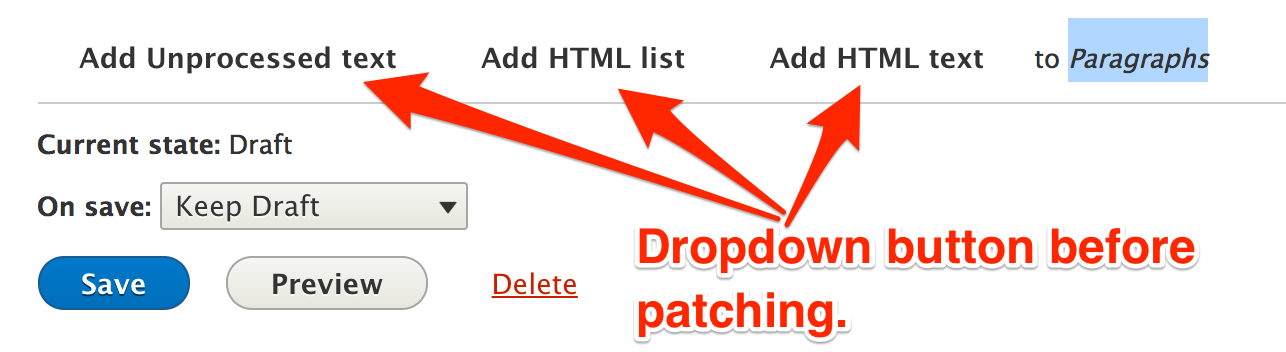
Changing workflow states is not intuitive, in fact it's almost indecipherable. Add to this the fact that using the dropbutton as the place where the workflow state change is set exponentially increases the number of transitions needed* and it is clear that this does not scale.
Proposed solution
We think the best looking/working solution would be a button bar but in order to move forward faster in smaller steps we'll start with offering the moderation states in a standard select list.
The description below the select list dynamically updates based on the selection made. This is added to clarify exactly what will happen when you click "Save".
*Eg. if I have two states, draft and published, I need two transitions: "save as draft","Save and publish." If I have three, Draft, ready for review, and published, I need nine: "Save as draft","Save draft as ready for review", "Publish draft","Publish reviewed draft","Move from review and save as draft","Unpublish and save as draft", "Unpublish and save as ready for review", "Save and Keep published". And so on.
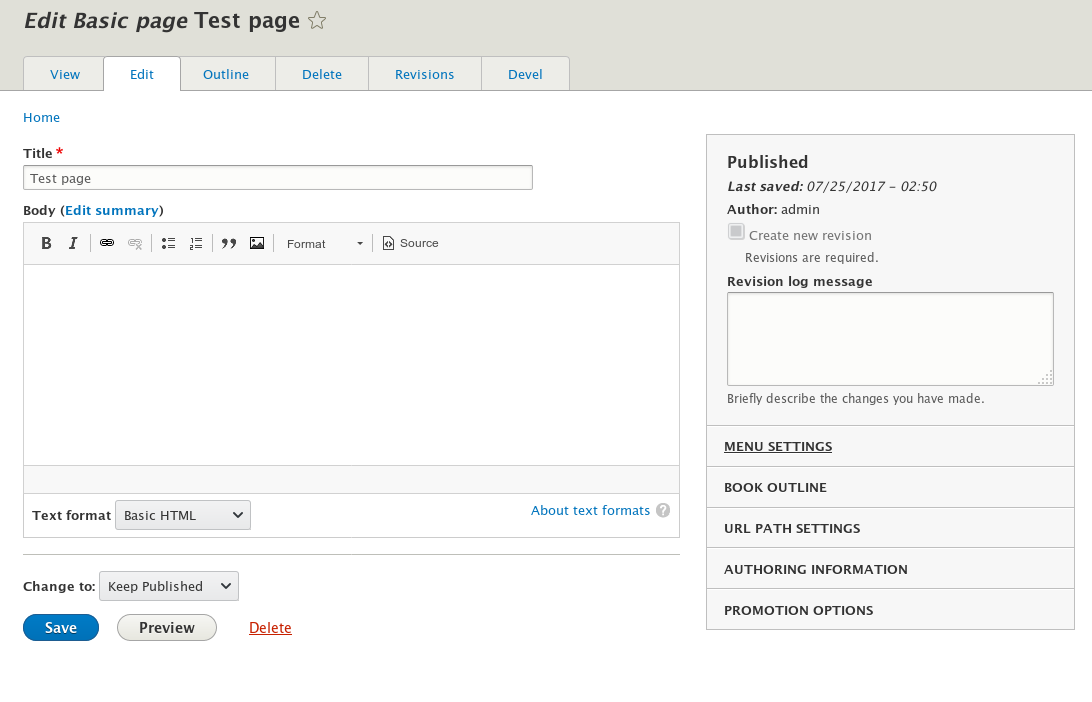
Moderation form on entity view:

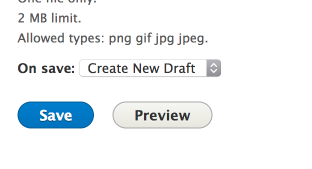
New Node creation:

Editing existing node:






Comments
Comment #2
Crell commentedActually if we drop the custom widget for moderation_state entirely, we get an ordinary select box I believe. That could then be restyled however we want, new widget or otherwise. However, we would also need to then strip the "and publish" logic from the save button entirely and turn it into a single-action, no-drop-down button, as the publication state becomes controlled exclusively through the moderation state field. It's a derived value.
Comment #3
webchickNoting this as a related issue that tries to address the scalability problem with the current drop button save.
Comment #4
larowlanYeah I think we should ship two widgets - its just a widget.
Then you can let the admin choose.
Note that we cannot do away with transitions, things like Workbench email react to the transition and need to know both the from and to state.
Comment #5
yoroy commented@tkoleary could this be used to indicate the *current* state as well?
( #2753673: Add status and workflow state to page title block. )
Comment #6
tkoleary commented@larowlan
It's not that transitions are "done away with", just that they don't need to be exposed to the author.
Comment #7
phenaproximaOne really simple approach -- that Lightning took -- would be to simply have a select list so that the user can explicitly choose the moderation state for the next revision, and a simple Save button at the bottom (none of that confuzzling "Save and keep published" drop-button tomfoolery). We've found that this keeps it perfectly clear what state the node is in, and what state it will be saved into. It was also very simple to implement. Just throwing that out there as a possibility...
EDIT: Essentially, we did exactly what @Crell suggests in #2. I could easily extract this patch out of Lightning and submit it here if people would like it.
Comment #8
tkoleary commented@phenaproxima
That would get us most of the way there. I'd be ok with scoping down this issue to that MVP and adding the "button bar widget" as a follow up.
Can you roll your Lightning code into a patch?
Comment #9
berdirSeems like that would be pretty close to what #2068063: Change "Save and keep un-/published" buttons to a "Published" checkbox and an included "Save" button is already doing, if I understand "a simple save button" correctly. it would simply replace the Published checkbox with the moderation state checkbox?
I'd love to get the other issue done, because as you can see there, the "simple save button" isn't quite as easy as you'd think. I think we got stuck on UX problems there.
Comment #10
phenaproxima@berdir: Thanks for the heads-up! I have rolled this patch so as not to conflict with the work being done in #2068063: Change "Save and keep un-/published" buttons to a "Published" checkbox and an included "Save" button. Instead, this just simplifies Workbench's ModerationState widget so that it won't mess around with the drop button, and instead displays a simple select list of states to transition to.
EDIT: IMHO, this should be postponed on the other issue, since presenting a select list of moderation states in addition to the existing drop button just makes things head-explodingly confusing.
Comment #14
tkoleary commentedAwesome work!
One minor follow up. When you change the workflow state to Published (which will also publish the node) the button still says "save as unpublished" even though clicking it will actually publish it.
The primary button would need to change with ajax, or else the module would need to just disable unpublished as a button option and only show "save"
Comment #15
tkoleary commentedComment #16
phenaproximaYeah -- that's a problem, and that's why I'm recommending postponing this on #2068063: Change "Save and keep un-/published" buttons to a "Published" checkbox and an included "Save" button. That one promises to untangle the drop-button itself, at which point it should be pretty trivial to replace the current suite of buttons with a simple "Save" button to dovetail nicely with this patch (and, indeed, do exactly what Lightning is already doing).
Comment #17
yoroy commentedLets do that. Untangling the dropbutton is the first step in this.
When we do continue here I would like to see us explore other possibilities than the dropdown :-)
Postponing on #2068063: Change "Save and keep un-/published" buttons to a "Published" checkbox and an included "Save" button
Comment #18
tkoleary commented@yoroy
I agree, but the dropdown at least gives us a good first step.
Comment #19
anavarreComment #20
timmillwoodNo need to postpone this, I have it working!
It's loosely based on @phenaproxima's patch from #10 but I am form altering out the Node form "save and publish" buttons for the default "save" link.
Comment #21
timmillwoodComment #23
jamesdeee commentedReviewed locally and on Simplytest.me, looks good to me.
Comment #24
sam152 commentedSome question/comments here.
I feel like this should probably be delegated to a handler because it's entity type specific logic. Aren't there form alters in there already?
nit, extra newline
Are these testing the buttons that appear? 'Publish' seems like a fairly broad string to assert, maybe we can lookup the button specifically? Also interesting this changed from assertNoRaw to assertRaw in the second case? Could indicate faulty asserts?
Comment #25
timmillwoodThis is testing the values in the select list now.
I think it was fatty before. The whole test is a bit odd, maybe it should be a follow up, because the node is published then moderation is enabled, so the published node will have a draft moderation state.
Comment #26
timmillwood#24.1 - I started working on an update to the patch moving this stuff to the handlers and as I did my hatred for the handlers came back. Maybe hook_form_FORM_ID_alter might be better to only alter the node form?
I think the only thing that makes this "Needs work" is #24.2
Comment #27
sam152 commentedRe: #26, to me it seems ugly to have special cases for specific entity types handled in various places throughout content moderation. At least a handler is self contained and can one day hopefully be moved to the module the entity is provided by.
The nit is fairly inconsequential, so without a tiebreaker, I'm happy to see what the core committers say.
Comment #28
alexpottThere's an interesting problem. That was need to test - it is perfectly possible that a transition to the same state is not possible. For example, it should be possible to prevent published->published transitions to enforce nodes going through a needs review state.
In \Drupal\content_moderation\Plugin\Field\FieldWidget\ModerationStateWidget::formElement()
It's possible that the $default->id() is not in $target_states. If it's not then I think we should set #default_value to NULL and have a please select and the it should be required.
Comment #29
timmillwoodComment #30
sam152 commentedManual testing is good, works as expected. Feedback below, after that +1 to RTBC.
Would be good to add both of these scenarios to the test.
Doing a quick survey of core, a single hyphen on either side of the label is the established convention.
Can we use #required => TRUE instead?
Comment #31
boaloysius commentedI did 2 and 3 of #30,
I am working on the test in 1 of #30
@Sam152,
1) if we are setting #required => TRUE, then the function
is only setting value. Should we change the function name appropriately?
Comment #32
boaloysius commentedComment #33
timmillwoodI'm currently working on the test from #30.1, and I'm not sure the change in #30.3 gives us the validation we need.
Comment #34
timmillwoodJust reporting back that the change suggested in #30.3 doesn't work. For example if you have a Node with the state "archived" and set the moderation state to be empty you get the message "Invalid state transition from Archived to Archived".
Comment #35
timmillwoodThis patch fixed #30.1 and #30.2
Comment #36
timmillwoodComment #37
tkoleary commented@timmillwood
We've established a clean separation of state and action in the model and the admin UI for this, now when we get into the node it's all muddied up again. What the user is doing is chosing to change the *state* on save but we have the *transition* names in the select. The select should contain the state names because it's not an action button.
Part of the problem I see here is that there is no indication of the *current* state in the UI as it exists now, and this patch doesn't really solve that because the default value in the select can be taken to mean "the first in a number of choices for states I can change to" rather than an explicit "This is the current state".
The descriptive text "The moderation state of this piece of content." does nothing to help this either because it could mean either "The current moderation state..." or "The moderation state you have just chosen..".
What I think we need is something like this:
Here the current state is explicit and the available states are as well. If we really want to underscore it we could add the transition information to the descriptive text when a selection is made, eg.
"On save a new draft will be created"
Comment #38
timmillwoodImplementing the change suggested in #37.
Comment #39
tkoleary commentedPerfect!
Comment #40
andypostComment #41
yoroy commentedVery nice!
Comment #42
tkoleary commented@timmillwood
Brought this up at this weeks UX meeting and everyone thought it was much better. Gabor did make one comment though that needs attention. Because there is 'always' a state on the node the ui will never look like my design in which the default value on the closed select box is '– Select new state –', therefore the select needs it's own label that just says 'New state'.
Like this:

Also, we need to think about what the experience will look like if #2068063: Change "Save and keep un-/published" buttons to a "Published" checkbox and an included "Save" button lands. I'm going to mock that up.
Comment #43
berdirThe published field is now automatically hidden through access checks if workflows are enabled, as workflows define that implicitly. So it will look exactly the same with that issue committed as well. Either you have a [ ] Published checkbox or you have a select with the states, never both.
Comment #44
tkoleary commentedI discussed this with @timmillwood and put forward the idea that we actually keep published checkbox but disable it. My concern is that the experience for users moving from one to the other or for users of more than one site where smoe have and others do not have workflow will be confusing.
Users accustomed to the published checkbox will be looking there to see what the status of the document is. If the site does have workflow they will at least be able to see the status checkbox (and it's status, disabled checked, or disabled unchecked).
If we don't think the presence of the workflow select immediately below that indicates that workflow has taken over publishing status we can also add descriptive text that explicitly states that eg. "Set publishing status with moderation state"
Comment #45
berdirHm, that will be harder to implement than just hiding it, as both are separate widgets that don't really know about each other.
At least in Seven, there's the h3 header at the top of the right sidebar that shows Published/Not Published. But as we know, nobody looks at the right sidebar anyway :)
Comment #46
tkoleary commentedYes. Not to mention the fact that the hard code right column will need to be ripped out and replaced with a layout column when field layout is stable. At that point choices about which fields appear there will be in the hands of the administrator.
Comment #47
timmillwoodI guess we can create a follow up to discuss what we do in content moderation when the published checkbox lands. I have a feeling this issue might land first.
My assumption is instead of hiding through access checks content moderation would just alter the published checkbox to be disabled. This field is then ignored by content moderation and the publishing status is set depending on the moderation state.
Comment #48
timmillwoodThis patch adds the "New state" label.
This gif shows an archived entity with bartik as the admin theme.

Comment #49
tkoleary commentedTested in chrome, mac; firefox, mac; both with bartik theme, seven theme, stark theme.
Everything works well, but I did notice a few of things that seemed odd.
When I went to Stark theme I saw that the draft state label was breaking strangely to the next line. To prevent something like this happening in other themes I think it might be better to use the 'field suffix' code that I believe we use elsewhere for things like machine name that need to always remain connected to the parent field or label.
Also I was surprised that the Current state label and the new state field were above, not below, the body field. Use of these fields is connected to the action of saving so IMO it's important that they are (at least by deafult) always the last two items before the form actions.
The last thing relates to my parenthetical 'at least by default' above. Why can't at least the position of these fields be managed in /manage_form_display? This would seem to me to be valuable to some users. At least to me it seemed odd that you couldn't do that.
Comment #50
timmillwoodIt was dropping onto the next line because of it being a
<h4>and stark doesn't have inline<h4>like bartik and seven, therefore I switched it to be a<strong>with the class "label" so it gets the sans-serif font like other labels.I have also enabled the form display to be configurable so you can move where the moderation state field shows up, and set it's default weight to 100, so it should by default appear at or near the bottom. The consequence of this is it allows the form field widget to be changed to a text field. We could have a follow up to prevent this if needed or just let people have a text field if they're stupid enough.
Comment #51
amateescu commentedLooks mostly ok, here's some points that need to be fixed :)
None of these are actually used in the file.
Do you think the test coverage added by this patch is enough for removing this @todo?
I don't think this is needed, we can probably just keep the '#markup' below.
You cannot compose strings like this, it makes them untranslatable. Think how this would look like in a RTL language :)
Everything (including the
<strong>markup) needs to be inside the t() call. Which, by the way, needs to be$this->t().This should go through
$this->t().Same as above, this needs to be translatable.
This will break when you have multiple node forms on a page. The ID of the div element needs to be specified as part of the
#descriptionmarkup, and it needs to be dynamic each time the form is generated.The patch needed a re-roll anyway for the array() to [] conversion.
These need a full description.
Like above, this needs to be translated and to include the wrapping
<div>s or<span>s, whatever you decide to wrap it with.$this->t().
Comment #52
timmillwood@amateescu - Thanks for the review, I'll get these addressed today.
Comment #53
jofitzLet's start with the re-roll.
EDIT: Sorry, I started this before you self-assigned, @timmillwood - I'll step back rather than addressing the changes. Hopefully the re-roll will save you a few minutes.
Comment #54
jofitzSetting back to "Needs work" to address the comments in #51.
Comment #55
gaurav.kapoor commentedComment #57
jofitzFor clarity, the re-rolled patch in #53 (https://www.drupal.org/files/issues/2753717-53.patch) should be the base handling the comments in #51.
Comment #58
jofitzIn fact, I have re-uploaded my patch from #53 because it seems to have got lost on this ticket.
Comment #59
timmillwood@Jo Fitzgerald - no need to keep uploading patches, I still see your patch in #53. I am working on the issues from #51, using the patch from #50 as a base.
git apply -3 2753717-50.patchapplied the patch nice a cleanly.Comment #60
timmillwoodInterdiff based on #50.
Addressing all items in #51:
1. fixed
2. I think we can remove one of them.
3. fixed
4. fixed
5. fixed
6. fixed
7. fixed
8. fixed
9. fixed
10. fixed
11. can't use $this->t() because it's a static method.
Comment #61
amateescu commentedWe don't need to invent a way to generate a random ID, we have
Html::getUniqueId();)And $description_id is not very.. descriptive, I would do something like:
$description_wrapper_id = Html::getUniqueId($this->fieldDefinition->getName() . '-state');$elementand the return value still need a short description.You can use
\Drupal::translation()->translate()inside static methods.Same here.
And about the @todo that was removed, don't forget to update the issue summary from #2779933: Check for missing test coverage in the Content Moderation module and strike out this one with a link to the issue that removed it ;)
Comment #62
amateescu commentedAnd another thing that is not currently affected by the latest patch, but since we're re-writing the whole widget it would be nice to fix this one as well:
The current
isApplicable()method and all the code of the widget assumes that the field name is called 'moderation_state'This will be a problem if we decide to support multiple "moderation state" fields on an entity type for different Content Moderation workflows, so I suggest changing the
isApplicable()method to look at whether$field_definitionuses our special field item list class (\Drupal\content_moderation\Plugin\Field\ModerationStateFieldItemList) and also change all the code that hardcodes the 'moderation_state' field name to use$this->fieldDefinition->getName()instead.Comment #63
timmillwoodWill sort this out first thing.
There is not her issue open about the isApplicable() method. I'll see what the latest is there.
Comment #64
timmillwoodI was mistaken is isApplicable(), I was thinking of #2845151: ContentModerationStateFormatter pretends it's for the moderated entity, but it is for the content moderation state entity which has been committed and uses
return $field_definition->getName() === 'moderation_state' && $field_definition->getTargetEntityTypeId() !== 'content_moderation_state';for it's isApplicable().Comment #65
timmillwoodResolving all items in #61 and #62.
Comment #66
amateescu commentedThis part of #62 was forgotten :)
There is at least the
change()method that harcodes the 'moderation_state' field name.Comment #67
timmillwoodWe can't use $this->fieldDefinition->getName() in change() because it's a static method, there doesn't seem to be any other good option for getting the field definition but using $form_state->getTriggeringElement() seems to do the trick.
Although I'm open to better suggestions, change() already seems a bit of a mess with the multi level array values.
Comment #68
amateescu commentedAnother option (maybe a bit cleaner) would be to put a
'#field_name' => $this->fieldDefinition->getName()entry in the 'state' array and then access it with$form_state->getTriggeringElement()['#field_name'], but I don't feel strongly about it.This looks ready to me now :)
Comment #70
timmillwoodComment #71
yoroy commentedSo that brings us to the nitpicky state where we see that the actual user interface this patch introduces does not match the one in the issue summary at all :)
I tested with an additional state added to the default workflow. You quickly learn not to try and be funny with your transition label names :-)
The desciption of "[transition] when saved." started to feel a bit superfluous but I don't want to assume too much here so lets go for "complete" over "concise". Descriptions are full sentences though, so they need to end with a period. Needs work for that, sorry!
Comment #72
yoroy commentedFirst stab at issue summary update. Also, lets create the followup for making this a button bar so we don't lose sight of that idea.
Comment #73
yoroy commentedThanks for creating the followup @tkoleary.
Comment #74
timmillwoodAdding the full stop / period as @yoroy suggested, and going straight back to RTBC as it's such a minor change.
Comment #75
alexpottDid we consider changing the text on the save button. The description changing beneath the select box is a little hidden. I know that the drop-button is problematic and we're considering other options - so not setting back to needs review. Just asking and happy to be overruled by anyone saying that this idea is wrong. But if we're going to the trouble to update the description via ajax I think the question is worth asking.
Comment #76
alexpottAh one thing to set back to needs work for is to add a javascript test given the importance of getting the description right.
Comment #77
alexpottI guess one reason to not do #75 is #2068063: Change "Save and keep un-/published" buttons to a "Published" checkbox and an included "Save" button but that could leverage the same logic - add a checkbox and change the save label using javascript. But also there perhaps is something else we've not considered. The current javascript disabled node edit is highly usable - you just get extra buttons with the correct labels. Whereas with this you just get an incorrect description after the select box.
Comment #78
alexpottAlso I think we could do this differently and have a better non-js and js experience because they would be the same. Instead of selecting the state and using JS to tell the user what the save is going to do we can let the user select what the save is going to do. Like so:
I think we lose the need for a description. And no-js users / screenreaders get the same experience with this field as js users.
Comment #79
tkoleary commented@alexpott
Works for me.
Label could be even simpler though:
On save
[Select transition]
Comment #80
yoroy commentedI was thinking the same thing @tkoleary. Maybe we can put them on the same line then as well:
Note I also removed "moderation" from "current moderation state", mostly because I couldn't think of how to translate it. (To dutch in my case). Maybe we can do without. No biggie if not.
Thanks @alexpott for the suggestion, I think this is a worthwhile refinement!
Comment #81
timmillwoodThanks @tkoleary and @yoroy.
@alexpott did you mention you had the patch for this mostly done?
Comment #82
alexpottHere's a patch - one small change to the solution. If there is a default transition - ie. to remain at the same state - the label is changed to "Keep Draft" (or whatever) and it is moved to the top of the list. Another change is that for totally new entities there is no current state because - well they never don't have state. The last change is that the user never HAS to select from the list. There is always an option chosen.
No javascript. Some new CSS for the inline-ness - which I think looks really good.
Comment #84
alexpottFixing tests.
Comment #85
boaloysius commentedComment #86
yoroy commentedNice refinements @alexpott! Tested this on simplytest.me and works like a charm.
A small visual bug is with the spacing between elements:
The current state info is closer to the items above than to the Save and preview buttons.
We're adding a hr-tag on top of the "published" checkbox in #2068063: Change "Save and keep un-/published" buttons to a "Published" checkbox and an included "Save" button, can we do something similar here? Another way would be to increase whitespace on the top.
Comment #87
timmillwoodThe interesting think about the patch in #2068063: Change "Save and keep un-/published" buttons to a "Published" checkbox and an included "Save" button, it'll add a hr underneath this field before the save button, so if we add another hr above this field it could look a little odd.
Comment #88
yoroy commentedI was under the assumption this widget would *replace* that checkbox?
Comment #89
timmillwoodYes, it would replace the check box but not the hr, that is added in seven theme.
Comment #90
yoroy commentedAha, thanks. So my question should have been "will we keep that hr we're adding in that other issue, because yes please". :)
Comment #91
timmillwoodI mentioned this in IRC, but should add it here too.
The hr tag from #2068063: Change "Save and keep un-/published" buttons to a "Published" checkbox and an included "Save" button is added to node-edit-form.html.twig in seven theme, therefore with both patches applied the hr will appear but underneath the moderation_state select list. Ideally to resolve this we should add
{{form.moderation_state}}to the footer of node-edit-form.html.twig, but do we want optional modules adding things to core themes?Maybe a better solution would be to have
{{form.footer_fields}}in node-edit-form.html.twig and allow any module to add things to this? As I rarely do frontend stuff it's hard for me to comment, maybe @laurii and @Cottser can help?Comment #92
tkoleary commented@timmillwood
That sounds very sensible to me.
Comment #93
lauriiiProposed solution on #91 could cause similar issues that we have with the node.html.twig title_prefix and title_suffix variables. We have created overly generic variables to serve a clear purpose, but we haven't documented the reason someone has to print them. If title_suffix were instead contextual_links, it would be obvious for the front-end developer that if you want to support contextual links, you cannot remove that variable from the output.
I don't like optional modules adding things to core themes. However, I feel like the practical problems that overly generic or undocumented variables cause are more serious than one's liking.
If a theme is not printing this variable or supporting this feature, is there a sensible way to fallback so that the functionality doesn't break? If no, I think we have to document the dependency instead of trying to create the generic solution.
Comment #94
berdirI was thinking the same. We can define a container and use #group to move the status in there as we previously did with a fieldset/details element, except I guess we'd use a simple container or so now, as we don't need additional visual .. thingies?
Comment #95
timmillwoodAnother interesting idea I was thinking was having a markup field type, allowing site builders to add markup to a form. Then by default we could use a field of this type to add a
<hr>to the node form above the status or moderation_state field.But that seems overkill, a #group seems far more sensible.
Comment #96
timmillwoodThink this should be postponed on #2068063: Change "Save and keep un-/published" buttons to a "Published" checkbox and an included "Save" button to make sure we have somewhere below the
<hr>to put moderation_state.Comment #97
timmillwoodUpdated to use the footer container from #2068063: Change "Save and keep un-/published" buttons to a "Published" checkbox and an included "Save" button.
Comment #98
timmillwoodPostponing again.
Comment #99
kmajzlik commentedI would like to notice that it breaks my other dropdown in node form.
Comment #100
gábor hojtsy#2068063: Change "Save and keep un-/published" buttons to a "Published" checkbox and an included "Save" button landed.
Comment #101
timmillwoodre-roll
Comment #102
timmillwoodI had wondered if we should use underscores here instead of hyphens. Is there a convention?
Comment #103
manuel garcia commentedRe #102 The documentation is here https://www.drupal.org/node/2274843 but it doesnt say anything about underscores vs hyphens. However the example there uses hyphens so I'm guessing this is fine like it is.
Comment #104
berdiris this really related? Why is it necessary?
This would prevent contrib from switching out the class with something else.
Maybe we can do a subclass of check or so to support that as longs as it's a subclass?
Comment #105
timmillwoodThen I think we're good to go?
Comment #106
timmillwood@Berdir - We can't easily check if one is a subclass of the other because the classes are not instantiated. What we're just trying to do is make sure the ModerationStateWidget is only used by the moderation_state field added by Content Moderation. Therefore checking on the name of the field definition isn't ideal, because anyone can add a field called "moderation_state", checking on class isn't ideal because anyone can override the class.
Maybe we resolve this in a follow up?
Comment #107
berdiris_subclass_of also works with class name strings.
Comment #108
timmillwoodWe discussed this on the UX call today.
The biggest concern was how the moderation form (
\Drupal\content_moderation\Form\EntityModerationForm) doesn't match the new widget's terminology. We'll be looking at changing the labels from "Status" to "Current state", and from "Moderate" to "Change to".Also, thanks @Berdir, I'll give that a try.
Comment #109
gábor hojtsyWe also discussed on the UX meeting that the Seven theme node form sidebar top section has a display of the status of the node (published, unpublished) while the moderation state displayed above the submit button is different if its not published (eg. archived, draft, etc). Displaying both the status and the state in the same form/screen could lead to confusions. When it is published it looks like duplicate info above the submit button and at the top of the sidebar, otherwise it looks confusingly different.
Comment #110
timmillwood@Gábor Hojtsy - I've been investigating this, module form alters are run first, then theme form alters after. Therefore we're unable to change the state added by Seven theme.
One option here is to update Seven directly. Should Seven be aware of Content Moderation? Should we show the moderation state?
#2803875: Node form meta information should not come from a theme is looking to moving this sidebar from Seven to Node, and #2753673: Add status and workflow state to page title block. is moving some of the sidebar information to the top bar.
Comment #111
timmillwoodUpdating the moderation form text.
Using is_subclass_of in ModerationStateWidget.
Comment #112
tacituseu commented@timmillwood: Re #110 wouldn't
hook_module_implements_alter()help with it ?Comment #113
timmillwoodNo, because module alter hooks and theme alter hooks are called completely separately. Therefore you can never do a module alter after a theme alter.
Comment #114
tacituseu commentedThanks, makes sense, I guess, for theme to have final say.
Comment #115
timmillwoodApart from altering the publishing status in the sidebar of Seven theme, I think this issue is good to go, so more review welcome.
Comment #116
amateescu commentedWhy can't we use
'#wrapper_attributes' => ['class' => ['container-inline']],here instead of a library?This could be simplified to
is_a($field_definition->getClass(), ModerationStateFieldItemList::class, TRUE);)Comment #117
timmillwoodThanks for the review @amateescu, this should fix everything in #116.
Here's a screenshot to confirm we get the same layout without using a new library.

Comment #118
Bojhan commentedCurrent screens do not reflect the decision from https://www.drupal.org/node/2753717#comment-12136602 about labeling.
Comment #119
timmillwood@Bojhan - Here's how the moderation form looks in the patch from #117.

Comment #120
amateescu commented@timmillwood, I think @Bojhan is referring to the screens from the current issue summary.
Given that this issue is must-have in #2755073: WI: Content Moderation module roadmap, I'm going to promote it to major and add the required WI tag. Also, given @Gábor Hojtsy's review from #109, I'm also going to do the same for the blocker issue: #2803875: Node form meta information should not come from a theme
Comment #121
timmillwoodUpdating screenshots in issue summary to the latest patch screenshots.
Comment #122
amateescu commentedExtra empty line is not really needed :)
It seems here that we're losing test coverage for the case when a user is not able to publish a piece of content.
Is there any reason why that coverage is no longer needed?
Comment #123
mtodor commentedNice work! I have reviewed and tested patch provided at #117. And everything works really nice, there is only one edge case that maybe should be addressed. (it could be that it's already addressed in comments before, I didn't read everything :)
Problem is when user doesn't have rights to any possible transition from current state -> combobox is empty, but it's still possible to save content. So in this case it would be possible to pre-fill combobox with "Keep @current_state" and everything would be nice. But if we add problem that @alexpott mentioned at #28 - it's not possible to transition to same state -> then user is not able to change state (empty combo) or save to same state (not existing transition).
One possible solution is:
Only thing that I'm not sure off -> how much control we have over "Save" button and form in total, from
ModerationStateWidget.Btw. I have adjusted issues listed in #122.
For #122.2 - I have adjusted wordings, so that they are more strict to hit only combobox options.
And I did code style adjustments for changed lines only, but it still makes interdiff ugly. :(
Comment #124
mtodor commentedChanging state to trigger Tests. :(
Comment #126
mtodor commentedHere is correct created patch for #123.
Comment #128
timmillwoodThanks for the fixes. Looks good to me.
I managed to recreate the issue with a user having permission to add content, but not permission to transition moderation state. the "keep @state" idea is good, but doesn't work for new content. One option is to hide the field if there are no transitions.
Comment #129
timmillwoodAdding the suggestion from #128, also fixing the test. Although it still fails because this patch looks to be incompatible with the change added in #2883868: Content Moderation decides to set a new revision as the default one way too late in the entity update process.
Comment #131
amateescu commentedThen let's make it compatible :)
The problem that #2883868: Content Moderation decides to set a new revision as the default one way too late in the entity update process didn't take into account is that widgets set the value on the FieldItemList directly in
\Drupal\Core\Field\WidgetBase::extractFormValues()by calling$items->setValue($values);, and\Drupal\Core\TypedData\Plugin\DataType\ItemList::setValue()sets the value on each field item but doesn't notify the parent so theonChange()code added by that issue is not called.Comment #133
Bojhan commentedI am confused, why do we have two different labels at two places?
I miss the "current" label and we should not do "on save", this requires more cognitive effort than saying "change to" which doesn't directly relate it to the function of another button.
Comment #134
amateescu commentedThis should fix the failures from #131, haven't addressed #133 yet.
Comment #136
timmillwood@Bojhan - I feel this requires more discussion. These terms have been discussed in multiple UX meetings. I really like where we are with the labels at the moment.
Comment #137
timmillwoodThis should fix #134.
Comment #138
mtodor commentedNice, nice! I have tested this and it looks good from my point of view.
Solution with hidden combobox is fine.
Problem when user doesn't have list of transitions + there is no defined transition to same state -> it's not possible to save content. But that's really edge case with strange configuration.
Comment #139
timmillwoodWe discussed this issue on the Workflow triage call and decided we need both manual and automated for the fix in #137 and also the edge case in #138. The test for #138 would just confirm that the user gets a sensible validation error.
Comment #140
timmillwoodI performed some manual testing here by giving the anonymous role all Node permissions, but no Content Moderation permissions.
As an admin user I created a Node, published it, then archived it.
As the anonymous user I loaded the Node edit form. It lists "Current state: Archived" but does not show the select list. When saving the Node I get the validation error "Invalid state transition from Archived to Archived".
Adding a functional test for this now.
Comment #141
timmillwoodComment #143
timmillwoodBook and menu_ui both have content moderation tests now, these need updating too.
Comment #144
berdirjust wondering if such an error is clear enough, or whether content_moderation should even deny edit access completely, knowing that the user will not be able to do anything, instead of letting him make changes and then showing a validation error that is not related to an actually visible form element?
That's not a problem that this issue introduced or made worse, so I think a follow-up for that is perfectly fine. But seems like a useful discussion to have.
Comment #145
amateescu commentedOk, let's push this across the line :)
Here's an update that fixes the new book and menu_ui tests, in a separate interdiff because they're not really exciting to look at.
Besides that, I also fixed #109 (now that #2803875: Node form meta information should not come from a theme is in), #133 and a few other things I noticed while poking around.
Here's how the node form looks with this patch:
Published:
Draft:
Comment #146
timmillwoodI think we should show the current state both in the meta region, and in the moderation state widget.
"Change to" doesn't make sense here with the transition labels. We either need to list the state we're changing to, or use the label "On save".
Comment #147
amateescu commentedRe #146:
1. This was specifically requested in #109 in order to not show two confusing state labels in different parts of the screen, and I agree with that decision :)
2. Yeah, showing the state labels rather than the transitions labels when we switch the title of the select element to 'Change to' makes more sense. Let's see what the UX team prefers here.
Comment #148
webchick@amateescu showed off this patch during this week's UX meeting, asking for opinions on what's needed to drive this across the finish line.
@yoroy, @ckrina, and myself reviewed. From our findings, it only needs the following things and then is good to go (and MUCH improved over HEAD, so yay!)
1. Re-add the "Current state: Foo" text from the proposed resolution in the issue summary above the select list. This keep the two settings visually close to one another, so users can better understand what it is they're changing.
2. The drop-down under "Change to" should list the workflow state names, not the transition names. And then "Keep Published" would just turn into "Published." We're not 100% sure if this is the ultimate solution, but adjusting labels and such is something that can happen in a follow-up all the way through 8.4.0-rc1.
3. Speaking of follow-ups, maybe add one for the fact that the workflow state information is duplicated in both the "Current state" label and the top-right of the node form. I don't personally see a problem with that, but it was pointed out that it is duplicating information.
Comment #149
amateescu commentedAnd here we go! This patch implements what was agreed upon in #148 :)
Comment #151
amateescu commentedLet's fix those tests.
Comment #152
timmillwoodI still have concerns about changing the entity form label from "On save" to "Change to", because if you are resaving in the same state, for example draft to draft, you will need to set "Change to: draft" even though the state isn't changing. "On save: Keep draft" or "On save: Crate new draft" makes much more sense.
On Slack @ckrina clarified that we can make the final decision on this in a follow up so we don't block the full issue, so RTBCing.
Comment #154
timmillwoodRe-roll
Comment #156
plachRerolled
Comment #158
timmillwoodFixing failing test.
Comment #159
plachComment #160
larowlanPatch no longer applies after #2893778: Remove deprecated Workflows methods - was going to manually test
Will manually test against earlier commit.
Comment #161
larowlanManually tested, makes sense but I think there is one matter of confusion - when you add a new piece of content - the label is Change to, but at that stage, you're not really changing anything.
So perhaps in that instance it should say 'Create as' or 'Save as'?
Screenshot
Comment #162
amateescu commentedRerolled and fixed #161.
Comment #163
larowlanDoes the fact that we didn't get any test fails after this change indicate we're not testing the presence of the widget on the node add form?
If so - needs tests?
Comment #164
timmillwoodWe're testing the select list options not the label.
Comment #165
amateescu commentedThat's right :) @larowlan, do you think we should be testing the label as well? If so, feel free to put it back to NW.
Comment #166
larowlanAll good, requeued after #2890364: Replace all uses of "forward revision" with "pending revision" went in.
Contacted @webchick for another once-over on this issue to make sure UX/Product Manager team are happy with #161 and that #148 has been addressed.
Comment #168
larowlanComment #169
timmillwoodRe-rolled
Comment #170
timmillwood@larowlan asked me to look if this issue needed rerolling after workflows / content moderation changes, and provide screenshots for the changes in #162.
Comment #171
timmillwoodComment #172
webchickYep, #170 looks like what we talked about! Thanks a lot, all. Really excited for this UX improvement!
Comment #175
larowlanUpdating issue credits
Committed as 2d5e8d1 and pushed to 8.5.x
Cherry-picked as d1eba3a and pushed to 8.4.x.
Comment #177
timmillwood@larowlan Thanks for committing, this is the final "must have" for Content Moderation!
IIRC the commit credit for Jo Fitzgerald and gaurav.kapoor was removed deliberately because the patches in #53 #55 #58 didn't add any value.
Comment #178
webchickThis is a significant usability improvement for this module, so marking for a release notes mention.
Great work, everyone!
Comment #180
sahil432 commentedusing lightining workflow created a module need reviews on it
https://github.com/sahil432/workflow-moderation-module-for-seperate-drop...
Comment #181
arthurg commentedDoes anyone have a solution for Drupal 10?