Change record status: 
Project: 
Introduced in branch: 
8.2.x
Introduced in version: 
8.2.0
Description: 

As of Drupal 8.2, it's possible to opt in a particular site to enable CORS for responses served by Drupal.

(This is particularly helpful for fully decoupled Drupal sites which have JS that needs to talk to a Drupal 8 site's REST API. In such cases, that Drupal 8 instance often runs on a separate domain. Due to the same origin policy those requests will be blocked by the browser.)

This is not enabled by default because there are security consequences.

New in default.services.yml:

  # Configure Cross-Site HTTP requests (CORS).
  # Read https://developer.mozilla.org/en-US/docs/Web/HTTP/Access_control_CORS
  # for more information about the topic in general.
  # Note: By default the configuration is disabled.
 cors.config:
   enabled: false
   # Specify allowed headers, like 'x-allowed-header'.
   allowedHeaders: []
   # Specify allowed request methods, specify ['*'] to allow all possible ones.
   allowedMethods: []
   # Configure requests allowed from specific origins.
   allowedOrigins: ['*']
   # Sets the Access-Control-Expose-Headers header.
   exposedHeaders: false
   # Sets the Access-Control-Max-Age header.
   maxAge: false
   # Sets the Access-Control-Allow-Credentials header.
   supportsCredentials: false

Note particular that enabled: false key-value pair!

Impacts: 
Module developers
Themers

Comments

jaypan’s picture

An example would be nice. I've tried every possible combination I could think of, and CORS requests are still denied.

Contact me to contract me for D7 -> D10/11 migrations.

johnreytanquinco’s picture

Yes. I would appreciate if you can provide us with a concrete example for it to be enabled.

This is so far is my config:

  cors.config:
    enabled: true
    # Specify allowed headers, like 'x-allowed-header'.
    allowedHeaders: ['x-allowed-header']
    # Specify allowed request methods, specify ['*'] to allow all possible ones.
    allowedMethods: ['*']
    # Configure requests allowed from specific origins.
    allowedOrigins: ['http://localhost:9000']
    # Sets the Access-Control-Expose-Headers header.
    exposedHeaders: true
    # Sets the Access-Control-Max-Age header.
    maxAge: true
    # Sets the Access-Control-Allow-Credentials header.
    supportsCredentials: true

but still getting the error below:

XMLHttpRequest cannot load http://localhost:8888/dir/html/oauth/token. No 'Access-Control-Allow-Origin' header is present on the requested resource. Origin 'http://localhost:9000' is therefore not allowed access.

kevla’s picture

Yeah I'm getting the same issue.

salimousavi’s picture

I forked original module and fixed this bug and pull request. I hope accept this branch.
You can download it in https://github.com/setali/drupal_cors

josueValRob’s picture

I'm calling rest services from angular in my localhost.
with Acquia dev desktop for Drupal environment:
in my services.yml file I did this:

  cors.config:
    enabled: true
    # Specify allowed headers, like 'x-allowed-header'.
    allowedHeaders: []
    # Specify allowed request methods, specify ['*'] to allow all possible ones.
    allowedMethods: [get]
    # Configure requests allowed from specific origins.
    allowedOrigins: ['*']
    # Sets the Access-Control-Expose-Headers header.
    exposedHeaders: false
    # Sets the Access-Control-Max-Age header.
    maxAge: false
    # Sets the Access-Control-Allow-Credentials header.
    supportsCredentials: false
koushikuk’s picture

Hi,
I am developing a react app and tried to post requests from react - Axios. But facing the same problem and not able to make the drupal post API work. It is not working for cors issue. Done the required change in services.yml but no result. My change in services.yml file,

 cors.config:
    enabled: true
    # Specify allowed headers, like 'x-allowed-header'.
    allowedHeaders: ['x-csrf-token','authorization','content-type','accept','origin','x-requested-with', 'access-control-allow-origin','x-allowed-header']
    # Specify allowed request methods, specify ['*'] to allow all possible ones.
    allowedMethods: ['POST', 'GET', 'OPTIONS', 'DELETE', 'PUT', 'PATCH']
    # Configure requests allowed from specific origins.
    allowedOrigins: ['*']
    # Sets the Access-Control-Expose-Headers header.
    exposedHeaders: true
    # Sets the Access-Control-Max-Age header.
    maxAge: false
    # Sets the Access-Control-Allow-Credentials header.
    supportsCredentials: false

still trying to resolve this issue.

https://drive.google.com/open?id=1rPrUdf8Tf5JmKVL1UmkIthzzw2Jy3FjZ

saili.jaguste’s picture

Did you get any solution?

emergencyofstate’s picture

I was able to make a successful GET request locally using the following cors.config. I transferred these rules over from headers I had previously set in my Apache VHost that I knew were working while experimenting w/ json_api.

(note: this is not an example of a production CORS configuration, just trying to get CORS to work via services.yml file)

  cors.config:
    enabled: true
    # Specify allowed headers, like 'x-allowed-header'.
    allowedHeaders: ['x-csrf-token,authorization,content-type,accept,origin,x-requested-with']
    # Specify allowed request methods, specify ['*'] to allow all possible ones.
    allowedMethods: ['POST, GET, OPTIONS, DELETE, PUT']
    # Configure requests allowed from specific origins.
    allowedOrigins: ['*']
    # Sets the Access-Control-Expose-Headers header.
    exposedHeaders: false
    # Sets the Access-Control-Max-Age header.
    maxAge: 1000
    # Sets the Access-Control-Allow-Credentials header.
    supportsCredentials: false
mkudenko’s picture

Successful POST request to /user/login.

allowedHeaders is an array of comma-separated strings, not just a single string.

cors.config:
    enabled: true
    # Specify allowed headers, like 'x-allowed-header'.
    allowedHeaders: ['x-csrf-token','authorization','content-type','accept','origin','x-requested-with']
    # Specify allowed request methods, specify ['*'] to allow all possible ones.
    allowedMethods: ['*']
    # Configure requests allowed from specific origins.
    allowedOrigins: ['*']
    # Sets the Access-Control-Expose-Headers header.
    exposedHeaders: false
    # Sets the Access-Control-Max-Age header.
    maxAge: 1000
    # Sets the Access-Control-Allow-Credentials header.
    supportsCredentials: false
lastlink’s picture

Here are my settings in sites/default/default.services.yml:

enabled: true
    # Specify allowed headers, like 'x-allowed-header'.
    allowedHeaders: ['x-csrf-token','authorization','content-type','accept','origin','x-requested-with']
    # Specify allowed request methods, specify ['*'] to allow all possible ones.
    allowedMethods: ['*']
    # Configure requests allowed from specific origins.
    allowedOrigins: ['*']
    # Sets the Access-Control-Expose-Headers header.
    exposedHeaders: true
    # Sets the Access-Control-Max-Age header.
    maxAge: 1000
    # Sets the Access-Control-Allow-Credentials header.
    supportsCredentials: true

I'm still having this error: No 'Access-Control-Allow-Origin' header is present on the requested resource. Origin 'http://localhost:3000' is therefore not allowed access. The response had HTTP status code 403.
Is it not activated or something else is the issue?

adambernstein’s picture

Yep, getting same error with same settings.

`Cross-Origin Request Blocked: The Same Origin Policy disallows reading the remote resource at [url]. (Reason: CORS header ‘Access-Control-Allow-Origin’ missing). `

even though I've specified a domain and all headers and methods.

When this is enabled, shouldn't it write the appropriate rules to docroot/.htaccess? How else can you enable CORS without touching your server config?

coufu’s picture

You have to copy default.services.yml to services.yml in order for it to work.

adambernstein’s picture

Yes, I've made the edits directly to services.yml, not default.services.yml

chriswsh’s picture

I had some issues getting CORS to work after changing the yaml file and adding CORS headers through htaccess. I believe Drupal may have been serving the response from a cache. There's a header in the network response: X-Drupal-Cache was set to HIT.

Have you tried Configuration -> Performance -> Clear All Caches?

My immediate next CORS access attempt worked.

coufu’s picture

You have to copy default.services.yml to services.yml in order for it to work.

justinlevi’s picture

Here is my working services.yml file and corresponding JS request.

cors.config:
    enabled: true
    # Specify allowed headers, like 'x-allowed-header'.
    allowedHeaders: ['x-csrf-token','authorization','content-type','accept','origin','x-requested-with']
    # Specify allowed request methods, specify ['*'] to allow all possible ones.
    allowedMethods: ['*']
    # Configure requests allowed from specific origins.
    allowedOrigins: ['http://localhost:3000']
    # Sets the Access-Control-Expose-Headers header.
    exposedHeaders: true
    # Sets the Access-Control-Max-Age header.
    maxAge: 1000
    # Sets the Access-Control-Allow-Credentials header.
    supportsCredentials: false
function reqListener() {  
  var data = this.responseText;  
  console.log(data);  
}

function reqError(err) {  
  console.log('Fetch Error :-S', err);  
}

var oReq = new XMLHttpRequest();  
oReq.onload = reqListener;  
oReq.onerror = reqError;  
oReq.open('get', 'http://blt.dev/session/token', true);  
oReq.send();

Or if you'd rather use promises:

fetch('http://blt.dev/session/token')  
  .then(  
    function(response) {  
      if (response.status !== 200) {  
        console.log('Looks like there was a problem. Status Code: ' +  
          response.status);  
        return;  
      }

      // Examine the text in the response  
      response.text().then(function(data) {  
        console.log(data);  
      });  
    }  
  )  
  .catch(function(err) {  
    console.log('Fetch Error :-S', err);  
  });

This responds with the appropriate csrf token for the anonymous user.

jeremy.seipelt’s picture

Shouldnt be added where the default.services.yaml is ? Like "sites/default/default.services.yaml" .
Then that you should save the changes to the services.yaml.
Maybe you should add a reminder to clear cache.

Everything works as expected now.

drakythe’s picture

Since my team just spent an inordinate amount of time debugging this I thought I'd pass on the knowledge. Enabling this configuration in drupal is not the only step. At least for us we had to configure nginx to give a proper CORS header response in addition to our services.yml file. If you're unable to get it working with just the services.yml change (and a drush cr) then consider looking at your web server configuration and whether it is also allowing CORS.

imoscarlee’s picture

Hey man, I just wanted to thank you for being the one useful comment in this thread. Searching 7 years in the past for answers in this industry should tell you just how desperate I was. I hope you're doing great.

drupalmaze.com’s picture

While working on ionic app I face the Same issue.

No 'Access-Control-Allow-Origin' header is present on the requested resource. Origin 'http://localhost:8100' is therefore not allowed access.

Made changes to file -> services.yml
enabled: true
# Specify allowed headers, like 'x-allowed-header'.
allowedHeaders: ['x-csrf-token','authorization','content-type','accept','origin','x-requested-with']
# Specify allowed request methods, specify ['*'] to allow all possible ones.
allowedMethods: ['*']
# Configure requests allowed from specific origins.
allowedOrigins: ['http://localhost:8100']
# Sets the Access-Control-Expose-Headers header.
exposedHeaders: true
# Sets the Access-Control-Max-Age header.
maxAge: 1000
# Sets the Access-Control-Allow-Credentials header.
supportsCredentials: true

*********

Note:- make a copy of default.services.yml and rename to services.yml .

sites/default/services.yml
-> default.services.yml to
-> services.yml

steveoliver’s picture

In cors.config, the exposedHeaders property should be an array of header names, or false -- but never 'true' (as some examples on this page are).

See Asm89/Stack/CorsService.php and Read the Access-Control-Expose-Headers docs

johnhanley’s picture

If you look at line 94 in CorsService.php (Drupal 8.4.4), it's expecting an array and not a Boolean.

$response->headers->set('Access-Control-Expose-Headers', implode(', ', $this->options['exposedHeaders']));

Defining 'exposedHeaders' as 'true' rightfully produces an error in the log.

So what's the purpose of this property in services.yml? Should it contain the same header array as the allowedHeaders property?

justinlevi’s picture

Got bitten by this issue again. The following is working for me as of today.

   # Configure Cross-Site HTTP requests (CORS).
   # Read https://developer.mozilla.org/en-US/docs/Web/HTTP/Access_control_CORS
   # for more information about the topic in general.
   # Note: By default the configuration is disabled.
  cors.config:
    enabled: true
    # Specify allowed headers, like 'x-allowed-header'.
    allowedHeaders: ['x-csrf-token', 'authorization', 'content-type', 'accept', 'origin', 'x-requested-with']
    # Specify allowed request methods, specify ['*'] to allow all possible ones.
    allowedMethods: ['POST', 'GET', 'OPTIONS', 'DELETE', 'PUT', 'PATCH']
    # Configure requests allowed from specific origins.
    allowedOrigins: ['*']
    # Sets the Access-Control-Expose-Headers header.
    exposedHeaders: false
    # Sets the Access-Control-Max-Age header.
    maxAge: false
    # Sets the Access-Control-Allow-Credentials header.
    supportsCredentials: false
magick93’s picture

Its disappointing to see that there are so many development efforts to make Drupal truly headless - Lightening Headless, Contenta, Reservoir etc - yet there all of these efforts are hampered by poorly documented and support CORS, requires editing files, whereas there used to be a module that allowed CORS to be set via a UI.

sanguine_rose’s picture

Hey everyone,

I enabled CORS in settings.php and it was still not working because I didn't have CORS enabled in my server. Check how to do it, here are the steps for Apache https://enable-cors.org/server_apache.html

AhmedEldeeb’s picture

I'm trying to access Drupal rest api with Angular 5 but i have a problem in cors :

-----
failed to load http://localhost/drupal/node?_format=json: Response to preflight request doesn't pass access control check: No 'Access-Control-Allow-Origin' header is present on the requested resource. Origin 'http://localhost:4200' is therefore not allowed access.
----

i have made changes in default.services.yml and serices.yml but also the same error.
How can i solve thing problem?

lukas.fischer’s picture

There seems to be a CORS issue with Drupal 8.5.x. I run 8.5.2 with this cors config:

  cors.config:
    enabled: true
    # Specify allowed headers, like 'x-allowed-header'.
    allowedHeaders: ['x-csrf-token', 'authorization', 'content-type', 'accept', 'origin', 'x-requested-with']
    # Specify allowed request methods, specify ['*'] to allow all possible ones.
    allowedMethods: ['POST', 'GET', 'OPTIONS', 'DELETE', 'PUT', 'PATCH']
    # Configure requests allowed from specific origins.
    allowedOrigins: ['*']
    # Sets the Access-Control-Expose-Headers header.
    exposedHeaders: true
    # Sets the Access-Control-Max-Age header.
    maxAge: false
    # Sets the Access-Control-Allow-Credentials header.
    supportsCredentials: false

I get:
The 'Access-Control-Allow-Origin' header contains multiple values '*, https://my.domain.com', but only one is allowed. Origin 'https://my.domain.com' is therefore not allowed access.

mxh’s picture

This is insufficient when using resources for Accelerated Mobile Pages, see https://www.ampproject.org/docs/fundamentals/amp-cors-requests

ghalenir’s picture

  cors.config:
    enabled: true
    # Specify allowed headers, like 'x-allowed-header'.
    allowedHeaders: [x-csrf-token', 'authorization', 'content-type', 'accept', 'origin', 'x-requested-with']
    # Specify allowed request methods, specify ['*'] to allow all possible ones.
    allowedMethods: ['*']
    # Configure requests allowed from specific origins.
    allowedOrigins: ['*']
    # Sets the Access-Control-Expose-Headers header.
    exposedHeaders: true
    # Sets the Access-Control-Max-Age header.
    maxAge: false
    # Sets the Access-Control-Allow-Credentials header.
    supportsCredentials: false
hanskuiters’s picture

This works for me in 8.5.3. With Vue.js I can view and post content.

  cors.config:
    enabled: true
    # Specify allowed headers, like 'x-allowed-header'.
    allowedHeaders: ['content-type', 'authorization']
    # Specify allowed request methods, specify ['*'] to allow all possible ones.
    allowedMethods: ['GET', 'POST']
    # Configure requests allowed from specific origins.
    allowedOrigins: ['http://moviesapp.local']
    # Sets the Access-Control-Expose-Headers header.
    exposedHeaders: false
    # Sets the Access-Control-Max-Age header.
    maxAge: false
    # Sets the Access-Control-Allow-Credentials header.
    supportsCredentials: false
justclint’s picture

I can confirm these settings worked.

crash_springfield’s picture

Where is the allowedOrigins array parsed and how? I'm trying to set this up for multiple subdomains that won't be known in advance. Does it accept regular expressions?

wombatbuddy’s picture

If you use 'jsonapi' module and have trouble with: create, update or delete operations then visit
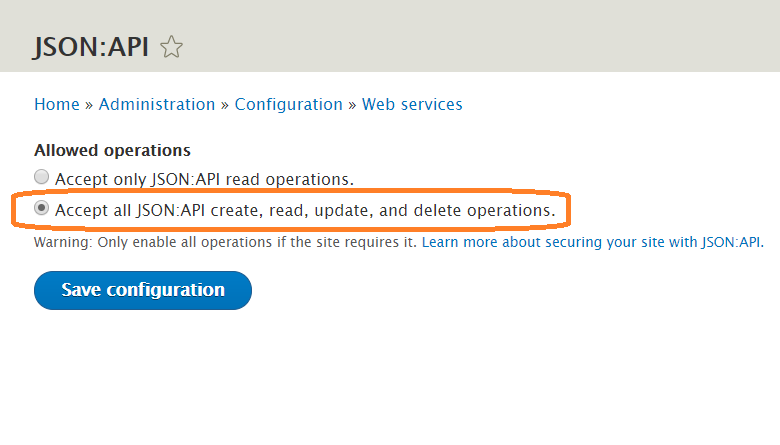
/admin/config/services/jsonapi
and ensure that the following option is selected: "Accept all JSON:API create, read, update, and delete operations."
jsonapi-accept-create-read-update-delete

mchelen’s picture

Just a heads up for anyone else, this config has no effect on public files because they are not served through Drupal. They have to be added to the webserver (apache, nginx, etc) config in this case.

All opinions are personal and do not represent anyone but myself.

vikas500’s picture

I am able to register user by using rest api in drupal,Using React as front end.Below configuration are working for me

cors.config:
enabled: true
# Specify allowed headers, like 'x-allowed-header'.
allowedHeaders: ['x-csrf-token','authorization','content-type','accept','origin','x-requested-with', 'access-control-allow-origin','x-allowed-header','*']
# Specify allowed request methods, specify ['*'] to allow all possible ones.
allowedMethods: ['*']
# Configure requests allowed from specific origins.
allowedOrigins: ['http://localhost/','http://localhost:3000','http://localhost:3001','http://localhost:3002','*']
# Sets the Access-Control-Expose-Headers header.
exposedHeaders: false
# Sets the Access-Control-Max-Age header.
maxAge: false
# Sets the Access-Control-Allow-Credentials header.
supportsCredentials: true

bennlich’s picture

I am noticing that the old CORS module supported adding CORS to specific paths: https://www.drupal.org/project/cors

Is there a way to enable CORS only for specific paths using services.yml?

ryrye’s picture

I wanted to achieve the same, because I only needed to enable CORS for a specific endpoint, and didn't want it enabled for my entire drupal site due to the security implications. I ended up solving it simply by putting some conditional code in my settings.php:

if ($_SERVER['REQUEST_URI'] == "/my/endpoint") {
  header('Access-Control-Allow-Origin: *');
  header('Access-Control-Allow-Methods: POST,GET,OPTIONS');
  // other headers etc. 
}

It's a little bit dirty and old-school, but it's simple and does the trick.

jurgenhaas’s picture

There is another module advanced cors which allows detailed configurations for individual paths and there is an issue with an MR available that makes it compatible for Drupal 9 as well.

julianmancera’s picture

Good day,

After spending half a day in this issue I decided to post my working configuration and the logic behind it:

For any post request initiated from the browser, it sends an OPTIONS request to the server to ask if the domain (in my case localhost:8100) has permisions to send information using POST method. As I was trying to login the user my angular service function request looks like this:

public login(username: string, password: string) {
    let data = JSON.stringify({
      name: username,
      pass: password,
    });
    let apiloginUrl = 'http://mydrupaljsonsite.com/user/login?_format=json';
    let options = {
      headers: new HttpHeaders({      
        'Content-Type': 'application/json'
      })
     }

    return this.httpClient.post(apiloginUrl, data, options)
       
  }

As you can see the Content-Type header is sent, so we should allow this header in nginx specifically for the OPTIONS request which seems that isn't done by drupal in the sevices.yml configuration. So jumping into nginx recipe for drupal you should put

location / {

add_header 'Access-Control-Allow-Origin'  '*' always;

if ($request_method = 'OPTIONS') {
  add_header 'Access-Control-Allow-Origin'  '*' always;
  add_header 'Access-Control-Allow-Credentials' 'true' always;
  add_header 'Access-Control-Allow-Methods' 'POST, GET, OPTIONS' always;
  add_header 'Access-Control-Allow-Headers' 'Accept,Authorization,Cache-Control,Content-Type,DNT,If-Modified-Since,Keep-Alive,Origin,User-Agent,X-Requested-With,X-Cache-Hash' always;
  ### Tell client that this pre-flight info is valid for 20 days
  add_header 'Access-Control-Max-Age' 1728000;
  add_header 'Content-Type' 'text/plain charset=UTF-8';
  add_header 'Content-Length' 0;
  return 204;
}

This was found in this repository https://github.com/drupal-graphql/drupal-decoupled-app/blob/master/backe...

As you can see when it comes to and OPTION request a 204 code is return so we don't use drupal backend sevices.yml configuration.

In the other hand when other kind of request is sent like POST, GET, PATCH,PUT , the request should be passed to drupal and the services.yml becomes useful

cors.config:
    enabled: true
    # Specify allowed headers, like 'x-allowed-header'.
    allowedHeaders: ['content-type', 'authorization']
    # Specify allowed request methods, specify ['*'] to allow all possible ones.
    allowedMethods: ['POST', 'GET', 'DELETE', 'PUT', 'PATCH']
    # Configure requests allowed from specific origins.
    allowedOrigins: ['http://localhost:8100']
    # Sets the Access-Control-Expose-Headers header.
    exposedHeaders: false
    # Sets the Access-Control-Max-Age header.
    maxAge: false
    # Sets the Access-Control-Allow-Credentials header.
    supportsCredentials: false

Not sure if there are more options that should be added.

Hope it saves some time.

Julian Mancera

kevishie’s picture

I figured I'd comment here since I was having trouble testing the CORS response headers with curl commands on the cli or using Postman. The package that Drupal 9 core uses for CORS asm89/stack-cors and the version they are using only adds the CORS headers if there is a `Origin` header on the request (see code). The browser adds that automatically on XHR requests but obviously curl and postman don't. It doesn't look like the latest version of asm89/stack-cors does this check anymore so hopefully it'll be a moot point in the future. Hope this saves someone time, cheers.

tostinni’s picture

We struggled about this too and here is a working services.yml example with minimal configuration to let Gatsby post webform to your backend.

  # Configure Cross-Site HTTP requests (CORS).
  # Read https://developer.mozilla.org/en-US/docs/Web/HTTP/Access_control_CORS
  # for more information about the topic in general.
  # Note: By default the configuration is disabled.
  cors.config:
    enabled: true
    # Specify allowed headers, like 'x-allowed-header'.
    allowedHeaders: ['access-control-allow-origin','content-type']
    # Specify allowed request methods, specify ['*'] to allow all possible ones.
    allowedMethods: ['POST']
    # Configure requests allowed from specific origins.
    allowedOrigins: ['http://example.com']
    # Sets the Access-Control-Expose-Headers header.
    exposedHeaders: false
    # Sets the Access-Control-Max-Age header.
    maxAge: false
    # Sets the Access-Control-Allow-Credentials header.
    supportsCredentials: false
tostinni’s picture

We struggled about this too and here is a working services.yml example with minimal configuration to let Gatsby post webform to your backend.

  # Configure Cross-Site HTTP requests (CORS).
  # Read https://developer.mozilla.org/en-US/docs/Web/HTTP/Access_control_CORS
  # for more information about the topic in general.
  # Note: By default the configuration is disabled.
  cors.config:
    enabled: true
    # Specify allowed headers, like 'x-allowed-header'.
    allowedHeaders: ['access-control-allow-origin','content-type']
    # Specify allowed request methods, specify ['*'] to allow all possible ones.
    allowedMethods: ['POST']
    # Configure requests allowed from specific origins.
    allowedOrigins: ['http://example.com']
    # Sets the Access-Control-Expose-Headers header.
    exposedHeaders: false
    # Sets the Access-Control-Max-Age header.
    maxAge: false
    # Sets the Access-Control-Allow-Credentials header.
    supportsCredentials: false
joe huggans’s picture

I was having issues after a Drupal 9 upgrade, finally figured out that things were incorrectly indented, so check that from enabled down to supportsCredentials keys that they are all in the same indentation.

fmitchell’s picture

If you are on Pantheon, Drupal 9.3.x, you also need this patch, https://www.drupal.org/project/drupal/issues/3001809.

I also tried adding the cache_control_override module.

Hopefully that saves someone the days of pain I felt trying to get this to work.

ainsofs’s picture

I've been struggling with this for a few days. Finally figured out the following config to open everything up to get dev working:

parameters:
  cors.config:
    enabled: true
    # Specify allowed headers, like 'x-allowed-header'.
    allowedHeaders: ["*"]
    # Specify allowed request methods, specify ['*'] to allow all possible ones.
    allowedMethods: ['*']
    # Configure requests allowed from specific origins.
    allowedOrigins: ['*']
    # Sets the Access-Control-Expose-Headers header.
    exposedHeaders: false
    # Sets the Access-Control-Max-Age header.
    maxAge: false
    # Sets the Access-Control-Allow-Credentials header.
    supportsCredentials: false

I had thought it was an issue with my nginx config but after looking at the logs realised it was from the Drupal end. Now I can get some nodes (GET) and update them (PATCH and OPTIONS).

I must say trying to get Drupal up as a backend is far more difficult than using Firebase API mainly due to scattered resources. Wish everything was documented with the JSON-API section - https://www.drupal.org/docs/core-modules-and-themes/core-modules/jsonapi.... Found some help here too but its not completed yet - https://www.drupal.org/docs/develop/decoupled-drupal/getting-started-gui... and https://www.drupal.org/docs/develop/decoupled-drupal/getting-started-gui.... An SDK and/or something like this for Drupal would be use for headless-ness https://firebase.google.com/docs/reference/js/auth#signinwithemailandpas...

parvind87’s picture

# Local development services.
#
# To activate this feature, follow the instructions at the top of the
# 'example.settings.local.php' file, which sits next to this file.
parameters:
  http.response.debug_cacheability_headers: true
  # Configure Cross-Site HTTP requests (CORS).
 # Read https://developer.mozilla.org/en-US/docs/Web/HTTP/Access_control_CORS
 # for more information about the topic in general.
 # Note: By default the configuration is disabled.
  cors.config:
    enabled: true
    # Specify allowed headers, like 'x-allowed-header'.
    allowedHeaders: ['x-csrf-token','authorization','content-type','accept','origin','x-requested-with', 'access-control-allow-origin','x-allowed-header','*']
    # Specify allowed request methods, specify ['*'] to allow all possible ones.
    allowedMethods: ['*']
    # Configure requests allowed from specific origins.
    allowedOrigins: ['http://localhost/','http://localhost:3000','http://localhost:3001','http://localhost:3002','*']
    # Sets the Access-Control-Expose-Headers header.
    exposedHeaders: false
    # Sets the Access-Control-Max-Age header.
    maxAge: false
    # Sets the Access-Control-Allow-Credentials header.
    supportsCredentials: true
services:
  cache.backend.null:
    class: Drupal\Core\Cache\NullBackendFactory


  • In order to resolve the CORS error,you should take care of these points
  • 1) Indentation in services.yml file - CORS configuartions should come under parameters section.
  • 2) path of services.yml file - /var/www/html/d9/web/sites/default/services.yml
  • keeping the services.yml file in sites folder will not work.
  • 3) Clear the cache
rakesh.gectcr’s picture

Please follow the steps to help you get worked.

  1. Copy the default.services.yml to services.yml
  2. Change the enabled: false to enabled: true under cors.config:
  3. Change the allowedHeaders:[] to allowedHeaders: ['x-csrf-token','authorization','content-type','accept','origin','x-requested-with', 'access-control-allow-origin','x-allowed-header','*']
  4. Change the allowedMethods: [] to allowedMethods: ['*']
  5. Change the allowedOrigins: [] to allowedOrigins: ['*']
  6. save the file
  7. Clear the Drupal cache

Following are the working services.yml

parameters:
  session.storage.options:
    # Default ini options for sessions.
    #
    # Some distributions of Linux (most notably Debian) ship their PHP
    # installations with garbage collection (gc) disabled. Since Drupal depends
    # on PHP's garbage collection for clearing sessions, ensure that garbage
    # collection occurs by using the most common settings.
    # @default 1
    gc_probability: 1
    # @default 100
    gc_divisor: 100
    #
    # Set session lifetime (in seconds), i.e. the grace period for session
    # data. Sessions are deleted by the session garbage collector after one
    # session lifetime has elapsed since the user's last visit. When a session
    # is deleted, authenticated users are logged out, and the contents of the
    # user's session is discarded.
    # @default 200000
    gc_maxlifetime: 200000
    #
    # Set session cookie lifetime (in seconds), i.e. the time from the session
    # is created to the cookie expires, i.e. when the browser is expected to
    # discard the cookie. The value 0 means "until the browser is closed".
    # @default 2000000
    cookie_lifetime: 2000000
    #
    # Drupal automatically generates a unique session cookie name based on the
    # full domain name used to access the site. This mechanism is sufficient
    # for most use-cases, including multi-site deployments. However, if it is
    # desired that a session can be reused across different subdomains, the
    # cookie domain needs to be set to the shared base domain. Doing so assures
    # that users remain logged in as they cross between various subdomains.
    # To maximize compatibility and normalize the behavior across user agents,
    # the cookie domain should start with a dot.
    #
    # @default none
    # cookie_domain: '.example.com'
    #
    # Set the session ID string length. The length can be between 22 to 256. The
    # PHP recommended value is 48. See
    # https://www.php.net/manual/session.security.ini.php for more information.
    # This value should be kept in sync with
    # \Drupal\Core\Session\SessionConfiguration::__construct()
    # @default 48
    sid_length: 48
    #
    # Set the number of bits in encoded session ID character. The possible
    # values are '4' (0-9, a-f), '5' (0-9, a-v), and '6' (0-9, a-z, A-Z, "-",
    # ","). The PHP recommended value is 6. See
    # https://www.php.net/manual/session.security.ini.php for more information.
    # This value should be kept in sync with
    # \Drupal\Core\Session\SessionConfiguration::__construct()
    # @default 6
    sid_bits_per_character: 6
  twig.config:
    # Twig debugging:
    #
    # When debugging is enabled:
    # - The markup of each Twig template is surrounded by HTML comments that
    #   contain theming information, such as template file name suggestions.
    # - Note that this debugging markup will cause automated tests that directly
    #   check rendered HTML to fail. When running automated tests, 'debug'
    #   should be set to FALSE.
    # - The dump() function can be used in Twig templates to output information
    #   about template variables.
    # - Twig templates are automatically recompiled whenever the source code
    #   changes (see auto_reload below).
    #
    # For more information about debugging Twig templates, see
    # https://www.drupal.org/node/1906392.
    #
    # Enabling Twig debugging is not recommended in production environments.
    # @default false
    debug: false
    # Twig auto-reload:
    #
    # Automatically recompile Twig templates whenever the source code changes.
    # If you don't provide a value for auto_reload, it will be determined
    # based on the value of debug.
    #
    # Enabling auto-reload is not recommended in production environments.
    # @default null
    auto_reload: null
    # Twig cache:
    #
    # By default, Twig templates will be compiled and stored in the filesystem
    # to increase performance. Disabling the Twig cache will recompile the
    # templates from source each time they are used. In most cases the
    # auto_reload setting above should be enabled rather than disabling the
    # Twig cache.
    #
    # Disabling the Twig cache is not recommended in production environments.
    # @default true
    cache: true
  renderer.config:
    # Renderer required cache contexts:
    #
    # The Renderer will automatically associate these cache contexts with every
    # render array, hence varying every render array by these cache contexts.
    #
    # @default ['languages:language_interface', 'theme', 'user.permissions']
    required_cache_contexts: ['languages:language_interface', 'theme', 'user.permissions']
    # Renderer automatic placeholdering conditions:
    #
    # Drupal allows portions of the page to be automatically deferred when
    # rendering to improve cache performance. That is especially helpful for
    # cache contexts that vary widely, such as the active user. On some sites
    # those may be different, however, such as sites with only a handful of
    # users. If you know what the high-cardinality cache contexts are for your
    # site, specify those here. If you're not sure, the defaults are fairly safe
    # in general.
    #
    # For more information about rendering optimizations see
    # https://www.drupal.org/developing/api/8/render/arrays/cacheability#optimizing
    auto_placeholder_conditions:
      # Max-age at or below which caching is not considered worthwhile.
      #
      # Disable by setting to -1.
      #
      # @default 0
      max-age: 0
      # Cache contexts with a high cardinality.
      #
      # Disable by setting to [].
      #
      # @default ['session', 'user']
      contexts: ['session', 'user']
      # Tags with a high invalidation frequency.
      #
      # Disable by setting to [].
      #
      # @default []
      tags: []
  # Cacheability debugging:
  #
  # Responses with cacheability metadata (CacheableResponseInterface instances)
  # get X-Drupal-Cache-Tags, X-Drupal-Cache-Contexts and X-Drupal-Cache-Max-Age
  # headers.
  #
  # For more information about debugging cacheable responses, see
  # https://www.drupal.org/developing/api/8/response/cacheable-response-interface
  #
  # Enabling cacheability debugging is not recommended in production
  # environments.
  # @default false
  http.response.debug_cacheability_headers: false
  factory.keyvalue: {}
    # Default key/value storage service to use.
    # @default keyvalue.database
    # default: keyvalue.database
    # Collection-specific overrides.
    # state: keyvalue.database
  factory.keyvalue.expirable: {}
    # Default key/value expirable storage service to use.
    # @default keyvalue.database.expirable
    # default: keyvalue.database.expirable
  # Allowed protocols for URL generation.
  filter_protocols:
    - http
    - https
    - ftp
    - news
    - nntp
    - tel
    - telnet
    - mailto
    - irc
    - ssh
    - sftp
    - webcal
    - rtsp

  # Configure Cross-Site HTTP requests (CORS).
  # Read https://developer.mozilla.org/en-US/docs/Web/HTTP/Access_control_CORS
  # for more information about the topic in general.
  # Note: By default the configuration is disabled.
  cors.config:
    enabled: true
    # Specify allowed headers, like 'x-allowed-header'.
    allowedHeaders: ['x-csrf-token','authorization','content-type','accept','origin','x-requested-with', 'access-control-allow-origin','x-allowed-header','*']
    # Specify allowed request methods, specify ['*'] to allow all possible ones.
    allowedMethods: ['*']
    # Configure requests allowed from specific origins.
    allowedOrigins: ['*']
    # Sets the Access-Control-Expose-Headers header.
    exposedHeaders: false
    # Sets the Access-Control-Max-Age header.
    maxAge: false
    # Sets the Access-Control-Allow-Credentials header.
    supportsCredentials: false

---
Kind regards,

Thank you,
Rakesh James

praveenmoses61’s picture

After enabling cors.config in the server service.yml file, ensure allowedOrigns config contains your client application URL's

allowedOrigins: ['http://localhost/','http://localhost:3000','*']

bird-cage’s picture

I spent a lot of painful hours before seeing what I did wrong. Somewhere I read that www.somedomain.com and www.somedomain.com/ (with and without trailing slash) are treated as 2 different origins in CORS, and therefore you should add both to your list of origins. That is not correct!
If you do, the origin sent to the browser will have the www.somedomain.com duplicated in the allowed-origins header, which will make it reject your origin (www.somedomain.com). This particularly late in the evening after a long days work is a hard bug to spot in your browsers console and Network tab. The next morning I did spot that the orgin was duplicated, went to my services.yml, removed the one(s) with the trailing slash, and presto it work perfect. Here is my cors bit from my services.yml (domain is changed of course):
cors.config:
enabled: true
# Specify allowed headers, like 'x-allowed-header'.
allowedHeaders:
- x-csrf-token
- authorization
- content-type
- accept
- origin
- x-requested-with

# Specify allowed request methods, specify ['*'] to allow all possible ones.
allowedMethods: ["*"]
# Configure requests allowed from specific origins. Do not include trailing
# slashes with URLs.
allowedOrigins:
- https://production.somedomain.de
- https://www.somedomain.de

# Configure requests allowed from origins, matching against regex patterns.
allowedOriginsPatterns: []
# Sets the Access-Control-Expose-Headers header.
exposedHeaders: false
# Sets the Access-Control-Max-Age header.
maxAge: false
# Sets the Access-Control-Allow-Credentials header.
supportsCredentials: true

NB: I have both production and www as sub-domains, because until the new app is ready to launch, I am able to test the production API and app at production.xxxx.de and when the time comes, just point the server for www.xxxx.de to the correct folder.

Pages