

Closed (fixed)
Project:
Drupal core
Version:
9.2.x-dev
Component:
update.module
Priority:
Normal
Category:
Bug report
Assigned:
Unassigned
Reporter:
Created:
30 Sep 2015 at 08:30 UTC
Updated:
20 Dec 2020 at 23:44 UTC
Jump to comment: Most recent, Most recent file






Comments
Comment #2
cilefen commentedThis is the form for installing modules. That is all it does, and that is different from D7. There is a different form for uninstalling them, so "Install" is appropriate here.
Comment #3
snehi commentedThis is the extend page where we can enable module that are already installed. I don't think install button should be there.
There is already a button named as install new module which link to another page for installing module and there is also a install button, which is OK.
I hope you got my point.
Comment #4
cilefen commentedMaybe "Enable"?
Comment #5
snehi commentedI think save configuration because it also includes disabling too.
Comment #6
nickdickinsonwildeComment #7
nickdickinsonwildeNo disabling is not on that page - that page only lets you enable modules - uninstall and install are on different pages. So I would say enable would make the only logical/userfriendly sense.
Comment #8
Bojhan commentedThis works as designed. We changed the functions, you now "install" not enable.
Comment #9
snehi commentedHi all i m talking about EXTEND page in D8.
Install button at the bottom of this page means you are installing all the selected modules. But in actual these modules are already installed we have to just enable on this page.
Let me know if further clarification required. Please don't close the issue directly, first discuss and then close it.
Comment #10
cilefen commented@Bojhan I think the issue and the head-scratcher on this form is that there is an "Install new module" button and and "Install" button. They do two different things: the former installs the files for a module, and the latter installs the module in the database.
Comment #11
Anonymous (not verified) commentedComment #12
Anonymous (not verified) commented@snehi
should install button be save configuration or save configurations
Comment #13
cilefen commentedThe button enables modules and nothing else, so i vote for "Enable Modules".
Comment #14
longwaveHow about "Install selected modules", as opposed to "Install new module"?
Comment #15
cilefen commented@longwave There is an "Install new module" button at the top of the page, which is the form that actually downloads modules. The idea is to differentiate this button, which enables modules, from that one.
Comment #16
Anonymous (not verified) commentedComment #17
Anonymous (not verified) commentedComment #18
cilefen commentedI think the standard is "Save configuration". The second word is not capitalized. "Save configuration" is an improvement over "Install", but I prefer "Enable modules", but we may be moving away from the notion of "enabling" to simply "install" and "uninstall".
Comment #19
Anonymous (not verified) commented@cliefen "Enable modules" is good. so can i change "Save Configuration" as "Enable modules" or just kept it as "Save configuration"
Comment #20
longwave@cliefen Yes, so I am suggesting "Install selected modules" for the bottom button, and keep "Install new module" at the top.
Comment #22
Anonymous (not verified) commentedComment #23
Anonymous (not verified) commentedComment #24
cilefen commentedRe #19 and #20: The top button downloads, then installs a module. The bottom button installs (formerly "enables") the modules. The trouble is the wording of install. Of anything, I like @longwave's suggestion in #20 more than my own.
Comment #25
Anonymous (not verified) commentedComment #28
cilefen commented@pavan.maddula The tests are failing because each test line referencing the "Install" button must be updated too. Can we try it with the suggestion in #20?
Comment #30
sagar ramgade commentedI think its better to rename the Install button to "Save configuration" as same form is used to install/enable/disable modules. I had attached the patch which covers the test too.
Comment #31
sagar ramgade commentedComment #32
longwaveNo, this form is only used to install modules. There is no concept of enabled or disabled modules any more, and to uninstall them you have to use the separate tab provided for this.
Comment #33
Anonymous (not verified) commentedComment #34
sagar ramgade commentedSorry about that I was unaware, suggestion in #20 makes sense and patch is attached.
Comment #36
Anonymous (not verified) commentedComment #39
davidhernandez#20 is the only suggestion that seems reasonable. This page is installing modules, not simply enabling them, so I think that needs to be referenced in the button/text.
Comment #41
sagar ramgade commentedAttached the patch which covers the test missed in earlier one.
Comment #42
marvin_b8 commentedComment #45
Anonymous (not verified) commentedComment #46
cilefen commentedNow that we are in RC and this issue changes translatable strings, it is postponed to 8.1.x.
Comment #47
dawehnerThe issue summary is seriously confusing at the moment.
Comment #48
cilefen commentedbetter?
Comment #49
sagar ramgade commentedyes that makes sense than earlier.
Comment #50
snehi commented@Sagar Thanks for the patch
 but i think it should be 'Save configuration'
Comment #51
cilefen commented@snehi I am not sure that is agreed.
Comment #52
snehi commentedThis is RTBC now.
Comment #53
yesct commented@snehi thanks for looking at this issue.
especially a rtbc review should have some explaination of what was reviewed and why the changes are ok.
this issue had a couple "needs" tags on it, which indicate that it is not rtbc until those things are done.
additionally, I think in this issue, we need screenshots in the issue summary. I added a link with instructions for how to make nice screenshots.
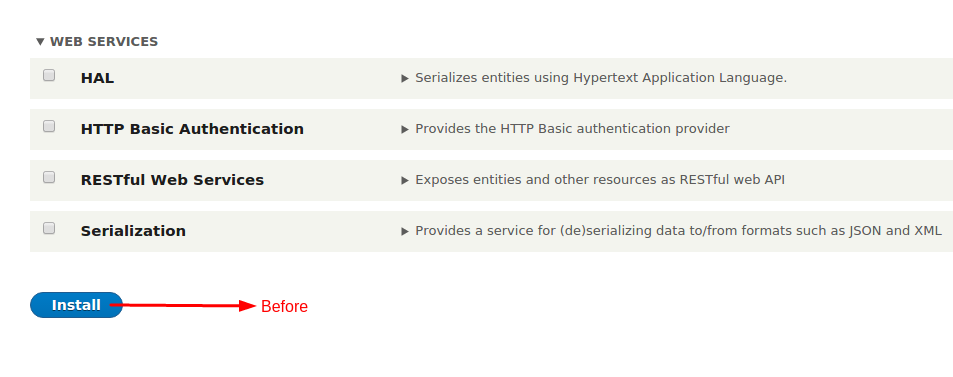
specifically, in this case, we should have a screenshot which shows both buttons, the one at the top, and the one at the bottom. (both before and after screenshots)
Comment #54
snehi commentedComment #55
snehi commented@YesCT Hows Now ?
Comment #56
cilefen commented@snehi Based on YesCT's comment...
... no, we need more.
Also please read the patch review article to find out what is expected. It is not necessary to do every little thing, however, you should review the patch on all relevant points.
Finally, the screenshot you just posted contradicts the issue summary and the newest patch.
Comment #57
snehi commented@cilefen, Sorry for doing this. Actually i applied the patch in drupal 8.0.x but i checked it in 8.1.x in wrong Drupal Installation.
It is my fault, i am changing issue status.
In 8.1.x this issue is resolved and install button is now as save configuration but i lost my 8.0.x it is showing
Again my Apologies for the same.
Comment #58
cilefen commentedLet's put this back on 8.0.x for the sake of testing. I don't even know the status of the 8.1.x branch. It has no commits merged since 2014. I wish we still had the 8.x branch.
I think the button used to read "Save configuration" but a more recent change converted it to "Install" so this issue is necessary. What we want is "Install selected modules".
Comment #59
snehi commentedIt is well working in 8.0.x.
Before
After
Comment #60
cilefen commented@snehi Could you put the screenshots in the issue summary please?
Comment #61
snehi commentedComment #62
cilefen commentedComment #63
cilefen commentedComment #64
Bojhan commentedI dont think this resolves anything? Aslong as they both state "Install" its likely people will confuse the two.
Comment #65
cilefen commented@Bojhan I do not understand you reasoning. The patch makes them say "Install new module" and "Install selected modules", which is an improvement over "Install new module" and "Install", which are confusing.
Comment #66
Bojhan commented@cilefen You are right that the output is different and more specific. But do you think people won't just keep confusing the two? I think the bottom should be install, and the top should be Add module? Since you are not installing it anyway?
Comment #67
cilefen commentedThat could happen.
I would prefer removing "Install new module" and making a new tab layout. Instead of List, Update, Uninstall: Install, Uninstall, Add, Update.
Comment #68
Bojhan commentedNope, that is against UI guidelines see #1090012: Tabs
I don't want this to turn into a opinions game. We have established patterns for buttons, and they ought to be as short and simple as possible. This is diverting from that. We start actions at the top with the Add "result" and in this case that is adding a new module, it is not installing. We can spend more time discussing this, but I am not sure how effective that is over queues.
Comment #69
cilefen commentedThen why push it to 8.1.x? There is nothing to discuss.
Comment #70
Bojhan commentedI hope you are not getting frustrated. We can fix this in 8.1, I feel like we can resolve this - but perhaps not the solution your proposing.
Comment #71
cilefen commentedSorry, I thought that what you wrote in #68 meant "no".
Comment #72
Bojhan commentedWhat about: "Add new module" at the top and "Install" at the bottom?
Comment #73
cilefen commentedYes, that would be an improvement.
Comment #74
snehi commentedAdding Patch.
Comment #75
snehi commentedAdding screenshot.

Comment #76
cilefen commented@snehi Could you put the new screenshot in the issue summary as the new "after" screenshot and update the issue summary with the new plan?
Comment #77
snehi commentedComment #78
snehi commentedComment #79
snehi commented@cilefen Done.
Comment #80
jhodgdonI just reported #2667812: UI text around "install" and "enable" when you download/install/enable a module from d.o is confusing, which is mostly a duplicate of this issue.
However, in that report, I also suggested we need to change the form on admin/modules/install so that it doesn't say "install" all over it, and also the form you get to after you do an upload, which says you need to go "enable" the new modules (we don't say "enable" any more, and there is no "enable" on the admin/modules page that this links to, it's "install").
I don't think this issue covers those two problems. Should we:
a) Expand this issue to cover those two problems
b) Keep the other issue open to cover those two problems.
Also... what about themes? I bet the wording problem is the same there?
My recommendation would be, since this is such a small patch anyway and it's all UI, we fix all of the related problems on this one issue rather than fragmenting.
Thoughts?
Comment #81
cilefen commentedI agree with your recommendation.
Comment #82
jhodgdonIf no one disagrees with that recommendation, we should copy the "Problem" section from the other issue's summary to here, because it's more complete, and close the other one as a duplicate. And probably change the title here to include the new problems.
Comment #83
David_Rothstein commentedIs this a duplicate of #2543066: "Install new module" and "Install new theme" links are confusing?
In that issue I had thought about "Add new module" but felt like it just introduced even more unclear terminology (do most people really perceive a difference between "add" and "install")? So in short, if you come to that page intending to turn on something like the Forum module (which ships with core) you might still be very tempted to click "Add new module" at the top (i.e. to add the Forum module to your site) and then wind up stuck.
My suggestion to resolve that was to rename the top link to "Install a module not listed below" (or if we can find a less wordy way to say the same thing) and leave the bottom button alone, and then also do #992190: Link to enable a new module after adding it via the Update Manager is confusing - allow users to enable it directly from that screen instead so that the top link can be used to do what people expect it to.
Comment #84
jhodgdonWe have at least 3 issues around this same problem. Let's consolidate and make 1 issue and fix all the problems there.
Comment #85
snehi commentedI closed the following issues. We can start work over here.
https://www.drupal.org/node/2543066
https://www.drupal.org/node/992190
Comment #86
David_Rothstein commentedFor the second one (#992190: Link to enable a new module after adding it via the Update Manager is confusing - allow users to enable it directly from that screen instead) did you really mean to close that or did you mean to close #2667812: UI text around "install" and "enable" when you download/install/enable a module from d.o is confusing instead?
I think #992190: Link to enable a new module after adding it via the Update Manager is confusing - allow users to enable it directly from that screen instead should be kept separate since it's quite a bit more involved than this one. But maybe it could be postponed on a decision here.
Comment #87
David_Rothstein commentedAlso transferring the backport tag over from the first issue.
Comment #88
jhodgdonAlso we desperately need an updated issue summary here that explains exactly what this issue is and isn't covering. And probably, since the issue scope here has been expanded, a new patch that fixes the full scope.
But please, first an issue summary update so we know what we are trying to solve.
Comment #91
vulcanr commentedOnly updated the label created at
update.links.action.ymlWIth the new label for that button.
Comment #92
vulcanr commentedComment #95
vulcanr commentedpatch 91
Comment #96
vulcanr commentedComment #97
vulcanr commentedAdded new patch.
Comment #99
pixelmord commentedI reviewed the patch and it does exactly what this issue goal requires.
Patch applies cleanly to 8.3.x
Comment #100
manjit.singhBut i dont know why the testing is going to fail again and again in 8.2.x. finger crossed for 8.3 ;)
Comment #102
manjit.singhupdating the test file also.
Comment #103
vulcanr commentedNew patch changing the strings in both files.
Comment #104
Tony-Mac commentedBefore and after screenshots
Comment #105
Tony-Mac commentedComment #106
Tony-Mac commentedComment #107
Tony-Mac commentedOoops uploaded same jpgs twice. Corrected.
Comment #108
manjit.singhChanges looks good as per the expectation in the description.
Removing the duplicate patch - #102.
Comment #111
xjmSo this issue has gone a lot of different places over the past year, but the current patch looks great to me for two reasons:
Great work everyone!
However, the "+Add new module" button still takes you to a page entitled "Install new module" at
/admin/modules/install. I think in order for this change to be complete, we also should change the word "Install" to "Add" on that page as well. Otherwise, we are making the UI text on the other form more confusing.Since I don't think the changes can be made separately, I've closed #2667812: UI text around "install" and "enable" when you download/install/enable a module from d.o is confusing as a duplicate of this issue.
Comment #112
xjmThen there's the strings after you submit the form on

authorize.php:That also needs "Install*" fixed to "Add*" as well as "Enable newly added modules" changed to "Install newly added modules" (not as directly in scope, but also confusing because it uses the old terminology).
Comment #113
xem8vfdh commentedI'm wondering why the options aren't:
"Install new module" -- actually downloads/unpacks/"installs" the module package (currently: "Install a new module")
"Enable Module" -- enables the module (currently: "Install module")
"Disable Module" -- disabled the module (currently: "Uninstall module")
In the grand scheme, isn't Drupal only capable of installing, enabling, and disabling modules? There is no actual "uninstall" functionality, just disabling functionality. To actually uninstall, one must "Uninstall" (read: disable) the module from the UI, then remove (read: uninstall) the files from the file system via command line/(s)ftp.
I think the word "install" is misused and, as a result, confusing.
While we are at it, it would be nice if there was legitimate "uninstall" functionality that could be run after disabling a module, to completely remove it from the file system.
Comment #114
vulcanr commentedOk adding a new patch, changing the wording on the "INSTALL" button at:
/admin/modules/installAlso changed the sentence: Install another module (when a module has been installed/added) to Add another module
Pending for review.
Thanks for the feedback btw.
Comment #116
greta_drupal commentedFirst of all, it doesn't matter what Drupal is actually doing in the backend (like installing to database after 'installing' in UI), it only matters about the user's comprehension about what is occurring. "Install a module" at the top works, but "Install" at the bottom doesn't, nor does "Enable" because the submit button also saves the disabled states.
There are 3 operations on this page/tab: 1.) Installing a module; 2.) Enabling an installed module - by checking the box; 3.) Disabling an installed module - by unchecking the box.
IMO, the bottom button should read "Save settings" or such to match other pages where this same behavior (checking/unchecking settings) is used -- permissions, configurations, etc. And, the checkbox column could simply be labeled Enable/Disable.
Alternatively: Activate and Inactivate* (over Enable and Disable).
In practice, the newer UI way to represent these states is with a slider on/off button (e.g., YouTube videos autoplay), rather than checkbox.
If you use "Add new module" here, then also use "Add new theme" on Appearance page -- and likewise enable/disable (or activate/inactivate). Stop intermixing the terms "add", "install", "enable" (and their counterparts) throughout the Drupal platform. All these issues of nomenclature need to be discussed as a package, not simply patched per individual issue in a long queue of related UI issues, without coordination. [And, how has Drupal come this far without that having been mapped out from the beginning?]
Has this UI language been reconciled with the themes page language too?
* While native English speakers will be more familiar with "deactivate", it doesn't have a parallel adjective ("deactive" not a valid word)
Comment #117
vulcanr commentedI agree with greta_drupal @ #117. I think what we need to close this issue is:
- Agree in which wording to use (including after installing the module).
- Change the wording on code.
We won't be able to close this issue, if we don't do that.
Br.
Comment #118
brahmjeet789 commentedI agree with @vulcanr and @greta_drupal becuase in drupal-7 also we have "install new module" so we can change intall text to enable or more i also changed some chunks is it fine? please heck.
Comment #119
brahmjeet789 commentedComment #121
gábor hojtsy@brahmjeet789: seems like the patch you uploaded is empty and the screenshot you attached is not related to this issue? It is not even a core UI screenshot.
Comment #122
vulcanr commentedAdded a new Patch. Changing the strings. Please review.
Just changed the 2 strings mentioned on #117.
Comment #123
gábor hojtsy@vulcanr: can you post an interdiff? https://www.drupal.org/documentation/git/interdiff
Comment #124
vulcanr commentedComment #125
vulcanr commentedComment #126
gábor hojtsy@greta_drupal: how can you disable an installed module on the module install page? Disabling a module in general is not a feature that exists in Drupal 8 that I know of. (Uninstalling is).
Comment #127
tkoleary commentedSome of @greta_drupal's comments are valid points but really relate to other issues already open such as #2035079: [PP-1] Figure out what to do with the install/uninstall modules page
As far as this patch it works perfectly and does what is intended, disambiguates 'Add' ie. 'go find a module to add to this list' from 'install' ie 'submit the form to activate the checked modules'.
Comment #128
Bojhan commentedThanks for all the work, this sounds like a good choice - hope we can convert the others soon.
Comment #129
xjmMy previous reviews in #111 and #112 have not been fully addressed.
Comment #130
vulcanr commentedxjm I honestly think that then we are scoping much more than what we have in the task. We would then need to scope the entire admin part to see where else are showing those tables. To be honest I think we could do a follow-up task after fixing this one.
Comment #131
tkoleary commented@xjm I tend to agree with @vulcanr on this one.
The contexts are different and require different solutions. When I am on the extend page the "Add module" button is not installing a module, it is bringing me to a place where I can install a module by importing or uploading.
Once I'm on this page I still cannot 'install' a module which can only be done on the extend page, but I also want more specificity than just "add". Something along the lines of:
[title] Get modules
[field label] Import from Drupal.org
[description] Paste the URL of the version you want to import here.
[field label] Upload an archive from your computer.
[description] If you have downloaded a module archive zip or tag.gz to your computer, upload it here.
The important thing here is that we are being explicit about the fact that you are "getting" the modules from elsewhere and that there are two ways to "get" them; import and upload. At least that's my take on it, whatever the solution, the specific needs of the import/upload screen and to the messages it returns are not adequately addressed by simply extending "add" and need to be handled individually.
Comment #132
tkoleary commentedStarted a new issue to address #111 and #112.
#2839586: Make the wording on the "Install new modules" page more clear
Comment #134
gábor hojtsyUnrelated fails with upgrades and missing config schemas.
Comment #136
vulcanr commentedI'll upload a new patch
Comment #137
vulcanr commentedComment #138
vulcanr commentedComment #139
gábor hojtsyComment #140
David_Rothstein commentedWhat about #83 and the older issue/patch linked there? No one has responded to any of that yet. I do not agree that the wording change in the current patch improves usability - it effectively just replaces one confusing word ("install") with another ("add").
Comparing to the patch in the other issue also points out two required changes that are needed here:
Comment #141
David_Rothstein commentedTrying to combine the ideas from this issue and #2543066: "Install new module" and "Install new theme" links are confusing, the button text could be:
"Add modules not listed below"
Or perhaps (since the goal was to shorten that) just:
"Add other modules"
The key point is that the word "new" is currently very confusing. Everyone going to this page is there because they want to add a new module to their site. What the text needs to communicate to them is that this is the link to use if you want to add a module that isn't already listed on the page.
Comment #142
vulcanr commented@David_Rothstein I totally agree with you, and that's why a while ago I was asking if there is any native english speaker that could give us the right wording (which could make things more clear)
Comment #144
charles belovNative English speaker here. I dispute the wording in the issue description.
This implies the end state is the same. However, if I do the first button action, I have to follow it up with the second button action. Therefore "Install" has two different meanings. Better wording for the issue, which I have applied:
However, the instructional text in the UI reads
"Download additional contributed modules to extend your site's functionality."
Therefore, I suggest the first button be reworded to agree with that wording:
Download contributed module
so that admins can see the direct relationship between what the UI is telling them they can do and actually doing it.
However, it's not clear to me if this button can be used both to download a contributed module and to update an existing module. If that's the case, then:
Download contributed or updated module
would be clearest.
Comment #145
charles belovClarified my rewording of what the first button accomplishes.
Comment #146
charles belovComment #147
charles belovAdded "Additionally, whatever wording change is made would need to be carried through to /admin/modules/install." to UI change description and possibly the URL.
Comment #148
charles belovAdded /core/authorize.php, the page that appears when you submit /admin/modules/install, as a page affected by the resolution of this issue.
Comment #149
charles belovShort answer:
I suggest that the button which goes to /admin/modules/install be changed as follows:
On /admin/modules, change to "+Load contributed module"
On /admin/reports/updates, change to "+Load contributed module or theme"
On /admin/appearance, change to "+Load contributed theme"
On /core/authorize.php, change links upon loading a module to be consistent with the above buttons.
I suggest that the button on /admin/modules/install be changed to "Load" and the page title changed to Load Contributed Module or Theme.
I suggest that, for consistency, the button on /admin/theme/install be changed to "Load" and the page title changed to Load Contributed Theme.
I've made minimal changes to the issue description to call out the pages that need to be maintained.
Long answer:
Okay, after some testing, I'm not sure whether to change this issue's title to something like "Hamonize Extend module/theme-add/update terminology" or create a new issue. The point is, it's not just that first button, it's all of the terminology around "installing" a module into the file system vs. "installing" a module that is already in the file system into the database, as well as the sequence in which the instructions occur.
/admin/modules
Would better be:
This is because:
1) The +Download a module button only works to add a non-present module to the file system. I just tested and it cannot be used to update a module that is already in the file system. Therefore, it needs to be moved to immediately after the relevant instruction it can be used to respond to.
2) /admin/reports/updates/update uses the term Download these updates (button) for the act of obtaining a file from someplace else and placing it into the file system.
That said, /admin/modules/install both lets you "Download" from Drupal.org or whatever website and "Upload" from your local computer network, so I can see why "Download" might be confusing. We could go simply with "Load" on the button, that is "Load contributed module or theme".
/admin/modules/install
would better be:
/admin/reports/updates
In this case, whatever the button is changed to on /admin/modules, this button would be changed to have the same wording, plus the words "or theme." I supposed it's okay that there would be a difference of "or theme" because /admin/reports/updates concerns both themes and modules, while /admin/modules just concerns modules.
/admin/modules/update
Has button Download these updates
If we were to adopt "Download..." or "Load..." as the word to appear on the various buttons under debate, this would bring the terminology into consistency with the exsiting wording on /admin/modules/update.
Comment #150
charles belovComment #151
charles belovAdded reference to /admin/reports/updates/install in the description.
Comment #152
David_Rothstein commentedI think "Load" might be too vague to explain what the button does.
Mentioning "contributed" here is interesting though. It feels a bit jargon-y to me, and it's also potentially confusing since it's likely that there are some contrib modules/themes available on the page already. But on the other hand, as you point out it's already used in the nearby help text.
Combining that with some refinements of what I wrote in #141 here are a few new possible suggestions:
I'm particularly interested in the last two.
Comment #153
charles belovYou have a good point that "contributed" module is jargony. There's also the issue that the page isn't restricted to bringing in contributed modules; it can also be used by custom modules. The actual key is that it is for modules that are not part of core.
I love "Get" because the whole upload/download question becomes meaningless when both the source and the site can be anywhere. I prefer "Get" to "Add" because "Add" could be misconstrued as enabling the module as well, while "Get" is clearly about movement only.
Most accurate would be "Get a non-core module" but I'd be okay with "Get a module". It does need to be singular, since the page the button takes you to will only let you get one module, after which it redirects you to a different page.
Comment #156
markusd1984 commentedDoes "enable newly added module" link directly to that module / enable it or does it just open the module list?
For me, in D7 it links to admin/modules which means I always need to search for it first.
https://www.drupal.org/project/drupal/issues/2950433#comment-12512340
Comment #157
xem8vfdh commented@markusd1984, it simply links the user back to the admin modules list page. And yes, the user has to first find it on the page, then check the box, then scroll down and click enable. Unless I am misremembering, this is how it has always worked in D6, D7, and D8. I had no experience with previous Drupal versions.
Comment #158
vulcanr commented@xeM8VfDh same thing :)
Comment #159
markusd1984 commentedthanks for clarifying. I understand modules have dependencies which probably adds to the complexity.
It would be nice when they are met, that the link could actually trigger the enabling of that module,
that would make installing + enabling a lot quicker ;)
Suprised I couldn't find much about it so far, would have thought people would want this to avoid the search step
Comment #160
ifrikThe "install module" button at the top of the page has been removed already, so this issue doesn't apply anymore. Closing the issue as outdated.
Comment #161
cilefen commentedI'm not sure what you mean. "Install new module" is still there in 8.6.x although it is not there in the screenshot you posted.
Comment #162
ifrikThanks,
I don't quite know why I didn't have that button there.
However this issue re-opens a whole can of worms about the use of "Install" and "Uninstall" where for Drupal 8 - in contrast to Drupal 7 - it should say enable/disable.
In any case this button cannot be changed without then also changing the page it links, as well as the equivalent link on the Appereance page and the page to Install a new theme.
So - unless we want to go for a consistent language use of "Install" is putting it on the server (either through the GUI/FTP, wget, drush download, composer require) and "enable" for the step that makes functionality of the module or submodule available (either by clicking Install in the GUI or running drush enable) - I would leave this one alone for now, or make a proposal that can get a UX review before making the patch.
Comment #163
cilefen commented@ifrik That was touched upon around comment #68.
Comment #165
xjmComment #169
jhodgdonThis is really a duplicate of #1207354: Install new module v/s Add new module and probably #976232: "Install" button at admin/*/install should be labeled "Continue" too? Not sure which one(s) we should keep open but probably not all 3. I will comment on the other 2 issues too.
Comment #170
sajosh commentedI suggest these changes on this page,
/admin/modules
The first just rearranges to start with the word Extend since that's the menu title of this page. Also add links to the install and update.php processes so the new user can review and understand before starting anything.
The second is not to use the words install and update together since we're using them for different purposes.
Third, why have /admin/modules/update and /admin/reports/updates? I vote for getting rid of reports/updates and putting that info in modules/update.
I suggest these changes on this page,
/admin/modules/install
Even the /core/authorize.php page uses the word "add" as per this issue.
Hi jhodgdon, I vote to keep
https://www.drupal.org/node/2577407
since it has 170 comments versus 20 and 14 for
https://www.drupal.org/project/drupal/issues/1207354
https://www.drupal.org/project/drupal/issues/976232
The word 'Add' is correctly suggested by arshadcn
https://www.drupal.org/project/drupal/issues/1207354
and Pancho has an excellent summary
https://www.drupal.org/project/drupal/issues/1207354#comment-7393362
There are a number of issues about this install workflow's wording. My suggestion is to start with the word "Add" module which then goes to the word "Enable" module then "Update" module then "Disable" module then "Uninstall" module then finally "Remove" module. All links, buttons and documents should use these words.
Comment #171
jhodgdon(removing making this issue "related" to itself)
I decided #1207354: Install new module v/s Add new module was a duplicate and, as you said, even though it was older it had less discussion, so it is now closed.
#976232: "Install" button at admin/*/install should be labeled "Continue" is closely related, but is about the "Install" button that is on the next screen after you click the button that is currently labeled "Install new module" from this issue. I think we should fix them together, but we would need to expand the scope here slightly.
We have a usability team and it would be good if they could decide what to do, so that we could implement it. The patch itself is pretty easy; the hard part is figuring out a better UI.
Comment #172
sajosh commentedHi Jhodgdon,
You're right, this is pretty easy (just wording changes), just needs some dedicated attention. I'm happy to help.
Four years ago Vulcanr kindly patched to be "+Add new module" but then the next comment got him to change it back, then he changed it back to Add then changed back, argh.
Can I suggest we go to "Add" because let's think of all the installations the general public does today ... install smartphone apps, install operating system programs. That installation process is not install then enable. It's finite. Install and use. Where as, for safety, Drupal install is Add (regardless of the steps download/unpack/install) then Enable and then set Permissions. There are three steps to the installation process. So in today's world Install would imply a complete operation, which this is not.
As I'm looking through drupal I'm seeing the "Add" words in lots of buttons. So the precedence is there so we should be consistent. "Add field", "Add content", "Add vocabulary" ... with the button "Save" or "Save and continue".
These good thoughts are years old, not days, weeks or months. So what can we do to get this whole entire thing to completion (all wording on all pages and in links)? It's under six pages I think, and mostly text changes.
Comment #173
jhodgdonWe have a Usability team now in the Drupal project. The next step would be to bring this issue to a meeting of the Usability Team, and let that team decide on the text that should be put in, rather than continuing to debate it here. The people who commit patches to Drupal Core will accept a patch if it is endorsed by the Usability Team, and they probably will not accept a patch that isn't.
This team meets in Zoom, with a link posted in the #ux Drupal Slack channel, on Tuesdays at 1400 UTC, but they will probably not meet this coming week due to DrupalCon. So, the next meeting would be July 21. I will bring this issue there; you are also welcome to join.
Comment #174
sajosh commentedHi Jhodgdon and UI team,
Your suggestions sound good. I also hope we can close all these issues after that meeting, whether text will be changed or not. For that meeting, I've consolidated all suggestions on all the relevant issue pages for everyone to review here before hand.
There's no commentary in the file, just UI text including link names. Any new commentary is here ...
A) The first thing for the UI team to decide on is the Drupal Installation Life-cycle wording ... Add then Enable then Update then Disable then Uninstall then Delete. This will make it easy to change the remaining sentences, links and buttons.
I skipped the word Install because it has three steps, for security, ... Add then Enable then Permission (and really Configure). Only after all four are done is it really installed. So I suggest not using Install as a single word or step but rather as an Installation Process or Drupal Module Life-cycle.
B) The second most important thing to do is create an Installation Process wizard or steps page or document because new users have to hunt around on how to upgrade. Take for example upgrading Drupal, the update page (/admin/modules/update) doesn't offer how to download core, how to manually overwrite and that update.php must be run afterward. (I can't even find a document for new users.)
C) Suggest removing or modifying the semi duplicate web page /admin/reports/updates
1) This has no function yet it looks the same as /admin/modules/update. It's misleading that one can't actually update from that page and there are no instructions on where to go to update, especially for the brand new Drupaler.
2) It duplicates URLs because the Update tab goes to the update page with another URL (/admin/reports/updates/update) not that page's real URL (/admin/modules/update).
3) It's breadcrumbs are different making new users think they do different things.
4) The setting and uninstall tabs are missing from one and the other.
Attached file has all the pages in the entire Drupal module life-cycle.
Comment #175
jhodgdonFYI -- on the parent issue #2888657: [meta] Less confusing and more consistent wording needed in module/theme add/install/update the Usability team is discussing the UI text for this and about 10 other issues. Until decisions are made, making another patch here would probably be premature.
Comment #176
sajosh commentedThe UX team decided to create a new idea page for the overall module life-cycle in #174 above.
Comment #178
jhodgdonWe discussed this issue today at a Usability meeting -- see #2888657-23: [meta] Less confusing and more consistent wording needed in module/theme add/install/update for the result of that discussion.
I'm adopting this issue to take care of item 1 there:
Updating title/summary to reflect this.
Comment #179
jhodgdonAdding slightly to the scope from #976232: "Install" button at admin/*/install should be labeled "Continue" and marking it as a duplicate of this issue.
Comment #180
jhodgdonAsking for more people to get credit from another duplicate issue #2839586: Make the wording on the "Install new modules" page more clear
Comment #181
jhodgdonAdding one more thing to the summary...
And here's a patch. The previous patch didn't apply, and it only changed two lines of code, so I didn't make an interdiff file. Hope that's OK. The scope of the issue has changed a lot anyway. I fixed up several tests; let's see what the bot has to say.
Comment #183
jhodgdonOf course, the one Functional test I didn't try locally failed. :) Needs a fix for the changed UI text. I'll do that tomorrow.
Issue also needs screenshots.
Comment #184
jhodgdonHere's a new patch, which should fix the tests. In that I found a couple more places with "Install" being used, and also tweaked one other change where I'd used the word "Addition" in the previous patch and switched it to "Files added".
Comment #185
jhodgdonHere are some screenshots:
So for some reason it decided this was an update rather than adding files, which is not correct. I did modify that code a bit (made the local variable $is_an_update and made two different error messages), but the logic was there before and it is wrong. I'm not sure what to do about it... The red error message does say "File add failed!" so maybe that is OK, but the message below is confusing.

Since I can't get past that screen (I tried messing with permissions etc.) I can't make the screenshots showing the end result after you upload a module/theme. Anyone else? Any ideas about the error message?
Comment #186
jhodgdonGiven that the logic there is wrong, I took out that local variable and just changed the message to be less specifically about updating vs. adding. Here's a new patch. Still needs screenshots of the successful result for adding a theme and adding a module.
And here is a new error screenshot:

Comment #187
jhodgdonUpdating issue summary with a Novice task for adding the 2 remaining needed screenshots.
Comment #188
jhodgdonmistaken status change
Comment #189
ressaThanks @jhodgdon, great work! The patch applies against 9.2.x correctly, and the wording makes more sense now. The code looks good, from what I can tell.
Successful result after adding a module
Successful result after adding a theme
Comment #190
jhodgdonThanks for the review and for making those screenshots! Removing tags.
Comment #191
ressaGreat! I now notice that the
projectfield frominfo.ymlis used in stead of the more human-readablenamefield. Wouldn't this be a friendlier, less machine-like message?Now
Better?
Is it best handled in a fresh issue, or if it isn't too complicated, change status here to "Needs work"?
Comment #192
jhodgdonI agree with #191, but it should definitely be a separate issue. This one is very targeted towards one verb. :)
Comment #193
ressaI thought as much, but wanted to check first :) I have created #3182663: Use name in upload confirmation message, instead of project.
Comment #194
catchBig +1 to the wording change. I found a few minor issues in the patch, and it also needs a re-roll.
We could remove the custom assertion message from this, which would also remove the word 'reinstalled'.
Why does this change to 'Updated/added' instead of just 'Added'?
While we're here, should this be 'add and update'?
Is it still called the 'Install' page? Shouldn't it be the 'Add' page?
Comment #195
jhodgdonThanks for the review! I first rerolled the patch (file called "reroll" here), and then addressed the items from #194. First the easy ones:
1. Good idea. I always like to remove assert messages, but had been trying to keep the changes in this patch limited to fixing the issue at hand, but since it's in the same line, I did this.
3. Agreed that this wording seems better.
4. Good catch! The pages are now called "Add new ..." not "Install" (see the part of the patch that is in the routing.yml file). Updated the help accordingly.
Item 2 is more complicated. The UI text change is in update.authorize.inc:
The reason that this was changed from "installed" to "updated/added" is that this code piece is used both when grabbing updated code for modules/themes and when installing completely new ones, as you can see from the two test hunks. This one is testing adding a new module:
And this one is testing updating an existing module:
You'll note that in the second case, you were doing a code update from the Available Updates report, and the old message said "Installed", which wasn't good wording. The new wording from the previous patch says "Updated/added", which at least makes it consistent with the rest of the UI.
However, the previous patch also updated a message a few lines up in the authorize.inc file:
I changed the other message so it now says "Added / updated" instead of "Updated/added", so that it is more consistent with this earlier message.
It would in theory be possible to change the code so that the same code was not being used for the two different cases (updating existing module/theme vs. adding new one). However, that would be a big code change that I felt that would be out of scope for this issue, which was otherwise only minor UI text changes for a big win in consistency.
Anyway, here's a new patch, and interdiff. I am on my non-dev machine so I haven't run the tests, but hopefully they will still pass since these are only a few minor tweaks to the UI text and help.
Comment #196
jhodgdonwhoops, named the interdiff with a .patch suffix, so that test will fail. :(
Comment #197
jhodgdonIf someone decides this is RTBC, could you please hide the interdiff file from the Files list after you are done reviewing, so that it doesn't get picked as the one to retest every few days? Thanks!
Comment #198
ressaThanks @catch and @jhodgdon, it looks good.
Comment #199
ressaComment #201
catchAgreed with #195.4, we shouldn't change the actual logic here, worth doing in a follow-up though perhaps. Rest of the changes look good.
Committed cfcf40d and pushed to 9.2.x. Thanks!
Comment #202
jhodgdonThanks for the quick action!!
Comment #203
jhodgdonAlso I created a follow-up issue for #194 item 2, which was further discussed in #195: #3186852: update.authorize.inc log messages should be improved