

 Come together with the global Drupal community in Rotterdam, 28 Sept – 1 Oct 2026. Sessions, contribution, connection, and Early Bird savings until 8 June.
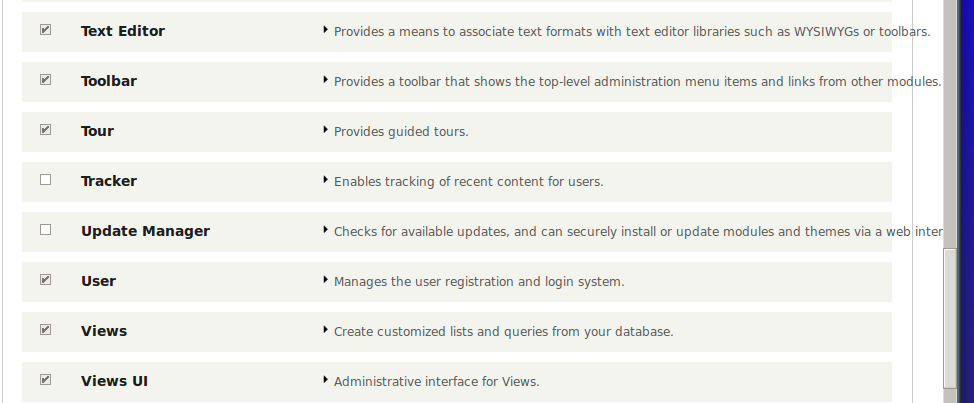
In the Extend Page (admin/modules), if the description of any items is more, then the text will go outside the container.

Beta phase evaluation
| Issue category | Bug because if the description of modules in the Extend Page is long, it will go out of the container. |
|---|---|
| Issue priority | Major because, as it is a problem of the displaying of description, it affects user experience. |
| Comment | File | Size | Author |
|---|---|---|---|
| #36 | Screen Shot 2021-07-12 at 9.23.47 PM.png | 85.78 KB | pameeela |
| #27 | 2158421-26.patch | 988 bytes | mgifford |
| #26 | 2158421-26.patch | 988 bytes | idebr |
| #26 | 2158421-26-after.png | 47.33 KB | idebr |
| #20 | 2158421-20.patch | 725 bytes | subins2000 |






Comments
Comment #1
jhodgdonIn Chrome I get nice boxes around the Details elements, by the way. Although some of the items in Extend go past the edges of the boxes:

Comment #2
internetdevels commentedMaybe something like this?
Comment #3
jhodgdonThat fixes the border problem, but not the "outside the box" problem shown in #1, which appears in Firefox with this patch, and Chrome even without this patch. Maybe that should be filed as a separate issue though?
The problem there seems to be that this page has a details element, and within that a div with class "details-wrapper", and within that a table of modules.
Each table row has a cell with the name of the module and a checkbox, and those are working fine. But the right cell has a details element in it. The label for that details element is way too wide for the table, and for some reason, it is just overflowing the outer Details box rather than making the box wider.
The problem may be coming from the #system-modules details element having
white-space: nowrap;
in its CSS, but removing that in Firebug causes all kinds of problems with overlapping text in that area.
I couldn't really figure out how to solve it (not much of a CSS wizard).
Comment #4
internetdevels commentedhere is before/after screenshot:
Comment #5
jhodgdonYour "After" screenshot shows a "..." instead of the descriptions going past the end of the box. Mine is as in #1, in Firefox, with the patch.
I am running a kind of old Firefox though (18.0) and I've been told on other issues that more up-to-date FF versions do not have certain problems. However, I'm on the "LTS" (long-term support) version of Ubuntu, running the version of Firefox that they're still supplying, so I doubt I'm alone at running this version of Firefox. Whether Drupal supports it is another question.
Comment #6
internetdevels commentedHere is one more patch. Now it looks like this:

Comment #7
jhodgdonThis patch does not work on Firefox 18 / Ubuntu. The text still runs over the edges of the boxes.

Comment #8
barraponto@jhodgdon Ubuntu 12.04 (latest LTS release) supports latest Firefox (see http://packages.ubuntu.com/precise/firefox) and even Ubuntu 10.04 (still supported LTS release) has Firefox 20 available (see http://packages.ubuntu.com/lucid/firefox).
Comment #9
alansaviolobo commentedI dont think this is applicable anymore. can we close this?
Comment #10
nod_Nope, still an issue.
Comment #11
alansaviolobo commentedComment #12
subins2000 commentedJust needed to remove the height limit of ".system-modules td details", change "white-space" property and add "word-wrap" property.

Comment #13
subins2000 commentedHere is the screenshot of the correct display of description as a result of the patch #12
Comment #14
lauriiiThanks for working on this! Good work on the patch. It fixes the issue we are fixing here. I tested the patch and saw it generates some additional spacing on Firefox for the bottom of the element. Screenshots:
Before:


After:
Comment #15
lauriiiWe could describe more briefly on the issue summary what we are doing here. We need to add also beta evaluation table.
Comment #16
subins2000 commentedComment #17
subins2000 commentedComment #18
subins2000 commentedThe problem mentioned in #14 is fixed as of this patch. Here is the displaying in Firefox :

Comment #19
subins2000 commentedComment #20
subins2000 commentedHere is the interdiff and the patch.
The problem mentioned in #14 is fixed as of this patch. Here is the displaying in Firefox :

Comment #21
lauriiiLets put this to needs review as it needs review and it activates the test bot
Comment #22
nod_For reference, this is what it was supposed to look like and used to look like: (from #1790280: Module page redesign 2.0)
Notice the text is always taking one line and text is cut off by
text-overflow: ellipsis;. The way this issue is going is not in the spirit of the redesign work, we need to involve UX people so they can sign off on this or not.Comment #23
lewisnymanComment #24
jhodgdonOK, so what you're saying in #22 is that if the box is collapsed, the text is supposed to be limited to one line with
text-overflow: ellipsis;, and then when the box is expanded, presumably the whole text should be shown?In that case, if that was the design agreed to previously by the UX team, we should make the patch do that.
Comment #25
nod_Right, it was a matter of having a consistent height for rows on this table.
Comment #26
idebr commentedThe
text-overflow: ellipsisonly works on a container with a fixed width. The fixed width was lost in #2289247: Visually hide the table headers on the modules page. Attached patch is the minimum of changes required to reintroduce it. A more elegant fix would require the table header to be removed from the markup completely, but this would contradict the intention of the linked issue.I'm a little confused on the scope of the issue though:
Screenshot after:

Comment #27
mgiffordRe-uploading last patch for the bots.
Comment #36
pameeela commentedThis appears to be all sorted now for longer descriptions: