

 The 2026 Drupal Business Survey is open. Your response will help shape the future of the Drupal business ecosystem.
Part of #2152519: [meta] Make sure Drupal 8 looks good and works right on browsers (both mobile+desktop).
We already fixed this at least once before, iirc.

Remaining tasks
- Write a patch for the field ui page to implement the hide column api introduced in #1276908: Administrative tables are too wide for smaller screens
- Test on desktop and mobile devices
| Task | Novice task? | Contributor instructions | Complete? |
|---|---|---|---|
| Create a patch | Yes | Instructions |
| Comment | File | Size | Author |
|---|---|---|---|
| #50 | sticky.mov | 362.7 KB | john cook |
| #50 | Screen Shot 2017-06-09 at 15.48.29.png | 146.19 KB | john cook |
| #50 | Screen Shot 2017-06-09 at 15.45.47.png | 143 KB | john cook |
| #47 | interdiff.txt | 429 bytes | Munavijayalakshmi |
| #47 | 2152525-wide-content-break-mobile-layout-47.patch | 425 bytes | Munavijayalakshmi |




Comments
Comment #1
webchickClarifying, since I found this on admin/structure/types, too:
Comment #2
lewisnymanThis is tricky, we are kind of running out of “non-essential” columns to remove on mobile. At least for the content listing page.
Comment #3
lewisnymanComment #4
lauriiiCould we re-format the table somehow? Let's say; put label and machine name on one row and rest for second row?
Comment #5
nod_Not really. Early on we tried the idea of using a
<ul><li>styled as tables to replace all responsive tables and we'd be able to make that work. We didn't go with that (don't remember the details, it's in a monter issue somewhere) so I don't know how we can solve this beside messy and slow javascript.Comment #6
yoroy commentedWhat would the slow & messy javascript approach be? Other options:
- Hide more "essential" columns. I'll assume that there's been discussion about why 'machine name' is essential, but in the end, the label and its operations are the two bare minimum ones, no?
- Revisit the ul/li approach (sounds like no fun) Anybody got a link?
Comment #7
webchickIn this case, I think machine name is fine to drop. You can get it from the edit page if you need it, and most often it matches the human-readable name, just with underscores or whatever.
However, I seem to remember this happening on many pages, not just this one. It's been awhile since I tested though.
Comment #8
yoroy commentedYeah, in the end, dropping more columns will not be the best approach. I asked Lewis to chime in.
Comment #9
nod_#1276908: Administrative tables are too wide for smaller screens
Comment #10
lewisnymanWe don't have another method for resizing tables on smaller screen. For now I think we should just hide more columns. This is not ideal but until we have a better method then it's better than what we have now
I've created: #2280035: Add another responsive tables solution that doesn't hide content
Comment #11
yoroy commentedI had a quick chat with webchick about this and we agreed that as long as the first and last column are there we're good enough: the first colum identifies the thing, the last column exposes what you can do with it.
Comment #12
lewisnymanUpdated the remaining tasks
Comment #13
ec1ipsis commentedTaking this one on.
Comment #14
ec1ipsis commentedAnswer determined privately.
Comment #15
ec1ipsis commentedAttached patch adds the table responsiveness classes to views mentioned in issue.
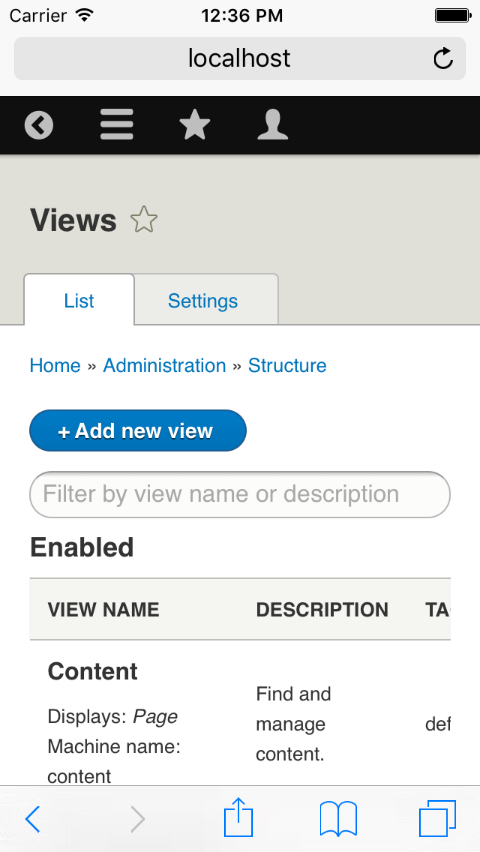
Comment #16
ec1ipsis commentedComment #17
lewisnymanHere're two pictures of both pages looking much better on mobile:
Comment #18
lauriiiAttaching one more picture where I have created some fields with very long labels.
I don't think this should be in the patch?
Comment #19
lauriiiComment #20
Anonymous (not verified) commentedI cannot create a interdiff cause the old patch would have required reverting many commits.
also sorted out same kind of an issue in Comment Type
There is still and issue related in display mode page.

Comment #21
Anonymous (not verified) commentedAfter picture for the comment type page :
Comment #22
Anonymous (not verified) commentedAs part of discussion i had with laurii i went thru all the admin pages and took screenshots which broke and how.
Comment #23
thamasAs I see in the comments, the last patch does not resolve all the problems. Soo it needs work. Also this seems to me confusing enough not to be a novice issue (so removed that tag too).
Comment #24
Anonymous (not verified) commentedThis needs quite few decisions on which of the table elements we hide on mobile or if none and find an alternate solution.
also the summary needs update on remaining tasks.
Comment #25
lewisnymanI think for this issue we should just go with a gut feel and hide the ones we think are not required. It's easier to see in code rather than discuss it.
If there are any tables where it's impossible to hide enough columns to fix on the screen. We postpone them to a separate issue.
Comment #26
Anonymous (not verified) commentedPages that need a closer look :
Block layout(/admin/structure/block)
Permissions(/admin/people/permissions)
Extend (/admin/modules/uninstall) this could be made similar like the modules enable page.
Proposed hide columns :
Content (/admin/people/permissions) => hide status.
Hidden columns :
Contact (/admin/structure/contact) => hidden recipients and selected
Views (/admin/structure/views) => hidden Description, tag and path
Right, the config pages were a bit too hard for me to solve, heres what i've done so some one else can pick up
Comment #27
marthinal commentedComment #28
Anonymous (not verified) commentedThis isnt in a needs review state..
Comment #29
DimitriV commentedEvaluating during Friday sprint in Barcelona
Comment #30
DimitriV commentedThe patch in #26 needs reroll against dev. The screens still have the same problem.
Comment #31
isholgueras commentedI did a 'special' reroll.
The file FieldOverview.php doesn't exist anymore, and the scope of the change cannot apply. This change, changes some code in buildForm. Now is done in buildHeader, and in all buildHeader function in fiuld_ui module is changed.
So, for this reason, I didn't add this change in the patch:
Comment #34
xavip commentedCorrected patch #31 to pass tests.
Comment #35
xavip commentedComment #36
xavip commentedThe patch #34 passes, but there are some work to do:
Already corrected tables:
Still needs correction tables:
Comment #37
xavip commentedComment #38
andypostComment #39
pazhyn commentedAs we can see tables are not responsive. As an alternative or additional solution for the problem could be adding overflow-x: auto for .page-content to make it scroll if it not fits the screen. In this case only content will have horizontal scroll, but not the whole page. And it looks better and more usable. See screenshots attached.
We can continue to hide low priority columns, but other tables could also appear with important columns and we will still have a problem. So my proposition could be additional to hiding columns for known tables.
How do you like the idea?
Comment #40
andypostI think we need to add responsive classes for all core's tables and use #39 suggestion for tables that wide
Comment #41
andypostComment #42
pazhyn commentedReview intermediate fix and continue hiding columns for default tables.
Comment #46
jmsv23 commentedthis is a proposed solution to avoid break the mobile layout without add new js, just allow the browser to add a horizontal scroll if the content it's to wide.
Comment #47
Munavijayalakshmi commentedComments should (noramlly) begin with a capital letter and end with a full stop / period .
Fixed and attached new patch.
Comment #48
andrewhdCurrently in 8.4-dev the white space is not immediately visible upon page load in mobile, but still seen when scrolling to the right of long tables like admin/content. It's not clear from discussion whether this accomplishes the parent issue's goal of "look[ing] good in all browsers".
The patch in #47 applies but does not seem to change behavior from the base 8.4-dev install.
Comment #49
cilefen commentedI am updating credit for the triage work. Going forward, you should know that we like to see documented triage steps (even if brief). It is the only way to know if the triage has actually been completed. Here are some made-up examples of documented triage steps:
Thank you!
Comment #50
john cook commentedI've tested the patch in a minimised chrome window.
The patch fixes the problem by allowing to table to scroll horizontally.
Before:

After:

Unfortunately, the sticky headings don't scroll with the rest of the table. See video sticky.mov
Comment #60
larowlanIs this still an issue?
Comment #62
xjmComment #64
quietone commentedI used simplytestme to test this with Drupal 10.0.3. I enabled language and translations and installed Italian. I then browsed through the configuration pages including admin/structure/types as in #1 and the translation pages. I was not able to produce the problem of a 'white gap' of any size.
Therefore I closing this as outdated.