Summary
At the moment, CKE5 textarea do not respect any configurable sizes.
MIN and MAX are both problematic. This issue focuses on the MAXIMAL aspect here. The following related issue focusses the min usability issues :
#3273744: CKE5 Respect a MINIMUM size for the CK-enabled textarea
Problem/Motivation
Using CKEditor 5, a textarea is currently presented small (1 row) and grows-up undefinitely as the user inputs text. By growing indefinitely, a long blog post (trust me, I always write long blog post!), or even just accidentally hitting enter too much (cat on the keyboard!) ends up in a long scrolling page which make it hard to navigate and use.
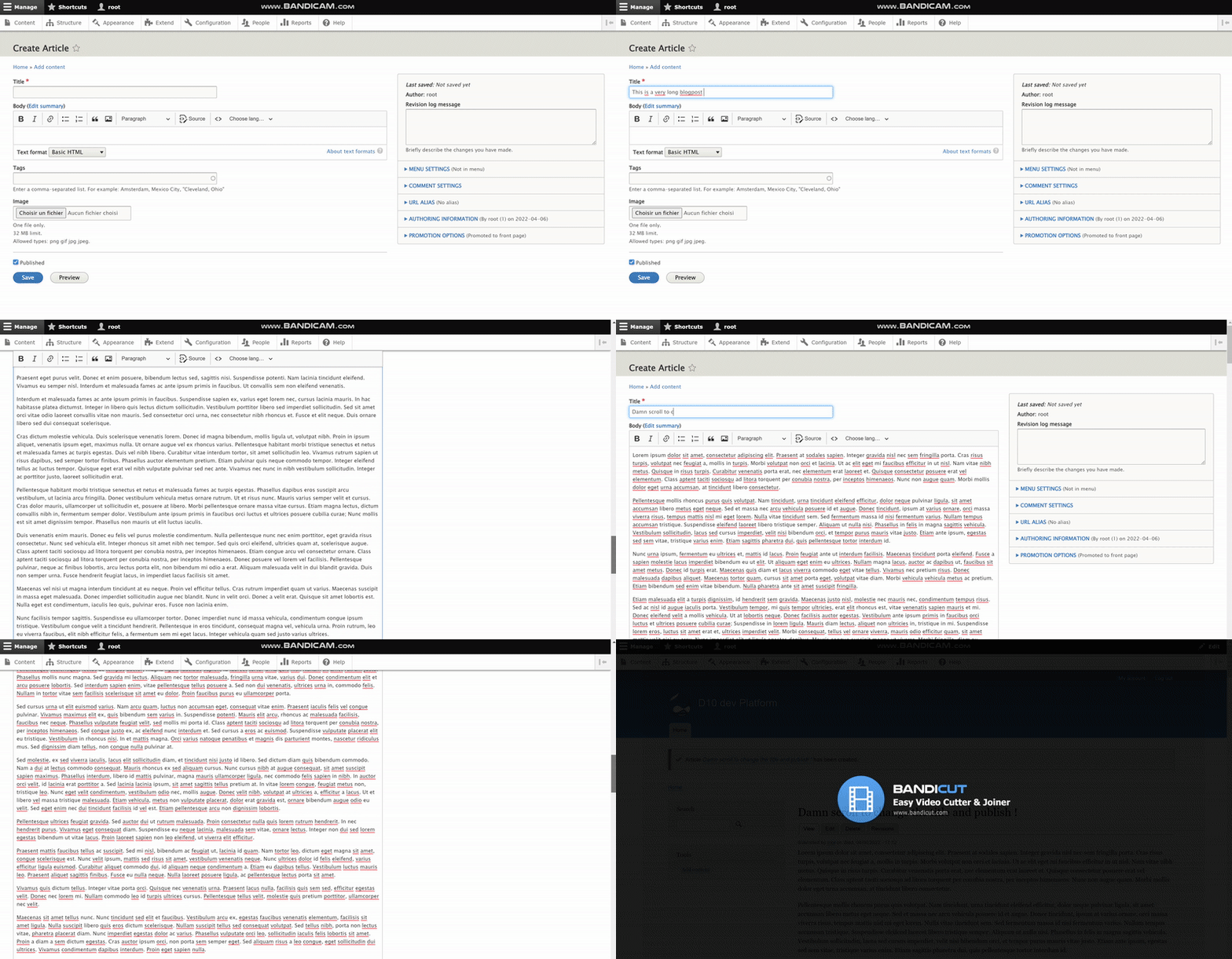
Proposed resolution
The three possible solutions are :
- Do not allow the field to grow, fixing it to the configured value such worked at #3273744: CKE5 Respect a MINIMUM size for the CK-enabled textarea
- Allow the field to grow but arbitrarily limit that growth to a yet-to-define number
- Allow the field to grow and add a limit configurable in the UI along with the current (min) number of row field configuration



Comments
Comment #2
wim leersUpstream issue: https://github.com/ckeditor/ckeditor5/issues/9489
Comment #3
wim leersUpstream issue: https://github.com/ckeditor/ckeditor5/issues/9489
Comment #4
andregp commentedJust a question.
I noticed the upstream issue description says:
But if I got it right, it's different from @Dom.'s desired behavior. I believe he doesn't want to limit the amount of text, but instead only limit the height of the textfield (maybe by adding a scrollbar to the field if the text is too long). That would allow him to keep writing 'long blog posts' while allowing him to keep seeing the bottom and top of the page without too much scrolling.
Is https://github.com/ckeditor/ckeditor5/issues/9489 proposed solution the right one for this issue?
Comment #5
dom. commentedIndeed @andregp, I think we missread the linked issue. Desired behavior here is not restricted content length, but restricted textarea height with an overflow scrollbar.
Comment #6
dom. commentedNo sure if that would work, but here is a workaround idea about this :
CKEditor5 does not seems to have a way to control that height and growth, but we can ensure the height using CSS. The issue becomes how to know the height in pixels corresponding to the desired number of rows and the theme line-height, font-size and stuff.
However, the basic textarea knows how to do it. Meaning the textarea which is completed (replaced) by CKE follows the number of row setting. What is, when ckeditor is activated to replace the textarea, we check the computed height of that textarea in the JS and add that as an inlined height to the ckeditor equivalent ?
I am refering to something within ckeditor5.es6.js file at :
getting
const height = element.clientHeight + a few pixels for adjustmentsand assign it to the editor.
Comment #7
dom. commentedHere is a POC to demonstrate how feasable it is.
It does not follow the exact number of rows as the textarea and the CKE do not have the same vertical space between lines.
But... it allows *some* control on this, and could help mimic what was done with CKE4 to have it bigger then one line only.
The trick could also be expanded as a setting on the field to get either infinite height growth or a fix height at wish.
Comment #8
rkolleryes altering the height via css is also the solution the ckeditor devs recommended over in https://github.com/ckeditor/ckeditor5/issues/636 . with
max-heightyou would achieve the goal of this issue and withheighttheminandmaxgoal ( from this issue https://www.drupal.org/project/drupal/issues/3241295). but i've tried that yesterday by applying the fixed height via css and i have to conclude that at least in safari 13.1.2 the scrolling was sort of clunky and jumpy in regards of the scrollbar. but @wim-leers also argued against fixing the issue downstream with css but instead would still go for an upstream fix: https://www.drupal.org/project/drupal/issues/3241295#comment-14424588 (cuz i asked there as well why not try the css fix downstream - but i understand his point made and it is reasonable)p.s. the comment refers to comment #6. @dom posted the follow up comment in #7. but will take a look at the patch now :)
Comment #9
wim leersThat would pretty simple to create a PoC patch for— could you do that maybe? 🤞LOL you already did in #7!#8: In #3241295-7: CKEditor 5 isn't respecting field widgets row settings I was especially concerned about the expectation described in that issue: matching the
<textarea rows="N">behavior. That is impossible. But something that is approximate, like limiting the max height … that's a different matter.Shouldn't this use
max-heightinstead ofheight? Otherwise this would be attempting to solve #3241295: CKEditor 5 isn't respecting field widgets row settings, which is unsolvable?Comment #11
dom. commented@wim-leers indeed for this particular issue, max-height would do it. But, that keeps the CKE field to be so small at first, smaller than the toolbar itself which make it weird.
You could say it is an intent at following the settings as per #3241295: CKEditor 5 isn't respecting field widgets row settings which we do agree is not really achievable.
I see it more as an opportunity to also mitigate #3273744: CKE5 Respect a MINIMUM size for the CK-enabled textarea in the same time.
Would still want me to update the patch with a max-height ?
Regardless of this, if the approach in the POC is elaborated, I think it would make sense to update the wording in the setting form so the site-builder understands that the exact number of row will not be match but tried to be approached. I am not good enough at english to provide a phrasing for that nuance, but here is a try :
Text editors (like CKEditor) uses this settings to estimate its height but can't technically match it exactlyComment #12
wim leersI think it'd be great if you could record a very short video demonstrating both cases — we'll need that anyway to get this committed. And that will allow us to jointly decide whether one of the approaches is acceptable.
I'd also for sure like to see
max-heightin action because I was trying to limit this patch to the scope of this issue and not also mix in #3241295: CKEditor 5 isn't respecting field widgets row settings.+1
Comment #13
ifrikIn the default behaviour, using Claro as admin theme, the text area field initially is indeed smaller then the toolbar, and rather swamped by label, toolbar, the dropdown to change the format. Having the field larger by default, would mean that the user can find the actual field more easily. And we expect the user to enter more then just a few words anyway - if not then the field should have not been text area anyway.
Roughly estimating a field height would be a good enough solution. Sitebuildesr don't necessarily want to create one field that has exactely 5 or 12 rows. They rather want to make smaller and bigger fields as a way of showing whether long or short bits of text are expected.
Happy to wait for a video to compare the options.
Comment #14
dom. commentedHere is a screencast showing the "height" version :

- the CKE field start at the estimated size
- An overflow scrollbar appears when content reachs the limit
- the CKE field do not change size when content is removed
In other words, it acts on both min / max height
Here is a screencast showing the "max-height" version :

- the CKE field start at the minimal default size which is 1 row only
- the CKE field expands until the estimated height of the given number of row
- An overflow scrollbar appears when content reachs the limit
- the CKE field reduces in size as long as the content is removed, until it reaches back to it's minimal size which is 1 row
In other words, it acts only on max height
Attached is a patch for the max-height demo.
Comment #15
rkolleri like both use cases shown (height and max-height). thanks for the animated gifs for illustrating the patches! would it make sense to let the site builder choose in the settings on a per field basis if the value should be for min-height, max-height or height (even though this issue is only about the max-height)? it just would have to be decided which of the three options should be the default behaviour for a ckeditor5 field?
Comment #17
dom. commented@rkoller: if we stick to what Drupal does, it is a fixed height pattern. As of you textarea (with no CKE) it is sold that you choose the number of rows and that is it. So in CKE the equivalent is too map this row number to and estimated height and that is it. IMHO, that is the "height" use case.
Technically, we *could* support this all in pixels, but not in rows as in the current POC. The reason is that number of row is not converted to pixels with a mathematical function, but with rendering the textarea and getting it's size. Therefore, we only have one. Asking the user for a min / max, we could not do the trick for both. Asking pixels though, we could send the height px values via drupalSettings to the javascript and use it from there. But is it easy enough for the site builder to understand ? How do you make it work with the none CKE version of the field ? (as of if moving back to 'plain text' for instance would that mean setting pixel size to the textarea too ?)
As I understand it, you would want a min / max, that is you don't enter a number it growth indefinitely, otherwise max-height at that limit, and same for min-height. I am not sure that is really an option here, but waiting for feedback on the subject.
Comment #18
ifrikI think we need some input from the Claro developers and a UX review, because whether or not text areas have autogrow significantly affects the admin theme.
Two screenshots for comparison about how visible the body field is in a default Article form, using Claro on a narrow screen - as a quick impression: on the left using CKEditor 5 default autogrow, on the right with a fixed minimum height.
Comment #19
geek-merlinThe min-height was fixed over in #3241295: CKEditor 5 isn't respecting field widgets row settings. Yay!
In comment #3241295-36: CKEditor 5 isn't respecting field widgets row settings, @mherchel fixed this too, but as unrelated art, that did not make it into the commit.
Here it is:
Given that CKEditor can be tweaked so easily, i doubt fixing this is an upstream job, so removing that tag.
Comment #20
glynster commentedAdded a patch for Drupal 9.5 adding on #3241295: CKEditor 5 isn't respecting field widgets row settings
Comment #21
wim leersI think it'd be great to have @mherchel review this 🤓
Comment #22
geek-merlin#20: I think copying over the min-height is not right.
Comment #23
tgoeg commentedMuch appreciated, I'll try to test this as soon as the other work load allows it.
My use case outlined in https://www.drupal.org/project/drupal/issues/3241295#comment-14812492 should mostly be fulfilled by the max-height option here (read: should be fair enough to have an adequate UX for editors that fill in one-line title fields that need to be HTML).
Still I want to mention a possible relation to upstream's behavior once https://github.com/ckeditor/ckeditor5/issues/9489 gets implemented.
There could be a use case where not only the height of the editor box should be restricted to a given amount but its actual content (that would even be better in my use case, which should, strictly speaking, be the use case for every Drupal site owner as it is the only way of creating accessible node titles if they contain foreign language terms/phrases; made this a core issue at https://www.drupal.org/project/drupal/issues/82751#comment-14852902).
I think we need an additional option in the field settings if both min-height and max-height get set. Maybe designers want to control both aspects separately.
The most intuitive way for me seems to be to offer two fields, for (approx.) min rows and (approx.) max rows.
Using just one number input as it is now and adding a checkbox or a radio button to define whether this should be min or max is not as flexible as being able to define both.
Just setting the min AND max height to the value entered (as I think this patch here together with https://www.drupal.org/project/drupal/issues/3241295) takes away flexibility.
If a change to the field config to allow for two inputs however takes another decade as fixing the max height did, I'd pleasantly go for just one input that fixes it to the given amount and disables growing/shrinking ;-)
Comment #24
mherchelI'm totally willing to help out. But do we have consensus on what the behavior we want is? In #14 we have animated GIFs (with a soft G) that show the different behaviors. In #15 @rkoller states that he'd like an option for both.
If want to provide multiple options, it increases the scope, but is doable. Assuming so, we need to decide on verbiage and what we want the admin UI for that to look like. We also have to figure out what we want the default behavior to be. Only after that can we pull those settings into CKEditor.
It might be simpler to make a default change, and then create a followup to change the behavior. Either way, we have some decisions to make.
Comment #25
glynster commented@geek-merlin as a quick test it worked for our needs. However it does duplicate the CSS. I was not too sure how to build on @mherchel patch for min height.
@mherchel we would love your input here. Just adding in your line of css servered our needs and multiple screen resolutions. For us it makes the CKeditor5 work much like the CKeditor4. So I think this should be the default behaviour. Adding in options increases the scrope and I am not sure this is really necessary IMHO.
Comment #26
wim leers+1
Comment #27
mherchelWhich behavior are we looking to implement:
Both should be straightforward to solve.
heightinstead ofmin-heightmax-height: calc(100vh - var(--drupal-displace-offset-top, 0px) - 20px);Comment #28
glynster commented@mherchel thanks for your clear points. I think 2 is the winner to accomplish most if not all user cases. My patch in #25 implimented this and it worked well. However my patch duplicated instead of adding to
.ck-editor__main > :is(.ck-editor__editable, .ck-source-editing-area)My attempt was for Drupal 9.5 as well.
Comment #29
tgoeg commentedJust fixing it to the given height is alright with me and reproducing CKE4 behavior also seems like a good idea.
I just thought that https://www.drupal.org/project/drupal/issues/3241295 explicitly wanted to implement an auto-growing feature. If it's not necessary to keep this, I'm all in.
Comment #30
glynster commentedWe came across an issue when using CKeditor "View Source". The textarea does not have
overflow: autoset which causes issues. Here is an updated patch based on #20.Comment #31
mherchelNote that these CSS variables don't exist within Drupal 9.x. this means that the editor field might overlap the toolbars.
Comment #32
mherchelPlaying around with the method that stops the autogrow from growing larger than the viewport height.
The user can still inadvertently (or purposefully) scroll down and have a significant part of the editor out of screen. Not sure if this is a problem.
However with #3331158: Support full-screen editing in CKEditor stalled, I believe that we do need a larger editor.
Attaching a patch. Still needs tests, but if we agree this is the desired behavior (and we can get maintainer signoff), I'll write the tests.
Comment #33
mherchelAttached a 0 byte patch. Attached is the correct patch.
Comment #34
glynster commented@mherchel to avoid the:
I introduced a small css tweak which resolved the issue for us in Drupal 9.5.x:
Comment #35
nayana_mvr commentedVerified the patch #33 and tested it on Drupal version 10.1.x. The editor initially has a min height and when content is added, it stops growing after a certain max height. Then an internal scroll will appear within the editor. I have added the before and after screen recordings for reference.
Comment #36
wim leersThe before vs after videos from @Nayana Ramakrishnan make it crystal clear that this is a huge leap forward in usability! 🤩
And magnificently, this is a CSS-only change! 🥳
This is a no-brainer improvement 👍
Comment #37
wim leersI think it's deserving of this 😇
Comment #38
quietone commentedJust updating tag
Comment #39
claudiu.cristeaWe need to understand whether #3326193: CKEditor 5 can grow past the viewport when there is a lot of content is a duplicate of this or has other purpose. Not very clear to me.
Comment #40
claudiu.cristeaStill needs tests as per #33
Comment #41
claudiu.cristeaComment #42
wim leersI didn't even realize we could write tests for this; that used to be completely impossible. I guess it indeed is possible here. But given it's viewport-related I have some reservations about how reliable that test could work on headless Chrome DrupalCI testing 🤔
@mherchel & @lauriii: thoughts?
Comment #43
wim leersOver at #3326193: CKEditor 5 can grow past the viewport when there is a lot of content, I wrote:
And #3241295: CKEditor 5 isn't respecting field widgets row settings already implemented
min-height, this issue is addingmax-height. We are using a different selector than the official docs recommended, but given that we use the "classical" editor UI, I think.ck-editor__mainis fine — plus, the official docs were written before the Source Editing plugin existed, so our addition to the selector just for that IMHO makes sense:.ck-editor__main > :is(.ck-editor__editable, .ck-source-editing-area).Apologies for the duplicate issue 🙈
Comment #48
wim leersTransfering issue credit and fixing title.
Comment #49
claudiu.cristeaSame comment as in #3241295-99: CKEditor 5 isn't respecting field widgets row settings: This is a bug that affects also Drupal 9.5 and 9.5 is still long time supported (until December 2023). Not porting this to 9.5 is affecting the CKEditor 5 adoption. Most of the sites are now on Drupal 9.5 (or even 9.4), preparing for D10. Adopting CKEditor 5 is one of steps they want (true, not mandatory, but highly recommended) to solve before migrating to Drupal 10. But this is the kind of bug that wouldn't make CKEditor 5 module production ready.
Let's backport this, at least, to Drupal 9.5 to ease the CKE5 adoption. It seems that the 9.x version requires #3241295: CKEditor 5 isn't respecting field widgets row settings to be fixed first because they touch the same area of code.
Comment #50
claudiu.cristeaRe #33:
Should the
internal.drupal.ckeditor5have alsocore/drupal.displaceas dependency, in ckeditor5.libraries.yml?Comment #51
claudiu.cristeaThis is a D9.5 tentative. It cumulates:
...so not something that can be merged but it might be used as patch for D95 projects.
Comment #52
frega commentedI am not a UX expert, so I am not sure if this is really problematic :). I'd like to point out though that the suggested max-height only considers the "ckeditor-editor part". The label, help text and text format selector will not be (fully) visible in the viewport when the CKEditor has reached it's maximum height.
I attached a video to demonstrate this. Demo styling has been applied: ckeditor (light yellow background) grows to fill the full viewport (minus drupal-specific "safe displace areas") but parts of the complete drupal field (light blue background) are pushed out of the full viewport.
Also not a CSS person, but 100vh used (?) to be problematic when used on mobile (_native_ not desktop-responsive) where relying on 100vh for "full viewport" can be tricky (e.g. https://chanind.github.io/javascript/2019/09/28/avoid-100vh-on-mobile-we...).
PS. I'd be happy to give a shot at amending the existing nightwatch test (adding "maximum height") in drupal/core/modules/ckeditor5/tests/src/Nightwatch/Tests/ckEditor5EditorHeightTest.js ...
Comment #53
frega commentedHere a (functional js) test-only patch (failing) and a passing test with CSS attached.
As stated in #52 I see some UX issues, but this can easily be adjusted accordingly.
Comment #54
nitin shrivastava commentedfix ccf error in #53
Comment #55
frega commentedSorry for the noise, coding standard fixes and cspell-related issue resolved. only-test.patch should fail the other one should pass.
Comment #56
frega commentedReacquainting myself with core contrib and its linting processes, sorry🤦.
Comment #57
wim leersThe #56 patch is identical to @mherchel's in #33, just with added test coverage goodness! 🤩
Looks great!
Comment #58
frega commented@wimleers - a quick pointer to #52 so it doesn't get lost. I am not sure the UX is quite optimal yet (body field label and text input selector pushed outside the viewport, see video in #52) but that's above my paygrade :)
Comment #60
lauriii❤️🦙
Committed c3a9cde and pushed to 10.1.x. Thanks!
Since this is a feature, it doesn't get a backport to 10.0.x or 9.5.x.
Comment #62
star-szrJust sharing a backported patch for 9.5.x in case anyone else needs it. Thanks to everyone who worked on this issue!
Comment #63
joshuautley commented@Cottser Thank you
Comment #64
burnellw_cit commentedAdded default height
Comment #66
murphyw commentedComment #67
sir_squall commentedDo we have a patch working for drupal 9.5?
Comment #68
leo liao commented#66 Support 10.1.1
Comment #69
leo liao commented#66 Support 10.1.2
Sorry please ignore this file, it has been fixed and merged into 10.1.2 in https://www.drupal.org/project/drupal/issues/3372922
Comment #70
leo liao commentedComment #71
solideogloria commented@sir_squall #66 works in 9.5.x
Comment #72
sir_squall commented@solideogloria Thanks!
I have migrated to D10 where this issue is not there anymore, but I appreciate that you have answered ;)
Comment #73
jessey commented