

 Come together with the global Drupal community in Rotterdam, 28 Sept – 1 Oct 2026. Sessions, contribution, connection, and Early Bird savings until 8 June.
Problem/Motivation
Follow up to Issue #3116377
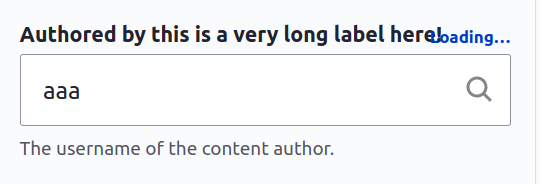
When autocomplete fields have long labels (or the viewport is just narrow), the loading text overlaps the label
Proposed resolution
?
Remaining tasks
Add screenshots
Review code
Commit
User interface changes
todo
API changes
Data model changes
Release notes snippet
| Comment | File | Size | Author |
|---|---|---|---|
| #42 | Screenshot-of-autocomplete-working-as-expected.png | 52.34 KB | niranjan_panem |
| #38 | 3199601-issue2-after-patch.mov | 408.53 KB | nayana_mvr |
| #38 | 3199601-issue2-before-patch.mov | 324.65 KB | nayana_mvr |
| #38 | 3199601-issue1-after-patch.png | 44.71 KB | nayana_mvr |
| #38 | 3199601-issue1-before-patch.png | 45.26 KB | nayana_mvr |



Comments
Comment #2
justafishComment #3
volkerk commentedThank you for creating the follow-up, as mentionend in a #3116377: Autocomplete input in views exposed filters does not align with select and text inputs, maybe adding background to .claro-autocomplete__message would be a solution? There is already a throbber replacing the magnifying glass, but only half of it is shown, afaics there is an issue with the svg.
A gif of the current state of the throbber and the loading message overlapping the message:

What adding a background could look like:

Comment #4
djsagar commentedI created patch regarding above issue please review.
Thanks!
Comment #5
hinal05 commentedApplied patch #4 and it's working fine please review the screenshot.
Comment #6
justafishThanks for the patch! I think that approach is a bit heavy-handed though as it touches every form label in Claro, not just ones which have a clash with the loading label. Also bear in mind the "Loading" text is customisable so this might still overlap.
Comment #7
abhijith s commentedAdded styling specifically for the autocomplete form element.Please review the patch.
Comment #8
abhijith s commentedComment #9
akrikawa commentedThanks Abhijith S. I applied the patch and took a look at two instances of autocomplete fields on the node edit form.
Content author field
Before:


After:
Tags field
Before:


After:
Your patch works when the field label and the input are the same width, but not when the input's width less than its wrapper (tested this on Chrome on a Mac).
Comment #10
sakthivel m commentedHi,
#10 I have provided the patch please verify if it is working or not.
Comment #11
kapilv commentedComment #12
sakthivel m commented#10 Patch Custom Commands Failed
#12 Patch Recreated
Comment #13
kapilv commentedComment #14
kapilv commentedComment #15
sakthivel m commented#15 Patch Recreated, Please verify it
Comment #16
sakthivel m commentedComment #18
chetanbharambe commentedVerified and tested patch #16.
Patch applied successfully and looks good to me.
Testing Steps:
# Goto: node/add/article
# Add some long label instead of Tags
# Search the result
# User is able to see loading text overlapping on long labels
Expected Results:
# User should not see loading text overlapping on long labels (should see loading text inside the box)
Actual Results:
# Currently User is able to see loading text overlapping on long labels
Can be a move to RTBC.
Comment #19
chetanbharambe commentedVerified and tested patch #16.
Patch applied successfully and looks good to me.
Testing Steps:
# Goto: node/add/article
# Add some long label instead of Tags
# Search the result
# User is able to see loading text overlapping on long labels
Expected Results:
# User should not see loading text overlapping on long labels (should see loading text inside the box)
Actual Results:
# Currently User is able to see loading text overlapping on long labels
Can be a move to RTBC.
Comment #23
maninders commentedAdding a Patch for Autocomplete loading text overlaps long labels, And also adding a screenshots for reference of mobile view as well as desktop. And also added for "rtl" view.
Comment #24
ranjith_kumar_k_u commentedComment #25
gayatri chahar commentedI have successfully applied patch #24 on drupal 9.5.x-dev
But its not working for me Adding screenshots for the refrence
Comment #26
maninders commentedHi @gayatri Chahar, Please try with the #23.
Comment #27
maninders commentedAdding a Patch again for Autocomplete loading text overlaps long labels, And also adding a screenshots for reference of mobile view as well as desktop. And also added for "rtl" view.
Comment #28
maninders commentedAfter PHP 8.1 & MySQL 5.7 Custom Commands Failed in #27 again adding patch.
Comment #29
maninders commentedAfter PHP 8.1 & MySQL 5.7 Custom Commands Failed in #27 again adding patch.
Comment #30
maninders commentedAfter PHP 8.1 & MySQL 5.7 Custom Commands Failed in #27 again adding patch.
Comment #31
javi-er commentedPatch at #30 worked well for me on 9.5.x
Before

After

Comment #32
Shubham Sharma 77 commentedApplied patch #30 applied successfully in drupal-9.5.x-dev.
Thanks for the patch
For ref sharing gif...
Comment #33
quietone commentedThanks everyone for getting a working patch for this problem! There are a few more things to do before this is ready for a committer.
The proposed resolution of the Issue Summary is a question. adding tag for an issue summary update. Write an issue summary for an existing issue has guidance on that.
There are many patches here with a comment asking for a review. It is expected and far more helpful to explain why you made the changes that you made. Also, a diff or interdiff is always expected. There are instructions for creating an interdiff .
@Maninders, before uploading a patch you can run the same checks that are run by the testbot, Have a look at the instructions for running the coding standard checks locally so you can be sure the tests will run before uploading a patch. It also has the advantage of saving resources, including money, for the Drupal association. There are real costs for running the tests.
There has not been a review of the code changes here since #6. This needs a code review.
Comment #35
gauravvvv commented1. Instead of
padding-right: calc(7rem - 1px);we can usepadding-inline-endwhich will work in both ltr & rtl direction.2.
.js .form-autocomplete.is-autocompleting {background-position: 100% 75%;}This is outdated.3.
.claro-autocomplete__messagestyling needs to refactored.Comment #36
gauravvvv commentedI have attached a patch for same, Updated the issue summary as well.
please review
Comment #37
gauravvvv commentedComment #38
nayana_mvr commentedVerified the patch #37 and tested it on Drupal version 10.1.x. The patch works fine and I have added the before and after screenshots of issue 1 (search icon overlapping) and screen recordings of issue 2 (loading text overlapping field label) for reference.
Comment #39
smustgrave commentedThis issue is being reviewed by the kind folks in Slack, #needs-review-queue-initiative. We are working to keep the size of Needs Review queue [2700+ issues] to around 400 (1 month or less), following Review a patch or merge request as a guide.
Number of patches here but not a lot of interdiffs. Please upload an interdiff with all your patches.
Confirmed this issue on D10 using this label
"Lorem ipsum dolor sit amet consectetur adipiscing elit, nunc facilisi porta risus quis cubilia ligula"
#33 called for an IS update which still needs to happen.
Proposed solution is still a question and as a UX issue this needs before/after screenshots.
Comment #41
akashdab commentedThe second issue of tags overlapping with process icon does not seem to occur anymore. Link
Comment #42
niranjan_panem commentedTested in drupal 11 claro theme, display of autocomplete values are not overlapping with search icon, not able to reproduce the issue. Below is the screen shot of it.
Comment #43
bnjmnm#42 That's not testing the reported issue which is specific to form labels
The part that was tesed is an out of scope addition that was incorrectly added in #36 and was fixed in a separate issue.