

 Come together with the global Drupal community in Rotterdam, 28 Sept – 1 Oct 2026. Sessions, contribution, connection, and Early Bird savings until 8 June.
It would be nice if the fixed positioning of the admin toolbar was configurable. In most cases, having the menu be fixed is fine, but when you have very long menus with many items, it's impossible to scroll to them since the menu is fixed.

Issue fork admin_toolbar-2917168
 Show commands
Start within a Git clone of the project using the version control instructions.
Or, if you do not have SSH keys set up on git.drupalcode.org:
 changes


Comments
Comment #2
adriancidHi @rael9 thanks for reporting, would be great if the next time you use the Issue Summary Template to report an issue.
Can you explain a more bit the issue please, maybe adding some screenshots?
Comment #3
adriancidComment #4
adriancidI'm closing this as we can't reproduce the issue, if the problem persists please feel free to reopen and update the status.
Comment #5
rael9 commentedHi @adriancid,
Sorry I didn't get back to this sooner, it's been a busy couple of months. Also, sorry I didn't use the issue template. Due to the name, I assumed that was only for bugs, not feature requests.
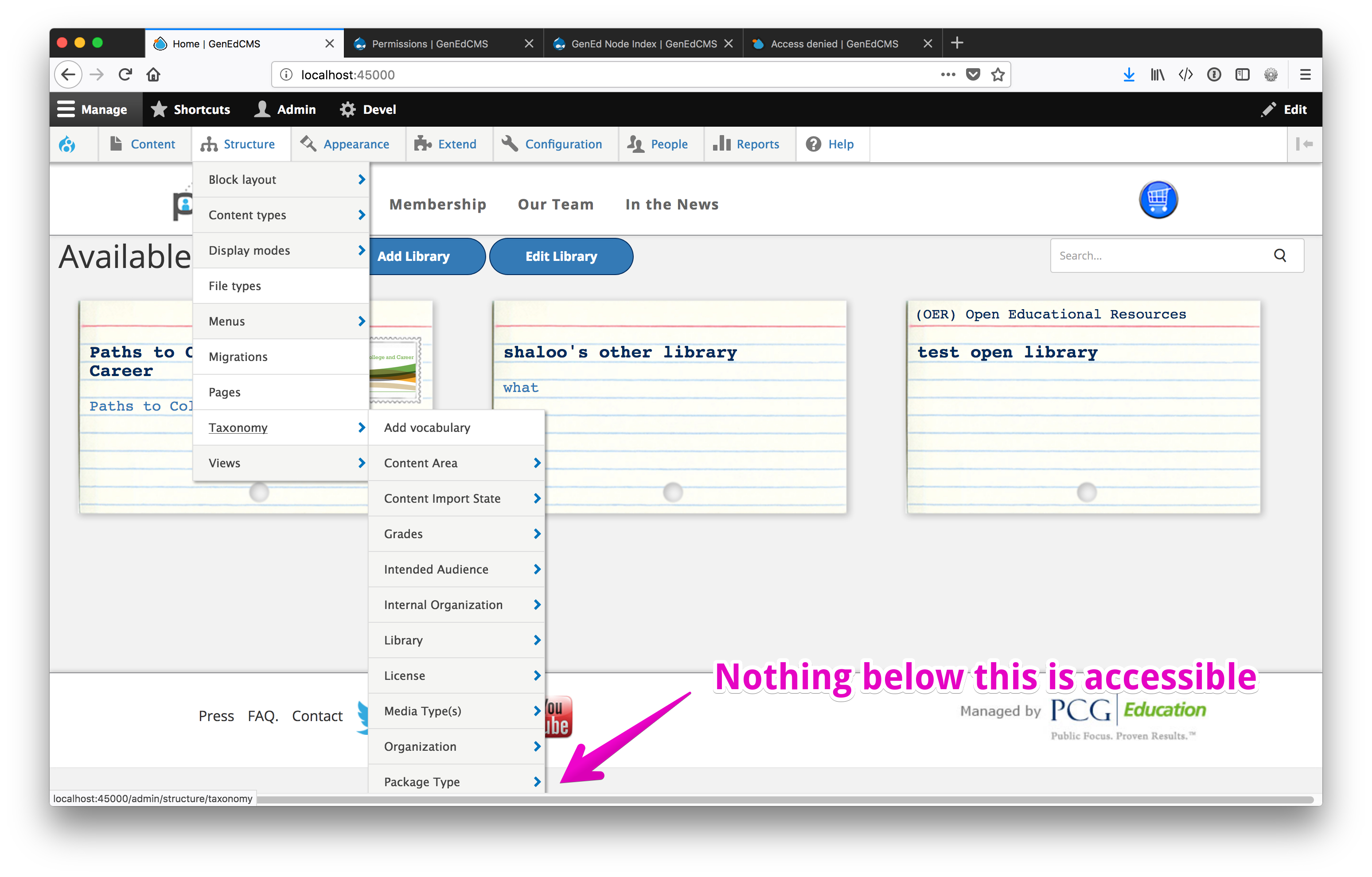
I've attached a screenshot to try to illustrate what I'm talking about. Since the admin menu is fixed position, you can't access any of the menu items that go down below the bottom of the screen. When you scroll the page, the menu stays in place, so you can't scroll down to - in this case - the vocabularies past "Package Type". Obviously you can still click on "Taxonomy" and get to the other vocabs, but we had a request from a user to be able to scroll down to access the rest of the menu.
I felt this was more of a feature request than a bug or anything, since there is a simple workaround and it doesn't hamper you from being able to use the site. That being said, I can see where it might be useful for this to be configurable (the fixed state of the menu) for requests like ours (or just for people that don't care for fixed menus).
Let me know if you have any further questions.
Comment #6
adriancidThanks @rael9 I see the problem, and yes I have the same problem in some sites, let see if somebody can help us in this, I'm a little busy too in this days.
Comment #7
kurinjiselvan v commentedHi,
I am also facing this issue. Its also affect the parent menu items. Please see the image below. I think in D7 menu will having scrolling option but in D8 the page only scrolling not the menu.
Comment #8
kurinjiselvan v commentedComment #9
amsteri commentedI have ported feature from Drupal 7 administration menu module (Keep at the top) and this patch should resolve issues like this. Please make review and apply this patch.
Comment #10
kurinjiselvan v commentedHi @Amsteri..
This patch working fine when the menu is not fixed at the top. If we enable the Keep menu at top of page, the menu having the scroll able problem which is mentioned before.
Comment #11
kurinjiselvan v commentedComment #12
eme commentedWell, I think that we should adapt the way the sub-menu shows up to have them going up in JS as we often have enough space but we got the issue with the sub menus of the last menu elements. Maybe we could have less margin to maximize too ? That would allow us to keep the module plug & play and fix most of the issue without having a special option and let the other that wish to keep it sticky still have the issu...
Comment #13
Schaklaggedehu commentedIf you like, you can use my custom module. It doesn't make the menu scrollable, but if you have too many items in one menu, it creates multiple rows of entries.
Comment #14
adriancidHi @Schaklaggedehu I installed your module but I don't see any changes in my menus. Can you show some screenshots of yours?
Comment #15
eme commentedSame for me : no change...
Comment #16
Schaklaggedehu commentedSure. Maybe you have to look into adjusting the css selectors, I don't know just yet.
As you can see in the images, the menu items get broken down into columns, if there are too many.
Comment #17
Schaklaggedehu commentedUpdated version. If there are more than 12 entries in a list, it gets broken down into multiple columns. Tested with drupal 8.6.
Comment #18
adriancidHi @Schaklaggedehu can you upload the patch please?
Comment #19
drintios commentedComment #20
drintios commentedI added fix based on @Schaklaggedehu custom module
Comment #21
adriancid@drintios I patched the module but I don't see any changes, How many content types I need to have to see the two columns?
Comment #22
adriancid@drintios I see it now, can you add some explanation about how this works?
And I see a minimal problem with the alignments, see the picture:
@eme Can you take a look at the last patch, please?
Comment #23
drintios commentedit works based on the screen height, if the content of dropdown is bigger than screen it splits into the amount of columns needed to be able to see the whole list, also yep alignment a bit broken need to do some little rework on the styles when dropdown divided in columns.
Comment #24
batkorI think this decision
Chris Coyier "Solution For Very Long Dropdown Menus"
Comment #25
malcomio commentedTested with the patch applied - works more or less OK, but if the screen is very small, then the bottom item of each column was not visible for me in Firefox.
Seemed to be less of a problem in Chrome, but still some of the options were not visible.
This issue existed in Seven and in Adminimal Theme, on a site where there are a lot of menus.

Comment #26
malcomio commentedComment #27
lyafel commentedBased on previous patch, fixed the alignment of the items and the height of the menus so that the last items are not cut out.
Comment #28
lyafel commentedRemoved some unexisting code that was failing the patch.
Comment #29
adriancidI tested the patch but the menu is not working well for me.
Comment #30
chris matthews commentedThe patch in #28 still applied, but needs work per #29.
Comment #31
galileo25 commented@Chris Matthews
I've fixed margin from #28 The patch contains all changes from #28 and some CSS fixes
Please review
Comment #32
adriancidI think this is not more needed in the branch 8.x-2.x, can you check? I don't have paragraphs installed now.
Comment #33
galileo25 commented@adriancid
Yes, you are right! In 8.x-2.x everything work's correct without any patches
Comment #34
adriancidComment #35
the_glitch commentedNeither the 2.x-dev version or the patches fix anything. The menus don't scroll as this issue title suggests, it just cuts them in half and moves the cut off half up to the relative right position of the first half.
Also, when hovering over items in a long menu, both the 2.x-dev version and the stable and 1.x-dev versions with patches just make a mess of the menus by stacking submenu lists in front of other lists then somehow it selects and flickers submenus on and off by itself when the user hasn't moved the mouse over to the submenus at all. This the leaves user confused to where they are and where they're supposed to be in the menu.
Terrible UX.
Can this be fixed by just having scroll bars in each long list in the menus?
Perhaps these pages help:
https://css3menu.com/rq/scroll-bar-for-sub-menu-in-superfish-menu-css-3X...
https://stackoverflow.com/questions/38712857/how-to-show-sub-menu-when-u...
Comment #36
adriancid@the_glitch will be great if you can provide a working patch for this issue.
Comment #37
thommyboy commentedHi @All I installed 8.x-2.4 but can't see any of the improvement mentioned here 🤔
I got a vertical menu but some branches have too many items to display but I can't access them at the bottom and nothing splits into multiple columns- did I get something wrong?
Comment #38
the_glitch commentedComment #39
nwom commentedI agree, it appears none of these fixes were included in the newest dev.
#31 applies cleanly however appears to be broken, since the submenus instead overlap and flicker non-stop. Perhaps this has to do with me using the Adminimal Admin Toolbar as well?
#28 applies cleanly as well and appears to work better than #31, but the submenus are too far to the right away from the menu.
Comment #40
stefanos.petrakisI am a bit split here:
First off, here is a reroll of #28 for 3.x-dev (N.B.: I tried #31 and it was breaking the layout).
With this patch and following #35 this issue should be renamed to "Split-n-stack into multiple columns to allow presenting longer lists horizontally on hover" (or sth similar).
This patch applies cleanly and seems to solve the problem, at least till the horizontal space is exhausted, when using the default admin_toolbar theme as per the screenshot below.
Second off, the easiest UX way out of this situation would be to switch to using the vertical version of admin_toolbar without any changes; the vertical orientation provides scrolling covering the case for very long lists. In this case, I would also be happy to see this issue closed with "works as designed".
Could the maintainers chip in on this?
Comment #41
klonosI would like to offer an alternative possible solution here: in Backdrop, we have been using https://www.smartmenus.org as the library to provide responsive drop-down functionality for the main navigation menu (since v1.5.0 - released September 2016) and it has been serving us well since.
Although we have not implemented it yet, we have an issue in our queue to use the same library for the admin menu as well. One of the main reasons for it is that it allows for scrollable menus when they get too long and are rendered below the viewport:
You can see the above in action if you head to https://www.smartmenus.org/about/themes and click the "Launch gallery" button (keep the example JS fiddles collapsed, and check out the submenus under the "Sub test" top-level item).
I believe that this would be a much more scalable solution, since even when stacking menus in horizontal chunks, you can still run out of screen space in very very long menus.
Comment #42
vselivanovReroll #40 for the latest 3.x-dev 9113639. Tested with Drupal 9.5.1.
Comment #43
rinku jacob 13 commentedI have tested the patch with drupal version 9.5.3. Patch doesn't applied. getting some errors like this
Checking patch css/admin.toolbar.css...
error: while searching for:
border-right: 1px solid #ddd;
}
.toolbar .toolbar-tray-horizontal ul ul li.menu-item:first-child {
border-top: 1px solid #ddd;
}
.toolbar-tray-horizontal li.menu-item--expanded.hover-intent ul ul,
error: patch failed: css/admin.toolbar.css:34
error: css/admin.toolbar.css: patch does not apply
Checking patch js/admin_toolbar.hoverintent.js...
error: while searching for:
// Other wise we get unwanted behaviour where menu items are expanded while already in hovering other ones.
$(this).parent().find('li').removeClass('hover-intent');
$(this).addClass('hover-intent');
},
out: function () {
$(this).removeClass('hover-intent');
},
timeout: 250
error: patch failed: js/admin_toolbar.hoverintent.js:6
error: js/admin_toolbar.hoverintent.js: patch does not apply
Comment #44
abelpzl#42 is applied correctly in 9.5.3 and in my opinion works as expected.
Thanks for providing this solution.
Comment #45
sonam.chaturvedi commentedTried testing #42 with v3.3.0 on Drupal 10.1.x-dev.
On applying patch, getting below:
Comment #46
vselivanovRerolled #40 for the v3.3.1 - 3.x-dev 50ff7eb6 commit. Tested with Drupal 9.5.8.
Comment #47
nikhil_110 commentedTried to apply patch #46 it is working fine for add content menu but not working properly for last content type in content type list for content type I have shared video.
need to work on it.
Comment #48
tostinni commentedWe've changed a little bit the patch so it can apply to Claro but also to Gin and works a little better with submenus as shown in #47 video.
We haven't tested yet on RTL theme and also the vertical admin menu bar for Gin is not functional, so keeping status as Need work.
Comment #49
chancenyasulu commentedpatch #46 works for me in drupal 9.4.10 Panopoly thank you.
Comment #50
abelpzlPatch #46 could not be applied in admin_toolbar 3.4.1 and drupal 9.5.10.
Instead #48 was applied correctly and seems to work correctly.
Comment #51
darkodev commented#48 works well for us on Drupal 10.1.3 and Admin Toolbar 3.4.1
Comment #53
oneillo commentedI have just made a couple of theming changes based on #48 to improve the appearance. Using Claro theme and Drupal 9.5.11.
Comment #54
vselivanovI rerolled patch #48 for Admin Toolbar 3.5.0 on Drupal 10.3.1
Comment #55
gallant_dev commentedThe attached patch does not build on the currently dominant approach to this issue (#54 at the moment), but allows the sub-menus to scroll (rather than expand laterally) as mentioned in the original request. It introduces a new override template with an added container div around the ul's to achieve the desired result. This required some adjustments to the CSS and Javascript, including a direct copy/tweak of some of the core toolbar module code.
This is my first contribution, so kindly let me know if I've missed any steps or approached the process incorrectly. Based on 3.5.1 running on core 10.3.6.
Comment #56
gallant_dev commentedComment #57
kanchan bhogade commentedHi
I've tested patch #55 on Drupal 10.3.x
The patch is applied successfully...
The menu dropdown is scrollable after applied patch
Screenshots
Comment #59
bsuttis commentedHere's a reroll of the patch in #54 against admin_toolbar:3.6.0
Comment #62
dydave commentedThanks a lot everyone for the great work on this issue, all the contributed patches and comments! 🙏
Looks like there is already a lot of history in this issue, going back to 2017 😅
Let's try summing up the current status:
Currently, this issue contains two different implementations to achieve a similar goal:
1 - Multi-column menu dropdown: MR !150
Based on patch #59 which is the latest version of the very first implementation of this feature, when the ticket was initially created, so it has quite a lot of reviews and testing feedback.
Patch MR!150 displays long lists of items in dropdown menus broken down into multiple columns, so they could be displayed horizontally and fit the viewport, see a screenshot of the result:
2 - Scrolling menu dropdown: MR !151
Based on patch #55 which is a more recent approach of the feature with fewer exchanges, reviews or feedback, but seems like a very valid approach as well.
Patch MR !151 displays long lists of items in dropdown menus with a fixed height and a scrollbar, to be displayed when scrolling up or down the menu dropdown, see a screenshot of the result:
At this point, I have not started any kind of code review or careful testing of any of these merge requests, but only very superficial testing locally and they both seemed to work very well 👌
Great job everyone! 🥳
OK, first of all, we need to clarify what implementation should be chosen in this issue:
What solution should be implemented exactly? Solution 1 or 2 or something else?
Keep in mind, it is always possible to make any of these solutions configurable through the backend, for example, to enable/disable or select one method or another (select list, checkbox, radios, etc...).
It is also possible to break down this issue into multiple smaller issues with different types of implementations.
But if we would like to make any kind of serious progress here, we should start by having a clear vision of the results that would be expected by the changes in this issue.
What would be your suggestions on this?
Otherwise from a coding standpoint, MR !150 is much less intrusive than MR !151 which changes the HTML structure and classes of the menu with a twig template override....
So we would probably need to rework some of the code implementations once we have a better idea of the result expected.
Keeping this issue in Needs review for now, as an attempt to attract more attention, get more feedback, reviews of the new merge requests and replies to the questions in this comment.
Feel free to let us know if you have any questions or concerns on any aspects of this comment, the merge requests or this issue in general, we would surely be glad to help.
Thanks in advance! 🙂
Comment #63
dydave commentedComment #65
gallant_dev commentedReroll of scrolling patch in #55 for admin_toolbar 3.6.0.
Comment #66
abelpzlThe patch in #65 is applicable to 3.6.1 and works correctly. I like the scroll bar that was added in the latest iterations.
I hope this will soon be part of the module.
Comment #67
jennypanighetti commentedSomething seems to be affecting the CSS of fly-outs in unexpected ways. In my admin menu, the "Add content" submenu is fine and scrolls properly. But now the "Blocks" submenu is completely misaligned. I'm hovering over "Blocks" here and yet the submenu is placed above it. See attached screenshot.
This happens both with !MR51 and patch #65.
Comment #68
uptil4music commentedReroll of MR150 for 3.6.2
Comment #69
gallant_dev commentedRe the visual regression flagged in #67 - this may be related to the recently-added setting making hoverintent optional. Enabling it again fixed the problem for me, as the patch was written when that library was mandatory. HTH!
Comment #70
ressaPerhaps a compact display option could also help optimize the usage of space, as a supplement?
Comment #71
gallant_dev commentedReroll of scrolling patch in #65 for admin_toolbar 3.6.3.
Note - I had to disable and re-enable hoverintent after applying the patch to get the submenus appearing correctly.
Comment #72
harishpatel86 commentedImplemented a fix for the scrolling menus issue described in #7.
This patch improves submenu positioning/alignment for long admin menu trees and keeps nested flyout items aligned more consistently when the menu exceeds the viewport height.
Tested on admin_toolbar 3.6.3 and the patch applies cleanly.
Comment #73
charginghawk commentedFYI the #72 patch seems to apply to 3.6.2, not 3.6.3.