

Postponed
Project:
Drupal core
Version:
main
Component:
Claro theme
Priority:
Normal
Category:
Bug report
Assigned:
Unassigned
Issue tags:
Reporter:
Created:
18 Sep 2020 at 14:05 UTC
Updated:
23 Aug 2026 at 12:06 UTC
Jump to comment: Most recent, Most recent file
 Show commands
 changes








Comments
Comment #2
a3hill commentedComment #3
a3hill commentedComment #4
afireintheattic commentedThanks, @a3hill! This patch does fix this issue for me on two sites, both running 8.9.6. Figured we should get a few more reviews on this before marking RTBC
Comment #5
sergiurTested on 9.1.0-beta1, works as intended. Thank you
Comment #6
idebr commentedThis issue overlaps with #3104850: Support 'required' in details.html.twig by adding a marker to the summary title
Comment #7
bnjmnmLets add some screenshots of various field types so the fix is documented and there's evidence that it doesn't lead to regressions. A committer will need this before they can add it to core.
Comment #8
anmolgoyal74 commentedAdding screenshots of before and after the patch.
Tested on chrome and safari.
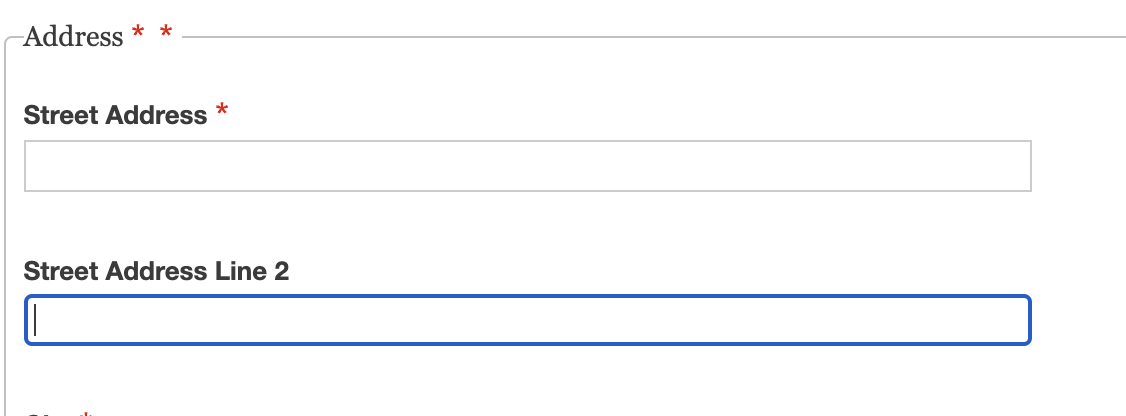
Asterisk is visible but the position is not correct.
Comment #9
komalk commentedLooking into this.
Comment #10
komalk commentedWorked on #8 -
Attached the screenshot of before and after the patch for reference.
Review the patch.
Comment #11
bnjmnmThis patch adds a required marker to every fieldset label, even if it isn't required.
Comment #12
komalk commentedLooking into this.
Comment #13
komalk commentedWorked on #11.
Attached the screenshot of the before & after the patch
1. when the field is required.
2. when the field is not required.
Review the patch.
Comment #14
sulfikar_s commentedHi,
I've applied the patch and it applied cleanly. It works properly.
when there is required field in a group the group will also be shown as required, I'll show the before and after images after the patch apply.
First case,
Before patch - when there is required field in the group,
After patch - when there is required field in the group,
Second case,
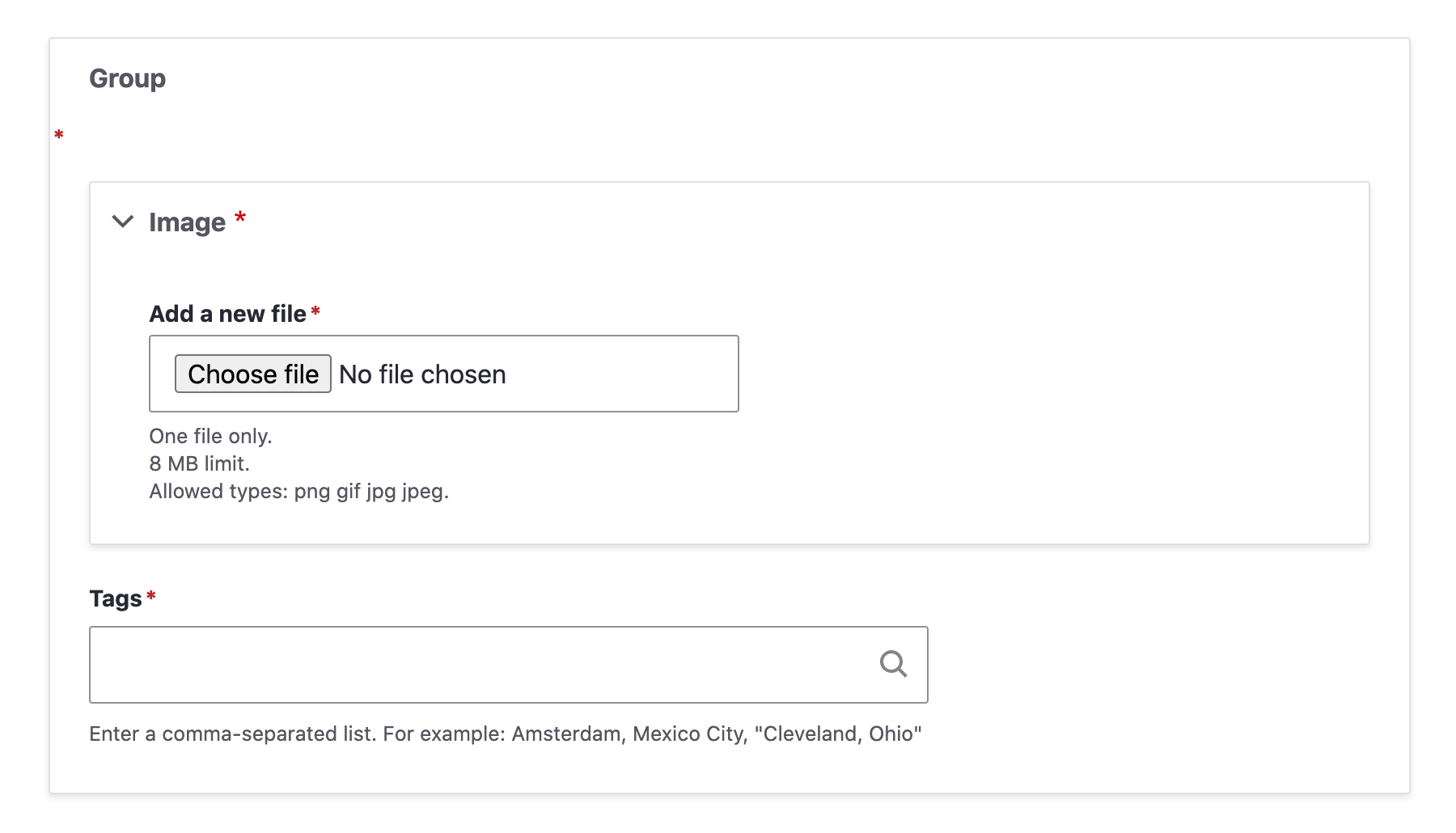
Before patch - when there is no required field in the group,
After patch - when there is no required field in the group,
So RTBC!
Comment #16
anmolgoyal74 commentedunrelated failure. back to RTBC
Comment #18
spokjeRe-uploading
3171835-13.patchso it will be re-tested every 2 days against9.1.x-dev.Currently it's tested every 2 days against
9.0.x-dev.Comment #20
bnjmnmComment #21
bnjmnmSwitching back to NR, the test fail was not related.
Comment #22
spokjeRe-rolled 3171835-13.patch against 9.2.x-dev in MR.
Comment #24
volkswagenchickAdding some tags for DrupalCon NA which is happening April 12-16 virtually.
Copied from summary:
Steps to reproduce
I tagged this issue novice in hopes that a new contributor could work on this, thanks.
Comment #25
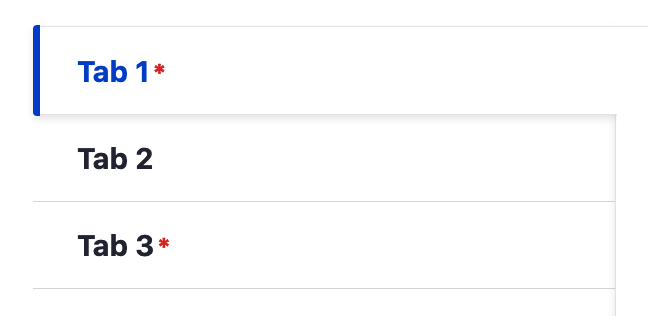
solantoast commentedThe patch in #13 didn't seem to fix the issue for vertical tabs (probably same with horizontal tabs). However, patch #2 works with the tabs.
Vertical tabs before patch:


Vertical tabs after applying patch #2:
Comment #27
acEvery patch after #2 reintroduced the specificity that it was trying to remove. This patch fixes that. The issues exists because the field group module provides a template that removes the classes that Claro is expecting so not really sure this fix is great.
Comment #28
gcbThis is an issue in 8.9.x too, and the patch from #27 is helpful but doesn't apply, so here's a re-roll against 8.9.17.
Comment #29
gcbPatch in 28 is bad. Use this one.
Comment #30
volkswagenchickTagging for DrupalCamp Colorado
DCCO2021which is Sunday August 8.https://2021.drupalcampcolorado.org/contrib-day
This patch can be re-rolled into a Merge Request to make maintainer review easier, thanks!
Comment #31
cedeweyI've tested this with each field group type. The patch did work for the fieldset type. However, all other field group types do not display the red asterisk next to the field group label as expected.
Comment #32
afireintheattic commentedI took another quick pass at this issue, and it also appears that numerous field types are not accounted for when determining the "required" status for the tab. Claro appears to have templates for details, datetime, fieldset, and form-element fields (setting a "required" variable in the template); however, I am not seeing the required element set for other field types, such as entity reference fields. It feels odd to me to have to manually specify every field type at the theme level, as there are myriad field types that the theme couldn't hope to manually account for. Perhaps this logic itself needs to be refactored?
Comment #33
m4oliveiLike @afireintheattic, I think there is more than meets the eye here. It was helpful for me to look at Seven theme and understand how field_group is achieving the required status on the fieldset label.
Here is a screenshot of Seven theme with a fieldset field group, with the relevant classes highlighted:
Note the
form-requiredclass on the<legend>element. Whats imporant to note is thatform-requiredclass is set via Javascript (https://git.drupalcode.org/project/field_group/-/blob/8.x-3.x/formatters...). No Javascript, noform-requiredclass, and no red asterisk. That's suprising that it has to do that in Javascript, b/c if you look at the relavant template in Seven theme (https://git.drupalcode.org/project/drupal/-/blob/9.3.x/core/themes/seven...), it seems like the intention is to have core detect a required state and set aform-requiredclass, but it's not doing that. That leads one to wonder about the value ofrequiredand what it's supposed to mean in that template. According to the Sevenfieldset.html.twigtemplate:Ok, sounds like what we want. Let's go deeper. It appears to be set here https://git.drupalcode.org/project/drupal/-/blob/9.3.x/core/includes/for..., which would imply that
$element['#required']is either not set for the fieldset, or isFALSEeven though we do have required fields that are children of the fieldset. The plot thickens. We must go deeper. But I don't have the time ATM. If I were to guess, I would guess that#requiredisn't allowed (or is ignored come render time) for fieldsets or other group elements. And field group is essentially working around it in Javascript.In the end we need to stick close to Seven markup and styles to get the same result, which means using the patch from #2 / #27, but also adding some fun (not fun) CSS absolute positioning for the legend like Seven does to position things such that the asterisk sits next to the legend text. Or some other clever CSS to position things nicely...
Comment #34
aleixTrying to mark required without JS as @m4olivei says.
Comment #35
ckrinaComment #36
murilohp commentedSince the custom commands failed on #34, I'm uploading a new patch based on #34 with a simple code sniffer fix.
Comment #39
peoriadrupaluser commentedI have applied the patch in #36 and it applied cleanly. It does not however appear to be working for me.
I think the difference is that I am using Conditional Fields as the CSS class is not applied. I will update this when I know more.
Comment #40
murilohp commentedThanks for your feedback @peoriadrupaluser! I'm uploading a new patch based on the previous #36, the idea is to correct the tests from CI/CD.
Comment #41
murilohp commentedComment #42
peoriadrupaluser commentedi am finding that with this patch sometimes I get multiple stars (red asterisk) for field groups. This is the HTML for the field set.
<fieldset class="required-fields field-group-fieldset group-address required js-form-item form-item js-form-wrapper form-wrapper" data-drupal-selector="edit-group-address" id="edit-group-address" required="required" aria-required="true">Comment #43
akhildev.cs commentedversion: Drupal 9.4.x
i applied #40. for me it also gets multiple 'red asterisks'.(works when only using tabs).
Comment #44
cedeweyI've tested the patch using both Drupal 9.3.0 and Drupal 9.4.x and here are my results.
Comment #45
ckrinaComment #47
jschref commentedRunning 9.3.12, I'm seeing the same issues for #40 as cedewey, but have an additional one: nested groups have the required classes, but aren't marked as required correctly.
Comment #48
sauravkashyap commentedI have checked it this issue is already fixed.
Comment #50
smustgrave commentedConfirmed I am seeing the issues in #44.
Appeared the form-required class was being added to both the legend and the span.
Took a shot at trying to remove from the legend.
Comment #51
smustgrave commentedFixed the CI error
Also had to add
to RenderElement as I kept getting this error
372 Cannot unset offset 'options' on array{url: string|null}.
Comment #52
smustgrave commentedComment #53
bbytyqi commentedThe patch in #52 is causing a warning for me when editing some content types.
The file attached (I hope I did this right) adds an additional check for
isset($complete_form[$group]['#type'])that removes this warning.Comment #54
gaurav-mathur commentedApplied patch #53 successfully on drupal version 10.1.x and its looks good to me.
Thank you
Comment #55
sahilgidwani commentedComment #56
xjmThanks everyone for working on this bug.
@bbytyqi, when you update patches, please supply an interdiff. Thanks!
My kneejerk reaction was to ask for test coverage for the issues described in #44 and #47. We might be able to do that with a JS test, but since it's CSS presentation, it's not something we normally add test coverage for. Furthermore, testing for "there aren't two asterisks" would always be fragile. However, we could test the elements' classes.
Did anyone manually re-test for the issues in #44 and #47 with #53?
Finally, tagging for frontend framework manager review, because the changes to the CSS and render arrays both seem a bit questionable. We can manually test the patch in the meanwhile, though.
Comment #57
xjmNW actually, because we can add test coverage that the classes on these various elements are at least correct.
Also another question: We are removing a class from
RenderElement-- seems like a frontend API BC break -- but then only updating the Claro theme. Has anyone tested in Olivero? Stark? Has anyone tested Seven and Bartik on D9? What about contrib themes?Comment #58
jaydee1818 commentedAfter applying patch #53, everything seems to work well, but when I click on a group to expand it, I see the element is focused with a green border as per usual, but I'm also seeing a duplicate red asterisk printing on top of the border. Is this by design or is it a bug?

Comment #60
bnjmnm#58 is not intentional. It's a bug that should be reasonably-easy-yet-satisfying to identify and address so that part can be categorized with the "novice" tag
This also needs tests as mentioned in #57 which wouldn't be novice for unless they'd already had experience writing Drupal tests.
Comment #61
bnjmnmComment #62
sirteatime commentedComment #63
xjmFixing attribution.
Comment #64
recrit commentedThe duplicate red asterisk reported in #58 is not trivial to fix. This patch add styles for ".form-required::after" that conflicts with Claro's styles for ".claro-details__summary:focus::after" which adds a green border around the SUMMARY element. When the DETAILS element is required then Claro adds the "form-required" class to the SUMMARY element. In this scenario, both styles are trying to style the same ":after" element.
The DETAILS element in Claro adds a "SPAN.required-mark" element inside of the SUMMARY element that adds the red asterisk when the DETAILS element is marked as required.
See "core/themes/claro/templates/details.html.twig":
Perhaps the style updates in this patch are not needed?
Comment #65
phernand42 commentedNot sure we can get away from not including the style updates but could something like this work instead (for changes to form.css file)? This would resolve conflict with .claro-details__summary and remove dupe asterisks. I can try and update the patch and test it out.
Comment #66
recrit commented@phernand42 thanks! that worked in my tests.
Comment #67
recrit commented@phernand42 There may still be one caveat with that style. It assumes that the
<span class="required-mark"></span>is present, so it will not work when a JavaScript#statescondition sets the field as required (where the field is using a DETAILS element). In that case, the red asterisk would not show so not a major issue. This scenario feels like an edge case though, so I think that the suggestion in #65 is a good approach.Comment #68
phernand42 commentedThe patch is for 9.5 since I'm still on 9.5 (in the process of updating to 10 now though) but will try and cook one up for 10.1 later today.
Comment #69
recrit commented@phernand42 Thanks! The patch applied cleanly to 10.1.x and 11.x. Attached are the patches for both.
Comment #70
phernand42 commentedSweet! Thanks @recrit
Comment #71
phernand42 commentedComment #72
smustgrave commentedWas tagged for tests #57 which are still needed. Also don't see an answer, unless I'm missing it somewhere, to the question @xjm has #57.
Comment #73
caesius commentedThis code is really enigmatic and should probably be removed. What class is being unset? How do we know the first element actually is the class we're trying to unset? If this is needed then we should be looping over the
['class']array and unsetting the specific item that's causing issues, but it would be better to resolve whatever issues are coming up in some alternative way.I tracked this to #50:
The issues in #44 refer to duplicated red asterisks which have persisted through relatively recent patches but seem to have been resolved by the latest ones.
I'll also point out that this issue has an MR open. We should be working from the MR, not posting patches.
Comment #74
caesius commentedWell, scratch that -- I'm having a lot of trouble getting the MR up-to-date even when following these instructions so I'm just gonna post a patch.
If someone could just nuke the current MR and make a new one that would be very helpful -- I don't think we have enough changes going on here to merit trying to salvage an MR that's stuck on 9.2.x.
Anyway, this patch is identical to the above but removes the code to unset a class. I haven't tested this thoroughly but it seems to work when using horizontal tabs.
If there are any issues we should try to resolve them in CSS, or if the issue is the class we were previously trying to remove then we should:
- Document what CSS class is actually causing the issues
- See if we can resolve the issue further up the pipeline by avoiding adding that class in the first place (if CSS isn't an option)
Is it safe to assume that the problem class was
.claro-details__summarywhich is now wrapped in:not()in the CSS?Comment #75
gauravvvv commentedRerolled the patch for 11.x
Comment #76
roshni27 commentedComment #77
caesius commentedDoesn't this still need tests? We're no longer removing a CSS class but I believe we still need to check whether affected elements are getting the
requiredclass.Comment #78
recrit commentedAfter reviewing some more placements, the removal of the class with the following code is still needed for FIELDSET elements.
Patches 74 and 75 removed this piece of code.
Patch 69 still has the code to remove the class.
The class that it was removing is "required-fields" from the FIELDSET. See markup comparison below.
Without removal of the class:
The FIELDSET has the "required-fields" class which causes the LEGEND to get the "form-required" class.
This results in:

With removal of the class:
The FIELDSET does NOT have the "required-fields" and the LEGEND does NOT have the "form-required" class.
This results in:

Comment #79
recrit commentedThe attached patches add the class removal back to the patch, but only removes the "required-fields" class.
Comment #80
caesius commentedSo am I reading the code correctly that we are:
- Adding
#requiredto field groups, which in this context is only for the purpose of ensuring it gets.form-requiredfor the red asterisk (rather than validation considerations)- Checking whether the field group we just made
#requiredis a fieldset, in which case we remove.required-fields, even though it only had that class because we made it#required?- Ensuring
.form-requireditems get the red asterisk, unless it specifically also has.claro-details__summaryThis all seems backwards to me. I think that we should ensure that we are only adding
#requiredon items that actually need it, e.g. tabs, and ensure the PHP code is completely agnostic to the CSS. The current patch kinda seems to be taking two different approaches in PHP and CSS to tackling fundamentally the same problem (duplicate asterisks).Also, am I the only one who noticed that the only way to test this is to install the Field Group contributed module? Is there no way to confirm the issue and test it just in Drupal core? I skimmed and didn't see a discussion on whether this is something that should be addressed in the contrib module or in core. Is this actually an issue with core that happens to be most visible when using a popular contrib module?
Comment #81
recrit commented@caesius I agree that the RenderElement processing seems a bit backwards. This re-roll was simply keeping the intent of the original patch which is the only one that worked in this scenario.
This is not TRUE. The "required-fields" is already there, not because the patch sets "#required".
That said, I finally tracked down the "required-fields" class and it is being added by field_group contrib module's
Drupal\field_group\FieldGroupFormatterBasewhen using "Mark group as required if it contains required fields". This class is then used by "field_group/formatters/fieldset/fieldset.js" to add the "form-required" class to the legend.This part of the patch should be fixed in the "field_group/formatters/fieldset/fieldset.js" and "field_group/formatters/details/details.js". There could be an exclusion if there are any legend or summary child elements that contain a "form-required" class.
Summary of changes:
RenderElement: if (isset($settings['options'])) {- This was added in #51. I do not get the error when I remove this change, so this might have been unrelated to the actual issue.RenderElement: $complete_form[$group]['#required'] = TRUE;- This fixes the processing of the group element (details or fieldset) so that it is also marked as required and gets the correct "form-required" classes in the claro templates. Not sure if this is the best place for this fix though.Thoughts?
Comment #82
caesius commentedI think what we need more anything else is a way to test these changes in Drupal core without using the Field Group module at all, e.g. render array code that could be placed in a custom module or theme to render all the "types" of field groups that come with Drupal. Anything left over should be addressed in the Field Group module.
Also, using patch #74, I can avoid getting a "rogue" asterisk on a fieldset simply by unchecking "Mark as required" for it, which still allows the "required-ness" of fields it contains to percolate up to parent field groups.
So, for each of your suggesstions:
Yes, for now, assuming we don't find some better way of accomplishing this without excluding such a specific CSS class.
I agree that this needs to be removed, as
unset()doesn't raise an error if a nonexistent array key is unset (I just tried it on PHP 8.1) and wrappingunset()in an apparently unnecessaryif(unset())isn't a code standard in Drupal core.Again, we'll keep this for now if we don't find a better way.
Definitely.
Comment #83
keshavv commentedI encountered a similar issue with the date range field, and the #75 patch resolved the issue for me.
Comment #84
smustgrave commentedClosed as duplicate
Comment #85
jmaguniaWe're using the Tabs field group and have "Mark group as required if it contains required fields" checked.
On the edit page there are now 2 red asterisks in the tab that has a required field. Not sure if that is expected behavior.
Comment #86
caesius commented^ That is a known bug with the latest patch as noted in the IS "Remaining Tasks" section.
I also noted a workaround in #82 for fieldsets; I don't recall if it also works for tabs:
Comment #87
anicotoComment #88
xjmActually, I'm removing the novice tag from this issue -- given the recent discussion, this is not currntly in a state where further screenshots or manual testing are helpful; none of the remaining tasks as listed in the issue summary are really novice when we're stuck in a cycle of trying to fix one bug without introducing a different one. Thanks!
Comment #89
gcbI have re-rolled the patch from 79 against 10.3.x.
Comment #90
caesius commentedI'm seeing duplicate red asterisks on tabs after applying the above patch. There's a workaround I'll describe below.
This issue was definitely left in a sort of limbo, probably due to the need to find a way to test this solely in Drupal core and not rely on the Field Group module, but I think #74 was the previous "best fit" patch for this issue, rather than #79.
To recap, in #74 I removed a block of code that I found unnecessary for reasons I described in more detail in #80. #79 added the block of code back in due to a misunderstanding of where a rogue asterisk was coming from (it was Field Group's fault, not Core's), and I described a workaround for it in #82:
So, attaching a 10.3.x reroll of #74. If you see duplicate red asterisks on tabs then you probably need to apply this workaround regardless of which patch you use. The previous patch does seem to work for specifically preventing "fieldsets" from duplicating asterisks, but I'm adamant that adding
.required-fieldsto all field groups only to selectively remove them right after is the wrong approach.Comment #91
luenemannThis still needs tests and a new merge request for 11.x could be created...
Comment #93
nayana_mvr commentedComment #94
nayana_mvr commentedUnable to create new branch from 11.x Getting the error saying "Failed to create branch '3171835-': invalid reference name '11.x' " . Changed version to check if it is possible to create branch from 11.0.x but faced the same error. So Changing it back to 11.x.
Comment #95
nayana_mvr commentedComment #96
nayana_mvr commentedI verified the issue with patches of #89 and #90 with 2 scenarios : Tabs vertical and Tabs horizontal. Both the patches fixes the issue for Tabs vertical but for Tabs horizontal, 2 asterisks are displayed. Please see the screenshots below:-
Vertical:

Horizontal:

I noticed that for vertical tab, template is rendered from core module and for horizontal tab template is rendered from contrib module field group that gets a
<span class="required-mark"></span>with::afterafter applying the latest patch which results in 2 asterisks.Vertical:

Horizontal:

In both templates
.form-requiredclass is correctly added in the label element. But the style corresponding to the class is not available. So either we need to do vertical tab style fix from core and horizontal tab style fix from contrib level or we should find a common solution in core or contrib to fix both but in that case I think both templates should be rendered from same module (core or contrib).I have attached the ticket as related ticket here which addresses the same issue in contrib module field group.
Comment #97
caesius commentedDuplicate asterisks are a known issue, as is the fact that this bug seems to mainly if not exclusively manifest when using the Field Group module and we need a way to replicate the issue in core. These are noted in the issue summary in the Remaining Tasks section.
However, I believe this issue was originally created in and remained a core issue because there is at least some degree to which Claro's code does not make sense and makes it more difficult than necessary for Field Group to do its thing. The fact that this issue is four years old and has not been fixed within the Field Group module with its hundreds of thousands of installs says as much.* As does the involvement of frequent Drupal core contributors in this issue, none of whom seemed to question whether this should be fixed in Field Group -- including xjm in #56, who funnily enough moved the linked issue to the Field Group queue. (also funny how these issues keep getting tagged as "Novice" issues that'll be fixed at various Drupalcons...)
So what someone needs to do is actually look at what Field Group does against what Claro is doing and see which one is behaving incorrectly. If Claro is spitting out code that is needlessly hard for modules to work with, then it should be fixed in core. Otherwise the issue should be tossed over to Field Group and kept there.
*alternatively, everyone just forgot Field Group isn't actually a core module...
Comment #98
nayana_mvr commentedI created 2 different patches: one for vertical tab (core module) other for horizontal tab (field group contrib module version 8.x-3.x). This is the solution I mentioned in my previous comment which may not be a correct method. I haven’t tested it with all the cases listed in #44 but this works for Tabs. Attaching screenshots for reference.
Vertical:
Horizontal:
Comment #99
nayana_mvr commentedPatch didn't get attached in previous comment. Attaching it again.
Comment #100
rick bergmann commentedThe patch in #90 works for me on Drupal 10.3. I had to apply the config workaround to remove the duplicate asterix, however there is a scenario that doesn't work.
In 1 of my fieldgroups I have a fieldset which contains a required field. In that case there was no duplicate asterix and I had to keep the
Mark group as required...setting enabled.So the result is I have 2 field groups with
<span class="required-mark">and 1 field group with<span class="form-required">which is visually noticeable.Comment #101
carolpettirossi commentedI've tried applying patch #99 - 3171835-98-horizontal-tab.patch and it did not solve the issue for me.
I have a required field in a fieldset that is on a horizontal tab:

Applying patch #90 gives me duplicated red asterisks.
Comment #102
maskedjellybeanHey all, we have a fix for missing required asterisks in horizontal and vertical tabs in Claro in the works in field_group 4.x:
https://www.drupal.org/project/field_group/issues/3160987
It is really the same solution as you have in #99.
Copying and pasting my comment from that issue:
"I was also looking at https://www.drupal.org/project/drupal/issues/3171835 which is marked as related. Looks to be trying to solve the same issue but in Claro/core. My thinking is that since Field Group provides horizontal tabs it should be responsible for making sure they work in core themes. Technically vertical tabs are part of core so I suppose we shouldn't really be fixing them, but since we can do it so easily I think we should.
However I'm seeing that other types of field groups don't have a required asterisk either, like Details and Fieldsets. These are such basic HTML elements that it seems to me that core should be responsible for making sure they have correct styling. Even if we wanted to fix them in field_group, there isn't enough markup to do it. You can see that summary.form-required already has an ::after pseudo element, so we can't add the asterisk without breaking styling:

"
That said, I'm now realizing that
.form-requiredis only added to<detail>because of field_group. In that case maybe all of this is the responsibility of field_group. But then again, it's not possible to style it without modifying a template provided by Claro...Comment #103
maskedjellybeanI fixed missing required asterisks in
<details>and<fieldset>field groups in Claro over on the field_group issue. See my comment: https://www.drupal.org/project/field_group/issues/3160987#comment-16119890Comment #104
kentr commentedThe asterisk needs to be hidden from the aural interface. Hidden text with the contents "(required)" may also be needed.
For more information, see #2921627: Do not use a CSS-only required marker in forms per WCAG 2.0.
A followup for Gin may also be needed. Related: #3566851: [PP-1] Avoid announcing the star for required fields in the aural interface .
Comment #105
kentr commentedActually, this might duplicate #2921627: Do not use a CSS-only required marker in forms per WCAG 2.0.
It looks like they addressed
fieldsetanddetails.Comment #106
kentr commentedComment #108
quietone commentedThe Claro theme was approved for removal in #3576460: [policy, no patch] Deprecate and remove Claro.
This is Postponed. The status is set according to two policies. The Remove a core extension and move it to a contributed project and the Extensions approved for removal policies.
The deprecation work is in #3576668: [meta] Tasks to deprecate Claro and the removal work in #3584638: [meta] Tasks to remove the Claro theme.