

File upload support has been added to JSON:API. This makes JSON:API as capable as Drupal core REST and also adds a new feature above and beyond core REST.
What does that mean?
JSON:API now:
- Supports
POSTing a file's contents - Supports sending file data as a binary data stream via the
Content-Type: application/octet-streamrequest header.- This allows uploads of an arbitrary size, including uploads larger than the PHP memory limit.
- Ensures that settings/validation constraints of the field to which the file is being uploaded will be respected.
- Supports naming the file using the
Content-Disposition: file; filename="filename.jpg"header
To use JSON:API's file uploads, you must choose to implement one or both of two different "flows":
- Flow 1 requires only a single HTTP request, but will only work when the host entity already exists.
- Flow 2 requires two HTTP requests but will work under all circumstances.
Flow 1 (single HTTP request; host entity must already exist)
You must send a POST request, like so:
POST /jsonapi/node/article/{uuid}/field_image HTTP/1.1
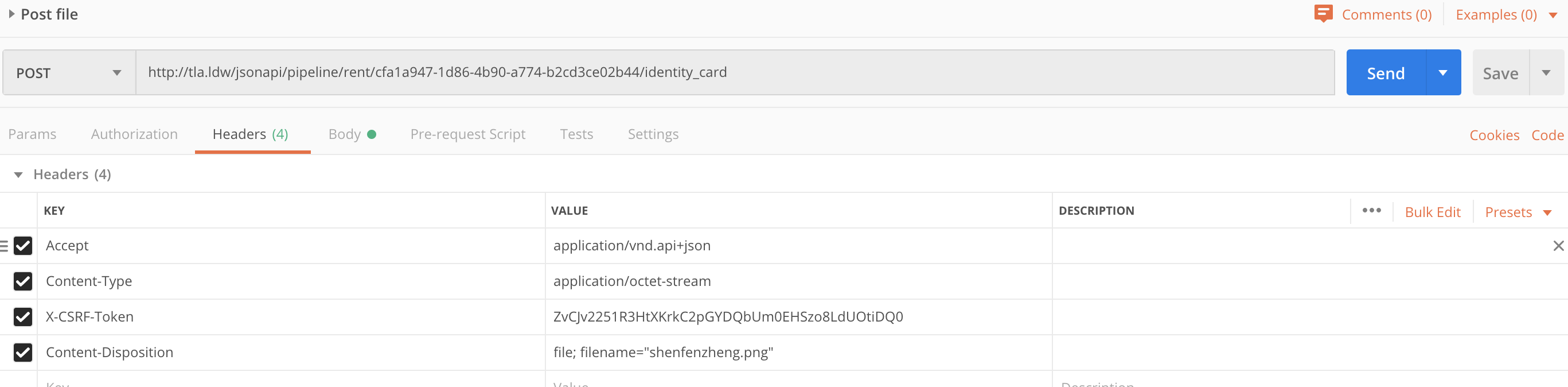
Content-Type: application/octet-stream
Accept: application/vnd.api+json
Content-Disposition: file; filename="filename.jpg"

[… binary file data …]
The response for this request will be the JSON:API response for a newly created file entity, as if you were to request GET /jsonapi/file/file/{UUID of new file entity}.
Flow 2 (two HTTP requests; no restrictions)
Step 1
You must send a POST request, like so:
POST /jsonapi/node/article/field_image HTTP/1.1
Content-Type: application/octet-stream
Accept: application/vnd.api+json
Content-Disposition: file; filename="filename.jpg"

[… binary file data …]
The response for this request will be the JSON:API response for a newly created file entity, as if you were to request GET /jsonapi/file/file/{UUID of new file entity}
Step 2
To ensure that Drupal does not automatically delete this newly created file on cron, you must "use" the file by creating an entity reference to it. JSON:API supports both POST and PATCH on entity references if the entity already exists. Typically, you will want to use POST unless you intend to replace any already referenced files. In both cases, you will need to parse and extract the UUID of new file entity from the response to your first request.
POST /jsonapi/node/article/{uuid}/relationships/field_image HTTP/1.1
Content-Type: application/vnd.api+json
Accept: application/vnd.api+json

{
  "data": {
    "type": "file--file",
    "id": "{UUID of new file entity}",
    "meta": {
      "description": "The most fascinating image ever!"
    }
  }
}
When the entity does not already exist (this will be the case when the file is needed for a required field), you will need to create the entity using a POST:
POST /jsonapi/node/article HTTP/1.1
Content-Type: application/vnd.api+json
Accept: application/vnd.api+json

{
  "data": {
    "type": "node--article",
    "attributes": {
      "title": "Dramallama"
    },
    "relationships": {
      "field_image": {
        "data": {
          "type": "file--file",
          "id": "{UUID of new file entity}",
          "meta": {
            "description": "The most fascinating image ever!"
          }
        }
      }
    }
  }
}
Wondering about something?
If you wonder why it is designed to work this way, see the very detailed issue summary of #1927648: Allow creation of file entities from binary data via REST requests, which explains every key design decision!
And, as always, feel free to open a support request.
How to send binary data with curl?
curl https://example.com/jsonapi/node/article/field_image \
   -H 'Accept: application/vnd.api+json' \
   -H 'Content-Type: application/octet-stream' \
   -H 'Content-Disposition: attachment; filename="kitten.jpg"' \
   -H 'Authorization: Basic …………' \
   --trace-ascii debug.txt \
   --data-binary @/path/to/kitten.jpg

Comments
I tried converting the base64
I tried converting the base64 for the image and when I attached the body post : [..binarydata..] it creates a blank image on the rest?
and no documentations are provided on what binary data should we provide?
File Upload using JSON:API
Use function to decode the Image
=> Use base64_decode to decode the Image if it is base64 Encoded Image
Can also upload binary data
Convert Image into binary and then upload.
Get a Response 500
I tried to upload image files into an image filed using the JSON API. However, I get an error (response 500) when I try to do Step 1 of Flow 2. Below is my python code. Where did I do wrong? Really appreciate some help here. I am using JSON API Version: 8.x-2.4.
Update Allowed Headers
Did you remember to update the allowed headers in your CORS config to include 'content-disposition'? That was my issue when I first tried to upload files. See my config below.
What is "binary file data"?
It seems that that many people are equating "binary" with "base64" (in this thread and on Slack). These are not the same thing:
binary !== base64.You do not need to convert your data at all before sending it to Drupal.
The file sent, byte-for-byte, exactly as it sits in your filesystem. You do not need to encode the file. Just send it "as-is".
If you're working in JavaScript, this typically means that you should be setting the
dataattribute of your request to aBloborFileobject.Here is an example of uploading a file using the browser's
fetchAPI with a file form input. (this example is not using Drupal, but it does demonstrate how to add "binary file data" to a request).Use js FETCH function reather than AJAX
Many thanks. I've been using AJAX to upload file but couldn't achieved. Then I followed the link you shared, finally with JS FETCH function solved the problem.
Thanks
@gabesullice, thanks for this very simple explanation and clarification. It can be confusing for those who are used to using base64 strings.
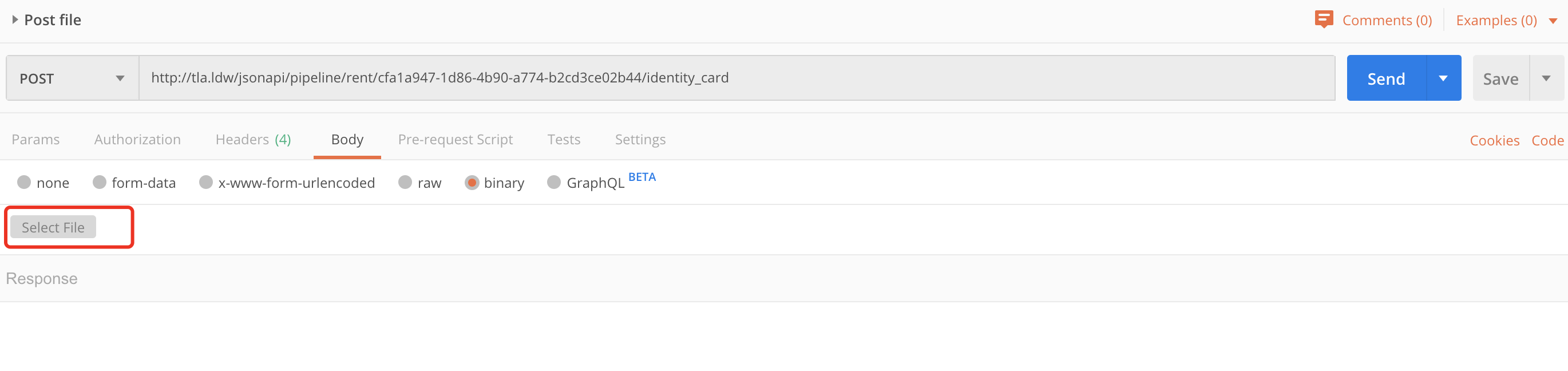
When testing with Postman, select "binary" on the Body tab and select the file to upload.
These two images show how to use postman to test this
These two images show how to use postman to test file upload by JSON:API
filename in request header is mandatory?
Is it mandatory to pass the filename in the header for Content-Disposition? What if we are uploading a file and we need the filename should be picked up from the uploaded file instead of header filename? How that can be achieved?
File Upload using JSON:API
1. Send a POST request using POSTMAN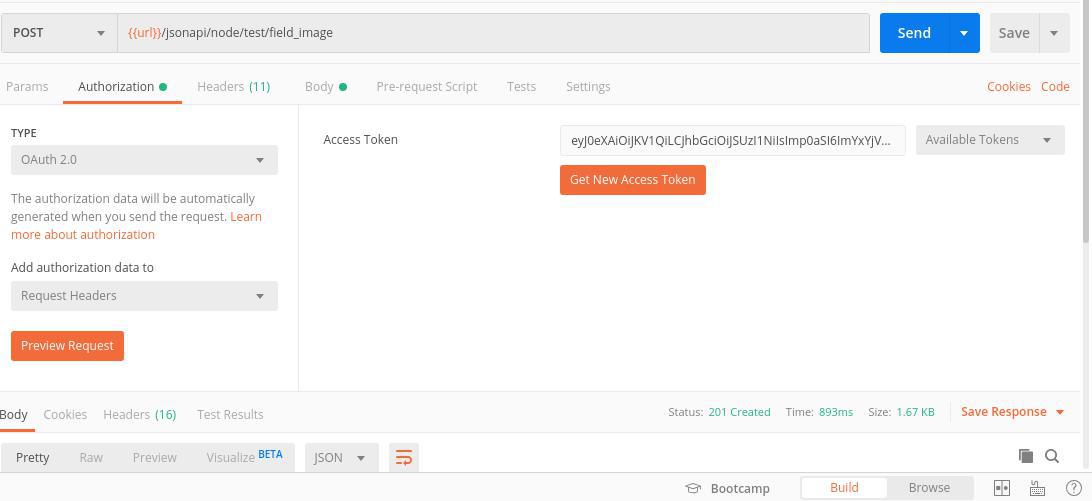


POST /jsonapi/node/article/field_image
[example:{{url}}/jsonapi/node/test/field_image]
1.1. In Authorization tab
Select Type [example: OAuth 2.0 ]
Enter Access Token [example: eyJ0eXAiOiJKV1Qi.....]
1.2. In Headers Tab
Add the following key and value
1. Content-Type application/octet-stream
2. Accept application/vnd.api+json
3. Content-Disposition file; filename="Testing1.jpg"
1.3. In Body Tab
Select Binary and select file with .txt
=> sample.txt [Image file converted to binary or base64]
If success you should get a status message 201 Created
2. Get newly created file entity
GET /jsonapi/file/file/{UUID of new file entity}
[example:{{url}}/jsonapi/file/file/56256e3a-a5c1-46fd-aac7-a1cad1b51e97]
If exists you should get a status message 200 OK
3. Create the entity using a POST and add the file required for image field

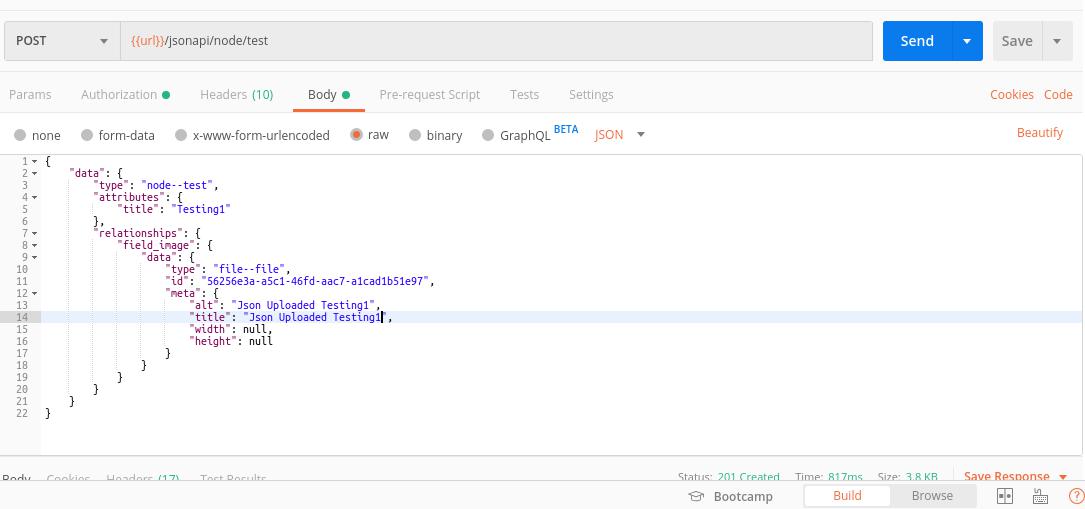
POST /jsonapi/node/article
[example:{{url}}/jsonapi/node/test]
3.1. In Authorization tab
Select Type [example: OAuth 2.0 ]
Enter Access Token [example: eyJ0eXAiOiJKV1Qi.....]
3.2. In Headers Tab
Add the following key and value
1. Content-Type application/vnd.api+json
2. Accept application/vnd.api+json
3.3. In Body Tab
Select raw and add the following
{
"data": {
"type": "node--test",
"attributes": {
"title": "Testing1"
},
"relationships": {
"field_image": {
"data": {
"type": "file--file",
"id": "56256e3a-a5c1-46fd-aac7-a1cad1b51e97", {UUID of new file entity}
"meta": {
"alt": "Json Uploaded Testing1",
"title": "Json Uploaded Testing1",
"width": null,
"height": null
}
}
}
}
}
}
If success you should get a status message 201 Created
4. If the text file uploaded is base64 encoded, Image will not be displayed properly
Create a custom module with hook_node_presave function to decode the Image
=> Use base64_decode to decode the Image
Profile picture is not possible
The user can't upload a profile picture.
The endpoint "jsonapi/user/user/user_picture" needs "administer users" permission but we don't want to set this permission to all users...
No response from my friend Google, it seems that nobody use the "user_picture" field with a headless Drupal site =)
Does somebody know how to achieve this properly ? Thank you !
Example for doing this with Drupal http_client?
Is there an example for doing this with drupal http client? Especially the file upload part.
I am trying to do this, but always ending up with
No route found that matches "Content-Type: application/octet-stream" in Drupal\Core\Routing\ContentTypeHeaderMatcher->filter().I've done this with postman and Unirest PHP successfully like described in the example but struggling with the Drupal http client.
it's working
it's working with drupal http client as well. There was an error in my implementation.
Flow 1 doesn't work for multiple values fields
The "flow 1" solution works great if the file field has only one value.
For multiple values field, only the last uploaded file gets added to the host entity
Upload file to subdirectory
Is there any way to ensure the uploaded file ends up in a particular directory?
Upload and delete file using JSON API With Drupal 9
In this video, we will explain how to upload and delete the file using Postman Platform and JSON API module for Drupal 9.
There are two flows to upload a file the first flow requires only a single HTTP request the second requires two HTTP requests, which are used in this video.
https://www.youtube.com/watch?v=6WQuk5TfRc8
Upload image file with Flutter Dart Language to Drupal jsonAPI
Hi,
The following snippet code explains how to upload an image file with Dart language to Drupal using JSON API module
Example 1
Example 2 with upload progress
Thank you so much for your attention and participation.
Add metadata (string) & image file (data-binary) in 1 or 2 curl
I am doing the following with the R language:
This runs something similar to this in bash :
curl -silent --user myuser:mypassword --header Content-Type:application/octet-stream --header Accept:application/vnd.api+json --header 'Content-Disposition:file;filename="the_image_file.jpg"' --data-binary @/tmp/RtmpSSAuJh/file1095b536fa35e --request POST https://the.server.ip.address:thePortNumber/jsonapi/node/article/the_article_uuid_here_is_9e7f3e8d-6062-451e-bd5c-ec19f8b4463c/field_inline_imagesAs I manage to get a predictable file path for the images, before uploading many images for an article I upload the article with src image links to the predicted file paths. This works well, except that when I open the article to modify it, it says the images do not have an alt (alternate) value for accessibility, so I cannot save subsequent changes to the article without adding this for each image, manually.
Is there a way to add (with curl) the "alt" tag attached to the uploaded images ? (not the alt="" in the source of the article). Could be in the same curl or, if not possible, in a second curl command (maybe as PATCH?). Thanks for any hint!