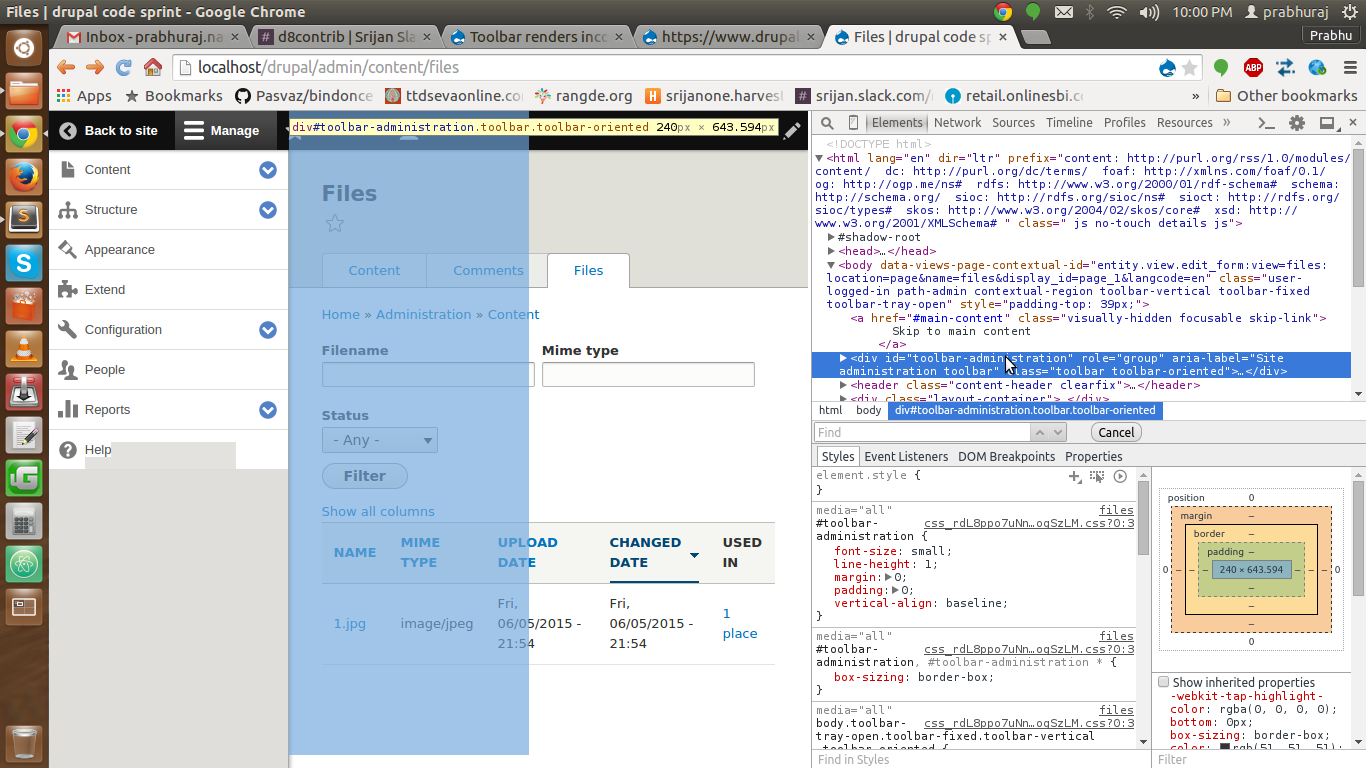
When using the toolbar with a page that puts the HTML class 'contextual-region' the element, the toolbar renders incorrectly.
It places de toolbar DIV on top of the content area ,making it impossible to click anything underneath.
It's because 'contextual-region' triggers CSS that makes the body 'position:relative'. The 'position:absolute' of the toolbar is now relative to the body.
- How to reproduce:
Upload a file and go to the files overview page (admin/content/files). You won't be able to click the uploaded file.
- Possible solutions
1. add CSS: body.contextual-region{position:static}
2. Don't add the 'contextual-region' class to the body. (it's not a contextual region in the end).
3. Don't use {position:absolute} in #toolbar-administration


Comments
Comment #1
wim leersComment #2
nuezThere are more CSS issues, it doesnt make sense to treat them separately. We could possibly make this a duplicate of:
https://www.drupal.org/node/1663198
Comment #3
wim leers@nuez: it is easier to get many incremental patches in because they're easier to review, than one enormous rewrite patch.
Comment #4
nuez@Wim Leers, ok.
In the end I've chosen the first approach. The patch is a simple fix: add
body.contextual-region{position:static}to contextual.module.css.The patch applies to the contextual module, not to the toolbar.
That is because, IMHO, the body tag should never get 'position:relative', even though it has the class 'contextual-region', as it complicates absolute positioning to the browser window. The fact that toolbar is not behaving as expected, is therefore an issue caused by contextual.
But I'm not confident enough, to change the 'component' of this issue, nor to say if this is the right approach, but I'll submit the patch for you or someone else to review.
Comment #5
wim leersI'll ping Lewis Nyman for a review.
Thanks! :)
Comment #11
lewisnymanhmm, I'm not really a fan of directly styling the body tag either. It could cause all kinds of potential problems with custom themes that we don't anticipate. Is there a way of preventing that class being applied altogether?
If not, then I have one suggestion to make to the current solution:
As static is the default value for position, we can simplify this but just changing the
.contextual-regionto.contextual-region:not(body)Comment #12
nuezWill try and figure out where the class comes from, today or tomorrow.
About the :not selector: I considered that, but the not selector doesn't have support for older IE. But now I see that D8 won't support IE 8 anyway so your solution would indeed be better.
Comment #13
manjit.singhIf we can add css as according to this then i guess problem can be solved :)
Comment #14
wim leersGood point, it'd be even better to not ever apply the
contextual-regionclass to the body. I didn't realize you were encountering this with just D8 core!Then this is definitely a bug in
core/modules/views/js/views-contextual.js, which makes this a JS bug.Comment #15
nuezThe issue has indeed to do with views-contextual.js.
The JS file looks for contextual links (rendered by $title_suffix), and then traverses through it's ancestors until it finds the element that holds both the contextual links ($title_suffix) and the view to which they apply. When the ancestor in common has 'position:relative', the contextual links will be positioned relative to the view.
Seven renders the $title_suffix in the header, completely separated from the main content DIV, so the closest shared ancestor it finds is
<body>. The class applied to body breaks the toolbar and makes body {position:relative} which we don't want.Bartik renders the $title_suffix in the same region as the content, so it finds an ancestor that is not
<body>, but a child DIV of body, so there is no problem.The following solutions occur to me:
1. exclude
<body>in the selector in views-contextual.js. The contextual links of views (with display:page) won't work if<body>is the ancestor, so they won't work in Seven.2. Put page.html.twig from Seven in a wrapper DIV, so that div becomes the ancestor and the contextual links work again.
3. Add a wrapper to html.html.twig {{page}} - this would avoid this problem for any custom theme made (unless html.html.twig is overridden)
4. Allow body to have contextual-region and fix the toolbar in another way.
Patch submitted is a combination of 1 and 3: avoid body being the shared element, both in JS and in html.html.twig.
The JS fix is necessary: In case someone wants to override html.html.twig in a custom theme it won't break the toolbar.
The html.html.twig fix is necessary to correctly render the contextual links for Views that have contextual links enabled, such as admin/content/files.
Comment #16
nuezComment #17
nuezClassy will need to be changed too...
Comment #21
lauriiiI guess the reason for the high amount of fails is missing {{ page }}
Comment #22
nuezStupid typo, fixed patch
Comment #23
manjit.singhComment #24
manjit.singhGreat... Thanks nuez :)
Now we just need a before/after screenshots :)
Comment #25
manjit.singhComment #26
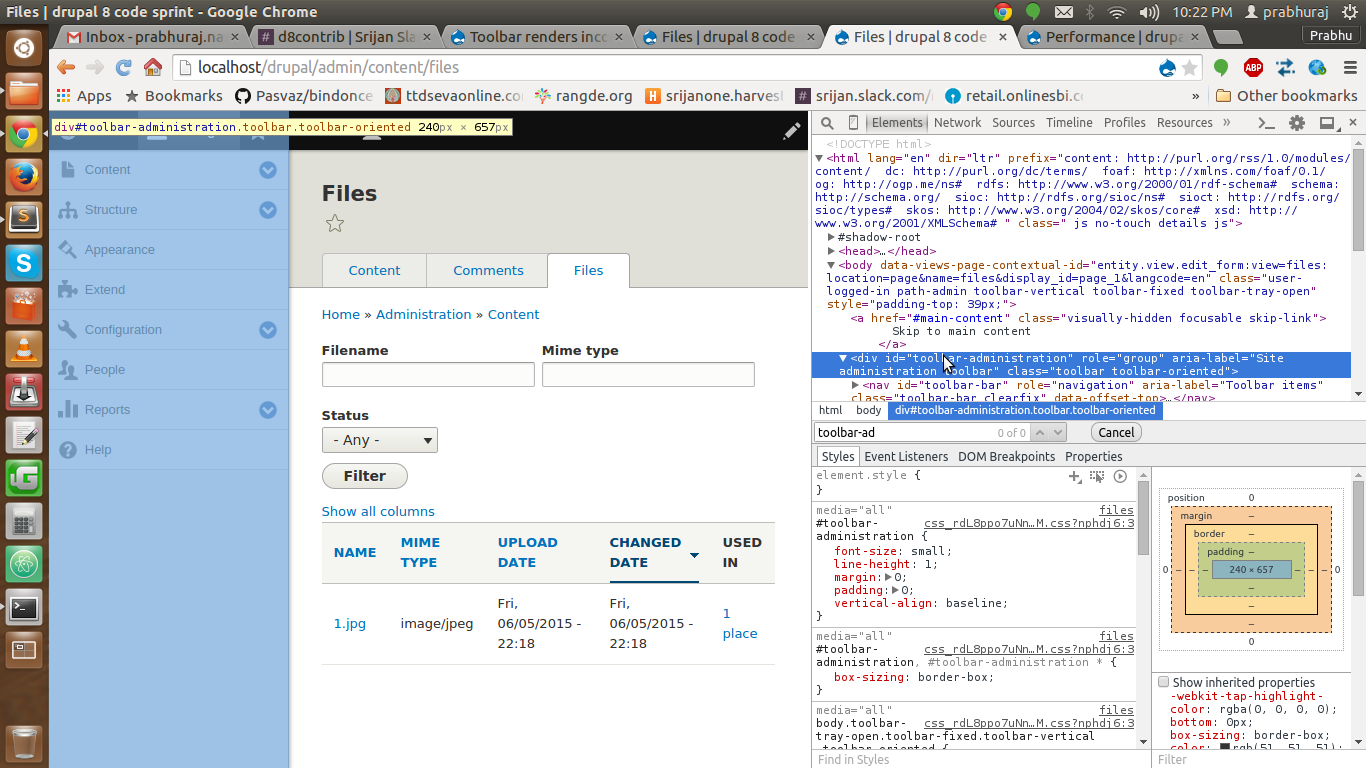
prabhurajn654 commentedstep 1 : patch downloaded fix-contextual-region-class-being-added-to-body-2494235-22.patch
step 2 : following screenshot describes that
step 3 : now we can see in below image after applying patch,
Before
After
Comment #27
lauriiiI'm not sure about adding page-container div only for this :/
Comment #28
nuezMe neither...
We can just apply the javascript fix, but that means that contextual links on views with display 'page' won't show in Classy and Seven.
We can change the approach in views_contextual.js but who knows what kind of other issues we might cause.
Happy to hear suggestions.
Comment #29
davidhernandezDefinitely not a fan of this.
As solution #2 points out, it is not a contextual region, so it shouldn't be getting the class. However, I don't think adding wrapper divs in the html template is a good way to do that. If that is necessary, it may be that the JS logic isn't as flexible as it should be.
Comment #30
lewisnymanShould we really be adding this div into Stark? Is it required for functionality?
Comment #31
idebr commentedThis issue was reported earlier in #2446663: Toolbar "covers" admin/content/files table in Seven. I have contributed a patch with a different approach in that issue.
Comment #32
mgiffordComment #34
dawehner#29 seems to be still true, so back to needs work
Comment #35
prabhurajn654 commentedComment #44
pameeela commentedThanks for reporting this issue. We rely on issue reports like this one to resolve bugs and improve Drupal core.
As part of the Bug Smash Initiative, we are triaging issues that are marked "Needs screenshots".
This appears to be a duplicate of #2446663: Toolbar "covers" admin/content/files table in Seven which has been fixed, so I'm marking this "Closed (duplicate)".