This module makes a slideshow out of field collection items using any of a selection of slideshow libraries.
It renders the field collection as slide-item elements for specified slider libraries, generating a block that can be used anywhere. The 4 slider libraries currently available are listed below and we aim to use more sliders in the future.
How it works
Consider you need 5 slideshows in different pages.
- Create a content type: Let's call it "Slideshows Configuration Page"
- Add a Field Collection Field with field_slide1, field_slide2, field_slide3, field_slide4 and field_slide5
- Configure each field_slideX in field_collection admin page.
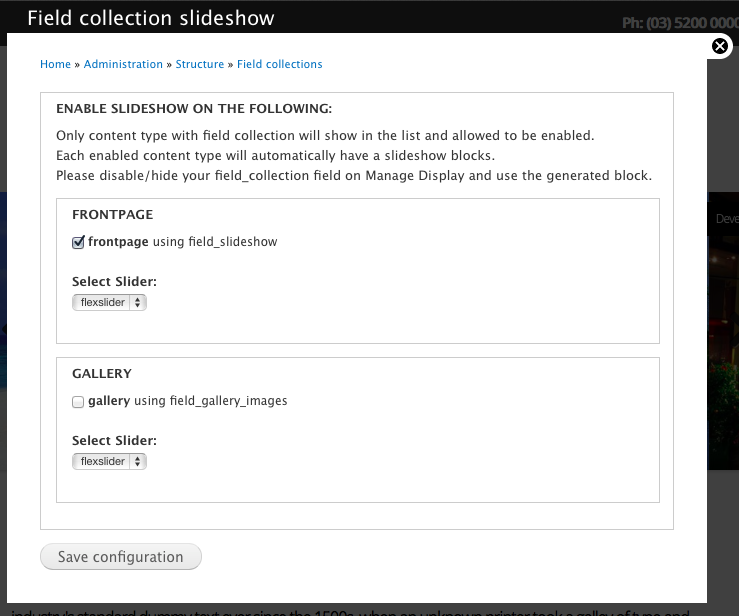
- Go to Field Collection Slideshow and enable them by ticking the checkbox which field_collection field you want to enable.
- You will have automatically 5 blocks that you can use anywhere each is already a slideshow that can use flexslider or fullpage JS library.
Advantages to using field collections for slides
Using this module makes it easier for site admins to edit and maintain slideshows as part of page content.
Scenario 1 - A single page has a single slideshow (eg home page)
A field collection can be used on a content type for a home page or landing page, if this module is used then any node of that type will have a slideshow.
- Easy for site admins to Add and Remove slides (field collection items)
- Easy to Sort the slides
- Easy to edit the slideshow inline with editing the other page content
This is much easier than the alternative of using a separate content type for slides that you have to add one by one as separate nodes.
To create a slideshow to be used only for specific page (i.e. home page), disable the field_collection on Manage Display and assign the generated slideshow block to the appropriate region.
Scenario 2 - You want to create multiple slideshow blocks that will appear across various pages on your site
If you need multiple slideshow blocks like you might on product sites, news sites, or portfolios, you could use this module to create 5 field collections in a single content type, then create a node and populate your field_collections, then go to admin and click the field_collection that you want to enable and you will have the slideshow blocks ready to attach anywhere.
- Easy for site admins to Add and Remove slides (field collection items)
- Easy to Sort the slides
- Easy to edit the various slideshows from a single edit screen
Scenario 3 - One-page website
You can create a single node containing multiple field collections, and each field collection can be set to display as a full-screen slide with this module. This effectively creates a simple one-page site where each frame is easily editable, sortable etc.
Choose your slider
Another advantage is that this module connects with various slideshow libraries so you can choose which one you want to use to suit the effect you need.
Requirements
You need at least one of the slideshow libraries currently supported:
Similar Modules
- Views Slideshow - A very good module but only uses the default JQuery slide feature and it is hard to manage if you have multiple sets of slideshows to make.
- FlexSlider Field Collection - using FlexSlider only as a field formatter, so it requires Views and block placement.
- Field Slideshow - using jQuery Cycle and serves as a formatter, so it requires Views and block placement.
.
To Do List
1. Add more Slider Library support:
2. More control over specific Sliders
Link to sandbox: https://www.drupal.org/sandbox/acausing/2291569
Git clone: git clone --branch 7.x-1.x http://git.drupal.org/sandbox/acausing/2291569.git field_collection_slideshow
Reviews of other projects



Comments
Comment #1
PA robot commentedThere are some errors reported by automated review tools, did you already check them? See http://pareview.sh/pareview/httpgitdrupalorgsandboxacausing2291569git
We are currently quite busy with all the project applications and we prefer projects with a review bonus. Please help reviewing and put yourself on the high priority list, then we will take a look at your project right away :-)
Also, you should get your friends, colleagues or other community members involved to review this application. Let them go through the review checklist and post a comment that sets this issue to "needs work" (they found some problems with the project) or "reviewed & tested by the community" (they found no major flaws).
I'm a robot and this is an automated message from Project Applications Scraper.
Comment #2
miroslavbanov commented(Not a review)
There is also the https://www.drupal.org/project/flexslider_field_collection module, which may be duplicate to yours. You should add this to the "Similarity" section in the summary.
Comment #3
acausing commentedComment #4
acausing commentedComment #5
acausing commentedChanges done: http://pareview.sh/pareview/httpgitdrupalorgsandboxacausing2291569git-7x-1x
Comment #6
johnpitcairn commentedAnother similar module is Field Slideshow, which can use field collections as slides.
Comment #7
acausing commentedComment #8
acausing commentedThanks @MiroslavBanov and @John Pitcairn i have added them into list.
Comment #9
gisleThere is also Views Slideshow.
The list of similar projects and how they are different should be on the project page, not only in the issue summary.
Please take some time to make your project page follow tips for a great project page.
There is a README.txt, and the content is OK, but formatting is non-standard. Please take a moment to make your README.txt follow the guidelines for in-project documentation and the README.txt Template.
Your git clone command is for you, and will not work for others.
Comment #10
acausing commentedComment #11
acausing commented@gisle
Thank you very much for taking time.
I have done the following as per review
Cheers!
Comment #12
gisleThere is now a section with the heading "Similar modules" on the project page, which is an improvement. According to the guidelines, this section should list similar projects and explain how they are different (my emphasis). This section is there to guide users.
There are quite a lot slideshow modules hosted on Drupal.org. To not just add to the clutter, any new slideshow module need to communicate clearly why it is unique and do something useful that no other slideshow module does. Your project page is not there yet.
The README.txt is now fine. There is actually no need to have a "Similar modules" section in README.txt. The purpose of this documentation is different from the project page. The project page shall help users select the right contributed module for their need. The README.txt shall guide the user in installing and configuring a module after it has been selected. However, if you want to leave it there, it is OK with me.
Your git clone command still results in git asking for a password.
Comment #13
acausing commented@gisle
Thank you for taking time for this application:
I have added Advantages so which explains the features and mentioning other module.
Comment #14
acausing commentedComment #15
acausing commentedComment #16
acausing commentedComment #17
acausing commentedComment #18
acausing commentedComment #19
acausing commentedComment #20
miroslavbanov commentedHi, acausing. Thanks for reviewing my module earlier. Now here's my review. Unfortunately, I ran into some issues with your module:
Invalid argument supplied for foreach() field_collection_slideshow.module:33The "return FALSE" in field_collection_slideshow_admin_checkboxes() should be removed.
Fatal error: Call to undefined function libraries_info() in ../field_collection_slideshow.admin.inc on line 16Fatal error: Call to undefined function field_group_read_groups() in ../field_collection_slideshow.module on line 156Notice: Undefined index: value in field_collection_slideshow_slideshow() (line 203 of ../field_collection_slideshow.module)
And images are not shown. I have no idea why the widget needs to be checked at all. The widget is how the field is being populated in administration, and has nothing to do with what the field really is, or how it displays.
Error: TypeError: a(...).each(...).promise is not a function
Source File: .../libraries/fullpage/jquery.fullPage.min.js?n7xaib
Line: 31
Error: TypeError: instance._init is not a function
Source File: .../libraries/animatedresponsiveimagegrid/js/jquery.gridrotator.js?n7xaib
Line: 810
Beside that, I have a conceptual issue with this. In the administration part I saw:
This lead me to believe that I am to use a content type, that is otherwise used for something else, but I should just hide the Collection field. This could potentially lead to having a large amount of blocks, and so performance problems and even out of memory, every time hook_block_info() is called. I think that site builders should be warned not to use that content type for anything else.
Comment #21
acausing commentedThanks MiroslavBanov for the review, ill take a look each points.
Comment #22
acausing commentedComment #23
acausing commentedComment #24
JmsCrk commentedComment #25
PA robot commentedClosing due to lack of activity. If you are still working on this application, you should fix all known problems and then set the status to "Needs review". (See also the project application workflow).
I'm a robot and this is an automated message from Project Applications Scraper.
Comment #26
acausing commentedWorking
Comment #27
PA robot commentedClosing due to lack of activity. If you are still working on this application, you should fix all known problems and then set the status to "Needs review". (See also the project application workflow).
I'm a robot and this is an automated message from Project Applications Scraper.