Problem: Browsers do not allow CSS styling of checkbox or radio form input types.
Cause: Current browser adoption of CSS standards do not allow styling of checkbox or radio types.
Testing config: Drupal 5.7, WinXP, Firefox2, IE7
The Drupal 'form_set_error()' function generates an error message for the top of the page and highlights the contents of the field which contains the error in red. Trouble is that highlighting of the input element does not work. From what I can find this bug has a Mozilla 'wontfix' status at present and a maybe for CSS3. See http://forums.mozillazine.org/viewtopic.php?t=388153 for more info.
In light of this situation could the error highlighting for these input form types be placed on the label element around inputs that use the checkbox or radio types? This would be better than nothing...
Any ideas as to how to deal with this issue?
Thanks,
Doug
------------------------------------------------
Example - present application of error highlighting "checkbox" type:
Note that 'error' is added to the input class. In the modified function 'error' would be appended it to the label class instead.
  <label class="option">
    <input type="checkbox" name="field-31[65-point vehicle maintenance inspection]" id="edit-field-31-65-point-vehicle-maintenance-inspection" value="65-point vehicle maintenance inspection" class="form-checkbox error" /> 65-point vehicle maintenance inspection</label>
Example - modified placement of error highlighting for "checkbox" type:
  <label class="option error">
    <input type="checkbox" name="field-31[65-point vehicle maintenance inspection]" id="edit-field-31-65-point-vehicle-maintenance-inspection" value="65-point vehicle maintenance inspection" class="form-checkbox" /> 65-point vehicle maintenance inspection</label>


 Show commands
 compare










Comments
Comment #1
quicksketchForms and survey modules are no longer being maintained, use Webform module instead.
---Closing down issue queue of survey module---
Comment #2
EmanueleQuinto commentedI guess this belong to fapi more than to webforms...
Comment #3
ben_scott commentedHi -
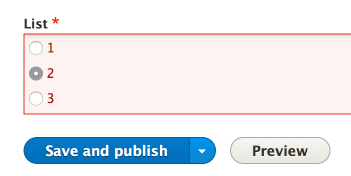
I agree - this is more of an issue with FAPI than in any particular module. Been having the same problem - firefox, safari & chrome do not show borders around checkboxes / radios so if there's an error they're not highlighted.
But these browsers do support the CSS outline property - so an alternative solution would be to use this to highlight errors:
Tested and it works in Opera 10, Safari 4, FF2, FF3, Chrome. IE6, 7 & 8 shows the default border - but not an outline.
Cheers,
Ben
Comment #4
ff1 commented#3: system-checkbox-error-222380.patch queued for re-testing.
Comment #5
ff1 commentedThis patch worked well for radios, even in IE7. But I couldn't work out how to generate the "error" class on a checkbox, so I haven't tested that.
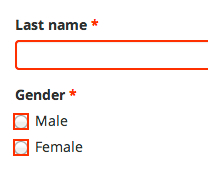
Here is a screenshot with Firefox 3.6.8 on the left and Internet Explorer 7.0.5730.13 on the right.
Comment #6
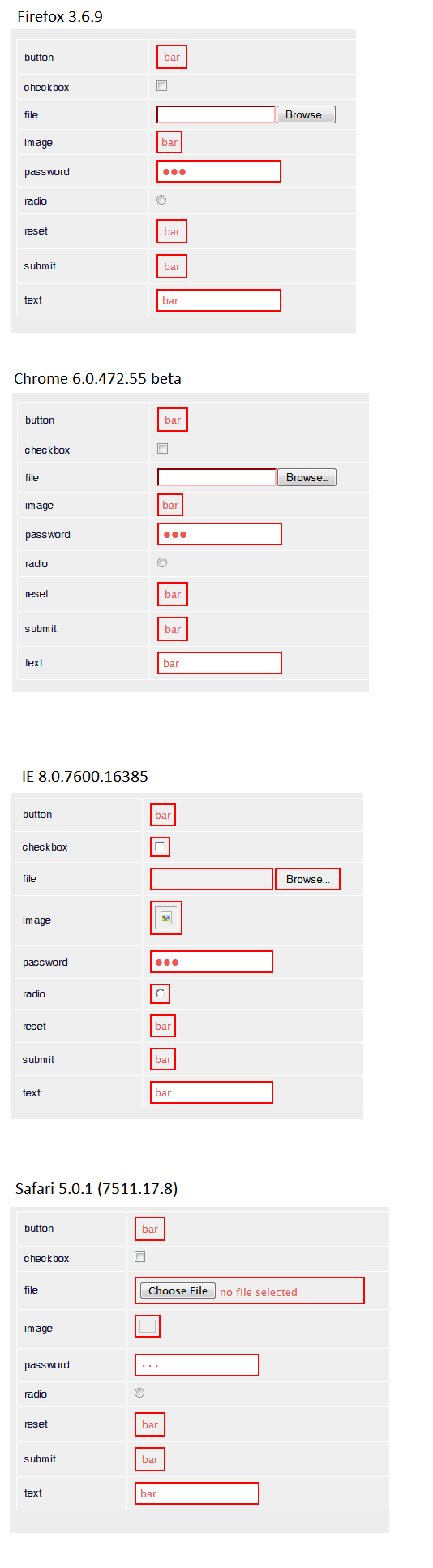
apaatsio commentedI think input[type=file] should be included in this, too. There are some differences between browsers. Here are screenshots of form elements with the error class on different browsers (the patch is not applied).
This issue is relevant for D6 also.
Comment #7
NickWebman commentedAnyone find a solution for checkboxes?
Comment #8
Berliner-dupe commented+1 Subscribing
Comment #9
Berliner-dupe commented+1 Subscribing
Is for this problem new information available?
Comment #10
jolava commentedIn /modules/system/system.css, modify the following lines:
.form-item input.error, .form-item textarea.error, .form-item select.error {
border: 2px solid red;
}
for
.form-item input.error, .form-item textarea.error, .form-item select.error , .form-item checkbox.error, .form-item radio.error{
border: 2px solid red;
outline: 2px solid red;
}
et voilà!
Comment #11
alanmackenzie commentedThis patch adds highlighting for file uploads as well.
Comment #12
alanmackenzie commentedStatus update.
Comment #13
chinita7 commentedI just wonder everybody here gets the error class for check box field?
I actually don't get them and it looks like my problem is something before CSS.
I found node/44933#comment-235842 and node/259292#comment-4817446 Both of them could solve the problem of single checkbox and multi radio buttons but not multi checkbox for me.
Comment #14
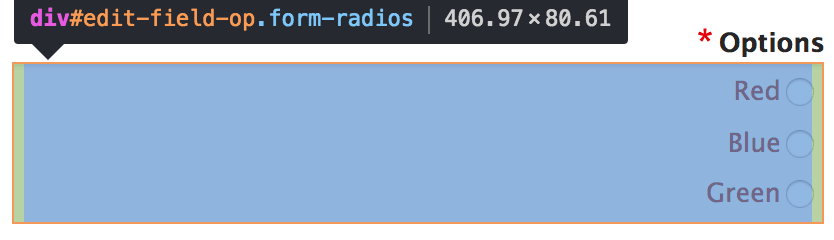
hlopes commentedchinita, you're not alone on this :D
I was having the same problem, but solved it by using form_error instead of form_set_error ( saw a thread named "Get rid of form_set_error - http://drupal.org/node/569094 ).
Use
instead of
Lots of error classes now. :D
Comment #15
geerlingguy commentedThis still seems to be a problem on D7 and D8... it's annoying that checkboxes aren't in anyway indicated when they have an error associated with them.
Comment #16
joachim commentedHere's a reroll for D8. I can confirm this works on Firefox 14.
Comment #17
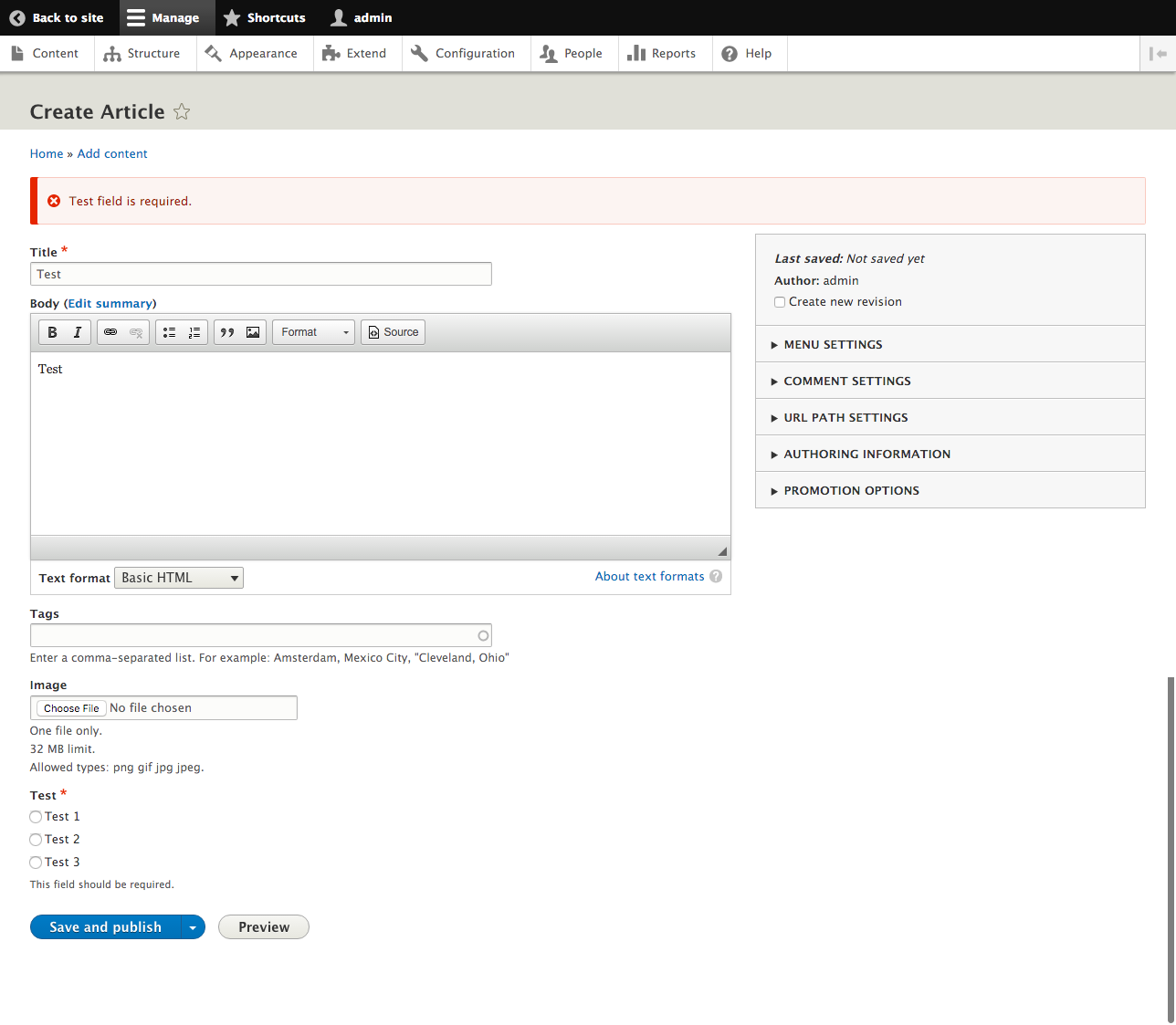
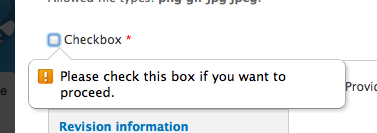
geerlingguy commentedWas trying to test this patch, but I noticed that Drupal 8 uses a jQuery popup thing now (instead of a red border and a message) to display errors on fields (see attached image). What condition would I use to be able to test this now? (I tried turning off JS, but Chrome still shows the popup message... I'm guessing it's using some sort of HTML5 validation?
Comment #18
geerlingguy commentedForgot to attach the screenshot...
Comment #19
joachim commentedHm maybe we don't need it on 8?
To be honest, while my patch is for 8, I had to test the red border shows in browser on 7 because my PHP requirements are too low to install 8.
Maybe this is just a D7 problem now?
Comment #20
geerlingguy commentedI'm guessing so... but I never noticed an issue concerning the form field error messages, so I don't know if this is 'the new way' for indicating errors, or if the patch you've provided would still be necessary in 8... any HTML5 initiative people know more about this?
Comment #21
nillio commented#3: system-checkbox-error-222380.patch queued for re-testing.
Comment #22
nillio commentedFor patch on #16. Is there a way to highlight the title of the set of radio buttons instead of just the radio buttons?
Comment #23
tswaters commentedCould always apply a sibling selector to target the label -- i.e. :
Changing the styling for titles wouldn't be easy because the error class is currently applied to the input elements. This would require code changes to FAPI to apply the error class to different spots, instead of a simple CSS rule... also, that styling would be unique for these input types; labels/titles for other inputs do not have any styling applied to them when they are in error.
--
Anyway, I'm fine with #16 as it stands -- this does the trick.
Comment #24
bbinkovitz commentedI couldn't get the patch for 7 to apply, so here's a re-roll against 7.20.
Comment #26
Moonshine commentedThis bug has been around for a long time. I submitted a patch for radios and checkboxes back in 2008 for 6.3 (#289871: Error classes are not applied to "checkboxes" or "radios"). :S
Personally, I think the error classes should be applied on the *groups* of radios and checkboxes, rather then the individual radio and checkbox elements. If a user must choose an option from 10 radios and doesn't, I'd certainly rather highlight the group than light up all 10 radios like a christmas tree. (see images)
The code change to theme_radios() and theme_checkboxes() is trivial, along with a little CSS addition. For years I've just been overriding it in my themes. But if a new patch was rolled, could it finally get in ?
Comment #27
anniegreens commentedAnother stab at the CSS highlighting solution.
Comment #28
magtak commented@Moonshine Could you please provide the overrides you perform to achieve the desired effect? :)
Comment #29
ianthomas_ukSetting to category bug report, since this is behaviour that works on some field types but not others.
Setting version to 7.x-dev as that is what any patch would be committed against.
The patch in #27 fixes this bug for me and I can't think of any problems it would cause. As mentioned in #17 this is no longer relevant in Drupal 8 because form validation has changed. Alternative designs have been suggested, but there are no patches for these available. Given this bug has been open since Drupal 5 I think we should just commit what we have and let people restyle it themselves if they are not happy with it, rather than wait for the perfect solution. Setting RTBC.
Comment #30
ianthomas_ukAfter another look at the patch I decided to check the purpose of the "-moz-appearance: none;", and the mozilla docs say it should not be used on websites[1]. Even if we ignore that, we don't really want the error-state checkboxes (or radiobuttons) to look different to the normal checkboxes in any way other than having a red border.
We also don't want checkboxes to have a double thickness border on any browser that does allow you to put a border on checkboxes, so here's a patch that removes the moz-appearance, and removes the border style.
[1] https://developer.mozilla.org/en-US/docs/Web/CSS/-moz-appearance
Comment #31
lewisnymanComment #32
jenlamptonI think this is a great solution, just a little CSS to clear up the confusion. Attached patch works for me on 7.30 too.
Comment #35
dcam commentedComment #38
dcam commentedComment #41
dcam commentedComment #44
dcam commentedComment #47
dcam commentedComment #50
dcam commentedComment #51
jenlamptonPatch in #30 still applies cleanly to 7.32
Comment #52
jdleonard+1 RTBC
Comment #53
valentin schmid commented+1 RTBC
Comment #54
David_Rothstein commentedDrupal 8 looks like it just colors errors with all the text red (screenshots above were showing the front-end HTML5 validation, but that's a totally different thing)... so yeah, that works for radios and checkboxes too and it seems to be fixed in Drupal 8.
However, won't this mess up any theme that has styled error messages to be something other than red with a border? Then they'll get most of their error messages looking like they want, but these with a totally different style? Even in Drupal core itself this is a problem (try the patch with the Garland theme and you'll see what I mean).
Also, minor, the indentation in the patch is wrong - should be 2 spaces, not 4.
Comment #55
wiredescape commentedWow, 6 years 8 months since I started this. Never would have imagined it would suck up so many hours... big thanks to all for the efforts and tenacity!
Comment #56
gngn commentedI remember somethin like some / some older browsers have difficulties to apply CSS to checkboxes or radio buttons.
You can get around this by also highlighting a label attached to (= following) your input.
E.g. if you have something like
you could add to your CSS
Comment #57
gngn commentedHere's my proposition as a patch against 7.39.
Comment #58
jenlamptonI don't like the idea of changing the label color. We're having fewer and fewer "old browsers" where you cant add styles to radios & checkboxes, and we've chosen to use outline instead of border for that reason as well. Changing the label color is taking it just a little too far, IMO.
To address @David Rothstein's comment, As far as these styles conflicting with the theme, I'm not sure that's as big a problem as having no indication whatsoever as to where the problem is with the form you just filled out. Any theme that hasn't styled these elements is going to be suffering from that problem anyway, since they were relying on core to handle it (and it didn't). Any theme that has styled these will still win.
Attached is a reroll of the previous patch with corrected indenting.
Comment #59
twodI like #58, but Garland uses a slightly different color for error highlighting so we should probably take care of that too, no?
Comment #60
jhedstromThis is very much still an issue in Drupal 8, not sure why it was kicking around in the 7.x queue.
To reproduce, add a 'list(text)' field to the article node type, allow unlimited values, edit the form display to use checkboxes. Submit the node add form without selecting any options, an error message will display at the top, but no highlighting around the checkboxes themselves.
Comment #61
jhedstromHere's a patch for 8.x, same fix as in #59.
Comment #62
geerlingguy commentedThis works for me, looks better in manual testing. See attached screenshots.
Comment #63
catchComment #64
alexpottLooking at the test images in #62... doesn't wrapping every radio with a red border make it look like all radio buttons have to be selected - which is obviously impossible.
Comment #65
jhedstromWe can alternatively target the div that wraps all the checkboxes/radios using
fieldset.error .form-checkboxes.Comment #66
jhedstromThis patch moves the error highlighting to the wrapper div:
Comment #67
yoroy commented#66 is not subtle but effective and better than #62 for the reasons @alexpott gives in #64 :)
A padding-left of 5px would create a bit of a gap between border and the checkboxes/radios, but that might mess with other scenarios?
Newbie question: is the top box-shadow part of the general styling for errors?
Comment #68
yoroy commentedComment #69
jhedstromThis adds padding. To avoid breaking things elsewhere, this only adds padding for radio and checkboxes.
re #67 the box shadow is from the seven theme, rather than from classy.
Comment #71
jenlamptonPatch in #59 still applies to 7.52.
Comment #72
jdleonardComment #73
joachim commentedThis looks great on Seven theme.
Not sure what else should be tested to set this to RTBC.
Comment #75
dmsmidtDoes this patch also take care of the focus styling? If so we should mark #2687251: Radios / Checkboxes focus styling wrong when marked as having an error a duplicate.
Comment #76
jenlamptonHere's a patch for D7 that more closely matches the approach in #69
Comment #78
manjit.singhI think this file is not longer exist. And the respective styling has been moved to classy's form.css.
really ?
I mean garland exists in D8 ?
Moving to Need review as per #69
Comment #80
amourowUpdate the patch from #69 for 8.5.x-dev and remove a box shadow glitch on Seven theme.
Seven theme has the additional box shadow for input element, they cause a glitch on radio btn and checkbox in Chrome

After patch:

@dmsmidt I agree that #2687251 Radios / Checkboxes focus styling wrong when marked as having an error is a duplicate.
After revisited both issues, I added the focus styling fixes to the patch for only Seven theme, since classy doesn't have the focus issue caused by the box shadow.
Comment #81
joelpittetThe padding left looks suspicious, is it needed? And if it is could you put the RTL version in as well?
Comment #82
amourowThe padding is needed to keep the radio button a distance from the border.
Thanks for mention the RTL version, it does need a padding for both ends.
Comment #83
amourowComment #85
jenlamptonPatch in #76 still applies cleanly to 7.57.
Comment #86
jenlamptonPatch in #76 still applies cleanly to 7.58.
Comment #87
Vidushi Mehta commentedI applied #82 on my local but patch failed to apply on 8.6.x. So re-rolled the patch and working fine.
Comment #88
jenlamptonPatch in #76 still applies cleanly to 7.59.
Comment #89
akshay kashyap commented#87 I have review the patch, apply successfully and working fine. I have attached After_patch image and Before_patch images.
I test this patch in Seven theme and Chrome browser. It's Working fine for me.
Comment #90
akshay kashyap commentedBut not working fine with bartik theme No error highlighting on form checkbox or radio input types
Comment #92
jenlamptonPatch in #76 still applies cleanly to 7.60.
Comment #93
manjit.singhDo i need to install any further extension to find out the errors ? I am not able to find any such form which is mentioned in earlier comments.
Comment #94
trevorbradley commentedPatch #87 Doesn't appear to work for single checkboxes on Drupal 8.6.7.
EDIT: This is the Seven theme's HTML for a single checkbox called "field_inactive". The CSS for ".form-item input.error" doesn't render in Chrome (which looks like the root issue of the ticket). If I add css like "outline: 1px solid red" to ".form-item input.error", I see the checkbox itself outlined.
Comment #98
rainbreaw commentedComment #99
chadhester commentedIssue persists in Drupal v9.0.2. The error message about the form, however, should be enough for compliance, from what Andrew Macpherson has explained.
Comment #100
andrewmacpherson commentedI think the issue scope could be clearer. What problem are you trying to solve here?
WCAG's "Error Identification" means that users are informed of errors, and can find them. However it doesn't require the actual HTML input elements to have any special styling, and there's no requirement for a red border on inputs. The text error messages are the primary means error identification (at the start of the page, or with inline form errors). The red borders here are a secondary indicator.
Re. #64:
Far worse: it risks being confused for a focus indicator, or interfering with focus indicators. Particularly in the case of a single mandatory checkbox. You can't rely on the red colour being perceivable; to some users it's just a rectangle. And an extra rectangle surrounding it conventionally means focus.
So I would veto the red-square around individual checkbox/radios from the screenshots in #5, #6, #26, #62.
Fortunately, the issue took a different direction after #66. I like the big-red-box approach because it need not interfere with the focus indicator for the individual radio/checkbox input element.
However:
What's the purpose of this? What does a focused checkbox/radio look like when there is an error?
Important: the focus indicator for individual inputs is crucial, and the error styling must not interfere with it. Before committing this, we should see screenshot evidence of how a checkbox/radio input appears when it has focus AND there is an error.
Bikeshedding... how about
fieldset.error {}, so the red box surrounds the legend too?Also, what about a single Form API
'#type' => 'checkbox', which doesn't have a fieldset wrapping it?Comment #101
sulfikar_s commentedI've Changed the form.css of bartik, seven and classy theme as per the need of the issue. Please verify.
Comment #103
sulfikar_s commentedI've updated the previous patch. Please review.
Comment #104
sulfikar_s commentedComment #106
komalk commentedFixing test case review the patch.
Comment #107
komalk commentedComment #108
sulfikar_s commentedThanks komalkolekar, I found that I was missing that line of change in ConfirmClassyCopiesTest.php in my patch which leads to fail my patch. Anyway, I've applied your (#106) patch cleanly and is working properly. Attaching the screenshots below,
Before patch,
After patch,
Thank you, I'm moving this to RTBC
Comment #109
sulfikar_s commentedComment #112
larowlanThese items from #100 have not yet been answered / addressed
And
And
In addition, the issue summary still reference Drupal 5.7 😿and IE7 - so let's get an issue summary update here too
Comment #113
samiullah commentedNeeds fix for above highlighted points
Comment #114
joseph.olstadI took the code from patch 87 and applied it to our custom front end theme that is using fapi and it works!
thanks!
no js was needed, just the css.
Comment #116
merilainen commentedThis doesn't seem to work for a single checkbox in a boolean field. I got it working by adding a css selector for
fieldset.error .field--widget-boolean-checkbox .form-type-checkboxComment #117
djsagar commentedRolling up patch for drupla 9.2.x-dev.
Thanks!
Comment #120
clairedesbois@gmail.comI added also checkbox field (the boolean element) because it was not include. I do a version for 9.2.x et 8.9.x
Comment #125
gauravvvv commentedI have added the patch for 11.x. I have addressed the issue. please check.
Comment #126
smustgrave commentedDid not test.
Moving to NW for issue summary per #112
Comment #128
bjc2265 commentedHas anyone been able to reproduce this error in Drupal 9+? I've tested in D9 and D10 (with Claro theme), and with no patch there is error highlighting for checkboxes and radios (screenshots attached).
If nobody can reproduce, I think the patch can be strictly for 7-8. Might also want to use the same style implemented in Claro, where the lines of the bubbles/boxes are highlighted red (focus indicator appears around the inputs).
Comment #129
akshayadhavYes, as @bjc2265 mentioned this issue is not reproducible in Claro. So changing the version to 9.1.x-dev as Claro was introduced in core after 9.2 version.
Comment #130
smustgrave commentedSince D9 is EOL and not reproducible in D10 closing out.