By working closely against D7 Calendar, I've updated Calendar 8-dev so that calendars display multi-day events as expected.
However - my solution so far is not nearly ready to commit, so I'm starting this thread (after discussion w/ pjonckiere) simply to spark discussion/work. I'm fairly confident I've isolated the areas which need changing, less confident that my changes are correct (even if they work).
And one major caveat - my working calendar relies on brute hardcoding of some field values in CalendarHelper::dateViewFields. Haven't quite cracked that problem yet.
As an overview: a key to understanding Calendar is found in /src/Plugins/views/style/Calendar.php in function render(). This is where src/Plugins/views/row/Calendar.php function render() (and prerender) are called on. Note this code, with original 8.x-1.x-dev lines commented out:
    foreach ($this->view->result as $row_index => $row) {
      $this->view->row_index = $row_index;
      $events = $this->view->rowPlugin->render($row);
      // @todo Check what comes out here.
      /** @var \Drupal\calendar\CalendarEvent $event_info */
      foreach ($events as $event_info) {
        $item_start = $event_info->calendar_start_date->format('Y-m-d');
        //$item_start = $event_info->getStartDate()->format('Y-m-d');
        $item_end = $event_info->calendar_end_date->format('Y-m-d');
        //$item_end = $event_info->getEndDate()->format('Y-m-d');
        $time_start = $event_info->calendar_start_date->format('H:i:s');
        //$time_start = $event_info->getStartDate()->format('H:i:s');
        $event_info->setRenderedFields($this->rendered_fields[$row_index]);
        $items[$item_start][$time_start][] = $event_info;
      }
The entity being placed on the calendar has event_info->start_date and event_info->end_date (which of course can be the same as the start date). These are being called in the commented out lines via $event_info->getStartDate() etc. However, Calendar requires that the entity also have a "calendar_start_date" and a "calendar_end_date". Later, in calendarBuildWeekDay(), the entity->start_date is compared to entity->calendar_start_date to determine whether we have an event spanning multiple days or not (ditto the end_date & calendar_end_date).
Once you've gleaned that, travel over to /src/Plugins/views/row/Calendar.php, where the heavy lifting happens in the prerender(), render(), and explode_values() functions.
A couple of other overall notes:
- working on this requires #2161337: Add a Date Range field type with support for end date patch #90
- I haven't addressed any of the pre-existing to-do's in Calendar dev - hardcoding of granularities and so on
- recommend grabbing Calendar 7.x-3.5 for full comparison if you're trying to grasp 8


 Show commands
 changes




Comments
Comment #2
13jupiters commentedThe simplest of the needed fixes is in calendar/src/DateFieldWrapper.php. Currently the function function getEndTimeStamp() simply returns $this->getStartTimeStamp().
Attached is an approach that has worked so far for me (just copied the code from getStartTimeStamp). It would seem logical that handling of null values should be added, but it's possible that getEndTimeStamp is only called if a null has been tested for.
Comment #3
13jupiters commentedThe next of the needed fixes will occur in /src/CalendarHelper.php, function dateViewFields(). The function has a fairly simple purpose - it reads table_field names, determines if they represent Date fields, and determines the table name for each field (i.e. the entity's Date field). Without the end date, this was a simple matter of parsing out field_[mydatefield]_field_[mydatefield]_value.
With end date support, what we now have to make clear is that [mydatefield]_field_[mydatefield}_VALUE2 needs the same handler as [mydatefield]_field_[mydatefield]_value. Should be simple enough.
Also, we need to populate $to and $from variables with proper tablename_fieldname pairs.
Why this is complicated goes back to original Calendar architecture. When you create a Calendar from a template, you'll note that the View is *not* filtering by entity type. That is, if you have an entity called Conference, with Date field conference_date, you might expect that your calendar view will filter by entity type = Conference. Not the case. DateViewFields instead invokes a ported version of views_fetch_fields() in date_views module in D7 (tx to pjonckiere for clarification) - which returns a vast matrix of all possible fields in the drupal universe, or something similar.
Anyway... the attached file shows how to hardcode this stuff if you want to proceed directly to tackling start and end dates. Replace all occurrences of event_date with the name of a Date field from your own chosen entity.
Comment #4
13jupiters commentedNext, in src/Plugins/views/style/Calendar.php a few changes, very minor in themselves, but essential as explained above.
In function render() we ensure that Calendar is dealing with the event value it requires - calendar_start_date - which will not necessarily be the same as the entity's actual start date.
I notice I tweaked line 686 but I can't recall why, other than dim memories of error messages over null values. Possibly not needed.
Finally, in calendarBuildWeekDay (which is where much of the actual work gets applied) I've made a tiny change to filter out all_day events from the handling. Without this adjustment, nothing will break, but single day events seemingly have the class="multi-day" applied to them down the line. Not sure if this is an error in Calendar 8 or the continuation of a noted issue back in the Calendar 7 epoch. I brute-forced the solution here mainly because I wanted the distinction between single and multiday events as clear as possible.
Comment #5
13jupiters commentedFinally, the main event.
To recap:
You have a calendar view. The view delivers its query results to #4, calendar/src/Plugins/views/style/Calendar.php::render(). For each result row, the style renderer invokes the row handling mechanism, which is where we are now. The 3 functions involved are prerender, render, and explode_values.
In simplest terms, your task, as developer, is to protect your Date field's precious VALUE2 through prerender, through render, all the way to @ line 512 of render:
In explode_values, the necessary work is done to provide the extra values Calendar requires to make a multiday function span across the days.
Example work attached. Questions welcome, improvements moreso.
Comment #6
Anonymous (not verified) commentedThanks for your work on this, for posting the patch and for explaining everything in an incremental way. That makes it a lot easier to review, and for other people to hopefully contribute as well.
I do realise that the core functionality for end dates is needed here, but do you have any idea what happens if it's not available? Will it break, fail silently...?
For now, I just stepped through the explanations and the patches without actually testing anything on my local machine. The main goal for now was understanding what happened and giving feedback where possible. Turns out it's quite limited given the size of the patch, but that's a good thing.
Re #2: This makes a lot of sense. As an optimisation we might want to abstract t he code in both start- and enddate to avoid duplicate code. Off course, that is not the biggest priority.
This is somewhat strange. Shouldn't we return the start date if no end date was found? IIRC that is what the D7 version did. And then on calculation/rendering, if startdate == enddate, we assume there is no end date.
Re #3:
I recognise this approach from somewhere, but I can't recall where it was. Seems good enough for me, but you probably can drop the ternary operator and just use str_replace().
I knew this check was probably not ok, and this looks a lot better. However, I think it's very limiting. But it's a good start.
Re #4, together with IS, you make a very valid point. I never really tested the calendar start date variable in the context of multidate events. That use case was not a primary concern at that time. But it makes sense, and I think we should add the calendar_start_date on the CalendarEvent class. We could do that as an optimalisation as well and use the magic property for now.
I already committed and pushed the "#selected" part of the patch for another issue.
Re #5:
I do think there is an existing mechanism to handle those duplicate entities (template preprocessors?). We probably want to split this into a separate issue.
Overall this looks very good. I'll give more feedback after testing this manually (and I hope to do that soon-ish), but it's quite possible I start committing this as I go. I think we can make it so that we don't break anything without the core patch. Somewhere along the lines of "If you have the field, we use it. If not, we ignore it.". That shouldn't be too hard.
Either way, thanks again for all this work :)
Comment #7
colanBefore this latest push gets too far ahead, please keep in mind that we cannot rely on that core patch. As per the latest comments in that issue, it needs to be rewritten. So please keep that in mind before committing to anything here.
Comment #8
13jupiters commentedRe #7:
Good point. As far as I can tell, Calendar is actually field impartial - that is, it can be fed any date-enabled field, not just the field provided by Date module. For multiday events to display properly, all that is required is that the date-enabled field include an end date as "_value2". The determination of which field to use is made in CalendarHelper (the part I've barely addressed above). At some point we can investigate whether there are simpler/quicker ways of doing that work.
In other words - if "Date Range" or similar becomes a separate field, Calendar will be okay, as long as _value2 is used in db. If not, some work would be needed. (And following back through the Date 'end date' thread it seems that discussion has occurred already.)
Comment #9
Anonymous (not verified) commentedTrue, and thank you for reminding it.
As @13jupiters notes however, the final goal is actually multi day events and not just end dates. For example, these patches also have a fix for the missing calendar_start_date (that's a porting bug). The "right" way probably is to split everything up as much as possible, but to be honest, I think that would be a lot of overhead and I would hate to see this momentum lost because of that.
As for the end date issue specifically, I think the main problems will be in the discovery (#3) and the addition per event (#2). The rest should stay somewhat the same. Nevertheless, you probably are right that I was somewhat too enthousiast about committing everything on the fly.
Thoughts? Or a suggestion on an approach would be appreciated as well?
Comment #10
colanMarked #2604550: End date as a duplicate of this issue.
Comment #11
nicholas.alipaz commentedLooks like they are reaching some consensus over on the daterange core issue. Seems like this could be doable soon with that core patch.
Comment #12
sylus commentedJust rerolled the patch as it wasn't applying to latest dev for Calendar (8.x-1.x).
Using the 8.x-1.x backport patch from:
#2161337-267: Add a Date Range field type with support for end date
Also started to get views_templates to generate views for daterange fields as well. The views for the date range fields get instantiated but was getting a broken / missing handler for Contextual Filter in View. I proposed a fix in the other issue which seems to work on my initial testing.
#2161337-269: Add a Date Range field type with support for end date
Comment #13
sylus commentedI was getting notices such as:
Notice: Undefined index: value2 in Drupal\calendar\Plugin\views\row\Calendar->render() (line 452 of modules/calendar/src/Plugin/views/row/Calendar.php).
So I changed:
To the following:
Comment #14
martinma commentedAny news about D8.2? Its beta1 is released now. I think I read somewhere that enddate should be in core wir D8.2 ...
Comment #15
dankegel commentedIs there an update of this against Drupal 8.2, now that date ranges are experimental there ( https://www.drupal.org/node/2161337 )?
Comment #16
Frando commentedI came up with a similar patch as in #13 when working on a module for recurring/repeating dates (see date_recur and #2820803: Support Recurring Dates Field in Calendar 8.x-1.x). The problem is that with this solution, the name of supported field types is still hard-coded. We should either add in an alter hook or find another way to derive field types extending datetime, because otherwise calendar needs to be patched for any field type that extends datetime.
Comment #17
Christophe Bourgois commentedI used #13 patch and for the first time, I could see my content type including a date range field in the "Add view from template" list.
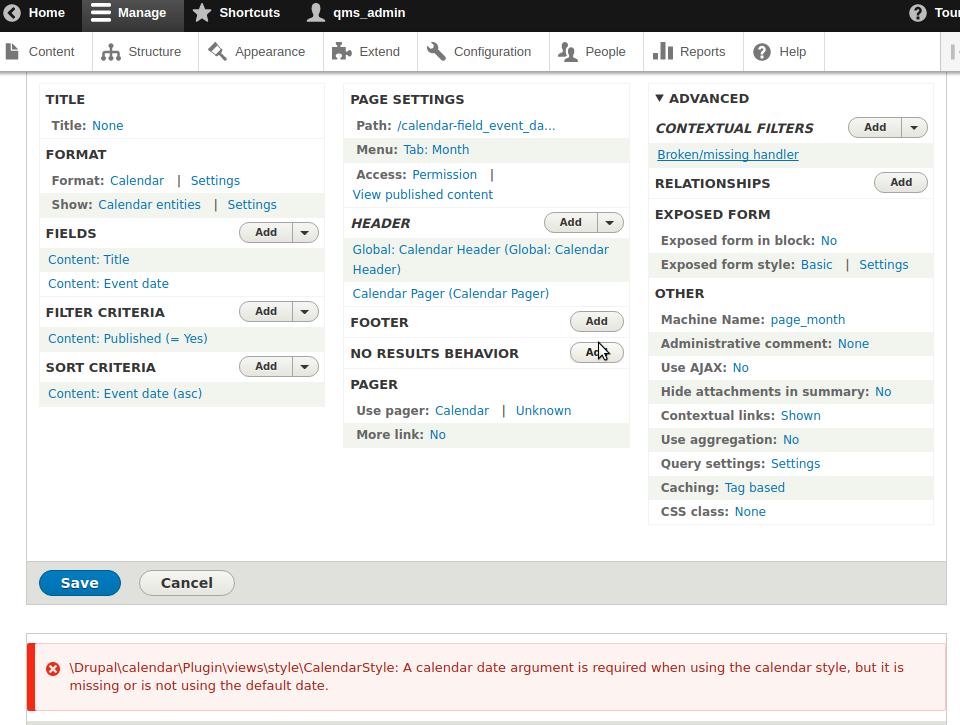
So created a view, I can see everything seems to be ok, but I got this error message :
\Drupal\calendar\Plugin\views\style\CalendarStyle: A calendar date argument is required when using the calendar style, but it is missing or is not using the default dateComment #18
Christophe Bourgois commentedGoing deeper, here is what I find.
If I look the value of $all_arguments in function getDateArgumentHandler in file /calendar/src/CalendarHelper.php :
On a working view, I got list of objects of class Drupal\views\Plugin\views\argument\FullDate or YearDate or YearMonthDate.
On my view, using a date range field instead of a date field, I got list of objects of class Drupal\views\Plugin\views\argument\Broken
So does anybody can give me a solution, or a way to find the solution by myself ?
Comment #19
csedax90 commentedI've the same problem, how can I use it with the end date core field?
Comment #20
csedax90 commentedOk, i've solved all my problems with combination of #13 and this patch: https://www.drupal.org/node/2786577#comment-11751528
Comment #21
csedax90 commentedComment #22
bobemoe commentedWith patches #13 and #20 I am able to create a view from template on DateRange fields and see the entity on the calendar :)
The entity only shows on the start day though and doesn't span multiple days (cells) up until the end date as I'd expect. The start and end date are displayed in the cell. It all looks really neat so I'm guessing lack of display across multiple cells isn't a bug and is yet to be implemented?
Comment #23
cslevy commentedIn date range field the end date key changed from (value2 to end_value).
I adjusted @sylus patch.
In order to make this work, you need to apply this patch and also the patch from
https://www.drupal.org/node/2786577#comment-11751528 (#20)
Comment #24
psiegel commentedHello,
I have applied the two patches in comment #23 and it seems to work, I can create the view from the template and the date range appear in the calendar.
But, when I add a filter to the view to filter on the content type that has the date field with the range, the date don't appear anymore, removing the view make the date appear again.
Also, I guess this is more a feature request: can the range be display in all days instead of displaying the start and end date the same day? Meaning that if the date range is from the 15th to the 20th, all days have the date (node title and date field) displayed instead of the start and end being displayed the 15th?
Best,
Pascal
Comment #25
cslevy commented@psiegel. For me it's displayed on multiple days.
Maybe you don't have configured to show like that.
Edit the view
On the Format -> Settings -> Multi-day-style select Display multi-day item as multiple column row
Regarding the filtering I will take a look later
Comment #26
cslevy commented@psiegel
I don't know what is the issue with filtering. I tested it, for me looks ok. Can you provide more detail/screenshots anything?
Comment #27
adriancid@cslevy I used the two patchs and when I create the view from template I see this message:
\Drupal\calendar\Plugin\views\style\CalendarStyle: A calendar date argument is required when using the calendar style, but it is missing or is not using the default date.Comment #28
adriancidI can confirm that its works (at least I can see the event in many days in the calendar, I need to do more tests), you need to clean the cache after install the two patches:
https://www.drupal.org/node/2786577#comment-11751528
https://www.drupal.org/node/2699477#comment-11858017
Comment #29
adriancidThere is another patch https://www.drupal.org/node/2786577#comment-11860104 that replace the patch https://www.drupal.org/node/2786577#comment-11751528
To see why read this: https://www.drupal.org/node/2786577#comment-11859909
Comment #30
psiegel commentedHello,
So I did some more testing.
Concerning the filter, it seems to work. I think I had a date field from another content type than the one that I was filtering on.
I got the feeling that once a view is created from templates, I cannot change the view and select a different content type and a different date field that the one from the initial template, is that correct or should I be able to select a field from a different content type after the view has been created?
Concerning the display of multi-days (date range), it does not seem to work (Display Multi-day is the default). I tried to change to single, and back to multiple, flushing the cache a few times of course. I also tried the option to hide fields but this didn't work since I guess the Multi-Day is not taken into account.
I will do some more testing starting from a fresh install.
Pascal
Comment #31
psiegel commentedHello again,
I did some more testing with drupal 8.2.4 standard install, with the patch https://www.drupal.org/node/2786577#comment-11860104 and steps_towards_handling-2699477-22.patch. there is progress, thanks.
(note: I had previously applied patch steps_towards_handling-2699477-13.patch that was not working for the display of multiple days).
I still have some issues with multiple days display, it is working on the month view, but not the week view. see attached screen copy. You will also see that there is a layout issue in one of the week screen copy (week view - do not display overlapping.jpg), but the multi-days are visible.
I have tried multiple combination for the format settings Overlapping time style, I applied this patch (calendar-2833021-1.patch) and can choose "none" without getting the "Overlapping items only work with hour or half hour groupby times." message . When I select hour in the time grouping, it seems that 3 hours are grouped, it seems to be working with half hours, I was unable to use the custom option with 00:00:00,08:00:00,18:00:00 in the field.
There seems to be an issue with the time at which the dates are displayed, my Linux server and Drupal are set to the Kuala Lumpur Time zone (see day view), if you look at the date and times, they don't appear at the correct time. I tried to set the time zone in the date field, no luck. I have seen this issue (https://www.drupal.org/node/2604546), wondering if it is my issue or not since the server and Drupal are in the same timezone?
Best,
Pascal
Comment #32
sukanya.ramakrishnan commentedThe filtering issue seems to be only with the view preview, not the actual view!
Thanks,
Sukanya
Comment #33
sukanya.ramakrishnan commentedHello,
Trying to work with the date_id so that we can do some theming based on the date for which the items are being displayed and the dates on the items itself. I see that the date_id is still marked to_do. Can someone give us a roadmap of when that will be done?
Thanks a lot!
regards,
Sukanya
Comment #34
meramo commentedGuys can you share your contextual filters setup please? Should I add both start and end values from the range element to contextual filters? Can't make it work unfortunately
Comment #35
sukanya.ramakrishnan commentedhmm, u shudnt have to do anything with the filter setup? When u create the view from the appropriate date field, calendar should take care of it for u IMHO?
What i have noticed in the past is that, a cache clear is needed after the view is created. Not sure if that issue still exists.
Thanks,
Sukanya
Comment #36
nicholas.alipaz commentedHere is a straight re-roll of the patch in #23 against current HEAD.
Comment #37
dave kopecek#36 works for me on 8.2.6
Using #36 against 8.2.6 with Calendar 8.x-1.x-dev / 2017-Jan-28 & can get date range calendars to display with after applying:
https://www.drupal.org/node/2699477#comment-11906700
https://www.drupal.org/node/2786577#comment-11860283 ( Replacement for patch recommended in #29 )
I'm not seeing begin and end times displayed as colored ranges on week or day views. Are they covered in this issue?
Comment #38
nicholas.alipaz commentedWell, I am thinking there might still be something wrong. I still can't get this to work using a date field that is in a paragraph on my node rows. I am guessing it is not handling the usage of relationships properly. Here is the error I get whenever I try to use a daterange field within a paragraph as my contextual filter:
Comment #39
nicholas.alipaz commentedSo I found part of the issue at least. It seems that when using the relationship the

$datavariable does not contain my alias and corresponding data. I am looking into why now, if anyone has any input please let me know. Here is the output I received when debugging:Comment #40
nicholas.alipaz commentedOkay, searching issue queue there is already a reported bug regarding relationships not displaying dates properly. I am going to move this back to "Needs review" and keep this point as a separate issues so as not to slow down completion of this fix.
Comment #41
nicholas.alipaz commentedComment #42
stephen ollmanUsing core 8.3.0-alpha1 with Calendar 8.x-1.x-dev with patch @36 applied (THANKS!!) plus Date Range module with patch 'https://www.drupal.org/files/issues/improve_the_views-2786577-76.patch' applied.
Works as expected for Months view but not for Day views as middle and end days are not showing in the day list.
I also have a timezone issue with the start date (possibly the end as well) but I'll raise a separate ticket for that.
Thanks for the patch. I look forward to seeing further modifications to tweak the date issue.
Comment #43
stephen ollmanJust updated to 8.3.0-beta1 (which has the date range module patched as above) and now views doesn't respect the dates in the date range when filtering.
For example filtering on the date range field: Greater than now = no results, Less than now = now results. Equal to now = all results. Despite having dates that span before and after todays date.
One step forward...two steps back....
Comment #44
csedax90 commentedthere is some news for the 8.3 support?
Comment #45
stephen ollmanI don't believe this will be fixed in 8.3 at all, which is a shame. I'm not sure when 8.4 is due for release (later this year perhaps), but I don't think I can wait that long. So for now I'm going to 'try' and role back my patches to 'core/modules/datetime', 'core/datetime_range' and 'modules/calendar'.
Basic views date filtering just isn't working at all in 8.3 with patches applied.
Comment #46
stephen ollmanI've rolled back the patches applied to both 'core/modules/datetime', 'core/datetime_range', but left the patch to Calendar in place.
Views date filtering now works as expected.
So what I have is 8.x-3.0-rc2 and patched Calendar 8.x-1.x-dev'.
For now I'll forgo the Date Range functionality.
Comment #47
dkre commentedI havent actually tested Calendar since 8.2.0 was released but current I am using date range successfully but it requires multiple patches on 8.2.5.
8.2.6 created issues (I can't remember what those were now), so we rolled back.
The patch stack (in order):
A couple of these are 8.4.x so I thought I would post this for anyone trying to move this forward or testing date_range in Calendar.
Comment #48
Frando commentedPlease consider that there are other modules that also provide date-like fields. Currently, and also in the latest patch, the names of the supported fields (datetime, and now datetime_range) are hard-coded. I wrote a module for recurring dates in Drupal 8 (Date Recur) which also works with calendar, but needs to be patched so that calendar accepts date_recur fields (see #2820803: Support Recurring Dates Field in Calendar 8.x-1.x).
So a proper solution would either call out to a hook to collect date-like field types with calendar support, check for all field types extending DateTime or check for a to-be created field type annotation property. Which of these is best I don't know right now, but something that does not hard code the names of supported field types is needed.
Comment #49
arosboro commentedI made a patch that takes into consideration some of @Frando's concerns and works with the latest release of drupal.
Comment #50
colanLet's start posting interdiffs with patches so we can see what's changed.
Comment #51
arosboro commentedHere's an interdiff for #49 against #36
Comment #52
noah commentedWe're using the datetime and datetime_range patches at https://www.drupal.org/node/2786577#comment-12013418 along with the patch at #36, and it's working quite well.
One issue that we've encountered is that time zones don't appear to be handled correctly when determining whether an entity should appear as a multi-day item in the month view. We're currently at UTC -4, and any items that end at 20:00:00 or later appear as multi-day events stretching into the following day.
Comment #53
roaldumandal commentedHi @noah what version of Drupal 8 and calendar module your using?
Comment #54
noah commentedHi @roald.umandal -- it's Drupal 8.3.5 with this patch:
https://www.drupal.org/node/2786577#comment-12013418
And Calendar 8.x-1.x-dev (2017-Jun-02) with this patch:
https://www.drupal.org/node/2699477#comment-11906700
Comment #55
slewazimuth commentedI did a quick test by applying patches to calendar, datetime and datetime_range on an 8.3.5 site and while initially everything worked fine, when an event ended where the end date was in a subsequent month display ceased on last day of month in which event started. I left testing there and decided not to test year end.
Comment #56
robotjox commentedI can confirm that #49 works with Drupal 8.3.7 and Drupal 8.4.x. All my daterange fields are finally showing as templates and working with calendars. Thanks!
I did apply the patches from https://www.drupal.org/node/2786577 before this, though - don't know if that is necessary.
Also, I can confirm #55: dateranges break if they are carried over into another month :-/ Anyone manage to work around this?
Comment #57
petsta commented#49 worked with me on 8.4.x and 8.5.x with calendar 8.x-1.x-dev. Still the problem that month' overlapping dates don't show up correctly. Results are the same if I apply these patches before or not https://www.drupal.org/node/2786577
Comment #58
robotjox commentedReally frustrating. I managed to "solve" the problem of monthly overlaps with a combination of adding both start and end dates in contextual filters AND using the "Views Contextual Filters OR" module (on Drupal 8.x.4.dev). But now I can't recreate it - serves me well for not documenting every step of the way :)
Log keeps throwing
InvalidArgumentException: Field field_dato2_end is unknown. in Drupal\Core\Entity\ContentEntityBase->getTranslatedField() (line 509 of /home/morten/websites/drupal84/core/lib/Drupal/Core/Entity/ContentEntityBase.php)....where "field_dato2_end" is my daterange field's end date.
Comment #59
robotjox commentedRight. I managed to hack a solution to the problem. I won't even bother writing a patch as this is most definitely NOT the right approach, but I'll describe the steps here with the hope that someone might find it useful when trying to solve the problem in a better way :)
1. I use Drupal 8.x.4-dev. No idea if this can be implented in prior versions.
2. Apply this patch: https://www.drupal.org/node/2786577#comment-12164667
3. Apply this patch: https://www.drupal.org/node/2699477#comment-12132795
4. Create 2 contextual filters for your view:
Content: node.field_somedate:end_value (year_month)
and
Content: node.field_somedate (year_month)
It is IMPORTANT that the end_value comes first!
5. install https://www.drupal.org/project/views_contextual_filters_or and apply it on your view
6. In file /modules/calendar/src/Plugin/views/row/Calendar.php.
Line 409 (just below
insert:
7. To fix the pager, go to file /modules/calendar/src/Plugin/views/pager/CalendarPager.php.
Line 97 (in function getPagerURL) change the foreach construct to:
8. Last step is fixing the top date header of the view to show the right Month. Edit it and put:
{{ arguments.field_dato_end_value_year_month }}into the field "Heading" (adjust the name according to the name of your date field).
Comment #60
robotjox commentedI made a mistake in my hack that breaks none-daterange views:
6. In file /modules/calendar/src/Plugin/views/row/Calendar.php.
Line 409 (just below
foreach ($this->dateFields as $field_name => $info) {insert:
and then close the IF construct just before return $rows like this:
Also please keep in mind that this is an ugly hack :)
Comment #61
slewazimuth commentedI can confirm that #59 and #60 work for 8.4.0-rc1, although I altered step 8 in #59 for my twig setup.
Comment #62
adriancidRerolling #49 against last dev version
Comment #63
geertvd commentedComment #64
geertvd commentedTo fix #55 I think we'll need something like I proposed in #2924061-2: Create views filter plugin for date range fields
Comment #65
keszthelyi commentedHi @robotjox,
I tried what you described in #59 and #60
What happened is that now the end date month is displayed but the start date month is not. Before the hack it was the other way around, the event was displayed in the starting month and was not visible in the end month.
Any ideas what might be the problem?
Comment #66
geertvd commentedI added a patch in #2924061: Create views filter plugin for date range fields which introduces a configurable operator for datetime arguments. This allows you to use >= and <= on the date range fields which should fix the problem with the overlaps.
I just had to do a small fix on this patch to ensure that the field actually exists.
So with both of these patches applied my argument configuration looks like this:
Comment #67
g3r4 commentedHello guys, thank you all for all the hard work everyone has done in this thread.
I was able to add visual date ranges displayed on the calendar, it took me a while to go though all the comments here and in other threads, so I will try to summarize a little bit what I had and what I did in order to have this working so new people finding this thread can have a better idea of how to use it and what to patch.
I am currently working on an OpenSocial implementation, these are the specs I have
OpenSocial 1.7.0
Drupal 8.4.2
drupal/calendar dev-1.x (latest version as of now 2018-01-04T14:54:04+00:00)
core/datetime_range 8.4.2 (make sure you have this installed)
Then I proceeded to apply the patch here on #66 and this patch from this thread
Add a new date range field to your content type
After you assign the date range field to one of your content types, you have to "Add view from template" from the Structure->Views page
Select the one that says something like "Content Field Date range on Calendar" (if you don't see this try clearing caches first)
You should have a view that shows date ranges now, I still have a bug that someone also mentioned in this thread and is that, whenever an end date for range carries over to the next month, if I click the next month, I don´t see any indication that an event is happening there and it started the previous month.
Do any of you guys have any ideas why this might be happening or how can it get solved?
Comment #68
nickdjmUsing the 2 patches mentioned by #67, if you use https://www.drupal.org/project/views_contextual_filters_or and add a filter for the end_value, you won't have the issue where events don't display if they start in a different month. This also applies to day and year views as well (Week view still doesn't work with date ranges).
It's worth noting that if you do use views_contextual_filters_or, you need to have the "end_value" filter come before the starting "value" filter.
Another issue that I've noticed is:
If you start an event in one month (lets say March) and it ends 2 months from then (May), the event will not show up in the month(s) in-between (April). This issue applies to Day/Year views as well.
Comment #69
thursday_bw commentedI've applied the patches mentioned in #67 without much success creating a view.
I am however working Drupal 8.5.0 and the latest dev version of drupal/calendar (at commit 73e2979f3ed951b1fb3ad942e2d89d673aa52e1d).
After adding the view from a template, the contextual filter is broken:
Broken/missing handlerI also get
\Drupal\calendar\Plugin\views\style\CalendarStyle: A calendar date argument is required when using the calendar style, but it is missing or is not using the default date.And when I click on the contextual filter, the dialog contains:
The handler for this item is broken or missing. The following details are available:
I'm continuing to investigate, but it's a little beyond me at present.
Comment #70
plachI've tried to push this a bit forward: that attached patch depends on #2924061-10: Create views filter plugin for date range fields and should allow to use date ranges with the week and day displays. To handle events spanning multiple months/weeks/days properly, you need to select the "Intersects range" operator in the argument Formula fieldset:
Comment #71
plach#70 was missing one file, sorry, here's the correct patch + interdiff
Comment #72
corn696Hi,
i think the file DatetimeRangeYearWeekDate.php is added to the wrong path.
The Patch add it to core\modules\views\src\Plugin\views\arguments
The namespace indicates, that the file has to be added to the calendar module
namespace Drupal\calendar\Plugin\views\argument;modules\contrib\calendar\src\Plugin\views\argument
After moving the file to the mentioned path it seems to be working, except that dates overlapping a month still are not displayed in the new month.
Comment #73
akalata commentedRe #70, does solving this issue depend on #2924061: Create views filter plugin for date range fields? Since that's currently an issue against 8.6.x (and may be pushed back), if that's the case should this issue be marked postponed?
Comment #74
plachWell, of course #71 cannot be committed until the core issue goes in, but there is still work we can do here: reviewing and testing. Totally fine with postponing this once it reaches the RTBC status :)
Comment #75
anybodyI can NOT confirm #72. The patch is correct about it, I think you made a mistake when applying it, Com696. If you are using Composer you may want to try https://github.com/cweagans/composer-patches
I'll now review the patch from #71 combined with the core patch.
Comment #76
anybody#71 works perfectly together with the other patches. We're already using it successfully.
Comment #77
noah commentedI'm using this successfully on multiple sites that use date ranges—thanks very much for all the hard work that went into it.
I've discovered an issue with the calendar month view when this patch is applied and dates are not ranges, just single dates but with multiple values: in this case, with this patch in place, all events appear on the first date in the calendar, rather than on the correct date.
So, for example, if I have an event "Lunch" and there are two values for the date, August 30 and August 31, with this patch applied, in the calendar month view "Lunch" appears twice on August 30 and not on August 31. Without the patch applied, it appears (correctly) once on August 30 and once on August 31.
Comment #78
missvengerberg commentedHello all and thanks for all the work done with this expansion. I just wanted to make a remark about a case when the data range of the field includes dates between two months: ex starting 28-august and finishing 02-september. In my case, the output of the calendar got broken in the last day of august. To solve this fast, I added another condition in the template of calendar-datebox.html.twig to make sure to include the rows even though it is not the current month.
The extra condition I added is this:
I hope this can help anyone with the same problem and wants an easy solution.
Comment #79
scottsawyerI am trying to nail down which patches need to be applied for 8.5.6.
https://www.drupal.org/files/issues/2786577-270_0.patch in #318
and
https://www.drupal.org/files/issues/2018-04-06/calendar-date_range-2699477-71.patch in #71
and
https://www.drupal.org/files/issues/2018-04-06/2924061-10.patch in #10
Is this correct? Are there other patches needed?
Comment #80
akalata commentedIn my testing, multi-day events are showing up great, but events that occur on a single day are also pulled into the "multi-day" calendar row, instead of the "single-day" calendar row, for that week (in the month view).
Based on this, and #77 and #78, I'm downgrading to NW.
Comment #81
stefanroman commentedDid someone tested this using the Day display? I encounter problems with the hours of the event.
First that is not displayed on the exact hour on the calendar
Second if i have a event that is more then one hours it does not extend on the calendar, is still on one row.
https://www.screencast.com/t/9CmYv1OXdIpF
https://www.screencast.com/t/9sM0MNybhhih
i have a date range field https://www.screencast.com/t/minyRQW782
need advice on this.
PS i applied the #71 and some other
Thanks
Comment #82
yaach commented#71 Work for me without the need to use other patches.
Using Core 8.6.1
*** Update *** I see a bug, some events having the same date for start and end date, span in two days. I double checked the dates and both dates are on the same day. Why is this happening? Did I forgot to apply one of the multiple patches?
Comment #83
yaach commentedMore on this:
It seems the two-day spanning bug happens when the times are 07:00:00 PM to 08:30:00 PM, but it is fine when times are 07:00:00 PM to 07:30:00 PM. The bug happens when the end date time is equal or after 8PM. Thoughts?
Comment #84
xmacinfoCan you change your Drupal timezone and check if there are relations to this?
Comment #85
yaach commented@xmacinfo I changed the timezone and it updated the times of the events. The bug still there even though the end time is now before 8:00PM.
Also, this happens in random events, I have other events on the same day and they seem to work fine.
Comment #86
yaach commentedI really DON'T like what I did BUT in order to have a presentable display (or 'fix' this bug), was I set the value of the Multi-day style field on the Calendar settings to 'Display multi-day item as a single column'; even though my events are single day events.
My needs doesn't require multi-day events at this moment so I guess it is fine for now.
*** UDPATE ***
SORRY!...This creates the same event in two different days. :(
Comment #87
yaach commentedI checked my database and the data stored on this date range field. All values are in UTC, but my system is in EST, my drupal instance is in EST, the field overwrite is in EST.
Comment #88
karlsheaIt's spanning multiple days because a bunch of timezone code is commented out. I'm having the same issue.
All of those dates are wrong because it's using the raw timestamp and not taking into account the timezone.
Comment #89
karlsheaI tracked this down a little further:
The Calendar row plugin creates a CalendarEvent object by pulling the start and end times out of the item's field. The problem is that the field's storage is UTC, but when a new DateTime object is created it assumes the date stamp is in the current timezone (it isn't), so the conversion isn't done.
You can see how the DateTime field handles this in DateTimeFormatterBase::buildDateWithIsoAttribute and ::setTimeZone.
I've attached a patch that fixes this for me, but I doubt this is the right way to do it to take into account any of the other TZ override settings that look like they're planned.
Comment #90
karlsheaAhh looks like the timezone handling is addressed in #2604546: Timezone handling. I've removed that from the patch, as it looks like the solution in that issue is basically the same.
However, I did remove the chunk of code starting with the "unrelated to end date" comment, which is what was breaking events with multiple times from appearing in the calendar. An entity showing up multiple times is a totally valid use-case—if it has entity references causing multiple entries that's what you would need to use aggregation for.
Comment #91
karlsheaFixed additional issues for field delta.
Comment #92
karlsheaI have to roll this all back for a client site, it's just so incredibly broken. Every fix breaks something else.
Comment #93
anybodyThank you very much! This is really important, also see the older issue, now marked as duplicate #2820255: need Views Template for Date Range' field data for information.
Comment #94
Syntapse commentedDo project maintainers intend to integrate calendar date/time ranges in dev? If so is there any idea or estimate of when available for testing in dev? Thanks.
Comment #95
w01f commentedI'm thinking the new smart date (https://www.drupal.org/project/smart_date) module would be better for this in terms of user experience and speed.
It would be another dependency for users wanting to use end dates, but I think the benefits would be well worth it.
A blog post describing this module is on digital echidna's site here - https://blog.echidna.ca/smart-date-module-puts-premium-time-user-experience
Comment #96
solide-echt commentedThe new maintainers for Calendar (https://www.drupal.org/u/neslee-canil-pinto and https://www.drupal.org/u/solide-echt) are currently working through the backlog of issues. This is one that has had some serious dedication, many thanks to all contributors here!
However, this thread also is relatively old and IMHO patches have been surpassed by the current status of both 1.x and 2.x branches.
So my question is: are there any remaining issues that still need attention or can we close this?
Eric
Comment #97
colanComment #98
robotjox commentedWell, all I can say is that I just tried the 8.x-1.x-dev version, and end-dates are still not displaying for events spanning across months.
For instance:
An event starts on the 25th of May and ends on the 6th of June.
In month view the event displays correctly for the month of May.
But when I switch to June the calendar is empty.
Comment #99
solide-echt commentedDateRanges spanning across multiple days/weeks/months (depending on the granularity) are only shown in the calendar with the start of the event in the 1.x branch. AFAIK this is by design as the regular datetime argument plugins are used. The 2.x branch uses custom argument plugins that check if start, end or both are outside of the current calendar timeframe.
I'm not planning on fixing this for 1.x.
Comment #100
colanUpdated version as per #99.
Comment #101
anybodySo @colan I guess what we need here is:
- Feedback for 2.x if this is FIXED
- At least a reroll against 1.x or an upgrade path for users who used the patches from above before? If 1.x will not receive major updates anymore, a rerolled patch would be enough I think?
Until that as a workaround you can use the following in composer (older version, last working with patch #71):
"drupal/calendar": "1.x-dev#1ef5b86",Comment #102
scottsawyerDoes this need a reroll to work with the latest dev (c172a6a at this time)? I want to update from 1ef5b86 as it looks like 2 of my 5 patches have been incorporated, but I don't have the bandwidth to reroll all of the other patches.
Comment #103
scottsawyer@solide-echt are you saying that there will be no fix for date ranges that span multiple months in the 1.x branch? That is absolutely going to screw up a project I've been working on for a year. What is the technical reason it can not work? Will you pin-point where the trouble spot is? I need to work on this, if it's possible.
Comment #104
solide-echt commented@scottsawyer Maybe we need create a new issue for date ranges that have a start date outside of the current viewed range.
I think the relevant issue here is the 1.x branch using existing view date argument plugins. If the contextual argument from the view is e.g. 202005 this is used to query content for range dates *starting* this month. In 2.x we use dedicated date arguments to filter for dates that start *before* the end of the month OR *end* after the first day of the month.
Changing the argument plugins for 1.x will likely have big repercussions on code elsewhere. I haven't made my mind up yet but it might be more beneficial to work on an upgrade path from 1.x to 2.x.
I'd like to hear your opinion on that though.
Eric
Comment #105
poker.ca commented@solide-echt Glad to hear that 2.x resolves the issue you describe in #99. Apologies if this is the wrong place to discuss it, but since development now appears focused on 2.x, shouldn't the project/calendar page point users to that version? At the moment, links are displayed only to 8.x-1.0-alpha3 and 8.x-1.x-dev, so until now I was unaware that 2.x was available.
Comment #106
scottsawyer@colan, sorry for the slow response. I actually had to abandon Calendar in favor of a custom solution that solved my specific use-case. I didn't have the time to work on a general solution or an upgrade path, unfortunately.
Comment #107
anybody@solide-echt calendar 2.x is now completely GONE on the module page!
What's going on in this important project? You're pointing to 2.x but as @poker.ca wrote, it's not pointed out anywhere?! This should be clarified and improved (outside this issue).
Last commit to 2.x is 8 months ago, so how can that be the better choice? Should we revive this issue to fix the huge problem in 1.x finally?
Comment #108
anybodyComment #109
anybody@KarlShea what do you mean exactly in #92?
is #71 the better choice or #92? Which one should we reroll and where should we proceed to at least keep this alive?
Switching back to 8.x-1.x-dev as of #107 because @solide-echt implies this is already fixed in 2.x in #104 if I get it right
Comment #111
anybodyRerolled the patch from #91 against latest 8.x-1.x via 3way merge. Didn't try it yet, but needed a starting point to be able to upgrade a customer page to Drupal 9 which was using #71 before. So we can proceed in the issue fork.
https://git.drupalcode.org/project/calendar/-/merge_requests/8.diff if someone needs the (dynamic) patch link.
Comment #112
karlshea@Anybody just what I said, I was fixing things in one place and it would break things somewhere else. At the time I couldn't put any more time into fixing everything I was finding, but that was four years ago so I'm not sure what all of the issues were.
Comment #113
someshver commentedIssue still occurs after applying the patch.
Related task https://www.drupal.org/project/calendar/issues/3264589
Comment #114
webdrips commented#111 needs a reroll vs the latest dev. I can take a stab at it at the end of Sept.
Comment #115
dianacastillo commentedwhat is the progress on this ? I am having and issue in drupal 9.5 there is no longer the option for the view template 'Calendar event Field date_daterange on Calendar'
Comment #116
dianacastillo commentedd
Comment #117
joelpittetThanks everyone for the years of work and discussion here. Since this issue began (2016), Calendar’s 1.x branch has evolved and now supports core Date Range fields and
date_recurrecurring dates. The long-running patch set in this thread is outdated, the last activity was in 2023 without a path to commit, and other maintainers previously noted that the 1.x behaviour differed by design while more complete range handling was implemented elsewhere. I’m closing this as outdated.If you’re still seeing a specific bug on 8.x-1.0-beta4 or 8.x-1.x-dev with Drupal 10/11, please open a new, focused issue with exact steps to reproduce (view export, field setup, expected vs. actual). I’ll track any remaining gaps there.