

Closed (fixed)
Project:
Views Slideshow
Version:
6.x-2.1
Component:
Code
Priority:
Normal
Category:
Support request
Assigned:
Unassigned
Reporter:
Created:
24 May 2010 at 23:46 UTC
Updated:
15 Jul 2010 at 03:50 UTC
Jump to comment: Most recent file


Comments
Comment #1
redndahead commentedIf you can please answer the questions on the other issue you commented on.
Comment #2
supersteph commentedfrom #770170: Upgrading to Slideshow 6.x-2.0-beta4 I lost Javascript:
Slideshows are also broken. (Rebuilding does not fix.)
No firebug js errors.
It never occurred to me to check another theme...the issue is not showing in garland!
Any help you could provide to help me troubleshoot my theme would be greatly appreciated (from one red head to another).
I do have one views tpl file, but i disabled it to troubleshoot and it did not seem to be a contributing factor.
Comment #3
supersteph commenteda little more info...
the first slide of both of my slideshows display, but there is no rotation. also, the thumbnail pager does not appear.
it may be notable that with other views_slideshow updates, i would lose the thumbnails or some other quirky error would present itself, but all was easily remedied by opening the view and simply re-saving it.
Comment #4
redndahead commentedIf it doesn't rotate or the thumbnails don't show that usually indicates a javascript error and firebug should show something. If it's working in garland I'm not sure what else to do. If you could attach your theme then possibly I could look at it with your theme.
Comment #5
soajetunmobi commentedI had the same problem as well. Although the images are showing but seems to have lost the pager...
Comment #6
soajetunmobi commentedJust an update, I reverted back to version 2.0 and the pager is back. Looks like there is a bug in the newer version or just doesn't fit properly.
Comment #7
supersteph commentedwhich beta of 2.0, soajetunmobi? would you mind sending me a link to the version you downloaded?
i have tried to downgrade to v 2.x-dev and 2.0-beta2 with no success.
also, i attached my theme, redndahead. thanks again for the help!
Comment #8
supersteph commentedfound a js error:
settings is undefined in line 15 of sites/all/modules/views_slideshow/contrib/views_slideshow_singleframe/views_slideshow.js?t
Comment #9
redndahead commentedOk the only way this could happen is either your settings variable is off or your views output is wrong. So in the header of your source you will see something like this in between script tags. If you could post that here that would be awesome. Specifically we are looking at that first #views_slideshow_sinlgeframe_main_slideshow-page_1
The next thing is to post the id of the main div. It should have a class of viewsSlideshowSingleFrame-processed. It should match our value as I stated above in this case views_slideshow_singleframe_main_slideshow-page_1. If it doesn't then that is our problem and we need to figure out why that is occurring.
So please post the values within the script tag and the div id in your html.
Thank you,
Adam
Comment #10
supersteph commentedhere is the script info:
My homepage actually has 2 singleframe slideshows (which both worked simultaneously before).
Here is the first, and more simple one (i added the class "taglinerotator" in views):
And here is the image rotator with thumbnails:
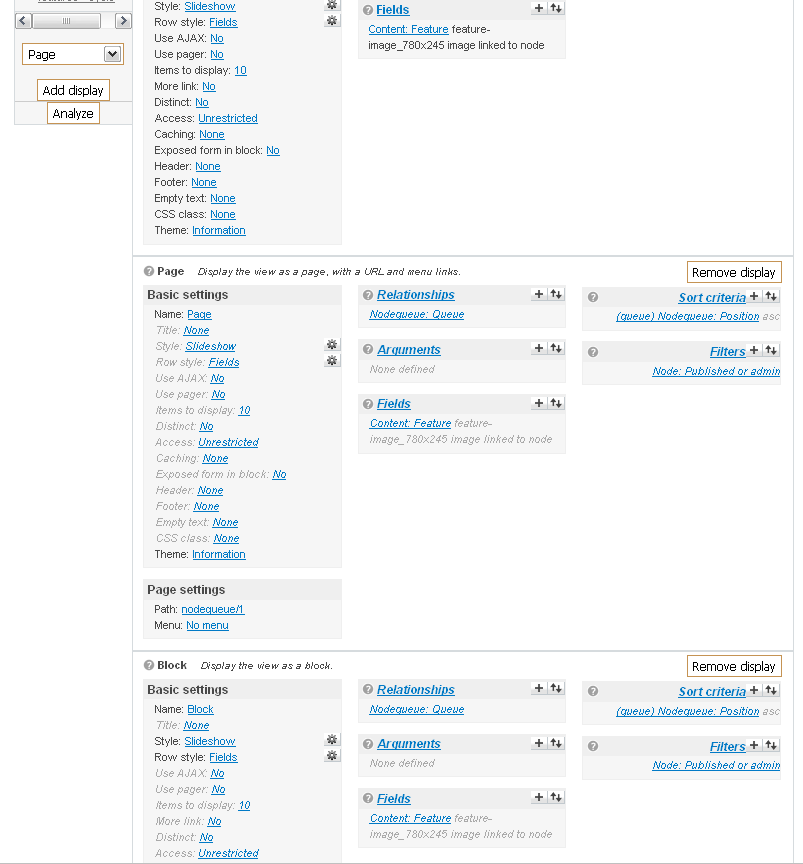
Just for the extra special fun of it, I also attached a screen shot of the view settings. Thought maybe that would be useful.
Comment #11
redndahead commentedHmm that is not 2.1 output. That seems to be 2.0 output. Do you need to clear the cache? This Id
views_slideshow_singleframe_main_3Should be something like
views_slideshow_singleframe_main_page_1or
views_slideshow_singleframe_main_block_2or something like that.
Looking at your image I believe there are settings missing that 2.1 has also. Maybe things didn't get overwritten correctly on the upgrade. Try deleting the views_slideshow folder and then uploading the new one.
Comment #12
supersteph commentedgah! that was totally my bad, sorry. it's just that my site doesn't function with 2.1 (the disabling of the expand/collapse links on admin pages renders many things useless, particularly panels) so those were 2.0-beta2.
Let's try again, shall we?
here's the one without thumbnails or images:
And the image/thumbnail one:
I also attached another ss of the views interface. Not so much so you could see my settings this time, rather how the page displays when under the influence of 2.1.
Thx again for the help, Adam.
Comment #13
supersteph commentedJust giving this a friendly bump...
Any ideas on my issue, redndahead? (fingers crossed!)
Comment #14
redndahead commentedYour first one doesn't have any of it's settings listed. Are you adding it differently? In the settings section there should be a
Somewhere and it's not there.
You have
But you are not showing me any code that has this. Does this exist? Anyway you could have renamed the ID?
Comment #15
supersteph commentedthat page is created via panels. is there an incompatibility between VS and Panels? Interestingly, another panel page on my site (one that uses tabs) also broke when i upgraded VS. Not all panel pages broke, though.
Comment #16
redndahead commentedSorry for the delay. There is no incompatibility with this module and panels. I can't quite put my finger on where your issue is. I'll try to keep on thinking of debugging items I can ask you.
Comment #17
intyms commented@ #5 soajetunmobi - May 25, 2010 - 09:06
See these issues:
#815084: Upgrade to 2.1 breaks pager
#825450: How to use images as pagination?
#811044: Pager in slideshow creates problems with content below slideshow
@ #0 supersteph
Panels 3.4 has many bugs. I also remember that i had a lot of problems during upgrade of panels and ctools.
I think that both Panels and Views depend of Ctools. So, if you are doing an upgrade, please upgrade all these modules together and ! look to the issue queue of these modules.
Here is my configuration wich works well:
Drupal 6.17
Views 6.x-2.10
Views Slideshow 6.x-2.x-dev (2010-Iun-09)
Panels 6.x-3.5
Chaos tool suite 6.x-1.6
After upgrade, run update.php.
Clear caches (drupal cache and browser cache), also if you have access to your database tables, emtpy the "ctools_object_cache" table (TRUNCATE `ctools_object_cache`;).
Go to your slideshow views and check all settings to be ok. Rebuild it if needed.
Hope it helps.
Comment #18
redndahead commentedMarking as fixed.