

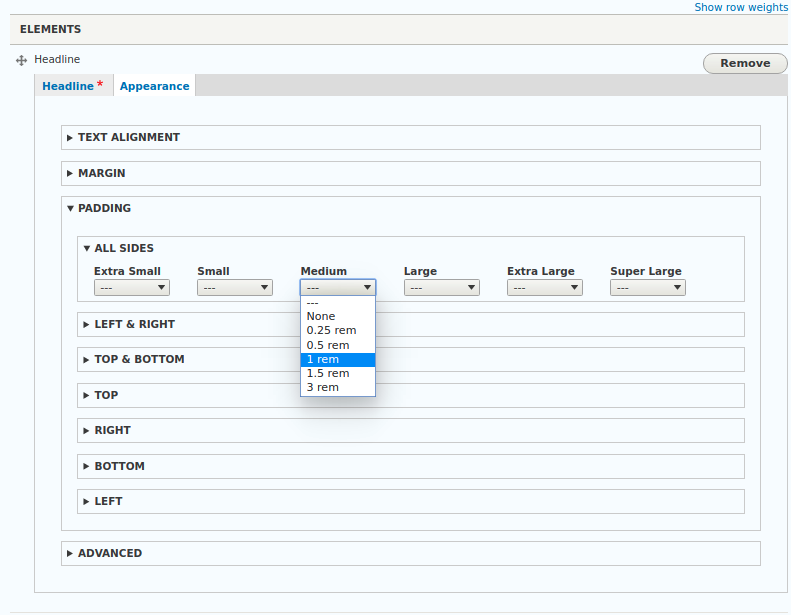

The Responsive Class Field module provides a field type that allows content editors to define breakpoint dependent styling options (CSS classes) for the entity view display of the entity it is attached to.
Rather than using general display settings for an entity type/bundle, the styling can be configured individually for each entity.
The module has been created to improve content editing in Drupal sites that use a responsive front-end theme as Bootstrap and inlined content entities as Paragraphs. It isn't limited to Bootstrap or Paragraphs, but comes with a set of breakpoints best suitable for this use. You can alternatively use any other breakpoints group defined by any of your modules or themes, and also use the responsive class field with regular content or other custom (fieldable) entities.
This module does not provide any CSS styling. It merely is a tool to attach CSS classes to your entity's HTML wrapper markup. Classes generated using the responsive class field must be implemented within your theme.
Features
- Allow content editors to safely influence front-end styling
For allowing content editors to edit styles on a per-content base, you usually add a text field for additional CSS classes, or define multiple sets of styling options using list fields. The first approach requires your content editors to know the theme's CSS classes, the second will result in a multitude of fields when trying to support all variations of a responsive theme. With the responsive class field, you can define sets of styling options that can differ between multiple breakpoints. - Automatically attaches the CSS classes to entity view displays
When using the responsive class field, CSS classes can automatically be added to the attributes of the parent entity. No need to implement template pre-processing, nor to adding the classes within your theme's templates on your own. - Distinctively decide when to add the resulting CSS classes
The responsive class field module gives site administrators various options to influence when to add the resulting CSS classes, and when to keep the output clean. Automatic CSS class addition can be enabled for certain themes only, and also per entity view display. - Leverage the power of Drupal's Field API
The responsive class field is using Drupal's Field API and fieldable entities. As site builder, you can access/extend its properties as you would with any other field.
Requirements
- Drupal 8.8 or higher.
Dependencies
There are no other dependencies than Drupal core's entity, field and breakpoint features.
Installation
Install and enable the module as you would do with any other Drupal module.
See Installing Drupal 8 Modules for more information.
Configuration
- Before adding responsive class fields to any entity, you may wish to configure a default breakpoint group and which theme to use when adding responsive classes to entities. These general configuration options are available at
Configuration > Content authoring > Responsive class fields - Add a responsive class field to the entity within its Manage fields configuration page.
- Define a CSS class pattern using the tokens
{breakpoint}and{value}. - Enable the breakpoints you want to use and configure a label and breakpoint token replacement for each breakpoint.
- Define the list of allowed values. Its keys will be used to replace the
{value}token of the CSS class pattern. - Within your entity's Manage form display, ensure the field is enabled and uses the
Responsive classform widget. - Within your entity's Manage display, ensure the field is enabled for all displays where the classes should be added.
Note: TheResponsive classformatter won't produce any output on its own, so the label position does not affect your output.
Read more about the configuration and how to use the module within its documentation pages.
Similar Projects
As to our knowledge, there is no other module available, that allows adding responsive classes by a content editor on a per-entity base. If you are looking for a general approach to allow content editors adding classes to a content entity, you may wish to check out
- Classy paragraphs
This module ships a new field type "Class list" which allows an editor to apply a selected class to paragraphs via a drop-down list.
If you are seeking for a general back-end configurable approach to style your entity view displays, you may find the following modules useful:
- Display Suite
This module allows to use various predefined layouts for your entity views. - Field Group
This module allows to wrap your entity's fields into custom HTML elements that can have their own CSS classes. - Field Formatter Class
For a predefined set of classes on your entity's fields, consider using the Field Formatter Class module.
Issues & Feature Requests
If you find a bug or are missing really important features, please use the module's issue queue.
Project information
 Minimally maintained
Maintainers monitor issues, but fast responses are not guaranteed.- Project categories: Content display, Site structure, Developer tools
 3 sites report using this module
- Created by mario steinitz on , updated
 Stable releases for this project are covered by the security advisory policy.
There are currently no supported stable releases.

