

 The 2026 Drupal Business Survey is open. Your response will help shape the future of the Drupal business ecosystem.
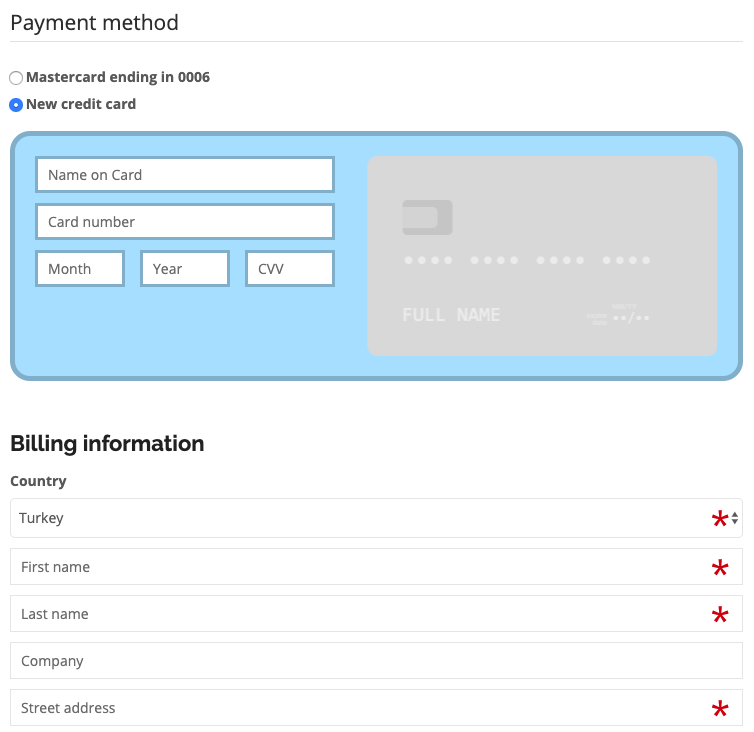

This module integrates Iyzico Iyzipay with Drupal Commerce, providing a credit card payment gateway. You can add an On-Site credit card payment gateway to your Drupal Commerce shop.
Iyzipay is an Iyzico product to modernize credit card payments, make the credit card payments mechanisms easy for the individuals and companies. Iyzipay supports amex, dinersclub, discover, jcb, maestro, mastercard, visa, troy and visa electron types. More information about the service can be found here.
Features
- Encrypt credit card information completely using the encrypt module.
- 3DSecure payments are supported out of the box. The system checks if the bank is forcing for 3Dsecure payment method and then automatically handles the request. Otherwise it handles the process without the 3DSecure authentication.
- Turkish banks do not except foreign currency payments on Turkish cards, so the system first checks if the card is Turkish, if the product price currency is foreign, then it converts the price to TRY automatically via exchangeratesapi.io API
- Sends all the cart data to Iyzico so later you can monitor your customer's behavior via Iyzico dashboard
- A Credit Card front-end library added https://github.com/jessepollak/card to make the look and feel better.
Installation
- You now need an API key to be able to convert to TRY. You can obtain it from https://exchangeratesapi.io/ for free with 250 requests per month.
- This module depends on the Iyzipay-php library, if you are installing via composer, the dependencies should install automatically. Otherwise you need to install iyzipay-php library under
/sites/all/libraries/iyzipay-phpand must install Libraries module - IMPORTANT! The credit card data is encrypted by the encryption module. Therefore you need to install the module first and then generate an encryption key and finally put it on the settings.php file. The details are explained on the encryption module project page.
Setup
- After the installation, go to
admin/commerce/config/payment-gatewaysand add a payment gateway. Choose Iyzipay On-Site plugin and add your credentials. - That's it, now you should be able to see the credit card payment screen on the payment page
How to test
- Go to https://sandbox-merchant.iyzipay.com and create an account. Copy the credentials generated via their dashboard and then put the information as described above.
- You can see test credit cards on the github page. Try a few credit cards to see if the gateway is working properly.
This payment gateway requires cURL and OpenSSL.
Supporting organizations:
Project information
 Minimally maintained
Maintainers monitor issues, but fast responses are not guaranteed.- Maintenance fixes only
Considered feature-complete by its maintainers. - Project categories: E-commerce
- Ecosystem: Commerce Core
 14 sites report using this module
- Created by bekirdag on , updated
 Stable releases for this project are covered by the security advisory policy.
Look for the shield icon below.


