


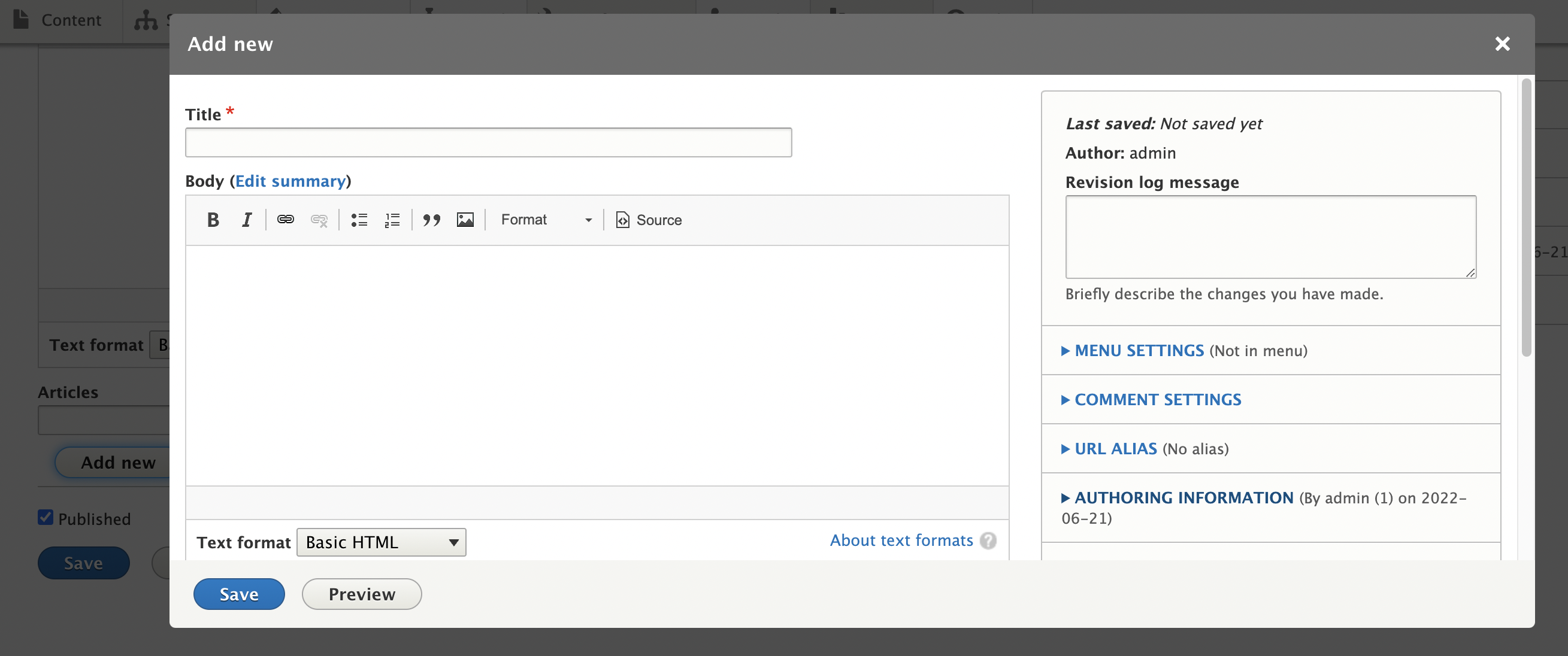
Provides a autocomplete with Add new button widget for entity reference field. You can search and reference existing entities or Add new one using entity form in a modal window. There is also full support for form modes which can be selected from widget settings.
Newly added entity can be referenced in the same form by other autocomplete fields. The autocomplete search field is similar to that of Drupal's core but without the (id) suffix, therefore bringing UX improvement.
How to use
- Install the module as any other Drupal module
- Go to the the Manage form display of any Drupal entity with an entity reference field
- Set the widget to Entity Reference Modal Create
- Open the widget settings and adjust settings like:
- Allow add new - adds Add new button below entityreference field which triggers entity form in a modal window so that new entities can be created (and autoselected in entityreference field)
- 'Add' button title
- Bypass Access control - disables access control for entity form in a modal window
- Bundles allowed to be added - at the moment the module supports only one bundle to be used in Add new modal
- Form mode - select which form mode to use for creating new entity in a modal
- Modal width - width of the modal in percentage
- Modal title
- Be careful with bypass access control option as this will ignore permissions to create content
Supporting organizations:
sponsored and developed original version of the module.
Project information
- Project categories: Content editing experience, Site structure
 32 sites report using this module
- Created by tamerzg on , updated
 Stable releases for this project are covered by the security advisory policy.
There are currently no supported stable releases.


