

 The 2026 Drupal Business Survey is open. Your response will help shape the future of the Drupal business ecosystem.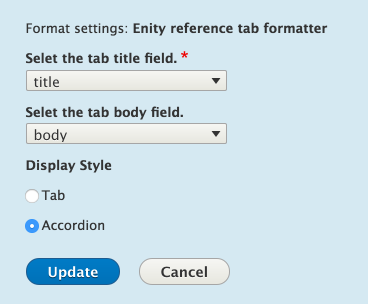

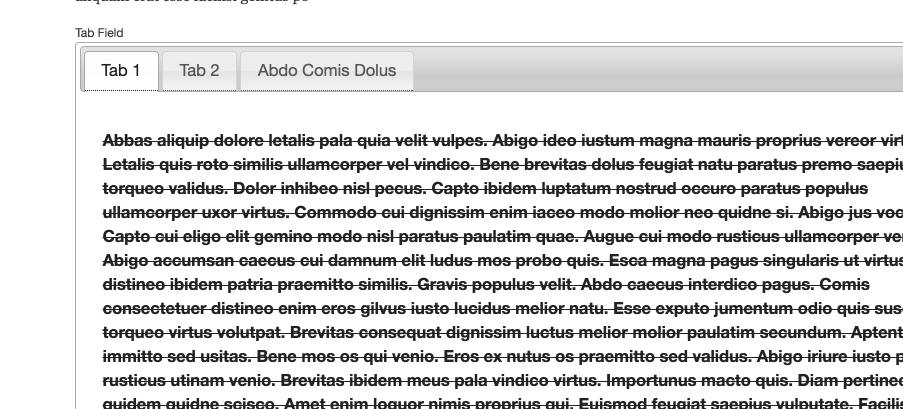

Entity Reference Tab Formatter adds an accessible tab/accordion formatter for
entity_reference and entity_reference_revisions fields. It pairs nicely with
Paragraphs but works with any referenced entity type.
- Switch between Tabs or Accordion layouts without touching stored data.
- Map tab titles to any referenced field, with a fallback to the entity label.
- Render bodies as a single field, the full referenced entity (view-mode aware), or any Views block display (supports contextual filter arguments).
- Tune accordion behaviour (single vs. multiple open items, header color/width, icon alignment).
- Lightweight JavaScript built on Drupal core
once(); no jQuery UI dependency. - Accessible markup and keyboard defaults keep the first panel visible even before scripts load.
Installation
- Install with Composer.
- Enable via Extend or run
drush en entity_ref_tab_formatter. - Clear caches.
Configuration
- Open Manage display for the entity reference field (e.g., a Paragraph reference field).
- Pick Entity reference tab formatter in the Format column.
- Adjust the settings:
- Tab title field – choose the field to display in the tab/accordion header; falls back to the entity label when empty.
- Tab body field – select a specific field, choose Views block (then pick a block display and optional comma-separated contextual arguments), or use Rendered entity (full view).
- Rendered entity view mode – when rendering the full entity, select the view mode configured under Structure → [Bundle] → Manage display.
- Display style – toggle Tabs vs. Accordion and set accordion options (single/multiple open items, header color, full-width header, icon alignment).
- Save and clear caches if needed.

Project information
- Project categories: Content display
 81 sites report using this module
- Created by rakesh.gectcr on , updated
 Stable releases for this project are covered by the security advisory policy.
Look for the shield icon below.


