

Closed (outdated)
Project:
Drupal core
Version:
7.x-dev
Component:
taxonomy.module
Priority:
Normal
Category:
Bug report
Assigned:
Unassigned
Issue tags:
Reporter:
Created:
3 Jan 2009 at 06:41 UTC
Updated:
31 Jul 2019 at 14:32 UTC
Jump to comment: Most recent, Most recent file


Comments
Comment #1
David Lesieur commentedI'm surprised that no one seems to have stumbled onto this bug.
The patch still applies...
Comment #2
Mark Theunissen commentedYep, I had noticed this before but thought nothing of it, until I installed Faceted Search and ran into the bug. Patch applies and solves the issue. Thanks David!
Comment #3
domidc commentedI confirm that the patch works. Also ran into it using faceted search.
Comment #4
David Lesieur commentedTo others who might wonder: This is really a (trivial) bug in Drupal core. Faceted Search only springs up because only a few modules rely on this flag.
Comment #5
David Lesieur commentedRe-rolled patch for D7.
Comment #6
cburschkaNeat, but could we fix the similarly hard-coded value of $form['relations'] just below it as well?
There's another slight WTF there: The defaults added to the $edit array at the top of the function make $edit['relations'] default to 0 - but the hard-coded form value forces it to 1. If we continue to enable relations by default, then this value should be changed in the defaults array.
Comment #7
David Lesieur commentedImplemented the suggested fixes.
Comment #8
cburschkaLooks good now.
Comment #9
dries commentedCan we write a test for this please, or adjust the existing tests? Thanks!
Comment #10
stevenghines commentedAre there any plans to release this patch in the next 6.x version of Drupal? I too am using the faceted search module and found this issue via #420354: Subcategories / Terms not heirachical in Guided Search
Comment #11
netdreamer commentedyes, please... include it also in D6...
It's really a big issue to have to go back to database each time someone updates the hierarchy parameters...
Comment #12
bunker commentedtaxonomy-hierarchy.patch queued for re-testing.
Comment #13
nardberjean commentedtaxonomy-hierarchy.patch queued for re-testing.
Comment #14
nardberjean commentedAppears to me like the d6 version is tested against d7 and fails, does it make any sense ?
Comment #15
dawehnerThe patch does not apply anymore
Comment #16
nardberjean commentedThis patch is still recommanded on http://drupal.org/project/faceted_search , I assume for d6. If it is no more the case the project page should be modified, in my opinion.
Comment #17
tvb commentedtaxonomy-hierarchy.patch queued for re-testing.
Comment #18
DanielJohnston commentedSubscribing.
Comment #19
klonossubscribing...
Comment #20
Eronarn commentedNope. It doesn't make any sense to try and apply the d6 patch to d7.
If you are like me and stumble across this patch from the Faceted Search project page - it does work in d6! It will prevent the hierarchy bugginess from recurring whenever you edit a vocabulary, whereas just modifying the database values for 'hierarchy' would be a one-time fix.
Comment #21
nardberjean commentedThe confusion came because #0 does not tell it is the version for D6, but #5 and #7 explicitely tell they are for D7. #5 also tells ''Version: 6.x-dev » 7.x-dev'' from that it can be deduced that #0 is for D6. It was just not obvious to me at first glance.
Comment #22
Eronarn commentedI just updated core and ran into this issue again until I modified my database and reapplied the patch.
I'm changing the version on this to 6.x because, while D7 patches have been submitted, #0 is for D6 and the mismatched version is making it fail testing.
I'm changing the status on this to RTBC because this patch has been in use for over a year. Additionally it is very minor, has (in the D7 versions posted, which appear easily backported) met community suggestions for improvements, and fixes a problem that otherwise requires database edits.
I hope to see this in core some time before next year!
Comment #23
Eronarn commentedtaxonomy-hierarchy.patch queued for re-testing.
Comment #24
David Lesieur commentedThe next step for getting this patch committed is clear: We have to write a test case (see #9).
Comment #25
David Lesieur commentedThe usual process at this point would also require to check whether the problem is still present in Drupal 7, then write a patch and test for D7, and then backport to D6.
Comment #26
BeaPower commentedtaxonomy-hierarchy.patch queued for re-testing.
Comment #27
klonosAre we absolutely sure this has 'normal' priority?
Comment #28
pwolanin commentedlooks like we are still missing the test Dries wanted - let me try to write it
Comment #29
pwolanin commentedThe relations field is no longer used:
Comment #30
pwolanin commentedHere's a 1st pass at a regression test - should have 1 fail which demonstrates that it detects the bug.
Comment #31
pwolanin commentedHere's a new patch with the test.
Comment #33
pwolanin commented#31: 353775-preserve-hierarchy-31.patch queued for re-testing.
Comment #34
BeaPower commentedWill this patch also list subcategories by default on the blocks?
Comment #35
pwolanin commented@BeaPower - that is totally unrelated to this patch.
Comment #36
BeaPower commentedThen can you please help me, the posts Ive read similar to what I want directed me to this post. How can this be achieved? http://drupal.org/node/964970
Comment #37
Peter Swietoslawski commentedHere is a backport of patch @31 to D6.
Comment #38
klonosI want to help with this. Can someone please provide steps to reproduce the issue so I can test if patches resolve it?
Comment #39
Peter Swietoslawski commentedklonos for D6 you just need to:
Comment #40
klonosI am trying to test/reproduce this in 7.0, and here are my findings so far:
Behavior before patch:
a. After setting multiple parents for a term, I get this:
Notice: Undefined index: description in taxonomy_form_term_submit_build_taxonomy_term() (line 840 of /var/www/d7test/modules/taxonomy/taxonomy.admin.inc).b. The list page is always draggable in my case, but while the field is set to '2' it simply has no 'Save' button available. Is this a known issue? If so, please point me to it, otherwise I'll file a new Usability/UX issue for that.
c. Editing and saving the vocabulary does bring back the 'Save' button (+ the 'Reset to alphabetical' button)
and the hierarchy field of the taxonomy_vocabulary table changes to '0' (not '1' as mentioned in the 2nd step in Peter's repro instructions above). I don't know if this is important or not, but I thought I'd report it anyways./ note-to-self: read issue title better next time ;) /d. Dragging a term to another place and saving the list throws this:
Behavior after the patch from #31 is applied* (also reset the vocab to alphabetical and no multiple parents):
a. When setting multiple parents, I still get the notice I get without the patch applied. I've filed #1015572: Notice: Undefined index description taxonomy_form_term_submit_build_taxonomy_term(), line 842 of taxonomy.admin.inc for that.
b. Still the same behavior. Be it a known/accepted behavior or not, I still think that drag handlers should not be there at all. But that's a different issue as I've said. Let me know if it is already reported.
c. Editing and saving the vocabulary does NOT bring back the 'Save' button (NOR the 'Reset to alphabetical' button) and the hierarchy field of the taxonomy_vocabulary table DOES NOT change to '0' remaining set to '2'.
d. I cannot reproduce this (since there is no 'Save' button in the list page), but if this is considered a kind of 'locked' state, then no dragging should be enabled whatsoever.
*Note: I manually applied the patch as it seems that code has shifted a few line down. Needs re-roll(?).
PS: I was not able to locate the 'relations' field in order to include this in my tests. In which table am I supposed to be looking for it?
PPS: Does this count as a proper review?
[edit: patch from #31 was used - I'll see if I can find some time to test #37 in D6 too]
Comment #41
klonos...never mind, I just realized that this field is available only in D6 vocabulary table. I'll test it in D6.
Comment #42
klonos...minor title change to avoid confusion.
Comment #43
haopei commentedWow lots of information here. Can someone point me to the one which definitely works?
I am not very familiar with patches, and patch jargon.
Comment #44
haysuess commentedNone of the patches works for me. I can add terms fine, but any time I try to edit or delete one it gives me the WSOD and the Hierarchy value changes back to 1.
My workaround was this:
I created 3 dummy categories and set them up like so:
X
-XZ
Z
-XZ
XZ is a child of both X and Z, so it somehow makes the vocabulary know that it shouldn't revert to a hierarchy of 1 because XZ has 2 parents, even if I change other things.
Is there a better solution? I'd like for this not to be any issue at all :-/
Comment #45
xjm#1197240: Editing Vocabulary changes a Multiple Hierarchy Term list to be marked as a Flat list was marked as a duplicate of this issue.
Comment #46
stpaultim commented#1309990: Value of the field 'hierarchy' in the table 'vocabulary' is not being set correctly when terms are added or deleted. was marked as a duplicate of this issue.
Comment #47
stpaultim commentedOk, with the encouragement of xjm I'm trying to recreate this issue in Drupal 8 core.
This is what I've done, so far.
1) I create a new Taxonomy.
2) I added two terms.
3) Then I added a third term and assigned it two "parent" terms.
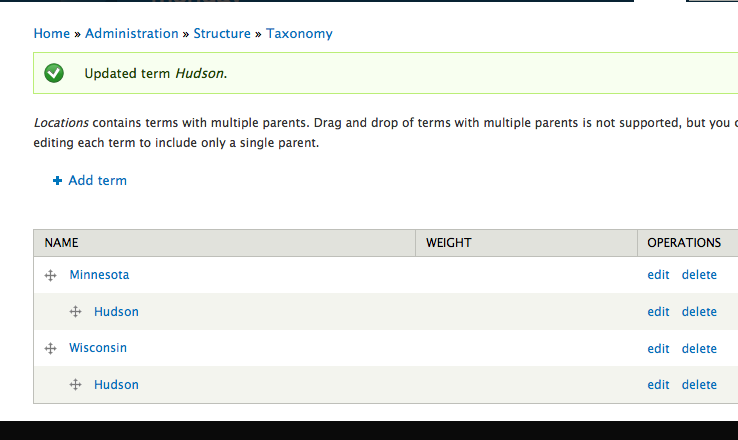
At this point, all terms are "draggable." The third term is listed twice, once under each parent, and both are movable. I can add terms to the list, but I can't save any changes to the list, because once I added the third term, assigned to two parents, the SAVE button on the taxonomy list disappeared.
That doesn't look right. I'm not sure if I need to go further.
Comment #48
stpaultim commentedAgain, not sure if this related to the original issues, but I've been urged to provide some screenshots. So here they are.
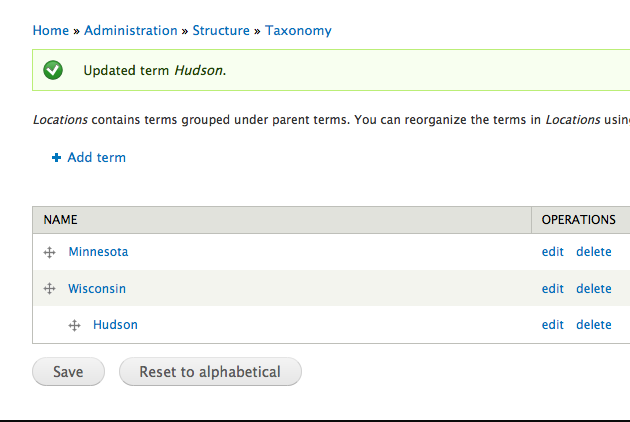
Created a taxonomy of locations and created three items, assigned "Wisconsin" as the parent of "Hudson." Behaved the same at both these locations:
http://monday:8082/taxonomy/term/8#overlay-context=taxonomy/term/8&overl...
http://monday:8082/admin/structure/taxonomy/locations
Then added "Minnesota" as a second parent of "Hudson" and the SAVE button disappears.
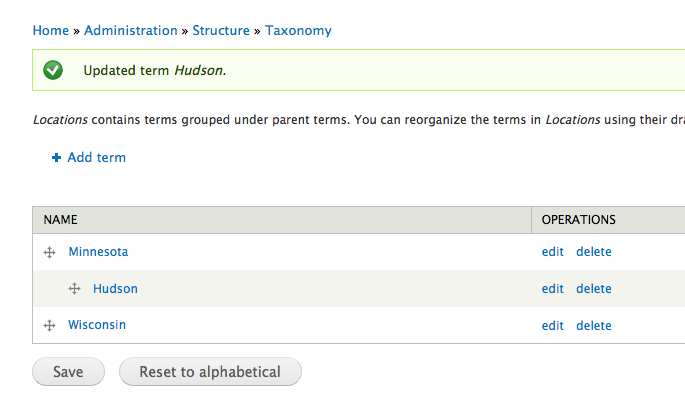
If I remove one of the parents, the SAVE button comes back.
Comment #49
stpaultim commentedNow, trying to recreate the problem:
1) Added two taxonomy terms, assigned no parents, at: "admin/structure/taxonomy/terms"
MySQL table "taxonomy_vocabulary" item "hierarchy" = 0
2) Added third taxonomy term (THREE), assigned to terms ONE and TWO as parents.
MySQL table "taxonomy_vocabulary" item "hierarchy" = 2
3) Modified taxonomy term THREE to only have ONE as its parent.
Used this page: taxonomy/term/28/edit?destination=admin/structure/taxonomy/my_terms
MySQL table "taxonomy_vocabulary" item "hierarchy" = 1
4) Added taxonomy term FOUR to have TWO as its parent.
(two terms have one parent each, no term has two parents)
MySQL table "taxonomy_vocabulary" item "hierarchy" = 1
5) Modified taxonomy term THREE to have "ROOT" as its parent.
taxonomy/term/28/edit?destination=admin/structure/taxonomy/my_terms
(one term -FOUR- still has one parent)
MySQL table "taxonomy_vocabulary" item "hierarchy" = 0
If I understand, this is bad behavior we were looking to confirm.
BUT, one more thing that may or may not be a problem.
6) Modified taxonomy term THREE to not have any parent.
taxonomy/term/28/edit?destination=admin/structure/taxonomy/my_terms
Term THREE is no longer listed here: admin/structure/taxonomy/my_terms
BUT THREE is still visible in the MySQL database table = taxonomy_term_data
(see screenshot)
Here is a shot where a parent is selected (for comparison):
This seems like it might be a potential problem? Or not?
Comment #50
xjmThanks @stpaultim!
So the behavior is definitely still present in D8 with all manner of weirdness. @stpaultim's research above shows three different weird behaviors between the vocab edit form and the tabledrag.
The next step here is to create a new patch and some automated tests that fail with the bugs @stpaultim found. Edit: See #31 for a starting point.
Comment #51
xjmComment #52
dags commentedComment #53
dags commentedReroll of #31 for changes to D8 directory structure. The patch still needs work though.
Comment #54
dags commentedComment #55
dags commentedFixing a couple typos.
Comment #57
tim.plunkettSum up the issue instead of just linking to it.
This should not be lowercase, 'the' is spelled wrong.
Maybe change this message to "Vocabulary is still marked as hierarchical."?
Comment #58
vlad.k commentedsubscribing
Comment #59
roderikA little addition to this issue... just text, no patches, sorry.
1)
There are more bugs in taxonomy.module than the ones covered in this patch.
taxonomy_check_vocabulary_hierarchy() mistakenly resets 'single hierarchy' (1) vocabularies to 'flat' (0).
This -and not the current patch- is probably what causes the issue listed in point 5 of comment #49 by @stpaultim.
The following can fix this:
(The 'isset' just does not make any sense here.)
...but this will be unnecessary if #1925638: optimize taxonomy_check_vocabulary_hierarchy() gets in, which makes taxonomy_check_vocabulary_hierarchy() faster, but gets rid of the bug as well.
2)
As far as point 6 of comment #49 goes:
'not having any parents' (as opposed to 'having "root" as parent) should be made impossible, no? Shouldn't the "Parent terms" widget be 'required'?
Comment #60
Anonymous (not verified) commentedThis is still present in Drupal 8 Alpha 11 and as today also in HEAD.
Comment #61
mgiffordThis still a concern in D8? Unassigned issue too.
Comment #69
idebr commentedThe hierarchy property ended up being removed in #2957381: Data model problems with Vocabulary hierarchy for Drupal 8