

 Come together with the global Drupal community in Rotterdam, 28 Sept – 1 Oct 2026. Sessions, contribution, connection, and Early Bird savings until 8 June.
Problem/Motivation
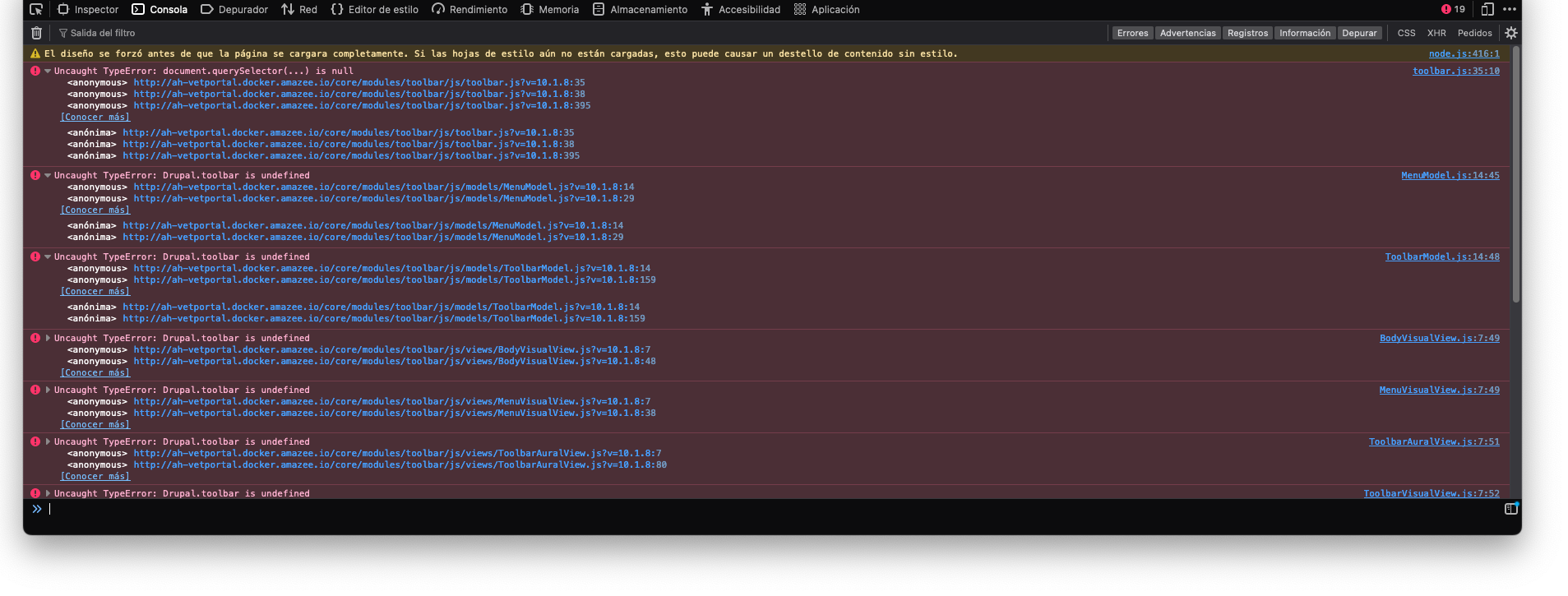
After upgrading to drupal core 10.1.x that is many errors in the console like
Uncaught TypeError: document.querySelector(...) is null
and
Uncaught TypeError: Drupal.toolbar is undefined
And this makes the toolbar misplaced.
It seems that inside the Toolbar.js file, there is a missing class 'toolbar-oriented' in the toolbar:
if (isOriented) {
      document
        .querySelector('#toolbar-administration')
        .classList.add('toolbar-oriented');
    }
I could reproduce this issue using landing pages builder with layout builder.
But also document.querySelector('#toolbar-administration').classList.add('toolbar-oriented') is giving null using Claro admin theme.
Steps to reproduce
- Use a theme or module that always requires the toolbar/toolbar library
- Log in as a user who has permission to see a horizontal toolbar
- Log out again
The error now appears because the Session Storage still contains a value for "Drupal.toolbar.toolbarState". This object contains information about the state of the toolbar, even though the anonymous user doesn't see a toolbar. Other parts of Drupal then act upon this information, assuming a toolbar must be present.
Usually, this doesn't happen because the toolbar.js file is only included when the toolbar is actually displayed. Unless some theme or module of course lists it as a dependency and thus always includes the file.
Proposed resolution
Remaining tasks
User interface changes
API changes
Data model changes
Release notes snippet
| Comment | File | Size | Author |
|---|---|---|---|
| #18 | 3456835-media-library-js-error-with-hidden-toolbar.patch | 723 bytes | siegrist |
| #9 | 3456835-toolbarjs-document-querySelector-error.patch | 577 bytes | zahord |
Issue fork drupal-3456835
 Show commands
Start within a Git clone of the project using the version control instructions.
Or, if you do not have SSH keys set up on git.drupalcode.org:
 changes
Comments
Comment #2
andreadruiz commentedComment #3
andreadruiz commentedComment #4
andreadruiz commentedComment #5
cilefen commentedCan you please update the issue summary with instructions to build a site that exhibits this bug in Drupal 10.3?
Could you include the complete JavaScript stack trace too?
Comment #6
andreadruiz commentedComment #7
andreadruiz commentedComment #8
cilefen commentedPlease create a merge request.
Comment #9
zahord commentedI've seen a similar error in toolbar.js file where `document.querySelector` is not defined, so I added a validation to avoid the error.
Comment #10
zahord commentedComment #11
smustgrave commentedIssue summary appears incomplete and missing steps.
Also all fixes should be in an MR against 11.x please
Comment #12
ammaletu commentedI just ran into this on Drupal 10.2.8. It seems to happen always once you logged in as a user who can see the toolbar and then log out again. After comparing this with a clean Drupal 10.2 installation with Claro theme, I found the source of the problem: A colleague required the "toolbar/toolbar" library as a dependency in our theme, unconditionally. This way, the toolbar.js file was always loaded, even when no toolbar was being displayed.
I added steps to reproduce in the issue summary. This is more or less a user error, but maybe it helps somebody else in the future. Of course, it would be nice if there was a way to clear this session storage value when switching sessions. Maybe add something after the "Add anti-flicker functionality." block, starting in toolbar.js on line 241. If "#toolbar-administration" is not a part of the page, can we then delete the session storage value? This would help in cases where this library is loaded withput a toolbar.
Comment #13
mdsohaib4242 commentedTo fix this issue, update Toolbar.js to first check if #toolbar-administration actually exists before trying to apply any classes to it. This way, the script won’t attempt to modify elements that aren’t there, something like this
Comment #14
anybodyI can also confirm the issue. Could someone maybe turn the patch into a MR and follow the steps described in the comments? Thanks!
Comment #17
liam morlandI ported the patch in #9, but I'm not sure it will do anything anymore since there is now a question mark after the
querySelector()call.Comment #18
siegristThe following fix works for us. We have run into this issue since 11.2. and in combination with blokk.li because it uses the backend in iframes, and in those, does not render the admin toolbar.
Comment #19
needs-review-queue-bot commentedThe Needs Review Queue Bot tested this issue. It fails the Drupal core commit checks. Therefore, this issue status is now "Needs work".
This does not mean that the patch necessarily needs to be re-rolled or the MR rebased. Read the Issue Summary, the issue tags and the latest discussion here to determine what needs to be done.
Consult the Drupal Contributor Guide to find step-by-step guides for working with issues.
Comment #20
pfrenssenI reviewed the MR but it looks like the problem was already fixed. I checked the git log and indeed it was fixed recently in #3536350: Fix a JS error when toolbar element is missing. Marking as a duplicate.