Make two vocabularies with some terms, Pets (dog, cat) and Fruits (apple, orange). Add the Pets taxonomy term field to the Page type.

Create a node programmatically:

use Drupal\node\Entity\Node;
$node = Node::create([
  'type' => 'page',
  'title' => 'Created page',
  'field_pets' =>[3], // tid 3 is apple, which should not be allowed in Pets
]);
$node->save();

This happens:
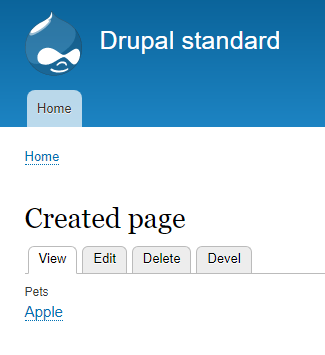
pets has apple

So in view mode, it appears that assigning a fruit to the Pets field has been successful. In edit mode, there are no terms assigned.

I were expecting to get a warning about trying to assign an impossible term id to a term field.

CommentFileSizeAuthor
drupal_8_assign_wrong_term_2.PNG12.36 KBkari.kaariainen

Comments

kari.kaariainen created an issue. See original summary.

cilefen’s picture

Version: 8.4.5 » 8.4.x-dev

Core issues are now filed against the dev versions where changes will be made. Document the specific release you are using in your issue comment. More information about choosing a version.

Version: 8.4.x-dev » 8.9.x-dev

Drupal 8.8.7 was released on June 3, 2020 and is the final full bugfix release for the Drupal 8.8.x series. Branches prior to 8.8.x are not supported, and Drupal 8.8.x will not receive any further development aside from security fixes. Sites should prepare to update to Drupal 8.9.0 or Drupal 9.0.0 for ongoing support.

Bug reports should be targeted against the 8.9.x-dev branch from now on, and new development or disruptive changes should be targeted against the 9.1.x-dev branch. For more information see the Drupal 8 and 9 minor version schedule and the Allowed changes during the Drupal 8 and 9 release cycles.

interdruper’s picture

Status: Active » Closed (works as designed)

Since this use case is only programmatic, params must be checked previously by the programmer:

    $terms = \Drupal::entityTypeManager()
      ->getStorage('taxonomy_term')
      ->loadByProperties([ 'vid' => $vid, 'tid' => $tid ]);

   if (empty($terms)) {
     \Drupal::logger('my_module')->error('...');
    return;
   }
