
 The 2026 Drupal Business Survey is open. Your response will help shape the future of the Drupal business ecosystem.
List of issue fields
If you're new to issues, see Creating or updating an issue report. If you need to report a security issue, see Reporting a security issue.
This page provides the details of the fields you will see when you create a new issue or click on a Create an issue link for a particular project. Not all projects use all of the fields (for example, projects that are for working groups not connected to software do not use the "version" field), and some fields have value lists that are project-specific.
Project
Either Drupal core; the contributed module, theme, or distribution that has the issue; or the working group that the issue is related to.
If you started from a Create an issue link in a particular project, this will already be filled in. See Overview of projects and issues for more information. To choose the correct project for a documentation problem, see Reporting problems with documentation.
Title
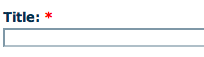
A description of what the issue is intended to resolve.
The issue title is included in the commit message and displayed in issue lists, so make sure it is both descriptive and short. Avoid the use of an error message. See also Special issue titles.
Category
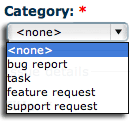
The type of issue report:
-
Bug report is used for errors.
-
Task is used for things that should get done, but do not fit into another category.
-
Feature request is used when asking for new features that will enhance a project.
-
Support request is used when you need assistance using the project.
-
Plan is used when discussing the project roadmap.
See the Issue category field page for more details.
Priority

The relative importance of an issue in relation to the project and other issues:
-
Critical: Broken functionality that makes the project unusable.
-
Major: Has significant repercussions, but does not render the whole system unusable.
-
Normal: Default priority.
-
Minor: Non-urgent issues, such as a spelling error that does not affect understanding.
See the Issue priority field page for more details.
Status
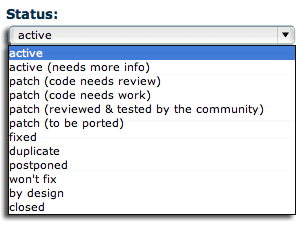
The current state in the life-cycle stages of the issue, and if it is resolved, the type of resolution.
See the Issue status field page for more details.
Version
Normally, set this to the current development version of the project, rather than the exact release version where you noticed the problem. For Drupal Core, the development branch is 'main' and the backport policy explains when another version value is used.
Projects not associated with software do not have this field.
Component
The part of the project that the issue falls in.
Component choices are set on a per-project basis. For example, each module and theme distributed with Drupal Core is one component; other projects may only have a few issue components (such as Documentation and Code). For Documentation project issues, see Components of Documentation issues.
Assigned
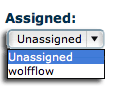
The username of the person who is working on the issue. There are two different ways to fill out this field:
-
Unassigned: The issue has no one assigned to it. This is the typical setting for issues and is the default.
-
User (member name): A username of a drupal.org member who is responsible for this issue.
See the Assigning ownership of issues page for more details.
Issue tags
A non-hierarchical keyword or term to further categorize the issue.
See the Issue tags field page for more details.
Issue summary
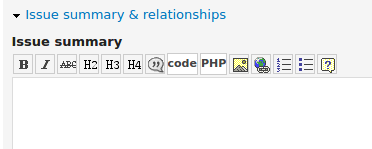
Description of the issue. Following the issue summary template is recommended, if this is an issue for a software project; for a non-software project, most of the template still applies.
Parent issue
In some cases, an issue will be divided up into several "child" issues. This field links a child to its parent.
There is a link to create a child issue on the sidebar of any issue page. Child/parent relationships are shown on the issue sidebar.
Related issues
Links to issues that are related to this issue.
If issue A lists issue B as related, then you will see a link to issue A on issue B's sidebar, and vice versa.
Files
Files associated with this issue, such as screenshots, code snippets, documents, or patches.
Screenshots are especially helpful when reporting a problem with the user interface. Before/after screenshots are also helpful when testing a patch for an issue that affects the user interface.
Help improve this page
You can:
- Log in, click Edit, and edit this page
- Log in, click Discuss, update the Page status value, and suggest an improvement
- Log in and create a Documentation issue with your suggestion
